


EHR (Electronic Health Record) software development is the process of building digital systems that store, manage, and share patient health records. A well-built EHR helps doctors, nurses, and staff work faster, reduce manual tasks, and keep patient information clear and accessible across different parts of care.
Furthermore, EHR systems also need to follow the healthcare rules and data protection requirements of the markets where they will be used. Therefore, security, access control, audit tracking, and clear workflow design should be planned from the beginning, not added near the end.
In this article, you will learn how EHR software development works, what features matter, how much it costs, how long it takes, and what to watch out for when planning your own system.
What Is EHR Software Development?
EHR software development is the process of planning, building, testing, launching, and improving healthcare platforms to store, manage, and update patient health records easily. These systems help doctors, nurses, clinics, hospitals, and other care teams record medical information, review patient history, place orders, track treatment, and share data across different parts of care in one platform.
Developing an EHR software requires a strong understanding of healthcare work, user roles, privacy rules, data structure, and long-term system reliability. If those parts are handled well, the result is software that supports better daily work for care teams and a better experience for patients.
>> Read more: A Complete Guide to Healthcare Software Development
Who Needs Custom EHR Software Development?
When a healthcare organization has complex workflows, data needs, or service models that standard systems cannot support well, custom EHR software development is an optimal solution.
Small Clinics and Specialty Practices
Small clinics often need an EHR that feels simple, focused, and close to how they already work. However, off-the-shelf systems can include too many features that they do not use, while still missing details that matter in their specialty.
Therefore, a modern EHR system should fit real workflows instead of forcing every clinic or care team into the same setup, which makes the system not only feel lighter and easier to use but also more relevant to daily care.
Multi-location Care Groups
Multi-location groups need consistency across sites, but each location still has its own way of working. Generic EHR systems are too rigid in this situation because they cannot balance central control with local flexibility. A custom EHR can support shared standards across the whole group while still allowing location-specific workflows where needed.
If a patient visits another branch, the care team can still access the same record and continue care without asking for the same information again. Managers can also track performance across locations while each branch keeps its own workflows.
Large Healthcare Organizations
Large healthcare organizations (e.g., hospitals or enterprise health systems) often deal with many departments, user roles, approval steps, and connected systems. Doctors, nurses, labs, billing teams, and admin staff have to work from connected data instead of separate tools to keep workflows organized across the whole organization.
In this case, off-the-shelf EHR software is able to cover many general needs, but it can become hard to adjust when workflows are highly specific. A custom EHR can be built around department-level needs, internal rules, and larger operational goals, giving the organization more control over how the system works.
Telehealth & Virtual Care Platforms
Telehealth platforms often operate differently from traditional clinics because care happens through digital channels. Many off-the-shelf EHR systems can still support basic digital workflows, but they may not fully match how each virtual care business operates.
Some platforms need online intake, remote consultation, follow-up, patient messaging, or digital care coordination to work in one connected flow, instead of being handled through separate tools. A custom EHR can be shaped around these workflows, helping providers manage care in one connected system instead of relying on separate tools.
Digital Health Startups
Digital health startups often need to test new care models, serve specific patient groups, or build a product around one focused healthcare problem. Off-the-shelf EHR systems limit product flexibility, forcing the startup to adapt to the vendor’s structure. A custom EHR gives startups more freedom to design the user experience, adjust workflows, and grow the platform in the direction their business wants.
Key Features in Modern EHR Software
- Patient demographics and chart management: Store and organize patient details, medical history, allergies, and past visits so care teams can quickly review a full patient record in one place.
- Clinical documentation templates: Provide structured forms for recording visits, symptoms, diagnosis, and treatment to save time and keep data consistent across users.
- E-prescribing and medication history: Allow doctors to send prescriptions directly to pharmacies and review current and past medications to reduce errors and improve safety.
- Lab, imaging, and referral workflows: Help providers order tests, receive results, manage imaging reports, and share referral information with other care teams or systems.
- Scheduling: Support appointment booking, calendar management, provider availability, and visit reminders to help clinics manage patient flow more smoothly.
- Patient portal: Give patients access to selected services, such as viewing records, booking visits, checking test results, or communicating with care teams, depending on the system.
- Billing coding support: Connect clinical data with billing codes to support claims processing, reduce errors, and improve payment flow.
- Clinical alerts system: Provide alerts, reminders, and suggestions based on patient data, such as allergy warnings or care recommendations during visits.
- Audit trails: Track who accessed or changed data and control permissions based on user roles to protect patient information.
- Reporting tools: Generate reports on patient outcomes and operations, and help providers analyze groups of patients for better care planning.
Step-by-Step EHR Software Development Process
Discovery & Workflow Mapping
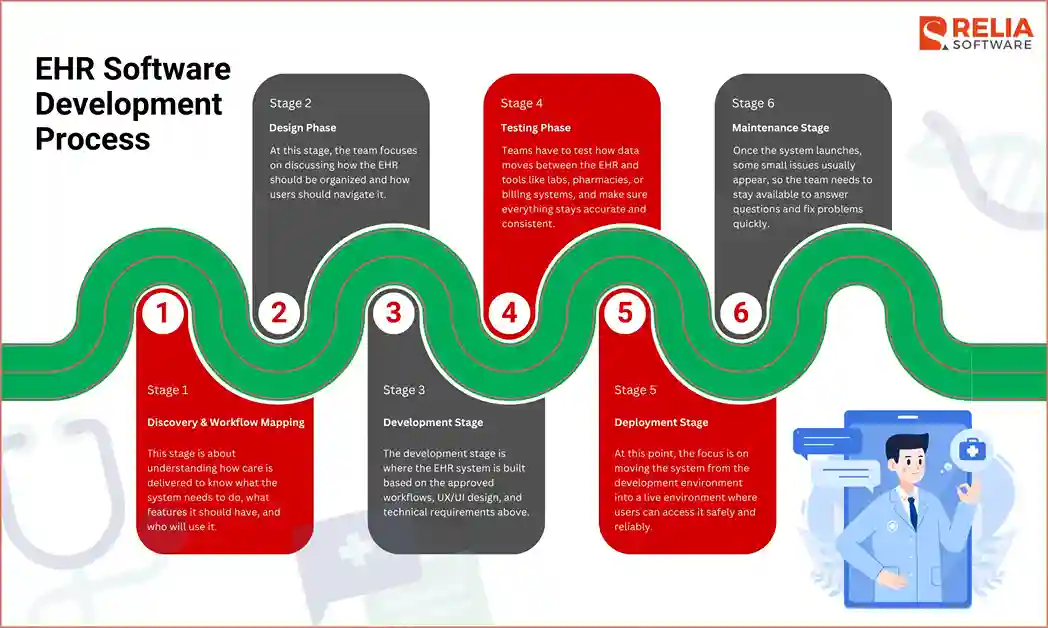
This stage is about understanding how care is delivered to know what the system needs to do, what features it should have, and who will use it.
At this stage, teams usually:
- Talk to doctors, nurses, admin staff, and managers to identify key workflows such as patient intake, charting, prescribing, and billing.
- Define user roles and access levels to ensure data privacy and comply with HIPAA or other local healthcare regulations.
- List required integrations with labs, pharmacies, or other systems to eliminate manual data entry.
- Set initial goals for the product, timeline, and budget to establish a clear roadmap and manage stakeholder expectations.
After discovering the requirements and workflow, the team then turns real workflows into clear system requirements, including workflow maps, feature needs, data structure planning, and early decisions on what should be included in the first version. This step shapes the system’s backbone and reduces confusion during the development process, giving everyone a shared view of how the system should behave.
Once the team understands the workflows and system needs, the next step is to define compliance and security requirements, including:
HIPAA basics for EHR development
In the United States, HIPAA sets the standard for how patient health information must be handled. For EHR development, the system should protect electronic patient data during storage and transfer, limit access to authorized users, and keep records of how data is used.
HHS (The U.S. Department of Health and Human Services) explains that the HIPAA Security Rule focuses on protecting electronic protected health information through administrative, physical, and technical safeguards, so features like access control, audit logs, encryption, and secure authentication should be planned early.
GDPR & Regional Privacy Rules
In regions such as Europe, GDPR focuses on how personal data is collected, stored, and used. Patients have rights over their data, including access, correction, and deletion in certain cases. EHR systems must support these rights and ensure data is handled in line with local laws, especially when operating across different countries.
Design Phase
At this stage, the team focuses on how the EHR should be organized and how users should move through it, including planning the screen layout, information architecture, navigation flow, form structure, and how important patient data should appear on each screen. The software layout and architecture should match how doctors, nurses, admin staff, and managers actually work.
The team then turns these UX/UI designs into a clickable prototype or an early usable version, called an MVP (Minimum Viable Product). An MVP usually includes the most important workflows and features, such as:
- Core patient records
- Basic charting
- Scheduling
- Essential user roles and permissions
- A small number of key integrations
Instead of building the full EHR at once, the team uses the prototype to test the core experience with real users. Doctors, nurses, and staff can try common tasks and point out what feels slow, unclear, or unnecessary. Based on their feedback, the team can adjust layouts, move fields, reduce clicks, improve navigation, or change how patient data is shown.
>> Read more: A Practical Guide to Prototype Testing in Software Development
In short, a strong UX/UI design and prototype phase should focus on:
- Clear and easy-to-read patient information
- Simple navigation between charts, notes, and tasks
- Fewer clicks for common actions
- Layouts that match real clinical workflows
- Consistent design across different user roles
- Early testing before full development begins
If this stage is done well, the EHR feels more natural to use and is easier to build later. It also helps the team catch usability problems early, before they become costly development issues. If it is rushed, even a technically strong EHR can feel slow, confusing, or hard to use in real clinical settings.
Development Stage
The development stage is where the EHR system is built based on the approved workflows, UX/UI design, and technical requirements. At this stage, the team turns planned features into working software, including the frontend, backend, database, integrations, cloud infrastructure, and security controls.
Instead of building the whole system at once, teams usually follow an Agile approach. The work is divided into smaller sprints, with each sprint focusing on a specific feature or workflow, such as patient records, charting, scheduling, billing, or access control. As a result, the team can test features early, collect feedback, fix issues faster, and improve the system step by step before launch.
In detail, some of the main tasks in this stage include:
|
Tasks |
Main Works |
Tech Stack |
|
Frontend Development |
|
|
|
Backend Development |
|
Node.js, Java, .NET, Python, Go |
|
Database Design |
|
|
|
Third-Party Integrations |
|
REST APIs, GraphQL, HL7, FHIR, SMART on FHIR, OAuth 2.0 |
|
Document Storage & Analytics |
|
Amazon S3, Google Cloud Storage, Elasticsearch, OpenSearch, BigQuery, Snowflake, Redshift, Power BI, Tableau, Looker Studio |
|
Cloud Hosting |
|
AWS, Microsoft Azure, Google Cloud, Docker, Kubernetes, Prometheus, Grafana, Datadog, Terraform |
Besides the tech stack listed above, there are other healthcare technology trends, such as applying AI in healthcare, remote care, automation, and data-driven tools, that may shape how your EHR grows over time. Remember to choose suitable frontend stacks, backend technologies, database choices, and infrastructure tools to keep the system stable, secure, and ready to grow.
Testing Phase
In 2025, healthcare technology vendor Episource reported a ransomware-related breach that affected about 5.4 million individuals. The incident involved unauthorized access between January 27 and February 6, 2025, and the exposed data included health insurance details, medical record information, diagnoses, medications, test results, and personal identifiers such as Social Security numbers.
Therefore, testing in healthcare software has to be conducted carefully and step-by-step to ensure the software works and is safe enough to store a large amount of healthcare data.
Common types of testing for EHR software include:
|
Testing Type |
What it checks in EHR software |
|
Checks whether core features work as expected, such as patient registration, charting, scheduling, prescribing, billing, and report generation. | |
|
Tests how the EHR connects with labs, pharmacies, imaging platforms, billing tools, insurance systems, patient portals, and telehealth platforms, ensuring data is sent, received, and matched correctly. | |
|
Interoperability testing |
Checks whether healthcare data can be exchanged in the right format, especially when the system uses standards such as HL7 or FHIR. |
|
Finds weak points that could expose patient data, such as poor access control, weak authentication, unsafe APIs, or unencrypted data transfer. | |
|
Role-based access testing |
Confirms that each user can only access the information and actions allowed for their role, such as doctor, nurse, admin staff, or patient. |
|
Data accuracy testing |
Checks whether patient records, lab results, prescriptions, billing details, and clinical notes stay correct after being created, updated, transferred, or synced. |
|
Performance testing |
Measures how the system works under heavy use, such as many users opening charts, submitting forms, or searching records at the same time. |
|
Usability testing |
Checks whether doctors, nurses, and staff can complete daily tasks without confusion, delay, or too many clicks. |
|
Regression testing |
Make sure new updates do not break existing features, workflows, integrations, or permissions. |
|
Backup and recovery testing |
Confirms that patient data can be restored after system failure, outage, or other serious incidents. |
Deployment Stage
The deployment stage is when the EHR system is prepared and released for real use. At this point, the focus is on moving the system from the development environment into a live environment where staff can access it safely and reliably.
Before rollout, old patient data needs to be moved into the new EHR carefully. The development team has to clean, organize, and map the data so records stay accurate, complete, and easy to find in the new system.
One important decision in this stage is where the EHR will be hosted. Some organizations may choose on-premise deployment when they want more direct control over infrastructure, data storage, and internal systems. Others may choose cloud deployment because cloud setup is easier to scale, update, and maintain compared to an on-premise one.
Key tasks in this stage often include:
- Setting up production servers or cloud environments.
- Configuring security, access control, and backups.
- Deploying the application and database.
- Migrating old patient records into the new system.
- Checking migrated data for accuracy and completeness.
- Training doctors, nurses, admin staff, and managers on how to use the new EHR.
- Monitoring system performance, errors, and early user issues.
- Supporting users during the first days of use.
Deployment is usually done carefully, not all at once. Many teams release the system in phases, such as starting with one department, one location, or a small group of users first. This helps staff adjust more easily and gives the team time to fix early issues before a full launch.
Maintenance Stage
Once the system launches, some small issues usually appear, so the team needs to stay available to answer questions and fix problems quickly. After launch, the work does not stop when the system still needs updates and improvements, as users give feedback and the organization changes.
EHR Software Development Costs and Timeline
|
Project Size |
Estimated Development Cost Range |
Annual Maintenance |
Typical Timeline |
|
Basic EHR |
$20,000 – $90,000 |
$8,000 – $16,000 |
3–6 months |
|
Mid-size Clinics |
$65,000 – $400,000 |
$15,000 – $60,000 |
6–12 months |
|
Large & enterprise software |
$500,000 – $1,000,000+ |
Over $100,000 |
12–18+ months |
|
Highly customized platform |
$1,000,000 – $10,000,000+ |
Varies |
18+ months |
Several factors have a strong impact on the app development cost and the development time of an EHR software:
- Unclear requirements: If the team starts building before the workflows and feature needs are fully clear, changes will keep coming during development.
- Changing workflows: When stakeholders adjust how the system should work after development has already started, the team often has to rework screens, logic, or data handling.
- Complex integrations: Connecting the EHR with labs, pharmacies, billing tools, or legacy systems can increase both development and testing effort and development time, especially when outside systems are old or poorly documented.
- Messy legacy data: Old patient data often needs cleaning, organizing, and remapping before it can be moved into the new system.
- Compliance depth: Stronger privacy, security, and audit requirements add extra work across the system.
- Limited user feedback early on: When doctors, nurses, or admin staff are not involved early enough, usability issues often appear later, when they are harder and slower to fix.
- Migration scope: Moving old patient data into the new system can take significant time, especially if the data needs cleaning.
- Mobile needs: Supporting mobile apps or remote workflows adds another layer of development.
To shorten delivery time and reduce development costs without increasing risk, you should keep the first release focused. Teams usually save time when they start with the most important workflows, test early with real users, and avoid trying to launch every feature at once. Clear requirements, strong stakeholder input, and early decisions on architecture and compliance also help reduce rework later.
Best Practices for Successful EHR Software Development
A successful EHR project usually comes from making good decisions early and staying focused on what users really need. The goal is not to build the biggest system as fast as possible, but to build a system that works well in daily care, keeps data safe, and can improve over time without becoming messy or hard to use.
- Start with narrow, high-value workflows: It is better to begin with the most important workflows instead of trying to build everything at once. A focused first version is easier to test, easier to improve, and less likely to slow down because of unnecessary features.
- Involve clinicians early: Doctors, nurses, and other healthcare staff have to be involved from the beginning, because they are the people who will use the system every day. Their feedback helps the team understand what feels practical, what slows work down, and what needs to be adjusted before development goes too far.
- Design for interoperability from day one: EHR systems rarely operate in isolation, so the product should be planned with integrations in mind from the start. This makes it easier to connect with labs, pharmacies, billing systems, and other healthcare platforms later without major rework.
- Embedded compliance into the SDLC: Privacy, security, and access control should be part of the development process from the beginning, not something added near the end. When compliance is built into planning, design, development, and testing, the system is easier to launch and safer to use.
- Plan migration and training early: Moving old data and preparing users for the new system should not wait until the final phase. Early planning gives the team more time to clean data, reduce migration issues, and help staff feel ready when the system goes live.
- Measure adoption after launch: Launching the EHR is only one step. The team should also watch how people actually use it after release, where they struggle, and what needs to be improved. This helps the system become more useful over time instead of staying fixed after go-live.
>> Read more:
- 11 Best Custom Software Development Companies in Vietnam
- 6 Best Vietnam Healthcare Software Development Companies
- Top 8 Telemedicine App Development Companies in Vietnam
FAQs
1. What is the difference between EMR and EHR software?
EMR (Electronic Medical Records) usually refers to a digital patient record used within one clinic or organization. Meanwhile, EHR (Electronic Health Record) is broader and is designed to provide a comprehensive, shareable, and interoperable view of patient data across multiple providers and settings.
2. What standards are important for EHR integration?
EHR integration usually depends on a few key standards, including:
- HL7 FHIR: Supports modern API-based data exchange between EHR systems and other healthcare tools.
- HL7 v2: Helps older healthcare systems exchange clinical messages and data.
- SNOMED CT: Keeps clinical terms consistent across systems.
- LOINC: Standardizes lab tests, results, and clinical measurements.
- DICOM: Supports the storage and exchange of medical images.
- OAuth2: Helps manage secure authentication and access between connected systems.
3. How do teams improve an EHR system after launch?
After launch, teams usually improve an EHR by tracking real user feedback, fixing workflow issues, improving slow or confusing screens, and adding features based on daily use. Regular updates also help the system stay aligned with new compliance needs, integration changes, and healthcare operations.
4. How much does it cost to customize a new EHR software?
Customizing EHR software can cost from $40,000 to $300,000+, depending on the workflow changes, integrations, compliance needs, data migration, and custom features required.
5. How long does it take to build an EHR software?
Building an EHR software usually takes 3 to 18+ months, depending on the project scope, number of integrations, data migration needs, and testing requirements.
Conclusion
EHR software development is a long-term investment that shapes how healthcare teams manage patient data and daily work. A system that fits real workflows, keeps data accurate, and connects well with other tools can improve both efficiency and care quality.
The best approach is to stay focused on real user needs, build step by step, and keep improving the system after launch. With the right plan and the right development partner, an EHR can become a reliable tool that supports your organization as it grows.
>>> Follow and Contact Relia Software for more information!

- development