


Healthcare application testing is important for building safe and reliable software. Verizon reported that 20% of healthcare breaches started with vulnerability exploitation, and IBM estimated the average cost of a healthcare data breach reached $10.93 million in 2025. These numbers show that weak security and poor system quality can be very costly, so careful testing is needed to keep healthcare apps safe, stable, and reliable in real use.
In this article, we explain what healthcare application testing is, why it matters, and how to plan and execute testing effectively for real healthcare use. After reading this article, you’ll have a clear path to understand the key areas of healthcare application testing, build a stronger testing strategy, and reduce risks before release.
What Is Healthcare Application Testing?
Healthcare application testing is the process of checking whether a healthcare platform works properly, protects private health data well, and is safe and reliable for real use. Healthcare apps need more careful testing than regular apps because these products often store personal data and handle important tasks like booking care, viewing records, and joining online visits, where even a small issue can cause confusion, privacy problems, or delays in care.
When testing a healthcare app, it is essential to look at these four big areas:
- Function: the app should perform the right functions smoothly, so users can complete tasks without errors, broken steps, missing data, or confusing results.
- Safety and trust: the app should handle personal health data carefully, keep private information secure, show the right data to the right people, and reduce actions that can lead to harm or misuse.
- Practical use: the app should work well in daily conditions, whether patients use weak internet, doctors switch devices, or staff work quickly under pressure.
- Compliance and system fit: the app should follow healthcare-related rules (e.g., HIPAA, GDPR, FDA guidelines) and work properly with outside systems such as records platforms, labs, billing tools, or connected devices.
Why Is Healthcare Application Testing Important?
Ensure Patient Safety and Clinical Accuracy
In healthcare apps, data is often used to support care decisions. Patients check results, doctors review records, and staff update treatment-related information. If the app shows outdated data, mixes up records, or fails to save updates correctly, it can lead to mistakes in treatments.
Moreover, most healthcare apps often connect with other systems such as EHRs, lab platforms, pharmacies, or connected devices. If these systems do not exchange data correctly, the app may show missing, delayed, or inconsistent information.
Carefully testing here ensures data stays accurate and moves properly between systems and stays reliable during real use.
Keep Data Privacy, Security, and Trust
Healthcare apps usually store sensitive health information, so privacy and security are a basic part of product quality. Weak login flows, poor access control, or unsafe data handling can expose private records and damage user trust.
At the same time, healthcare products often need to meet strict rules around data handling, user access, and system behavior. Testing helps check that data is protected, the right controls are in place, and the product is ready for client reviews, audits, or release checks.
Reduce Business Risk
A failed release in healthcare can create serious business problems, including:
- Users may lose trust quickly.
- Clinics may stop using the product.
- Partners may raise concerns.
- Fixing these issues after release often costs more than catching them early.
- The business may also face penalties such as fines, legal issues, compliance violations, or contract problems.
Testing helps reduce these risks by finding issues before users see them. It checks how the app behaves under load, how it handles errors, and whether it can recover from failures. A well-tested product is more likely to launch smoothly, keep users satisfied, and protect the business from avoidable problems.
Key Aspects of Healthcare Application Testing
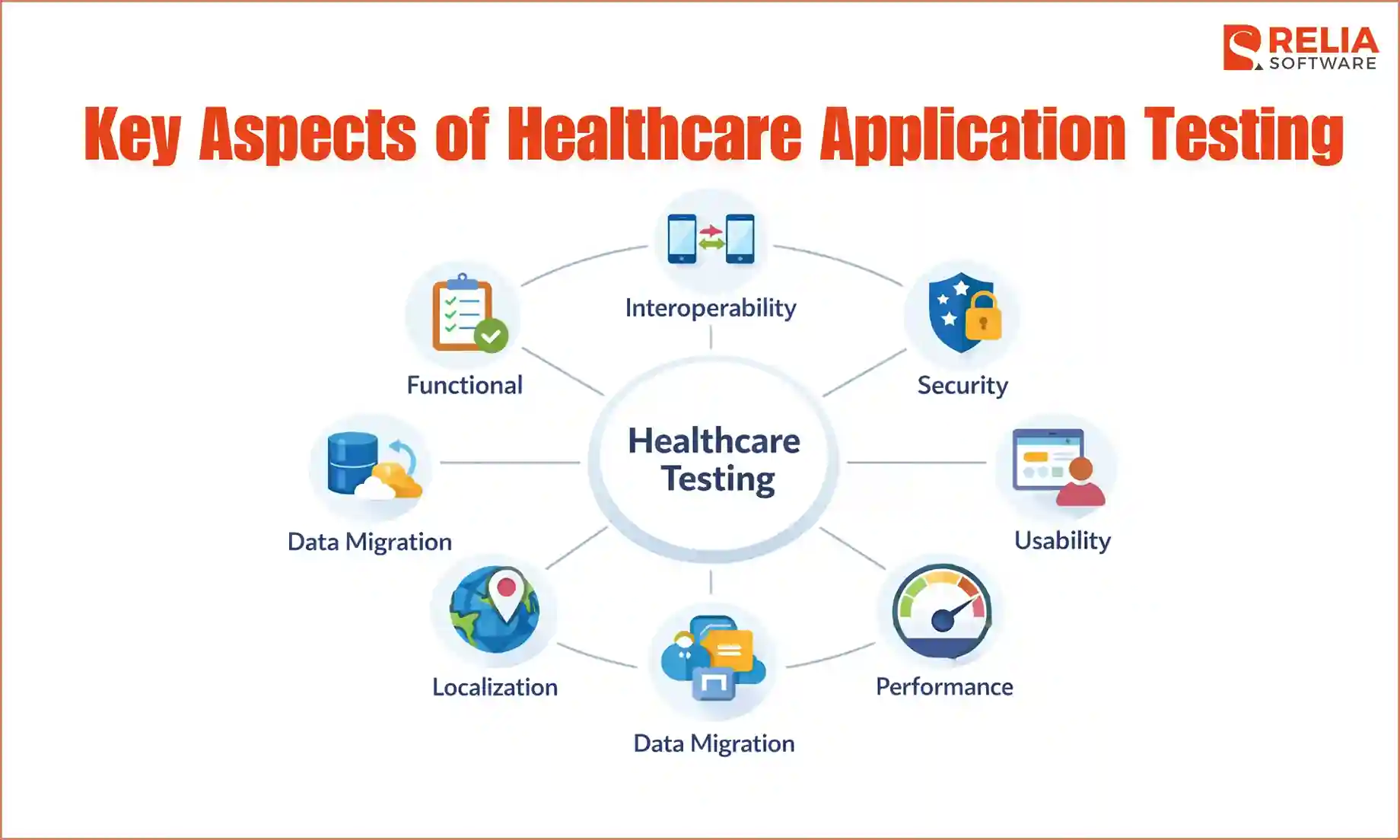
Together, testing components below help teams check the healthcare app more fully, with a focus based on the product’s main risks and needs.
Functional Testing
Functional testing checks whether the app works the way it is supposed to work. This includes testing basic flows such as signing in, creating accounts, booking appointments, sending messages, uploading files, viewing records, making updates, or completing payments. The goal is to make sure users can move through each task without hitting broken steps, wrong results, or confusing behavior.
>> Read more: Differences Between Functional and Non-Functional Testing
Interoperability Testing
Interoperability testing checks whether the healthcare app can work properly with other systems it connects. Many healthcare products are connected to EHRs, lab systems, pharmacy platforms, billing tools, insurance services, or wearable devices. The team needs to confirm that data moves correctly between these systems, appears in the right format, stays consistent, and does not get lost during sync.
Security Testing
Security and privacy testing checks whether the app protects personal health information properly. It covers areas such as sign-in, password rules, session handling, user access, file access, API security, and how the system responds to unusual or risky actions. This is very important in healthcare because one weak point can expose private data, reduce user trust, and cause legal or business problems.
Usability Testing
Usability testing reviews whether the app is clear, readable, and easy to follow for all the people it is built for. Testing in this area looks at whether users can complete tasks without confusion and whether the product supports people with different needs through things like proper contrast, readable text, keyboard support, and screen reader access.
>> Read more: Top 15 Best Usability Testing Tools For Businesses
Performance Testing
Real problems of a healthcare app often appear when many users log in at once, large records are loaded, or a weak internet connection slows the experience. Performance testing looks at loading speed, response time, system stability, and how well the app handles heavy traffic or busy hours. This is important in healthcare because delays or slowdowns can interrupt urgent tasks.
>> Read more: 7 Leading Performance Testing Tools for Developers
Localization Testing
A healthcare app may support users across multiple countries or markets, so the team needs to ensure the app works properly in different languages and regions. Localization testing includes checking translated text, date and time formats, number formats, local terms, and region-specific settings, confirming that translated content fits inside the design properly.
This testing helps make sure users in different markets can understand the app clearly and use it without confusion.
Data Migration and Regression Testing
Data migration testing checks whether records move correctly from one system or version to another without losing details, changing values, or breaking relationships between fields. This is very important in healthcare because old records, patient histories, and stored results often need to remain complete and accurate after any change.
Regression testing, on the other hand, checks whether newly added features or updates accidentally break parts of the app that were already working. Since healthcare apps often grow over time, this kind of testing helps teams catch hidden problems before they affect real users.
Regulations and Standards Of Healthcare Testing
Since healthcare apps often handle sensitive data, besides checking the product quality, they also need to meet healthcare rules and standards, including:
HIPAA and PHI Protection
HIPAA focuses on how personal health information is stored, accessed, and shared. In testing, this means checking whether only the right users can access sensitive data, whether login and session controls are secure, and whether data is protected during storage and transfer. It also includes checking logs and tracking actions when users view or update records.
>> Read more: A Complete Guide to HIPAA Compliant App Development
GDPR and Patient Data Privacy
GDPR applies to how personal data is handled, especially for users in certain regions. Testing should check whether users can control their data, such as viewing, updating, or requesting deletion. It also needs to confirm that the app collects only the necessary data and handles consent properly.
FDA and Software Validation Expectations
Some healthcare apps, especially those linked to medical devices or clinical use, may need to meet FDA-related expectations. Testing in this case focuses on clear validation, traceability, and documented results. Teams need to show that the app behaves as expected under different conditions and that testing is recorded clearly.
HL7, FHIR, X12, and DICOM in Interoperability Testing
These standards define how healthcare systems exchange data. HL7 and FHIR are often used for patient records, X12 for billing and claims, and DICOM for medical imaging. Testing should check whether the app follows these formats correctly, sends and receives data properly, and keeps information consistent across systems.
In general, these standards often lead to more structured test cases, better tracking, and stronger review before release. Teams require more attention to data handling, access control, system integration, and documentation. Testing also needs to produce clear evidence that the app meets the required rules and behaves correctly in real scenarios.
How to Build A Healthcare Testing Strategy?
A healthcare testing strategy is a clear plan for deciding what to test, how deeply to test it, and how to make sure the product is ready for real use. Instead of treating all features the same, it helps them focus on the areas where quality matters most and where failure would cause the biggest problems.
Identify Highest-Risk Workflows First
The first step is to identify the workflows that are most important and most sensitive. These are usually the parts linked to patient records, appointments, lab results, prescriptions, billing, alerts, device data, or communication between users. If one of these flows fails, the impact is often much bigger than a small UI issue or a less important feature. Starting here helps the team build the strategy around what truly matters in real use.
Map Failure Impact
After identifying the key workflows, the next step is to map what could go wrong in each one and how serious the result would be. Review each workflow and ask a few direct questions:
- Does failure affect patient safety?
- Does failure affect operations?
- Does failure affect data privacy or compliance?
- Does failure affect user trust or business stability?
After having clear answers for these questions, the team can then rate each workflow by impact level, such as high, medium, or low. For example, patient record updates or prescription flows would usually be high impact, while a simple profile setting may be lower. This makes it easier to see which areas need the most testing attention first.
Define Test Depth by Risk Tier
Once risks are clear, the team should group features into risk tiers and decide how deeply each one needs to be tested. The idea is simple: the higher the risk, the more careful and detailed the testing should be.
A practical way to define risk is to look at:
- Impact: what happens if this fails (patient safety, wrong data, workflow disruption, privacy issue).
- Usage frequency: how often users rely on this feature.
- System dependency: whether it connects with other systems (EHRs, labs, devices).
- Data sensitivity: whether it handles private health information.
Based on that, features can be grouped like this:
- High-risk areas: Features in these areas require deep testing with full coverage, edge cases, negative cases, multi-device checks, and strong regression testing
- Medium-risk areas: Include supporting workflows such as notifications, dashboards, or reporting features, which require standard functional testing, some edge cases, and basic regression coverage.
- Low-risk areas: Are often simple UI elements or non-critical features, which require basic checks to confirm they work, without heavy test depth.
This approach helps the team focus effort where failure would cause the most problems, instead of testing everything at the same level.
Create Test Plan
After defining priorities and test depth, the next step is to create a clear test plan. This plan outlines what will be tested, how testing will be done, what environments are needed, and how results will be tracked. It helps the team stay aligned and ensures that important workflows are covered before release.
A simple healthcare test plan can include:
- Scope: what features, workflows, and integrations will be tested (for example: patient registration, appointment booking, EHR sync).
- Objectives: what the testing aims to confirm (such as data accuracy, system stability, or secure access).
- Test types: functional, integration, security, performance, usability, and regression testing.
- Test environment: devices, browsers, operating systems, network conditions, and connected systems used for testing.
- Test data: type of data used (synthetic data, masked data) and how it will be prepared.
- Roles and responsibilities: who will design test cases, run tests, review results, and approve the release.
- Entry and exit criteria: when testing can start and what conditions must be met before release.
- Defect tracking: how issues are recorded, prioritized, and resolved.
- Timeline: key testing phases, milestones, and deadlines.
This kind of structure helps turn the strategy into a clear plan that the whole team can follow, especially when the product includes high-risk healthcare workflows and system integrations.
Build Test Cases for Key Workflows
Once the test plan is ready, the next step is to create test cases for the most important workflows. These should cover normal flows, edge cases, invalid inputs, failed actions, and role-based scenarios that may happen in real use.
To make them more effective, the team can use some test case design techniques, such as:
- Equivalence partitioning,
- Boundary value analysis,
- Decision table testing,
- Use case testing,
- State transition testing,
- Exploratory testing, etc.
This helps the team test high-risk areas in a clear and practical way instead of relying only on broad planning.
Requirement Traceability
A strong healthcare testing strategy should also make it easy to track what has been planned and what has already been tested. Important requirements should be linked to test cases, and each test case should have clear results. This helps the team see whether coverage is complete, review release readiness more easily, and show proof of testing when clients or internal teams ask for it.
Real Test Scenarios in Healthcare Applications
Below are some common examples of scenarios that teams should test closely before release.
|
Workflow |
What to test |
|
Patient registration |
Missing required fields, duplicate accounts, similar names or birth dates, wrong profile matching after import or sync |
|
Appointment booking and reminders |
Booking, rescheduling, cancellation, double booking, expired slots, delayed reminders, failed reminder delivery, and schedule updates |
|
Allergy, medication, and dosage checks |
Wrong or missing allergy details, incorrect medication list, dosage mismatch, conflicting inputs, and missing warnings |
|
Lab result delivery and sync |
Delayed results, partial data, repeated sync, failed updates, wrong patient mapping, inconsistent result status |
|
Billing status updates |
Approved, rejected, delayed, or corrected claims, wrong payment status, missing billing data, unclear error handling |
|
Telehealth session continuity |
Weak internet, dropped calls, camera or microphone issues, device switching, reconnect flow, fallback options |
|
Patient data access and security |
Unauthorized record access, weak role-based access, session timeout, insecure password reset, exposed APIs, unsafe file access, and missing audit logs |
These scenarios show why healthcare testing needs to focus on real workflows, not just isolated features. The more closely the test cases match actual use, the better the team can find problems before they affect patients, providers, or support staff.
Latest Technologies in Healthcare App Testing
AI-Assisted Test Automation
AI-assisted test automation helps teams speed up repetitive work such as regression testing, test case generation, and defect review. In the 2025 State of Testing report, AI and machine learning testing grew from 7% in 2023 to 16% in 2025, and 45.6% of respondents said AI improved test automation efficiency. This shows why more healthcare teams are starting to use AI to test larger and more complex systems faster.
>> Read more:
- A Practical Guide to AI Agents in Software Testing
- Top 12 Best AI Agents in Software Testing For Businesses
Synthetic Data for Safe Healthcare Testing
Healthcare teams often cannot use real patient data freely in test environments. Synthetic data helps create realistic records without exposing private information. NHS England says artificial data can be used to build and test data pipelines, and its service offers sample files with 10,000 rows and full files with 1 million rows. This makes synthetic data very useful for testing workflows, integrations, and edge cases more safely.
AI and ML Validation for Healthcare Apps
AI and ML validation is now an important part of healthcare app testing, especially for apps that use prediction, smart alerts, summaries, or decision support. These features must verify that the model behaves properly, produces reliable output, remains safe after updates, and can be monitored after release. This is becoming more important as more healthcare apps start using AI features.
Smart Simulation for Connected Systems
Smart simulation and digital twins are new tools that help teams test situations that are hard to recreate before release. They are useful for healthcare apps that rely on connected systems, devices, or real-time monitoring. In testing, they can help simulate device problems, unusual patient conditions, and workflow failures in a more realistic way.
Common Challenges in Healthcare Application Testing
Knowing the problems in testing healthcare apps early helps teams plan better, set the right expectations, and build a testing approach that fits the real complexity of the product.
Legacy System Integration
Many healthcare apps need to work with older systems that were not built for modern software. These systems may have poor documentation, old data formats, slow response times, or unusual connection rules. Because of that, testing data exchange, sync behavior, and error handling becomes much harder, and problems like delays, mismatched records, or missing updates may appear.
Partner System Differences
Even when two systems follow the same healthcare standard, they may still behave differently in real use. One system may send extra fields, another may leave some fields empty, and another may format the same data in a different way. As a result, it makes testing harder because passing one integration test does not mean the app will work smoothly with every partner system.
Limited Test Environments
Healthcare teams often cannot use real patient data in testing, so the test environment may not fully match real use. Sample data is often too simple, and outside systems may be limited or unavailable, which makes testing harder. Because of that, some issues only appear later when the app runs with more realistic data and conditions.
Compliance Delays
Healthcare products often need more review before release because privacy, data handling, and system controls are very important. This can slow down delivery if the team does not prepare early. More documents, approvals, and test evidence may be needed, so without a clear process, testing can pile up near the end and delay launch.
Fragile Test Automation
Automation testing is useful, but in healthcare apps, it can become fragile when the product changes often or depends on many connected systems. Small UI updates may break automated tests even when the main workflow still works, and regression suites can become slow, noisy, and hard to maintain. Over time, this makes the team trust automation less and weakens release checks.
Best Practices for Healthcare Application Testing
Start Early and Keep Testing Continuous
Healthcare testing should start as soon as key workflows are defined, not wait until the final stage. This helps teams catch issues earlier and avoid rushed fixes before launch. Testing should also continue as the product grows, because new features, updates, or integrations can easily affect workflows that already worked before.
Focus on High-Risk User Workflows
Healthcare teams should give the most attention to workflows that involve patient data, system connections, or time-sensitive actions. It is also better to test full user flows instead of checking features one by one. This makes it easier to find issues that only appear when several steps are linked together in real use.
Use Realistic Test Data and Conditions
Testing should be as close to real use cases as possible. That means using realistic sample data and checking how the app performs under different conditions, such as weak internet, large records, or device differences. This helps teams find issues that may not appear in simple test setups.
Combine Manual and Automated Testing
Both manual and automated testing are useful in healthcare projects. Manual testing helps explore complex workflows and catch unexpected issues, while automation helps repeat key checks faster and more consistently. Using both gives the team better coverage without relying too much on one approach.
Maintain Clear Records and Review the Strategy Regularly
Teams should keep clear records of what has been tested, what passed, and what still needs attention. This makes release reviews easier and helps answer questions from clients or internal teams. At the same time, the testing strategy should be reviewed regularly so it stays aligned with new risks, product changes, and real usage needs.
Cost of Healthcare Application Testing
Healthcare application testing often costs more than standard app QA. In general, testing may take around 15% to 25% of the total software development budget. Clutch’s pricing guide also notes that many software development firms and software testing firms cluster around the $25–$49/hour range.
Here are the estimated costs using current market benchmarks:
|
Project situation |
Testing budget share (of total budget) |
|
Basic wellness or patient-facing MVP with limited integrations |
15%–20% |
|
Mid-size healthcare app with portals, scheduling, messaging, and a few integrations |
20%–25% |
|
Complex healthcare platform with EHR sync, billing, role-heavy workflows, audit needs, or device data |
25%+ |
In healthcare, there are a few things that usually push the budget up faster than others:
- Product complexity: More features, more user roles, and more workflows mean more test cases and more regression work.
- Integration scope: Links to EHRs, labs, pharmacies, billing tools, devices, or wearables add setup time and more failure points.
- Compliance and evidence needs: Regulated or higher-risk products often need stronger validation records and clearer traceability, which adds effort beyond normal feature testing.
- Platform coverage: Supporting iOS or Android for mobile, web, tablets, older devices, and weak-network conditions increases test effort.
- Automation maturity: Automation can lower repeated manual effort over time, but building and maintaining it still adds cost early on.
- Data and environment limits: When realistic healthcare test data or partner environments are hard to access, setup, and validation takes longer.
>> Read more: Detailed Breakdown For App Development Cost
How to Choose a Healthcare App Testing Partner?
The right partner should understand healthcare workflows, sensitive data, connected systems, and the higher quality standards this type of product needs. A weak vendor may still run tests, but it can easily miss the issues that matter most in real healthcare use.
- Look for healthcare testing experience: Check whether they have tested products such as telemedicine apps, patient portals, EHR systems, billing platforms, or remote monitoring apps.
- Check their understanding of real workflows: A strong healthcare app testing partner should know how patients, doctors, nurses, and admin teams use the system differently.
- Ask about privacy and integration testing: They should clearly explain how they test sensitive data, access control, and connections with EHRs, labs, pharmacies, billing systems, or devices.
- Review their testing approach: They should be able to explain how they set priorities, handle regression testing, track defects, and support release decisions.
- Look for real proof: Useful signs include healthcare case studies, sample test documents, bug reports, or clear examples of similar healthcare application testing work.
- Watch for red flags: Generic proposals, weak knowledge of privacy or interoperability, too much focus on speed alone, and no clear reporting process are all warning signs.
- Expect clear test evidence: A good partner should provide practical outputs such as test plans, test cases, defect reports, coverage updates, regression results, and a release-readiness summary.
>> Read more: 6 Best Vietnam Healthcare Software Development Companies
Relia Software - A Dedicated Partner in Healthcare Application Testing
Relia Software presents as a dedicated QA and testing partner, providing QA and testing services such as functional testing, regression testing, API testing, mobile testing, security testing, performance testing, automation testing, and manual testing. Since 2011, we have delivered 300+ web and mobile applications, showing our dedicated development skills in various industries.
Our experience in healthcare application testing is shown in WhiteCoat, a telemedicine app project.
WhiteCoat is a strong healthcare app testing example because it includes many connected parts in one telemedicine system. In this project, Relia Software’s QA team had to test the full user flow across the patient app, doctor panel, and admin platform, including role-based access, mobile behavior, API communication, and the stability of telehealth features for different users.
As a result, the project was launched successfully, processing about 20–25 consultations per day by the end of 2018, and that grew to 500 consultations per day in Q1 2019.
FAQs
1. How long does healthcare app testing usually take?
It depends on the product scope, risk level, and number of integrations. A simple app takes less time, while a system with records, billing, telehealth, or device data needs a longer QA cycle.
2. Can you use synthetic data safely in healthcare QA?
Yes, if it is created carefully. Synthetic data helps teams test realistic cases without exposing real patient information.
3. What is an application testing process?
An application testing process is the step-by-step work of planning, running, reviewing, and reporting tests to make sure the software works as expected before release.
>> Read more:
- What are 4 Levels Of Testing In Software Testing?
- Detailed Explanation of 7 Software Testing Principles
5. What are the 6 C's in health care?
The 6Cs are Care, Compassion, Competence, Communication, Courage, and Commitment, which are values essential to high-quality care.
6. What is QA in healthcare?
QA in healthcare means checking and improving the quality of healthcare software or services so they are safe, accurate, reliable, and fit for real use.
>> You may be interested in:
- Top 6 Healthcare Technology Trends You Should Know
- Pros and Cons of AI in Healthcare with Detailed Explanation
Conclusion
Healthcare application testing ensures healthcare apps work correctly, protect user data, and stay reliable in daily use. By focusing on high-risk workflows, using the right testing methods, and following clear best practices, teams can reduce issues before release and build more dependable products. A strong testing approach not only improves product quality but also helps create trust with users and supports long-term success.
>>> Follow and Contact Relia Software for more information!

- Mobile App Development
- development
- mobile applications