


Most online stores start with a ready-made platform like Shopify or WooCommerce. StoreLeads reported around 4.8 to 7 million active Shopify stores and 4.5 to 6 million WooCommerce stores worldwide in 2025–2026.
However, the limits show when a business grows, such as when the store cannot connect to the new ERP or inventory system the company runs, or cannot support a new sales model like B2B wholesale or subscriptions. Custom ecommerce web development solves this by building around the business's needs instead of forcing it into a fixed template.
In this article, we will explain the ecommerce web development approaches, when it is worth investing in custom development, key features and tools behind it, a step-by-step development process, and costs and timelines.
What Is Ecommerce Web Development?
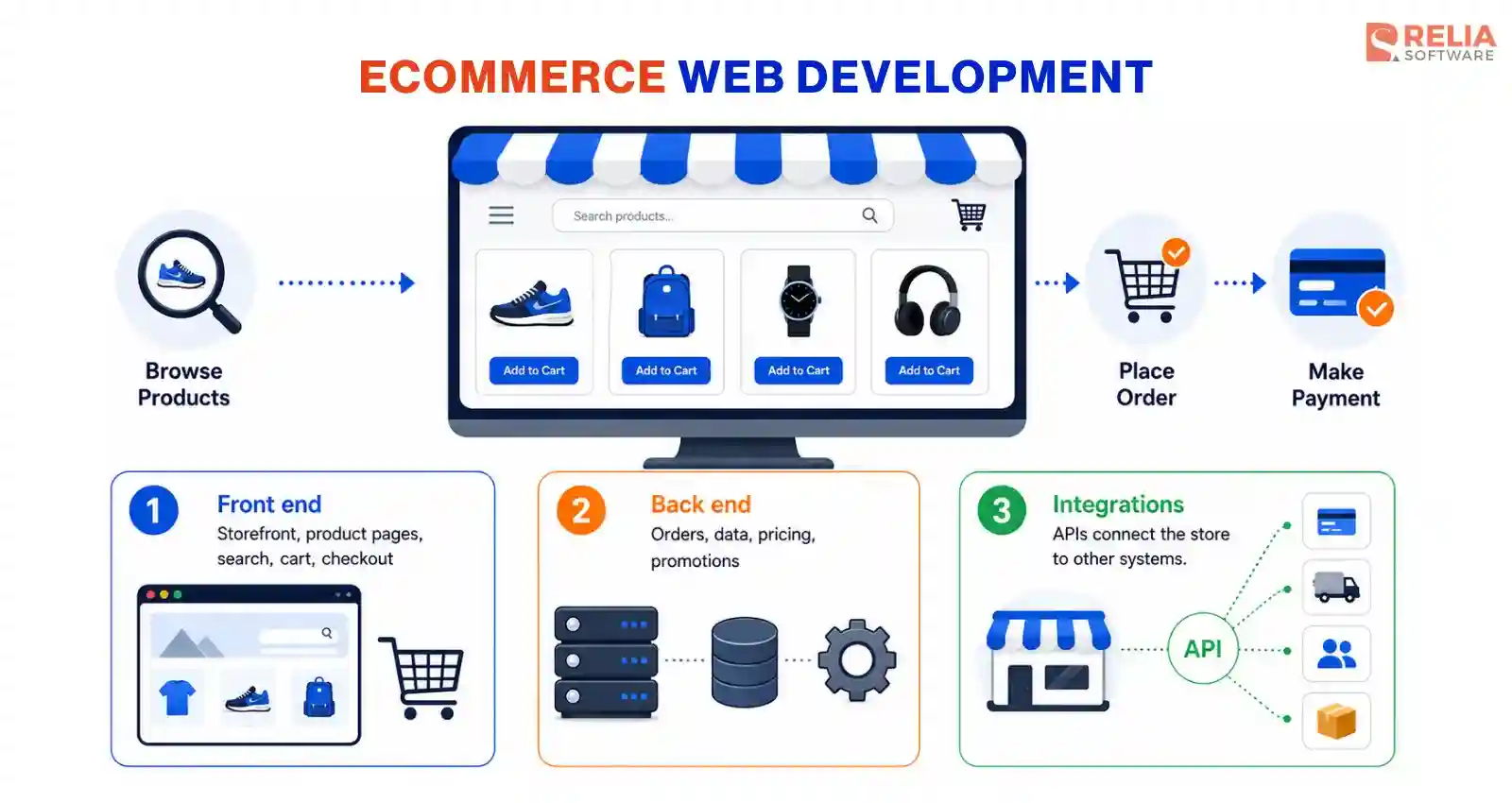
Ecommerce web development is the process of building and maintaining an online store where customers can browse products, place orders, and make payments. Developers create the storefront, checkout, product catalog, and integrations based on the business’s requirements.
A custom build usually has three parts:
- Front end: the storefront customers interact with, including product pages, search, cart, and checkout.
- Back end: the server-side logic that processes orders, manages data, and applies business rules such as pricing or promotions.
- Integrations: the connections between the web store and other systems through APIs (application programming interfaces).
Popular Approaches to Build an Ecommerce Web App
SaaS Platform
A SaaS platform such as Shopify or BigCommerce is hosted software the business rents for a monthly fee. These platforms manage the infrastructure itself, including hosting, databases, security, updates, and PCI-compliant payment processing, so the development team does not need to build those.
In this case, the developer's work is to write theme code in the platform's own language, such as Shopify's Liquid, along with app and API integrations that connect the store to outside systems like an ERP or CRM. The trade-off is that the platform still sets the limits: its features, themes, and transaction fees shape what developers can change, and moving away later means rebuilding.
Open-source Platform
An open-source platform such as WooCommerce or Magento Open Source gives the business the platform's source code to install and modify but does not manage the infrastructure. The development team can modify the hosting, database, security, and updates based on the code given. This approach gives more control in exchange for more responsibility: the business can change almost anything, but it also owns the maintenance and updates.
Custom Web App Development
A custom ecommerce store is built with custom code from scratch rather than an existing platform, giving full control over the front end, back end, and data. There are two common ways to structure it, and the choice shapes cost, speed, and how the store grows.
- Monolithic: A monolithic build keeps the front end and back end in one connected codebase, where a single framework such as Laravel or Ruby on Rails handles both the user interface and business logic.
- Headless: The front end and back end are separated and connected through APIs, which makes each side easier to update and allows one back end to support multiple channels, such as a website, mobile app, and in-store display.
>> Read more: Monolithic vs Microservices vs Serverless: Which is The Best?
|
Approach |
Best for |
Customization |
Upfront cost |
|
SaaS platform |
Standard catalogs and quick launches |
Limited to platform features and themes |
Low |
|
Open-source platform |
Teams wanting more control on a budget |
Moderate to high, within the platform's structure |
Low to medium |
|
Custom development (monolithic or headless) |
Complex logic, deep integrations, differentiation |
Full control over every layer |
High |
When to Choose Custom Ecommerce Web Development?
Custom ecommerce development is worth it when a ready-made platform can no longer support your revenue model, workflows, or growth, and the cost of those limitations outweighs the cost of building. In short, custom development is preferred when standard features in an off-the-shelf platform start to hold the business back.
Several signals suggest a business has reached that point:
- Complex business logic: Custom pricing, B2B quotes, product bundles, or subscription rules that the platform cannot model without workarounds.
- Deep system integrations: A need to connect the store directly to an ERP, warehouse system, or in-house CRM through APIs, beyond what off-the-shelf plugins support.
- Scale and performance limits: A large catalog or high traffic that slows page load times and hurts conversion on a shared platform.
- Rising platform costs: Transaction fees and tier pricing that grow with sales volume and erode margin at scale.
- A differentiated experience: A storefront or checkout that competitors using the same template cannot copy.
- Data and compliance control: Full ownership of customer data and infrastructure to meet security or regulatory requirements.
Custom development is not necessary for every business, especially early-stage companies that need to test demand quickly and cheaply. But once the business has scaled, a custom build often delivers more long-term value. Instead of looking only at upfront cost, businesses should compare the total cost of ownership and the flexibility they gain over time.
Key Features of an Ecommerce Web App
Basic/Core Features
Basic features form the foundation every store needs to sell. Customers expect all of them to work reliably, and a store cannot operate without them.
- Product catalog and search: Organized listings with categories, filters, and fast search, so customers can find items quickly.
- Cart and checkout: A clear cart and a short checkout with visible shipping and tax, which reduces cart abandonment.
- User accounts: Profiles that store order history, saved addresses, and payment methods for repeat purchases.
- Order management: A back-end view that tracks orders, statuses, and returns for the team running the store.
- Content management: A way to update products, prices, and pages without a developer for every change.
- Mobile responsiveness: A layout that works on phones, since a large share of ecommerce traffic is mobile.
Advanced Features
Advanced features help a store differentiate and grow once the basics work, creating competitive advantages for businesses.
- AI product recommendations: Suggestions based on browsing and purchase history, which raise average order value.
- Personalization: Tailored content, pricing, or offers shown to different customer segments.
- Advanced search: AI-driven or faceted search that understands intent and handles large catalogs.
- Analytics and reporting: Dashboards that track sales, conversion, and customer behavior, so the team can act on real data.
- Subscriptions and loyalty: Recurring billing and rewards or loyalty programs that support repeat revenue.
- Multi-currency and multi-language: Support for selling across regions with local pricing and content.
Ecommerce Web Development Tools and Tech Stack
An ecommerce web needs various layers, including front end, back end, database, hosting, and commerce services to work effectively. Because a monolithic build and a headless build organize these layers differently, the two sections below list the common tools for each structure.
Monolithic Development Stack
- Framework: A full-stack framework such as Laravel (PHP), Ruby on Rails, Django (Python), or ASP.NET (C#) renders the front pages and runs the business logic together, with a built-in templating engine like Blade, ERB, or Django templates for the interface.
- Database: Using a relational database such as PostgreSQL or MySQL, accessed through the framework's built-in ORM.
- Hosting: The whole application can run in one environment, such as AWS EC2, DigitalOcean, or Heroku, with a CDN for faster delivery.
- Commerce services: Using Stripe or PayPal handles payments, while tools like Redis and search services can be added as the store grows.
Headless Development Stack
- Front end: Often needs a JavaScript framework such as Angular, React or Vue, through a meta-framework like Next.js, Nuxt, or Remix, styled with a tool such as Tailwind CSS.
- Back end: Using an API-first back end such as Node.js with Express or Nest.js, or a headless commerce engine such as Medusa, Saleor, or commercetools that expose commerce APIs directly.
- Database: Same as monolithic, headless build also uses relational database such as PostgreSQL or MySQL, often alongside a document database like MongoDB for flexible catalog data.
- Hosting: Split hosting, with the front end on an edge platform such as Vercel or Netlify and the back end on AWS, Google Cloud, or Azure, often using Docker containers.
- Commerce services: A best-of-breed set connected through APIs, including a payment gateway (Stripe, PayPal), a search service (Algolia, Elasticsearch), a headless CMS (Contentful, Sanity), and a cache (Redis).
The table below summarizes the two stacks side by side.
|
Layer |
Monolithic |
Headless |
|
Front end |
Rendered by the back-end framework |
Separate framework such as Next.js |
|
Back end |
Single full-stack framework |
API back end or commerce service |
|
Connection |
Internal, one codebase |
APIs between front end and back end |
|
Database |
PostgreSQL or MySQL |
Relational, often with MongoDB |
|
Hosting |
Single environment |
Split front-end and back-end hosting |
|
Best fit |
Web-only store, smaller team |
Multi-channel store, larger team |
Practical Ecommerce Web Development Process
A custom ecommerce development follows a clear sequence, in which each step produces something the next one depends on, so skipping a stage usually costs more time later.
Step 1: Discovery & Planning
The discovery step often turns a business idea into a documented plan the team can build against. The work is mostly structured conversation and research, run by a business analyst or product lead with input from stakeholders.
The team often digs into:
- Stakeholder interviews: Sessions with the people who run sales, operations, and marketing to capture how the business actually sells, including edge cases like wholesale pricing or regional tax rules.
- Workflow mapping: A written map of each core flow, such as how an order moves from cart to fulfillment, so the build reflects real operations rather than assumptions.
- Feature prioritization: A ranked list that separates must-haves from nice-to-haves, usually with a method like MoSCoW (must, should, could, won't), which sets the MVP scope.
- Success metrics: Agreed numbers the store must hit, such as a target conversion rate or page load time, so the team can measure the result.
The output is a scope document and an MVP definition. Getting this right can prevent scope creep, the slow addition of unplanned features that inflates cost and delays launch.
Step 2: UI/UX Design
The ecommerce web design decides how customers move through the store and how the store looks, and it moves from rough structure to a finished, testable interface. In this stage, designers and engineers work together so the design stays feasible to build.
The process usually runs in this order:
- User flows and wireframes: Low-detail layouts of each page (homepage, category, product, cart, checkout, account) that fix structure and navigation before any visual styling.
- Visual design: The brand-applied version of those wireframes, with color, typography, and imagery, built as a reusable design system so components stay consistent.
- Prototyping: A clickable version of the design, often in a tool like Figma, that lets stakeholders walk the purchase path and catch problems early.
- Feasibility review: A working session where engineers flag any design that is expensive to build, such as a real-time product configurator, so trade-offs are settled before development.
>> Read more: 10 Popular Prototyping Tools For UI/UX Developers
Step 3: Architecture & Setup
In this step, engineers need to decide how the store is structured and prepare the ground for development. These decisions are hard to reverse later, so they are made deliberately and documented. The key decisions must include:
- Stack selection: The specific development frameworks, databases, and services chosen to match the store's requirements and the team's existing skills rather than trends.
- Data modeling: The design of how products, variants, orders, and customers are stored, which sets how the store queries data and how fast it stays as the catalog grows.
- Environment setup: The creation of separate development, staging, and production environments, plus version control and a deployment pipeline, so code can be built, tested, and released safely.
- Scale setup: You should also plan for scale at this stage, such as adding caching and a CDN. It is far cheaper than re-architecting a store that slows down once traffic climbs.
Step 4: Development
The development process usually starts with building the minimum viable product (MVP) first, with core features that let the store sell, such as the catalog, cart, and checkout, before anything secondary. The MVP keeps the first release focused, gets a working store to market sooner, and lets the business learn from real customers before investing in more.
Most teams work in short iterations, often two-week sprints. Within each sprint, developers build across the front and back end for easy review and management. Two practices keep the code reliable as it grows:
- Code review: Another developer checks each change before it merges, which catches errors and keeps the codebase consistent.
- Automated testing: Small scripts confirm that important features, such as checkout, still work after each change, so new work does not break existing paths.
>> Read more:
- Top 6 Automation Testing Tools for Businesses
- Top 10 Automated Code Review Tools For Developers
After the MVP launches, development continues in phases rather than stopping. The team uses early customer behavior and feedback from the MVP to decide what to build next, adding features in priority order. Common work includes:
- Expanding features: Adding capabilities and advanced features held back from the MVP, such as subscriptions, loyalty programs, or a product configurator.
- Optimization: Improving page speed, search, and the checkout flow based on real conversion data.
- Scaling: Strengthening the architecture to handle higher traffic as sales increase.
This phased approach spreads cost over time and grounds each new feature in real usage, so the team builds what customers actually need instead of guessing up front.
Step 5: Integrations
Integrations connect the store to the outside services it depends on, and each connection is built and verified on its own before the whole flow is tested together. The work is done through APIs, the interfaces that let two systems exchange data.
Common integrations include:
- Payment gateway integration: A service such as Stripe or PayPal that processes transactions, integrated so that card data flows through the gateway rather than the store, which reduces PCI compliance scope.
- Shipping and tax: Carrier and tax tools that calculate real rates at checkout based on address and cart.
- ERP systems: A connection to back-office systems that keeps stock levels and orders in sync.
- CRM system: Links to customer and email tools that support retention and campaigns.
- Analytics: Tracking that shows how customers behave, so the team can improve conversion.
The method matters here: each integration is tested in isolation first, then as part of the end-to-end checkout, so that when something fails the team can trace it to one service instead of searching the whole flow. Handling failures gracefully, such as retrying a dropped request, keeps a single service outage from breaking checkout.
Step 6: Testing & QA
Testing is often conducted by QA specialists to confirm the store works correctly, performs well, and is secure before customers ever see it. QA specialists run a mix of manual and automated testing against the requirements set in discovery.
Testing covers several layers:
- Functional testing: Confirming every feature works, from search and filtering to placing a real test order and receiving confirmation.
- Cross-device and browser testing: Checking the store behaves correctly on ordinary phones, tablets, and browsers, since a large share of traffic is mobile.
- Performance testing: Measuring load times and behavior under high traffic, so the store holds up during peak periods like a sale.
- Security testing: Checking for common coding and API vulnerabilities, verifying data is encrypted, and confirming payment handling meets PCI requirements.
>> Read more: 7 Leading Performance Testing Tools for Developers
Security is a must-have for a store that handles payments and personal data. Building security in from the start is far cheaper than adding it after a breach, which can bring fines, lost sales, and lasting damage to customer trust. A custom store must meet the same standards a platform provides by default, and the business owns that responsibility.
- PCI DSS compliance: The Payment Card Industry Data Security Standard (PCI DSS) sets rules for handling card data. Routing payments through a gateway keeps most card data off the store's servers, which reduces the compliance burden.
- Data encryption: Encryption in transit (HTTPS/TLS) and at rest protects customer data from interception and theft.
Finally, a launch checklist ties it together: place a test order, confirm payment processing, verify tax and shipping rates, check that promo codes apply, and confirm the store loads well on mobile. Clearing that checklist is the signal the store is ready for production.
Step 7: Launch & Maintenance
A careful launch reduces the risk of downtime at the moment customers first arrive. Launch is handled in a controlled way:
- Staged rollout: Moving from staging to production with final checks, sometimes releasing to a limited audience first to catch issues before full traffic arrives.
- Monitoring: Setting up tools that track uptime, errors, and performance, so the team sees problems as they happen rather than through customer complaints.
- Access control: Checking and maintaining role-based permissions limits who can view or change sensitive data inside the store.
- Regular updates: Ongoing patching of the code and its dependencies closes known vulnerabilities after launch.
Maintenance is the ongoing phase most platform-focused guides skip. A custom store needs regular security patches, dependency updates, and bug fixes, and it grows through new features guided by the analytics collected after launch. This ongoing work is a real cost the business carries, and planning for it keeps the store secure and competitive over time.
The time each step takes depends on the store's complexity, the team's size, and the number of integrations. Those same factors drive the budget, which the next section covers in detail.
Cost & Timeline for Ecommerce Web Development
By Project Size
The clearest way to estimate a custom build is by project size. The table below shows typical total costs for a Vietnam-based offshore team, with a rough timeline for each tier.
|
Project size |
What it includes |
Cost |
Timeline |
|
Simple store |
Standard catalog, cart, checkout, payment gateway, few integrations |
$8,000–$20,000 |
2–3 months |
|
Mid-complexity store |
Custom features, custom design, several integrations |
$20,000–$45,000 |
4–6 months |
|
Complex / enterprise store |
Custom logic, many integrations, headless, high traffic |
$45,000–$100,000+ |
6–9 months+ |
By Region
Beyond the project size, businesses also have to choose a dedicated ecommerce web development partner to assist them in building the full system. The cost for hiring a team is often the largest cost variable because developer rates vary widely by region.
Rates within each region still depend on seniority and specialization. Senior engineers and niche skills, such as AI or security, cost more everywhere, so a region's range is a starting point rather than a fixed price.
|
Region |
Typical hourly rate per developer |
|
North America |
$80–$150 |
|
Western Europe |
$50–$100 |
|
Latin America |
$30–$60 |
|
Eastern Europe |
$30–$70 |
|
Asia (incl. Vietnam) |
$20–$50 |
By Additional Features
Specific features add to the base cost, and knowing the common add-ons helps a business estimate its own scope. The figures below are typical ranges from recent industry guides.
|
Additional Features |
Typical added cost |
|
Each third-party API integration |
$1,000–$5,000 |
|
Custom design over a template |
$5,000–$15,000 |
|
ERP, CRM, or inventory integration |
From $10,000 |
|
AI features (recommendations, search, chatbots) |
$10,000–$25,000+ |
How Relia Software Builds an Ecommerce Web App?
Relia Software, an experienced ecommerce development company in Vietnam, runs the whole ecommerce web development lifecycle as one connected process: planning, UX design, architecture, development, integrations, testing, launch, and the maintenance support that follows. The team starts with the business problem first, then chooses the right architecture and technology that best solves it.
For instance, Reebonz, a Singapore marketplace for new and pre-owned luxury goods, came to Relia Software with a store that worked but could not scale, because it had been built as a single standalone application. We built the platform following a clear progression:
- Problem defined: Relia's engineers diagnosed that Reebonz's real limit was architectural, so we chose microservices architecture specifically to fix how the platform scaled.
- Architecture first: The Relia team moved the platform onto microservices, so the catalog, checkout, and other functions could scale independently instead of straining one shared system.
- UX across the platform: The team redefined the user experience for the full application, keeping the shopping flow consistent as the structure changed underneath.
- One back end, every channel: Shared services fed both the web store and native mobile, so each channel drew on the same scalable foundation.
- Scoped for the deadline: By keeping the first release focused, Relia delivered it in three months, in time for the Singapore shopping season.
As a result, Reebonz handled peak-season traffic with zero downtime, while the service-based setup gave the platform room to grow without rebuilding the core.
This case study also shows how Relia Software approaches custom software development across 300+ delivered applications. By focusing on the real constraint and the peak shopping season requirements, the team completed the rearchitecture in three months and built a platform that could handle traffic spikes without downtime.
FAQs
1. Should I choose custom ecommerce development or Shopify?
Choose Shopify for a standard store when you want to launch quickly at a lower cost. Custom development is more suitable when your store requires complex pricing, B2B or subscription models, deep ERP or CRM integrations, or a unique storefront.
2. What is the difference between an ecommerce website and an ecommerce web app?
An ecommerce website focuses on browsing products and making purchases, while an ecommerce web app works more like software in the browser. In practice, the public storefront and product pages act as a standard website for discovery and SEO, while the shopping cart, user accounts, and checkout engine function as a dynamic web app that processes interactive data.
Web apps support more complex features, such as product configurators, subscription management, and B2B portals, making them a better fit for businesses with advanced workflows.
3. Do I also need a native mobile app, or is a responsive web store enough?
A responsive web design is enough for most businesses because it works across devices and costs less to build and maintain. A native mobile app makes sense when the business needs features like push notifications, offline access, or deeper device integration. Many stores start with a responsive web app and add a mobile app later as demand grows.
>> Read more: Why E-Commerce Businesses Necessitate A Mobile Application?
Conclusion
Custom ecommerce web development is worth considering when a business has outgrown what a platform allows and needs full control over its features, integrations, and data. The decision should be made based on:
- How complex is the business logic?
- How many systems must connect?
- How much traffic must the store handle?
- How different does the experience need to be?
A monolithic build fits a simpler, web-only store, while a headless build fits a multi-channel or high-traffic one. Whichever approach you choose, a custom build always starts by defining its MVP, and the business should review that scope with an experienced development partner before committing to a budget.
>>> Follow and Contact Relia Software for more information!

- E-commerce
- development
- web development