


A native app is a mobile application built for a specific operating system, usually iOS or Android. Recent market data shows that in the mobile enterprise application market, native apps held about 52.3% revenue share in 2025, while global in-app purchase revenue across iOS and Google Play reached $150 billion, up 13% year over year, showing that businesses are still investing heavily in mobile products, especially native apps.
With this growth, businesses need quality and native mobile apps to stand out, keep users engaged, and compete in markets. In this article, we will explain native mobile app development, when to choose it, how it compares with PWA, web app, hybrid app, and cross-platform development, and what to know about the process, tech stack, cost, timeline, testing, and long-term maintenance.
What Is Native Mobile App Development?
Native mobile app development is the process of building mobile apps for a specific operating system, usually iOS or Android, using that platform’s official tools, programming languages, SDKs, and design guidelines. Normally, developers use Swift and Xcode for iOS apps while using Kotlin and Android Studio for Android apps.
Different from browser-based apps that run through a URL, a native app runs directly on the mobile operating system after users install it from the App Store, Google Play, or a private app store. Because native apps are built closer to the device, they can usually offer smoother performance, deeper access to phone features, stronger offline support, and a more natural iOS or Android experience for users.
Native iOS App Development
Native iOS app development means building apps for Apple devices such as iPhone and iPad. Developers usually use Swift as the main programming language and Xcode as the main development tool. Some older iOS apps still use Objective-C, but Swift is now the common choice for new iOS projects because it is easier to read, safer to work with, and well-supported by Apple.
To release on the iOS platform, the team must submit the app to Apple for review and wait for approval before users can download the public version. Apple will check many aspects of the app, including privacy, security, payment policies, content, user experience, and technical quality. Because of this review step, iOS teams need to prepare release details carefully before launch.
Native Android App Development
Meanwhile, native Android app development means building apps for Android phones, tablets, and other Android-based devices. Kotlin as the main development language and Android Studio as the main development tool are now common choices for modern Android projects.
The Android release process usually goes through Google Play Console, where the team submits the app for review, manages store details, and controls how the release reaches users. Android also supports private distribution options for internal business apps that do not need a public Google Play listing.
>> Read more: 7 Key Factors for A Successful Mobile App Development Strategy
Benefits of Native Mobile App Development
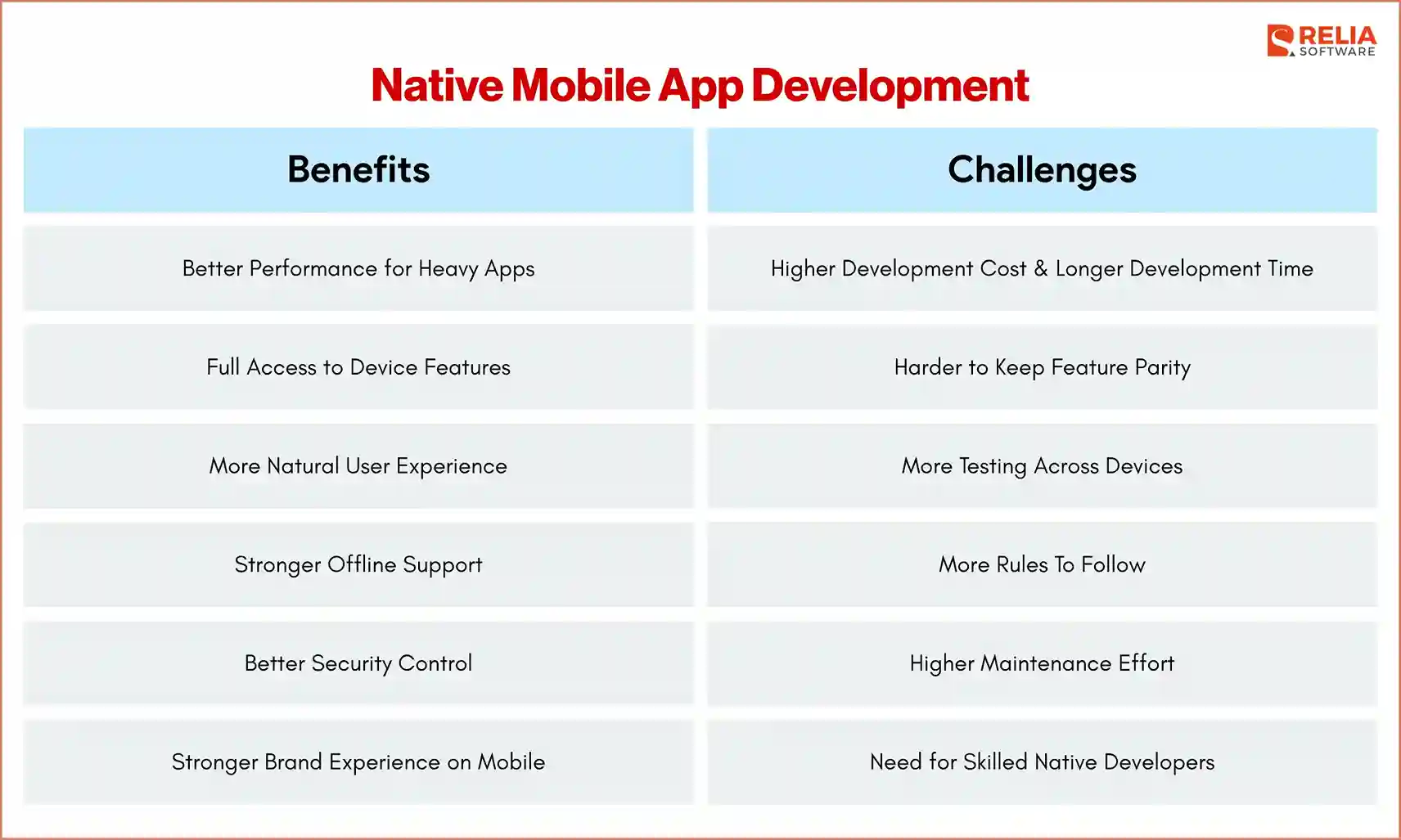
Better Performance for Heavy Apps
Native apps usually perform better than web apps on mobile because they run directly on the mobile operating system. They can use platform-level features more efficiently and respond faster to user actions, which is important for apps that handle many tasks at the same time or need smooth screen updates.
For example, a food delivery app needs live tracking, a banking app needs fast and secure payments, and a fitness app needs smooth sensor and wearable data. Users expect these actions to work without delay, so native development is useful here when app speed and response time directly affect the user experience.
Full Access to Device Features
Native apps can work closely with phone and tablet features, such as the camera, GPS, microphone, Bluetooth, NFC, biometrics, sensors, push notifications, etc. As a result, it is one of the biggest reasons businesses choose native development instead of a browser-based app.
Due to its deeper access, native development is a strong choice for apps that depend on real device actions, such as a ride-booking app that needs GPS and background location, or healthcare apps that usually need camera upload, secure login, and notification reminders. Browser-based apps can access some device features, but native apps usually give teams better control and more stable device integration.
More Natural User Experience
iOS and Android users expect different navigation styles, gestures, menus, alerts, privacy prompts, keyboard behavior, and system interactions. Native development allows each app version to follow the way its own platform works instead of forcing the same interface to behave the same way on all platforms, helping the app feel more familiar to users during daily use.
A natural user experience is especially important for apps that users open many times per week, such as banking, fitness, delivery, booking, messaging, productivity, healthcare, or e-commerce apps. When common actions feel smooth and familiar, users can complete tasks with less effort and are likely to keep using the app over time.
Stronger Offline Support
Native apps can store data directly on the device, which helps the app keep working when the internet is weak or unavailable. It is useful for users who travel, work in the field, visit remote locations, or use the app in places with unstable network access.
For example, a field-service app can let technicians open job details, take photos, fill out reports, and collect signatures without a stable connection, then sync the saved data when the device reconnects. Native development gives the team better control over what data is stored, how long it stays on the device, how sync conflicts are handled, and how sensitive data is protected.
Better Security Control
Native apps can use platform-level security features to protect user accounts, stored data, and sensitive actions. It is important for apps that handle personal, financial, medical, business, or location data, such as fintech apps or healthcare apps.
Security still depends on good development practices, but native development gives the team more direct access to secure storage, biometric login, permission control, and OS-level protection. Native development does not make an app secure by itself, but it gives developers stronger tools to protect sensitive workflows when security is planned from the start.
Stronger Brand Experience on Mobile
A mobile app often becomes one of the most frequent touchpoints between a business and its customers. Users may open the app more often than they visit the website, read emails, or contact support. Because of that, the app experience also affects how users judge the brand.
For competitive markets, small experience problems can make a large difference. If two apps offer similar services, users often stay with the one that feels faster, easier, and more reliable. Native development helps businesses compete on mobile quality, especially when users have many other options available.
Native App Development Challenges
Higher Development Cost
Native development usually costs more because each iOS and Android platform needs its own codebase, tools, and development work. If the product needs both platforms, the team may need to build the same feature twice, prepare separate releases, and maintain each version over time, which can increase the budget, especially for apps with complex features.
Solution: Start by building a clear MVP with only the features needed for launch, and avoid adding nice-to-have features before the app has real user feedback.
Longer Development Timeline
Building native apps for both iOS and Android can take longer because each platform has its own design rules, APIs, permission flows, testing needs, and store release process. Even when both apps share the same product goal, a distinct feature still needs different handling on each platform. More platform-specific work means more time for planning, development, testing, and release, leading to the project stretching longer than expected.
Solution: Prioritize the most important platform first if the budget or timeline is limited, then build the second platform after the main product flow is stable.
More Testing Across Devices
Native apps need careful testing because users can run the app on different devices, screen sizes, OS versions, and network conditions. Android testing can be wider because of the many device brands and hardware levels, which means the QA team may need more time to test and verify performance.
Meanwhile, iOS testing is more controlled, but the team still needs to check different iPhone models, iPad layouts, iOS versions, permissions, and App Store requirements carefully before release. Weak testing can lead to crashes, broken layouts, slow screens, or failed releases.
Solution: Build a test plan early, choose a realistic device list, test weak network cases, and use crash reporting tools before and after launch.
More Rules To Follow
Native apps must follow app store rules before users can download them publicly. Apple and Google review apps for areas such as privacy, security, user data, payments, content, permissions, and technical quality. A missing privacy detail, unclear permission request, broken login flow, or policy issue can delay the release. For this reason, store submission should be planned as part of the project, not treated as a final small task.
Solution: Prepare privacy details, screenshots, review notes, permission explanations, and account access for reviewers before submission.
Higher Maintenance Effort
Native apps need ongoing updates after launch. Apple and Google may change OS behavior, SDK rules, privacy requirements, permission models, and store policies. New devices and screen sizes can also affect how the app works. The team must keep both platforms updated, fix bugs, monitor crashes, improve performance, and support users after release. Without long-term maintenance, even a well-built native app can become slow, outdated, or unstable.
Solution: Set a maintenance plan that includes SDK updates, OS testing, crash monitoring, security fixes, and regular performance checks.
Need for Skilled Native Developers
Native development requires developers who understand each platform deeply. They need to know platform APIs, UI patterns, app lifecycle, local storage, permissions, performance tuning, testing tools, and release workflows. A weak native team may still build an app that looks complete, but hidden issues can appear later through crashes, slow performance, poor battery use, weak security, or failed app store review.
Solution: Work with developers who have real iOS and Android project experience, and review their past apps, architecture decisions, testing habits, and release experience.
Harder to Keep Feature Parity
When a business builds both iOS and Android apps, users often expect the same main features on both platforms. Keeping that balance can be difficult. One platform may get a feature earlier because of technical limits, review delays, SDK support, or team capacity. The product team needs a clear release plan, so users do not feel one version is neglected.
Solution: Keep one shared product roadmap, define which features must launch on both platforms together, and communicate clearly if one platform needs a different release schedule.
When Should You Choose Native Mobile App Development?
You should choose native mobile app development when your app needs to serve a specific user group on iOS, Android, or both, and the mobile experience has a direct impact on trust, usage, or revenue. In specific terms, choose native app development when:
- Your target users are mainly on iOS, Android, or both: The app needs to match each platform’s behavior, navigation, gestures, alerts, and system patterns.
- Performance directly affects the user experience: The app must handle live tracking, video, audio, payments, chat, maps, AR, or large data loads without delay.
- The app depends on device features: The product needs camera, GPS, Bluetooth, NFC, biometrics, sensors, push notifications, secure storage, or background tasks.
- Users need offline access: The app must keep key features working when the internet is weak, then sync data when the connection returns.
- The app handles sensitive data: Personal, financial, medical, business, or location data needs secure login, safe storage, clear permissions, and strong access control.
- The product needs long-term growth: The app will keep adding features, so it needs a stable base that can support future updates.
- Users open the app often: Frequent-use apps need to feel smooth and familiar because small issues in speed, layout, or usability can make users switch to another option.
However, native development is not always the best first choice. If the app is simple, content-heavy, budget-sensitive, or mainly used through a browser, a PWA, web app, hybrid app, or cross-platform app may be more practical. A business may also start with one platform first, validate the main product flow, and then expand to the second platform later.
In simple terms, choose native mobile app development when mobile quality matters more than the fastest or cheapest launch. If users expect the app to be fast, secure, reliable, and deeply connected to their device, native development gives the team the best control over the final experience.
Native Mobile App Development Process
Product Discovery and Requirement Planning
The first step is to understand what the app needs to do and why users need it. The team should define the app's goal, target users, main user flows, core features, supported platforms, business model, and technical risks. This stage also helps decide whether the app should launch on iOS, Android, or both platforms.
A clear plan should answer questions such as:
- Who will use the app?
- What problem does the app solve?
- Which features are needed for the first launch?
- Which device features are required?
- Does the app need offline support?
- What data will the app collect and store?
- Which third-party systems must the app connect with?
- What security or compliance needs should be planned early?
This stage is important because unclear requirements can increase cost, delay the timeline, and lead to features that users do not need. A focused MVP helps the team build the most important version first, then improve the app after real user feedback.
UX/UI Design for iOS and Android
After the product scope is clear, the design team now has to create user flows, wireframes, and visual screens based on platform characteristics and requirements. Native app design should not only look good, but also match how users expect iOS and Android apps to behave.
It is important to acknowledge that the design for iOS apps must follow Apple’s common patterns for navigation, gestures, spacing, alerts, permissions, and system behavior. Meanwhile, for Android, the design has to follow Material Design patterns, Android navigation, device back behavior, notification settings, and different screen sizes.
A well-designed app helps reduce confusion during development. Developers can see how each screen should behave, what happens after each user action, and how the app should handle loading states, empty states, errors, permissions, and offline cases.
Architecture and Tech Stack Planning
Before coding starts, the technical team should plan how the native app will connect with the backend, device features, local storage, security layer, and release workflow. Many apps need APIs, authentication, notifications, analytics, payment, or media handling, but native apps require extra planning because these features must work properly with iOS and Android system behavior.
For example, in an iOS application, push notifications need a different setup for Apple Push Notification Service and Firebase Cloud Messaging. Secure login may use Face ID, Touch ID, or Android biometrics in different ways. Location tracking, Bluetooth, camera access, and background tasks also have separate permission rules and system limits on iOS and Android.
In detail, the team should decide:
- iOS and Android programming languages and frameworks
- Backend API style, such as REST or GraphQL.
- Local storage approach for cache or offline data.
- Authentication method, such as email login, OTP, social login, SSO, or biometric login.
- Push notification setup for iOS and Android.
- Payment integration, if needed.
- Security rules for sensitive data.
- Analytics and crash reporting tools.
- CI/CD setup for testing and release builds.
This stage helps the team avoid platform-specific issues later. Offline mode, secure storage, push notifications, background location, and device permissions should be planned early because they affect both the app architecture and the user experience on each platform.
App Development
In this stage, iOS and Android developers will build the app features based on the approved design and requirements above. The iOS team works with Apple tools and frameworks, while the Android team works with Android tools and frameworks. Backend developers may also build or update APIs so the mobile app can send and receive data.
This phase includes building native screens, setting up navigation, connecting APIs, adding login, storing local data, handling permissions, and integrating features like camera, GPS, push notifications, payments, chat, maps, or media. Remember, the team should also test features during development to catch issues early and keep the iOS and Android versions consistent.
If the app is built for both platforms, the same product feature may still need two different implementations and different setup steps on iOS and Android. Because of this, native development requires close coordination between product, design, backend, iOS, Android, and QA teams so both versions feel consistent while still respecting each platform’s rules.
Testing and Quality Assurance
In real uses, a feature can work well in the development environment but fail on a real phone because of network changes, OS limits, device settings, background behavior, or store policy issues. Good testing and QA help the team catch crashes, broken layouts, slow screens, failed payments, login errors, permission problems, and release blockers before users experience them.
QA should cover:
- Functional testing.
- Device testing.
- Performance testing.
- Security testing.
- Permission testing.
- App store compliance checks.
- Regression testing before release.
For iOS app testing, testers also need to check whether the app follows iOS navigation habits, handles privacy requests clearly, works well after OS updates, and behaves properly when the app moves between active, inactive, and background states. Meanwhile, Android testing often takes more time because the same feature may behave differently on Samsung, Google Pixel, Xiaomi, Oppo, or lower-end devices.
>> Read more:
- Top 7 Web App Security Testing Tools For Developers
- 10 Popular CI/CD Pipeline Security Tools For Developers
- 7 Leading Performance Testing Tools for Developers
App Store Deployment
After development and testing, the team has to prepare the app for release. Because both Apple and Google check apps before public release, this stage is not normally about uploading the build, but also preparing release information carefully for app store review.
Release preparation usually includes:
- App name and description.
- App icon.
- Screenshots and preview assets.
- Privacy details.
- Permission explanations.
- App category.
- Age rating or content rating.
- Release notes.
- Test accounts for reviewers if login is required.
- Version number and build number.
- Support links and contact details.
To publish and manage the app properly, the team must follow each platform’s release process:
- For iOS apps: Apple’s review process is often strict about privacy, user data, payment rules, content quality, app behavior, and technical stability. If the app has unclear permission requests, broken login, missing privacy details, hidden payment flows, or poor user experience, Apple may reject the build and ask the team to fix it before release.
- For Android apps: Google Play Console also reviews apps for policy compliance, user data use, permissions, security risks, content rules, and app quality. Android may offer more flexible distribution options, such as internal testing and private app distribution, but public apps still need to meet Google Play requirements before they can reach users.
- For updates: Both platforms support gradual rollout in different ways. Apple offers Phased Release for approved app updates, while Google Play offers staged rollout. These options help teams release updates to part of the user base first, monitor crashes and feedback, then expand the release when the app is stable.
Because of these review steps, deployment should be planned before the final week of the project. A well-prepared release package can reduce approval delays, avoid last-minute fixes, and help the app reach users with fewer issues.
Maintenance and Continuous Improvement
Apple and Google update their operating systems, SDKs, privacy rules, permission models, and store policies. Users also report bugs, request features, and expect the app to keep improving. Therefore, a native app still needs updating and fixing continuously after launch.
Without regular updates, a native app can become slow, unstable, or outdated even if the first version was built well. A good team keeps watching how users interact with the app and improves the product based on real usage, not only internal assumptions.
Native Mobile App Development Tech Stack
iOS Tech Stack
- iOS programming language: Swift, with Objective-C still used in some older apps.
- Development tool: Xcode.
- UI frameworks: SwiftUI for newer interfaces, UIKit for older apps or screens that need deeper control.
- Local storage: Core Data, SQLite, Realm, or simple file storage, depending on the data type.
- Secure storage: Keychain for sensitive data such as tokens or credentials.
- Testing tools: XCTest and XCUITest for unit and UI testing.
- Release platform: App Store Connect for TestFlight, review submission, version control, and public release.
Android Tech Stack
- Android programming language: Kotlin, with Java still used in many older Android apps.
- Development tool: Android Studio.
- UI frameworks: Jetpack Compose for newer interfaces, XML layouts for older apps or existing codebases.
- Local storage: Room, SQLite, DataStore, or file storage, depending on the app’s data needs.
- Secure storage: Android Keystore and Encrypted SharedPreferences for sensitive data.
- Testing tools: JUnit, Espresso, and UI Automator.
- Release platform: Google Play Console for internal testing, review, staged rollout, and public release.
Backend and Infrastructure
Even though native iOS and Android apps are built separately, they often connect to the same backend system. The shared backend and infrastructure may include:
- API layer: REST or GraphQL for communication between the app and backend.
- Authentication: Email login, OTP, social login, SSO, or biometric login connected with secure token handling.
- Database: PostgreSQL, MySQL, MongoDB, Firebase, or another database based on product needs.
- Cloud hosting: AWS, Google Cloud, Azure, or private infrastructure.
Native Mobile App Development Cost & Timeline
|
App Type |
Estimated Cost |
Estimated Development Time |
|
Simple native app |
$25,000 – $60,000 |
2 – 4 months |
|
Medium native app |
$60,000 – $150,000 |
4 – 7 months |
|
Complex native app |
$150,000 – $300,000+ |
7 – over 12 months |
|
Enterprise native app |
$250,000 – $500,000+ |
9 – over 18 months |
The cost and timeline in the table above are only average estimates. A native mobile app development project's cost and timeline depend on:
- Number of platforms: Building both iOS and Android usually costs more and takes longer than building one platform first.
- Feature complexity: Payments, chat, maps, live tracking, offline sync, media upload, AI features, and IoT features need more planning and testing.
- Security needs: Fintech, healthcare, enterprise, and location-based apps need stronger login, secure storage, access control, and data protection.
- Testing scope: More devices, OS versions, screen sizes, permissions, network cases, and store requirements mean more QA time.
- Maintenance plan: Native apps need ongoing updates for OS changes, SDK updates, bug fixes, security patches, and new features.
Based on the cost drivers above, we can also break down into details the cost and development time of each iOS and Android app.
Native iOS App Development Cost & Timeline
|
App Type |
Estimated Cost |
Estimated Development Time |
|
Simple iOS app |
$18,000 – $45,000 |
2 – 3 months |
|
Medium iOS app |
$45,000 – $110,000 |
3 – 6 months |
|
Complex iOS app |
$110,000 – $230,000+ |
6 – over 10 months |
|
Enterprise iOS app |
$200,000 – $400,000+ |
8 – over 15 months |
Native Android App Development Cost & Timeline
|
App Type |
Estimated Cost |
Estimated Development Time |
|
Simple Android app |
$20,000 – $50,000 |
2 – 4 months |
|
Medium Android app |
$50,000 – $120,000 |
4 – 7 months |
|
Complex Android app |
$120,000 – $260,000+ |
7 – over 12 months |
|
Enterprise Android app |
$220,000 – $450,000+ |
9 – over 16 months |
Android app development can cost slightly more and take longer in some projects because Android apps often need wider testing across more device brands, screen sizes, OS versions, and hardware levels. iOS app development may have a more controlled device range, but App Store review, Apple privacy rules, and Apple-specific features still need careful planning.
Native Mobile App Development vs Other App Development Approaches
Native mobile app development is one way to build a mobile product, but it is not the only option. A business can also choose a PWA, web app, hybrid app, or cross-platform app, depending on the budget, timeline, user needs, and technical requirements.
The table below shows how each approach differs in the areas that usually affect business decisions, such as performance, device access, cost, launch speed, and long-term fit.
|
Native App |
PWA |
Web App |
Hybrid App |
Cross-Platform App |
|
How it is built: | ||||
|
Built separately for iOS and Android with platform-specific tools |
Built with web technologies and enhanced with app-like features |
Built with web technologies and accessed through a browser |
Built with web code inside a mobile app shell |
Built with one shared codebase for iOS and Android |
|
Performance: | ||||
|
Best for heavy, device-level features. |
Good for light to medium use |
Depends on browser and network |
Good for simple apps, weaker for heavy use |
Strong for most business apps |
|
Device access: | ||||
|
Deepest access to device features |
Limited by browser support |
Limited by browser support |
Better than web, but not always complete |
Broad access with native modules |
|
Offline support: | ||||
|
Strong when planned well |
Good for simple offline needs |
Limited unless built carefully |
Depends on setup |
Good when planned well |
|
User experience: | ||||
|
Most natural on each platform |
App-like but still browser-based |
Browser-based |
Mixed app and browser-based |
Close to native for many apps |
|
Cost and launch speed: | ||||
|
Higher cost and slower launch |
Lower cost and faster launch |
Lower cost but fastest access |
Lower to medium cost |
Medium cost, faster than native |
|
Best fit: | ||||
|
Secure, high-performance, device-heavy apps |
Content, commerce, simple portals, MVPs |
Dashboards, admin tools, SaaS, browser products |
Simple apps that need an app store presence |
Business apps need iOS and Android faster |
>> Read more: What is The Difference Between Native and Hybrid App?
FAQs
1. Is native app development better than PWA development?
Native app development is better when the app needs high performance, deep device access, secure storage, advanced offline support, or a polished iOS and Android experience. A PWA may be a better choice for content platforms, simple portals, e-commerce sites, or MVPs that need faster launch and lower cost.
2. What programming languages are used for native mobile app development?
Swift is commonly used for native iOS app development, while Kotlin is commonly used for native Android app development. Some older iOS apps may still use Objective-C, and some older Android apps may still use Java.
3. Can native apps work offline?
Yes. Native apps can store data on the device and keep selected features usable without a stable internet connection. Offline mode still needs careful planning because the team must decide what data is stored, how syncing works, how conflicts are handled, and how sensitive data is protected.
4. What are the common mistakes in native mobile app development?
Common mistakes in native mobile app development include:
- Building too many features before launch.
- Treating iOS and Android as exactly the same.
- Underestimating backend and API work.
- Planning offline mode too late.
- Skipping real device testing.
- Ignoring App Store and Google Play requirements.
- Handling security only near the end of the project.
- Launching without a clear maintenance plan.
These mistakes can increase cost, delay release, weaken user experience, and make the app harder to improve after launch.
Conclusion
Native mobile app development builds apps specifically for iOS or Android. These native apps can work closely with device features, support smoother performance, offer better offline control, and follow the user experience patterns people already expect on their phones. However, native development also needs more planning, budget, testing, and long-term maintenance than some other app development approaches.
Businesses should choose it when mobile quality directly affects user trust, daily engagement, revenue, or operations. With a clear MVP scope, the right tech stack, strong QA, and a realistic release plan, native app development can help businesses build mobile products that compete better and support long-term growth.
>>> Follow and Contact Relia Software for more information!

- Mobile App Development
- Designing an application
- development
- mobile app
- mobile applications