


Generally, PWAs use web technologies to run in browsers, allowing fast development, instant updates, and cross-platform compatibility. Meanwhile, native apps are built for specific mobile platforms, which offer deeper device integration and high performance at a higher development cost.
Even so, choosing between them is not just about where the app runs, but also about how people will use it, what kind of experience they expect, and what your product needs to do well.
In this article, you will see the main differences between a PWA and a native app clearly and practically. It covers how they compare in technologies, accessibility, performance, offline support, device features, updates, cost, and best-fit use cases, so you can decide which option makes more sense for your project.
PWA vs Native App Comparison Table
Take a quick view of how a PWA and a native app differ across the key points that usually affect real decisions.
|
Aspects |
PWA |
Native App |
|
Development Technologies |
Built with web technologies such as HTML, CSS, and JavaScript |
Built for specific OSs like iOS or Android using Swift or Kotlin |
|
Accessibility |
Works across devices through a browser link, and can also be installed to the device home screen |
Limited to the platforms built for and can be installed on the device directly through app stores |
|
Performance |
Good for basic flows, may slow down in heavy interactions |
Strong performance for complex, interactive, or real-time features |
|
Offline Support |
Only supports some offline use through cached data |
More complete offline control and storage options |
|
Device features and notifications |
Supports some phone features, but access is more limited and less consistent |
Gives broader device access and more reliable notifications |
|
Discovery |
Easier to find through search engines |
Depends more on app store visibility |
|
Updates |
Faster and easier |
Harder due to the reliance on app store reviews |
|
Launch & Maintenance |
Faster to launch and easier to maintain |
Longer to build and needs ongoing efforts for maintenance |
|
Cost |
Lower starting cost in most cases |
Usually costs more and takes longer to build and release |
|
Best fit |
Limited budget, broad user reach, SEO, fast deployment, etc. |
Complex features/interaction apps, deep OS integration, heavy graphics, etc. |
Key Differences Between PWA and Native App
The table gives a quick overview, but the real differences become clearer when you look at how each option works in practice. The sections below explain what these differences mean for your product, your users, and your long-term plans.
Technologies
PWA is built with web technologies (HTML, CSS, JavaScript), runs through the browser, and usually starts from one shared codebase for users across devices and platforms, instead of separate codebases for iOS and Android. It offers fast development by letting teams build and manage one main product experience, supports instant updates, and gives cross-platform compatibility without creating a separate app for each mobile platform.
For example, if a restaurant chain wants customers to browse the menu, place an order, and track delivery fast and easily, a PWA can cover that whole flow without building many apps at the same time. The product is still shaped like an app in many ways, but the base is web-first.
Meanwhile, native apps are built for a specific mobile system, such as iOS or Android, which means the product is shaped more directly around the rules and tools of that platform. In return, the team usually gets more control over how the app behaves on the device. However, the team may need separate development efforts for different platforms, more platform-level testing, and more attention to how each version behaves after release.
Accessibility
PWA is easier to access because users can open it through URLs and start using it right away without installing an app. For example, in a healthcare PWA, a patient can access a shared link to book appointments for a clinic visit. A travel PWA can also work in a similar way, where a passenger opens a check-in link from an email, reviews flight details, selects a seat, and completes check-in directly in the browser.
With a native app, people usually need to go to the app store, find the app, install it, and then open it, creating more friction at the start. But once installed, the app becomes easier to reopen and can feel like a more permanent part of the user’s daily routine. A music streaming app is a good example, as people who use it every day are usually willing to install it and make it part of their daily routine.
Performance
PWA only has good performance for lighter, simpler product flows, such as browsing products, reading content, checking loyalty points, booking a service, or managing an account. In contrast, complex interactions, heavier animations, live updates, repeated actions, or more background work can cause slower response and a less smooth experience.
As in an online fashion store app, if the user mainly searches items, filters products, views details, adds to cart, and checks out, PWA can often handle it very well. But when it requires smoother transitions, richer animations, faster response to repeated actions, or more background work, a PWA is usually slower and less smooth than a native app.
A native app offers top performance for products with richer interactions, faster transitions, live updates, heavier processing on the phone, or more control over how the app works. For example, developing a fitness app that tracks workouts live and updates charts during exercise, or a social app with heavy camera use and constant live content, often feels smoother as a native app.
Offline Support
A PWA can support offline use in just limited ways, usually through cached files, saved pages, or limited stored data. For some types of product, such as news apps, ecommerce stores, booking platforms, or account portals, where users mainly need to reopen content, check saved information, review past orders or bookings, or continue simple tasks when the internet is weak, developing a PWA can be enough.
Meanwhile, a native app allows a deeper offline experience, giving the team more control over local storage, offline actions, and how the app syncs later when the connection returns. It is more important in products that are usually used with weak networks. For example, delivery apps need to keep showing route or order information even when the internet becomes unstable.
Device Features & Notifications
A PWA can use some phone features, but access is more limited and can vary depending on the browser or operating system. For products with simple needs, such as a restaurant ordering service that might only need location access to suggest nearby branches, a PWA can still support this main user flow without much trouble.
On the other hand, a native app gives much broader access to device features and usually handles them in a more consistent way, which matters when the product depends heavily on the phone hardware. Ride-hailing apps, for example, need accurate live location, fast updates, background behavior, and smooth map interaction. In this situation, a native app is usually the safer choice because the phone is now part of how the product works.
With notifications, a native app usually gives a more stable experience, while a PWA may only support notifications in some cases. For example, a PWA for food ordering may rely more on email to send order updates or promotions, while native apps send these straight to the user’s phone. Therefore, if reminders, alerts, or re-engagement messages are central to how the product keeps users active, native apps are often a better choice.
Updates
PWAs are usually easier to update because changes can be pushed through the web, so users often get the latest version faster without needing to download anything manually. As a result, it is preferred for products that need frequent fixes, quick tests, or regular improvements, such as e-commerce sites during sales campaigns or booking platforms that often adjust their flows.
Native apps usually take longer to update because new versions often need to go through app store review, such as App Store or CH Play, before users receive them. This process gives teams more control over formal app releases, but it can slow down fixes and feature changes.
Launch & Maintenance
PWAs are often faster to launch because the team is working from a web-based path with fewer release barriers and less platform-specific setup at the start. Also, PWA maintenance is easier because of having only one core code path, reducing the effort needed to fix issues, improve features, and keep the product consistent across devices.
Imagine a startup launching a local service marketplace. If the first goal is to let users browse services, book a slot, and pay online, a PWA can help the team get live sooner and learn from real users without waiting for full app store delivery across platforms.
Native apps usually take longer to launch because there is more platform work involved and more release steps to manage. The team must think more carefully about how the product behaves on different mobile systems, how it performs on real devices, and how updates will be handled after release. Clearly, native apps need more effort to maintain as each platform may introduce its own changes, testing needs, and release work.
Cost
A PWA usually costs less to build at the start because the team can build from a shared web foundation and avoid some of the extra work that comes with full platform-specific app development. So, PWA is often chosen for creating MVPs, pilot projects, and businesses that want to test demand before investing more deeply.
A native app usually costs more because it often needs more specialized work, more testing, and more release effort for each platform. If the business wants strong support across both iOS and Android, the investment even grows further. The higher cost can still make sense when the product truly needs what native provides.
>> Read more: Detailed Breakdown For App Development Cost
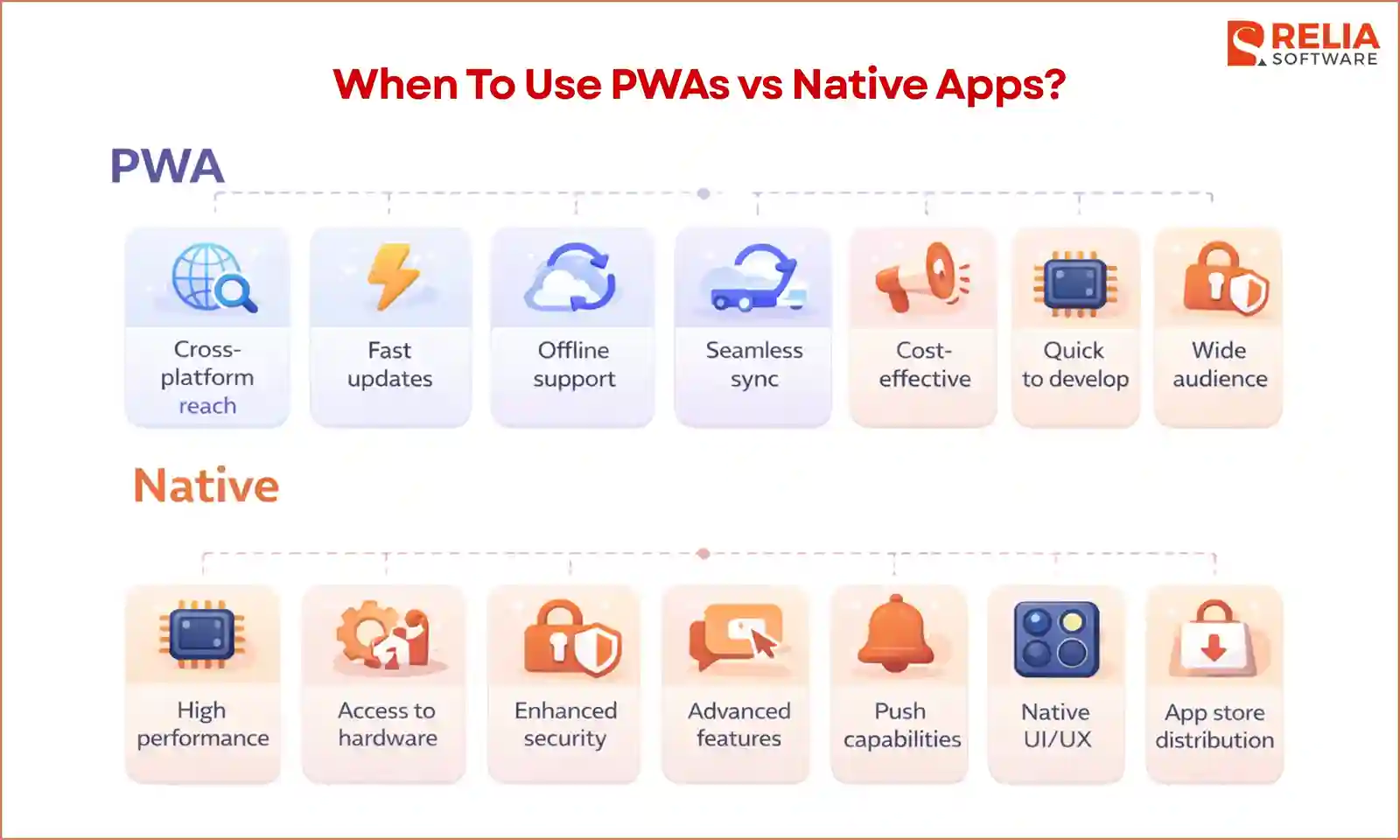
When To Use PWAs?
Your users prefer quick access without installing anything
A PWA works well when people just want to open a link and finish a task right away. This is common for things like booking an appointment, ordering food, checking a delivery, or paying a bill.
The product depends on search traffic or shared links
A PWA makes sense if users often come from Google search, ads, emails, QR codes, or messages. For example, a hotel booking page or an e-commerce store can benefit because users can go from discovery to action in one step.
Business wants to launch faster
A PWA is often a good choice for teams that want to get the product live sooner. This is useful for MVPs, new services, or businesses testing demand before investing more in mobile app development.
The project budget is more limited
A PWA can help reduce upfront cost because the team can build one main web-based product instead of creating separate mobile apps from the start.
>> Read more: How To Reduce Software Development Costs?
The user flow is simple and task-focused
PWA is often enough for products where users mainly browse, search, read, order, book, or manage account details, rather than use advanced phone features.
Broad reach across devices matters
PWA can work across phones, tablets, and desktops, so it fits businesses that want one experience to serve many types of users.
Updates need to happen quickly
A PWA is helpful when the team expects to make frequent fixes or improvements, because updates can be pushed through the web without waiting for app store review.
When To Use Native Apps?
Mobile experience is the core of the product
If the product is built mainly for mobile use, a native app usually fits better. For example, apps like banking, ride-hailing, or fitness tracking depend on a smooth and reliable mobile experience.
The product needs strong performance
A native app is a better choice when the app must respond quickly, handle complex interactions, or support real-time updates. This matters in apps with live data, heavy animations, or frequent user actions.
Deeper device features are required
If the app depends on features like camera, location tracking, biometrics, or background activity, native gives more stable and consistent access. This is common in apps like navigation, telemedicine apps, healthcare platforms, or delivery management.
Users are expected to return daily
A native app works well when users open the app frequently. For example, people may check a banking app, fitness app, or messaging app every day, so having it installed on the phone makes it easier to access.
Notifications are a key part of engagement
If the product relies on reminders, alerts, or real-time updates to bring users back, native apps usually provide a more reliable notification experience.
App store presence matters
Some businesses want their product to appear in app stores because it builds trust or supports user acquisition. For example, users often expect to find finance, health, or social apps in the app store.
Long-term mobile investment is part of the plan
If the product is expected to grow into a more advanced mobile experience over time, starting with native can help avoid limits later.
How to Choose Between a PWA and a Native App?
Look at how users will access the product
Start by thinking about how users will reach the product most of the time. If your users are likely to come from Google search, ads, emails, or shared links and want to complete a task quickly, PWA may be the better fit because they can open it right away without installing anything.
However, if users are expected to install the app and return often, a native app may make more sense. Native apps are more common for products like music apps, banking apps, fitness apps, or messaging apps that become part of daily use.
Review the main user actions in the product
List the most important things users will do. When the core flow is simple, such as browsing products, reading content, booking a service, placing an order, or managing account details, a PWA can often handle it well.
If the product needs stronger performance, richer interactions, live updates, heavy animations, or more demanding mobile behavior, a native app is often the safer choice. Therefore, native apps often suit products like fitness tracking, social media, messaging, or other mobile-first apps where quick response and smoother interaction matter more.
Decide how much device support the product really needs
Check how much the product really depends on phone features. If it only needs light support for things like location, camera uploads, or basic notifications, a PWA may still work well. But if the product relies on deeper phone features, background activity, stronger notifications, biometrics, or closer system-level behavior, a native app is usually the better choice.
Think about how often the team needs to update the product
When your product will change often after launch, this can also affect the final decision. A PWA is easier to update because changes can be pushed through the web, and users usually get them faster. A native app usually takes more time to update because new versions often go through app store review. It’s actually not bad, but it does matter if the team expects to move very quickly after launch.
Consider your launch plan and budget
PWAs are often a better starting point when the goal is to launch quickly, test demand, or keep the first version lighter in cost and scope. Meanwhile, native apps usually need more time and budget, but that can be worth it if the project already has a clear mobile-first direction and needs stronger performance, deeper device support, or a more polished app experience from day one.
FAQs
1. Can a PWA replace a native app?
Sometimes, yes. A PWA can replace a native app for products with simpler flows, such as browsing, booking, ordering, or account management. But if the product depends heavily on phone features, stronger performance, or a more advanced mobile experience, a native app is usually a better fit.
2. Is a PWA better for SEO and discoverability?
Yes, in most cases. A PWA is easier to find through search and easier to open through shared links because it works like a website. This can help businesses attract users more easily, especially for products that depend on search traffic or quick access.
3. Should a startup build a PWA or a native app first?
It depends on the product. A startup often starts with a PWA when the goal is to launch quickly, test demand, and control cost. But if the product is clearly mobile-first and depends on strong phone performance or deeper device support, starting with native may make more sense.
>> Read more:
- PWA vs Web App: Key Differences, Use Cases & How to Choose
- What is The Difference Between Native and Hybrid Apps?
Conclusion
In conclusion, PWA is often the better choice when you want easy access, faster launch, and broader reach across devices, while a native app is usually the better choice when your product depends on strong mobile performance, deeper device features, and frequent user engagement.
The right choice depends on how people will use your product, how often they will come back, and what kind of experience you need to deliver. If your product focuses on quick tasks and wide access, a PWA can work very well. If your product is mobile-first and needs a richer, more stable app experience, native is often worth the extra investment.
>>> Follow and Contact Relia Software for more information!

- Web application Development
- development
- mobile applications
- Mobile App Development