



In general, unit testing checks one small piece of code in isolation, while integration testing checks whether multiple functions in an app work correctly together. However, in real projects, the harder question is knowing when to use each one and how much effort to rely on each type of test. Too many unit tests can miss problems in real flows, while too many integration tests can slow pipelines and make debugging harder.
In this article, you will learn the core differences between unit testing and integration testing, when to use each one, what they catch well, how they fit into CI/CD, the common mistakes teams make, and how to choose the right test for each scenario.
Unit Testing vs Integration Testing: Side-by-Side Comparison Table
|
Aspect | ||
|
Scope |
Check if a single function, method, or class works correctly on its own |
Check if multiple modules, services, and data flows work correctly when connected |
|
Isolation |
Fully isolated from external systems |
Works with real or semi-real components |
|
Use of Mocks |
Common and often required |
Limited use, real systems preferred |
|
Runtime |
Very fast, runs in milliseconds |
Slower due to system interaction |
|
Infrastructure Needs |
Minimal, no external setup needed |
Requires environment setup (DB, API, services) |
|
Cost |
Lower overall (faster to write, run, and maintain) |
Higher overall (more setup, slower runs, more upkeep) |
|
Ideal Time to Run |
During development, every commit |
In CI pipelines, before release, staging |
|
Used For |
Developers, while coding features |
Developers and QA during the integration phase |
Key Differences Between Unit Testing and Integration Testing
Purpose
A unit test exists to check whether one small piece of logic works correctly on its own, which is a narrow and direct goal. Meanwhile, an integration test checks whether several connected parts work correctly together. Now, the test is not limited to one function or one small rule but is used to answer a broader question: “Now that these parts are connected, does the flow still work the way it should?”
Imagine a checkout feature in an online store. A unit test may check whether the discount calculation follows the business rule. An integration test may check whether the order service, payment step, stock update, and database save all work well together in one real flow. In short, the purpose of unit testing is precision, and the purpose of integration testing is connection.
Scope
A unit test usually covers a very small area. It may test one function, one method, one helper, one validation rule, or one class method. The boundary stays tight, which is intentional because the team wants the result to point clearly to one area of code.
An integration test covers more ground, such as several modules, a service layer, a repository, an API route, and a database, or one service calling another service. Integration tests still stay reasonably focused, but they always reach beyond a single isolated code unit.
This wider scope is what makes integration testing useful. Many production bugs do not happen because a small function is wrong in isolation. They happen because data moves incorrectly between layers, because one module expects a different input shape. After all, the configuration is wrong, or because a real dependency behaves differently than the team expected.
Speed
A small function in unit tests can often be tested very fast in a second because the test does not need to start the full app or connect to real outside systems. It just runs the code, checks the result, and finishes. A developer can run them again and again while writing or changing code without waiting too long for feedback.
Integration tests usually take more time because it has to check a more realistic flow, which usually takes more time to run. A test may need to start part of the application, prepare a test database, load test data, call an API route, or wait for a response from another part of the system. Even if each test is still reasonably quick, a full integration test suite often takes much longer than a unit one.
Setup Complexity
In many cases, all the unit test needs is simpler with a small piece of code, a few input values, and an expected result. Otherwise, integration testing usually asks for more setup. A team may need a running database, seeded test records, configuration values, service containers, API routing, authentication setup, or a clean environment before each run. The test may also need cleanup after it finishes so that later tests do not fail because of leftover data or a changed state.
Dependencies
A unit test tries to keep the code isolated, which means the test focuses on one small piece of logic without depending on real outside systems. If a function depends on another outside system, the test usually replaces that dependency with a mock, stub, or fake. These mocks help the team focus only on the logic inside the unit being tested. If the test fails, the cause is more likely to be inside that unit rather than somewhere outside it.
On the other hand, integration tests are written to test real connections between integrations. All the dependencies, such as the database, API, and route, etc, are real because this testing becomes meaningful only when real parts are connected. Sometimes the team still replaces a third-party system with a local fake for speed or control, but the main goal stays the same: test the interaction, not just the isolated logic.
Reliability
Unit tests are usually more reliable because they run in a controlled setup with fixed inputs, no outside systems, and fewer timing issues. If a well-written test fails, the code likely changed, or a real bug was introduced. Integration tests are more likely to be flaky because moving parts, such as slow environments, dirty test data, service startup issues, or network timing, can cause failures even when the feature code has not changed.
Flaky tests are risky because they reduce trust in the test suite. Once developers start seeing failures as random noise, they may ignore them or rerun the pipeline without checking the cause, which makes it easier for real bugs to slip through. Therefore, unit tests are usually more reliable, while integration tests matter more for checking real connected flows.
Debugging Speed
When a unit test fails, developers can usually look at the failing assertion, inspect the function, and find the problem quickly. The failed test often directly points to one rule, one branch, or one small change in the whole program.
Meanwhile, integration test failures are harder to trace because the problem may come from many places, such as the controller, service layer, query, or database schema. The failure often appears at the top of the flow, while the real cause sits deeper in the system. Finding it usually takes more time and may require logs, tracing, database checks, or step-by-step debugging.
This is one reason unit tests remain so useful even in teams that care deeply about integration coverage. Fast debugging keeps the daily development process moving.
Who Writes The Test
In many teams, developers write both unit tests and integration tests, but the timing and ownership can look different.
Unit tests are usually written by developers during feature work. A developer adds logic, writes tests around that logic, and uses those tests to check behavior while coding. Unit tests live close to the code, so the person building the feature is often the best person to write them.
Integration tests are often written with a wider quality focus. Backend developers may cover service and database flows, frontend developers may cover route and state interaction, and QA or test engineers may help with critical workflows that span multiple parts of the system. The exact split depends on the team, but the key person who understands the full flow should take responsibility for testing how those parts work together.
Cost
Unit tests usually cost less overall. They are often quicker to write, faster to run, and easier to manage because they stay small and do not need much setup. Most of them can run without a database, network, or full application environment, which keeps both execution cost and developer time lower.
Besides, integration tests usually cost more. They often take longer to write because the setup is heavier, and they also take longer to run because more parts are involved. Some of them need test databases, services, containers, or other infrastructure, which adds more overhead to the process. Over time, they can also cost more to maintain because changes in one part of the system may affect the test.
The higher cost does not make integration tests a poor choice. It simply means teams should use them carefully for the flows that matter most, while using unit tests to cover smaller logic at a lower cost.
Types of Bugs Caught
Unit tests are good at catching logic bugs. They help teams find wrong calculations, incorrect branches, broken validation rules, bad formatting, missed edge cases, and unexpected results inside one code unit. They are especially strong during refactoring because they tell you whether the internal behavior of a function or class has changed.
Integration tests catch a different class of bugs. They reveal problems that appear only when parts start interacting. That may include broken database mapping, bad service wiring, wrong configuration, request and response mismatches, failed authentication flow, serialization problems, or data moving incorrectly from one layer to another.
A feature can pass all unit tests and still fail when connected to real parts. At the same time, a feature can pass one broad integration test while still hiding weak internal logic that unit tests would catch more precisely. It is exactly why businesses often need both.
Tools Used
For unit testing, teams usually choose tools that make it easy to run fast tests around small code units. These unit testing tools help developers organize small test cases, make assertions, and run tests quickly during daily coding. For example:
- In Java, many teams use JUnit.
- In JavaScript and TypeScript projects, Jest and Vitest are common choices.
- In Python, pytest is widely used.
- In C#, NUnit and xUnit are common.
For integration testing, the tool choice depends more on the stack and the kind of connection being tested.
- A backend team may use Supertest to exercise API routes, Testcontainers to start temporary databases or services, or framework-specific tools to boot part of the app in a test environment.
- Frontend teams may use tools that test how screens, state, routing, and APIs behave together.
- Some teams also use Postman or Newman for API flow checks, though those often sit closer to API or contract validation, depending on how they are used.
>> Read more:
- Top Back-End Technologies & Trends For Developers
- 12 Frontend Technologies and 8 Development Trends
The tool itself does not always decide the test type. The same testing framework can support both unit tests and integration tests. What changes is the test design. If the test isolates the code and removes real dependencies, it behaves like a unit test. If the test becomes meaningful because real parts are connected, it behaves like an integration test.
When to Use Unit Testing?
Unit testing is most useful when you want fast, focused feedback on a small piece of logic. It works best in parts of the code where the expected behavior is clear and where the result can be checked without needing the full system to run.
For Core Business Logic and Algorithms
Use unit tests for code that handles calculations, data formatting, or business rules. A good example is a function that calculates a shopping cart total after applying a discount code and taxes. Testing this logic in isolation helps you check different cases clearly, such as invalid coupons, empty carts, or special pricing rules.
During Active Development
Unit tests are very useful while writing new code because they help you check small pieces of logic right away. In test-driven development, the test comes first, which helps define the input, output, and expected behavior before implementation begins. Even outside TDD, this approach still helps developers think more clearly and catch mistakes early.
>> Read more: 8 Common Software Development Life Cycle (SDLC) Methodologies
Before Refactoring Code
Use unit tests before refactoring old or messy code so you can change the structure without changing the behavior by accident. A common approach is to write tests for the current behavior first, then clean up the code while checking that the same results still hold, which gives developers more confidence to improve code safely.
When Fixing Bugs
Unit tests are a strong choice when fixing bugs because they help recreate the exact problem before the code is changed. Once the test fails, you can fix the logic until it passes, which confirms the issue is really solved. The same test then helps prevent that bug from coming back later.
When to Use Integration Testing?
For database interactions
Use integration tests when your code reads, writes, updates, or deletes data in a real database. Unit tests should not touch the database, so they cannot fully prove that queries, mappings, and save logic work correctly. For example, if a function creates a new user, an integration test can run it against a test database and check whether the record was saved in the right place with the expected values, such as an encrypted password.
For external APIs and third-party services
You can also use integration tests when your application has to send requests to outside services. For example, if your app uses Stripe for payments and SendGrid for emails, an integration test can call their sandbox environments and check whether the flow still works when a card is declined or an email request times out.
For microservices communication
In a microservices setup, even a small mismatch in field names, payload shape, or response structure can break the flow between services. Using integration tests here can help catch these mismatches early and ensure both services stay aligned. For example, if an Order Service asks a User Service for a customer address, an integration test can confirm that the User Service returns the JSON structure exactly as the Order Service expects.
For framework and environment wiring
Integration tests can help when the main risk lies in how routes, controllers, middleware, configuration, or dependency injection are connected. A function may work perfectly by itself, but still fail because the framework setup around it is wrong. For example, you may write a correct login controller but forget to register the /login route. An integration test that sends a real request to that endpoint can catch the issue right away.
For file system operations
Another case is when your feature reads files, writes files, or depends on file storage behavior. Unit tests can mock file handling, but they do not prove that the file is actually saved, loaded, or parsed correctly in a real environment. For example, if users can upload profile pictures, an integration test can check whether the image is stored in the correct local folder or cloud bucket and whether the file handling works as expected.
Unit Testing vs Integration Testing in CI/CD Pipelines
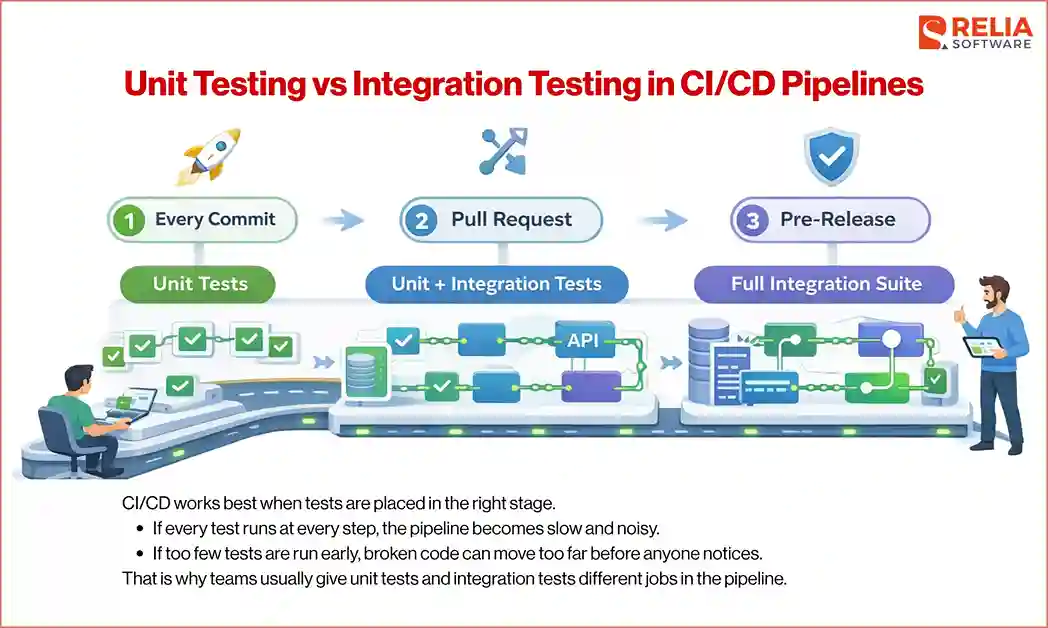
CI/CD works best when tests are placed in the right stage. If every test runs at every step, the pipeline becomes slow and noisy. If too few tests are run early, broken code can move too far before anyone notices. That is why teams usually give unit tests and integration tests different jobs in the pipeline.
What to run on every commit?
Unit tests are usually the best choice for every commit because they are fast and focused. Developers always need quick feedback at this stage. If a small logic change breaks a rule, validation, calculation, or helper, the team should know right away before the code moves further.
What to run in pull requests?
Pull requests are a good place for a broader test layer. Unit tests should still run here because they remain the fastest way to catch clear problems. In addition, many teams can run a larger set of integration tests at this stage to check whether the new code still works with real connections, such as database access, API behavior, routing, or service communication.
What to run before release?
Before release, teams usually want wider confidence, where integration tests become much more important. The pipeline may run the full integration suite, especially for critical flows such as checkout, booking, account creation, authentication, or communication between services. The goal is to catch problems that only appear when real parts work together in a more complete environment.
Unit tests can still matter here, but they are no longer the main focus. By this stage, the main question is not just whether small pieces of logic work. The bigger concern is whether the full feature still behaves correctly once the real connections are in place.
How to reduce flaky integration tests?
Integration tests can slow down CI/CD if they are unstable. One way to reduce its flakiness is to keep test data clean and isolated. Each test should control its own setup and cleanup so it does not depend on leftovers from another test. It also helps to avoid shared environments when possible, because shared state often creates random failures.
Another useful solution is to keep each integration test focused on one clear flow instead of trying to cover too much in one run. Smaller tests are easier to debug and usually fail for more understandable reasons. Teams also reduce flakiness by using stable sandbox services, limiting network uncertainty, and making sure databases, queues, and containers are started predictably before the tests begin.
Unit Testing vs Integration Testing by Project Type
Backend APIs
Backend APIs usually need both test types, but they often lean heavily on integration testing because many important problems appear at the connection level. A route may work in isolation but fail once request validation, service logic, database queries, and response formatting come together. Therefore, integration tests are useful for checking those real flows.
Frontend Apps
Frontend apps often use unit tests for small UI logic, formatting, state helpers, and utility functions because they are quick to run and easy to check in isolation. However, integration tests still matter more for user-facing flows, such as form submission, route changes, state updates, and how components work together, because they reflect what users actually experience.
Microservices
Microservices usually need stronger integration coverage because many failures happen at service boundaries. One service may send data in the wrong shape, return missing fields, or handle errors differently than another service expects. Integration tests help catch those problems before they spread across the system.
Data Pipelines
Data pipelines often use unit tests for transformation logic, parsing rules, filtering steps, and small processing functions because the expected output is usually easy to check. Integration tests matter more once the pipeline connects to real data sources, storage systems, queues, or downstream services, where the main concern is whether data moves correctly from one stage to another.
Mobile Apps
Mobile apps often use unit tests for local logic like validation, formatting, calculations, and small state rules because they are quick to run and easy to check. Integration tests matter more when the app depends on APIs, authentication, navigation, local storage, or push flows, where the goal is to confirm everything works together with real data.
Common Mistakes When Deploying These Tests
Mocking too much
Mocks are useful, especially in unit tests, but too much mocking can make tests feel less realistic. If every dependency is replaced, the test may only prove that the code works in a very controlled setup, not in real use.
Mislabeling end-to-end tests
Teams sometimes call any larger automated test an integration test, even when it behaves more like an end-to-end test, which creates confusion because the test is broader, slower, and harder to manage than a focused integration test.
Relying only on unit tests
Unit tests are great for checking small logic, but they do not prove that the real parts of the system work together. Problems with databases, APIs, routing, or config can still slip through when business only applies unit testing.
Writing brittle integration tests
Integration tests become brittle when they depend too much on timing, shared data, or large multi-step flows. Small setup changes can make them fail even when the feature still works.
Using unclear test names
Unclear test names make failures harder to understand. A clear name should quickly show what behavior the test is checking and why it matters.
Mixing concerns in one test suite
Some tests try to check too many things at once, such as logic, database behavior, and API responses in one flow, which makes them harder to read, slower to run, and harder to debug.
Best Practices for Creating A Good Test Strategy
Keep unit tests fast
Unit tests should stay fast so developers can run them often without thinking twice. Avoid adding real databases, network calls, or heavy setup to unit tests. The faster they run, the more likely developers will use them during daily work.
Keep integration tests focused
Integration tests should check one clear flow at a time instead of trying to cover everything in one test. A smaller, focused test is easier to understand and easier to fix when it fails. This also helps reduce flakiness and keeps the test suite more stable.
Use realistic test data
Tests should use data that reflects real use cases. If the data is too simple or unrealistic, tests may pass while real scenarios still fail. Using realistic values helps catch problems earlier and makes the test results more meaningful.
Isolate test data
Each test should manage its own data and not depend on data from other tests. This helps prevent random failures caused by shared state. Clean setup and cleanup make tests more reliable and easier to run in any order.
Avoid shared mutable environments
Shared environments often cause unpredictable results. When multiple tests change the same data or resources, failures become harder to understand. Using isolated environments or resetting the state between tests helps keep results consistent.
Review flaky tests quickly
Flaky tests should not be ignored. If a test fails randomly, it needs to be fixed or removed quickly. Leaving unstable tests in the pipeline reduces trust and makes it harder to spot real issues.
How to Choose the Right Test for Your Project?
Choosing between unit testing and integration testing does not need to be complicated. The key is to look at what you are trying to prove. Each test type answers a different kind of question, so the choice depends on where the main risk sits.
Instead of thinking in terms of tools or labels, it helps to walk through a few simple questions.
Are you checking pure logic?
If the code mainly handles calculations, rules, or data transformation, unit testing is usually the right choice. The behavior can be verified with clear inputs and outputs, and there is no need to involve other parts of the system.
Does the behavior depend on a real external system?
If the result depends on a database, API, file system, or another service, unit tests alone are not enough. In that case, integration testing is also needed to help confirm that the real connection works as expected.
Do you need fast feedback or realistic validation?
If you need quick feedback during the development process, unit tests are a better fit because they run fast and are easy to debug. If you need to confirm that a full flow works in a real setup, integration tests give more confidence, even though they take longer.
Will mocking hide the bug you care about?
Mocks help keep unit tests simple, but they can also hide issues. If the bug you are trying to catch involves real data, real responses, or real system behavior, integration testing is a better choice.
FAQs
1. Is integration testing better than unit testing?
No. They serve different purposes. Unit tests check small logic, while integration tests check how parts work together. Most projects need both.
2. Can a unit test call a database?
Yes, it can, but it usually should not. Unit tests are meant to stay isolated. Calling a real database makes the test slower and harder to control.
3. Are API tests integration tests?
Often yes. If the test calls a real API endpoint and checks how it works with other parts like services or databases, it is an integration test.
4. What is the difference between integration testing and end-to-end testing?
Integration testing checks how a few connected parts work together. End-to-end testing checks a full user flow across the entire system.
5. How many unit tests vs integration tests should I have?
There is no fixed number. Most teams have more unit tests because they are faster, and then add integration tests for important flows.
6. Are mocks bad in unit tests?
No. Mocks are useful for keeping tests fast and focused. The problem comes when they are overused and hide real issues.
>> Read more:
- Manual Testing vs Automation Testing: A Head-to-Head Comparison
- Differences Between Functional and Non-Functional Testing
- Core Differences Between Black Box and White Box Testing
Conclusion
In conclusion, unit testing and integration testing solve different problems. Unit tests give fast, clear feedback for small pieces of logic. Integration tests give confidence that connected parts still work together in real scenarios.
The best approach is to use both in the right balance. Start with unit tests to protect core logic and support daily development, then add integration tests to verify important flows that depend on real connections.
>>> Follow and Contact Relia Software for more information!

- development
- testing