


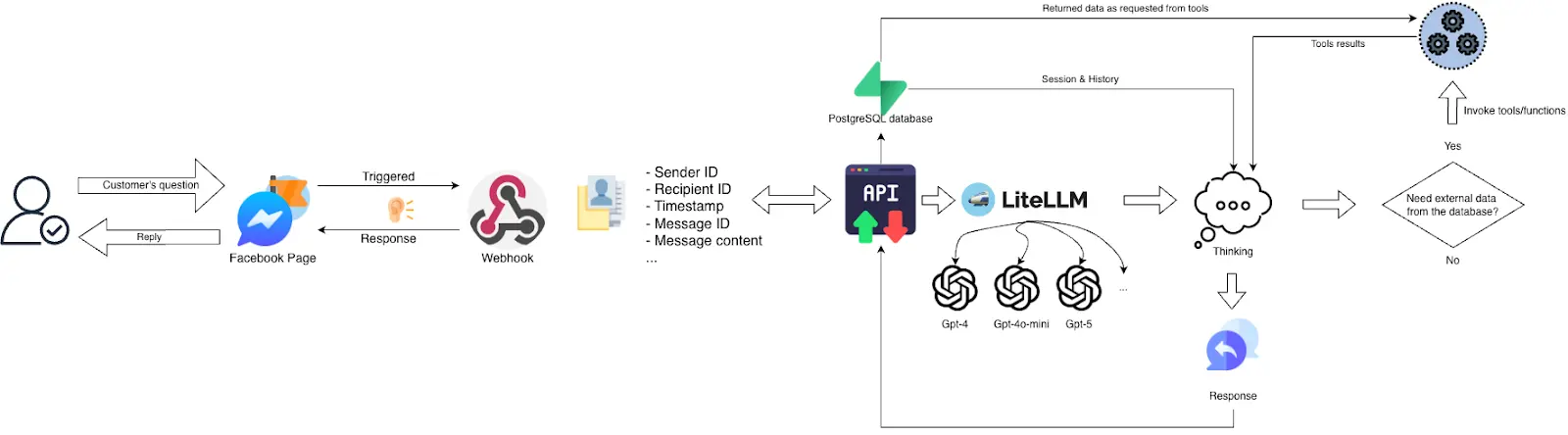
In Part 1, we set up the core Facebook Messenger AI chatbot. In this Part 2, we will turn it into a smarter shop assistant by adding PostgreSQL, Supabase, Tortoise ORM, function calling, and a RAG workflow for real-time data retrieval.
By the end of this blog, you will be able to design a database system that contains all your shop’s activities, how to set it up and use it inside your assistant application server.
Moreover, you will also be able to design a RAG (Retrieval-Augmented Generation) system with LLM and tools. This system can really become powerful in helping both the shop manager and customers manage or interact with the shop.
Here are tech stack you will use:
| Feature | Technology / Method |
| Database | PostgreSQL (Supabase) |
| Data Schema | Galaxy Schema (Constellation) |
| ORM | Tortoise ORM (Async Python) |
| AI Orchestration | OpenAI Function Calling / LiteLLM |
| Platform | Meta Messenger Webhook |
|
Key Takeaways
|
Prerequisites
Before designing the database, we first need to define how conversations and shop data will be stored.
Store Facebook Messenger Sessions in PostgreSQL
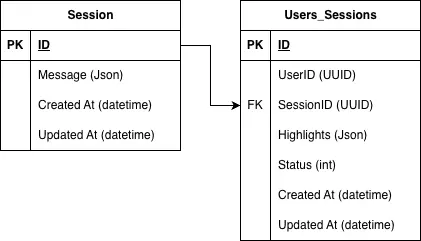
For conversations, the assistant receives key data from the Messenger webhook, such as the sender ID, recipient ID, message content, and timestamps. To store this properly, we use two foundational tables:
- The
Sessiontable stores the chat history in JSON format, along with the session ID and timestamps. - The
Users_Sessionstable links each user to their sessions, tracks which session is active, and can also store highlights from past conversations for later use.
Design a Galaxy Schema for retail AI assistants
For shop data, we also need a clear schema before building the RAG workflow, because the assistant can only query data correctly if the database structure is well defined.
In this guide, we use the Galaxy Schema principle of Data Warehouse Design, where a few fact tables are connected to multiple dimension tables. Fact tables store the measurable business data, while dimension tables store descriptive information that helps explain and organize that data.
This means core fact tables such as Product_inventory, Orders, and Order_items store the main business activity, while dimension tables such as Products, Customers, Employees, and Product_media store descriptive information.
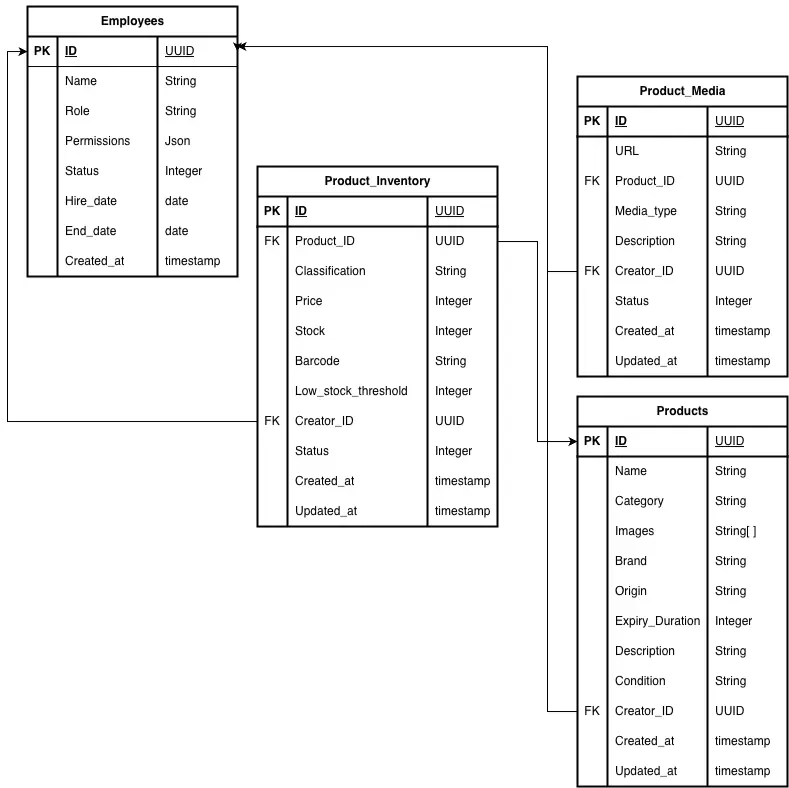
EmployeesDimension Table: Stores information about the people working at the shop, such as employee ID, full name, role, employment status, and start date. This table tracks staffing, labor costs, and employee-related activities.ProductsDimension Table: Holds the most fundamental and descriptive information for every item sold or used by the shop such as product ID, name, brand, category, etc.Product_mediaDimension Table: Stores references to visual and multimedia assets associated with the products. In this project, it helps the Messenger Assistant show product previews to customers while they browse the menu.Product_inventoryFact Table: Stores key stock data such as product quantity, inventory update date, reorder threshold, and inventory value. It links to the Products table and helps track stock levels and product availability.
This structure makes it easier to manage shop data and support later analytics, search, and assistant responses.
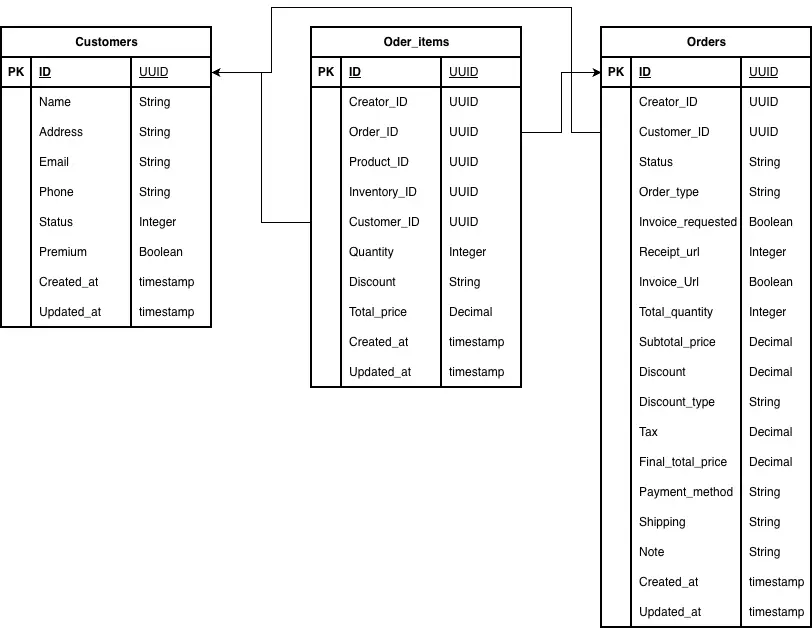
CustomersDimension Table: Store all customer information such as customer ID (often the Messenger user ID from Meta), name, contact information, email address (if collected), and possibly loyalty status. This table links customer records to their related orders and transactions.OrdersFact Table: Stores the main transaction data for each order, including order ID, total amount, date and time, payment method, and the related customer and employee to track sales, revenue, and ordering activity.Order_itemsFact Table: Stores the details of each item within an order, such as order ID, product ID, quantity, and unit price. This granular level of detail helps analyze product sales, order composition, and inventory changes more accurately.
Now let’s connect all tables together:
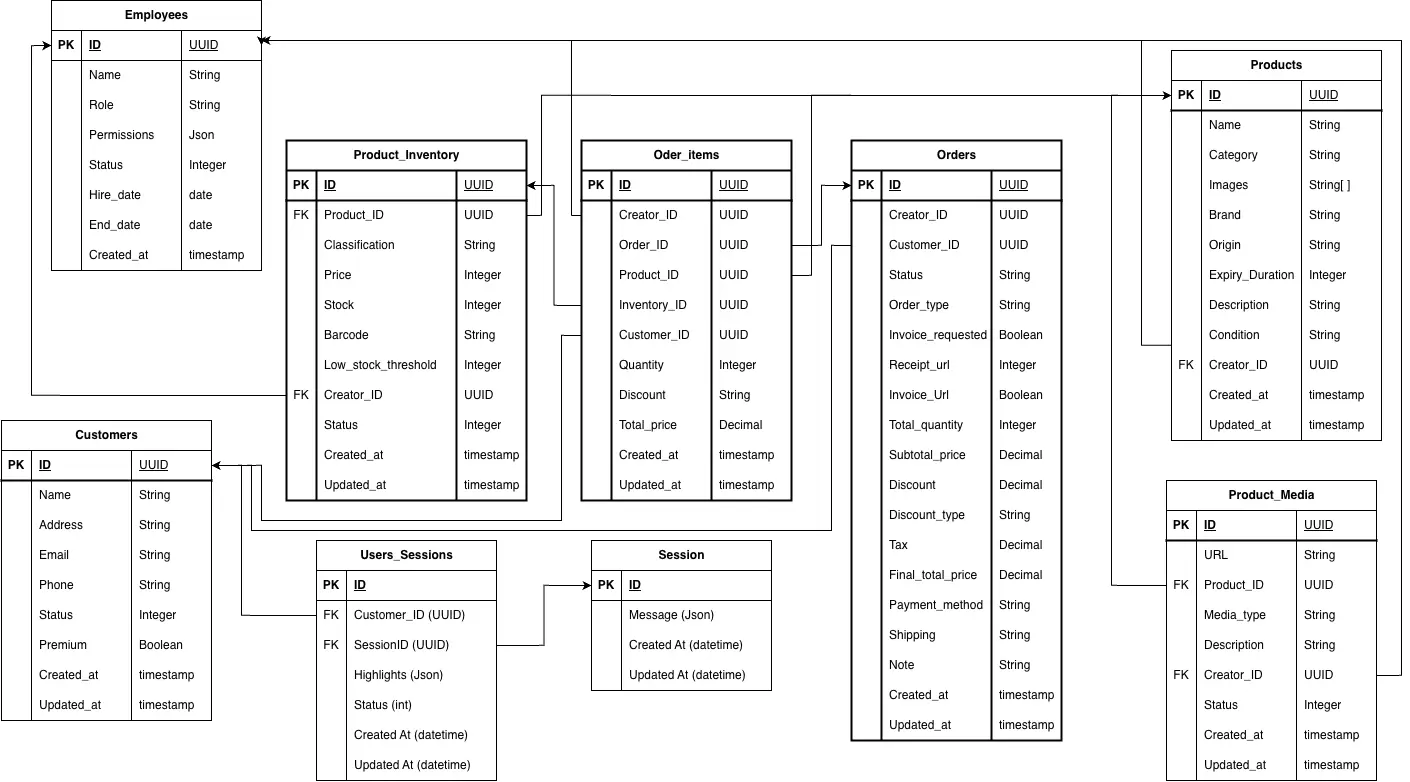
At this point we have completed designing our data warehouse based on the Galaxy Schema principle. This is also called the Storage layer of the application which builds a strong foundation for the service layer and application layer.
In the following sections, you will learn how to set up a database and get started with creating the service layer of the application.
How to Design a Shop Database in Supabase?
In the scope of this demo, I will introduce to you a database hosting service which is fast and free for beginners and ideal for small start-ups or businesses: Supabase. You can access to it by this URL: https://supabase.com/
First, please go to the website, create an account and log in. After that, Create an organization to store the activity of this demo application.
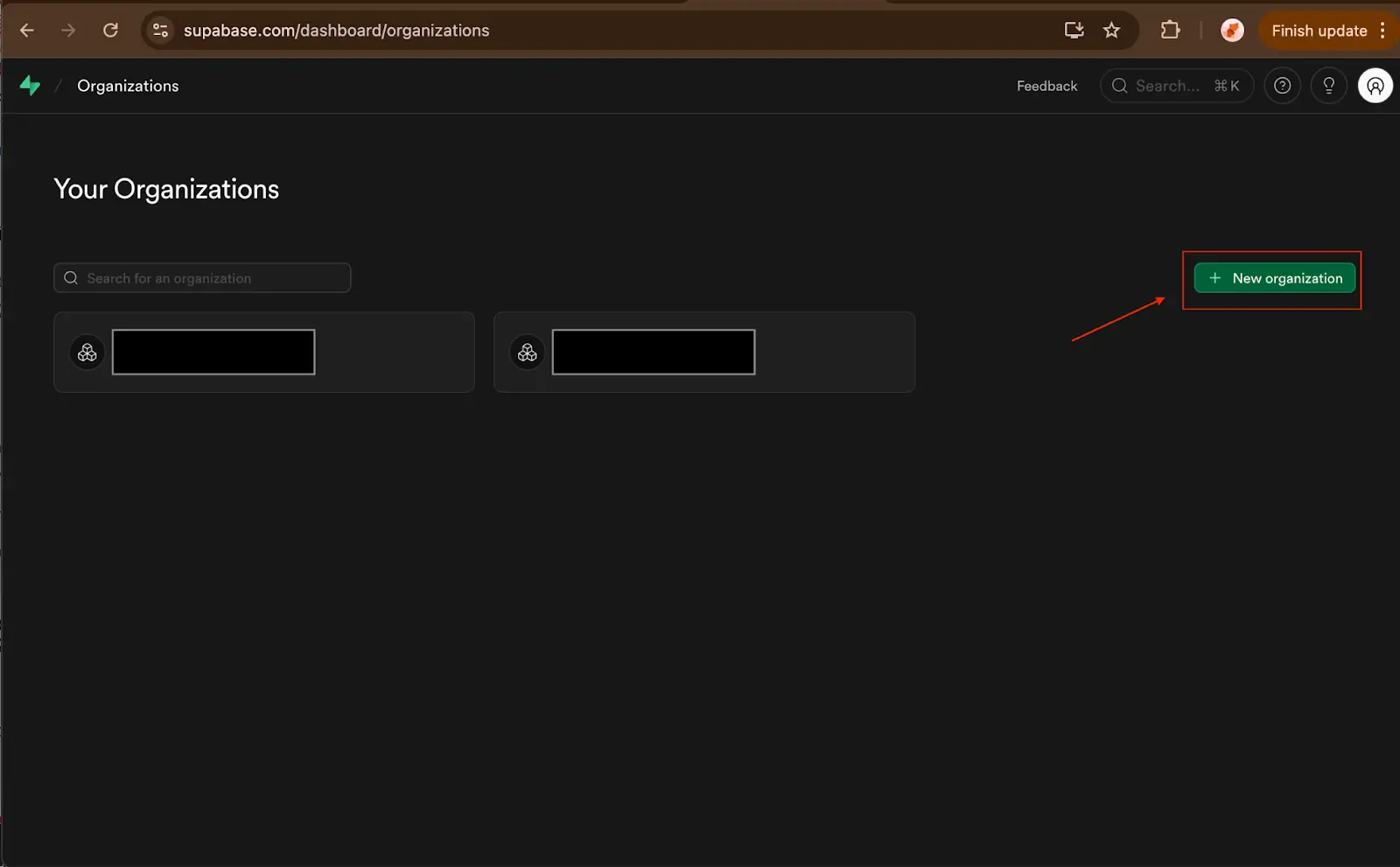
Fill in the necessary information and choose to subscribe to the free plan. Then click Create.
After that you will be asked to create your first project inside your fresh organization. Please note that this information is also the credentials used by your application code to connect with the Supabase Storage.
You should assign it a new name with a database password which you should keep secret. This password will be used in the application database connection.
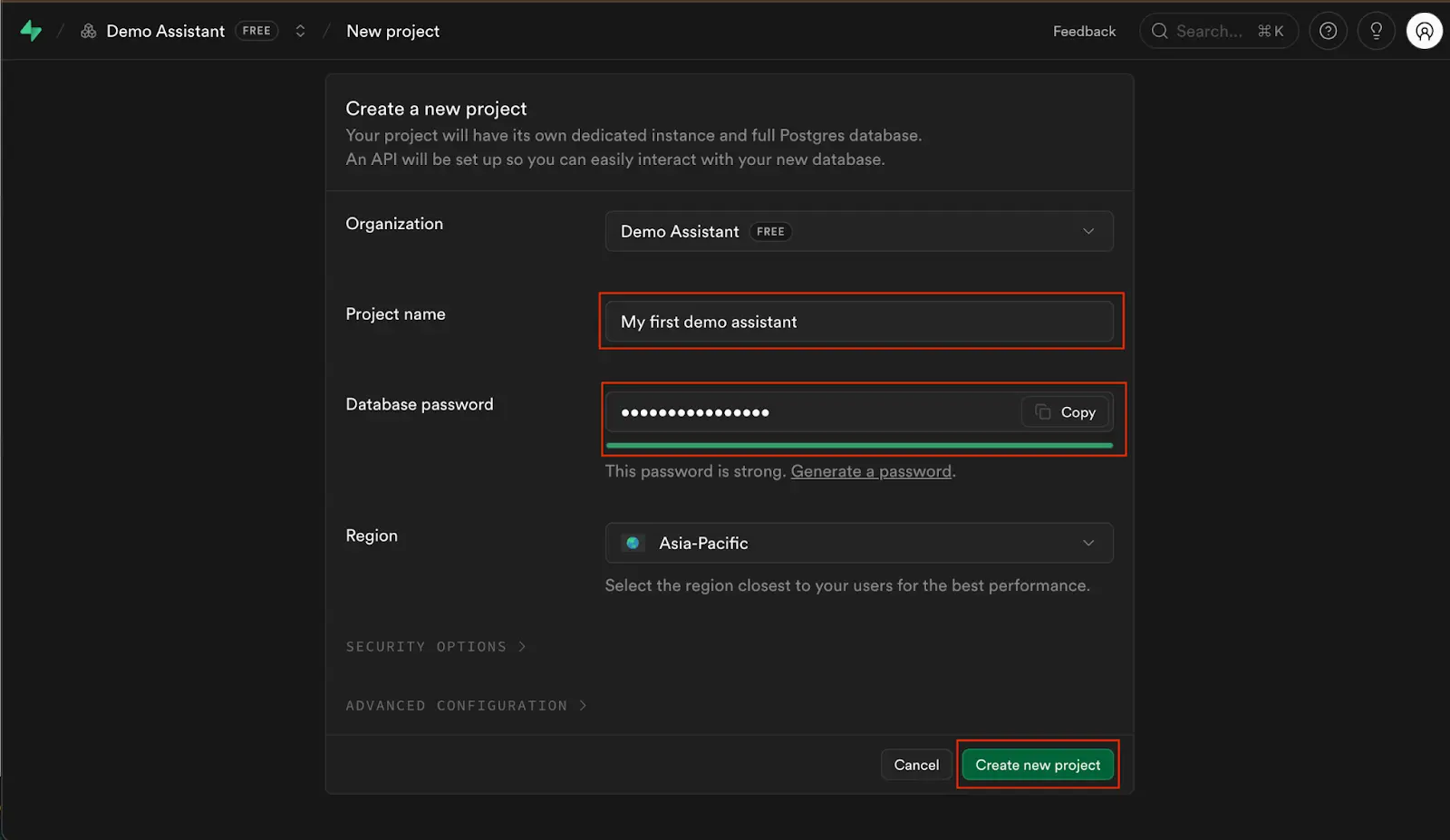
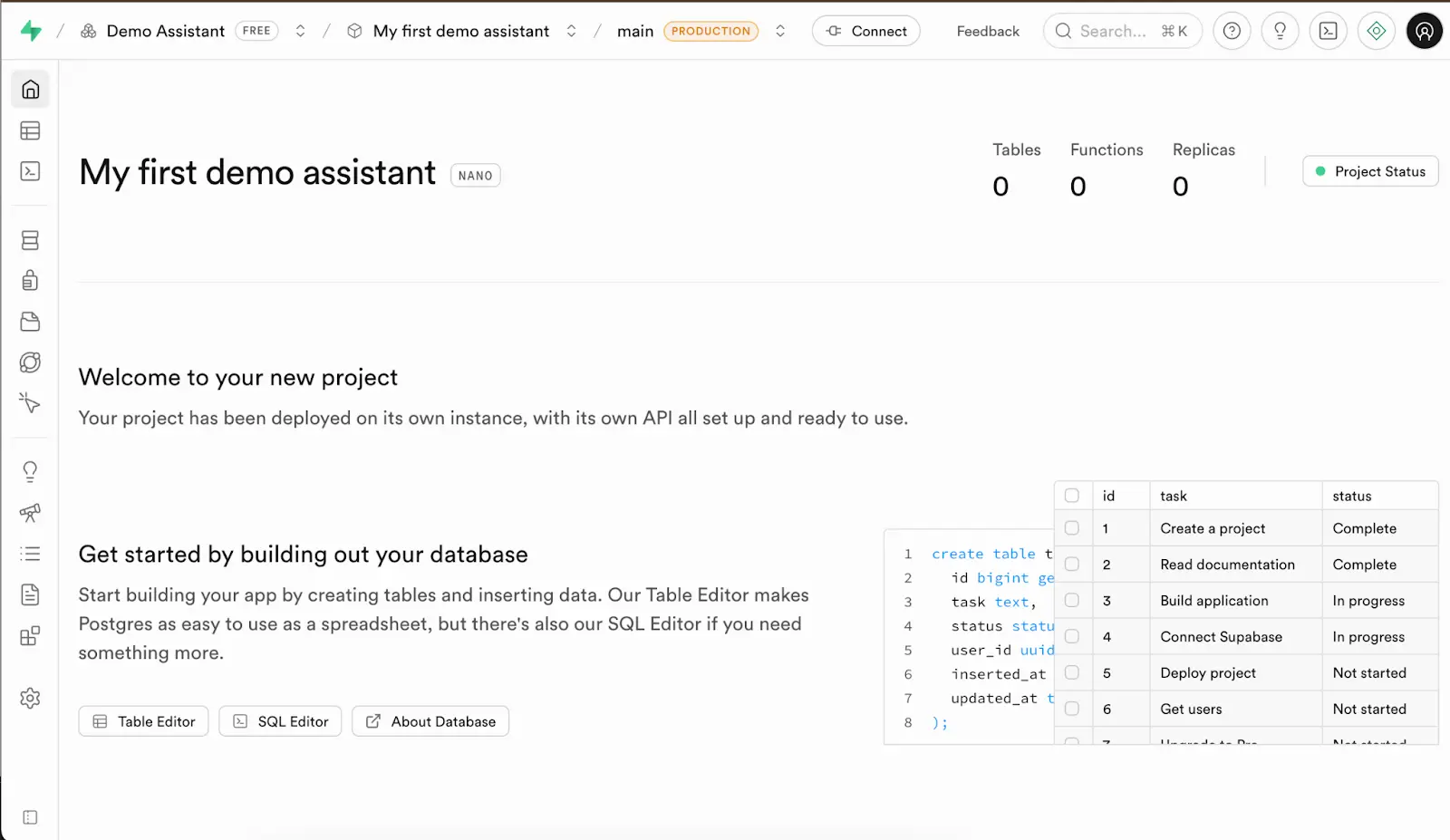
If all your previous steps were successful, you would see your project Overview looked like my following project dashboard.
Create tables
There are two approaches to creating database tables which you can consider to use based on your preferences.
1. Using the Table Editor
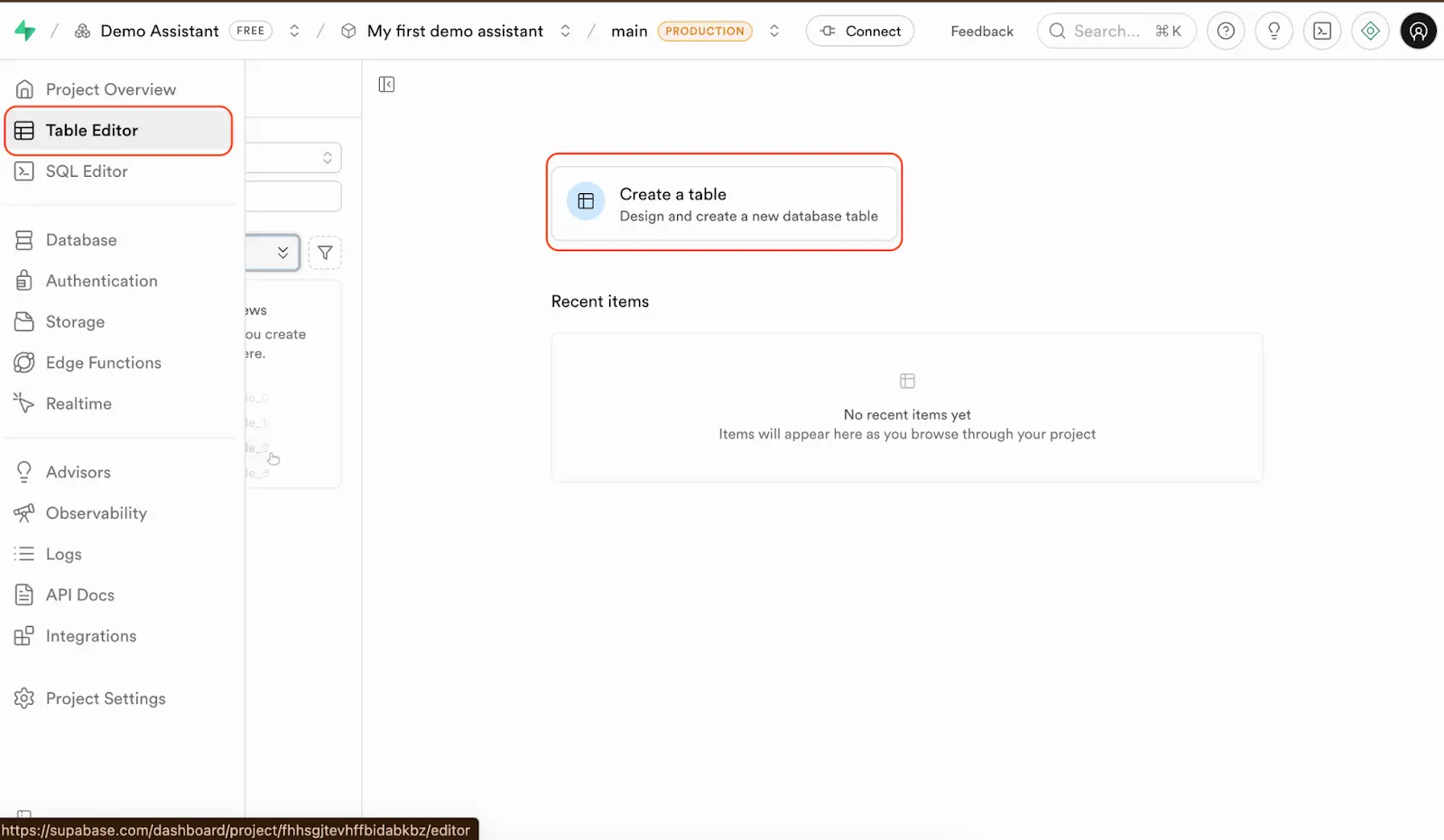
Navigate to the tab “Table Editor” and click on the button “Create a table” to start creating your first table.
A new sidebar would appear and require you to update some necessary information like the table name, and whether the RLS policy is turned on or off.
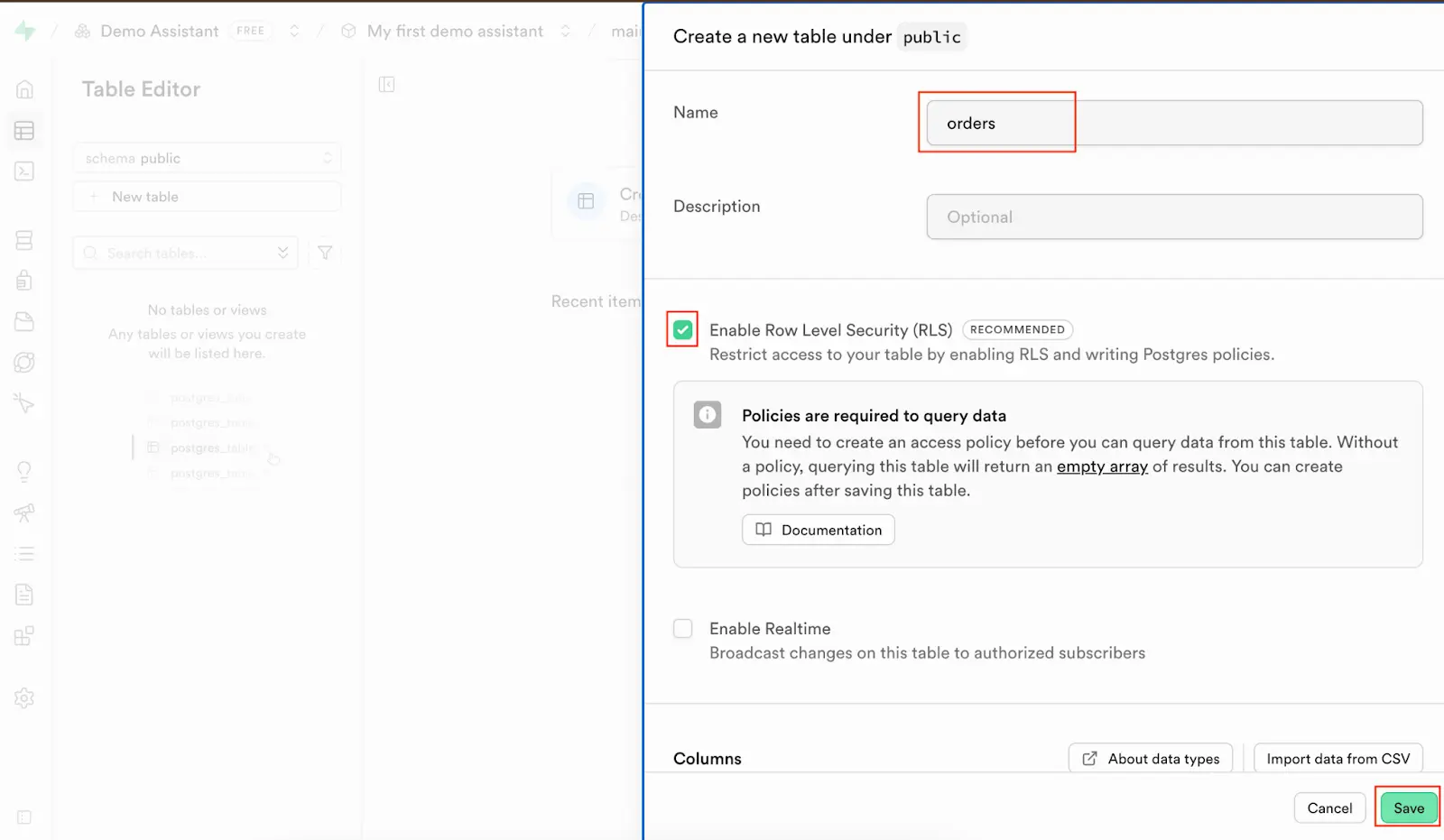
Although it is not relevant to this post’s activity, I want to explain a little bit about the Supabase’s RLS policy because you may find it new and confusing. This is a security functionality of Supabase which assists organizations in restricting the users’ data permission and eliminating the security risks.
Scroll down a little bit, you would see it asks you to create the table columns. Then you can click on the button ‘Add column’ to create a new column by specifying the column name and type.
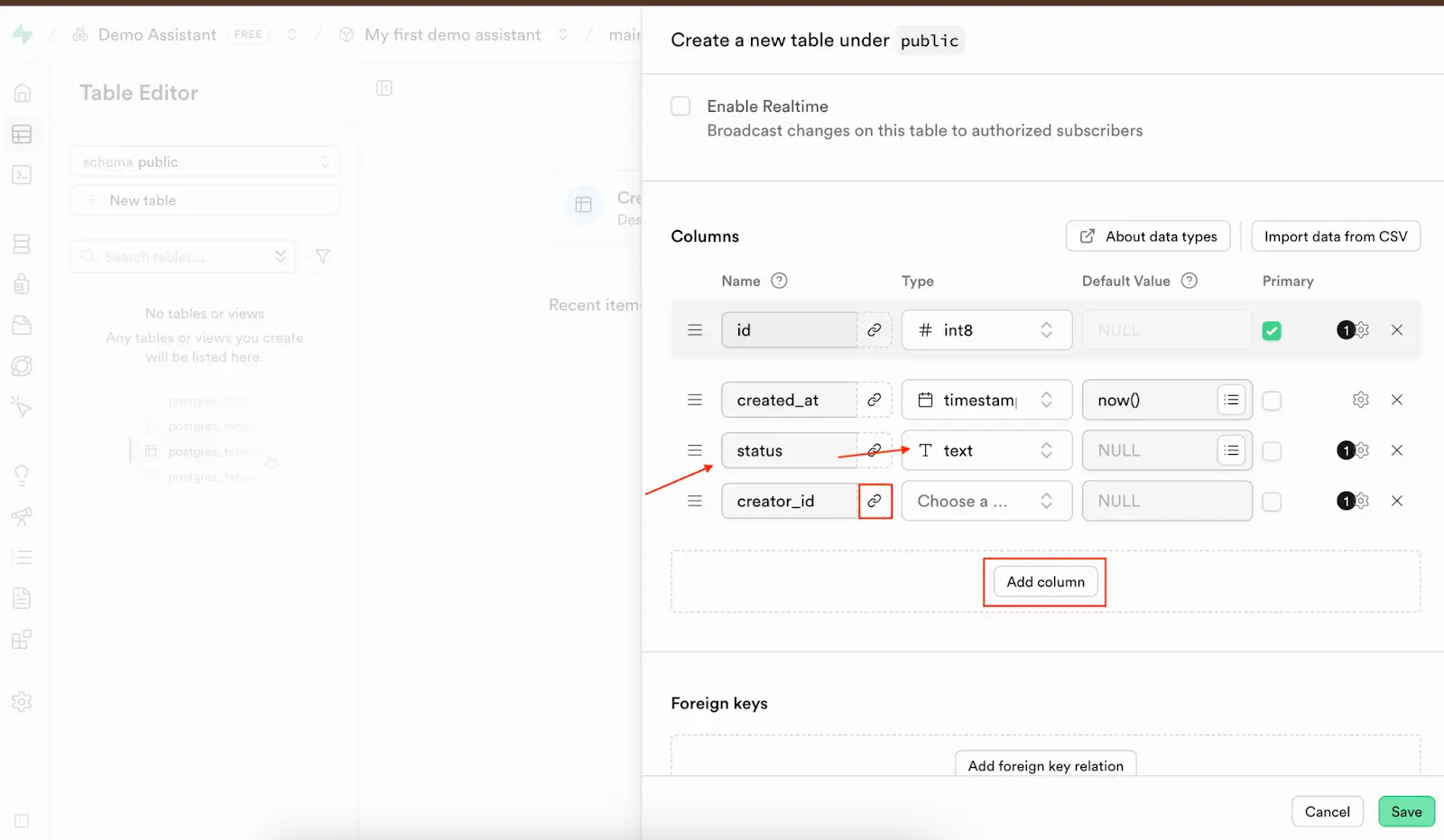
If any column needs to be the foreign key of another table, you can click on the link icon next to the column name. You will be asked to select which schema, table and column that need to be connected with the chosen table column.
This method is visualized, so it is easy for you to understand what to do and avoid many possible schema creation/insertion errors. However, it takes much effort and time, it will also cost much more time in the future if you want to update any table or want to migrate to another project/ database service.
My suggestion is to use the second option which I will guide you in the following section.
2. Using the SQL editor
Navigate to the tab SQL Editor, here you are allowed to write any SQL queries that you want to create or update the schema.
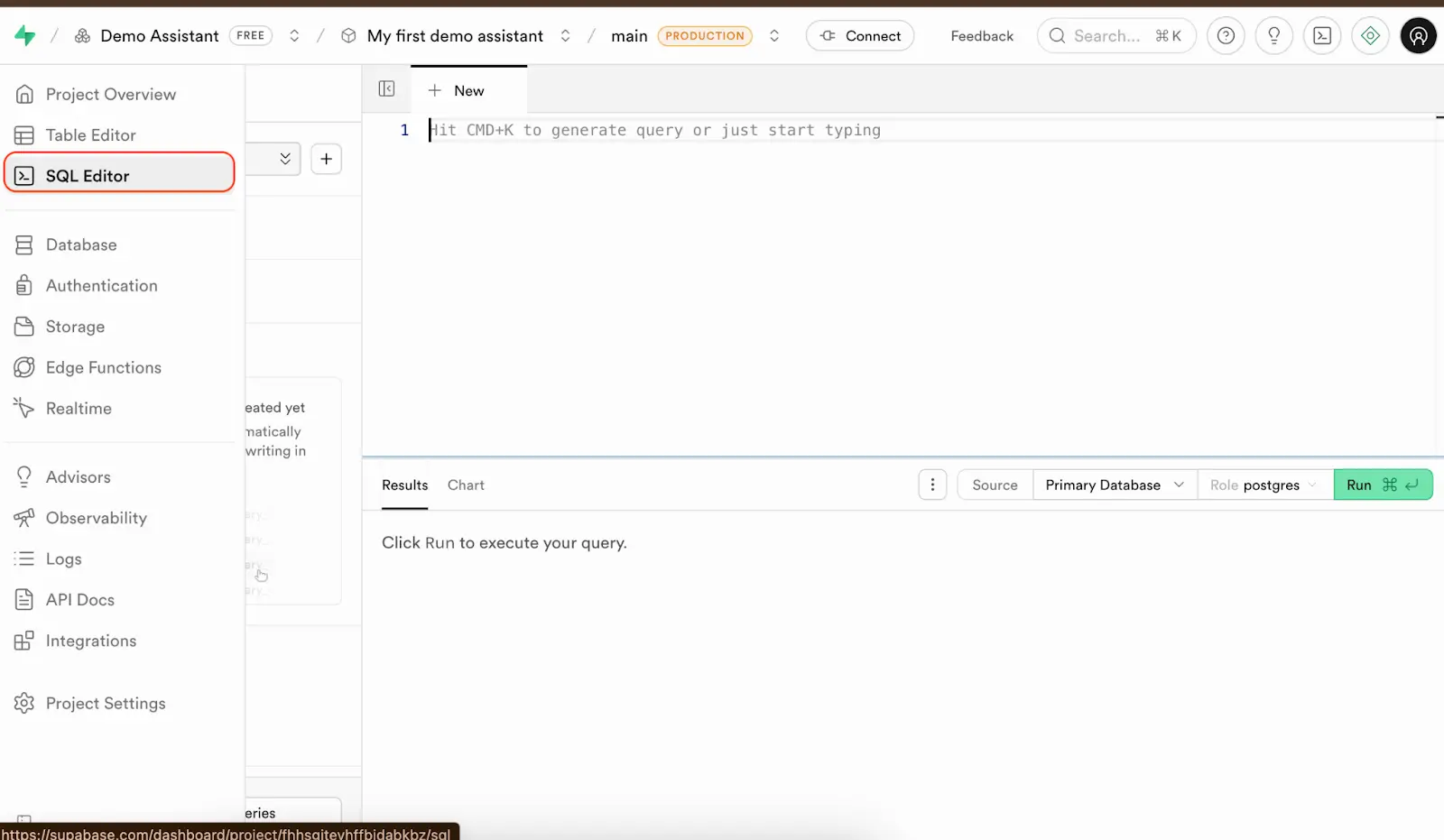
I have already developed a piece of SQL code which creates all the tables.
-- Employees Table
CREATE TABLE Employees (
    ID UUID PRIMARY KEY,
    Name TEXT NOT NULL,
    Role TEXT,
    Permissions JSON,
    Status INTEGER,
    Hire_date DATE,
    End_date DATE,
    Created_at TIMESTAMP DEFAULT CURRENT_TIMESTAMP
);

-- Customers Table
CREATE TABLE Customers (
    ID UUID PRIMARY KEY,
    Name TEXT,
    Address TEXT,
    Email TEXT,
    Phone VARCHAR(50),
    Status INTEGER,
    Premium BOOLEAN DEFAULT FALSE,
    Created_at TIMESTAMP DEFAULT CURRENT_TIMESTAMP,
    Updated_at TIMESTAMP DEFAULT CURRENT_TIMESTAMP ON UPDATE CURRENT_TIMESTAMP
);

-- Products Table
CREATE TABLE Products (
    ID UUID PRIMARY KEY,
    Name TEXT NOT NULL,
    Category TEXT,
    Images JSON,
    Brand TEXT,
    Origin TEXT,
    Expiry_Duration INTEGER,
    Description TEXT,
    Condition TEXT,
    Creator_ID UUID,
    Created_at TIMESTAMP DEFAULT CURRENT_TIMESTAMP,
    Updated_at TIMESTAMP DEFAULT CURRENT_TIMESTAMP ON UPDATE CURRENT_TIMESTAMP,
    FOREIGN KEY (Creator_ID) REFERENCES Employees(ID)
);

-- Product_Inventory Table
CREATE TABLE Product_Inventory (
    ID UUID PRIMARY KEY,
    Product_ID UUID NOT NULL,
    Classification TEXT,
    Price INTEGER,
    Stock INTEGER DEFAULT 0,
    Barcode TEXT UNIQUE,
    Low_stock_threshold INTEGER,
    Creator_ID UUID,
    Status INTEGER,
    Created_at TIMESTAMP DEFAULT CURRENT_TIMESTAMP,
    Updated_at TIMESTAMP DEFAULT CURRENT_TIMESTAMP ON UPDATE CURRENT_TIMESTAMP,
    FOREIGN KEY (Product_ID) REFERENCES Products(ID),
    FOREIGN KEY (Creator_ID) REFERENCES Employees(ID)
);

-- Product_Media Table
CREATE TABLE Product_Media (
    ID UUID PRIMARY KEY,
    URL TEXT,
    Product_ID UUID NOT NULL,
    Media_type TEXT,
    Description TEXT,
    Creator_ID UUID,
    Status INTEGER,
    Created_at TIMESTAMP DEFAULT CURRENT_TIMESTAMP,
    Updated_at TIMESTAMP DEFAULT CURRENT_TIMESTAMP ON UPDATE CURRENT_TIMESTAMP,
    FOREIGN KEY (Product_ID) REFERENCES Products(ID),
    FOREIGN KEY (Creator_ID) REFERENCES Employees(ID)
);

-- Orders Table
CREATE TABLE Orders (
    ID UUID PRIMARY KEY,
    Creator_ID UUID NOT NULL,
    Customer_ID TEXT NOT NULL,
    Status INTEGER,
    Order_type INTEGER,
    Invoice_requested BOOLEAN DEFAULT FALSE,
    Receipt_url INTEGER,
    Invoice_Url BOOLEAN DEFAULT FALSE,
    Total_quantity INTEGER,
    Subtotal_price DECIMAL(10, 2),
    Discount DECIMAL(10, 2),
    Discount_type VARCHAR(50),
    Tax DECIMAL(10, 2),
    Final_total_price DECIMAL(10, 2),
    Payment_method INTEGER,
    Shipping TEXT,
    Note TEXT,
    Created_at TIMESTAMP DEFAULT CURRENT_TIMESTAMP,
    Updated_at TIMESTAMP DEFAULT CURRENT_TIMESTAMP ON UPDATE CURRENT_TIMESTAMP,
    FOREIGN KEY (Creator_ID) REFERENCES Employees(ID),
    FOREIGN KEY (Customer_ID) REFERENCES Customers(ID)
);

-- Order_Items Table
CREATE TABLE Order_Items (
    ID UUID PRIMARY KEY,
    Creator_ID UUID NOT NULL,
    Order_ID UUID NOT NULL,
    Product_ID UUID NOT NULL,
    Inventory_ID UUID NOT NULL,
    Customer_ID TEXT NOT NULL,
    Quantity INTEGER NOT NULL,
    Discount VARCHAR(50),
    Total_price DECIMAL(10, 2) NOT NULL,
    Created_at TIMESTAMP DEFAULT CURRENT_TIMESTAMP,
    Updated_at TIMESTAMP DEFAULT CURRENT_TIMESTAMP ON UPDATE CURRENT_TIMESTAMP,
    FOREIGN KEY (Creator_ID) REFERENCES Employees(ID),
    FOREIGN KEY (Order_ID) REFERENCES Orders(ID),
    FOREIGN KEY (Product_ID) REFERENCES Products(ID),
    FOREIGN KEY (Inventory_ID) REFERENCES Product_Inventory(ID),
    FOREIGN KEY (Customer_ID) REFERENCES Customers(ID)
);

-- Session Table
CREATE TABLE Session (
    ID UUID PRIMARY KEY,
    Message JSON,
    Created_At DATETIME,
    Updated_At DATETIME
);

-- Users_Sessions Table
CREATE TABLE Users_Sessions (
    ID UUID PRIMARY KEY,
    Customer_ID TEXT NOT NULL,
    SessionID UUID NOT NULL,
    Highlights JSON,
    Status INTEGER,
    Created_At DATETIME,
    Updated_At DATETIME,
    FOREIGN KEY (Customer_ID) REFERENCES Customers(ID),
    FOREIGN KEY (SessionID) REFERENCES Session(ID)
);

-- Indexes for better performance
CREATE INDEX idx_products_creator ON Products(Creator_ID);
CREATE INDEX idx_inventory_product ON Product_Inventory(Product_ID);
CREATE INDEX idx_inventory_creator ON Product_Inventory(Creator_ID);
CREATE INDEX idx_media_product ON Product_Media(Product_ID);
CREATE INDEX idx_media_creator ON Product_Media(Creator_ID);
CREATE INDEX idx_orders_customer ON Orders(Customer_ID);
CREATE INDEX idx_orders_creator ON Orders(Creator_ID);
CREATE INDEX idx_order_items_order ON Order_Items(Order_ID);
CREATE INDEX idx_order_items_product ON Order_Items(Product_ID);
CREATE INDEX idx_users_sessions_customer ON Users_Sessions(Customer_ID);
CREATE INDEX idx_users_sessions_session ON Users_Sessions(SessionID);
Then click on the “Run” button to execute the queries. You will see the notification result showing “Success. No rows returned” which means all the queries have been successfully executed.
The benefit of editing the schema with SQL queries is that you can easily change or update the schema. By viewing everything as code, you can drop or add a new column. It is also convenient if I want to set up the schema again, which usually happens because almost every development team has multiple coding environments separated from the primary production environment.
Insert data into the tables
I have walked you through the process of designing the database schema and I will not dive into the details of setting up the whole process and the whole application.
There are the following reasons why I have shown the process of designing data schema.
- I need to show you how I set up the database which is the foundation of the later steps which the assistant need to have the full picture of the whole schema to decide its interaction with the database (e.g. which tables should be used to query to get the data it needs)
- We should have a clear definition of tables’ fields, especially the tables related to the chat sessions.
Connect Supabase to Flask with Tortoise ORM
An ORM (Object-Relational Mapper) is a tool that lets developers work with a database using regular programming objects instead of writing raw SQL queries.
In this guide, I will use Tortoise ORM, the async category which run database queries one at a time and block the program while waiting for results (like Django ORM or SQLAlchemy in sync mode). It’s lightweight, simple to use, and designed specifically for async Python frameworks like FastAPI.
Get the database connection string from Supabase
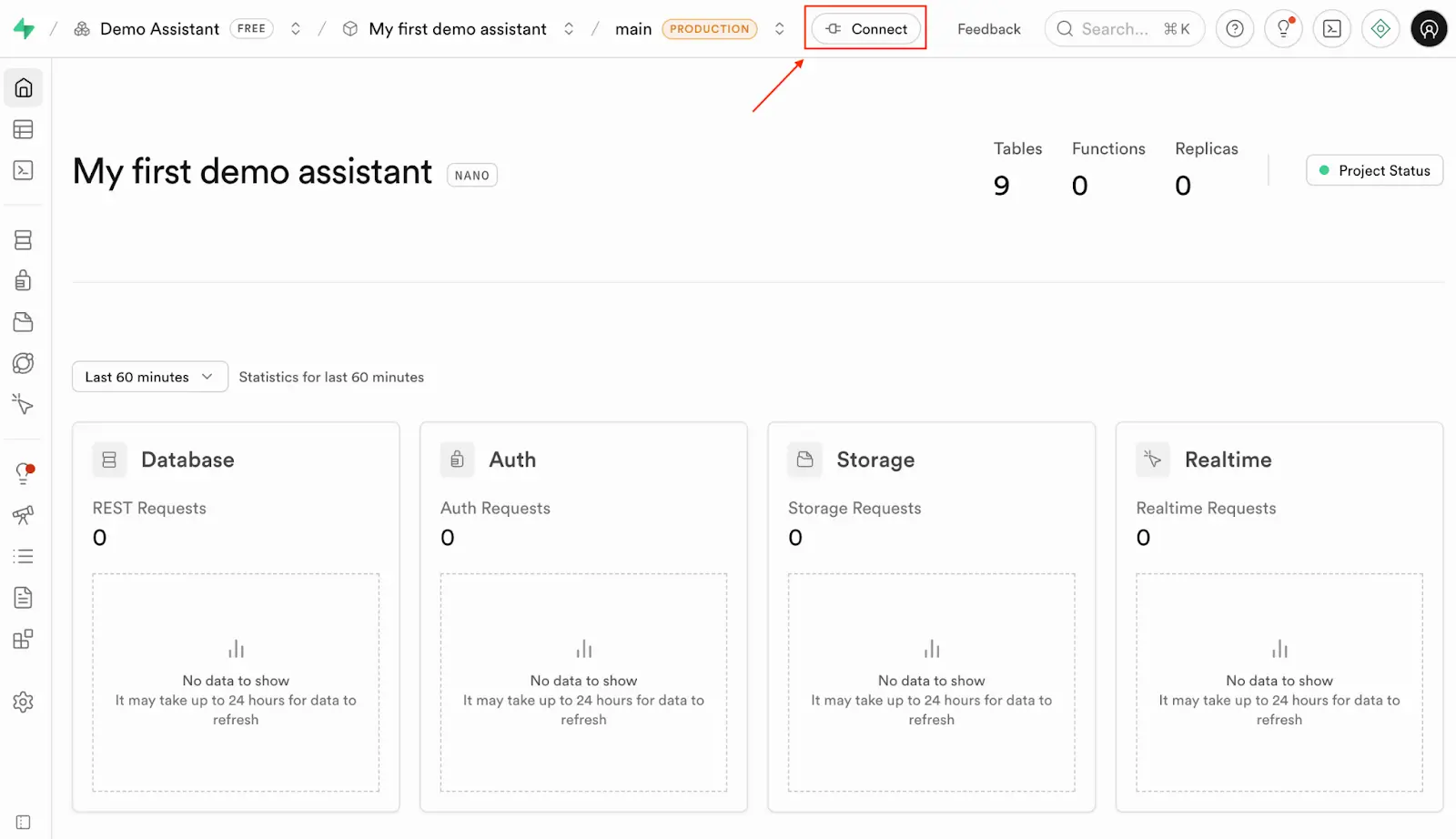
Go to your Supabase Project Overview page and click the button Connect.
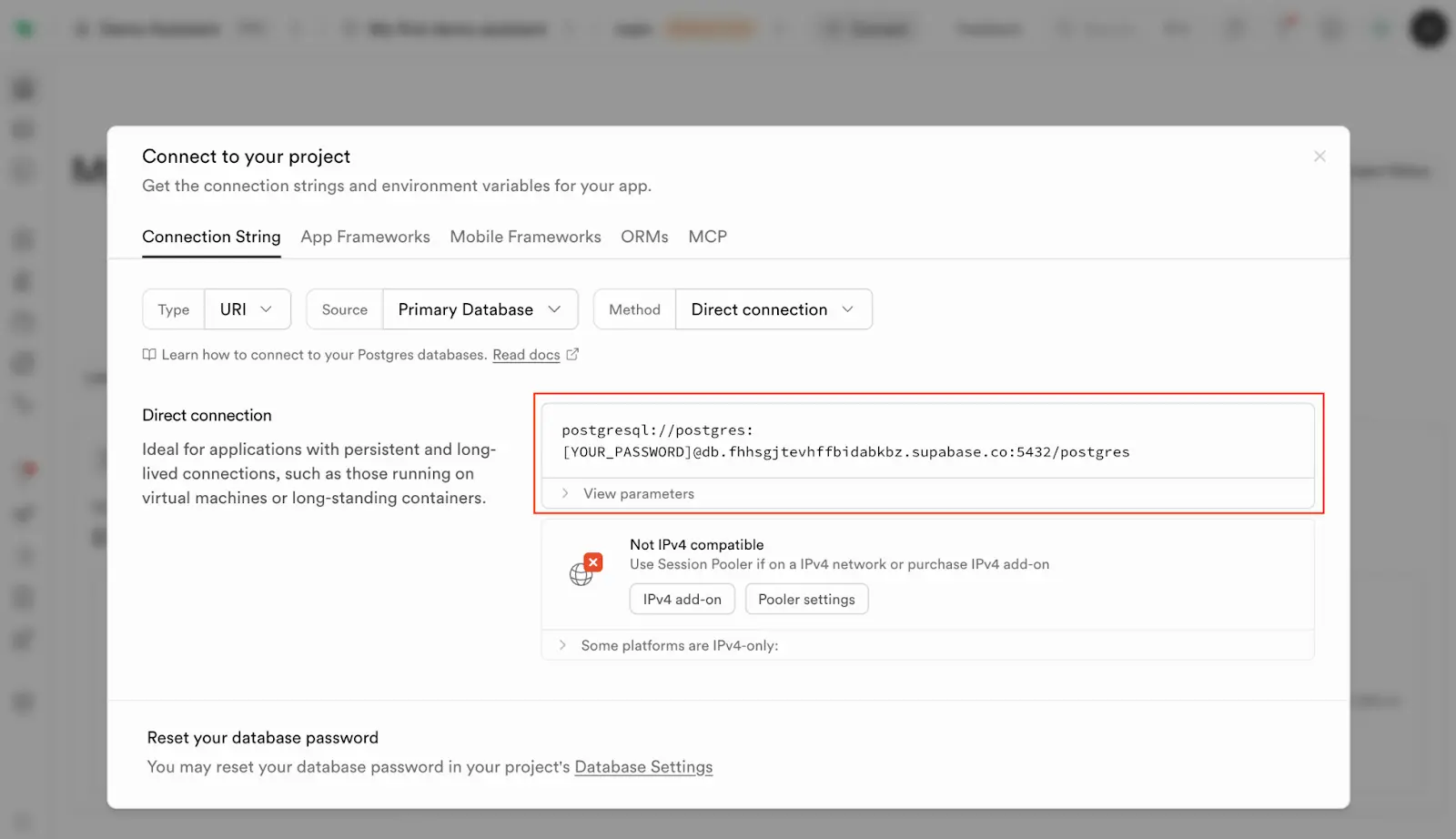
Copy the Direct Connection string. This is the connection that will be used by Tortoise ORM to interact with your database. Remember to replace the word [YOUR_PASSWORD] with your actual password.
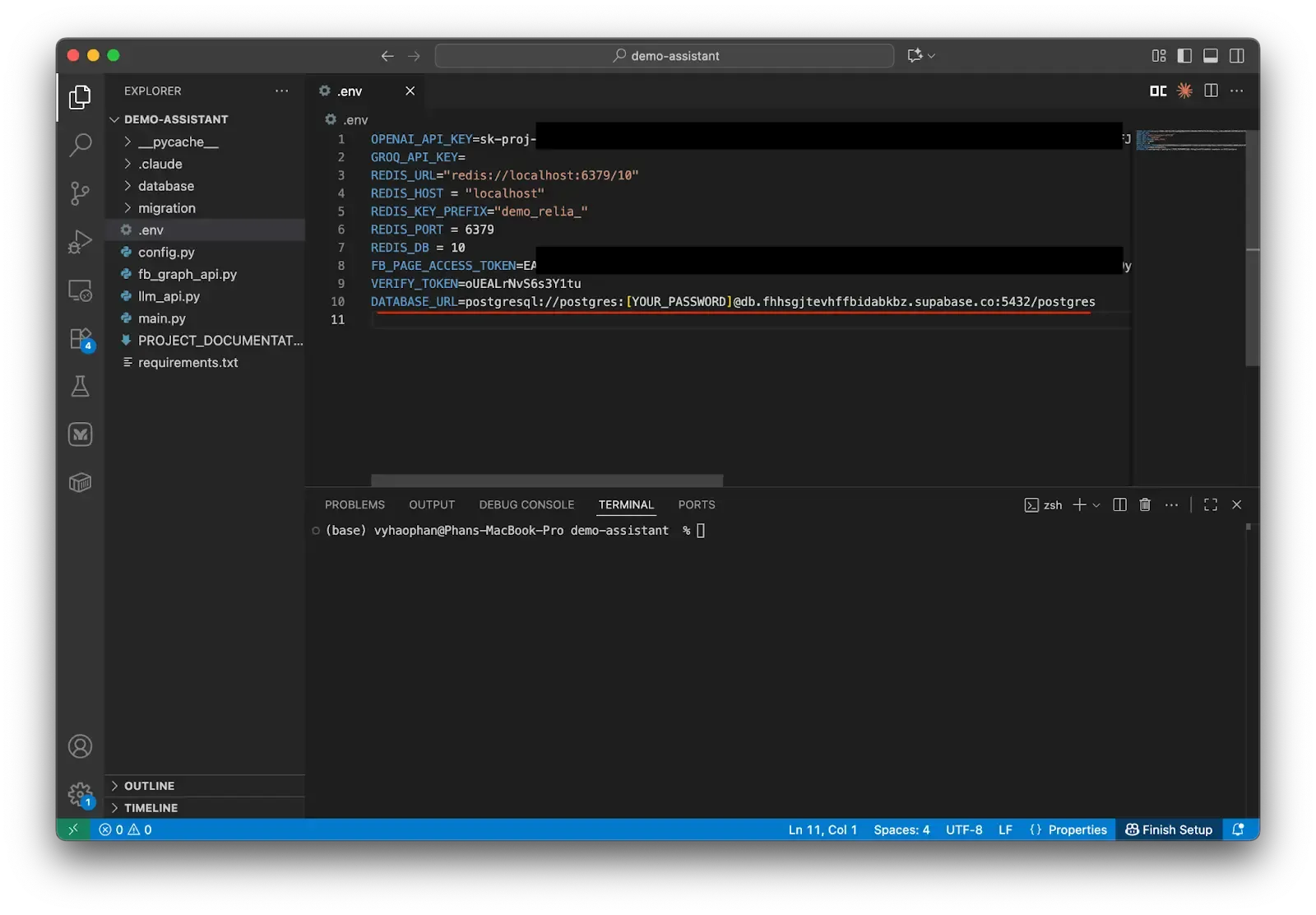
Go back to the project, open the environment file and put a new variable.
DATABASE_URL=postgresql://your-supabase-database-connection-url
Prepare the database module
Now we will create a new folder named database and create a new __init__.py file. This init file’s purpose is to help the Flask server file recognize this as an API component.
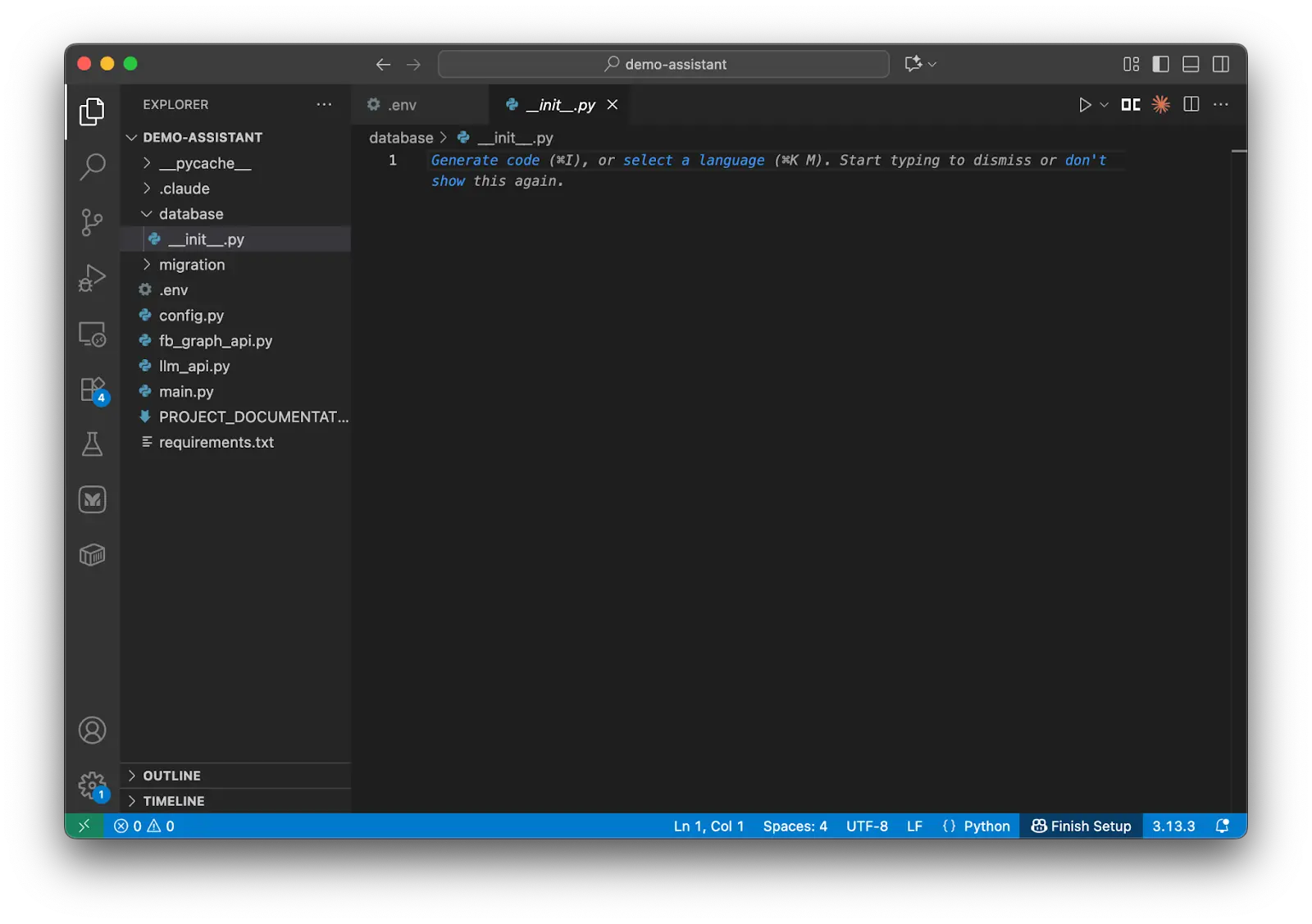
Create a new Python file models.py to store the database models used to map between the user-friendly field names and the actual data schema’s field names.
Configure the database connection
We need to set up the database connection configuration which stores all the connection details such as where the database lives (localhost), what port to use (5432), and login credentials, etc.
Create a database manager
Then we have the class SimpleDatabaseManager which handles the most tricky task - what happens when your database needs to be accessed by multiple processes. This manager uses two types of locks:
- A thread lock: used for different threads (you can understand they are different workers in a team) trying to access the database simultaneously.
- An async lock: used for handling asynchronous operations (like when your app is juggling multiple tasks at once).
This helps the system work smoothly without creating duplicated connections or any conflicts.
# models.py

# Database configuration following Tortoise ORM best practices
DATABASE_CONFIG = {
    "connections": {
        "default": {
            "engine": "tortoise.backends.asyncpg",
            "credentials": {
                "host": os.getenv('DB_DEFAULT_HOST', 'localhost'),
                "port": int(os.getenv('DB_DEFAULT_PORT', '5432')),
                "user": os.getenv('DB_DEFAULT_USER', 'postgres'),
                "password": os.getenv('DB_DEFAULT_PASSWORD', 'password'),
                "database": os.getenv('DB_DEFAULT_DATABASE', 'postgres'),
                "minsize": 5,
                "maxsize": 20,
                "command_timeout": 30,
                "statement_cache_size": 0,
                "max_cached_statement_lifetime": 300,
                "max_inactive_connection_lifetime": 300,
                "server_settings": {
                    "statement_timeout": "30000",
                    "idle_in_transaction_session_timeout": "30000",
                    "log_statement": "none"
                },
            }
        }
    },
    "apps": {
        "models": {
            "models": ["database.models"],
            "default_connection": "default"
        }
    },
    "use_tz": False,
    "timezone": "UTC"
}

class SimpleDatabaseManager:
    """
    Simple database manager that initializes once and reuses the connection.
    """

    def __init__(self):
        self._initialized = False
        self._init_lock = asyncio.Lock()
        self._thread_lock = threading.Lock()

    async def ensure_connection(self):
        """Ensure database connection exists."""
        if self._initialized and Tortoise._inited:
            return True

        # Use thread lock first to prevent race conditions across threads
        with self._thread_lock:
            # Check again after acquiring lock
            if self._initialized and Tortoise._inited:
                return True

            # Create async lock if it doesn't exist
            if not hasattr(self, '_init_lock') or self._init_lock is None:
                self._init_lock = asyncio.Lock()

        # Use async lock for async operations
        async with self._init_lock:
            # Final check after async lock
            if self._initialized and Tortoise._inited:
                return True

            try:
                if not Tortoise._inited:
                    await Tortoise.init(config=DATABASE_CONFIG)
                    await Tortoise.generate_schemas()
                    print("Database initialized successfully")

                self._initialized = True
                return True

            except Exception as e:
                print(f"Failed to initialize database: {e}")
                self._initialized = False
                raise

    async def close_all_connections(self):
        """Close all database connections."""
        with self._thread_lock:
            if self._initialized and Tortoise._inited:
                await Tortoise.close_connections()
                self._initialized = False
                print("Database connections closed")

# Global database manager
db_manager = SimpleDatabaseManager()
Remember to put the correct environment variables.
Create the main database models
Next, you will create two database models. These models are crucial for using Tortoise, as they provide a Python-friendly mapping for the actual database fields. This approach saves significant time compared to writing raw SQL queries for every data retrieval need.
# models.py
class Session(Model):
    id = fields.UUIDField(pk=True, source_field='id')
    message = fields.JSONField(source_field='message')
    created_at = fields.DatetimeField(source_field='created_at', auto_now_add=True)
    updated_at = fields.DatetimeField(source_field='updated_at', auto_now=True)

    class Meta:
        table = 'Session'

    def to_dict(self) -> Dict[str, Any]:
        return {
            'id': str(self.id),
            'message': self.message,
            'created_at': self.created_at.isoformat() if self.created_at else None,
            'updated_at': self.updated_at.isoformat() if self.updated_at else None
        }

class UsersSessions(Model):
    id = fields.UUIDField(pk=True, source_field='id')
    customer_id = fields.CharField(max_length=255, source_field='customer_id')  # Changed from UUIDField to CharField for Facebook user IDs
    session_id = fields.UUIDField(source_field='sessionid')
    highlights = fields.JSONField(source_field='highlights', default=dict)
    status = fields.IntField(source_field='status', default=1)
    created_at = fields.DatetimeField(source_field='created_at', null=True)
    updated_at = fields.DatetimeField(source_field='updated_at', null=True)

    class Meta:
        table = 'Users_Sessions'

    def to_dict(self) -> Dict[str, Any]:
        return {
            'id': str(self.id),
            'customer_id': self.customer_id,  # No need to convert to string anymore since it's already a string
            'session_id': str(self.session_id),
            'highlights': self.highlights,
            'status': self.status,
            'created_at': self.created_at.isoformat() if self.created_at else None,
            'updated_at': self.updated_at.isoformat() if self.updated_at else None
        }
Let me explain the first model Session.
- Inside the class Session, we initialize four variables
id,message,created_at, andupdated_at. Each variable is assigned a different data type, e.g. we specify the field id to have data typefields.UUIDField, etc. - Moreover, we tell the model to understand the primary key field which is the field
id. - Each field must be assigned the name of the source field which is the actual name in the database schema.
- We also define a sub-class
Metato tell the model that this model should be associated with the tableSessionin the actual database. - An internal function
to_dictis also established to return the data record in a Python-friendly format (dictionary).
The same logic happens similarly with the table Users_Sessions and the model UserSessions.
Add helper methods and response models
Let’s put some more models to match our needs. We need a database manager instance to create or close the database connection, and also some API response models to ensure the response consistency.
# models.py
async def init_database():
    """Initialize database connection using thread-safe manager."""
    return await db_manager.ensure_connection()

async def close_database():
    """Close database connections using thread-safe manager."""
    await db_manager.close_all_connections()

# Pydantic models for API responses
class SessionResponse(BaseModel):
    id: str
    message: Dict[str, Any]
    created_at: Optional[str] = None
    updated_at: Optional[str] = None

    class Config:
        from_attributes = True

class UsersSessionsResponse(BaseModel):
    id: str
    customer_id: str  # Already string type, matches the new CharField
    session_id: str
    highlights: Dict[str, Any]
    status: int
    created_at: Optional[str] = None
    updated_at: Optional[str] = None

    class Config:
        from_attributes = True
Add CRUD operations for the Session table
We must also complete the code and functions for CRUD operations for sessions and user-session relationships. These operations help our Assistant run smoothly without complicated field handling.
# models.py
class SessionCRUD:
    @staticmethod
    async def create_session(message: Dict[str, Any]) -> Optional[Session]:
        max_retries = 3
        retry_count = 0

        while retry_count < max_retries:
            try:
                # Ensure database connection for current event loop
                await db_manager.ensure_connection()
                session = await Session.create(message=message)
                return session
            except Exception as e:
                retry_count += 1
                print(f"Error creating session (attempt {retry_count}/{max_retries}): {e}")

                if retry_count < max_retries:
                    # Wait before retry
                    await asyncio.sleep(0.5 * retry_count)
                else:
                    print(f"Failed to create session after {max_retries} attempts")
                    return None

    @staticmethod
    async def get_session_by_id(session_id: str) -> Optional[Session]:
        try:
            await db_manager.ensure_connection()
            session = await Session.get_or_none(id=session_id)
            return session
        except Exception as e:
            print(f"Error getting session: {e}")
            return None

    @staticmethod
    async def update_session(session_id: str, message: Dict[str, Any]) -> Optional[Session]:
        try:
            await db_manager.ensure_connection()
            session = await Session.get_or_none(id=session_id)
            if session:
                session.message = message
                await session.save(update_fields=['message'])
                return session
            return None
        except Exception as e:
            print(f"Error updating session: {e}")
            return None

    @staticmethod
    async def delete_session(session_id: str) -> bool:
        try:
            session = await Session.get_or_none(id=session_id)
            if session:
                await session.delete()
                return True
            return False
        except Exception as e:
            print(f"Error deleting session: {e}")
            return False

    @staticmethod
    async def get_all_sessions() -> List[Session]:
        try:
            sessions = await Session.all()
            return sessions
        except Exception as e:
            print(f"Error getting all sessions: {e}")
            return []

    @staticmethod
    async def get_sessions_with_filters(limit: int = 100, offset: int = 0) -> List[Session]:
        try:
            sessions = await Session.all().limit(limit).offset(offset)
            return sessions
        except Exception as e:
            print(f"Error getting sessions with filters: {e}")
            return []
Let me explain a little more about the functions inside the class SessionCRUD.
- The
create_sessionfunction is how you add a new record to theSessiontable. You can optionally include a messages dictionary to fill in the data for this new session. To avoid issues, we implemented the retry process of maximum 3 attempts. - The
get_session_by_idfunction helps you retrieve the target session using its ID quickly. - The
update_sessionfunction is helpful whenever you want to update or remove the session by replacing the message variable with a new message dictionary. - The
delete_sessionfunction removes your target session from the database by providing its ID. - The
get_all_sessionsfunction andget_sessions_with_filtersfunction retrieve all the sessions in the database.
I will also input a new class to execute the CRUD operations on the table Users_Sessions.
# models.py
class UsersSessionsCRUD:
    @staticmethod
    async def create_user_session(
        customer_id: str,
        session_id: str,
        highlights: Dict[str, Any] = None,
        status: int = 1
    ) -> Optional[UsersSessions]:
        try:
            await db_manager.ensure_connection()
            user_session = await UsersSessions.create(
                customer_id=customer_id,
                session_id=session_id,
                highlights=highlights or {},
                status=status
            )
            return user_session
        except Exception as e:
            print(f"Error creating user session: {e}")
            return None

    @staticmethod
    async def get_user_session_by_id(user_session_id: str) -> Optional[UsersSessions]:
        try:
            await db_manager.ensure_connection()
            user_session = await UsersSessions.get_or_none(id=user_session_id)
            return user_session
        except Exception as e:
            print(f"Error getting user session: {e}")
            return None

    @staticmethod
    async def get_sessions_by_customer(customer_id: str, date: Optional[str] = None) -> List[UsersSessions]:
        """
        Retrieve all sessions for a specific customer, optionally filtered by date.

        Args:
            customer_id (str): The unique identifier of the customer
            date (Optional[str]): Optional date filter in 'YYYY-MM-DD' format.
                                 If provided, returns sessions created on that specific date.
                                 If None, returns all sessions for the customer.

        Returns:
            List[UsersSessions]: List of user session objects for the customer.
                                Returns empty list if no sessions found or if an error occurs.
        Example:
            # Get all sessions for a customer
            sessions = await get_sessions_by_customer("customer_123")

            # Get sessions for a specific date
            sessions = await get_sessions_by_customer("customer_123", "2024-01-15")

            # Example output:
            # [
            #     UsersSessions(id="session_1", customer_id="customer_123", created_at="2024-01-15T10:30:00Z"),
            #     UsersSessions(id="session_2", customer_id="customer_123", created_at="2024-01-15T14:20:00Z")
            # ]
        """
        try:
            await db_manager.ensure_connection()
            query = UsersSessions.filter(customer_id=customer_id)

            if date is not None:
                try:
                    target_date = datetime.strptime(date, '%Y-%m-%d').date()
                    start_datetime = datetime.combine(target_date, datetime.min.time())
                    end_datetime = datetime.combine(target_date + timedelta(days=1), datetime.min.time())

                    from tortoise.expressions import Q
                    date_filter = Q(created_at__isnull=False) & Q(created_at__gte=start_datetime) & Q(created_at__lt=end_datetime)
                    query = query.filter(date_filter)
                except ValueError:
                    logger.error(f"Invalid date format: {date}")
                    return []

            return await query.all()
        except Exception as e:
            logger.error(f"Error getting sessions by customer: {e}")
            return []

    @staticmethod
    async def get_session_users(session_id: str) -> List[UsersSessions]:
        try:
            users = await UsersSessions.filter(session_id=session_id)
            return users
        except Exception as e:
            print(f"Error getting session users: {e}")
            return []

    @staticmethod
    async def update_user_session(
        user_session_id: str,
        highlights: Dict[str, Any] = None,
        status: int = None
    ) -> Optional[UsersSessions]:
        try:
            user_session = await UsersSessions.get_or_none(id=user_session_id)
            if user_session:
                update_fields = []
                if highlights is not None:
                    user_session.highlights = highlights
                    update_fields.append('highlights')
                if status is not None:
                    user_session.status = status
                    update_fields.append('status')
                if update_fields:
                    await user_session.save(update_fields=update_fields)
                return user_session
            return None
        except Exception as e:
            print(f"Error updating user session: {e}")
            return None

    @staticmethod
    async def delete_user_session(user_session_id: str) -> bool:
        try:
            user_session = await UsersSessions.get_or_none(id=user_session_id)
            if user_session:
                await user_session.delete()
                return True
            return False
        except Exception as e:
            print(f"Error deleting user session: {e}")
            return False

    @staticmethod
    async def get_all_user_sessions() -> List[UsersSessions]:
        try:
            user_sessions = await UsersSessions.all()
            return user_sessions
        except Exception as e:
            print(f"Error getting all user sessions: {e}")
            return []

    @staticmethod
    async def get_user_sessions_with_filters(
        customer_id: str = None,
        session_id: str = None,
        status: int = None,
        limit: int = 100,
        offset: int = 0
    ) -> List[UsersSessions]:
        try:
            query = UsersSessions.all()

            if customer_id:
                query = query.filter(customer_id=customer_id)
            if session_id:
                query = query.filter(session_id=session_id)
            if status is not None:
                query = query.filter(status=status)

            user_sessions = await query.limit(limit).offset(offset)
            return user_sessions
        except Exception as e:
            print(f"Error getting user sessions with filters: {e}")
            return []
Now you have successfully established some basic models and functions to connect and interact with our Supabase database.
Replace Redis with PostgreSQL for Chatbot Sessions
Go back to the project and let’s change our functions inside the file config.py. These functions are used for generating and managing the user’s sessions.
Firstly, please remove the Redis-based session functions in order to switch to use only the PostgreSQL database. Please remove the following code from config.py.
# config.py
# please remove the following code
import redis
import json

# Redis configuration
REDIS_URL = os.getenv('REDIS_URL')
redis_client = redis.StrictRedis.from_url(REDIS_URL)

# Memory configuration
CHATBOT_MEMORY_CONFIG = {
    'key_prefix': os.getenv("REDIS_KEY_PREFIX"),
    'url': os.getenv("REDIS_URL"),
    'host': os.getenv("REDIS_HOST"),
    'port': os.getenv("REDIS_PORT"),
    'db': os.getenv("REDIS_DB", 10),
}

# Session management functions
def create_session_id():
	...
def get_conversation_key(user_id):
	...
def create_or_get_session_id(user_id):
	...
def get_conversation_info(conversation_key):
	...
def store_message(conversation_key, role, content):
	...
def get_conversation_messages(conversation_key, limit=10):
	...
def delete_conversation(user_id):
	...
Now we will integrate what we have done so far with Supabase and Tortoise ORM into this config file.
# config.py
from uuid_extensions import uuid7
from loguru import logger
from database.models import SessionCRUD, UsersSessionsCRUD
load_dotenv(find_dotenv(), override=True)

async def create_session_id() -> str:
    """
    Create a new unique session ID.

    Returns:
        str: The new session ID
    """
    session_id = str(uuid7())
    logger.success(f"Created session successfully with id: {session_id}")
    return session_id
We use UUID version 7 for all session IDs because of its time-sorted nature. To improve code clarity, the function create_session_id wraps this UUID package and returns a new UUID instance, which makes our code become more understandable.
Let’s apply it with the function create_or_get_session_id which first gets the user’s active session in the day, then returns the active session’s ID or uses the function create_session_id to initialize the new session ID.
We also need to use the command asyncio.Lock() which blocks the concurrent database access. The code is put inside the scope of the variable _db_lock, preventing the multiple anonymous concurrent access.
# config.py
import asyncio
# Global lock for database operations to prevent concurrent access issues
_db_lock = asyncio.Lock()

async def create_or_get_session_id(user_id: str) -> tuple[str, str]:
    """
    Get an existing session ID or create a new one if it doesn't exist.

    Args:
        user_id: The Facebook user ID

    Returns:
        tuple: (session_id, conversation_id)
    """
    async with _db_lock:
        try:
            # Try to get existing session for today
            today = datetime.now(timezone.utc).strftime('%Y-%m-%d')
            # today = datetime.now(timezone.utc)
            logger.info(f"Retrieving the user_sessions with input customer_id={user_id}, date={today} ... ")
            user_sessions = await UsersSessionsCRUD.get_sessions_by_customer(customer_id=user_id, date=today)

            # Check for today's session
            if user_sessions:
                user_session = user_sessions[0]  # Get the first session from today
                session_id = str(user_session.session_id)
                logger.info(f"Retrieved existing session: {session_id} for user: {user_id}")
                return session_id, str(user_session.id)

            # Create new session
            session_id = await create_session_id()

            # Create session record
            session = await SessionCRUD.create_session(message={"messages": []})
            if not session:
                raise Exception("Failed to create session")

            # Create user session mapping
            user_session = await UsersSessionsCRUD.create_user_session(
                customer_id=user_id,
                session_id=str(session.id),
                highlights={"message_count": 0, "last_message_time": str(datetime.now(timezone.utc))},
                status=1
            )

            if not user_session:
                raise Exception("Failed to create user session mapping")

            logger.success(f"Created new session: {session.id} for user: {user_id}")
            return str(session.id), str(user_session.id)

        except Exception as e:
            logger.error(f"Error creating/getting session for user {user_id}: {e}")
            raise

In terms of the function get_conversation_info, we apply the model UsersSessionsCRUD to return the user’s session.

# config.py
async def get_conversation_info(conversation_id: str) -> dict:
    """
    Get conversation metadata.

    Args:
        conversation_id: The user session ID

    Returns:
        dict: Conversation metadata
    """
    try:
        user_session = await UsersSessionsCRUD.get_user_session_by_id(conversation_id)
        if user_session:
            return user_session.to_dict()
        return {}
    except Exception as e:
        logger.error(f"Error retrieving conversation info: {e}")
        return {}
Now we are going to define a function which helps us save a new message to the session history. In this function, we first check for the session ID and raise an error message if the target edit conversation is not found.
The current conversation is from the retrieved session and added the new message. We keep only a predefined number of conversation messages. Finally, the messages and highlights are updated for the given session.
# config.py
async def store_message(conversation_id: str, role: str, content: str) -> None:
    """
    Store a message in the conversation.

    Args:
        conversation_id: The user session ID
        role: The role of the message sender ('user' or 'assistant')
        content: The message content
    """
    async with _db_lock:
        try:
            # Get user session
            user_session = await UsersSessionsCRUD.get_user_session_by_id(conversation_id)
            if not user_session:
                logger.error(f"User session not found: {conversation_id}")
                return

            # Get session
            session = await SessionCRUD.get_session_by_id(str(user_session.session_id))
            if not session:
                logger.error(f"Session not found: {user_session.session_id}")
                return

            # Get current messages
            messages = session.message.get("messages", [])

            # Add new message
            new_message = {
                "role": role,
                "content": content,
                "timestamp": str(datetime.now(timezone.utc))
            }
            messages.append(new_message)

            # Keep only last MAX_MESSAGES_PER_SESSION messages
            if len(messages) > MAX_MESSAGES_PER_SESSION:
                messages = messages[-MAX_MESSAGES_PER_SESSION:]

            # Update session with new messages
            updated_message_data = {"messages": messages}
            await SessionCRUD.update_session(str(session.id), updated_message_data)

            # Update user session highlights
            highlights = user_session.highlights or {}
            highlights.update({
                "message_count": len(messages),
                "last_message_time": str(datetime.now(timezone.utc))
            })
            await UsersSessionsCRUD.update_user_session(
                conversation_id,
                highlights=highlights
            )

            logger.info(f"Stored {role} message in conversation: {conversation_id}")

        except Exception as e:
            logger.error(f"Error storing message: {e}")
Moreover, we are going to define two more functions which help us retrieve only the messages from the target conversation and delete the user session.
# config.py
async def get_conversation_messages(conversation_id: str, limit: int = 10) -> list:
    """
    Get recent messages from the conversation.

    Args:
        conversation_id: The user session ID
        limit: Maximum number of messages to retrieve

    Returns:
        list: List of message dictionaries
    """
    try:
        # Get user session
        user_session = await UsersSessionsCRUD.get_user_session_by_id(conversation_id)
        if not user_session:
            return []

        # Get session
        session = await SessionCRUD.get_session_by_id(str(user_session.session_id))
        if not session:
            return []

        # Get messages
        messages = session.message.get("messages", [])
        return messages[-limit:] if limit else messages

    except Exception as e:
        logger.error(f"Error retrieving messages: {e}")
        return []


async def delete_conversation(user_id: str) -> None:
    """
    Delete a user's conversation.

    Args:
        user_id: The Facebook user ID
    """
    try:
        # Get user sessions
        user_sessions = await UsersSessionsCRUD.get_sessions_by_customer(customer_id=user_id)

        for user_session in user_sessions:
            # Delete session
            await SessionCRUD.delete_session(str(user_session.session_id))
            # Delete user session mapping
            await UsersSessionsCRUD.delete_user_session(str(user_session.id))

        logger.info(f"Deleted conversation for user: {user_id}")

    except Exception as e:
        logger.error(f"Error deleting conversation for user {user_id}: {e}")
How to Add RAG and Function Calling to a Facebook Messenger AI Chatbot?
Now let’s move on to the main part: defining the use cases for our assistant.
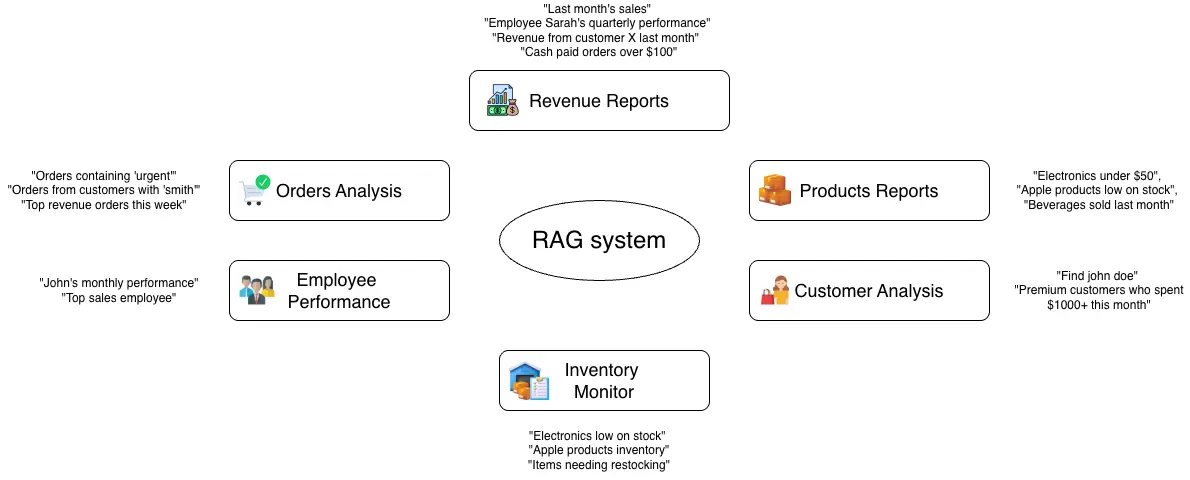
To keep this example focused, we will look at the needs of a shop owner, customer-facing use cases can be covered in another post. In a shop, there are many repetitive tasks that can be supported by this assistant. For example, the owner may want to:
- Check revenue for a specific time period
- Search products by category or price
- Find customer activity and spending patterns
- Detect low-stock items
- Review employee performance
- Track orders in a certain date range.
To sum up, we have six kinds of management activities which help owners to keep track of our shop performance.
Set up the query executioner
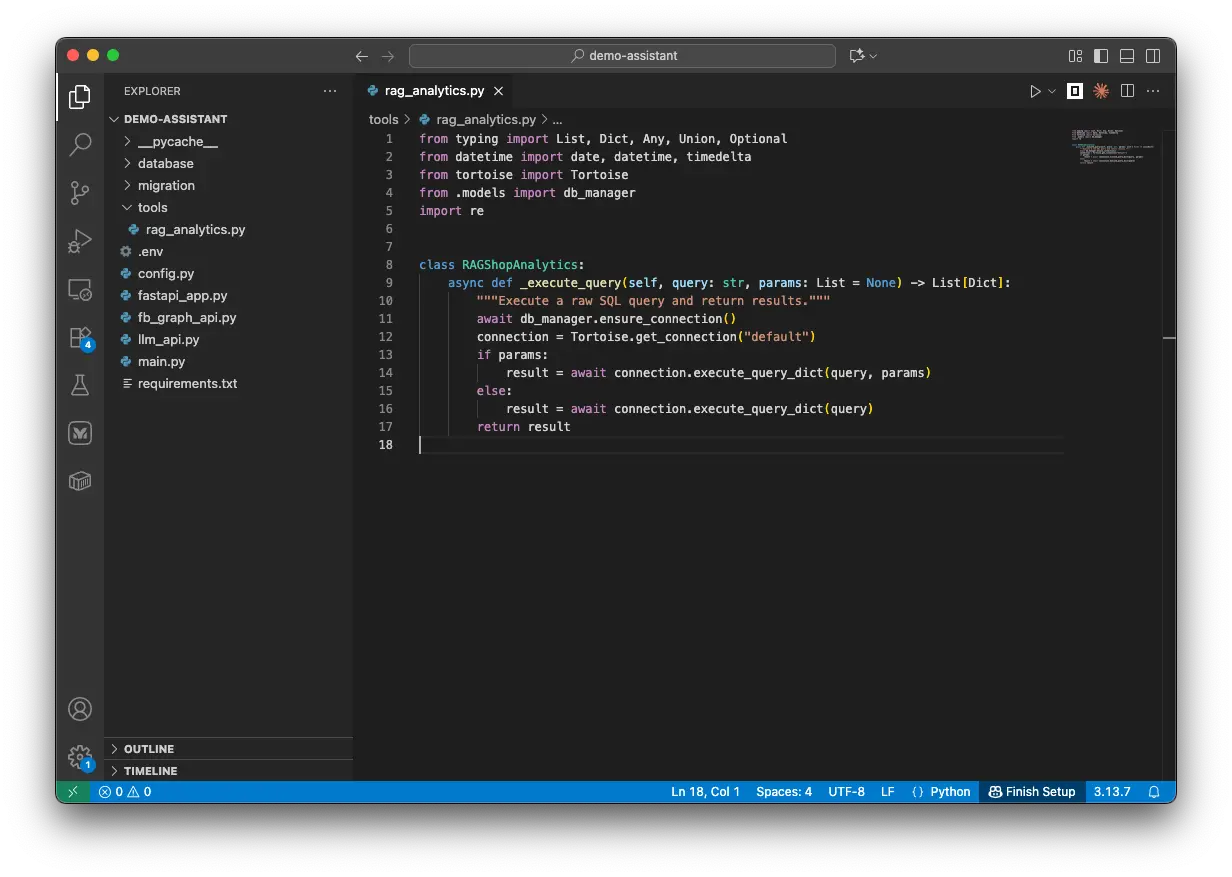
Let’s create a new file named rag_analytics.py with the following content.
# rag_analytics.py
from typing import List, Dict, Any, Union, Optional
from datetime import date, datetime, timedelta
from tortoise import Tortoise
from database.models import db_manager
import re

class RAGShopAnalytics:
    """
    RAG-optimized analytics for natural language queries about shop data.
    Each function is designed to handle specific business questions with flexible parameters.
    """

    async def _execute_query(self, query: str, params: List = None) -> List[Dict]:
        """Execute a raw SQL query and return results."""
        await db_manager.ensure_connection()
        connection = Tortoise.get_connection("default")
        if params:
            result = await connection.execute_query_dict(query, params)
        else:
            result = await connection.execute_query_dict(query)
        return result
I have just created an object RAGShopAnalytics with its first function _execute_query(). This object plays as the RAG-related functions center. And this first function helps us employ Tortoise to execute the queries to get the target data.
Revenue Report Functions
Let’s start with revenue-related queries. Shop managers may want to check revenue by time period, employee, customer, payment method, or order value. To support this, we create get_revenue_by_filters, which joins the Orders, Customers, and Employees tables and returns key revenue data with flexible filters.
# rag_analytics.py
class RAGShopAnalytics:
...
    async def get_revenue_by_filters(
        self,
        start_date: Optional[Union[str, date]] = None,
        end_date: Optional[Union[str, date]] = None,
        employee_name: Optional[str] = None,
        customer_email: Optional[str] = None,
        payment_method: Optional[str] = None,
        min_amount: Optional[float] = None,
        max_amount: Optional[float] = None
    ) -> List[Dict[str, Any]]:
        """
        Get revenue data with multiple filter options.

        Use cases:
        - "What was the revenue from john@email.com last month?"
        - "Show me cash payments over $100 this week"
        - "Revenue processed by employee John Smith in December"
        """
        query = """
        SELECT
            o.ID as order_id,
            o.Created_at as order_date,
            o.Final_total_price as revenue,
            c.Name as customer_name,
            c.Email as customer_email,
            e.Name as employee_name,
            o.Payment_method as payment_method
        FROM Orders o
        LEFT JOIN Customers c ON o.Customer_ID = c.ID
        LEFT JOIN Employees e ON o.Creator_ID = e.ID
        WHERE o.Status = 1
        """

        params = []
        param_count = 1

        if start_date:
            query += f" AND DATE(o.Created_at) >= ${param_count}"
            if isinstance(start_date, str):
                start_date = datetime.strptime(start_date, '%Y-%m-%d').date()
            params.append(start_date)
            param_count += 1

        if end_date:
            query += f" AND DATE(o.Created_at) <= ${param_count}"
            if isinstance(end_date, str):
                end_date = datetime.strptime(end_date, '%Y-%m-%d').date()
            params.append(end_date)
            param_count += 1

        if employee_name:
            query += f" AND LOWER(e.Name) LIKE LOWER(${param_count})"
            params.append(f"%{employee_name}%")
            param_count += 1

        if customer_email:
            query += f" AND LOWER(c.Email) = LOWER(${param_count})"
            params.append(customer_email)
            param_count += 1

        if payment_method:
            if payment_method.lower() == 'cash':
                query += f" AND LOWER(o.payment_method) = 'cash'"
            elif payment_method.lower() in ['banking', 'bank']:
                query += f" AND LOWER(o.payment_method) IN ('banking', 'bank')"
            else:
                query += f" AND LOWER(o.payment_method) LIKE LOWER(${param_count})"
                params.append(f"%{payment_method}%")
                param_count += 1

        if min_amount:
            query += f" AND o.Final_total_price >= ${param_count}"
            params.append(min_amount)
            param_count += 1

        if max_amount:
            query += f" AND o.Final_total_price <= ${param_count}"
            params.append(max_amount)
            param_count += 1

        query += " ORDER BY o.Created_at DESC"

        return await self._execute_query(query, params)
This function accepts seven input parameters. Each one is checked in order and added to the WHERE clause only when it is provided. This makes the function flexible enough to return either all revenue data or a filtered result.
This is useful for questions like “What was the revenue from john@email.com last month?” or “Show me cash payments over $100 this week.”
For broader questions like “What were last month’s sales?” or “Show me this week’s revenue,” we also create another function that focuses on summary values such as total revenue, tax, discounts, and order count.
# rag_analytics.py
class RAGShopAnalytics:
...
    async def get_sales_summary_by_period(
        self,
        period: str = "month",  # day, week, month, year
        periods_back: int = 0,
        employee_name: Optional[str] = None
    ) -> Dict[str, Any]:
        """
        Get sales summary for specific time periods.

        Use cases:
        - "What were last month's sales?"
        - "Show me this week's revenue"
        - "How did employee Sarah perform last quarter?"
        """
        if period == "day":
            target_date = date.today() - timedelta(days=periods_back)
            start_date = end_date = target_date
        elif period == "week":
            target_date = date.today() - timedelta(weeks=periods_back)
            start_date = target_date - timedelta(days=target_date.weekday())
            end_date = start_date + timedelta(days=6)
        elif period == "month":
            target_date = date.today().replace(day=1) - timedelta(days=periods_back * 30)
            start_date = target_date.replace(day=1)
            end_date = (start_date + timedelta(days=32)).replace(day=1) - timedelta(days=1)
        else:  # year
            target_year = date.today().year - periods_back
            start_date = date(target_year, 1, 1)
            end_date = date(target_year, 12, 31)

        query = """
        SELECT
            COUNT(*)::BIGINT as total_orders,
            SUM(o.Final_total_price) as total_revenue,
            AVG(o.Final_total_price) as avg_order_value,
            SUM(o.Tax) as total_tax,
            SUM(o.Discount) as total_discounts
        FROM Orders o
        LEFT JOIN Employees e ON o.Creator_ID = e.ID
        WHERE o.Status = 1
            AND DATE(o.Created_at) BETWEEN $1 AND $2
        """

        # Convert to date objects if they're strings
        if isinstance(start_date, str):
            start_date = datetime.strptime(start_date, '%Y-%m-%d').date()
        if isinstance(end_date, str):
            end_date = datetime.strptime(end_date, '%Y-%m-%d').date()

        params = [start_date, end_date]

        if employee_name:
            query += " AND LOWER(e.Name) LIKE LOWER($3)"
            params.append(f"%{employee_name}%")

        result = await self._execute_query(query, params)
        summary = result[0] if result else {}
        summary['period'] = f"{start_date} to {end_date}"
        summary['period_type'] = period

        return summary
My design intention is to allow users to ask for the sales summary of a specific number of periods such as the sales of the last 1/2/3 days/weeks/etc. So I created this function with 3 input parameters of period, period_back, and employee_name.
The SQL query is designed to return the total number of orders, total revenue, average revenue, total tax, and total discount. If needed, you can also extend the query later by adding more values such as total sold items or average subtotal price.
Products Analysis Functions
The find_products_by_criteria function helps the assistant search products by name, category, brand, price range, or stock level. It can also include sales data for a selected date range when needed.
# rag_analytics.py
class RAGShopAnalytics:
...
    # PRODUCT ANALYSIS FUNCTIONS
    async def find_products_by_criteria(
        self,
        product_name: Optional[str] = None,
        category: Optional[str] = None,
        brand: Optional[str] = None,
        min_price: Optional[float] = None,
        max_price: Optional[float] = None,
        low_stock: bool = False,
        include_sales_data: bool = False,
        date_range_start: Optional[Union[str, date]] = None,
        date_range_end: Optional[Union[str, date]] = None
    ) -> List[Dict[str, Any]]:
        """
        Find products with flexible criteria and optional sales data.

        Use cases:
        - "Show me all drink products under $500"
        - "Which Apple products are low on stock?"
        - "What beverages sold well last month?"
        """
        if include_sales_data and date_range_start and date_range_end:
            query = """
            SELECT
                p.Name as product_name,
                p.Category,
                p.Brand,
                pi.Price,
                pi.Stock,
                pi.Low_stock_threshold,
                COALESCE(SUM(oi.Quantity), 0) as total_sold,
                COALESCE(SUM(oi.Total_price), 0) as total_revenue
            FROM Products p
            LEFT JOIN Product_Inventory pi ON p.ID = pi.Product_ID
            LEFT JOIN Order_Items oi ON p.ID = oi.Product_ID
            LEFT JOIN Orders o ON oi.Order_ID = o.ID
            WHERE pi.Status = 1
            """
        else:
            query = """
            SELECT
                p.Name as product_name,
                p.Category,
                p.Brand,
                pi.Price,
                pi.Stock,
                pi.Low_stock_threshold
            FROM Products p
            LEFT JOIN Product_Inventory pi ON p.ID = pi.Product_ID
            WHERE pi.Status = 1
            """

        params = []
        param_count = 1

        if product_name:
            query += f" AND LOWER(p.Name) LIKE LOWER(${param_count})"
            params.append(f"%{product_name}%")
            param_count += 1

        if category:
            query += f" AND LOWER(p.Category) LIKE LOWER(${param_count})"
            params.append(f"%{category}%")
            param_count += 1

        if brand:
            query += f" AND LOWER(p.Brand) LIKE LOWER(${param_count})"
            params.append(f"%{brand}%")
            param_count += 1

        if min_price:
            query += f" AND pi.Price >= ${param_count}"
            params.append(min_price)
            param_count += 1

        if max_price:
            query += f" AND pi.Price <= ${param_count}"
            params.append(max_price)
            param_count += 1

        if low_stock:
            query += " AND pi.Stock <= pi.Low_stock_threshold"

        if include_sales_data and date_range_start and date_range_end:
            query += f" AND (o.Status = 1 AND DATE(o.Created_at) BETWEEN ${param_count} AND ${param_count + 1})"
            # Convert to date objects if they're strings
            if isinstance(date_range_start, str):
                date_range_start = datetime.strptime(date_range_start, '%Y-%m-%d').date()
            if isinstance(date_range_end, str):
                date_range_end = datetime.strptime(date_range_end, '%Y-%m-%d').date()
            params.extend([date_range_start, date_range_end])
            param_count += 2
            query += " GROUP BY p.ID, p.Name, p.Category, p.Brand, pi.Price, pi.Stock, pi.Low_stock_threshold"

        query += " ORDER BY p.Name"

        return await self._execute_query(query, params)
Customer Analysis Functions
Shop managers are usually very curious about their customers. There are some common questions such as “Find the customer with name A or email address Y@email.com” or “Show me premium users who spent X dollars last week.”
# rag_analytics.py
class RAGShopAnalytics:
...

    # CUSTOMER ANALYSIS FUNCTIONS
    async def find_customers_by_criteria(
        self,
        customer_name: Optional[str] = None,
        customer_email: Optional[str] = None,
        is_premium: Optional[bool] = None,
        min_orders: Optional[int] = None,
        min_spent: Optional[float] = None,
        date_range_start: Optional[Union[str, date]] = None,
        date_range_end: Optional[Union[str, date]] = None
    ) -> List[Dict[str, Any]]:
        """
        Find customers with various criteria and spending patterns.

        Use cases:
        - "Find customer john.doe@email.com"
        - "Show me premium customers who spent over $1000 this month"
        - "Which customers haven't ordered recently?"
        """
        query = """
        SELECT
            c.Name as customer_name,
            c.Email as customer_email,
            c.Premium,
            c.Created_at as customer_since,
            COUNT(o.ID) as total_orders,
            COALESCE(SUM(o.Final_total_price), 0) as total_spent,
            MAX(o.Created_at) as last_order_date
        FROM Customers c
        LEFT JOIN Orders o ON c.ID = o.Customer_ID AND o.Status = 1
        WHERE 1=1
        """

        params = []
        param_count = 1

        if customer_name:
            query += f" AND LOWER(c.Name) LIKE LOWER(${param_count})"
            params.append(f"%{customer_name}%")
            param_count += 1

        if customer_email:
            query += f" AND LOWER(c.Email) LIKE LOWER(${param_count})"
            params.append(f"%{customer_email}%")
            param_count += 1

        if is_premium is not None:
            query += f" AND c.Premium = ${param_count}"
            params.append(is_premium)
            param_count += 1

        if date_range_start and date_range_end:
            query += f" AND (o.Created_at IS NULL OR DATE(o.Created_at) BETWEEN ${param_count} AND ${param_count + 1})"
            # Convert to date objects if they're strings
            if isinstance(date_range_start, str):
                date_range_start = datetime.strptime(date_range_start, '%Y-%m-%d').date()
            if isinstance(date_range_end, str):
                date_range_end = datetime.strptime(date_range_end, '%Y-%m-%d').date()
            params.extend([date_range_start, date_range_end])
            param_count += 2

        query += " GROUP BY c.ID, c.Name, c.Email, c.Premium, c.Created_at"

        if min_orders:
            query += f" HAVING COUNT(o.ID) >= {min_orders}"

        if min_spent:
            query += f" {'HAVING' if 'HAVING' not in query else ' AND'} COALESCE(SUM(o.Final_total_price), 0) >= {min_spent}"

        query += " ORDER BY total_spent DESC"

        return await self._execute_query(query, params)
With this function, I let users have an execution query which gets data from table Customers and table Orders about the customers and/or their orders, amount spent, etc. The query returns the customer name and email, premium status, membership start date, total number of orders, total amount spent, and the last time they made a purchase.
Inventory-Related Analysis
Another function would help us to get information about our product inventory status, the users can tell the Assistant to quickly check if any product is low on stock or out of stock.
# rag_analytics.py
class RAGShopAnalytics:
...
    # INVENTORY ANALYSIS FUNCTIONS
    async def get_inventory_status(
        self,
        category: Optional[str] = None,
        brand: Optional[str] = None,
        stock_level: Optional[str] = None  # "low", "critical", "normal", "high"
    ) -> List[Dict[str, Any]]:
        """
        Get inventory status with various filters.

        Use cases:
        - "What electronics are low on stock?"
        - "Show me Apple products inventory"
        - "Which items need restocking urgently?"
        """
        query = """
        SELECT
            p.Name as product_name,
            p.Category,
            p.Brand,
            pi.Stock,
            pi.Low_stock_threshold,
            pi.Price,
            (pi.Stock * pi.Price) as inventory_value,
            CASE
                WHEN pi.Stock = 0 THEN 'out_of_stock'
                WHEN pi.Stock <= (pi.Low_stock_threshold * 0.5) THEN 'critical'
                WHEN pi.Stock <= pi.Low_stock_threshold THEN 'low'
                WHEN pi.Stock > pi.Low_stock_threshold * 2 THEN 'high'
                ELSE 'normal'
            END as stock_status
        FROM Products p
        JOIN Product_Inventory pi ON p.ID = pi.Product_ID
        WHERE pi.Status = 1
        """

        params = []
        param_count = 1

        if category:
            query += f" AND LOWER(p.Category) LIKE LOWER(${param_count})"
            params.append(f"%{category}%")
            param_count += 1

        if brand:
            query += f" AND LOWER(p.Brand) LIKE LOWER(${param_count})"
            params.append(f"%{brand}%")
            param_count += 1

        if stock_level:
            if stock_level.lower() == "low":
                query += " AND pi.Stock <= pi.Low_stock_threshold AND pi.Stock > (pi.Low_stock_threshold * 0.5)"
            elif stock_level.lower() == "critical":
                query += " AND pi.Stock <= (pi.Low_stock_threshold * 0.5)"
            elif stock_level.lower() == "normal":
                query += " AND pi.Stock > pi.Low_stock_threshold AND pi.Stock <= (pi.Low_stock_threshold * 2)"
            elif stock_level.lower() == "high":
                query += " AND pi.Stock > (pi.Low_stock_threshold * 2)"

        query += " ORDER BY stock_status DESC, pi.Stock ASC"

        return await self._execute_query(query, params)
Employee Performance Function
The managers may have questions about their staff, how they did in the last week/ month, who brought the most sales, whether they should be rewarded. Below is a function which combines two tables Employees and Orders.
It allows inputting 4 parameters which are the employee name, the date time duration of querying, and a metric type of one kind of (sales, orders, or customers). Each metric type gives a different SQL query to get the employees name with their associated sales or customers.
# rag_analytics.py
class RAGShopAnalytics:
...
    # EMPLOYEE PERFORMANCE FUNCTIONS
    async def get_employee_metrics(
        self,
        employee_name: Optional[str] = None,
        start_date: Optional[Union[str, date]] = None,
        end_date: Optional[Union[str, date]] = None,
        metric_type: str = "sales"  # "sales", "orders", "customers"
    ) -> List[Dict[str, Any]]:
        """
        Get employee performance metrics with various filters.

        Use cases:
        - "How is employee John performing this month?"
        - "Which employee had the most sales last week?"
        - "Show me Sarah's customer interactions"
        """
        if metric_type == "customers":
            query = """
            SELECT
                e.Name as employee_name,
                COUNT(DISTINCT o.Customer_ID) as unique_customers,
                COUNT(o.ID) as total_orders,
                SUM(o.Final_total_price) as total_sales
            FROM Employees e
            JOIN Orders o ON e.ID = o.Creator_ID
            WHERE o.Status = 1
            """
        else:
            query = """
            SELECT
                e.Name as employee_name,
                e.Role,
                COUNT(o.ID) as total_orders,
                SUM(o.Final_total_price) as total_sales,
                AVG(o.Final_total_price) as avg_order_value,
                MAX(o.Created_at) as last_sale_date
            FROM Employees e
            LEFT JOIN Orders o ON e.ID = o.Creator_ID AND o.Status = 1
            WHERE 1=1
            """

        params = []
        param_count = 1

        if employee_name:
            query += f" AND LOWER(e.Name) LIKE LOWER(${param_count})"
            params.append(f"%{employee_name}%")
            param_count += 1

        if start_date:
            query += f" AND DATE(o.Created_at) >= ${param_count}"
            if isinstance(start_date, str):
                start_date = datetime.strptime(start_date, '%Y-%m-%d').date()
            params.append(start_date)
            param_count += 1

        if end_date:
            query += f" AND DATE(o.Created_at) <= ${param_count}"
            if isinstance(end_date, str):
                end_date = datetime.strptime(end_date, '%Y-%m-%d').date()
            params.append(end_date)
            param_count += 1

        query += " GROUP BY e.ID, e.Name, e.Role ORDER BY total_sales DESC"

        return await self._execute_query(query, params)
Summarized Function
It is the best practice if we combine multiple functions into one for more convenient usage. For example, I just want to ask "How is the business doing overall?" and I want the assistant to find everything related to sales and customers during the last week, then display in the most readable format. I can quickly catch what is happening.
# rag_analytics.py
class RAGShopAnalytics:
...

    async def get_business_insights(
        self,
        insight_type: str = "overview",
        days_back: int = 30
    ) -> Dict[str, Any]:
        """
        Get high-level business insights for RAG responses.

        Use cases:
        - "How is the business doing overall?"
        - "What are the key metrics this month?"
        - "Give me a business summary"
        """
        end_date = date.today()
        start_date = end_date - timedelta(days=days_back)

        if insight_type == "overview":
            # Get comprehensive overview
            revenue = await self.get_sales_summary_by_period("month", 0)
            top_products = await self.find_products_by_criteria(
                include_sales_data=True,
                date_range_start=start_date,
                date_range_end=end_date
            )
            inventory_alerts = await self.get_inventory_status(stock_level="low")

            return {
                "period": f"Last {days_back} days",
                "revenue_summary": revenue,
                "top_products": top_products[:5],
                "inventory_alerts": len(inventory_alerts),
                "low_stock_items": inventory_alerts[:5]
            }

        return {}
Set up the LLM functions
We have just set up several functions which execute the database queries to get the data of many use cases. However, LLM cannot use them directly. LLMs are not able to see and understand everything in the project and automatically decides what it should use.
We need to allow and provide the LLM with the definitions and instructions on how to use the functions. In the following section, I will explain how to give this definition to LLM.
In the folder tools, please create a file named llm_tools.py with the following content.
# llm_tools.py
from typing import List, Dict, Any, Optional, Union
from datetime import date, datetime, timedelta
from .rag_analytics import RAGShopAnalytics
import json


class LLMShopTools:
    """LLM tool definitions for shop analytics and data retrieval."""
    def __init__(self):
        self.analytics = RAGShopAnalytics()
In this file, we have established a class LLMShopTools. When it is initialized, the RAGShopAnalytics object we have previously created will be imported because it will be used along with the LLM tools.
LLM tools definition
In this section, I will help me understand how to set up the tool definition which can be used with the OpenAI API call.
The OpenAI compatible definition of tools is in a format of a list which each item illustrates a how-to usage of each separate function. This is the overall key components of an LLM function calling tool:
 {
      "type": "function",           # Always "function"
      "function": {
          "name": "your_function_name",        # What the LLM will call
          "description": "Clear explanation",   # When to use this tool
          "parameters": {                      # Input specification
              "type": "object",
              "properties": {
                  "param_name": {
                      "type": "string|number|boolean|array",
                      "description": "What this parameter does"
                  }
              },
              "required": ["param1", "param2"]  # Optional: required params
          }
      }
  }
Let me explain each component so you can grasp a decent understanding of how to write them which will help you write your own functions.
- name: a short, descriptive function name. This must exactly match the real function name that the LLM will use.
- description: Tell the LLM when to use this tool. This should be written in detail and specific about the use case, when and how to use this function. You can also specify some few-shot examples which make the function’s purpose easier for the LLM to understand.
- Parameters: These parameters must be matched with the actual function’s parameters.
- type: the data type of the parameter (string, number, boolean, array, object)
- description: explains what each parameter means. This should tell the LLM how to understand the user query and how to fill in the correct value for that parameter.
- enum: Optional list of allowed values.
- required: Array of mandatory parameter names.
Now let me make an example about the function tool get_revenue_by_filters. Firstly, you should take a look at the file rag_analytics.py, we have defined the tool like this.
# rag_analytics.py
...
   async def get_revenue_by_filters(
        self,
        start_date: Optional[Union[str, date]] = None,
        end_date: Optional[Union[str, date]] = None,
        employee_name: Optional[str] = None,
        customer_email: Optional[str] = None,
        payment_method: Optional[str] = None,
        min_amount: Optional[float] = None,
        max_amount: Optional[float] = None
    ) -> List[Dict[str, Any]]:
	...
To make the LLM function calling tool compatible with the actual function, we need to define a few things clearly.
First, we need a clear and specific description of the use case. This should explain when, why, and how the LLM should call this function.
Second, we need to define all 7 parameters carefully.
- For the two date fields,
start_dateandend_date, it is important to clearly state that the LLM should always use theYYYY-MM-DDformat. - For parameters with limited allowed values, such as
payment_method, we should add anenumfield with values like"cash","banking", and"bank". - For currency-related fields such as
min_amountandmax_amount, we should also describe the expected currency clearly so the LLM can extract the correct amount from the user query.
The following code shows how I define this function calling tool. You can use it as a reference and adjust it to fit your own needs.
# llm_tools.py
class LLMShopTools:
...
@staticmethod
def get_tool_definitions() -> List[Dict[str, Any]]:
"""Return LiteLLM-compatible tool definitions."""
return [
{
"type": "function",
"function": {
"name": "get_revenue_by_filters",
"description": "Get revenue data with multiple filter options. Use for questions about sales revenue, specific customer purchases, employee sales, payment methods, or revenue within date ranges.",
"parameters": {
"type": "object",
"properties": {
"start_date": {
"type": "string",
"description": "Start date in YYYY-MM-DD format"
},
"end_date": {
"type": "string",
"description": "End date in YYYY-MM-DD format"
},
"employee_name": {
"type": "string",
"description": "Name of employee (partial match allowed)"
},
"customer_email": {
"type": "string",
"description": "Customer email address"
},
"payment_method": {
"type": "string",
"description": "Payment method: 'cash', 'banking', or 'bank'"
},
"min_amount": {
"type": "number",
"description": "Minimum order amount"
},
"max_amount": {
"type": "number",
"description": "Maximum order amount"
}
}
}
}
},
{
"type": "function",
"function": {
"name": "get_sales_summary_by_period",
"description": "Get sales summary for specific time periods like today, this week, this month, last month, etc. Perfect for period-based revenue questions.",
"parameters": {
"type": "object",
"properties": {
"period": {
"type": "string",
"enum": ["day", "week", "month", "year"],
"description": "Time period type"
},
"periods_back": {
"type": "integer",
"description": "Number of periods to go back (0 = current, 1 = last period, etc.)"
},
"employee_name": {
"type": "string",
"description": "Filter by specific employee name"
}
},
"required": ["period"]
}
}
},
{
"type": "function",
"function": {
"name": "find_products_by_criteria",
"description": "Find products with flexible criteria. Use for questions about specific products, categories, brands, price ranges, stock levels, or sales data.",
"parameters": {
"type": "object",
"properties": {
"product_name": {
"type": "string",
"description": "Product name (partial match allowed)"
},
"category": {
"type": "string",
"description": "Product category (partial match allowed)"
},
"brand": {
"type": "string",
"description": "Product brand (partial match allowed)"
},
"min_price": {
"type": "number",
"description": "Minimum price filter"
},
"max_price": {
"type": "number",
"description": "Maximum price filter"
},
"low_stock": {
"type": "boolean",
"description": "Filter for low stock items only"
},
"include_sales_data": {
"type": "boolean",
"description": "Include sales performance data"
},
"date_range_start": {
"type": "string",
"description": "Start date for sales data (YYYY-MM-DD)"
},
"date_range_end": {
"type": "string",
"description": "End date for sales data (YYYY-MM-DD)"
}
}
}
}
},
{
"type": "function",
"function": {
"name": "find_customers_by_criteria",
"description": "Find customers with various criteria and spending patterns. Use for customer lookup, premium customer analysis, spending analysis.",
"parameters": {
"type": "object",
"properties": {
"customer_name": {
"type": "string",
"description": "Customer name (partial match allowed)"
},
"customer_email": {
"type": "string",
"description": "Customer email (partial match allowed)"
},
"is_premium": {
"type": "boolean",
"description": "Filter by premium status"
},
"min_orders": {
"type": "integer",
"description": "Minimum number of orders"
},
"min_spent": {
"type": "number",
"description": "Minimum total spent amount"
},
"date_range_start": {
"type": "string",
"description": "Start date for analysis (YYYY-MM-DD)"
},
"date_range_end": {
"type": "string",
"description": "End date for analysis (YYYY-MM-DD)"
}
}
}
}
},
{
"type": "function",
"function": {
"name": "get_inventory_status",
"description": "Get inventory status with various filters. Use for stock level questions, restocking needs, inventory value analysis.",
"parameters": {
"type": "object",
"properties": {
"category": {
"type": "string",
"description": "Product category filter"
},
"brand": {
"type": "string",
"description": "Brand filter"
},
"stock_level": {
"type": "string",
"enum": ["low", "critical", "normal", "high"],
"description": "Stock level filter"
}
}
}
}
},
{
"type": "function",
"function": {
"name": "get_employee_metrics",
"description": "Get employee performance metrics. Use for employee performance questions, sales tracking, productivity analysis.",
"parameters": {
"type": "object",
"properties": {
"employee_name": {
"type": "string",
"description": "Employee name (partial match allowed)"
},
"start_date": {
"type": "string",
"description": "Start date for metrics (YYYY-MM-DD)"
},
"end_date": {
"type": "string",
"description": "End date for metrics (YYYY-MM-DD)"
},
"metric_type": {
"type": "string",
"enum": ["sales", "orders", "customers"],
"description": "Type of metrics to retrieve"
}
}
}
}
},
{
"type": "function",
"function": {
"name": "search_orders_by_text",
"description": "Search orders by text in customer names, emails, notes, or employee names. Use for finding specific orders or text-based searches.",
"parameters": {
"type": "object",
"properties": {
"search_text": {
"type": "string",
"description": "Text to search for in orders"
},
"limit": {
"type": "integer",
"description": "Maximum number of results to return",
"default": 20
}
},
"required": ["search_text"]
}
}
},
{
"type": "function",
"function": {
"name": "get_business_insights",
"description": "Get high-level business insights and overview. Use for general business performance questions, summaries, or overview requests.",
"parameters": {
"type": "object",
"properties": {
"insight_type": {
"type": "string",
"enum": ["overview"],
"description": "Type of insights to retrieve"
},
"days_back": {
"type": "integer",
"description": "Number of days to look back for analysis",
"default": 30
}
}
}
}
}
]
LLM tools executioner
We need to have another function which integrates the LLM tools into the actual database query execution functions in RAGShopAnalytics().
# llm_tools.py
class LLMShopTools:
...

    async def execute_tool(self, function_name: str, arguments: Dict[str, Any]) -> Dict[str, Any]:
        """Execute a tool function and return results."""
        try:
            if function_name == "get_revenue_by_filters":
                result = await self.analytics.get_revenue_by_filters(**arguments)
                return {"success": True, "data": result}

            elif function_name == "get_sales_summary_by_period":
                result = await self.analytics.get_sales_summary_by_period(**arguments)
                return {"success": True, "data": result}

            elif function_name == "find_products_by_criteria":
                result = await self.analytics.find_products_by_criteria(**arguments)
                return {"success": True, "data": result}

            elif function_name == "find_customers_by_criteria":
                result = await self.analytics.find_customers_by_criteria(**arguments)
                return {"success": True, "data": result}

            elif function_name == "get_inventory_status":
                result = await self.analytics.get_inventory_status(**arguments)
                return {"success": True, "data": result}

            elif function_name == "get_employee_metrics":
                result = await self.analytics.get_employee_metrics(**arguments)
                return {"success": True, "data": result}

            elif function_name == "search_orders_by_text":
                result = await self.analytics.search_orders_by_text(**arguments)
                return {"success": True, "data": result}

            elif function_name == "get_business_insights":
                result = await self.analytics.get_business_insights(**arguments)
                return {"success": True, "data": result}

            else:
                return {"success": False, "error": f"Unknown function: {function_name}"}

        except Exception as e:
            return {"success": False, "error": str(e)}
In this function, there are 2 inputs from users: the function name and the function’s arguments. For different function, we make a call to internal variable self.analytics which has been initialized with RAGShopAnalytics.
One more function that needs to be set up is the one which helps transform the raw query results into the LLM-friendly format. This would help the LLM feel easier to understand the data, also we can save a decent amount of unnecessary tokens.
# llm_tools.py
class LLMShopTools:
...

    @staticmethod
    def format_tool_result(result: Dict[str, Any], function_name: str) -> str:
        """Format tool execution result for LLM consumption."""
        if not result.get("success"):
            return f"Error executing {function_name}: {result.get('error', 'Unknown error')}"

        data = result.get("data", [])

        if function_name == "get_sales_summary_by_period":
            if isinstance(data, dict):
                return f"""Sales Summary for {data.get('period', 'N/A')}:
- Total Orders: {data.get('total_orders', 0)}
- Total Revenue: ${data.get('total_revenue', 0) or 0:,.2f}
- Average Order Value: ${data.get('avg_order_value', 0) or 0:,.2f}
- Total Tax: ${data.get('total_tax', 0) or 0:,.2f}
- Total Discounts: ${data.get('total_discounts', 0) or 0:,.2f}"""

        elif function_name == "get_business_insights":
            if isinstance(data, dict):
                insights = []
                if 'revenue_summary' in data:
                    rev = data['revenue_summary']
                    insights.append(f"Revenue Summary: {rev.get('total_orders', 0)} orders, ${rev.get('total_revenue', 0) or 0:,.2f} total")

                if 'top_products' in data:
                    insights.append(f"Top products found: {len(data['top_products'])} items")

                if 'inventory_alerts' in data:
                    insights.append(f"Inventory alerts: {data['inventory_alerts']} low stock items")

                return f"Business Insights for {data.get('period', 'period')}:\n" + "\n".join([f"- {insight}" for insight in insights])

        elif isinstance(data, list):
            if not data:
                return f"No results found for {function_name}"

            # Format list results
            formatted_items = []
            for item in data[:10]:  # Limit to first 10 items
                if function_name == "get_revenue_by_filters":
                    formatted_items.append(f"Order {item.get('order_id')}: ${item.get('revenue', 0) or 0:,.2f} on {item.get('order_date')} by {item.get('customer_name', 'N/A')}")
                elif function_name == "find_products_by_criteria":
                    formatted_items.append(f"{item.get('product_name')}: ${item.get('price', 0)} (Stock: {item.get('stock', 0)})")
                elif function_name == "find_customers_by_criteria":
                    formatted_items.append(f"{item.get('customer_name')} ({item.get('customer_email')}): {item.get('total_orders', 0)} orders, ${item.get('total_spent', 0) or 0:,.2f} spent")
                elif function_name == "get_inventory_status":
                    formatted_items.append(f"{item.get('product_name')}: {item.get('stock', 0)} units ({item.get('stock_status', 'unknown')})")
                elif function_name == "get_employee_metrics":
                    formatted_items.append(f"{item.get('employee_name')}: {item.get('total_orders', 0)} orders, ${item.get('total_sales', 0) or 0:,.2f} sales")
                else:
                    formatted_items.append(str(item))

            result_text = f"Found {len(data)} result(s) for {function_name}:\n"
            result_text += "\n".join([f"- {item}" for item in formatted_items])

            if len(data) > 10:
                result_text += f"\n... and {len(data) - 10} more results"

            return result_text

        return f"Result from {function_name}: {json.dumps(data, default=str)}"
LLM function calling
Let’s integrate them into our main LLM processing function. Go to the file llm_api.py and add some code.
# llm_api.py
from tools.llm_tools import LLMShopTools
import json

async def ask_assistant(query: str, recipient_id: str) -> str:
...
   try:
        # Initialize tools
        llm_tools = LLMShopTools()
        tool_definitions = LLMShopTools.get_tool_definitions()
We just imported the LLMShopTools which were defined earlier, this will be used along with the LLM API call to help the Assistant make a correct function call. I need you to remove these redundant code which is not needed in later steps.
            stream=True
        )
       # Process streaming response
        for chunk in response:
            if hasattr(chunk, 'choices') and chunk.choices:
                delta = chunk.choices[0].delta

                # Handle content
                if hasattr(delta, 'content') and delta.content:
                    assistant_response += delta.content
We need to integrate the tools with LiteLLM.
# llm_api.py
...
       # First LLM call with tools
        response = litellm.completion(
            model=config.DEFAULT_MODEL,
            messages=messages,
            tools=tool_definitions,
            tool_choice="auto"
        )
Next, we need to handle how the LLM uses these tools.
# llm_api.py
...
       assistant_response = ""
       tool_calls = []

        # Check if response has tool calls
        if response.choices and response.choices[0].message.tool_calls:
            tool_calls = response.choices[0].message.tool_calls
            assistant_response = response.choices[0].message.content or ""

            # Add assistant message with tool calls to conversation
            messages.append({
                "role": "assistant",
                "content": assistant_response,
                "tool_calls": [
                    {
                        "id": tool_call.id,
                        "type": "function",
                        "function": {
                            "name": tool_call.function.name,
                            "arguments": tool_call.function.arguments
                        }
                    } for tool_call in tool_calls
                ]
            })

            # Execute tools and add results
            for tool_call in tool_calls:
                function_name = tool_call.function.name
                try:
                    arguments = json.loads(tool_call.function.arguments)
                    logger.info(f"Executing tool: {function_name} with args: {arguments}")

                    # Execute the tool
                    tool_result = await llm_tools.execute_tool(function_name, arguments)
                    logger.info(f"Tool {function_name} executed, results: {tool_result}")
                    formatted_result = LLMShopTools.format_tool_result(tool_result, function_name)

                    # Add tool response to messages
                    messages.append({
                        "role": "tool",
                        "tool_call_id": tool_call.id,
                        "content": formatted_result
                    })

                except json.JSONDecodeError as e:
                    logger.error(f"Failed to parse tool arguments: {e}")
                    messages.append({
                        "role": "tool",
                        "tool_call_id": tool_call.id,
                        "content": f"Error: Invalid arguments format - {str(e)}"
                    })
                except Exception as e:
                    logger.error(f"Tool execution error: {e}")
                    messages.append({
                        "role": "tool",
                        "tool_call_id": tool_call.id,
                        "content": f"Error executing tool: {str(e)}"
                    })
To handle this, we first create two variables: assistant_response to store the final response, and tool_calls to store the returned function calls. Then we check response.choices[0].message.tool_calls to see whether the LLM wants to use any tool.
If it does, we take the tool name and arguments, execute the matching function through llm_tools.execute_tool(), format the result, and append it to the messages list. Since the LLM may call more than one tool, we process them one by one. It is also important to wrap this step in try/catch blocks for better error handling.
Now add some more code to handle both the first response and the tool calls’ results.
# llm_api.py
...
           # Second LLM call to generate final response based on tool results
            final_response = litellm.completion(
                model=config.DEFAULT_MODEL,
                messages=messages,
                stream=True
            )

            final_assistant_response = ""
            for chunk in final_response:
                if hasattr(chunk, 'choices') and chunk.choices:
                    delta = chunk.choices[0].delta
                    if hasattr(delta, 'content') and delta.content:
                        final_assistant_response += delta.content

            assistant_response = final_assistant_response
We just sent them to the LiteLLM again to get the LLM completion response. After this step, we would have a full and completed answer which can be sent back to users.
However, if the LLM did not decide to make a tool call, what would we do? We should add an Else clause to handle the case when there is no response.choices[0].message.tool_calls returned.
       else:
            # No tools needed, process normal response
            if response.choices and response.choices[0].message.content:
                assistant_response = response.choices[0].message.content
When there is no tool call needed, we just use the message content as the final assistant response. After that, we store the response to the database and also return it to the user.
Employ the LLM processing on the Flask server
Facebook Messenger webhooks require a fast response, but LLM processing can take longer. If we handle everything directly in Flask, the request may timeout. To avoid this, we run the LLM processing in a background async thread and return "OK" to Facebook immediately.
# main.py
import asyncio
import threading
from dotenv import load_dotenv

from llm_api import ask_assistant
from database.models import close_database
load_dotenv(override=True)

# Global flag to track database initialization
database_initialized = False

# Global event loop for background tasks
event_loop = None
loop_thread = None

def run_background_task(coro):
    """Run async task in a dedicated event loop thread."""
    global event_loop, loop_thread

    try:
        if event_loop is None or not event_loop.is_running():
            # Create a dedicated event loop in a background thread
            if loop_thread is None or not loop_thread.is_alive():
                loop_thread = threading.Thread(target=run_event_loop, daemon=True)
                loop_thread.start()
                # Wait for the loop to be ready with timeout
                timeout = 10  # 10 seconds timeout
                start_time = threading.Event()
                while event_loop is None and timeout > 0:
                    start_time.wait(0.1)
                    timeout -= 0.1

                if event_loop is None:
                    logger.error("Failed to start event loop within timeout")
                    return

        # Schedule the task
        if event_loop and event_loop.is_running():
            future = asyncio.run_coroutine_threadsafe(coro, event_loop)
            # Add error handling with timeout
            future.add_done_callback(handle_task_completion)
        else:
            logger.error("Event loop is not running")
    except Exception as e:
        logger.error(f"Failed to schedule background task: {e}")
def handle_task_completion(future):
    """Handle completion of background task."""
    try:
        result = future.result(timeout=30)  # 30 seconds timeout
    except asyncio.TimeoutError:
        logger.error("Background task timed out")
    except Exception as e:
        logger.error(f"Background task failed: {e}")

def run_event_loop():
    """Run an event loop in a background thread."""
    global event_loop
    try:
        event_loop = asyncio.new_event_loop()
        asyncio.set_event_loop(event_loop)
        logger.info("Event loop started")
        event_loop.run_forever()
    except Exception as e:
        logger.error(f"Event loop error: {e}")
    finally:
        if event_loop and not event_loop.is_closed():
            event_loop.close()
        event_loop = None
        logger.info("Event loop stopped")
To help the application create its threads and loops efficiently at the startup time, I need another function.
# main.py
def initialize_background_services():
    """Initialize background services including event loop."""
    global event_loop, loop_thread

    try:
        # Start the background event loop (database will be initialized per-loop)
        if event_loop is None:
            loop_thread = threading.Thread(target=run_event_loop, daemon=True)
            loop_thread.start()

            # Wait for event loop to be ready
            timeout = 10
            while event_loop is None and timeout > 0:
                threading.Event().wait(0.1)
                timeout -= 0.1

            if event_loop is None:
                raise Exception("Failed to start background event loop")

        logger.info("Background services initialized successfully!")

    except Exception as e:
        logger.error(f"Failed to initialize background services: {e}")
        raise
Because we are utilizing the PostgreSQL database connection, we need to clean up all the database connections when the application is closed.
# main.py
from database.models import close_database
async def cleanup_database():
    """Clean up database connections."""
    global database_initialized
    try:
        if database_initialized:
            await close_database()
            database_initialized = False
            logger.info("Database connections closed successfully!")
    except Exception as e:
        logger.error(f"Error closing database: {str(e)}")
Let’s integrate all of them in the startup phase.
if __name__ == '__main__':
    logger.info("Starting application initialization...")
    try:
        # Initialize all background services
        initialize_background_services()
        logger.info("Starting Flask application...")
        app.run(debug=False, host='0.0.0.0', port=5000)
    except KeyboardInterrupt:
        logger.info("Received shutdown signal")
    except Exception as e:
        logger.error(f"Application startup failed: {e}")
    finally:
        logger.info("Shutting down application...")
        # Clean up database connections on shutdown
        try:
            asyncio.run(cleanup_database())
        except Exception as e:
            logger.error(f"Error during cleanup: {e}")
Let’s apply these new functions into the API /facebook which is the main function used for receiving and replying to users. We need to replace the old approach of Threading.thread with our newly created function run_background_task which will ensure the isolated processes.
# main.py
@app.route('/facebook', methods=['POST'])
def facebook_post():
    """Handle incoming messages from Facebook Messenger."""
    try:
        logger.info('Received a new Facebook Messenger request')
        body = request.get_json()

        # Process each entry
        for entry in body.get('entry', []):
            for messaging_event in entry.get('messaging', []):

                # Only process message events (ignore read receipts, delivery confirmations, etc.)
                if 'message' in messaging_event and 'text' in messaging_event['message'] and 'app_id' not in messaging_event['message']:
                    recipient_id = messaging_event['sender']['id']
                    query = messaging_event['message']['text']

                    logger.info(f"User query: '{query}' from user ID: {recipient_id}")

                    # Process in background event loop, instead of using just threading
                    run_background_task(
                        get_and_send_assistant_message_to_fb_messenger(query, recipient_id)
                    )

                elif 'read' in messaging_event:
                    logger.debug(f"Received read receipt from user: {messaging_event['sender']['id']}")
                elif 'delivery' in messaging_event:
                    logger.debug(f"Received delivery confirmation from user: {messaging_event['sender']['id']}")
                else:
                    logger.debug(f"Received other event type: {list(messaging_event.keys())}")

        logger.info('Request processed successfully')
    except Exception as e:
        logger.error(f'Request processing failed: {str(e)}')

    # Always return 200 to Facebook quickly
    return 'OK', 200
Update prompts for the function calling tools
Besides configuring the LLM with its tools, we also need to help the Assistant become acknowledged about its new power and multi-function abilities.
Go to the file llm_api.py which contains the LLM function and its prompt, and add some new information to the prompt.
# llm_api.py
from datetime import datetime
async def ask_assistant(query: str, recipient_id: str) -> str:
...
       current_date = datetime.utcnow().strftime('%Y-%m-%d')
       messages = [
            {
                "role": "system",
                "content": f"""You are Relia Agent, a helpful AI assistant that helps shop owners manage their customers, orders, and shop revenue. You have access to powerful analytics tools to query the shop's database and provide detailed insights.

Today's date (UTC): {current_date}

Available Tools:
- Revenue analysis by date ranges, employees, customers, payment methods
- Sales summaries by time periods (day/week/month/year)
- Product search with sales data and inventory
- Customer analysis with spending patterns
- Inventory status and stock alerts
- Employee performance metrics
- Order searches and business insights

When users ask about shop data, sales, revenue, products, customers, inventory, or employees, use the appropriate tools to get accurate real-time data from the database.

When greeting users, always introduce yourself as a helpful Agent working at Relia Software company in Vietnam, specializing in shop management analytics.

*Output format*:
- Please only use text or list format in your responses.
- Never use table format.
- You can make some text formats with *, _, `, = like this:
    - This is *bold* text
    - This is _italics_ text
    - This is ~strikethrough~ text
    - This is a hyperlink [click here](https://www.example.com)
    - This is ==highlighted== text """
            }
        ]
Here are the summary of the updates:
- We tell the LLM about the current date. Because the internal knowledge of the LLM is usually cut off at some point in the past, we need to provide this date information to make users feel this assistant up-to-date.
- We tell the LLM about its available tools which it can use to enhance their answers with real-world and real-time data.
- And we also tell it a little bit about the appropriate behaviors when interacting with the users.
Test the Assistant Performance
Congratulations on your hard work of designing and implementing the RAG models which have been addressed and discussed.
Now you would like to see what the Assistant can do, whether it follows the RAG use cases which you have put effort into designing. Please open the app Messenger and go to the shop chatbox. Let’s try with the first use case.
Revenue Analysis
Let’s go to the application Messenger and ask something about the shop revenue.
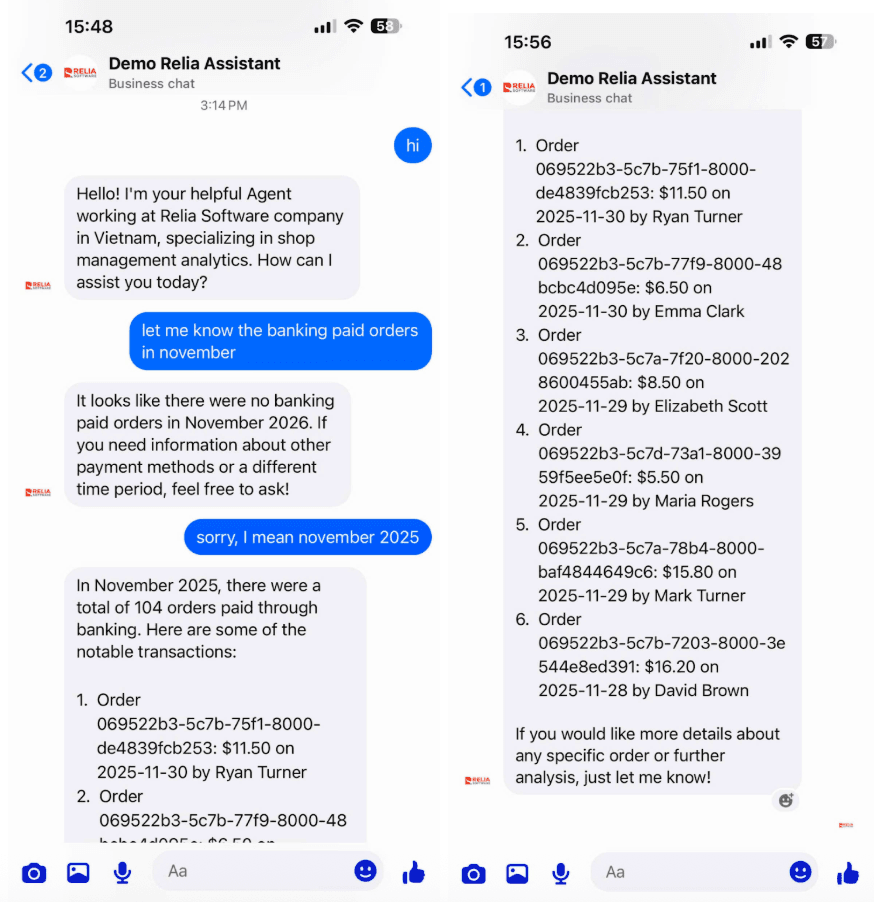
As shown in the screenshots, our assistant has been able to:
- Understand the user’s intention to get information about the revenue summary of a specific time period.
- Identify the correct time which is the month November of the current year (2026).
- Correct the time into November 2025 with the latest user feedback.
- Understand the responsibility of finding orders which were paid with method ‘banking’ and were placed during November 2025 although the latest user message does not contain the full information, he just corrected the time without specifying the task.
- Get the correct data from the database to reply to the user in a nice Markdown format.
Let’s go to the IDE to check what actually happened inside the code.
If you look at the console, you would see the logs showing what it processed after receiving the first request.
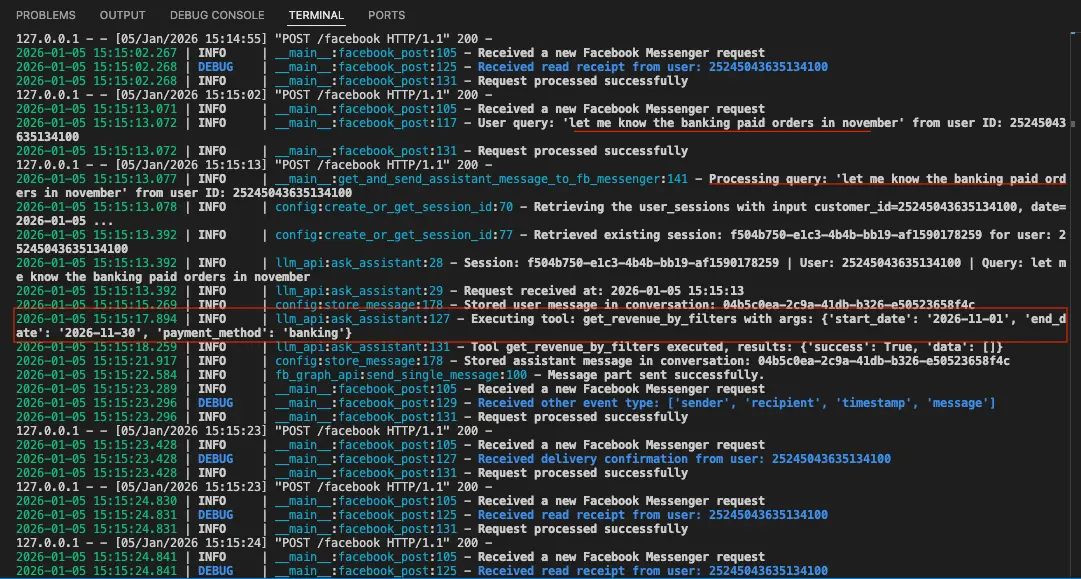
After receiving the user question “let me know the banking paid orders in November" it has started processing and identified that it needs an external tool to complete this answer which is get_revenue_by_filters, it has also extracted the parameters set {'start_date': '2026-11-01', 'end_date': '2026-11-30', 'payment_method': 'banking'}.
Tool execution returns empty results {'success': True, 'data': []}, which is understandable because November 2026 is in the future. Therefore, the user has feedback to correct the time. Let’s find what it processed after receiving the second request.
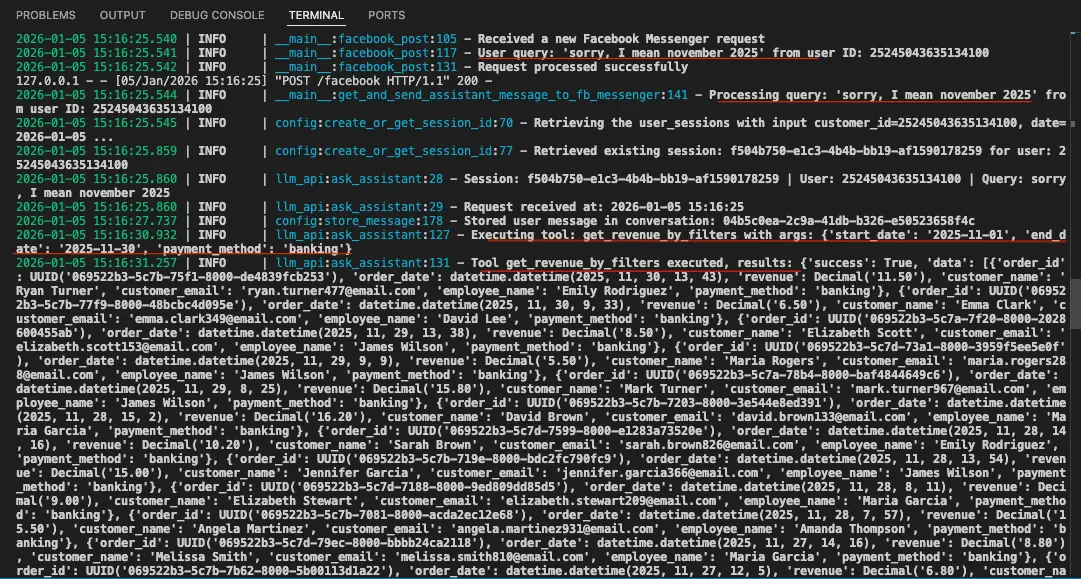
Okay here it is. Our LLM can understand the context and re-execute the tool again with the correct parameters of time.
In conclusion, we can say that this assistant has worked well and been able to handle the use case of Revenue analysis.
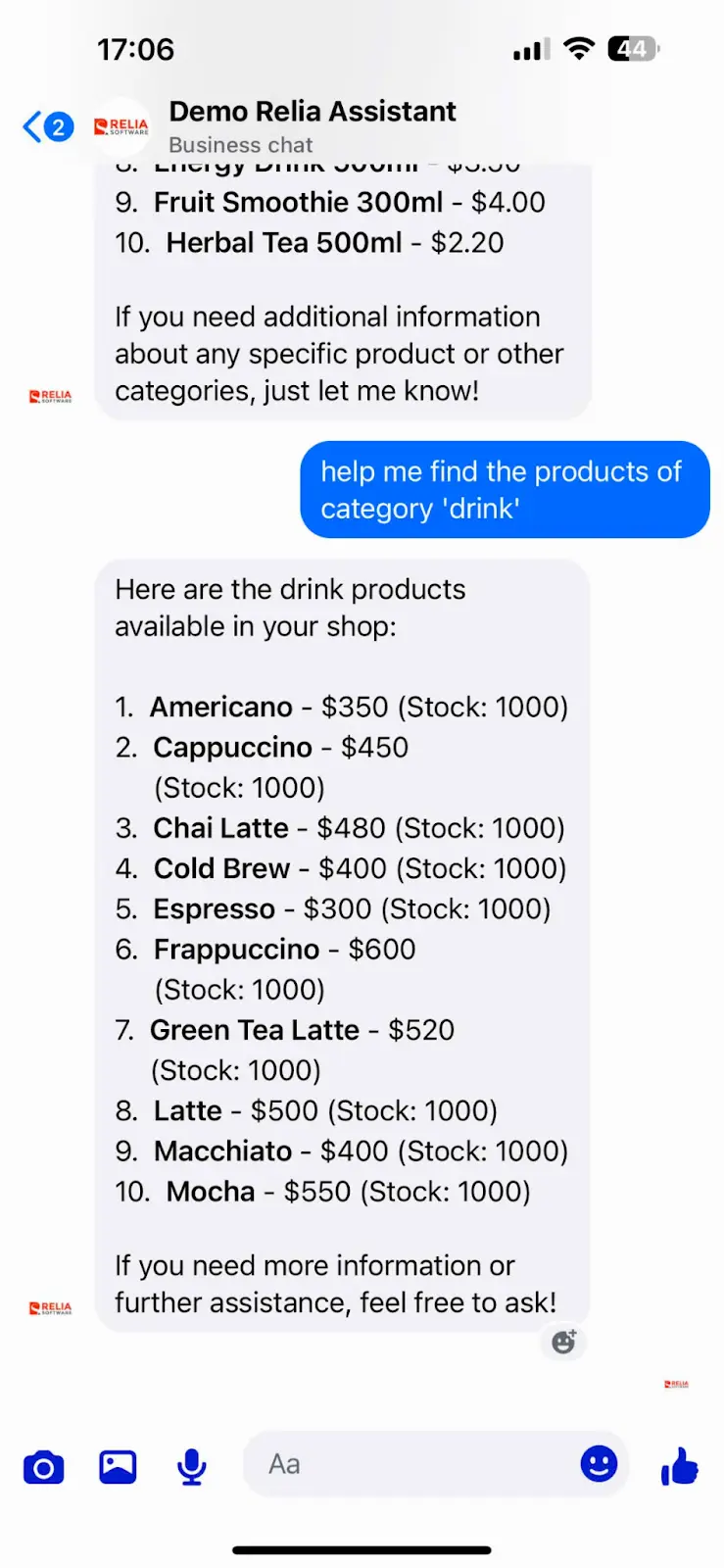
We can see it has responded with 10 drinks.
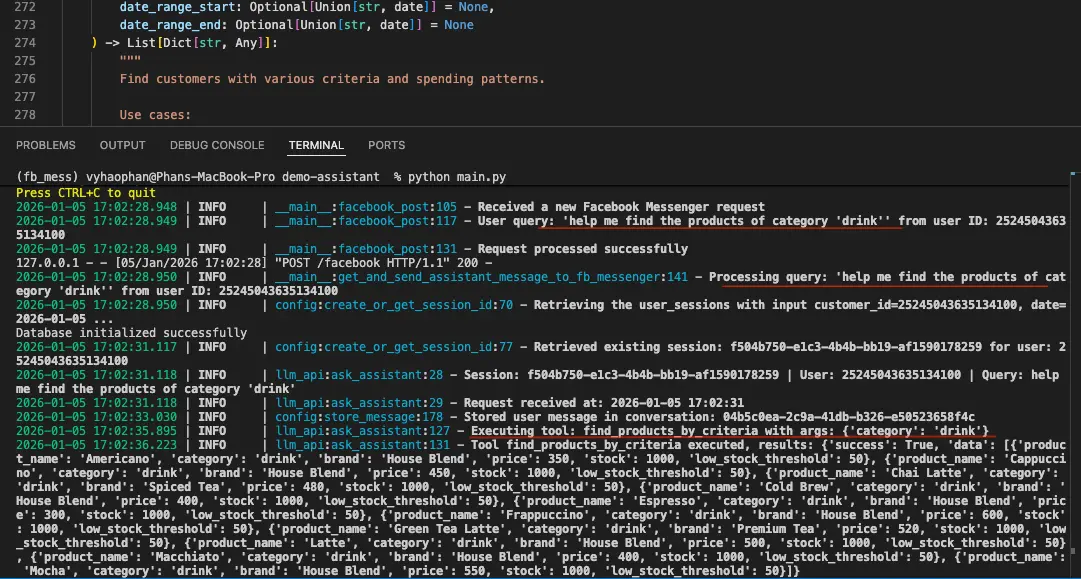
What the logs show to us has proved that the Assistant identified the correct tool and extracted the correct parameters from users.
You can also try to test the other tools and use cases of the assistant. If it has any unexpected responses, please review your LLM tools definition again and adjust the tools’ descriptions to help the LLM gain more knowledge in classifying and using the correct tools.
Conclusion
To sum up, we may want to look back on what we have learned so far from this blog.
- We have designed the whole database schema for our shop. Due to the scope of this blog, I did not walk you through every table, I hope you got the concept of database warehouse design and Galaxy Schema design principle.
- We have successfully set up a PostgreSQL database and migrated the app successfully from totally relying on Redis into using Supabase and Tortoise ORM.
- We have set up a RAG system with 7 tools used for the management of shops. Please note that I did not guide you on other use cases of the shop customers (such as customer services, auto-order, …). I hope these basic tools of management can help you build the base concepts of how to set up the system.

- coding
- development
- automation