


Businesses now invest heavily in AI chatbots, yet most teams still face the same three questions: how to build one, what it will cost, and whether to build in-house or hire a partner.
The global chatbot market reached about $9.6 billion in 2025 and is projected to grow to roughly $41.2 billion by 2033, with North America holding the largest share at 31.3%, according to Grand View Research. That growth brings more tools, models, and vendors to sort through, which makes clear planning harder, not easier.
This guide explains custom AI chatbot development from planning to launch. You will learn the main chatbot types, the features that matter, common industry use cases, the step-by-step build process, the platforms and tools involved, realistic cost drivers, and how to choose an approach that fits your goals.
What Is AI Chatbot Development?
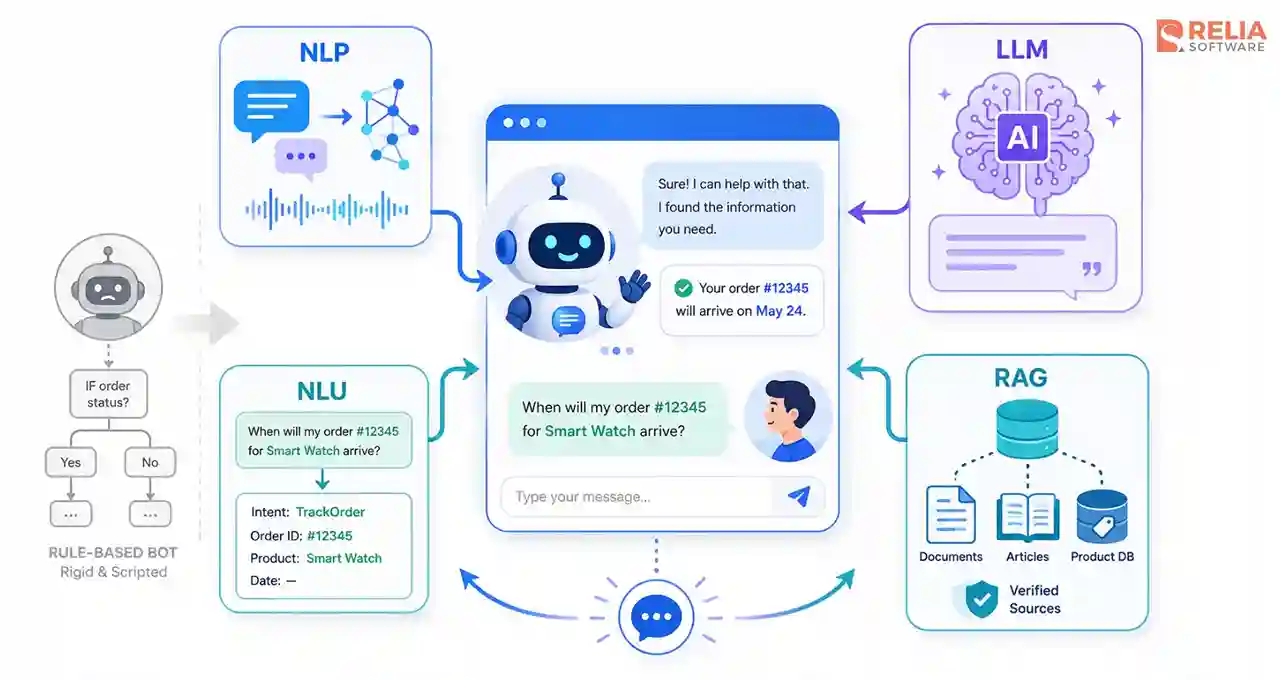
AI chatbot development is the process of designing, building, and maintaining software that holds automated conversations with people using artificial intelligence. Unlike rule-based chatbots that follow fixed scripts, an AI chatbot interprets what a user means, not just the exact words typed, and responds with relevant information or actions.
AI chatbot development pays off when your use case needs flexibility, natural conversation, and the ability to improve over time. This intelligence comes from a few core technologies:
- Natural language processing (NLP): Lets the chatbot read and interpret human language.
- Natural language understanding (NLU): A part of NLP that identifies the user's intent and pulls out key details called entities, such as a date, an order number, or a product name.
- Large language model (LLM): A type of AI trained on large amounts of text that generates human-like responses.
- Retrieval-augmented generation (RAG): Connects the LLM to your own content, such as articles or a product database, so the chatbot can answer from verified company information instead of guessing, which lowers the risk of wrong or invented answers.
Types of AI Chatbots
Retrieval-Based Chatbots
Retrieval-based chatbots use natural language understanding (NLU) to identify a user's intent, then reply with the best match from a set of approved answers. This approach keeps responses accurate because every reply comes from content you have reviewed. For example, a customer support bot can recognize "where is my order?" and "I need to track my delivery" as the same intent and return the same reviewed answer.
Generative Chatbots
Generative chatbots use a large language model (LLM) to produce original, human-like replies and handle varied, multi-turn questions. Many of the popular free AI chatbots, such as ChatGPT, Gemini, etc., people already use in day-to-day work this way. They offer the most natural conversation, though they need grounding in your data to stay accurate.
Hybrid Chatbots
Hybrid chatbots combine rule-based flows for common tasks with a large language model for harder questions. This blend gives you reliable answers for routine requests and flexibility when a conversation goes off the expected path. Many bank and telecom support bots work this way, using set flows to check a balance and a generative model to answer an open question.
Voice Chatbots
Voice chatbots use speech recognition to turn spoken words into text and text-to-speech to reply out loud. They let users interact hands-free, which suits situations where typing is slow or impractical. Familiar examples include Amazon Alexa, Google Assistant, and the automated voice systems that answer support calls.
Multimodal Chatbots
Multimodal chatbots understand more than text, including images, documents, and voice, and respond in the format that fits the request. They handle tasks a text-only bot cannot, such as reading an uploaded file or answering a question about a photo.
ChatGPT and Gemini started as text-only generative bots, but now have grown into multimodal systems in their newer versions. Their ability now expands to process images, documents, and audio alongside text, so a user can now upload an image or document and ask questions about the uploaded files.
Must-Have Features of an Effective AI Chatbot
- Intent recognition: The chatbot identifies what a user wants, even when the request is worded unexpectedly, and routes it to the right answer or action.
- Context and memory: The chatbot remembers earlier messages in the same conversation, so users do not have to repeat details like an order number.
- Knowledge grounding (RAG): The chatbot pulls answers from your verified content, such as FAQs, policies, or a product database, which keeps responses accurate.
- Human handoff: The chatbot passes the conversation to a live agent when confidence is low, or the issue is sensitive, and it shares the chat history so the customer does not start over.
- Omnichannel support: The chatbot works across your website, mobile app, and messaging platforms while keeping one consistent experience.
- Multilingual replies: The chatbot detects the user's language and responds in it, which matters for businesses that serve several regions.
- Analytics and reporting: The chatbot tracks metrics like resolution rate, escalation rate, and common questions, so teams can see what works and what needs fixing.
- Security and data protection: The chatbot encrypts data, controls access, and follows privacy rules such as GDPR when it handles personal information.
Not every chatbot needs all these features from the start. You should start with the ones your main use case depends on, then add the other features as usage grows.
Step-by-Step AI Chatbot Development Process
Building an AI chatbot follows a clear sequence, from defining the problem to maintaining the chatbot after launch. Each step below shapes the decisions in the next one, so working in order prevents costly rework.
Step 1: Define the Use Case and Success Metrics
Start by deciding what the chatbot should do and who will use it in your workflow process. Pick two or three high-volume, repetitive tasks that cost your team time, such as order tracking or password resets, because these deliver the clearest return. Set measurable targets, so you can judge the bot against real numbers later. Common targets include:
- Containment rate: The share of conversations the bot resolves without a human.
- Escalation rate: How often the bot hands off to a live agent.
- Customer satisfaction (CSAT): How users rate the help they received.
Step 2: Choose the Architecture and Model
Choose the architecture based on how varied your conversations are, then pick the model that powers it. Start with the use cases and tasks you identified in Step 1:
- Predictable, narrow tasks → Point to a rule-based or retrieval approach.
- Varied, open-ended questions → Call for a generative approach with RAG.
- A mix of routine and complex questions → Suit a hybrid architecture that handles both.
Once the architecture is set, weigh a few factors before you commit:
- Conversation variety: The more ways users phrase a request, the stronger the case for a generative model over fixed rules.
- Accuracy needs: High-stakes answers, such as billing or medical information, need retrieval or RAG so replies come from verified content.
- Data sensitivity: A hosted model API is faster to start, while a self-hosted model gives more control over where data lives.
- Cost and speed: Larger models cost more per request and can respond more slowly, so match the model to the complexity your use case actually needs.
If you choose a generative approach, test the top two models against your real questions before deciding. Keep the design model-agnostic so you can switch models as prices and capabilities change.
Step 3: Prepare Data and Connect a Knowledge Base
An AI chatbot is only as accurate as the data it can reach, so gather and clean that data before training. Three types of data matter most:
- Knowledge sources: Informative articles, product documents, policies, and manuals that the bot answers from through retrieval-augmented generation.
- Business data: Live records such as orders, accounts, and inventory, reached through APIs to your CRM, ERP, or database.
- Conversational data: Past chat logs and support tickets, used to define user intents and entities and to build test cases.
Prepare this data carefully by removing duplicates, keeping it updated, and splitting long documents into smaller chunks for retrieval. Convert the chunks into embeddings and store them in a vector database so the bot can find the right passage fast. Remove any sensitive information the bot should not expose, since good data governance prevents privacy problems later.
Step 4: Design the Conversation Flow
Map how a conversation moves from the first message to a resolved request. Strong conversation design keeps interactions short and prevents the dead ends that push users away. Focus on these elements:
- Intent mapping: Match each user goal to a clear response path.
- Slot filling: Collect the details the bot needs, such as an order number, before it acts.
- Persona and tone: Set a system prompt that defines how a generative bot speaks and what it avoids.
- Fallbacks: Plan polite recovery replies for when the bot does not understand.
- Confidence thresholds: Set a minimum score below which the bot asks the user to rephrase or escalates.
- Human handoff: Pass the full conversation history to a live agent so the customer does not repeat themselves.
- Guardrails: Restrict the topics and actions the bot can take to keep replies safe and on-brand.
Step 5: Build and Integrate the Chatbot
You should develop the chatbot and integrate it with your business systems at the same time, since both usually happen in the same codebase.
This development step includes building the backend, connecting the AI model through an orchestration layer, setting up the RAG pipeline, and creating the chat interface or widget. Moreover, try to use version control, protect API keys, and keep development and production environments separate.
This development step includes building the backend, connecting the AI model through an orchestration layer, setting up the RAG pipeline, and creating the chat interface or widget. The exact stack depends on your target platform — for a cross-platform mobile app, for example, one approach is to build an AI chatbot with Flutter and the Gemini API. Whatever the stack, use version control, protect API keys, and keep development and production environments separate.
Integration gives the chatbot access to the data and tools it needs to answer questions and perform tasks. For example, a support chatbot may connect to your helpdesk and order database, while a sales chatbot may connect to your payment or CRM system. Common integrations include:
- CRM and ERP systems: For customer records, orders, and account data.
- Helpdesk and ticketing tools: For escalation and case history.
- Authentication services: For verifying a user's identity before sharing private data.
Each integration needs secure authentication, clear error handling, and correct data mapping, so a failed API call does not break the conversation.
>> Read more:
- How To Build a Node.js Chatbot Backend?
- Build A Production-Ready React AI Chatbot with Streaming, RAG, & More
- How to Build A Flutter Chatbot UI with Google's Gemini API?
Step 6: Test the Chatbot
Test the chatbot across several dimensions before real users reach it, because one broken flow erodes trust quickly. Run each of these tests:
- Conversational testing: Confirm the bot recognizes intents and entities and follows the right paths.
- Integration testing: Confirm the connected systems return the correct data.
- Load testing: Confirm the bot stays responsive under heavy traffic.
- Security testing: Confirm the bot protects data and resists misuse.
- User acceptance testing: Let a small group of real users try the bot and surface confusion that internal tests miss.
Build an evaluation set of expected questions and answers, and set pass criteria the bot must meet before launch.
>> Read more:
- Top 15 Best Usability Testing Tools For Businesses
- Top 7 Web App Security Testing Tools For Developers
Step 7: Deploy the Chatbot
In this step, you should release the chatbot in stages rather than all at once, so a problem reaches few users before you catch it. Move the bot from a staging environment to production, then roll it out gradually instead of opening it to everyone on day one. A controlled launch covers several tasks:
- Phased rollout: Start with a small audience or a single channel, then widen access as the bot proves stable. A beta group or a percentage-based release limits the impact of any issue.
- Channel deployment: Publish the bot to each channel it will run on, such as your website, mobile app, and messaging platforms. Some platforms, like WhatsApp or Messenger, require their own review and approval before going live.
- Launch configuration: Turn on the guardrails, rate limits, and fallback responses designed earlier, and confirm they work under real traffic.
- Handoff verification: Test that the escalation path to live agents works in production, so users are not stuck when the bot reaches its limit.
- Monitoring setup: Put logging, conversation transcripts, and alerts in place before launch, so you can see failures as they happen. The right monitoring tools track live conversations and flag errors the moment they appear.
Configure the hosting infrastructure to scale with demand, and prepare a rollback plan so you can revert quickly if a serious issue appears. A phased rollout also gives you real-world data to refine the bot before the full launch.
Step 8: Monitor and Maintain the Chatbot
After launch, track the success metrics you set from Step 1 and review conversations where the bot failed or escalated. Maintenance work includes:
- Retraining: Correct wrong answers and feed them back so the bot improves.
- Knowledge updates: Refresh the content the bot relies on as products and policies change.
- Drift monitoring: Watch for drops in accuracy as user behavior or the underlying model shifts.
- Cost management: Track model usage so response costs stay predictable.
Popular AI Chatbot Use Cases for Business
AI chatbots solve different problems in different industries, from answering patient questions to tracking shipments. The use cases below show how each sector puts chatbots to work.
- Customer support: Chatbots will answer common questions, check order or account status, and pass complex issues to a human agent. This setup handles high volumes without adding staff.
- E-commerce and retail: Chatbots should be able to recommend products, answer stock and delivery questions, and help with returns. These bots also follow up on abandoned carts to recover sales.
- Banking and fintech: Chatbots can share account balances, flag unusual transactions, and guide users through tasks like card activation. Clear, secure answers are the most important factors in this sector.
- Healthcare: Chatbots are able to book appointments, send medication reminders, and answer basic questions before a visit. Human review stays important for anything close to medical advice.
- Logistics and manufacturing: Chatbots track shipments, share delivery updates, and give technicians step-by-step troubleshooting. These bots keep teams informed without manual lookups.
- Internal operations and HR: Chatbots answer employee questions about policies, IT issues, and leave requests, lowering the load on support teams for repetitive tasks.
These use cases share a pattern: the chatbot handles routine, high-volume requests, and people step in for the rest. Once you know where a chatbot fits in your business, you will need to explore how an AI chatbot is developed in steps.
>> Read more:
- Pros and Cons of AI in Healthcare with Detailed Explanation
- Common AI Use Cases in Modern EHR Software For Businesses
- AI in ERP Software: Use Cases, Benefits, and Challenges
AI Chatbot Development Frameworks & Tools
|
Layers |
Example tools |
What it does |
|
Rasa, Botpress |
Runs the core bot logic, intents, and dialogue management | |
|
Large language models (APIs) |
OpenAI GPT, Google Gemini, Anthropic Claude; Llama or Mistral for self-hosting |
Generates natural, flexible replies for open-ended questions |
|
Embedding models |
OpenAI text-embedding-3, Cohere Embed, open-source BGE or E5 |
Turn text into vectors so the bot can match a question to the right content |
|
Orchestration and RAG |
LangChain, LlamaIndex, Haystack; LangGraph for agent workflows |
Connect the model to your data and manage retrieval |
|
Vector databases |
Pinecone, Weaviate, Qdrant, Chroma, or pgvector; PostgreSQL or MongoDB for records |
Store knowledge for RAG and keep conversation and user data |
|
Evaluation and monitoring |
LangSmith, Langfuse, Ragas |
Track answer quality, catch errors, and measure accuracy after launch |
>> Read more: Top 5 React AI Chatbot Templates You Should Know
Custom AI Chatbot Development Cost
Cost by Chatbot Type
|
Chatbot type |
Typical build cost |
Best for |
|
Rule-based/simple chatbot |
$5,000 – $15,000 |
Fixed FAQs and predictable, scripted tasks |
|
AI-powered (NLU + RAG) |
$15,000 – $50,000 |
Natural answers grounded in your own content |
|
Generative/enterprise agent |
$50,000+ |
Complex, multi-step tasks and autonomous actions |
Cost by Engagement Model
|
Engagement model |
How you pay |
Typical cost |
Best for |
|
Freelancer |
Hourly or per project |
$30 – $300 |
Small, well-defined builds |
|
Monthly per engineer |
$2,500 – $8,000 |
Ongoing, complex custom builds | |
|
One project fee |
$10,000 – $50,000+ |
A defined scope with a clear deliverable | |
|
In-house team |
Salaries + overhead |
$100,000 – $200,000 per year |
Long-term ownership, if AI skills exist in-house |
Which engagement model fits depends on your scope, budget, and in-house skills. A cheaper partner that lacks chatbot experience or skips proper testing often costs more to fix later. Therefore, you should be aware of what to look for in an outsourced development company before you choose.
>> Read more: Top 10 Best IT Outsourcing Companies in Vietnam
Cost by Region
|
Region |
Hourly rate (per AI engineer) |
|
North America |
$95 – $200 |
|
Western Europe |
$45 – $90 |
|
Eastern Europe |
$30 – $80 |
|
Latin America |
$30 – $65 |
|
Asia (incl. Vietnam, India) |
$15 – $50 |
Vietnam and other Southeast Asian countries remain among the most affordable options, which makes the region attractive for companies that want to control chatbot development costs while still accessing experienced engineers.
How Does Relia Software Build AI Chatbots End-to-End?
Relia Software handles the full chatbot lifecycle, not just the coding. That covers use-case planning, conversation and UI/UX design, architecture and model selection, development and integration, testing, launch, and long-term support. Working with one team across all of them keeps the bot consistent and easier to improve after launch.
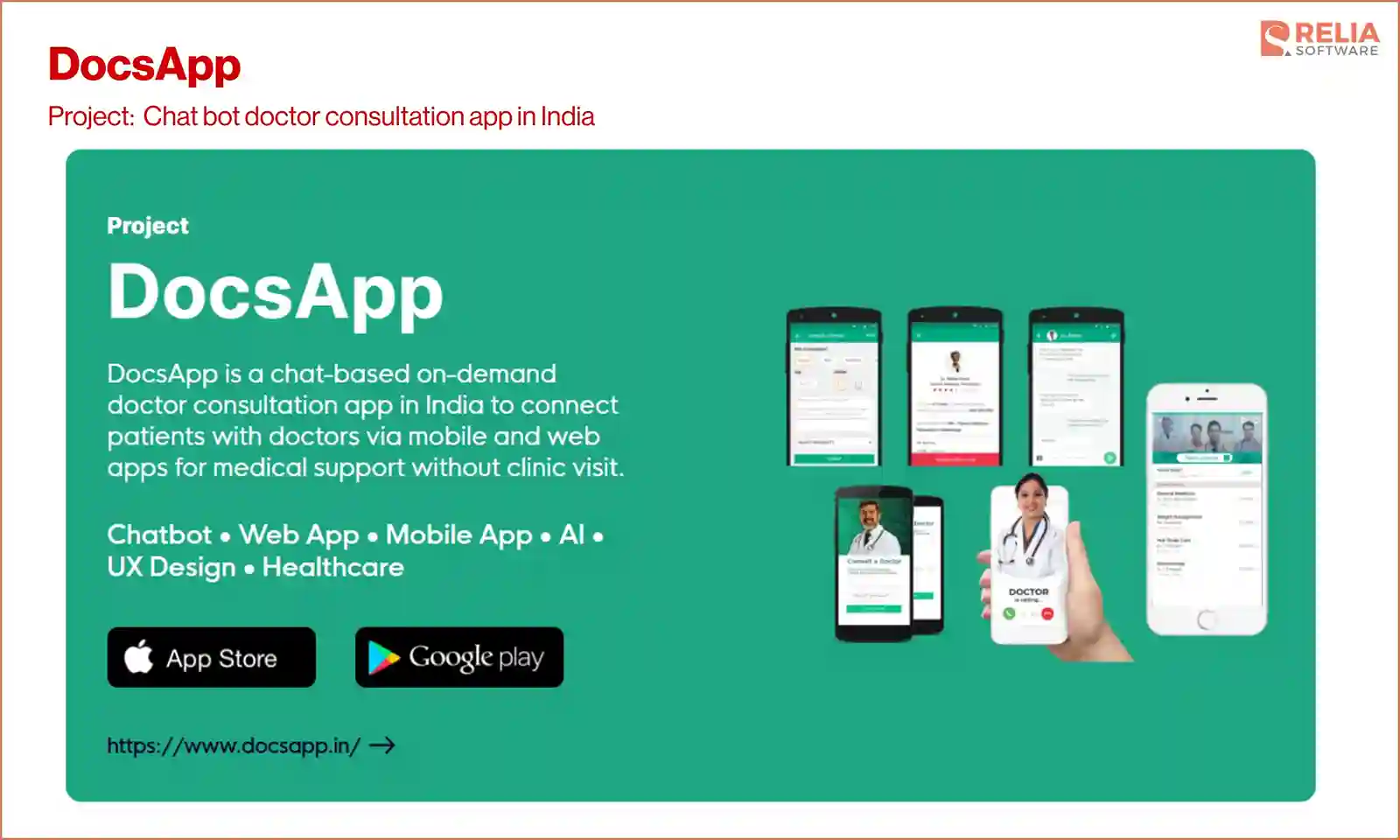
One example is DocsApp, a chat-based doctor consultation platform in India. Relia team built the chat-based consultation flow and an AI system that matches each patient to the right doctor, then delivered the native iOS and Android apps and the web platform around it. DocsApp grew into a fast-growing telemedicine platform, reaching more than 1 million users, helping around 5,000 patients daily, and raising $30 million in funding.
Whether you need a support bot, an internal assistant, or a customer-facing AI agent, we will always start with the problem, ground the bot in your data, and build for security and maintenance from the start. As a result, you get a chatbot grounded in your own data, connected to your systems, and built to stay accurate as your business grows.
FAQ
1. How long does it take to develop an AI chatbot?
Most AI chatbots take 4 weeks to 6 months to build, depending on complexity. A simple FAQ bot can launch in 4 to 6 weeks, a business chatbot with CRM integration and analytics usually takes 8 to 16 weeks, and enterprise builds with multiple integrations and compliance run to several months.
2. Which large language model should I use?
No single model is best for every case. Compare models on answer accuracy, response speed, cost per request, and data privacy, then test the top two against your real questions. Keep your design model-agnostic so you can switch as prices and capabilities change.
3. How do I stop an AI chatbot from giving wrong answers?
Ground the chatbot in your own verified content using retrieval-augmented generation, so it answers from real sources instead of guessing. Add confidence thresholds that trigger a fallback or a human handoff when the bot is unsure. Test with a fixed set of questions and re-run it after every change to catch accuracy drops.
4. Is my data safe with an AI chatbot?
Data safety depends on how the chatbot is built, not the technology itself. A well-built bot encrypts data, limits what it can access, and follows privacy rules such as GDPR. For sensitive data in healthcare or finance, a self-hosted model gives you more control over where that data lives.
>> Read more: A Comprehensive Guide to AI-Assisted Software Development
Conclusion
AI chatbot development works best when you have a clear development process in mind. Start with the specific problem you want the chatbot to solve. Once that is clear, it becomes much easier to decide on the right features, architecture, tools, and budget. Ground the chatbot in your own qualified data to improve accuracy, and plan for ongoing model costs, hosting, maintenance, and updates after launch.
The right development approach also depends on your scope, budget, and internal skills. You can use an off-the-shelf chatbot platform, build with an in-house team, or work with a development partner. If you need a qualified custom AI chatbot partner, Relia Software can help you scope the work and estimate it for your use case.
>>> Follow and Contact Relia Software for more information!

- development