


The manufacturing software market continues to grow from $411 billion in 2025 to $1.06 trillion by 2033, according to Grand View Research. However, Panorama Consulting reported that 73% of manufacturing ERP projects fall short, with average cost overruns of 215% (2026). All the failures can stem from the first important decision: whether to buy off-the-shelf software or build a custom system.
Off-the-shelf platforms deploy quickly, but they are built for thousands of companies. CyberCraft reports that 85%–90% of features often go unused because they are incompatible with the firm’s current workflow. That said, custom manufacturing software is built around how your factory processes, from scheduling and production lines to machine integration, making it a better fit for specialized operations.
This guide explains what custom manufacturing software development involves, including the main types of systems, the step-by-step development process, what projects cost, and how to choose a qualified and reliable development partner. Hope that you can make a good decision after reading this article for your project!
What Is Manufacturing Software Development?
Manufacturing software development is the process of designing, building, and maintaining software that runs and connects factory operations. These operations often include production scheduling, inventory control, procurement, quality management, and equipment monitoring.
Types of Manufacturing Software
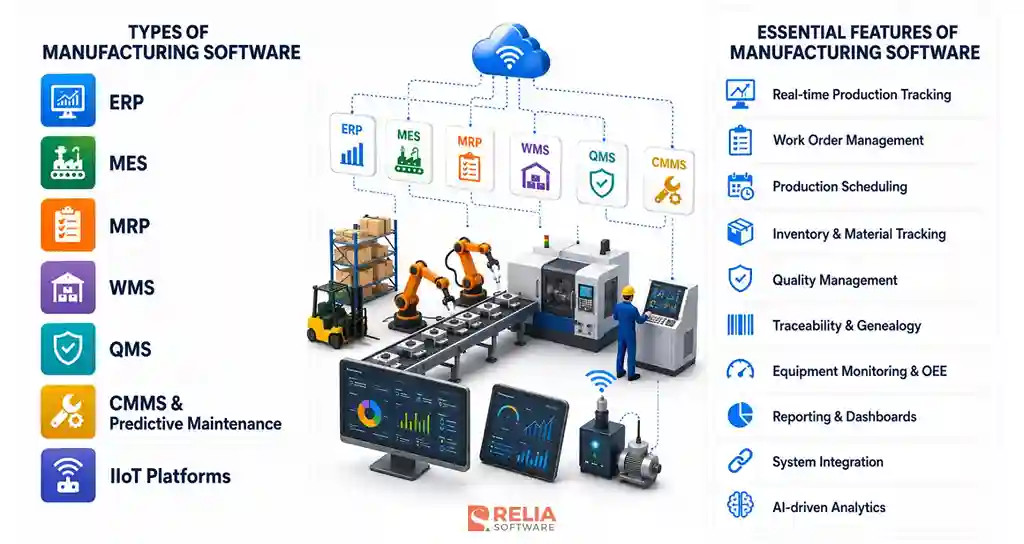
- ERP (Enterprise Resource Planning): Manages business-wide functions such as finance, procurement, inventory, and orders in one system, giving each department a shared view of operations.
- MES (Manufacturing Execution System): Tracks production on the shop floor in real time, recording work orders, machine output, and job status as each step happens.
- MRP (Material Requirements Planning): Calculates what materials to buy and when, based on production schedules and current stock, to prevent shortages and overbuying.
- WMS (Warehouse Management System): Controls storage, picking, and movement of materials and finished goods, reducing handling errors and lost inventory.
- QMS (Quality Management System): Records inspections, defects, and compliance data, helping teams catch quality problems early and meet industry standards.
- CMMS and predictive maintenance: Schedule equipment maintenance and use machine data, increasingly with AI and machine learning models, to flag failures before they cause unplanned downtime.
- IIoT platforms (Industrial Internet of Things): Collect data from connected sensors and machines, then feed it to the systems above for monitoring and analysis.
Essential Features of a Manufacturing Software
Manufacturing software varies by system type, but a few features appear in almost every effective build. These are the functions that turn raw machine data and order data into decisions a plant can act on.
- Real-time production tracking: Shows the status of every work order and machine as it happens, so managers can spot bottlenecks and delays without waiting for end-of-shift reports.
- Work order management: Creates, assigns, and tracks work orders across the full production cycle, giving each job a clear owner and status.
- Production scheduling: Builds realistic schedules from order priority, material availability, machine capacity, and labor, then adjusts when conditions change.
- Inventory and material tracking: Records stock levels and material movement in real time, often with barcode or RFID scanning, to prevent shortages and overbuying.
- Quality management: Captures inspections and defects during production and flags deviations early, which supports corrective action and compliance.
- Traceability and genealogy: Records the full history of each product, including its materials, equipment, and operators, which regulated industries need for audits and recalls.
- Equipment monitoring and OEE: Tracks machine performance and calculates OEE (overall equipment effectiveness), a standard measure of availability, output, and quality.
- Reporting and dashboards: Turns production data into clear views and KPI reports, so decision-makers see performance without pulling data by hand.
- System integration: Connects the software to ERP, machines, and other systems, so data flows automatically instead of being re-entered.
- AI-driven analytics: Applies machine learning to production and equipment data to forecast demand, predict failures, and surface patterns a manual review would miss.
The value of these features comes from how well they work together. Real-time tracking feeds scheduling, quality data links to traceability, and integration ties all of it to the wider business. A custom build has an advantage here, because the features can be shaped to a specific factory's workflows rather than forcing the plant to adapt to a fixed product.
Step-by-Step Manufacturing Software Development Guide
Manufacturing software development runs through seven stages, from mapping the factory to supporting the software after launch. The two stages that decide whether a project succeeds are architecture and integration, because manufacturing software has to join business systems to physical machines that were never designed to share data.
Step 1: Discovery and Requirements
First of all, the team needs to map how the factory runs today and audit what already exists in the manufacturing process. This audit usually covers:
- Control systems: the PLCs (programmable logic controllers) driving the machines and the SCADA (supervisory control and data acquisition) system monitoring them.
- Business systems: the ERP, and any MES or quality software already in use.
- Data formats: how each system stores and exposes data, since mismatched formats drive most integration work later.
The team also needs to interview operators and planners, then sets target metrics such as OEE (overall equipment effectiveness), scrap rate, and unplanned downtime. The output is a requirements spec, a system inventory, and an integration map that the later stages depend on.
Step 2: Architecture and Technology Decisions
This stage defines how the software is structured from the machine up to the enterprise, and which technology runs each layer. Manufacturing software is usually built in layers, following reference models like ISA-95, so data flows from the shop floor upward while control stays close to the equipment.
|
Layer |
What it does |
Common tech stack |
|
Edge / device (OT) |
Collects and pre-processes data at the machine |
OPC UA, MQTT, Modbus; MQTT brokers (EMQX, Mosquitto); edge gateways; Node-RED |
|
Ingestion/streaming |
Moves high-frequency machine data reliably |
Apache Kafka, RabbitMQ; Azure IoT Hub, AWS IoT Core |
|
Data storage |
Stores live and historical data |
Time-series DBs (InfluxDB, TimescaleDB); PostgreSQL or SQL Server; historians (AVEVA PI); Snowflake or BigQuery for analytics |
|
Application/business logic |
Runs work orders, scheduling, and quality rules |
.NET (C#), Java/Spring Boot, Node.js, Go, Python; microservices with REST or gRPC APIs |
|
Analytics/intelligence |
Predictive maintenance, digital twins, reporting |
Python (scikit-learn, TensorFlow); ML for forecasting |
|
Presentation |
Operator screens and management dashboards |
React, Angular, or Vue; Flutter or React Native for tablets; Grafana |
Step 3: Development Stage
In this stage, engineers build the services defined in the architecture. However, the development process and constraints of a manufacturing system slightly differ from ordinary software.
In general software, the core logic, features, and interfaces are built first, then data and other systems are integrated later. However, in manufacturing software development, the development team usually builds the data and integration layer first, because every other part depends on machine data flowing correctly. Business logic and operator interfaces come next.
Three constraints shape the work:
- Real-time throughput: Services that handle machine data must process a high volume of readings without blocking, so the team designs them to stream rather than batch.
- Offline resilience: Shop-floor networks drop often. Edge components must buffer data locally and sync when the connection returns, so no production data is lost.
- Standards reuse: Building against OPC UA information models and ISA-95 data contexts keeps the software compatible with equipment from different vendors.
The team works under version control, code review, and a CI (continuous integration) pipeline, developing against a staging environment that mirrors plant data without touching live production.
>> Read more:
- Top 10 Automated Code Review Tools For Developers
- 5 Best Practices for Enhancing CI/CD Pipeline Security
Step 4: OT/IT Integration
OT/IT integration connects factory machines and sensors with business software such as ERP software, databases, and cloud applications. The challenge is that factory equipment may run for decades using industrial protocols, while IT systems and APIs change much more frequently.
Bridging the two takes several moving parts:
- Protocol translation: OPC UA acts as a common language for modern machines. Older equipment needs adapters for Modbus, MTConnect, or EtherNet/IP.
- Data normalization: Machines from different vendors report the same value in different ways. The team maps every source to one consistent model, so downstream systems read clean, comparable data.
- Data contextualization: A raw sensor reading means little on its own. The team tags it with context, including which machine, which work order, which product, following ISA-95, so the number becomes usable.
- A message broker: MQTT or Kafka carries the data stream and decouples the machines producing data from the systems consuming it.
- ERP and MES connectors: These push and pull business data through APIs or middleware, or through direct database integration when a legacy ERP has no API.
- Legacy machine access: Equipment with no connectivity gets retrofit sensors, a gateway, or a read from an existing historian that already logs its output.
After that, the team tests each integration point in isolation before connecting it to live equipment, because a mistake against a running machine is far more costly than a bug in software.
Step 5: Testing
Testing checks whether the software works reliably under real production conditions without putting the live production line at risk. Because stopping equipment is costly and testing directly on machines can cause disruption or damage, manufacturing teams usually use several safer methods:
- Emulators, simulators, and digital twins: Recreate machine or production-line behavior so teams can test workflows, faults, and edge cases safely.
- Integration testing: Verifies connections between machines, sensors, PLCs, and software, including how the system responds to device failures, lost signals, or network outages.
- Performance testing: Confirms the system can process production-level sensor and machine data without delays.
- Security testing: Checks OT/IT connections for vulnerabilities before the system goes live.
In regulated industries such as pharmaceuticals, food manufacturing, and aerospace, testing may also require formal validation such as IQ/OQ/PQ, which are installation, operational, and performance qualification, with documented results and audit trails for compliance reviews.
>> Read more:
- 7 Leading Performance Testing Tools for Developers
- Top 7 Web App Security Testing Tools For Developers
Step 6: Deployment
The deployment step moves the software into production while minimizing disruption to factory operations. Rather than rolling it out across the entire plant at once, teams usually use a controlled approach:
- Pilot and phased rollout: Launch on one production line or site first, verify performance, then expand gradually.
- Parallel run: Run the new and old systems together so teams can compare results before switching fully.
- Shadow mode: Let the new system process live data without controlling equipment, so its accuracy can be verified safely.
Deployments are often scheduled during planned maintenance or shutdown windows. Edge software is installed on shop-floor gateways, while containerized services can be released through CI/CD pipelines with a rollback plan in place.
Operator readiness is also important. Clear procedures, training, and on-site support during the first shifts help ensure the system is used correctly after launch.
Step 7: Maintenance and Iteration
After launch, the team monitors system performance, fixes issues, and updates the software as production needs change. Monitoring tools such as Grafana and Prometheus can track uptime, errors, and performance so problems are detected early. A pilot on one production line helps confirm that the architecture and integrations work under real conditions before the software is rolled out across the entire plant.
How Much Does Manufacturing Software Development Cost?
Cost by Software Type
|
System Type |
Cost Range |
Timeline |
|
Single-function module (MRP, WMS, or QMS) |
$5,000–$20,000 |
1–3 months |
|
Predictive maintenance or IIoT platform |
$15,000–$60,000 |
3–6 months |
|
MES–ERP integration |
$13,000–$75,000 |
3–6 months |
|
MES (shop-floor execution) |
$30,000–$75,000 |
4–8 months |
|
Custom manufacturing ERP (phased core) |
$40,000–$185,000 |
6–12 months |
|
Full multi-site ERP or MES platform |
$200,000–$300,000+ |
12+ months |
Cost by Engagement Models
|
Engagement Model |
Cost Range |
Best for |
|
$13,000–$75,000+ per project |
Defined scope, stable requirements | |
|
$2,880–$6,400 per developer, per month |
Long or evolving products | |
|
$15–$50 per hour |
Shifting or unclear requirements |
Challenges of Developing Manufacturing Software
Connecting legacy equipment and keeping data clean
Older machines often use different protocols or have no API, which can produce inconsistent data across systems.
Solution: Use protocol adapters, gateways, or OPC UA to connect equipment, then normalize all data into a common model. Standards such as ISA-95 and input validation help keep the data consistent before it reaches other systems.
Meeting real-time performance and reliability demands
Factory software must process large volumes of sensor data quickly and keep working even when network connections fail.
Solution: Stream data instead of processing it in batches, and buffer data at the edge during outages. Test the system at full production load before launch to confirm it can handle real operating conditions.
Securing the OT/IT boundary
Connecting factory equipment to business systems creates more security risks, and an OT breach can stop production.
Solution: Build security into the architecture from the start. Separate OT and IT networks, control access with identity management, and test every new connection for vulnerabilities.
Testing and deploying without disrupting production
Factories cannot stop live production just to test or release new software.
Solution: Use digital twins and simulators for testing, then roll out gradually with a pilot, shadow or parallel run, maintenance-window deployment, and a rollback plan.
Driving operator adoption
Even good software can fail if operators find it difficult to use or it does not fit their daily workflow.
Solution: Involve operators early, keep the interface simple, and provide training and on-site support during the first shifts after launch.
Overall, these challenges are common in manufacturing software projects and can be managed with the right architecture, phased rollout, and experienced development team.
How to Choose a Manufacturing Software Development Company?
Choosing a manufacturing software development company comes down to a few practical checks, not brand claims. The right partner should understand both software engineering and how a factory actually runs, because a team that has never worked with shop-floor systems will underestimate the integration work that decides the project.
Weigh a potential partner against these criteria:
- Manufacturing domain experience: Ask for projects delivered in real production environments, not general software work. A team that has connected machines and ERP systems before will spot risks early.
- Systems integration skill: Confirm the team has joined ERP, MES, or machine data on past projects, since integration is where most manufacturing builds get difficult.
- Security and compliance practice: Check how the team separates OT and IT networks and handles any standards your industry requires, such as ISO or FDA validation.
- Clear IP ownership: The contract should assign full ownership of the source code and data to you from day one, which prevents lock-in to one vendor.
- A fitting team model: Decide whether you need a fixed-scope build, ongoing capacity, or a dedicated team, then confirm the company offers it.
- Direct access to engineers: Make sure you can reach the architects making technical decisions, not only account managers.
For offshore software development partners, you should also consider time-zone overlap and team stability. Time-zone overlap affects how fast issues get resolved, so ask how the team handles daily communication. Attrition also affects long projects, because every developer who leaves adds re-ramp time, so ask about team stability before signing.
>> Read more: 9 Leading Logistics Software Development Companies in Vietnam
Relia Case: Shareconomy Manufacturing Capacity Sharing Platform
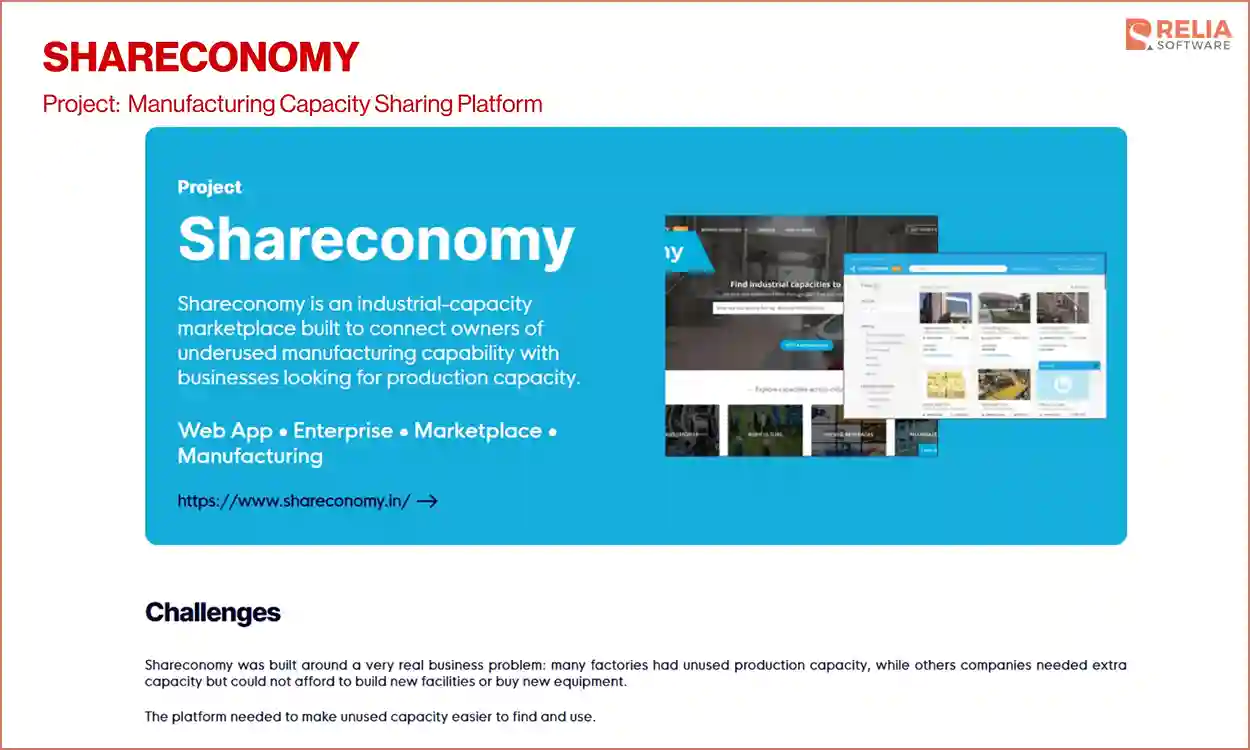
Shareconomy is a platform that helps factories rent out unused machines and floor space to other manufacturers. Relia's team handled full-stack development, from UI/UX design, backend development, and admin tools, using Ruby on Rails. More than 500 factories across India now use the platform, and many have improved their capacity by 20% to 30%.
Shareconomy project involved the parts that decide whether manufacturing software works in practice:
- A simple interface for non-technical users to stay clear under real daily use.
- Reliable backend logic to make information stay accurate across many factories at once, which puts the load on clean data handling.
- Admin tooling controls for the operator to manage users, resolve disputes, and monitor activity.
Once launched, the platform worked smoothly under real-world demand. Hundreds of factories could manage listings, availability, and bookings at the same time, while managers used the system every day without technical support. Relia Software made this by focusing on what factory users actually needed instead of adding unnecessary features. The team’s objective is to build a practical product that is easy to work with.
FAQs
1. What is the difference between MES and ERP in manufacturing?
The key difference between MES and ERP in manufacturing is that MES tracks what is happening on the line, while ERP tracks what the business needs. An MES (manufacturing execution system) runs the shop floor, tracking work orders and machine output in real time. An ERP (enterprise resource planning) system manages the business side, such as finance, procurement, and inventory.
2. What programming languages are used for manufacturing software?
It depends on the layer. Backends often use C# (.NET), Java, Node.js, or Python. Interfaces use React, Angular, or Vue. Python is common for the analytics layer. The machine layer depends on protocols like OPC UA and MQTT, not a specific language.
>> Read more:
- 12 Frontend Technologies and 8 Development Trends
- Backend Technologies: Languages, Frameworks & Databases
3. What standards or compliance apply to manufacturing software?
It depends on the industry. ISO 9001 covers quality, ISA-95 guides system integration, and IEC 62443 covers industrial cybersecurity. Regulated sectors add more, such as FDA 21 CFR Part 11 for pharma and IATF 16949 for automotive. These projects usually require formal validation (IQ, OQ, PQ).
4. How do you measure ROI on a manufacturing software project?
Compare key metrics before and after launch. Common ones are OEE, unplanned downtime, scrap rate, and inventory cost. Most returns come from less downtime and fewer manual errors. Set the baseline during discovery so the gains are measurable later.
>> Read more: What Is Digital Transformation in Manufacturing?
Conclusion
Manufacturing software development works best when it starts with the factory's real processes, not a generic template. The systems that return the most value depend on careful discovery, honest cost planning, and a team that understands both engineering and production.
The practical next step for any manufacturer weighing a build is a short discovery phase. Mapping current systems, defining scope, and running a paid pilot on one line turns a broad estimate into a plan the business can act on, and it tests a development partner before any large commitment.
>>> Follow and Contact Relia Software for more information!

- Web application Development
- development