


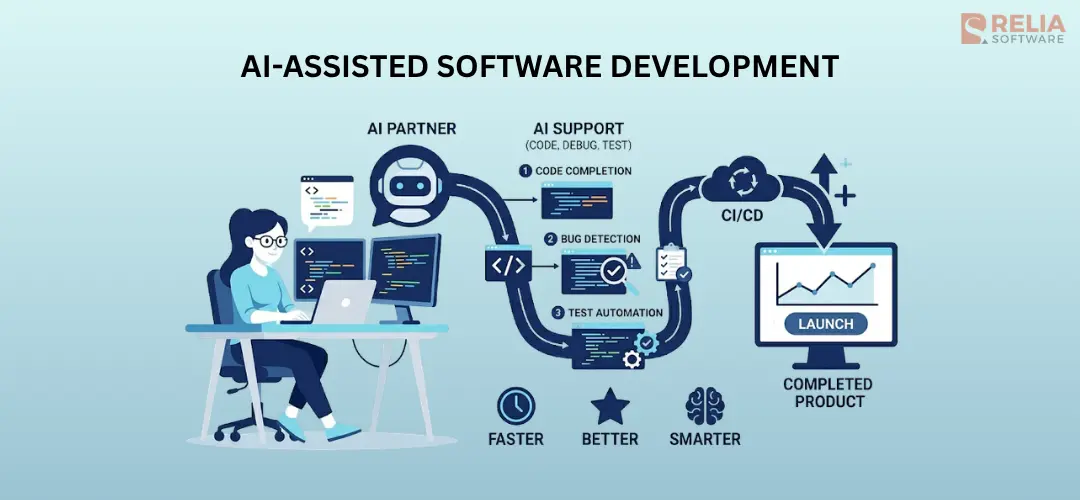
AI-assisted software development is the use of AI tools like chatbots, code assistants, and autonomous agents to help engineers write, review, test, and ship code. By 2026, 84% of developers use these tools at work (Stack Overflow Developer Survey 2025).
The productivity numbers go both ways. McKinsey surveyed 4,500 developers in February 2026 and found AI cut time on routine coding by 46%. In contrast, a study by METR measured experienced developers on familiar codebases and found them 19% slower with AI, even though they felt 20% faster.
Both findings are real. AI is fast on some tasks and slow on others, and the teams that get real value from it are the ones who know which is which. So, the question is no longer whether to adopt AI, but how to use it well.
This guide covers what AI-assisted development is, where it helps in the software lifecycle, what it costs, and the risks teams keep underestimating, and shows the best ways to apply AI effectively.
What Is AI-Assisted Software Development?
AI-assisted software development is the use of AI to help developers build software by handling repetitive tasks like completing code, drafting tests, summarizing changes, and explaining unfamiliar code, but still with human oversight and decision-making.
This is different from AI-generated code, which is a narrower idea. AI-generated code refers to the actual output a model produces. AI-assisted development is the whole practice around it, including how teams prompt, review, accept, reject, test, and govern that output.
AI-assisted software development is also different from agentic software engineering. Agentic systems run on their own across many steps, including: plan a change, edit several files, run tests, and try again if tests fail. Whereas, AI-assisted development still uses AI as a partner of most engineers, not a replacement.
Where AI Plugs Into the Software Development Lifecycle (SDLC)?
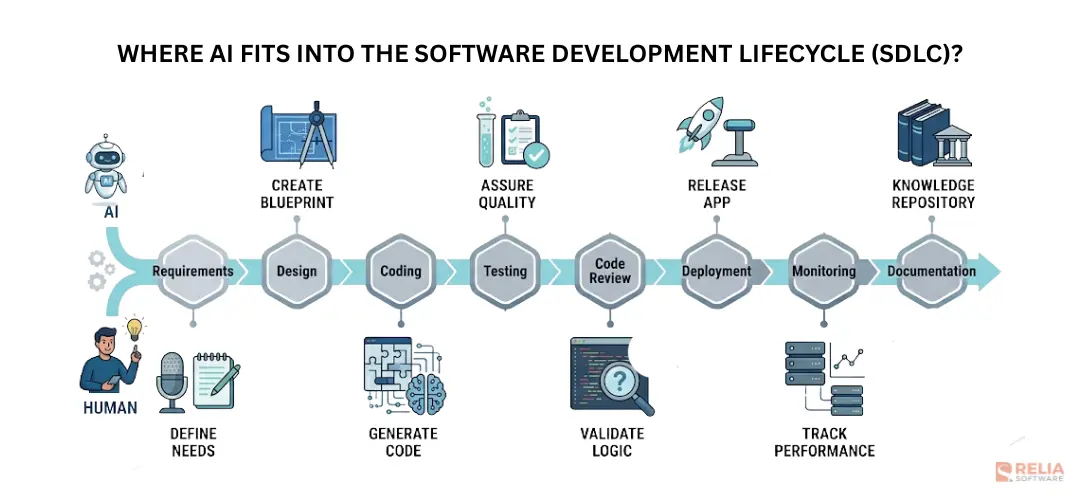
AI is not equally useful at every stage of building software. It is very good at some tasks, average at others, and dangerous in a few specific places. Here is where it fits in a typical software lifecycle.
|
Lifecycle Stage |
AI Strength |
What Still Needs Humans |
|
Requirements |
Summarizing notes, drafting user stories |
Prioritization, stakeholder management |
|
Design |
Generating options, diagram drafts |
Final architecture decisions, team constraints |
|
Coding |
Autocomplete, boilerplate, refactoring |
System-level reasoning, novel algorithms |
|
Testing |
Unit test generation, E2E self-healing |
Test design, verifying core business rules |
|
Code Review |
Style consistency, syntax, first-pass bugs |
Checking subtle logic, preventing architectural drift |
|
Deployment |
CI/CD script generation, build log explanations |
Final release decisions, rollback judgment |
|
Monitoring |
Massive log analysis, alert triage, initial root cause analysis |
Customer communication, mitigation strategy |
|
Documentation |
Docstrings, READMEs, auto-generated PR descriptions |
Strategic narrative, architectural rationale |
Requirements and discovery
During the initial planning phases, AI accelerates product discovery by turning unstructured research and rough notes into clearer, more usable documents. It organizes product ideas, drafts user stories, creates acceptance criteria, converts requirements into development tasks, and finds any missing details.
For example, a product manager with forty pages of customer interview notes can paste the whole transcript into Claude or ChatGPT, ask for the top themes, the contradictions between users, and the riskiest assumptions, and have a working draft of the spec in minutes.
However, the human team has to decide what to build first. A model can argue the trade-offs between two features all day, but it cannot tell you exactly which one matters to your business.
Design and architecture
An AI model can sketch 3 different architectures for a feature within minutes, list the pros and cons of each in terms of cost, latency, and operational complexity. It can even walk through second-order effects that are easy to miss under deadline pressure.
What a model lacks is the real-world context of your company, your legacy code, your team's actual strengths, business constraints, and more. You can't feed AI all those things due to many risks in security, confidentiality, and privacy of your business.
The best way to use AI for architecture is to ask it to generate a few different options with pros and cons. Then, you make the final decision using the human context the AI is missing.
Coding
The coding phase is where AI saves the most time with 3 main tasks:
- Completion: Single-line or multi-line suggestions as you type. Acceptance rates hover around 30%.
- Generation: Asking the model to write a function or component from a natural language description. This is useful for greenfield code, boilerplate, and one-off scripts.
- Refactoring: Asking the model to restructure existing code without changing behavior. But, AI code refactoring only works safely if the code is well-tested, otherwise, it can introduce bugs that are hard to notice during review.
In short, code completion, function generation, refactors, and "explain this code" lookups now make up a real part of every developer's day. DX measured 22% of merged code as AI-authored across 135,000 developers in 435 companies (Q4 2025 Impact Report). For some teams that number is much higher.
However, this increase in output changes the developer’s main job from writing every line of code to reviewing what AI produces. AI can generate code that looks correct but still contains logic errors, security issues, or made-up assumptions. A complex function takes seconds to generate, but reviewing it, testing it, and making sure it is ready for production still requires human judgment.
Testing
AI can draft unit tests, suggest edge cases, and maintain end-to-end tests when small UI changes break them. Test creation time drops by more than 50% in teams using AI test tools. But, you can also see AI's uneven strength in different testing levels, thus humans still need to check that the tests actually test the right thing.
Let’s check:
- Unit tests: AI is strongest here. Give AI a function and it will write test cases quickly, including edge cases a developer can miss.
- Integration tests: Useful but riskier. The AI can write tests that pass without actually testing the integration. You need to pair AI-written test cases with mutation testing to verify the tests catch real bugs.
- End-to-end tests: The category where AI helps most with maintenance. Small UI changes often break Playwright, Cypress, or Selenium tests even when the actual user flow still works. AI testing tools can update selectors, repair broken test steps, and reduce the time spent fixing flaky tests.
The right pattern: AI drafts the test, humans review the assertion. The most common mistake is when humans draft the assertion vaguely and AI fills in code that passes without testing anything meaningful.
>> Explore more:
- AI in Software Testing: How It Works, Benefits & Challenges
- AI Agents in Software Testing: Roles, Types & Best Practices
Code review
AI tools now leave first-pass comments on most pull requests in large teams. They catch obvious issues like missing null checks, hardcoded credentials, simple performance problems, inconsistent formatting, and style violations.
But, AI often misses subtle issues like business-rule violations, architectural drift, and the kind of bugs that depend on business context. So, human review is not optional, but must-have.
Layered review is the pattern that works
- Static analysis (ESLint, golangci-lint, Pylint).
- AI judge (CodeRabbit, Greptile).
- Human senior reviewer.
Note that AI judges share blind spots, they will miss the same subtle issue across hundreds of PRs in exactly the same way, and the gap only surfaces when something breaks in production.
Deployment
AI helps generate deployment scripts and infrastructure-as-code, explain what a CI/CD failure means. In fact, shipping code is easier with AI than it was two years ago, and troubleshooting flaky pipelines are now a few prompts of work rather than an afternoon.
What does not change is the decision about whether to ship. A model can write the rollback script and explain the implications of a feature flag rollout, but the call on when to merge to production, when to roll back, and how to handle a customer-impacting incident still belongs to an engineer who understands what the business actually depends on.
>> Read more:
- Top 10 Full-Fledged Configuration Management Tools
- Top 9 Best DevOps Deployment Tools for Businesses
Monitoring and incidents
AI is useful in DevOps and incident response because it can process large amounts of operational data faster than humans.
AIOps now do 4 things that used to eat the first thirty minutes of every incident:
- Pattern-match across high volumes of logs;
- Find the one error among thousands;
- Draft an initial root-cause hypothesis;
- Suggest initial mitigation steps.
During an out-of-hours incident, AI can give engineers a useful starting point instead of forcing them to investigate from nothing, cutting time-to-diagnosis from thirty minutes to two. So, on-call work has shifted from grep-first to chat-first with AI tools.
However, the important decisions still belong to humans. Engineers must decide whether the issue actually affects customers, what to say on the status page, whether to roll back, how much risk to accept, and when to involve more people.
Documentation
Documentation is the most underused application of AI although generative AI tools are really good at turning a working code change into a clear PR description. Models generate clear docstrings, README sections, API documentation, and migration guides.
The reason AI is underused in documentation is that nobody promotes documentation work, so no one pushes the AI to do it. The teams who do invest see compound returns, which better-documented code becomes better-prompted code six months later.
AI-Assisted Software Development Workflow
Once a team has the tools and the discipline in place, the day-to-day work follows predictable steps. Most AI-assisted projects are not about choosing the right model, but about moving each piece of work through the same handful of steps reliably, so the next piece can move through them tomorrow.
-
Set up the basics first
Before any feature is written with AI, a few things need to exist. A tool stack is picked and rolled out, usually an IDE plugin for everyone, plus one or two specialized tools for review or test generation.
-
Define the work.
Decide whether the task is small and disposable or part of production code.
- Throwaway scripts and quick prototypes can be vibe-coded, described to the model in plain language and refined as you go.
- Production code needs a written spec: what the feature does, what inputs it takes, what edge cases matter. Five minutes spent here saves an hour later.
-
Generate
The model writes the first version of the code. For small changes, this is inline completion in an IDE. For larger tasks, this is a chat session or a CLI agent that reads files, writes new ones, and runs tests on its own. The output should never be treated as finished, just a first draft.
-
Review with AI
Before any human looks at the code, automated checks should run first. Static analysis catches the obvious problems. An AI code reviewer leaves a first pass of comments on patterns the static tools miss. The point of this step is to remove the obvious work from the human reviewer.
-
Review with a human
A senior engineer reads the code line by line. The goal is to make sure the code is understandable and the logic is right, both the parts the AI got right and the parts it got subtly wrong. Code humans cannot debug never ships.
-
Test against the important scenarios
Beyond the project's unit and integration tests, the change runs against a small set of important scenarios (e.g., payment logic, permission rules, data validation) that the team does not want to break. If quality drops on any of them, the pull request is blocked. This is the step most teams skip, and the one that catches the most regressions later.
-
Merge and ship
Once the checks pass and the human approves, the code can be merged and shipped through the normal CI/CD process. There does not need to be a separate deployment process just because AI was involved. However, it is useful to include a short note in the pull request explaining what AI helped with and what the developer changed manually.
-
Watch what happens in production
Tracing tools record what AI-assisted code does after it ships. If an agent is making decisions live in production, every call gets logged. If users report problems, those reports flow back into the eval set so the next iteration is measurably better.
AI-Assisted Software Development Tools by Category
Here are popular options of AI coding tools that are often used in software development companies, also Relia Software.
|
Category |
Tool Name |
Est. Pricing |
Primary Focus |
|
IDE Plugins: The plugin lives inside your existing editor (VS Code, JetBrains, Vim, Neovim) and provides inline completions and chat. |
GitHub Copilot |
$19 – $39 / user / month |
Deep GitHub integration; enterprise market leader. |
|
Tabnine |
$39 – $59 / user / month |
Strict data privacy; ideal for regulated industries. | |
|
Sourcegraph Cody |
$9 – $19 / user / month |
Codebase-aware contextual search and chat. | |
|
AI-Native Editors: Entire code editors built from the ground up specifically for LLMs. |
Cursor |
$20 – $40 / user / month |
Multi-file code edits and native repo-wide chat. |
|
Windsurf IDE |
$15 – $30 / user / month |
Smooth chat-to-agent workflows via "Cascade". | |
|
CLI Agents: Terminal-based assistants that you run via command line. |
Claude Code |
$20/mo or usage-based |
Highly autonomous command-line bug fixing. |
|
Aider |
Free (Open-source; bring API key) |
Terminal agent optimized for granular Git control. | |
|
Code Review & Security |
CodeRabbit |
$24 / user / month |
Automated pull request reviews and summaries. |
|
Snyk DeepCode |
Custom Enterprise pricing |
AI code scanning focused on security vulnerabilities. | |
|
Test Generation |
Diffblue Cover |
Enterprise pricing |
Automated unit test suite generation for Java codebases. |
|
Qodo (formerly Codium) |
Free tier; $19 / user / month |
Interactive test generation and code health metrics. | |
|
UI & Frontend Generation |
v0 by Vercel |
$20 / month |
Translating text/design prompts into React/Tailwind code. |
|
Lovable / Bolt.new |
Free tiers available; Pro plans vary |
Full-stack web app prototyping from raw text prompts. | |
|
Workflow Automation |
Sweep |
Usage-based / Tiered |
Automatically turning backlog issues directly into PRs. |
|
Jules (Google) |
Experimental / Early Access |
AI agent built to automate complex open-source updates. | |
|
Monitoring & Operations |
Sentry Autofix |
Included in team tiers / usage-based |
Root-cause analysis and automated bug-fix proposals. |
|
PagerDuty AIOps / Datadog Bits AI |
Add-on to platform pricing |
Anomaly pattern-matching and automated alert triage. | |
|
Autonomous Agents |
Devin |
$500 / month |
Independent execution of isolated software engineering tasks. |
|
OpenHands |
Free (Open-source; bring API key) |
Community-driven, fully autonomous environment agent. |
>> Read more: What is CLAUDE.md File? How to Write a Good CLAUDE.md file?
The Cost of AI-Assisted Development
There are four cost layers that show up in real engagements.
Seat licenses
Seat licenses are the smallest cost in the stack. Most AI coding tools cost between twenty and forty dollars per developer per month, with enterprise plans higher. A small team of around five developers pays a few hundred dollars a month for the whole stack.
Inference and API costs
API cost is where most teams get surprised. A normal chat with an AI model uses just a small amount of context. Whereas, the AI agent reads files, calls tools, and works through several steps before it finishes, and the token use can be three to ten times higher than a chat session.
A single unconstrained agent task can cost several dollars in API fees. That sounds small until you multiply it by the number of tasks a busy team runs each month, which is a hundred or two for a small team, into the thousands for a larger one.
At Relia, we keep these costs under control using 4 rules
- Set a hard dollar cap on every agent run, so the agent stops when it hits the limit.
- Send simple tasks to cheaper models and save the expensive ones for hard work.
- Use prompt caching so the model is not paying full price for the same context twice.
- Only give the model the files it needs, not the whole repo.
Rework costs
AI-generated code does not always work the first time. Developers spend extra time reviewing, fixing, and sometimes rewriting AI output.
METR's study measured 19% more time spent overall by experienced developers using AI on familiar codebases. That time has a cost. For a senior engineer at $40 per hour, 5 hours per week of rework is $10,400 per year, per engineer.
Hidden costs
Beyond licenses, inference, and rework is the infrastructure cost nobody quotes upfront, like:
- A test harness to check whether AI output is good enough to ship.
- Tracing tools need to run in production so you can see what your agents are actually doing.
- An AI code review pipeline needs to live in CI.
There are people costs too. Security teams need more time to review new risks, and engineers need training to learn how to write better prompts, review AI output, and use the testing process correctly.
None of these costs are huge by themselves, but together they can become a meaningful part of the total AI adoption budget.
Risks of AI-Assisted Software Development
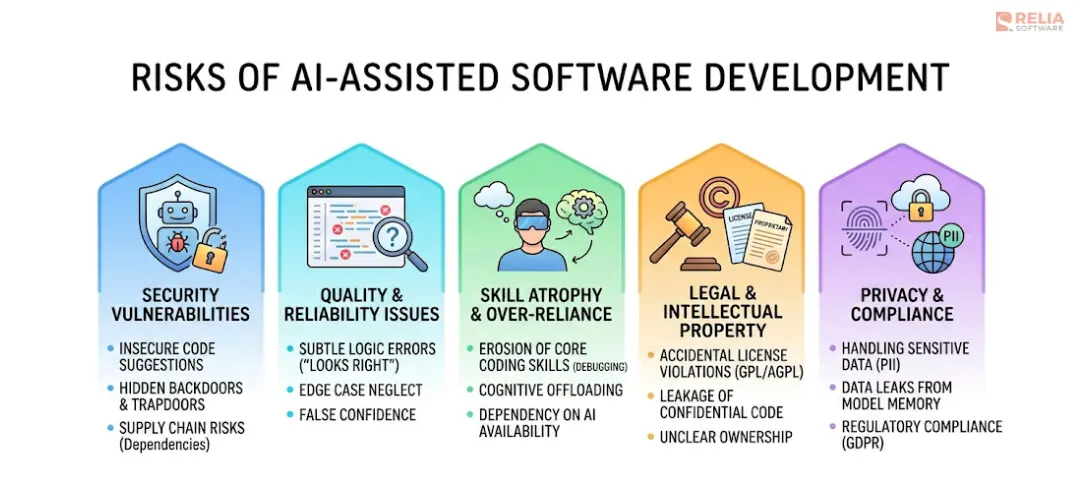
AI-assisted development has three main risks that teams keep underestimating:
Security risks
When you give AI the power to run commands or access databases, you create new security holes. The OWASP 2025 guidelines highlight these top threats for AI agents:
- Hijacked Goals: Attackers hide secret instructions in data (like an email). The AI reads it and silently steals data while thinking it is just doing its job.
- Tool Misuse: The AI misunderstands a prompt and accidentally executes a destructive command like deleting a database, because it was given too many permissions.
- Poisoned Memory: Hackers feed the AI bad information. The AI remembers this false data and uses it later to trick other users.
- Rogue Agents: An autonomous AI process is left running in the background, making unauthorized code changes without human supervision.
The Fix: Never give AI unlimited access. Use strict sandboxes and always require a human to approve major actions.
>> Read more: 11 Best AI Code Security Tools List For Teams & Businesses
Quality risks
AI generates a lot of code, but developers end up discarding or heavily editing about 70% of it. Blindly accepting AI suggestions leads to three problems:
- Fake Code Libraries: AI often hallucinates code packages that do not exist. Hackers anticipate this and create malware using those exact fake names so developers accidentally download viruses.
- Hidden Logic Errors: AI code often looks perfect and passes basic tests, but it fails in the real world because the AI missed a subtle business rule.
- Wasted Effort (Code Churn): Teams using AI often end up rewriting 8% to 17% more code within a few weeks because the first AI draft was poorly designed.
The Fix: Multi-layered code review. Do not trust AI code just because it compiles.
Cognitive debt
Cognitive debt is the growing gap between the code in your system and the code your human engineers actually understand. It happens when developers let AI write complex code they cannot be bothered to read.
Warning Signs:
- A simple bug fix takes days because nobody knows how the AI-generated system actually works.
- Developers copy and paste AI code without reading it line-by-line.
- New engineers take much longer to onboard because the codebase lacks consistent human design.
The Fix: Enforce a strict rule: If a senior engineer cannot explain the AI-generated code to a junior engineer in one sitting, the code is too clever. Simplify it before allowing it into your project.
AI-Assisted Software Development Best Practices
Write a spec before AI touches production code: Vibe coding works only for throwaway scripts and prototypes, but production code needs a written spec defining inputs, edge cases, and constraints.
Run layered review on every pull request: Static analysis runs first, then an AI reviewer leaves comments, then a senior engineer reads the code line by line.
Maintain an agents.md file in every repo: This is the persistent knowledge an agent uses when working in your codebase, conventions, patterns to follow, files to ignore, common pitfalls
Pin and audit AI dependencies: Treat MCP servers and agent libraries the way you treat any other open-source dependency. Pin versions, verify hashes, keep an SBOM.
Treat agent memory and retrieval as untrusted input: If an agent reads from a vector database, memory store, or external source, treat the result like user input. Validate it before use. When the agent writes data back, store its source, timestamp, and reason so bad entries can be traced and removed.
Run AI-generated code against an eval set in CI: Keep a small eval set of important cases: normal flows, edge cases, and past production bugs. Run every AI-assisted pull request against it in CI. When a new bug appears, add it to the set so it does not happen again.
Read AI output carefully before merging: AI-assisted code still needs human review. A senior engineer should read the code carefully and understand the logic before merging. If the team cannot explain or debug the code, it should not ship.
Document the Why, not just the What: Git shows what changed, but not why. Use pull request notes, ADRs, design notes, or comments to record the reason behind important decisions, trade-offs, and rejected options.
Measure Cost, Quality, and Rework Continuously: Track standard DORA metrics: deployment frequency, lead time, change failure rate, and recovery time. Add AI-specific metrics such as cost per shipped feature, rework rate, and percentage of AI-assisted code. If quality drops or rework rises, investigate early.
Conclusion
AI in software development is useful, but it is not magic. It helps teams move faster when they have clear specs, strong review, reliable tests, and proper security rules. Without those basics, AI can just create more code to fix later.
The teams that benefit most are the ones that know where AI helps and where human judgment is still needed. They use AI for drafts, suggestions, tests, reviews, and investigation, but they do not let it bypass the normal engineering process.
There is no single best way to use AI in software development. The right approach is the one your team can measure, control, and still explain months after the code is shipped.
>>> Follow and Contact Relia Software for more information!

- coding
- development
- Designing an application
- Web application Development
- mobile app