


Travel app development is the process of creating digital platforms for booking, trip planning, and navigation, assisting travelers in managing their trips as well as agencies, hotels, and restaurants in managing their operations and bookings.
In this article, we will explain the key parts of travel app development, including app types, architecture, the detailed development process, cost, monetization models, common mistakes, and how to choose the right development partner.
|
Key Takeaways:
|
Why Does Your Business Need To Develop A Travel App?
The reason is that modern travelers nowadays do not want to move between many browser tabs to check for each flight and booking, but prefer to manage their full trip in one place. Agoda’s Report shows that travel apps are among the top digital trends consumers now expect, with over 90% of travelers actively looking for complete digital travel assistants instead of separate platforms.
For travel businesses, Dataintelo also reports a 19.7% annual growth rate in the move from older desktop systems to mobile apps, showing that travel companies now see apps as a core sales and service channel. AtlasPerk also reports that standard mobile websites convert at around 6%, while travel apps can reach a 20% conversion rate, which means a travel app can convert real users over three times more than a website.
Therefore, if you want to compete in this competitive industry, having a mobile application for your service is not a nice-to-have channel anymore, but a must-have and even core business tool.
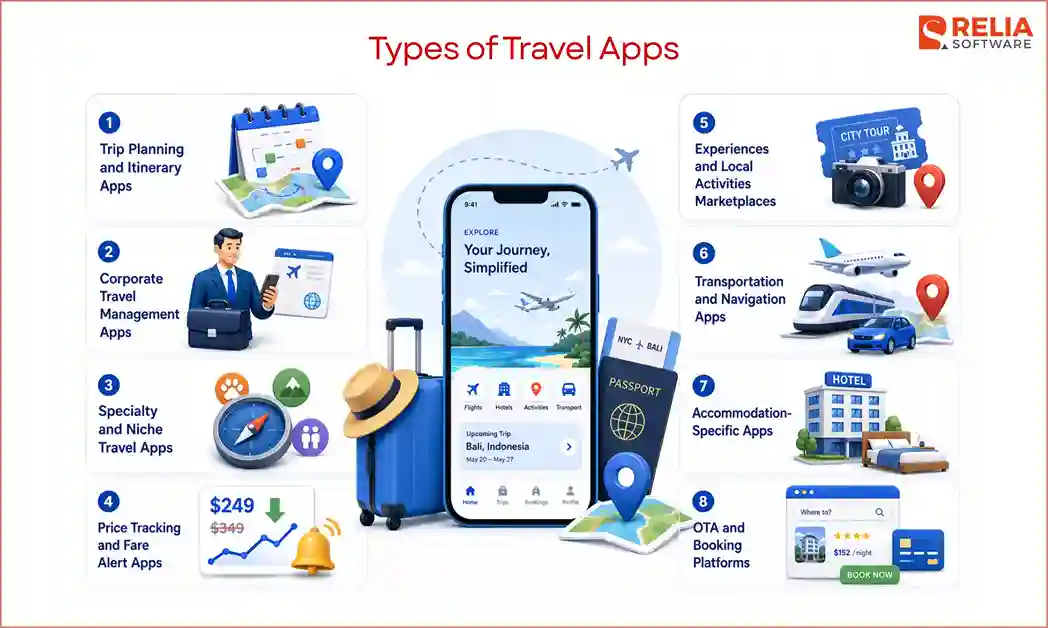
Main Types of Travel Apps
Trip Planning and Itinerary Apps
Trip planning and itinerary apps act as a digital hub that organizes flights, keeps hotel reservations, and plans daily activities in one place. Users can save destinations, build daily plans, add notes, store booking details, check maps, share plans with friends, and access important trip information offline. This type of app focuses on helping travelers reduce planning stress and keep all trip details easier to access.
Best for: Content-first companies, tour operators, travel media brands, tourism businesses, and travel creators with useful destination knowledge.
Key Features:
- Itinerary builder
- Saved places
- Map view
- Trip notes
- Budget planning
- Document storage
- Booking import
- Offline access
- Trip sharing
- Travel reminders
Examples: Wanderlog, TripIt, Roadtrippers, Sygic Travel, Lambus.
OTA and Booking Platforms
OTA (Online Travel Agency) and booking platforms let users search, compare, and book travel services from many suppliers. They cover flights, hotels, tours, car rentals, airport transfers, travel insurance, or travel packages. This type of app needs live inventory, price checks, booking confirmation, cancellation rules, payment processing, and customer support.
Best for: Companies with travel inventory access, supplier contracts, GDS (Global Distribution System) partnerships, or strong booking relationships.
Key Features:
- Travel search and filters
- Real-time inventory
- Live price checks
- Booking confirmation
- Secure payment
- Cancellation and refund handling
- Supplier management
- Customer support tools
- Reviews and ratings
- Admin dashboard
Examples: Booking.com, Expedia, Priceline, Trip.com, Agoda.
Accommodation-Specific Apps
Accommodation-specific apps focus on hotels, resorts, villas, serviced apartments, hostels, boutique stays, or property rental networks. These apps help users search rooms, view photos, compare prices, check amenities, book stays, manage reservations, and receive stay updates. For hospitality businesses, this type of app can support direct bookings and reduce dependence on third-party platforms.
Best for: Hotel chains, property managers, boutique hospitality groups, resort groups, and accommodation networks.
Key Features:
- Room search
- Availability calendar
- Room photos and amenities
- Direct booking
- Secure payment
- Cancellation control
- Member rates
- Loyalty points
- Mobile check-in
- Stay history
- Direct guest support
- Special offers
Examples: Marriott Bonvoy, Hilton Honors, Hyatt, Accor ALL, Airbnb.
Transportation and Navigation Apps
Transportation and navigation apps help travelers in car rental, bus booking, train booking, airport transfers, ferry routes, ride services, route planning, live tracking, fare estimates, and location-based updates. This type of app often depends on GPS, map tools, route data, payment, and real-time status updates.
Best for: Transport companies, car rental firms, ride platforms, fleet operators, and tourism businesses with access to route or vehicle data.
Key Features:
- Route search
- GPS tracking
- Fare estimate
- Vehicle or seat booking
- Live trip status
- Pickup and drop-off details
- In-app payment
- Delay alerts
- Offline map support
- Driver or operator dashboard
- Customer support
Examples: Uber, Lyft, Grab, Rome2Rio, Citymapper.
Experiences and Local Activities Marketplaces
Experiences and local activities marketplaces help travelers find and book tours, local guides, events, food experiences, classes, attraction tickets, outdoor activities, and day trips. This app type focuses on what users do at the destination, rather than how they get there or where they stay.
Best for: Destination marketing organizations, tour aggregators, tourism boards, local experience platforms, and travel businesses with supplier networks.
Key Features:
- Activity listings
- Guide or host profiles
- Availability calendar
- Ticket booking
- In-app payment
- Location map
- Reviews and ratings
- Cancellation rules
- Supplier dashboard
- Capacity management
- Payout tracking
Examples: GetYourGuide, Viator, Klook, Airbnb Experiences, Fever.
Price Tracking & Alert Apps
Price tracking and fare alert apps help users monitor flight, hotel, or package prices and receive alerts when prices drop or match their budget. Some apps also suggest the best time to book, compare price trends, or help flexible travelers find cheaper dates and destinations.
Best for: Fintech-adjacent teams, data-heavy travel startups, and companies with access to large travel pricing datasets.
Key Features:
- Price tracking
- Fare alerts
- Price history
- Flexible date search
- Destination-based deal alerts
- User budget settings
- Smart notifications
- Deal scoring
- Affiliate booking links
- Saved searches
- Recommendation engine
Examples: Hopper, Skyscanner, Google Flights, Kayak, AirHint.
Specialty and Niche Travel Apps
Specialty and niche travel apps serve a specific traveler group or travel need. Examples include adventure travel, accessible travel, pet travel, family travel, medical travel, luxury travel, wellness travel, student travel, road trip planning, and digital nomad tools. These apps can compete better because they solve problems that large platforms often treat as basic filters.
Best for: Founders, travel brands, and communities with deep knowledge of a specific traveler group.
Key Features:
- Custom search filters
- Niche travel guides
- Community features
- Saved preferences
- Verified reviews
- Special route planning
- Safety notes
- Accessibility details
- Local recommendations
- Personalized suggestions
- Partner listings
Examples: BringFido, Wheelmap, Nomad List, AllTrails, The Dyrt.
Corporate Travel Management Apps
Corporate travel management apps help businesses manage employee trips, approvals, travel policies, budgets, expenses, invoices, and reports. These apps are built for companies, finance teams, HR teams, travel managers, and employees who travel for work.
Best for: B2B SaaS companies, travel management firms, HR tech firms, and enterprises with frequent employee travel.
Key Features:
- Employee profiles
- Travel policy rules
- Approval workflows
- Preferred suppliers
- Booking records
- Expense export
- Invoice management
- Budget control
- Duty-of-care alerts
- Reporting dashboard
- Admin roles
Examples: TravelPerk, SAP Concur, Navan, Egencia, Ramp Travel.
How Does Travel App Architecture Work?
Travel app architecture works by coordinating live travel search, availability checks, price validation, booking rules, payment processing, supplier confirmation, itinerary storage, and trip updates in one flow. Unlike other kinds of apps, a travel app must constantly check changing information from hotels, airlines, tour operators, transport providers, or travel APIs before showing results and before confirming a booking.
Most travel apps include these core parts:
- User interface: Where travelers see and interact with the app, such as a mobile app, PWA, or custom web app.
- Backend server: The system that receives requests and controls the main app logic.
- Database: Where user, booking, supplier, payment, itinerary, and app data are stored.
- Booking engine: The logic that checks availability, pricing, booking rules, discounts, and cancellation terms.
- Travel APIs: External data sources for flights, hotels, tours, cars, maps, and other travel services.
- Payment gateway: The system that processes payments, refunds, wallets, and multi-currency transactions.
- Admin dashboard: Where the business team manages users, bookings, refunds, content, reports, and support cases.
- Supplier portal: Where hotels, tour operators, transport providers, or local vendors manage listings, prices, schedules, and orders.
- Notification system: The system that sends confirmations, receipts, reminders, alerts, and support messages.
- Analytics layer: The tracking system that shows user behavior, booking performance, payment issues, and drop-off points.
When the user selects an option, the backend asks the booking engine to recheck for the latest data before checkout. This step is important because travel data changes quickly. A room, seat, or tour slot may look available during searching but become unavailable before payment. Once payment is completed, the backend confirms the booking with the supplier or travel API, saves the record in the database, and adds it to the user’s itinerary.
After that, the notification system sends all the essential trip information to the user. The admin dashboard records the transaction so the business team can manage support, refunds, reports, and customer issues. If a local supplier is involved, the supplier portal also receives the order. Finally, the analytics layer will track the full journey, helping the business find drop-offs, payment issues, supplier performance, and areas to improve.
Travel App Development Process
After understanding how a travel app works, now it’s time to know how to build a successful travel app. Moving directly into coding without a clear plan is a fast track to feature bloat and wasted budget. Here is the practical, phase-by-phase development process you need to follow to take your travel app from an idea to a thriving digital product.
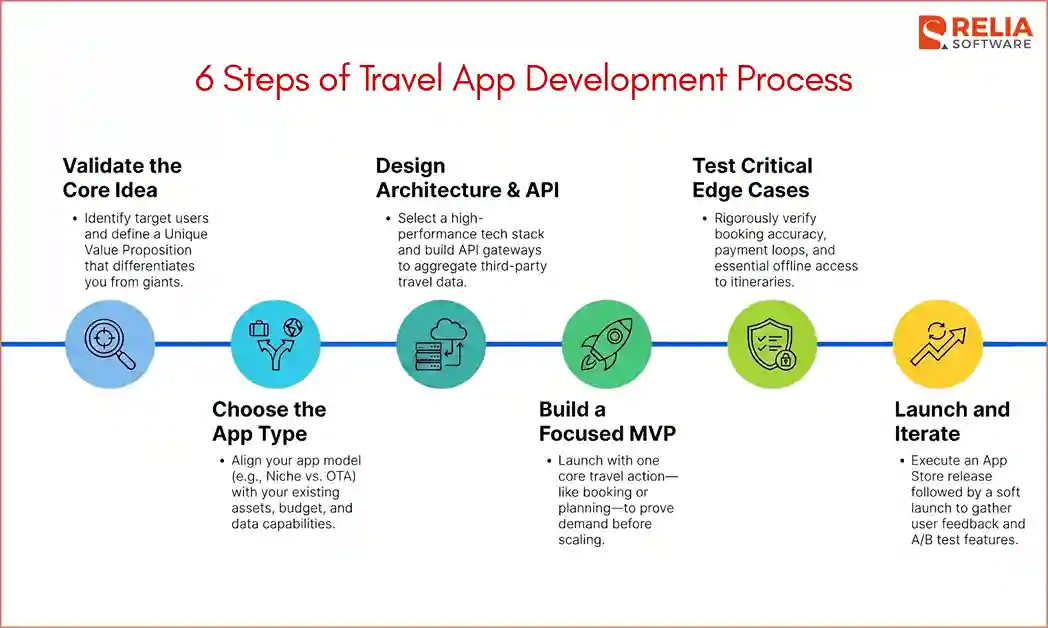
Step 1: Validate the Travel App Idea
Before spending a single dollar on software development, you must validate your concept.
Who is the target user?
The app can serve solo travelers, families, business travelers, digital nomads, hotel guests, tour customers, local experience seekers, or corporate travel managers. Each group has different needs. So, you need to be clear. Here we can define these 3 popular user groups:
- Family users: Who care about safe stays, flexible cancellation, and child-friendly activities.
- Business travelers: Who are more concerned about fast booking, policy rules, expense reports, and invoice records.
- Digital nomad: Who needs long-stay options, coworking spaces, visa notes, and internet quality.
What travel problem does the app solve?
Then, you should identify the specific pain point your target users face. Will the app help them book faster, plan better, compare prices, manage itineraries, find local activities, track expenses, or get support during the trip? The clearer the problem is, the easier it becomes to choose features and avoid building a product that feels too broad.
What is the core focus?
For this question, you need to define the app’s role, which it is primarily built for. A travel app can be built for:
- Booking: flights, hotels, tours, car rentals, transfers, or packages.
- Planning: itineraries, saved places, maps, budgets, and trip notes.
- Navigation: routes, transport, live location, local guides, or offline maps.
- Loyalty: rewards, member offers, direct booking, and repeat customer engagement.
- B2B operations: travel approvals, supplier management, expenses, reports, or corporate travel policies.
What makes this app different from the platforms users already know?
This is the most important question. You have to pinpoint exactly why a traveler would download your app instead of using dominant legacy giants like Booking.com, Airbnb, Hopper, TripAdvisor, or Google Travel. You need a unique value proposition that these massive platforms ignore or do not cover well.
Step 2: Choose the Right App Type
Choosing the right app type isn't about picking what sounds exciting, but a calculated decision based on your existing business assets, budget, and unfair competitive advantages. If you choose the wrong model, you will end up competing on ground where you are structurally outmatched.
To select the right path, evaluate your company against three distinct strategic pillars:
-
Asset-Driven Alignment: Look at what you already own.
If you operate physical hotel properties or vacation rentals, an Accommodation-Specific App is your logical choice to drive direct bookings. If you are a tourism board or have a vast network of local tour guides, an Experiences & Local Activities Marketplace leverages your existing ecosystem.
-
Data and Technical Capabilities: Be realistic about your engineering resources and data pipelines.
Building a Price Tracking or Transportation App requires complex, real-time data handling, machine learning expertise, and heavy server infrastructure, which requires your team to specialize in data science. If not, a Trip Planning or Specialty Niche App allows you to deliver high user value using lightweight, content-driven architecture and simple API integrations.
-
Capital and Marketing Power: Evaluating your current budget is also important.
If you plan to build an OTA or Booking Platform, you are entering a capital war against multi-billion-dollar giants. To win, you need massive marketing budgets to acquire users.
If your capital is limited, your best strategic move is to build a Niche Travel App (e.g., solo female travel, pet-friendly trips) where you can dominate a highly specific community through organic word-of-mouth rather than expensive paid ads.
Once you know what you are building, you must immediately design the interface to work flawlessly in real-world travel conditions. Keep these core travel design rules in mind:
- One-Hand Mobile Use: Place primary booking buttons and menus within easy thumb reach for users who are carrying heavy luggage or holding onto train handles.
- Slow Internet Optimization: Ensure the app remains functional and fast even on low-bandwidth 3G networks, spotty airport Wi-Fi, or international roaming data.
- Stress-Reducing Layouts: Simplify cluttered screens at airports and transit hubs so users can view gate numbers, addresses, and booking barcodes instantly without panicking.
- Short Booking Windows & Large Tap Areas: Design a lightning-fast checkout flow with oversized, easy-to-hit buttons to accommodate users trying to secure last-minute train tickets or hotel rooms while walking or moving on public transit.
- Offline Itinerary Access: Essential for international travel. Ensure users can view their downloaded tickets, check-in instructions, and maps without an active internet connection.
- Clear Trust Signals & Rules: Display refund and cancellation windows clearly right next to the purchase button, and use prominent security badges so users feel safe entering payment details on the go.
Step 3: Design the Architecture and API Flow
After the app type and user experience are clear, the team should plan the development work. This step should define what needs to be built, which skills are needed, and which tech stack fits each part of the product.
Frontend Mobile App Layer
- For high-performance, smooth map interactions, and offline caching, native mobile app development is ideal, which uses Swift for iOS and Kotlin for Android.
- If you need to launch on both platforms quickly with a unified team, cross-platform development frameworks like Flutter or React Native are highly effective.
- If the product starts as a PWA or web app, common frontend tech stacks include React, Next.js, Vue, or Nuxt.
Backend Server
This is the core logic engine of your app. Back-end tech stacks such as Node.js (TypeScript), Python (FastAPI), and Go are preferred for their ability to handle high volumes of concurrent data requests. Developers must possess advanced skills in algorithmic calculations to handle dynamic pricing adjustments, currency conversions, and complex cancellation logic.
Database
For the database, PostgreSQL or MySQL works well for structured booking and transaction data. MongoDB can fit content-heavy or flexible data. For fast search across hotels, tours, destinations, and listings, teams can use Elasticsearch, OpenSearch, or Algolia.
>> Read more:
- Mastering Index in SQL to Improve Database Performance
- SQL vs NoSQL Databases: What's the Difference & When to Use?
Data Routing & API Gateway
Travel apps rely heavily on third-party data. You will need to build an API gateway using tools like GraphQL or Kong to aggregate and clean the incoming data streams from Global Distribution Systems (GDS).
>> Read more:
- Unlock the Power of GraphQL with React to Master Data Fetching
- gRPC vs GraphQL: Choosing the Right API Technology
Payment & Security Infrastructure
To process payments securely, integrate developer-friendly toolkits like Stripe or Adyen. Developers must have explicit experience in PCI-DSS compliance and tokenization to ensure your business securely handles international credit cards and mobile wallets without storing raw financial data on your own servers.
Step 4: Build the MVP
A travel app MVP should prove the core travel flow before you invest in a full system. If you build too much too early, you may spend heavily on features users do not need or on automation before the booking model is proven.
The first version should focus on one main travel action, such as planning a trip, requesting a booking, saving places, tracking prices, booking local activities, managing transport, or approving business travel. Keep the app-type logic simple:
- Booking apps: Start with limited suppliers, one booking category, or manual confirmation before full automation.
- Planning apps: Focus on one strong input method, such as saved places, calendar planning, or pasted booking details.
- Local experiences apps: Start with a curated set of tours or activities in one city before building full supplier tools.
- Transportation apps: Focus on one route, service type, or location before adding live tracking and fleet tools.
- Price alert apps: Start with saved searches and simple alerts from one reliable data source.
- Corporate travel apps: Prove the request, approval, policy, and reporting workflow before deep integrations.
The right MVP reduces wasted budget, shortens the launch timeline, reveals real booking or planning behavior, and shows which features deserve deeper investment. Once the first version proves demand, you can add stronger automation, more APIs, supplier dashboards, loyalty, AI, advanced analytics, and enterprise features with much more confidence.
At Relia Software, we integrate advanced AI tools into our software development process to speed up timelines and lower overall labor costs. By automating repetitive coding tasks and optimizing workflows, we help travel businesses launch high-quality apps faster while maximizing their budget efficiency.
Step 5: Test the Travel App
Travel applications require intense testing across edge cases because booking errors can leave customers stranded in real life. Use this comprehensive QA testing checklist:
- Search accuracy: Verify that search filtering parameters return completely correct listings for users to find the right flights, rooms, tours, or destinations.
- Booking confirmation: Make sure the app creates the correct booking record and sends the right confirmation.
- Payment failure: Ensure the app handles declined cards gracefully without locking user screens or creating ghost bookings.
- Refund flow: Confirm that cancellations correctly trigger financial refunds through the payment processing loop.
- API timeout: Validate that the app displays a clear error message if a supplier network fails to respond.
- Offline access: Make sure saved itineraries, tickets, vouchers, addresses, and booking codes are still available without internet.
- GPS accuracy: Confirm that local mapping features track location coordinates correctly in foreign time zones.
- Multi-currency display: Test that changing base currencies alters pricing numbers accurately across the entire app.
- Time zone handling: Ensure flight times, check-in dates, and countdown alerts adjust correctly based on the smartphone's local time zone.
- Security testing: Conduct vulnerability penetration tests to confirm that user profiles and payment tokens are completely secure.
- Load testing during peak seasons: Test whether the app can handle traffic spikes during holidays, flash sales, major events, or high booking periods.
Testing should also include real devices, different screen sizes, slow networks, app crashes, notification delivery, admin dashboard actions, and supplier portal actions.
>> Read more:
- Top 7 Web App Security Testing Tools For Developers
- 7 Leading Performance Testing Tools for Developers
- Top 15 Best Usability Testing Tools For Businesses
Step 6: Launch and Improve
Once testing is complete, your app can now move into production launch operations. The launch process includes:
- App Store Release: Submit your final product builds to the Apple App Store and Google Play Store following their specific review compliance guidelines.
- App Store Optimization (ASO): Write clear app descriptions, use high-converting screenshots, and optimize keywords to maximize organic store discoverability.
- Analytics Activation: Monitor live customer behavior patterns to see which features attract the most active daily engagement.
- Review Monitoring: Keep a close eye on app store reviews to address user complaints and fix newly discovered bugs immediately.
- User Feedback Collection: Actively survey early adopters to understand what they love and what features they want built next.
- A/B Testing: Run live feature layout experiments to optimize booking conversions and increase checkout completions.
- Support & Maintenance Plan: Establish a 24/7 technical customer support flow to handle urgent booking emergencies, and budget for ongoing security patches and OS update maintenance.
For most travel products, a soft launch is safer than releasing everything to all users at once. It allows the team to test the app with a smaller group, collect feedback, fix bugs, and improve the product before wider release.
How Much Does Travel App Development Cost?
|
Travel App Type |
Estimated Development Cost |
Estimated Timeline |
|
Basic Travel Guide App |
$20,000 – $50,000 |
2 – 4 months |
|
Planning & Itinerary App |
$30,000 – $80,000 |
3 – 5 months |
|
Niche Travel App |
$35,000 – $90,000 |
3 – 6 months |
|
Tour & Activity Booking App |
$50,000 – $120,000 |
4 – 7 months |
|
Accommodation Booking App |
$70,000 – $180,000 |
6 – 10 months |
|
Transportation or Navigation App |
$70,000 – $180,000 |
5 – 10 months |
|
Flight Booking App |
$90,000 – $220,000 |
7 – 12 months |
|
Price Tracking or Alert App |
$60,000 – $160,000 |
5 – 9 months |
|
OTA Platform |
$120,000 – $300,000+ |
9 – 18+ months |
|
Corporate Travel Management App |
$100,000 – $250,000+ |
8 – 15 months |
|
AI-Powered Travel Assistant App |
$70,000 – $250,000+ |
5 – 12 months |
These numbers above are only the costs in the development process. Businesses should also plan for ongoing costs after launch, which can include cloud hosting, API fees, payment gateway fees, app store accounts, marketing, etc. For apps that use travel APIs, maps, AI, SMS, or push notifications heavily, these costs can grow as user activity increases.
Travel App Monetization Models
To build a profitable travel app, you need a smart monetization strategy. The most successful apps combine multiple revenue streams to maximize the value of every single user. Here are the primary monetization models you can use to generate revenue:
- Booking Commissions: You charge a percentage fee (typically between 5% and 20%) to service providers for every hotel room, flight, tour, or car rental booked directly inside your app.
- Subscription Plans: You offer a premium tier for a monthly or annual fee. Subscribers get access to exclusive, member-only discounts, ad-free browsing, priority customer support, or perks like airport lounge access.
- Affiliate Revenue: If you don't want to handle bookings yourself, you can earn a referral kickback by directing users to partner websites to purchase their flights, travel gear, or luggage.
- Sponsored Listings: You let hotels, restaurants, or tour operators pay a premium fee to jump to the top of your search results or appear featured on the app's homepage.
- In-App Advertisements: You display targeted banner or video ads to users. This works best for high-traffic utility apps, like local transit trackers or currency converters.
- Travel Insurance Add-ons: You partner with insurance providers to upsell flight protection or medical travel insurance directly inside the final checkout screen.
- B2B SaaS Licensing: You sell your software directly to other businesses. Corporate clients pay a recurring fee to use your platform to track employee business trips, manage travel budgets, and handle expenses.
- Local Business Partnerships: You partner with local hotspots (like restaurants, cafes, or gear rental shops) in popular destinations. You promote them to travelers currently in the area and take a cut of the revenue generated via in-app digital coupons.
A better approach is to match the revenue model to the app type:
|
App Type |
Best Monetization Options |
|
OTA or booking platform |
Booking commissions, transaction fees, insurance add-ons, price freeze, sponsored listings |
|
Hotel or accommodation app |
Direct booking, loyalty offers, room upgrades, travel add-ons, local partnerships |
|
Trip planning app |
Freemium, subscription, premium itinerary tools, affiliate revenue, local partnerships |
|
Local experiences marketplace |
Booking commissions, supplier fees, sponsored listings, local partnerships |
|
Price tracking app |
Affiliate revenue, premium alerts, subscription, sponsored deals |
|
Niche travel app |
Subscription, affiliate revenue, community plans, local partnerships, premium content |
|
Corporate travel app |
B2B SaaS licensing, per-user pricing, transaction fees, white-label tools |
|
Travel technology platform |
White-label booking engine, SaaS licensing, setup fees, support packages |
Common Travel App Development Mistakes
To ensure your app succeeds, look out for these common development mistakes that can waste your budget and hurt your brand:
- Building a Generic App with No Clear Difference: Trying to build a copy of Booking.com or Expedia is a fast track to failure. These giants have multi-billion-dollar marketing budgets and massive inventory networks. If your app doesn't solve a highly specific problem or target a clear niche market, users will have no reason to download it.
- Adding Too Many Features to the MVP: Trying to include many features in the first version can delay launch and increase cost. You should focus on doing one core thing exceptionally well before adding extra bells and whistles.
- Ignoring API Limits and Supplier Rules: APIs often have usage limits, fees, data rules, and booking requirements. If these are ignored, your app may face slow responses, blocked access, wrong data, or unexpected costs.
- Underestimating Booking and Cancellation Logic: Booking is not only about taking payment. If a user needs to cancel a hotel room, modify a flight time, or request a partial refund, your backend system has to handle these complex logic rules flawlessly without creating duplicate charges or system errors.
- Making Checkout Too Slow or Unclear: Travel purchases represent significant financial transactions, which naturally creates user anxiety. If your checkout flow has too many steps, hides taxes and service fees until the final screen, or lacks clear processing indicators, users will get nervous and abandon the booking.
How to Choose a Travel App Development Company?
Use this checklist to evaluate potential partners:
- Check relevant product experience: Look for a team that has built booking apps, marketplace platforms, hotel apps, transport apps, location-based apps, or mobile commerce products. These apps share similar logic with travel products.
- Evaluate API integration skills: The team should know how to integrate travel APIs, GDS systems like Amadeus or Sabre, hotel APIs, maps, etc.. They should also understand API limits, failed responses, outdated prices, missing availability, caching rules, and supplier data differences.
- Ensure their experiences: Ask how they handle payment failures, supplier confirmation errors, booking changes, cancellations, refunds, duplicate charges, and multi-currency payments. These cases are where many travel apps break.
- Review security and compliance knowledge: The team should understand secure login, encryption, API key protection, role-based access, payment security, consent controls, and safe data storage. Depending on your market, they should also know about your compliance, accessibility, cookie consent, and app store policies.
- Review real project examples: Ask for live apps, case studies, or product demos. Do not rely only on screenshots or design mockups.
- Evaluate communication and trade-off thinking: The team should explain choices clearly, such as Flutter vs. React Native, native vs. cross-platform, affiliate APIs vs. direct booking APIs, and manual MVP flows vs. full automation.
- Avoid agencies that promise everything too quickly: Be careful with teams that quote without discovery, ignore API complexity, skip QA planning, or cannot explain how the backend will handle bookings and refunds.
>> Read more: 10 Leading Travel App Development Companies in Vietnam
FAQs
1. Should I build a native app or a cross-platform travel app?
It is based on your project requirements. Native development is better for apps that need heavy and advanced features or deeper device features. Meanwhile, cross-platform with Flutter or React Native helps apps launch faster, reducing development costs.
2. What APIs are commonly used in travel app development?
Some APIs include flight APIs, hotel APIs, GDS systems, maps, payments, weather, currency, notifications, analytics, CRM, and customer support tools. For example, Amadeus, Sabre, Google Maps, Stripe, PayPal, Firebase, Twilio, SendGrid, GA4, Mixpanel, Zendesk, and Intercom.
3. Can I build a travel app without direct travel inventory?
Yes, but the business model must be clear. You can start with affiliate APIs, curated listings, manual supplier confirmation, content-driven trip planning, price alerts, or niche travel tools. However, if you want to build a full booking platform, direct inventory, supplier contracts, or reliable API access will become important as the product grows.
4. Is AI useful in travel app development?
Yes. AI is useful in travel apps when it supports real tasks like itinerary creation, booking parsing, review summaries, place recommendations, support answers, or personalized suggestions. It should be added only when the app has clean data, clear inputs, proper testing, and fallback options.
Conclusion
In the end, successful travel app development starts with a clear match between your business strengths and what travelers really need during a trip. Travel app development must have a clear architecture, a focused MVP, and a monetization model that does not depend on only one revenue stream. The best travel apps are not the ones with the most features, but the ones that help users plan, book, and manage trips with less friction.
>>> Follow and Contact Relia Software for more information!

- Web application Development