


For over a decade, the Electronic Health Record (EHR) has been a powerful repository of patient data, but it also pushes a lot of extra documentation work onto clinicians. Many clinicians ended up spending hours after their shift finishing notes, which people often call “pajama time.”
However, in the era of AI, modern EHRs can assist clinicians more than just a database with tools like generative AI, smarter search, and predictive analytics. In this guide, you’ll see where AI shows up across the patient journey and what the most common AI features look like in real EHR workflows.
>> Read more:
- A Complete Guide to Healthcare Software Development
- Top 8 Healthcare Apps For Patients & Clinics
- 6 Best Vietnam Healthcare Software Development Companies
What is EHR Software?
Electronic Health Record (EHR) software is a digital system that stores a patient’s medical record, such as diagnoses, medications, treatment plans, allergies, immunizations, lab results, and imaging reports in one place.
An EHR is designed to be updated in time, so authorized doctors, nurses, and staff can access the latest information when they need it. Unlike an EMR (Electronic Medical Record), which is just for containing information, an EHR is built to share data more easily across different providers and settings, such as hospitals, clinics, specialists, and labs.
How Does AI Improve Efficiency in EHR Systems?
Enhance Patient Care Quality
- Earlier risk signals: AI can scan EHR data (vitals, labs, history) and flag patterns that may suggest higher risk, such as possible deterioration or readmission, so the care team can review sooner.
- Better use of real-time data: By combining past records with current results, AI can help surface issues that might not be obvious at first glance and support faster follow-up.
- More personalized treatment support: AI can help clinicians check medication interactions, consider patient history, and compare similar cases to support treatment planning.
- Clearer patient communication: Generative AI can rewrite complex results and instructions in plain language, which helps patients understand what’s happening and what to do next.
Reduce Workload For Clinicians
- Less time on documentation: AI can draft visit notes, after-visit summaries, referral notes, and patient instructions, so clinicians spend more time reviewing and editing instead of typing from scratch.
- Faster chart review: AI can summarize long patient histories and highlight recent changes, which reduces scrolling and prep time before appointments.
- Inbox support: AI can sort portal messages, summarize long threads, and suggest draft replies, helping clinicians and staff clear the inbox faster without missing key details.
- Fewer repetitive admin tasks: AI can help with routine work like prior authorization drafts, refill workflows, and form completion by pulling the right information from the chart automatically.
Improve Accuracy
- Cleaner, more accurate documentation: AI can spot missing details in notes, like key history items, required fields, incomplete problem lists, and prompt users to fill gaps before signing.
- Better consistency across the record: AI can standardize wording and map similar terms, which reduces confusion caused by messy free-text notes, abbreviations, or inconsistent labels.
- Lower chance of manual copy-paste errors: By drafting content directly from chart data, AI reduces the risk of outdated information being copied into new notes or letters.
- Safer medication and order support: AI can help flag potential issues like duplicate meds, missing context, or possible interactions for clinicians to double-check during review.
>> Read more:
- Top 6 Healthcare Technology Trends You Should Know
- Digital Transformation in Healthcare: Why, When, How to Apply?
- 8 Main Benefits of Healthcare Automation Systems
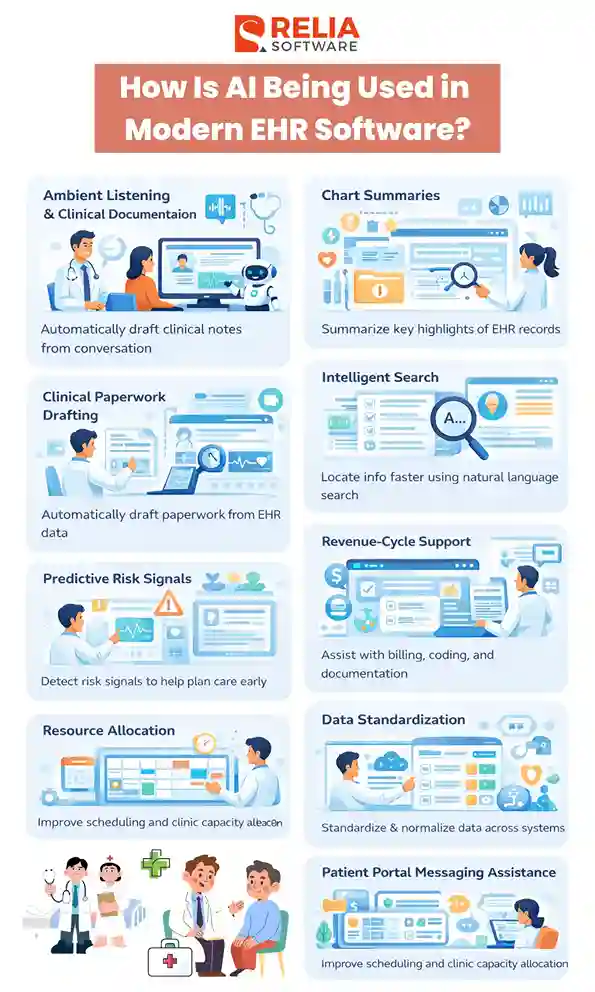
How Is AI Being Used in Modern EHR Software?
Ambient Listening & Clinical Documentation
AI helps clinicians capture the conversation, turn it into a transcript, and then generate a structured draft note for review. In many hospitals, it runs as an add-on connected to the EHR. Recording usually needs patient consent, and the draft must be checked and edited before it becomes the final note.
You’ll often see it used for:
- Drafting core note sections like the HPI, assessment, and plan
- Creating short summaries from the visit conversation
- Turning spoken details into a cleaner, more organized note format
Chart Summaries
AI summaries help users quickly understand what changed recently and what needs attention. EHR charts can be long, and not everything matters for today’s decision, so this feature can assist care teams in focusing on important tasks.
You’ll often see:
- Updated information summaries (what changed since the last visit)
- Highlights of recent labs, imaging, meds, diagnoses, and encounters
- Timeline-style views that pull key events into a quick scan
Intelligent Search
Compared to basic search, Intelligent Search in EHR software uses NLP and clinical terminology to understand medical terms, acronyms, and similar phrases. Instead of clicking through multiple tabs, clinicians can search in a more natural way and quickly pull the right details from long, scattered notes and records.
It typically helps with:
- Finding the latest values (labs, vitals) quickly
- Locating specific decisions or plans buried in notes
- Pulling together relevant information across multiple encounters
Clinical Paperwork Drafting
AI can reduce repetitive clinical paperwork by automatically drafting documents from chart data, so staff don’t have to copy-paste pieces across multiple screens. It’s mainly a “draft and assemble” tool, meant to reduce writing time.
Common drafts include:
- Electronic prior authorization (ePA) questionnaire answers, pre-filled responses
- Referral letters and supporting documentation
- Utilization review summaries, medical necessity summaries (drafted for review)
Predictive Risk Signals
EHR platforms use AI to flag risk signals, such as worsening vitals (rising heart rate, falling blood pressure, dropping oxygen), concerning lab trends, or notes that suggest decline, to help teams act before a small issue becomes a bigger problem. These tools don’t replace clinical judgment; they help teams spot risk sooner and plan care more smoothly.
Common examples include:
- Early warning signals based on vitals/labs trends
- Discharge planning support
- Readmission risk insights to guide follow-up planning
Revenue-Cycle Support
A lot of EHR work happens outside direct patient care: billing support, documentation checks, and appeals preparation. AI here focuses on reducing delays and improving completeness by helping staff catch missing information early and assemble what they need faster.
You’ll often see tools that:
- Flag documentation gaps that slow billing workflows
- Support appeals packages with relevant chart evidence
- Assist coding and CDI teams by highlighting missing specificity
Data Standardization
Data standardization tools use machine learning to clean and align stored information in each system, so it can move between platforms with less manual fixing. You’ll usually see this working behind the scenes in interoperability layers or data exchange pipelines.
Where it helps:
- Normalize formats (dates, units, medication names, problem labels)
- Map similar fields between systems
- Fill obvious gaps when something is missing or incomplete.
Even though it’s “automatic,” it still requires humans to review and validate the mappings, and pay extra attention to high-impact items like meds, allergies, and active problems.
Patient Portal Messaging Assistance
AI helps teams keep up by summarizing long message threads and drafting replies that staff can refine before sending. For test results, it can also help translate technical wording into more patient-friendly language.
It’s most useful for:
- Suggesting response drafts for common questions
- Summarizing conversations so staff can reply faster
- Drafting clear explanations for results and next steps
Resource Allocation
AI also helps clinic teams manage volume and capacity by improving scheduling decisions and resource planning based on patterns in historical data.
You might see it used for:
- Scheduling support and forecasting workload
- Capacity planning and staffing decisions
- Staffing and room or slot allocation
- Identifying bottlenecks in clinic flow
Risks of Using AI in EHR Software
Data Bias
Machine learning mainly learns from the data it is given. If the training data reflects past healthcare gaps or unequal treatment, the model can repeat those patterns and treat some data less accurately or less fairly.
Moreover, if the dataset does not reflect the diversity, including different ages, genders, ethnicities, or health conditions well, the model may give less accurate results for diverse real clinical cases.
Reliability Issues
Generative AI can sometimes sound confident even when it’s wrong. If a mistaken detail slips into the patient record without a careful review, it can lead to real harm. This risk gets higher when the input data is incomplete, outdated, or messy; therefore, teams must review every outcome from AI carefully before applying it to patients.
Another issue is over-reliance. If people trust AI too much, they may stop double-checking and become less likely to catch errors. AI works best as a second set of eyes that helps clinicians move faster, while humans still verify the facts and make the final decision.
Data Privacy
AI models and the clinical data must be protected with strong access controls, monitoring, and tamper protection. Otherwise, attackers could steal data or manipulate outputs. Outside clinical systems, AI content can be posted under fake author names, misleading people about who really wrote or reviewed it.
Therefore, for preventing legal issues of AI use in EHRs, personal health information (PHI) should stay encrypted in transit and at rest, access should be limited by role, and AI-generated documentation should keep a clear audit trail.
>> Read more:
- Data Security in Healthcare Software: Why Is It Important?
- Top 14 Best Data Security Software For Your Businesses
Integration Risks
One common risk is integration with older systems. Legacy EHRs don’t always connect smoothly with modern AI tools, so teams often need extra work to clean up data, map fields, and fix inconsistencies. That effort can be complex, take time, and increase cost.
Moreover, new AI features can slow things down at first while staff learn new steps and adjust how they document and handle daily tasks. Some clinicians may also resist adoption because they don’t fully trust AI, or because the system doesn’t clearly explain how it reached its suggestions.
>> Read more: Pros and Cons of AI in Healthcare with Detailed Explanation
FAQs
1. Is AI in EHR replacing doctors or nurses?
No. In most real settings, AI is used as an assistant to draft, highlight, and suggest, but clinicians still need to review, decide, and sign off.
>> Read more: Will AI Replace Software Engineers Altogether?
2. Does AI write directly into the patient record automatically?
No, it usually creates drafts or suggestions first. Many organizations set rules so that content must be reviewed and approved before it becomes part of the official chart.
3. How does AI connect to the EHR?
There are three common patterns:
- built-in vendor AI features
- third-party tools connected by APIs
- a “sidecar” AI layer that sends drafts/summaries back with strict write-back rules
4. What should we check before turning on AI features in an EHR?
Make sure you have: clear permissions, PHI protections, an audit trail, a review process, and staff training. Start with low-risk workflows (summaries, drafts) before moving to higher-risk use cases.
5. Is it safe to use generative AI in EHR documentation?
Yes, it can be safe when the system is used for drafting, and every output is reviewed. The main risk is inaccurate text that looks confident, so human verification and audit trails are essential.
>> Read more: Dive Deep into The Four Key Principles of Responsible AI
Conclusion
In short, AI in modern EHR software helps staff save time on typing, searching, sorting, and routine admin work through note drafts, chart summaries, smarter search, message support, and automation. Pick low-risk tasks first, make sure the integration and audit logs are in place, and train the team so AI feels like a helpful tool, not extra work.
>>> Follow and Contact Relia Software for more information!

- development