



Picking a router shapes how you handle URLs, data loading, and type safety. React Router has been the default for years: nested routes, loaders, and a big ecosystem. TanStack Router offers type-safe routing, integrated data loading, and a different DX.
If you are still confused, this article will help by comparing TanStack Router vs React Router, so you can choose the right one for your app. I'll cover type safety, data loading, migration, and when to use a framework (e.g. Next.js) instead.
Overview of TanStack Router vs React Router,
TanStack Router
TanStack Router is built around type-safe routes and first-class data loading. Routes are defined in code (or file-based via @tanstack/router-vite-plugin); params and search params are inferred so you get autocomplete and compile-time checks.
Loaders are part of the route definition, and the router can cache and invalidate data. TanStack Router supports folder-based routing and lazy-loaded route components, matching modern frontend doctrine (Suspense at route level).
That means fewer "wrong param name" or "search param typo" bugs and a single place to define what data a route needs. Both routers support code-splitting; with TanStack Router you can lazy-load route components and avoid bundle bloat for unused routes. The trade-off is a different API and mental model than React Router; teams that value type safety and integrated loaders often prefer TanStack Router.
React Router
React Router is the standard for many React apps. You define routes as a component tree, use loaders for data, and get nested routes and error boundaries. The API is well known and there is a lot of content and community support.
React Router 6.x and 7.x (v7 is current) use a data API (loaders, actions) that fits Remix and standalone React. Params and search params are available in loaders and components but are not type-safe by default; you type them yourself. For many teams, that's enough: simple mental model, easy onboarding, and Remix integration if you need it.
Best Practice: If your team already uses React Router and you're happy with it, staying on React Router is a valid choice. Migrate only when type safety or integrated data caching becomes a real pain.
Detailed Comparison: TanStack Router vs React Router
| Dimension | TanStack Router | React Router | Trade-off |
|---|---|---|---|
| Type safety |
Get: Params and search inferred; navigation and links type-checked. Give up: Requires TypeScript and route schema discipline. |
Get: Full control over types. Give up: No compile-time checks; typos and wrong params surface at runtime. |
Prefer TR if you want to catch route bugs at compile time. Prefer RR if you want zero type overhead |
| Data loading |
Get: Loaders + built-in (or Query) cache; pending/error components per route. Give up: Slightly more concepts (loader + cache lifecycle). |
Get: Loaders in config; simple. Give up: Caching and invalidation are yours (e.g. add TanStack Query). |
TR = batteries-included data at the route level RR = minimal. |
| Route definition |
Get: Code or file-based; route tree and types generated. Give up: Different mental model (config vs JSX). |
Get: Routes as JSX; visible in component tree. Give up: No generated types; structure is manual. |
TR = “config-first, types from structure” RR = “React-native” |
| Search params |
Get: Typed search + validateSearch; type-safe links and navigate(). Give up: Must define schema per route. |
Get: useSearchParams; flexible. Give up: Parse and validate yourself; string-based URLs. |
TR = safe and explicit RR = quick and loose |
| Preload / prefetch |
Get: preload="intent" or "viewport"; built-in. Give up: Slightly larger bundle for preload logic. |
Get: No built-in; you implement (e.g. on hover). Give up: No standard pattern. |
TR = out of the box RR = you own it |
| Error handling |
Get: errorComponent / notFoundComponent on route; retry in same API. Give up: Less ad-hoc than rolling your own. |
Get: errorElement + useRouteError; flexible. Give up: You wire boundaries and retry. |
TR bakes it into the route API Both support route-level errors |
| DevTools |
Get: TanStack Router Devtools (route tree, loaders, cache). Give up: Extra dev dependency. |
Get: React DevTools + manual logging. Give up: No router-specific inspector. |
TR = router-aware debugging RR = generic |
| Bundle size |
Get: More features (types, cache, preload). Give up: ~45KB minified; larger. |
Get: ~20KB minified; small. Give up: Fewer features in-core. |
TR = more features, more KB RR = minimal footprint |
| Ecosystem |
Get: Growing (TanStack Start, docs). Give up: Fewer third-party examples and hires. |
Get: Very large; Remix, tutorials, Stack Overflow. Give up: N/A. |
TR = newer, leaner community RR = safety in numbers |
| Remix / SSR |
Get: TanStack Start for full-stack. Give up: Not the default for “Remix stack”. |
Get: First-class Remix; SSR with React Router. Give up: N/A for this choice. |
Greenfield SPA or TanStack Start → TR Need Remix/SSR today → RR (or Remix) |
| Learning curve |
Get: Stronger DX once learned. Give up: New concepts (file routes, validateSearch, route tree). |
Get: Most React devs know it; shallow curve. Give up: N/A. |
TR = invest once, gain long term RR = low friction |
| Migration |
Get: Official migration guide from React Router. Give up: Non-trivial refactor (routes, loaders, search). |
Get: N/A. Give up: N/A. | Migrate only when type safety or data-loading pain justifies the cost. |
Below we go into each aspect with concrete code so you can see how the two routers differ in practice.
Route definition and configuration
TanStack Router uses code (or file-based routing with the Vite plugin). Each route is a config object; the route tree and types are derived from that.
// routes/__root.tsx
import { createRootRoute, Outlet } from '@tanstack/react-router';

export const Route = createRootRoute({
  component: () => (
    <div>
      <nav>...</nav>
      <main><Outlet /></main>
    </div>
  ),
});

// routes/products/$productId.tsx
import { createFileRoute } from '@tanstack/react-router';

export const Route = createFileRoute('/products/$productId')({
  component: ProductDetail,
  loader: async ({ params }) => ({ product: await fetchProduct(params.productId) }),
});
React Router uses a component tree: you declare routes as JSX. The structure is explicit and lives next to your layout components.
import { BrowserRouter, Routes, Route, Outlet } from 'react-router-dom';

function AppRouter() {
  return (
    <BrowserRouter>
      <Routes>
        <Route path="/" element={<Layout />}>
          <Route index element={<HomePage />} />
          <Route path="products" element={<ProductsLayout />}>
            <Route index element={<ProductList />} />
            <Route path=":productId" element={<ProductDetail />} />
          </Route>
          <Route path="cart" element={<ShoppingCart />} />
        </Route>
      </Routes>
    </BrowserRouter>
  );
}

function Layout() {
  return (
    <div>
      <nav>...</nav>
      <main><Outlet /></main>
    </div>
  );
}
So: TanStack Router is “routes as config/code” with generated types, React Router is “routes as JSX”.
Type safety and params
TanStack Router infers params and search from the route definition. Navigation and usage are type-checked.
export const Route = createFileRoute('/products/$productId')({
  validateSearch: (search) => ({
    sort: (search.sort as 'price' | 'name') ?? 'name',
    page: Number(search.page) || 1,
  }),
  component: ProductDetail,
});

function ProductDetail() {
  const { productId } = Route.useParams();
  const { sort, page } = Route.useSearch();
  const navigate = useNavigate();

  const goToPage = (p: number) => {
    navigate({ to: '/products/$productId', params: { productId }, search: { sort, page: p } });
  };
  // productId, sort, page are typed; wrong keys or values fail at compile time
}
React Router exposes params and search as strings. You define and validate types yourself.
import { useParams, useSearchParams } from 'react-router-dom';

function ProductDetail() {
  const params = useParams<{ productId: string }>();
  const [searchParams] = useSearchParams();

  const productId = params.productId!;
  const sort = (searchParams.get('sort') as 'price' | 'name') ?? 'name';
  const page = Number(searchParams.get('page')) || 1;

  const navigate = useNavigate();
  const goToPage = (p: number) => {
    navigate(`/products/${productId}?sort=${sort}&page=${p}`);
  };
  // ...
}
So: with TanStack Router the route definition drives types and validation, with React Router you maintain types and parsing.
Data loading and caching
TanStack Router integrates loaders with its own (or TanStack Query) caching and supports pending/error UI per route.
export const Route = createFileRoute('/products/$productId')({
  loader: async ({ params, context }) => {
    return context.queryClient.ensureQueryData({
      queryKey: ['product', params.productId],
      queryFn: () => fetchProduct(params.productId),
    });
  },
  component: ProductDetail,
  pendingComponent: () => <div>Loading...</div>,
  errorComponent: ({ error }) => <div>Error: {error.message}</div>,
});

function ProductDetail() {
  const product = Route.useLoaderData();
  return <div>{product.name}</div>;
}
React Router gives you loaders; caching and deduplication are up to you (e.g. with TanStack Query).
import { createBrowserRouter, RouterProvider, useLoaderData } from 'react-router-dom';

const router = createBrowserRouter([
  {
    path: '/products/:productId',
    element: <ProductDetail />,
    loader: async ({ params }) => {
      const product = await fetchProduct(params.productId);
      return { product };
    },
  },
]);

function ProductDetail() {
  const { product } = useLoaderData();
  // For cache/invalidation you typically add React Query (or similar) yourself
  return <div>{product.name}</div>;
}
So: TanStack Router = loaders + built-in (or React Query) cache and route-level loading/error states. React Router = loaders only; you wire caching.
Search params and navigation
TanStack Router: search is part of the route schema, so links and navigate are type-safe.
<Link to="/products" search={{ category: cat, page: 1 }}>Products</Link>
navigate({ to: '/search', search: { q: query } });
const { category, page } = Route.useSearch();
React Router: search params are string-based; you build URLs and parse manually.
<Link to={`/products?category=${cat}&page=1`}>Products</Link>
navigate(`/search?q=${encodeURIComponent(query)}`);
const category = searchParams.get('category');
So: same idea (links + programmatic navigation), but TanStack Router ties search to the route type so you get validation and autocomplete.
Error handling
TanStack Router: you set errorComponent (and optionally notFoundComponent) on the route; the router renders them when the loader throws or the route is not found. Retry and navigation stay type-safe.
React Router: you add errorElement (or error boundaries) to the route config and use useRouteError in the error component.
Bundle size and ecosystem
- TanStack Router is a bit larger (~45KB minified) and includes more features (type generation, caching, devtools). Ecosystem is growing (TanStack Start, docs).
- React Router is smaller (~20KB minified) and has a very large ecosystem (Remix, tutorials, examples).
Choose by how much you value type safety and integrated data/cache versus minimal bundle and maximum community resources.
Pro Tip: If you're starting a new app and care about type safety and data loading, try TanStack Router on a small feature first. If you're deep in React Router and not hitting limits, staying is fine.
Both support route-level error UI; TanStack Router keeps that UI and retry logic inside the same typed route API.
When to Choose TanStack Router vs React Router?
Follow the decision tree below, then use the bullet lists to double-check.
Decision tree:
flowchart TD
  A[Using Next.js, Remix, or framework with built-in routing?] -->|Yes| B[Use framework router]
  A -->|No| C[Existing app on React Router?]
  C -->|Yes| D[Type safety or data-loading pain?]
  D -->|Yes| E[Consider TanStack Router<br/>weigh migration cost]
  D -->|No| F[Stay on React Router]
  C -->|No| G[New app / greenfield]
  G --> H{Preferences?}
  H -->|Need Remix / SSR| F
  H -->|Type-safe params + integrated loaders/cache| I[TanStack Router]
  H -->|Minimal learning curve, largest ecosystem| F
  H -->|Unsure| J[Default: React Router<br/>try TanStack on a small module to evaluate]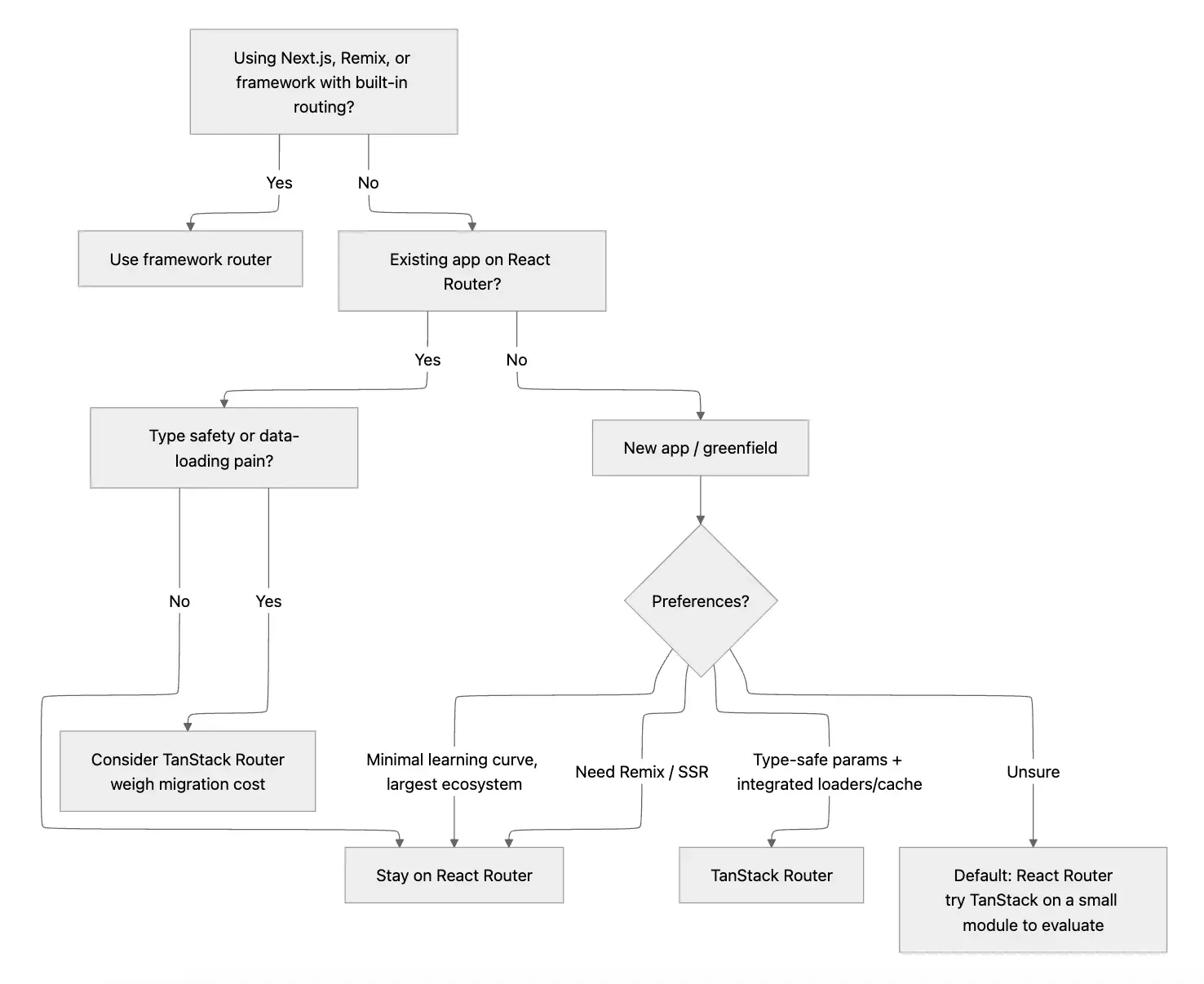
Choose React Router when
- Your team already uses it and you're satisfied.
- You use or plan to use Remix.
- You want the largest ecosystem and the most examples.
- You don't need type-safe params or built-in data caching.
Choose TanStack Router when
- You want type-safe route params and search params.
- You want loaders and data caching built into the router.
- You're starting a new app or a greenfield area and can adopt a new API.
- You're okay with a different mental model and a modestly larger bundle for better DX.
FAQs
What is React Router?
React Router is the standard client-side routing library for React. It provides nested routes, loaders, and a component-based API. It is widely used and has a large ecosystem, including Remix.
What is TanStack Router?
TanStack Router is a type-safe routing library for React. It infers route params and search params from your route definitions and offers integrated data loading and caching.
When should I use TanStack Router over React Router?
Use TanStack Router when you want type-safe params and search, built-in loaders and caching, and a modern routing API. Use React Router when you want familiarity, Remix alignment, or the largest ecosystem.
Is TanStack Router production-ready?
Yes. TanStack Router is used in production. It has documentation, a migration guide from React Router, and an active maintainer (TanStack).
How do I migrate from React Router to TanStack Router?
Use the official migration guide and plan for route definition changes (component tree vs code/file-based), loader signatures, and search param handling. Migrate one section at a time if possible.
Does TanStack Router work with Next.js?
Next.js has its own file-based routing and data fetching. For Next.js projects, use the framework's routing. TanStack Router is for non-Next.js React apps (e.g. Vite, CRA).
Can both do nested routes and loaders?
Yes. Both support nested routes and loaders. TanStack Router bakes in caching and invalidation; with React Router you often add that yourself or use Remix.
Does TanStack Router work with React 19?
Yes. Both React Router and TanStack Router work with React 19; there is no router-specific migration for React 19.
>>> Follow and Contact Relia Software for more information!

- coding