


Custom CMS (Content Management System) development is the process of building a content management system specifically for a business’s own needs, instead of using a ready-made platform like WordPress, Drupal, or Joomla.
Despite the explosion of off-the-shelf options, custom CMS development still exists because no platform fits every business. Also, deep AI integration needs, composable architectures, and vendor-lock-in costs, etc. are additional reasons businesses consider building a custom CMS.
This guide is for product owners, CTOs, and founders evaluating whether a custom CMS is the right call for their next project.
What is a Content Management System (CMS)?
A content management system, or CMS, is software that lets people create, edit, organize, and publish digital content without writing code. Behind the scenes, a CMS connects 3 main parts:
- A database stores the content,
- An admin interface for editors to manage content.
- A front-end interface displays content to readers.
CMS started as monolithic platforms like WordPress, Drupal, Joomla, where the front-end and back-end shipped as one package.
A CMS now has evolved into 3 distinct architectural patterns: coupled (the legacy approach), decoupled (front-end and back-end separated but bundled), and headless (back-end only, content delivered via API to any front-end). A custom CMS can take any of these shapes depending on what the business actually needs.
3 Types of CMS Architecture
Whether you build custom or use a platform, modern CMSs fall into 3 architectural patterns.
Coupled CMS
A coupled CMS bundles the back-end (content storage, editing) and the front-end (rendering, presentation) into one application. WordPress, Drupal, and Joomla are the typical examples.
The benefit of a coupled CMS is simplicity with one codebase, one deployment, and one mental model. However, the front-end stays inside the CMS's templating system, which makes modern interactive interfaces harder to build.
Coupled CMSes still suit marketing sites, blogs, simple business sites, and any project where setup speed beats front-end flexibility.
Decoupled CMS
A decoupled CMS keeps the back-end and the front-end inside the same project but separates them in code. The back-end handles content creation, storage, permissions, and publishing, and then exposes that content through APIs. The front-end consumes those APIs and displays the content on websites, apps, or other digital channels.
You have more front-end freedom than a traditional CMS while keeping some of the structure of a familiar CMS platform. For many businesses, decoupled architecture is a practical middle step between a tightly coupled CMS and a fully headless setup.
In new CMS projects, however, decoupled architecture is often less attractive than headless architecture. If a team already wants API-based content delivery, modern front-end frameworks, and multi-channel publishing, going directly to headless usually provides more long-term flexibility.
Some off-the-self decoupled platforms: WordPress Headless (Gatsby + WordPress), Drupal (Decoupled mode)
Headless CMS
A headless CMS is a back-end-only content system. It stores content, manages permissions and workflows, and exposes content through APIs such as REST, GraphQL, or both. Any front end can then consume that content, including a website, mobile app, smart TV app, kiosk, in-store display, or internal platform.
Headless is the dominant pattern for new CMS work, and it is the pattern most custom builds adopt because of composability. A headless content service slots cleanly into a modern stack alongside e-commerce, search, and personalization services.
Some off-the-self headless platforms: Contentful, Strapi, Sanity

Benefits of Building a Custom CMS
Three forces are pushing more teams to custom CMS builds.
Deep AI Integration
Although the leading SaaS CMSs have added AI features, for example, Contentful AI, Sanity's AI assistant, Strapi's plugins, the integrations are just surface-level. A custom CMS can embed AI deeper, including:
- Domain-specific content generation trained on your brand voice,
- Semantic search over your entire content history,
- Automated tagging and SEO optimization built into the editor flow,
- AI-assisted moderation and translation pipelines.
For content-heavy businesses, the AI layer is often the reason to build custom rather than buy.
Composable Architectures
The MACH (Microservices, API-first, Cloud-native, Headless) architecture pattern has become a practical way for companies to build flexible digital systems. Instead of relying on one large platform to handle everything, teams now combine specialized services for content, ecommerce, search, personalization, analytics, and customer data.
Off-the-shelf headless CMS platforms can still work well in the MACH setup, but they often come with fixed content models, vendor limits, and pricing based on API usage. A custom CMS supports the same headless and API-first structure and still keeps full control over content models, workflows, integrations, infrastructure, and long-term costs.
Lower Vendor Lock-in Costs
Contentful, Sanity, Storyblok, and the other major SaaS CMSs have all raised prices in the last two years, and several have introduced API call limits that punish high-traffic sites. For mid-to-large businesses, the multi-year SaaS bill now often exceeds the cost of a custom build.
A custom CMS requires a higher upfront investment, but it gives the business more control over ongoing costs.
Smooth 3rd-Party Integration
Third-party integrations are where off-the-shelf platforms often fall short. Each platform has a marketplace like WordPress plugins, Contentful apps, Strapi plugins, and the integration you need either exists, exists poorly, or does not exist at all.
With a custom CMS, you can connect directly to Salesforce, HubSpot, Stripe, Algolia, Auth0, GA4, or any internal service in exactly the way the business needs, with data flow shaped to your workflow rather than to a plugin's defaults.
Enhanced Security
Security is one of the strongest reasons to consider custom CMS development. With off-the-shelf platforms, security splits into two problems:
- WordPress plugins generate a steady stream of disclosed vulnerabilities, every plugin added expands the attack surface.
- SaaS CMSs store your content on someone else's servers, which is a real issue for fintech, healthcare, and any business with data-residency requirements.
A custom CMS removes both. The attack surface is smaller because you control every dependency. The data stays on your infrastructure because you chose where it lives.
Better Performance
Off-the-shelf platforms often limit how fast they can run for any specific use case. In contrast, custom CMS can tune the data model to your actual content, the caching strategy to your actual read patterns, and the infrastructure to your existing stack with no extra network hop to a SaaS API.
For publishers, large e-commerce sites, and anything serving content at scale, the tuning above compounds into real speed gains and lower infrastructure cost.
>> Read more: Optimize Next.js E-commerce Sites for Better SEO and Performance
WordPress vs. Open-Source CMS vs. Custom CMS
Most teams comparing options start with three categories: WordPress (the dominant traditional CMS), open-source CMSs like Drupal and Joomla, and a custom build. Each has a distinct profile.
| Criterion | WordPress | Open-source CMS (Drupal, Joomla) | Custom CMS |
|---|---|---|---|
| Setup time | Hours | Days to weeks | Months |
| Customization | Plugin-driven, often limited | Strong but complex | Full control |
| Performance | Depends heavily on plugins | Better than WordPress for complex sites | Tuned to your use case |
| Security | Plugin attack surface is large | Smaller surface, fewer plugins | Smallest surface — you control every line |
| Scalability | Strong with caching, weak without | Strong | Strong if architected for it |
| 3-year total cost | Low to moderate (plugins add up) | Moderate (developer-heavy) | High upfront, lower long-term |
| Best for | Marketing sites, blogs, small businesses | Mid-size sites with structured content | Products where the CMS is core to the business |
- WordPress still runs roughly 43% of the web in 2026 (W3Techs), and for the vast majority of small business marketing sites it remains the right answer.
- Drupal and other open-source CMSes occupy the middle: more capable than WordPress for structured content but more developer-heavy.
- A custom CMS is the right call when the business depends on the CMS in ways that off-the-shelf platforms cannot accommodate.
Key Features of a Modern Custom CMS
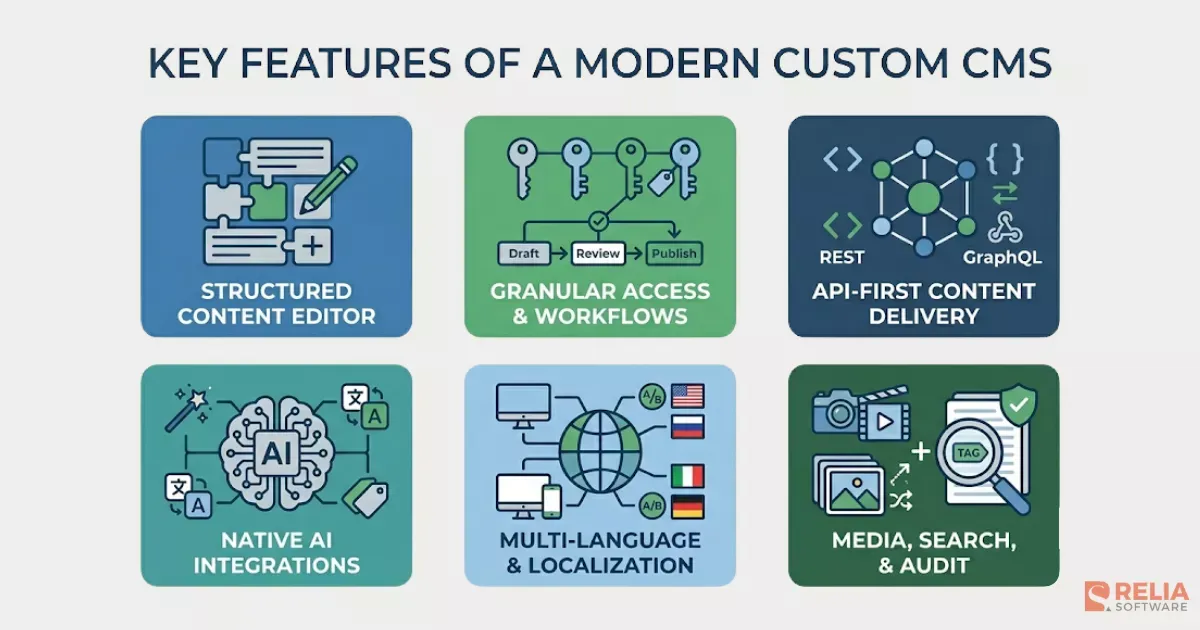
Core editorial functionality is still required, but a modern build also needs additional AI hooks, composable APIs, and integration patterns:
- A rich content editor with block-based or structured-content patterns.
- Role-based access control with granular permissions per content type, per workflow stage, and per environment.
- Workflow and approval flows like draft, review, publish, schedule with audit logs at every step.
- API-first content delivery with REST and GraphQL endpoints and webhook triggers on content changes.
- Multi-language and localization support, including content variants and translation workflows.
- Media management with image transformations, video handling, and CDN delivery.
- Search and content discovery like full-text search at minimum, with semantic search now standard.
- Versioning and rollback on every content type.
- AI integration hooks for generation, summarization, translation, tagging, and SEO.
- Audit logs for compliance.
The Custom CMS Development Process: 5 Stages
A typical Relia custom CMS engagement runs five stages over four to eight months, depending on scope.
Stage 1: Planning and requirements (2–4 weeks)
The team meets with stakeholders to define content types, editorial workflows, integration points, AI features, performance targets, and security requirements. The output is a written specification that the rest of the project works against.
Planning is also the stage where teams need to cut scope carefully. We know that every “nice to have” feature added during planning can become much more expensive once design, development, testing, and maintenance are involved.
Stage 2: Architecture and design (3–5 weeks)
- Architects choose the stack (typically Node.js or Python on the back-end, React or Next.js on the front-end, PostgreSQL or MongoDB for storage, Redis for caching, S3 or similar services for media).
- Designers wireframe the editor and admin interfaces.
- Engineers prototype the content model and validate it against the requirements.
Stage 3: Development (8–16 weeks)
The actual build takes place in this phase. Development often starts with the back-end APIs, then develops the editor interface, admin dashboard, permissions, publishing workflows, and integrations with tools such as search, analytics, AI services, CDN, or third-party platforms.
The development team works in sprints, with editor stakeholders reviewing every two weeks so the interface stays usable for the people who will actually live in it.
Stage 4: Testing and QA (4–6 weeks)
Team implements automated tests at every layer (unit tests, integration tests, end-to-end tests).
- Security testing with tools like OWASP ZAP.
- Performance testing under load with tools like JMeter or k6.
- Editorial UAT with a real editor team using real content.
If the system includes AI features, those features need a separate evaluation pass to check whether outputs are accurate, useful, safe, and aligned with the brand voice.
>> Read more:
- Top 10 Best End-to-End Testing Tools and Frameworks
- Top 15 Open-Source Unit Testing Frameworks For Developers
- Key Differences Between Unit Testing and Integration Testing
Stage 5: Deployment and maintenance (2–4 weeks plus ongoing)
Deployment starts with a staging environment before moving to production. The team always prepares rollback procedures, backup plans, monitoring, error tracking, and launch checklists before the CMS goes live.
The first month after launch is usually the most intensive. Teams need to fix bugs, train editors, adjust workflows, tune performance, and respond to feedback from real usage.
After that, maintenance depends on the complexity of the CMS and the rate of new feature requests. Businesses should expect annual maintenance to cost around 10–20% of the initial build cost, covering updates, security patches, infrastructure monitoring, support, and small improvements.
Best Practices for Building a Custom CMS
A few patterns separate custom CMS projects that succeed from ones that get rebuilt three years later.
Design the editor experience first. The most common reason a custom CMS gets abandoned is that editors find it harder to use than WordPress. The editor UI is the product, not an afterthought. Wireframe it in week one, prototype it in week three, and have real editors using a working prototype by month two.
Build a real content model, not a schema dump. Build a real content model, not just a database schema. Content types should match how editors work, not how the database stores data. If key fields are buried inside a generic “metadata” JSON blob, the CMS will become hard to use, maintain, search, and scale.
Make the API the contract, not the database. All front-ends, integrations, and AI features should talk to the API. The database is an implementation detail. This is what lets you change storage layers, add caching, or split services later without rewriting consumers.
Build versioning and audit logs from day one. Adding them later is twice the work. Editors and compliance teams both expect them in 2026.
Set up an AI evaluation harness early. Every AI feature needs a small test set of prompts with known good outputs, run in CI on every prompt change. Without it, AI quality drifts silently after launch.
Plan for the maintenance phase. A custom CMS is not a one-time build. Budget 10–20% of build cost per year for maintenance, security patches, dependency updates, and small feature additions.
How Much Does Custom CMS Development Cost?
Pricing for custom CMS work depends on three things: the complexity of the content model, the depth of AI integration, and the team building it. The ranges below are based on actual Relia engagements over the last two years:
By Development Stage
A typical custom CMS engagement breaks into five stages. The ranges below reflect mid-market projects across industry sources.
|
Stage |
Typical cost range |
|
Discovery & requirements |
$5,000 – $15,000 |
|
Design & architecture |
$10,000 – $30,000 |
|
Development |
$15,000 – $150,000 |
|
Testing & QA |
$5,000 – $20,000 |
|
Deployment & first-year maintenance |
$10,000 – $30,000 |
Development is the widest range because it covers everything from a single-team coupled CMS at the low end to a multi-channel headless build with deep integrations at the high end.
By Project Scope
Custom CMS work falls into four broad tiers based on overall scope and complexity.
|
Scope |
Typical total range |
|
Basic custom CMS (single team, single front-end) |
$10,000 – $30,000 |
|
Mid-range custom CMS (multiple content types, basic third-party integrations) |
$30,000 – $80,000 |
|
Enterprise headless CMS (multi-locale, multi-channel, full integrations) |
$70,000 – $200,000 |
|
Enterprise with deep AI integration |
$150,000 – $400,000+ |
The basic tier overlaps with what you might pay for a heavily customized WordPress or a small Strapi setup. The mid-range tier is where most custom builds actually live. Anything above $200,000 is enterprise work with multi-locale, multi-channel, or compliance requirements driving the scope.
By Region
Hourly rates vary widely by region, and that variation is the single biggest lever on total project cost.
|
Region |
Hourly rate range |
Typical mid-sized project total |
|
North America (US, Canada) |
$100 – $200 |
$120,000 – $250,000 |
|
Western Europe (UK, Germany, Netherlands) |
$70 – $150 |
$90,000 – $180,000 |
|
Eastern Europe (Poland, Ukraine, Romania) |
$40 – $80 |
$50,000 – $110,000 |
|
Southeast Asia (Vietnam, Philippines, India) |
$25 – $50 |
$30,000 – $90,000 |
For context, a US-based CMS developer salary maps to roughly $48–$62/hour on average in 2026 (Salary.com, ZipRecruiter, Glassdoor), but agency rates include overhead and typically run two to three times the underlying developer cost.
Relia falls in the Southeast Asia tier; we work with clients in all four regions and the regional cost gap is real.
AI Integration
AI integration depth changes the math. Industry research puts the AI premium at:
|
AI scope |
Adds to base build |
|
Basic AI feature (single-purpose, off-the-shelf LLM) |
$30,000 – $80,000 |
|
AI copilots and assistants |
$80,000 – $250,000 |
|
Full AI workflow automation |
$150,000 – $400,000 |
|
AI governance and compliance overhead |
+20–35% on the AI portion |
These numbers stack on top of the base CMS build cost. A mid-range custom CMS with one AI feature lands around $60,000–$160,000 total. The same CMS with a full editor copilot and multiple AI workflows lands at $200,000–$500,000.
Ongoing Costs
Build cost is the upfront figure. Three recurring lines matter for the multi-year picture.
Annual maintenance runs 20–30% of build cost per year, covering security patches, dependency updates, and small feature additions. For a $100,000 build, that's $20,000–$30,000 every year.
Infrastructure and third-party APIs add $500–$3,000 per month at moderate scale. The line covers hosting, LLM inference, CDN, search infrastructure, and any SaaS integrations the CMS depends on. High-traffic sites and heavy AI use push this higher.
Active development retainers for continuous feature work run $2,000–$10,000 per month on top of basic maintenance.
>> Read more:
- How Much Does It Cost to Design An App?
- Detailed Breakdown For App Development Cost
FAQs
How long does it take to build a custom CMS?
A typical Relia custom CMS project takes four to eight months from kickoff to launch, depending on scope. Simple coupled CMSs can ship in three months. Complex headless CMSs with deep AI integration usually take six to eight.
What are the best programming languages for a custom CMS?
Node.js (with Fastify, NestJS, or Express) and Python (with Django or FastAPI) cover most modern custom CMS work. PHP (Laravel, Symfony) is still common in agencies with a PHP heritage. Front-end is usually React or Next.js. Database is PostgreSQL or MongoDB. The best language depends on the team building it, not on any inherent CMS advantage.
Is a custom CMS worth it for a small business?
Usually no. For most small businesses, WordPress or a modern headless platform like Strapi covers the use case for a fraction of the cost.
Can I migrate from WordPress to a custom CMS?
Yes, and most teams do. The migration includes content export from WordPress (usually via the REST API or WP All Export), content transformation to fit the new content model, media migration, URL redirect mapping for SEO, and editor training.
Most WordPress-to-custom migrations take four to eight weeks beyond the custom CMS build itself.
How do I handle SEO during a CMS migration?
Carefully. A CMS migration is one of the most common causes of organic traffic loss. The non-negotiables:
- full URL mapping from old to new,
- 301 redirects on every old URL,
- schema markup preserved on every page type,
- sitemap submission to Google Search Console immediately after launch,
- a content audit before migration so nothing of value is dropped.
- Plan for a 30–60 day organic traffic dip even when the migration is done well.
>> Read more:
- Essential Insights into Custom Enterprise Software Development
- Top 10 CMS Development Companies in Vietnam
Conclusion
Custom CMS development today is a different proposition than it was even two years ago. AI features have raised what a content platform can do. Composable architecture has made custom builds easier to drop into modern stacks. SaaS pricing has shifted the math for mid-to-large operations.
For the right project, a custom CMS pays back its build cost in the first year through editor productivity, AI capability, and freedom from platform constraints.
For the wrong project, it is still an expensive mistake. The choice depends on whether your content needs fit into an off-the-shelf platform without forcing the business to bend around it. If they do, use a platform. If they do not, build custom and pick a partner who has shipped one that is still working three years later.
>>> Follow and Contact Relia Software for more information!

- development
- Web application Development
- web development