



The main web app vs website difference is that a web app allows users to perform tasks and interact with data directly in the browser, while a website mainly provides information and content. Although both run on the web and are accessed through a URL, they still serve different purposes for businesses and users.
In this guide, we will explain the key differences between web apps and websites, how they are built, when to use each one, and how to decide which option fits your business needs. Let’s start!
What Is A Web App vs Website?
Web App
Web application is a software program that runs inside a web browser and allows users to perform tasks, process data, or interact with systems online, such as creating content, managing data, collaborating with others, or completing transactions.
Core Characteristics:
- User interaction and actions: Users can perform tasks such as creating, editing, or managing data instead of only reading content.
- User accounts and authentication: Many web apps require users to log in so the system can store personal data or settings.
- Dynamic content updates: The interface can change based on user input, stored data, or system activity.
- Backend processing: The application communicates with servers and databases to process requests and store information.
Types of Web App
- Project management platforms;
- Social media platforms;
- Online banking systems;
- E-commerce platforms;
- SaaS applications;
- Content Management Systems (CMS);
- Customer Relationship Management (CRM) Systems.
Examples: Google Docs, Trello, Notion, Gmail, Facebook, etc.
Website
Website is a collection of web pages that people can open through a browser using a domain name. These pages are connected and mainly provide information for visitors to read or view. A website usually shares content such as articles, company details, images, or resources, allowing users to explore different pages through menus and links.
Core Characteristics
- Content-focused pages: The main purpose is to present information such as text, images, videos, or documents for visitors to read or view.
- Simple navigation: Pages are connected through menus and links so users can move between sections easily.
- Limited interaction: Visitors may perform small actions such as clicking links, submitting a contact form, or downloading files.
- Often built with CMS platforms: Many websites use systems like WordPress or similar tools so owners can manage content without coding.
Common Types of Websites
- Blogs;
- Corporate websites;
- Landing pages;
- Portfolio websites;
- News websites;
- Educational websites.
Examples: Wikipedia, BBC News, company websites, personal blogs, university websites.
Web App vs Website: Key Differences
|
Aspect |
Web App |
Website |
|
Main Purpose |
Allow users to perform tasks and work with data |
Share information and content with users |
|
Architecture |
Use a Single-Page Application (SPA) structure |
Use a multi-page structure |
|
Development Complexity |
More complex due to application logic |
Generally easier to build and maintain |
|
User Interaction |
High interaction, including creating, editing, and managing data |
Limited interaction, such as clicking links or filling forms |
|
User Accounts |
Often required for personalized access |
Usually not required |
|
Data Processing |
Continuous data processing and updates |
Minimal data processing |
|
Backend Systems |
Requires backend logic, servers, and databases |
May be simple or sometimes unnecessary |
|
Typical Technologies |
Frontend frameworks, backend services, and databases |
HTML, CSS, simple JavaScript, CMS platforms |
|
Cost |
Higher |
Lower |
Main Purpose
The main purpose of a web app is to help users perform tasks by processing user input and producing results immediately. Users don't just read a web app; they use it to finish a task. Whether you are editing a photo, managing a budget, or sending an email, the tool exists to help you manipulate data.
Meanwhile, a website mainly presents information about a company in one flow. The content of a website usually stays consistent for most users. People visit websites to read articles, check a restaurant menu, or find a company’s contact details.
Because of this difference, web apps behave more like software tools inside a browser, while websites act as information platforms.
Architecture
Web apps often use a Single-Page Application (SPA) structure. The app loads once in the browser, and when users click or perform actions, only small parts of the page update instead of loading a new page. This makes the experience faster and more like using a program on your computer.
Behind the scenes, a web app usually has several parts working together:
- Frontend: The interface users see in the browser, such as forms, dashboards, and buttons.
- Backend: The server that processes requests and runs the application logic.
- Database: Stores data like user accounts, documents, messages, or transactions.
- API communication: Connects the frontend and backend so they can send and receive data.
On the other hand, websites often use a multi-page structure which is simple and works well for SEO because search engines can easily crawl each page. When users visit a website, the browser asks the server for a page file, such as about-us.html, to send the full page back to you. Then, when you click another link, the browser will request a new page and load it again.
In a technical view, a website usually has a simpler setup:
- Page layer: HTML, CSS, and sometimes JavaScript define how pages look and how users navigate.
- Content system: Many websites use a CMS to manage articles, images, and page content.
- Hosting server: The server stores page files and delivers them to visitors when a page is requested.
- Optional database: Some websites use a database to store content, especially when using CMS.
Technologies Used
A web app usually uses multiple technologies to process user actions, store data, and manage communication between systems. Here are some popular technologies used to build a scalable web app:
- Frontend frameworks: React, Vue, Angular
- Backend frameworks: Node.js, Django, Spring, Laravel, or Go frameworks
- Databases: PostgreSQL, MySQL, MongoDB, Redis
- API systems: REST APIs or GraphQL
- Authentication systems: JWT, OAuth, and identity services
- Cloud infrastructure: AWS, Google Cloud, or Azure
At Relia Software, our team typically uses JavaScript frameworks such as React or Next.js to build responsive web interfaces, while backend systems are built with Node.js to handle server logic and APIs. For data storage, we commonly work with PostgreSQL or MongoDB to support scalable and efficient web applications. These stacks allow us to bridge the gap between high-speed performance and long-term stability for every project we take on.
In contrast, a website usually uses fewer technologies because it mainly delivers content to visitors. Such as:
- Core tech stack: HTML builds page structure, CSS controls layout and style, and JavaScript adds small interactive features.
- Content management systems: WordPress, Drupal, Ghost
- Static site generators: Tools such as Hugo, Jekyll, or Gatsby
- Website builders: Webflow, Wix, Squarespace
- Hosting platforms: Shared hosting or static hosting services
Development Complexity
In development, customizing a web app is more complex and requires a greater development effort than traditional websites.
Web apps require state management, which is a way of keeping track of what the user is doing at every moment. If a user changes a setting in one part of the app, that change must appear everywhere else instantly without a page refresh. This requires a deep level of engineering and a lot of testing to make sure things don't break when data changes.
>> Read more:
- Top 7 Popular Approaches for State Management in Angular
- Top 7 Best React State Management Libraries
- 7 Best Approaches for State Management in Flutter
Building a website is easier due to its minimal logic, which mostly just involves connecting different pages with links. A developer can use a basic text editor or a site builder to develop a website since the pages are mostly static text and images. The biggest challenge is just making sure the layout looks mobile-friendly.
User Interaction
Web apps offer high-level interaction because users actively work with the system by creating files, editing content, uploading data, managing settings, or collaborating with others. Therefore, the interface of a web app needs to respond quickly to actions. For example, when a user sends a message in a chat app, it appears in the conversation immediately.
On a website, interaction is usually simple to help users explore information, but rarely change the system itself. User's interaction is limited to:
- Click links to move around.
- Scroll through text.
- Fill out a basic contact form.
- Watch a video.
User Account
Most web apps require user accounts because the system needs to identify each user and store their data. Logging in allows the app to keep personal information, such as emails, tasks, or account details, separate for each user.
Meanwhile, most websites do not require users to log in. Visitors can open pages and read information freely. Some websites may offer optional accounts for features like comments or member-only content, but they are usually not required to access the site.
Backend System
A web app requires a strong backend system because it must handle user actions and manage stored data. When users perform a task, such as sending a message, saving a file, or updating a record, the request is sent to the server. The server processes the request, retrieves or updates data in a database, and sends the result back to the user.
In detail, the backend of a web app needs to handle:
- Authentication: Making sure your password is correct.
- Permissions: Checking if you are allowed to delete a specific file.
- Integrations: Talking to other services (like processing a payment through Stripe).
- Logic: Running the actual "brains" of the tool.
On the other hand, a website may run with a simpler backend because it mainly displays content such as text, images, or articles that already exist on the server. When a visitor opens a page, the server simply sends that content to the browser without heavy processing. Some websites are even static, where page files are stored on the server and delivered directly to visitors.
Cost
A web app usually costs more to build because it requires more development work, such as both frontend and backend development, database setup, user account systems, and stronger infrastructure. It also takes longer to launch and requires ongoing maintenance to keep the system secure and running smoothly, which makes the cost higher over time.
A website usually costs less because its development only focuses on page design, content setup, and basic hosting to display information. Many websites can be built quickly using templates or CMS platforms, which helps reduce development time and overall cost.
>> Read more: How Much Does It Cost to Design an App?
When To Develop a Web Application?
If your goal is to provide a tool that helps users complete tasks or manage data, a web app is the right choice. It works best when users need to do something, not just read information.
Some popular use cases include:
- SaaS products: When your business plans to deliver software through the browser, such as CRM systems, project management tools, or accounting platforms.
- Dashboards and management systems: When users need a central place to view reports, track data, monitor performance, or manage operations.
- Marketplaces: When the platform must connect buyers and sellers, manage listings, process orders, and handle transactions.
- Collaboration tools: When multiple users need to work together online, such as editing documents, managing tasks, or communicating in shared workspaces.
- Customer portals: When customers need a private area to view orders, manage subscriptions, track services, or download documents.
- Booking and reservation systems: When users need to schedule services such as appointments, hotel rooms, transportation, or events.
- E-learning platforms: When the system must manage courses, student accounts, lessons, and progress tracking.
- Internal business systems: When companies need tools for employee management, workflow tracking, or internal reporting.
When To Build a Website?
A website is the best choice when your goal is to reach many customers and share information clearly. Website’s use case includes:
- Business introduction and brand presence: When your company needs an online space to introduce the business, explain services, and provide contact information.
- Content publishing: When the main goal is to share articles, guides, news, or educational content for readers.
- Marketing and promotion: When the website supports campaigns, product launches, or lead generation through landing pages.
- Portfolio or showcase: When individuals or companies want to present projects, work samples, or case studies.
- Information portals: When the platform mainly provides resources, documentation, or public information.
- Company announcements and updates: When the site is used to publish news, events, press releases, or company updates.
- SEO and online visibility: When the goal is to appear in search results and attract visitors through helpful content.
Can a Website and Web App Work Together?
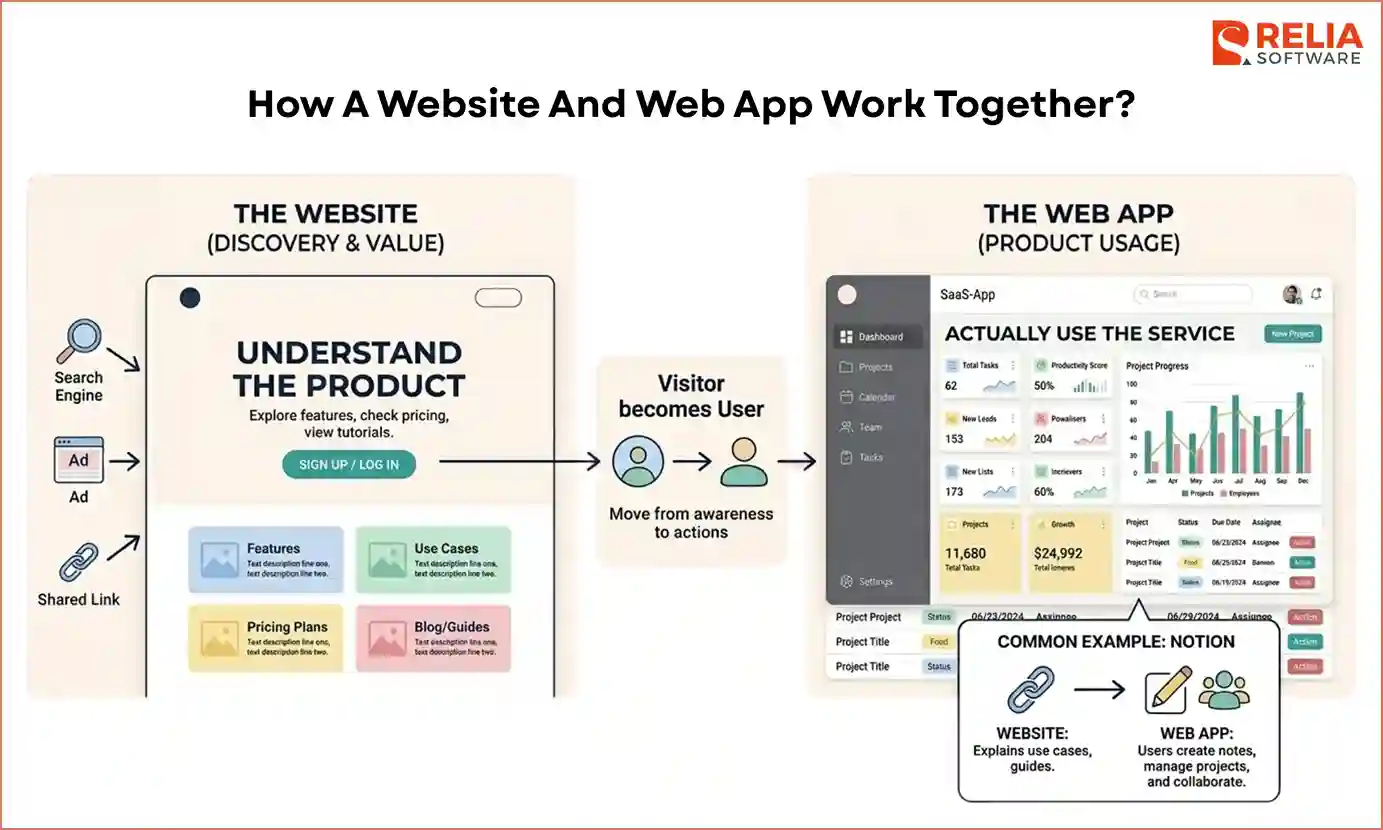
In many digital products, the website and web app can work together in a hybrid system, allowing businesses to support both audience discovery and product usage at the same time. The website helps people discover the product and understand its value, while the web app is where users actually use the service.
First, visitors will visit the website from search engines, ads, or shared links to read about the company's product, explore features, check pricing, or view tutorials. Therefore, the goal at this stage is to help visitors understand the product and decide whether they want to try it.
Once a visitor decides to use the service, they move from the website to the web app through actions such as Sign Up, Log In, or Get Started pages. After entering the web app, users can access tools, dashboards, or systems that allow them to perform tasks.
A common example is Notion. Its website, first, explains the product, shows use cases, and provides guides. After signing up, users can now enter the web app where they create notes, manage projects, and collaborate with their team.
For many businesses, combining a website with a web app creates a complete digital system where the website brings people in, while the web app provides the service that keeps users engaged.
How Businesses Decide Between a Web App and a Website?
Choosing between a web app and a website depends on what your platform needs to do for users and how it supports your business goals. Before starting the development process, define your needs clearly by answering the practical questions below:
What is the main goal of the project?
Start by defining the business goal and user journey. If the platform mainly introduces your company, publishes content, or supports marketing, and users mostly browse pages to read information, a website is usually enough. If the goal is to provide a digital tool or service where users perform tasks such as managing data, submitting records, or running processes, the project should be built as a web app.
Is SEO important for your strategy?
If your main goal is to attract visitors from search engines through articles, guides, or company pages, a website is a more suitable choice.
Who is the target audience of the platform?
If the project mainly targets new visitors who want to learn about your brand or explore your services, a website is usually the better choice. If the platform is built for real users who have to log in, use your service, and need a personal workspace, a web app is more suitable.
FAQs
1. Does a web app require an app store?
No. Unlike mobile apps, web apps run directly in your browser. You don’t need to download or install anything from an app store to use them.
2. Can a website become a web app?
Yes, when features like user accounts, dashboards, or data management are added to a website, it can grow into a web app.
3. Can a web app and a website share the same domain?
Yes. Many companies host both on the same domain. The website usually appears on the main pages, while the web app runs in a section such as app.company.com or company.com/app.
4. Do web apps require more security than websites?
Yes. Web apps handle user accounts, personal data, and transactions, so they require stronger security measures. Websites usually need basic protection but often manage less sensitive data.
5. Which is better for startups: a web app or a website?
It depends on the business model. If the startup mainly needs marketing and content, a website is enough. If the startup’s product is a digital tool or service, a web app is usually required.
Conclusion
In short, a website is best for sharing information, building brand presence, and attracting visitors through content. Meanwhile, a web app is better when users need to perform tasks, manage data, or use the platform as a tool.
The right choice depends on your business goals and how users will interact with the platform. By defining your project scope, understanding the user journey, and identifying the main purpose of the platform, you can decide whether a web app or a website is the better solution for your project.
>>> Follow and Contact Relia Software for more information!

- Web application Development
- web development