


Mobile app development project management does not only involve structuring the mobile app development process to manage scope, timelines, and resources, but also means working through a limited, device-dependent environment. Unlike web projects, mobile teams must deal with App Store rules and the chaos of device fragmentation.
In this article, we will explain the common failures, common working methods, and what to do at each development stage. It also covers simple tools and best practices that help teams stay aligned, ship more smoothly, and avoid confusion. Let’s start!
Common Failures in A Mobile App Project
Scope Creep
Scope creep occurs when new requests keep being added after work has already started. Each small change adds more work in design, coding, testing, and review for the app. Over time, the risk is not only delay but also rushing in development, cutting QA, or releasing a version without carefully checking and enhancing.
Unclear Requirements
Unclear requirements happen when the team cannot answer simple questions, such as what the user should do, what should happen if an error occurs, or what “done” actually means. In mobile apps, if these details are not defined, developers may build the feature in the wrong way, QA may test the wrong behavior, and problems are often found late when fixes take longer.
Inadequate Planning
Poor planning happens when key decisions are not made early, such as developing the MVP, planning how data moves through the system, and preparing what is needed for the first release, not just about missing a timeline. Without these, teams may build features in the wrong order, run into blockers late, and waste time reworking unnecessary things.
Poor Communication
Communication fails when updates are inconsistent, feedback comes late, or decisions are made without agreements from other departments. As a result, team members start working in different directions: designers expect one flow, developers build another, and QA tests are based on outdated notes.
This becomes worse in outsourced or mixed teams, where time zones and handoffs already slow communication, leading to rework, frustration, and a last-minute rush before release.
Integration Issues
Integration issues happen when the app depends on systems outside the mobile codebase, such as APIs, payment services, login providers, analytics, push notifications, maps, or third-party SDKs. These services can fail for reasons that the team cannot control, like unstable endpoints, missing data fields, slow responses, permission changes, or SDK updates.
If integration is treated as a final step, teams may discover that important user flows do not work in real conditions, even though the app interface already looks complete.
App Store Rejection & Policy Changes
Many mobile projects fail right before launch because the team did not prepare for Apple’s or Google’s review rules. Even a small naming issue or a misunderstood privacy permission can delay a launch by weeks.
Device & OS Fragmentation
Just because the app works well on one phone does not mean it will work well on all phones. If the team does not plan for different screen sizes, battery levels, and OS versions, many users may end up with a poor experience.
Insufficient Testing
Users run the app on many devices, OS versions, screen sizes, and network conditions, so a bug that doesn’t appear on one phone may still affect many real users. When testing is too limited, these issues, such as crashes and broken flows, may happen after launch and often lead to bad reviews, more support requests, and urgent fixes that disrupt the roadmap.
The Importance of Mobile App Development Project Management
Keeps scope creep under control
Project management (PM) acts as a translator between business goals and technical constraints. They ensure that a planned feature is actually technically feasible within the hardware limits of a smartphone and the legal limits of the App Store.
Moreover, PM also helps the team define the requirements and limits clearly. They become the reference point for the whole project, so small additions do not slowly pile up and stretch the timeline.
When a new request comes in, the PM records it and checks how it affects design, development, testing, and the release plan. Then, the team decides whether it should be conducted now or later, keeping the project focused and on track.
Fixes unclear requirements before they turn into rework
Good project management ensures requirements are clear and detailed, so developers and QA do not have to guess what they have to do. The PM helps the team describe in detail what steps the user takes, what the app shows after each step, and what happens when something goes wrong. When these details are clear, the team can build and test the feature correctly without confusion or rework.
Prevents late-stage chaos
With a clear timeline, milestones, and task order, the team can avoid last-minute pileups where many tasks are still unfinished. It helps the team handle risky or unclear work earlier, remove blockers, and focus on core flows before polishing the UI. This way, the team avoids the final rush where quality drops and bugs increase.
Reduces poor communication problems
A PM always has to set a simple routine: regular updates, clear owners, and decisions written in one place. This keeps design, development, and QA aligned, especially when feedback comes from multiple stakeholders. It also prevents the common problem when building something that is not right or does not matter.
Brings integration risks forward
A PM plans and tracks API or third-party work early during the mobile app development project. They encourage early proof tests; that way, if the API is missing fields, the SDK behaves oddly on one platform, or responses are slow, the team is able to find out while there’s still time to adjust the plan.
Protects testing time
A PM prevents cutting testing times by planning QA work from the start and treating it as part of delivery, not a final step. This includes choosing a device and OS coverage plan, testing real network conditions, checking common edge cases, and leaving space for fixes.
Mobile App Project Management Methodologies
>> Read more: 8 Common Software Development Life Cycle (SDLC) Methodologies
Agile Methodologies
Best for: Projects requiring high flexibility and continuous scalability.
Agile focuses on building software by dividing the project into short cycles where the team delivers small working parts of the app. After each cycle, the team reviews the results, gathers feedback, and adjusts the next steps if needed. This helps mobile app projects adapt when new ideas appear or when user feedback suggests changes.
Agile also encourages teamwork and regular feedback, allowing stakeholders to review progress, and helps the team find problems early. As a result, the app can improve continuously during the project.
Three common methods used under Agile are Scrum, Kanban, and Extreme Programming (XP):
-
Scrum: Scrum organizes work into short cycles called sprints, usually lasting one to four weeks. During each sprint, the team focuses on a set of features and meets regularly to review progress and solve issues.
-
Kanban: Kanban uses a visual board to track tasks as they move through stages such as “To Do,” “In Progress,” and “Done”, helping teams manage workload and keep work moving smoothly.
-
Extreme Programming (XP): XP focuses on strong engineering practices to improve code quality by encouraging pair programming, automated testing, and frequent code updates so the team can fix problems quickly and maintain stable software.
Overall, Agile methods are well suited for mobile app development because they support flexibility, continuous improvement, and regular feedback during the project.
Waterfall Methodology
Best for: Projects with fixed scope, budget, and clear requirements.
Waterfall is a method where work moves step by step through fixed phases, including requirements, design, development, testing, and release. Each phase is usually completed before the next one begins.
However, this approach only works best when the project scope is stable. In mobile app development, many issues only appear during real testing, and fixing them late can affect work that was already finished. Because of this, many teams use a hybrid approach, which applies Waterfall for early planning and design tasks, while development and testing happen in smaller cycles so the team can adjust when needed.
>> Read more: Agile vs Waterfall Methodology: Similarities, Differences & Use Cases
Lean Approach
Best for: Eliminating waste and validating business ideas (MVP).
Lean is a project management approach that focuses on delivering value by starting with the most important tasks while reducing unnecessary work. The team will release a simple version of the app to test ideas early and avoid spending time on features that users may not need.
Lean also encourages teams to learn from real usage by observing how users interact with the app and collecting feedback after releasing a basic version. Based on this feedback, the team improves the product step by step with small improvements and continuous learning.
Rapid Application Development (RAD) Method
Best for: Fast-paced UI/UX design and user-driven feedback.
Rapid Application Development (RAD) is a project management approach that focuses on improving the app through prototypes and frequent feedback. The team creates working versions of the app early so stakeholders can see how it works and suggest changes.
This method helps teams test ideas fast, adjust the product during the development process, improve the user experience, and fix issues before the final release. RAD works well for mobile app projects that need quick development and frequent updates based on feedback.
Spiral Model
Best for: High-risk, large-scale, and complex systems.
The Spiral Model is a project management method that manages development through repeated cycles while focusing on risk control. The project moves step by step through phases such as planning, risk analysis, development, and evaluation before moving to the next cycle.
In the Spiral Model, the team identifies possible problems early and may build prototypes to test solutions before moving forward. Because of this careful process, the Spiral Model is often used for systems like banking or healthcare software, where stability and security are more important than releasing quickly.
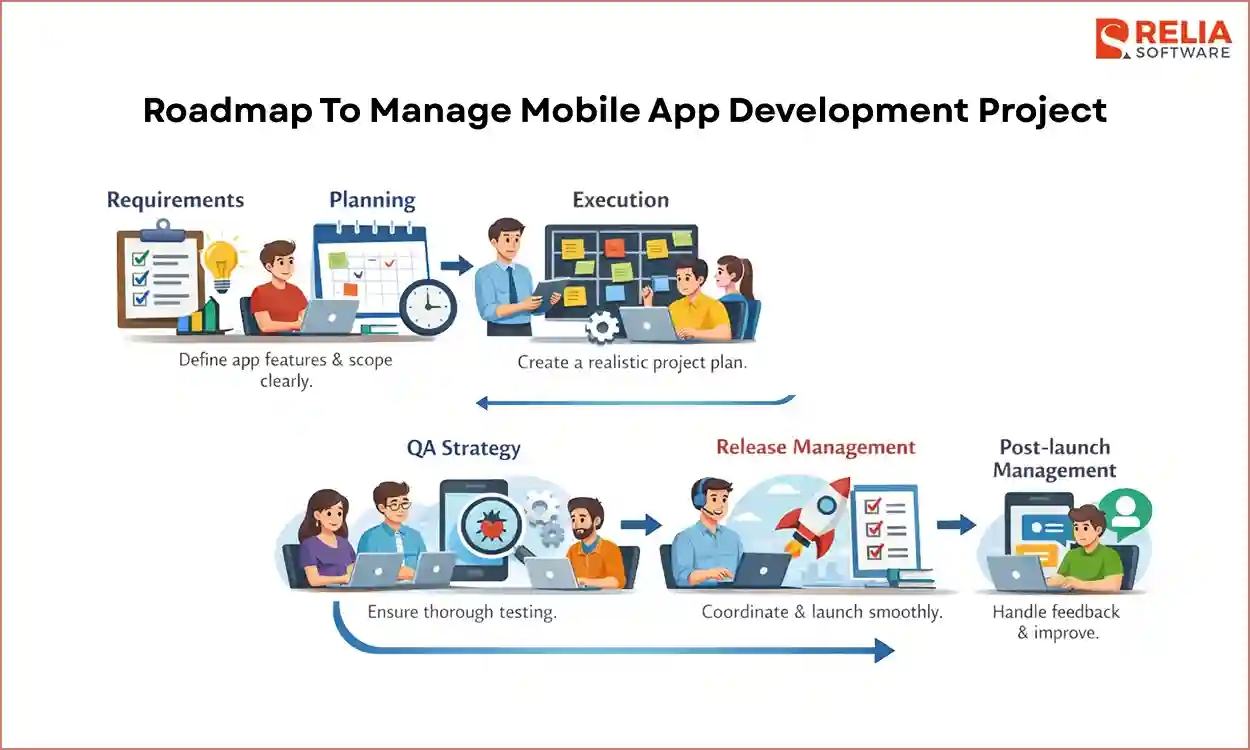
Roadmap To Manage Mobile App Development Project
Requirements
Before any build starts, the PM’s job is to define the app types and what the first release should include, so the scope does not slowly expand every time a new idea appears. It also describes app features clearly in simple terms, including what the user does, what the app shows, and what should happen if something goes wrong, ensuring everyone understands the feature in the same way.
Planning
Once the requirements are clear, the PM needs to turn them into a realistic plan. Planning for a mobile app needs a device-first mindset. In addition to setting timelines, the PM must decide which devices and OS versions the app will support and which it will not.
This stage should also cover provisioning and signing keys early, as these mobile-specific issues can delay the team for days if not addressed. A mobile roadmap is not only about features, but also needs to manage how the app depends on the OS and the device hardware.
Execution
During execution, the PM's responsibility is to keep the work organized so it does not turn into a pile of half-finished tasks. Clear priorities help the team stay focused, even when new requests appear and try to shift attention away from the main goals.
The PM also makes sure possible issues and pop-up requests are handled quickly. If any blockers get stuck and stay unresolved, the team can slow down even if everyone is working hard. With good coordination, the project can move forward steadily.
>> Read more: Top 15 Mobile App Development Frameworks For Businesses
QA Strategy
QA for mobile apps needs to reflect how people use phones in real life. A mobile PM should make sure testing goes beyond normal office conditions, which includes checking what happens when a phone call comes in, the battery gets low, or the network changes from Wi-Fi to 4G. The PM also needs to make sure the app works well on real devices, from low-end Android phones to the latest iPhone.
This stage is also where the PM helps the team keep a clear line for “release-ready,” so the project doesn’t slip into endless debate about which bugs matter.
Release Management
Release management is the final checkpoint of a mobile project. Unlike web updates that go live right away, mobile apps must be submitted to the Apple App Store or Google Play for review before release. Therefore, the PM must keep the launch from being blocked to meet the release time by ensuring submission items are ready, the rollout plan is clear, and the team knows what to watch right after release.
The PM also needs to plan for users who do not update the app quickly. This means the system and APIs should still work well with older app versions, so users do not face errors after server updates. When release management is handled well, the launch feels organized and controlled instead of rushed.
Post-launch Management
When your app receives feedback from real users after launch, the PM has to keep the team calm and focused by fixing urgent problems quickly and organizing feedback clearly. Managing well here can let user feedback become useful input for improvements and help shape a better plan for the next release.
Popular Templates For Mobile App Project
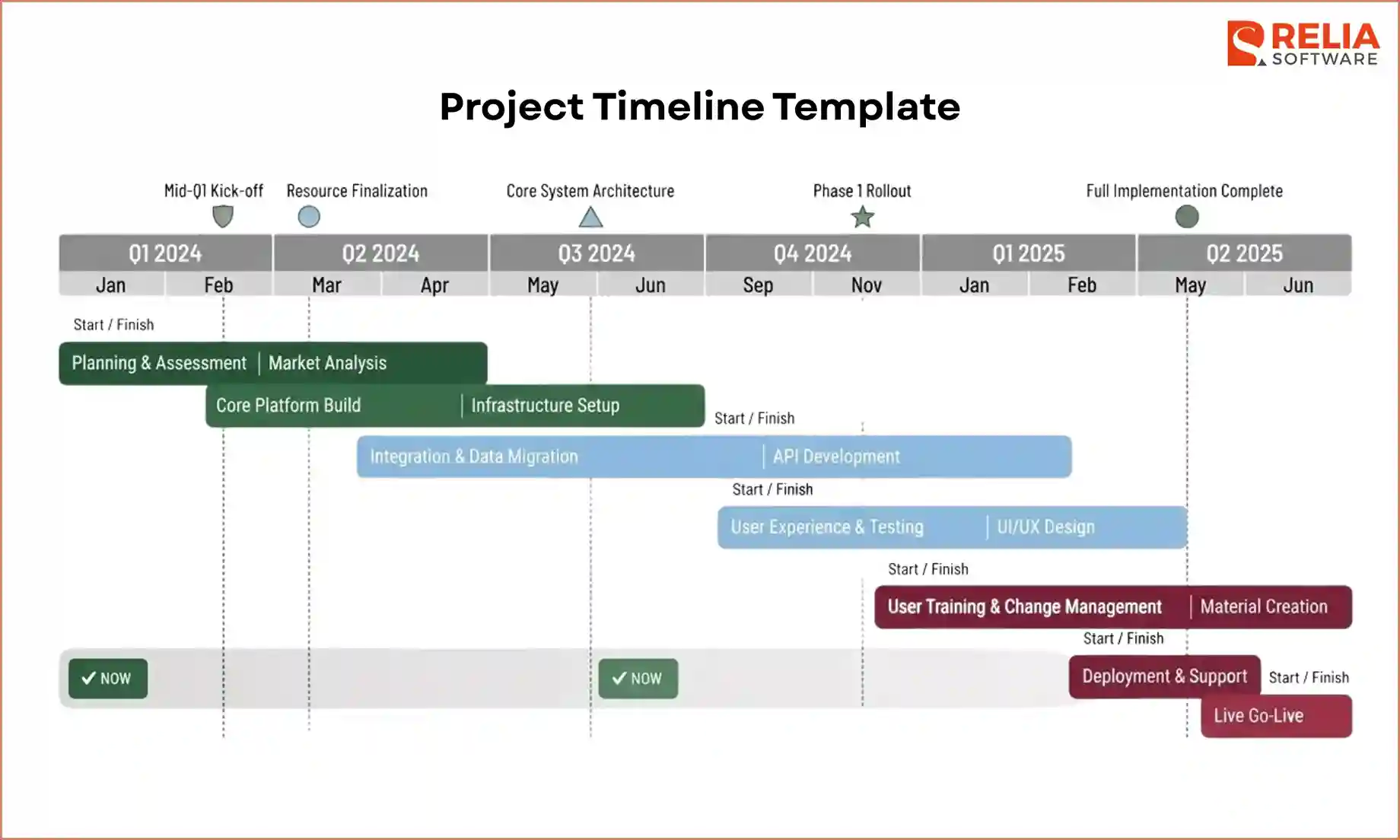
Project timeline template
The project timeline template shows the main phases, milestones, and target dates of the project, helping the team plan key stages such as requirements, design, development, testing, store preparation, beta release, and launch.
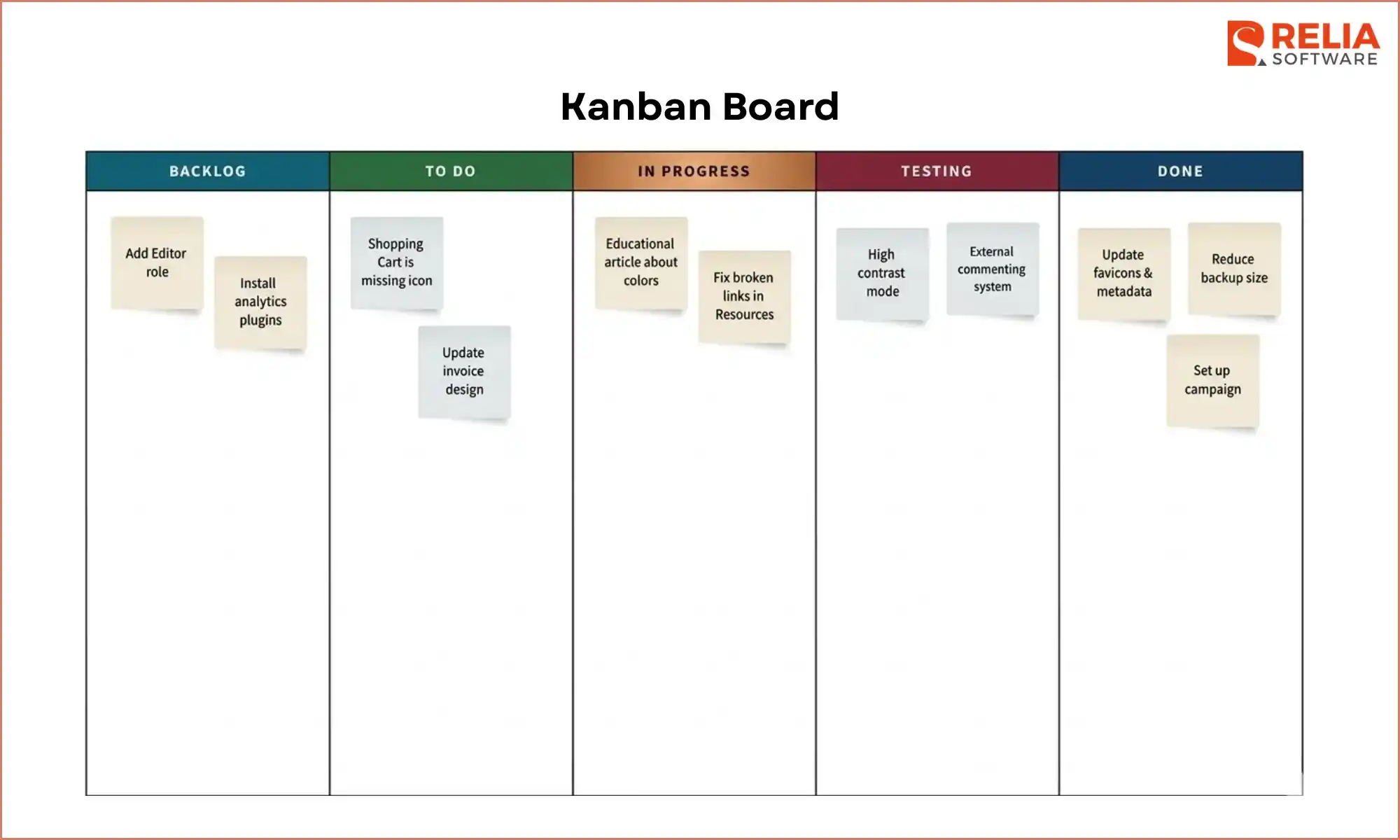
Kanban board or task board template
Kanban template is used to follow feature work, bug fixes, QA tasks, and release items across design, iOS, Android, backend, and testing as it moves through stages like “To Do,” “In Progress,” “Testing,” and “Done.”
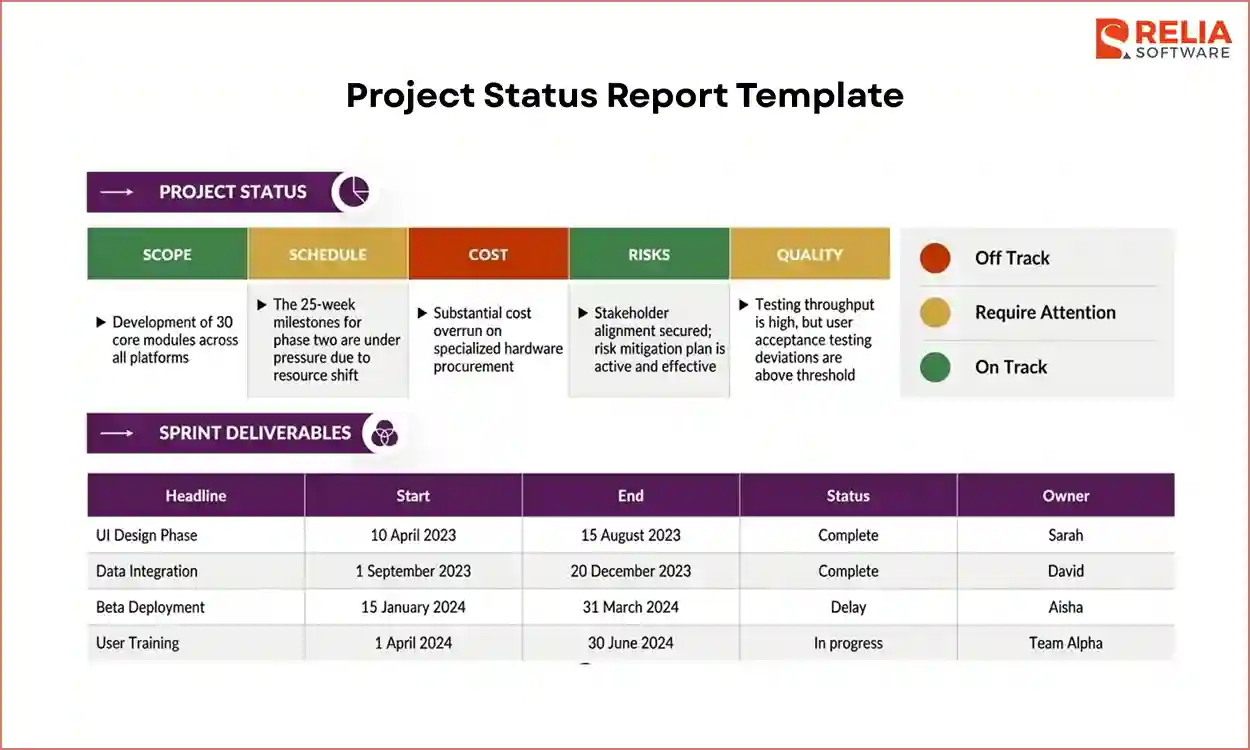
Project status report template
Project status report is a short update document that shows what has been completed, what is in progress, what is blocked, and what comes next, helping to keep stakeholders informed about progress, delays, testing results, and release readiness.
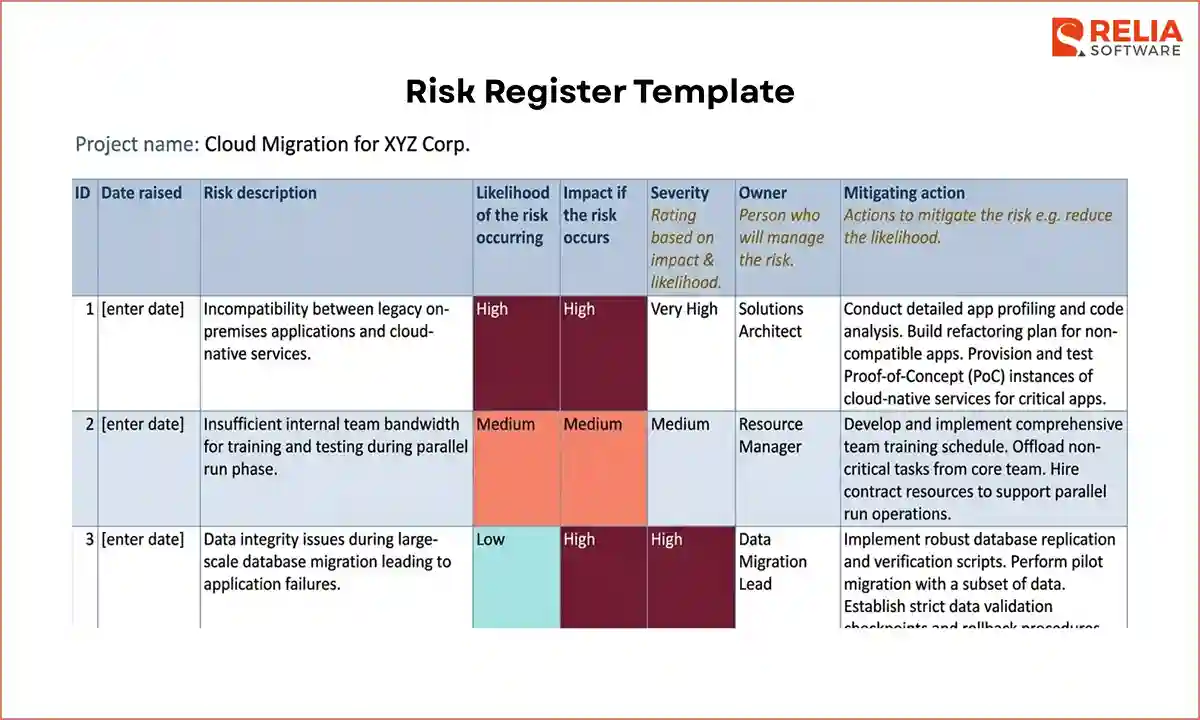
Risk register template
Risk register template records possible risks that may affect the project such as unstable APIs, SDK setup delays, device compatibility problems, store policy risks, or unclear requirements.
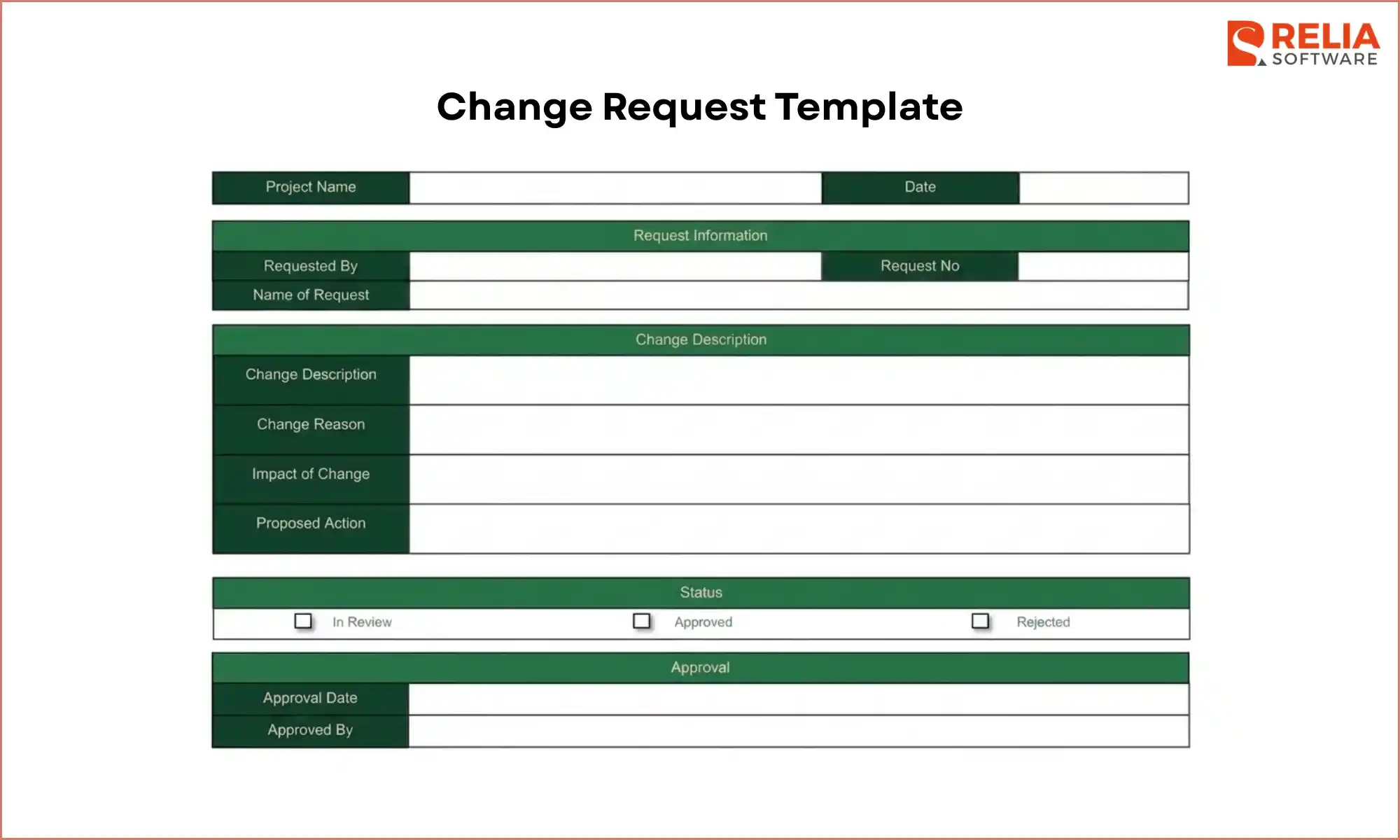
Change request template
The change request template is where the PM reviews how the request may affect design, development, testing, timeline, and release before deciding whether it should be done now or later. It is usually used when someone asks to add or change part of the project scope.
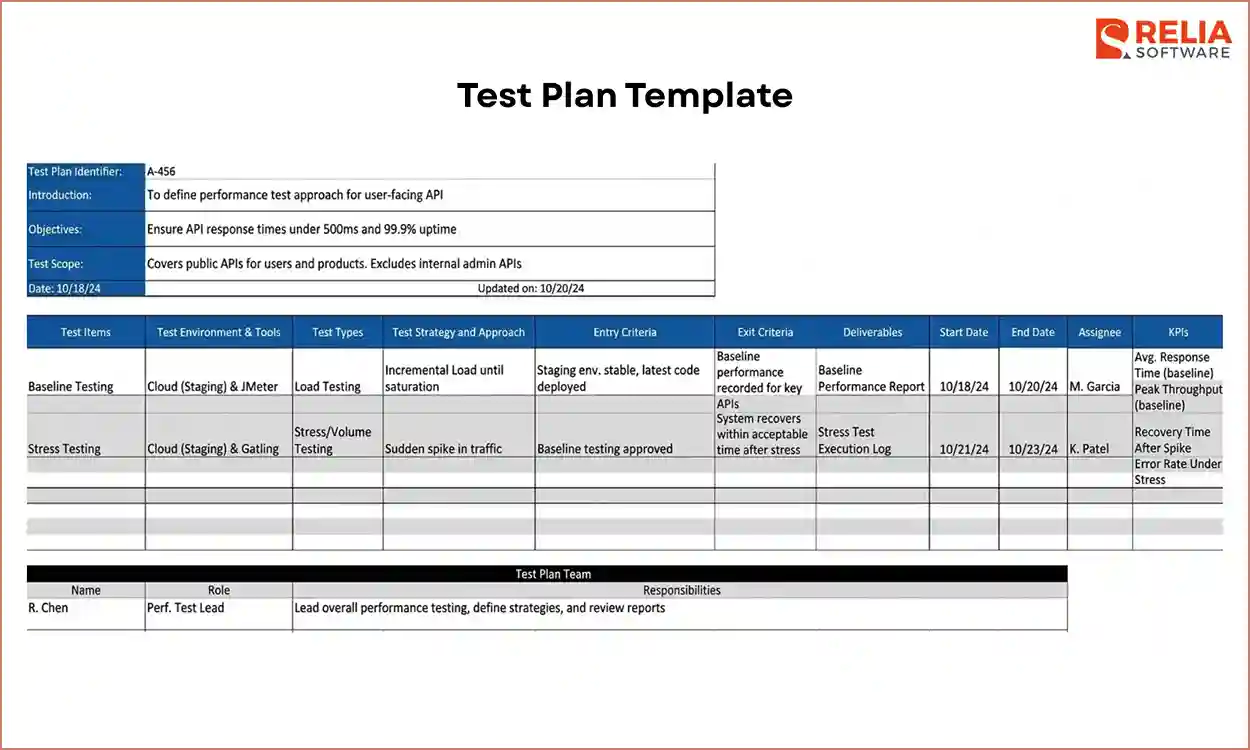
Test plan template
The test plan template outlines how the team plans testing across different devices, OS versions, screen sizes, network conditions, permission flows, and common edge cases.
>> Read more: How to Write A Powerful Test Plan in Software Testing?
Release checklist template
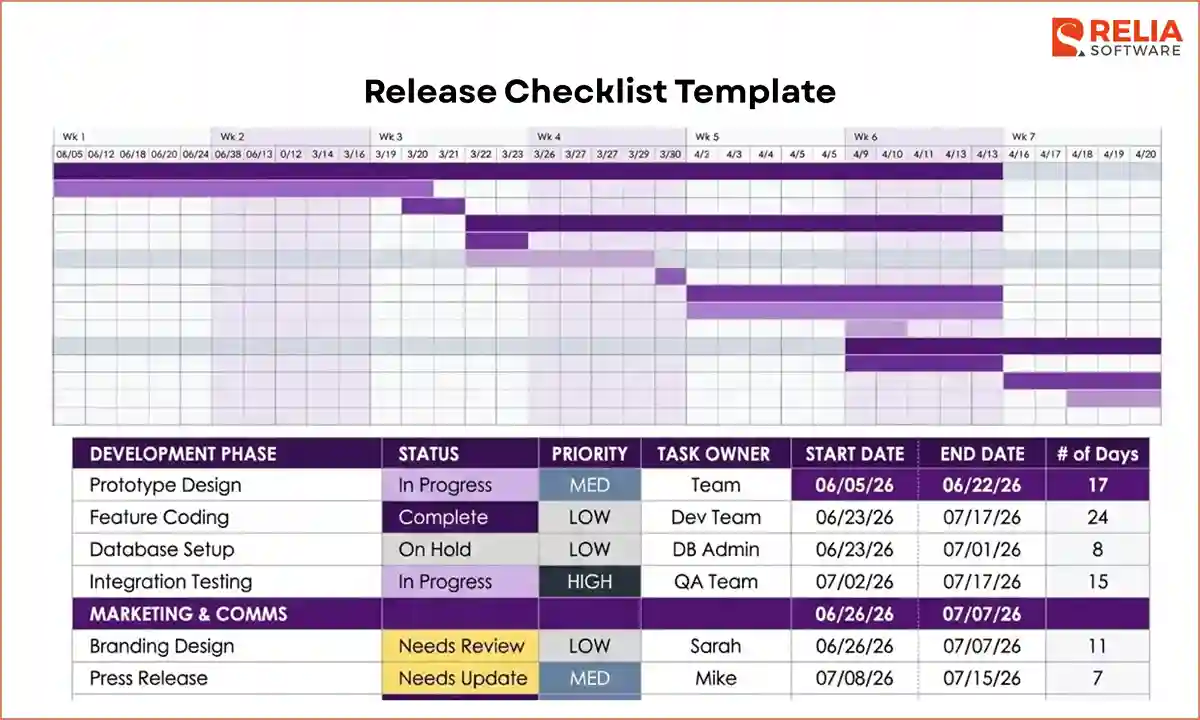
The release checklist template lists the tasks that must be finished before launch, including final QA, version updates, store screenshots, privacy details, permissions review, rollout steps, and monitoring setup.
Post-launch feedback template
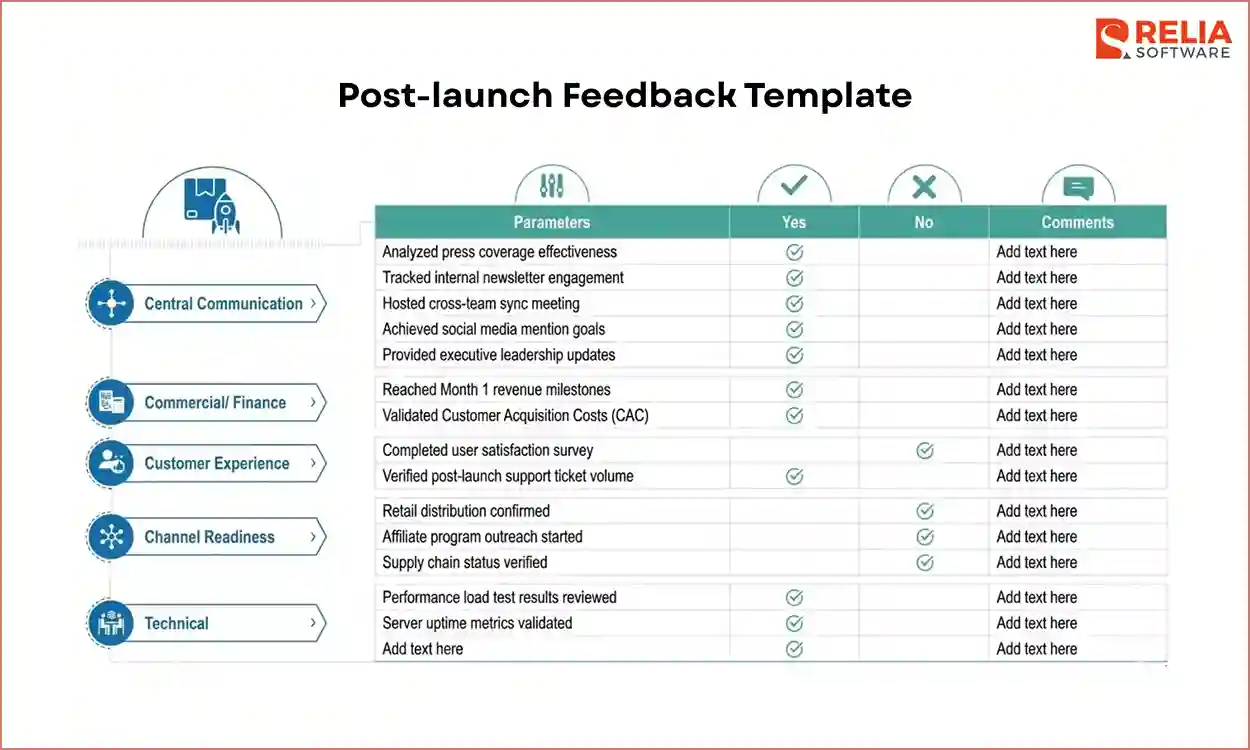
Post-launch feedback template helps the team collect and organize feedback, such as user complaints, crash reports, app store reviews, support issues, and ideas for the next update after release.
Tools for Project Management in Mobile App Development
|
Category |
Tools |
|
Project Tracking |
Jira, Trello, Linear |
|
Communication |
Slack, Microsoft Teams |
|
Design UX |
Figma, Adobe XD |
|
Documentation |
Notion, Confluence |
|
Beta Distribution |
TestFlight, AppCenter |
|
Analytics |
Mixpanel, Google Analytics for Firebase |
Jira
Jira is a project tracking tool widely used by technical teams to organize tasks, track progress, and keep development work structured through Scrum or Kanban method. In mobile app projects, Jira is often used to manage epics and user stories and help teams track features, bug fixes, and progress across Android and iOS development in one place.
Trello
Trello is a visual collaboration tool that organizes work using boards and cards, allowing teams to see tasks clearly and move them through different stages of the project. This tool works well for MVP development or post-launch updates, making it easy to track UI changes and small feature requests from backlog to completion.
Slack
Slack is a real-time communication tool that helps project teams stay connected. It can also connect with tools like GitHub or Sentry, letting the team receive instant alerts about build failures, app crashes, or important bug reports, so problems can be addressed quickly.
Microsft Teams
Microsoft Teams is a collaboration and communication platform used by many companies to support teamwork. It combines chat, video meetings, and file sharing in one place, helping teams stay connected during a project.
Teams also provides a central space for meetings, project documents, and team discussions. It is often used in large organizations where security rules and internal systems need to be closely managed.
Figma
Figma is a collaborative design and prototyping tool used to create mobile app screens and user flows. Designers and team members can work on the same file, review layouts, and test basic interactions before development begins.
This tool also helps developers understand the design clearly. They can check details like spacing, fonts, and assets directly from the design file, which helps ensure the final app matches the intended design.
Notion
Notion is an all-in-one workspace used for documentation, notes, and team knowledge. It can store important documents such as product requirements, App Store details, and privacy policies. This gives the whole team a clear place to find project information and understand the app’s goals and rules.
TestFlight
TestFlight is Apple’s platform for testing iOS apps before they are released on the App Store. It allows developers to send beta versions of the app to testers so they can try it on real devices.
This platform also helps teams collect feedback, find crashes, and fix issues before the official release. This helps improve app quality before it goes through the App Store review process.
Mixpanel
Mixpanel is an analytics tool that tracks how users interact with a mobile app. It records user actions in real time, showing where users stop or leave a process, such as during onboarding or checkout. This data helps teams find problems in the user flow and improve the overall app experience.
Challenges in Managing A Mobile App Project
If you have only managed web projects before, mobile app development can feel very different. It comes with more limits, more risks, and more things that can go wrong.
Here is why mobile project management is often harder:
- You have to follow platform rules: With a website, you can publish changes right away. However, in a mobile app project, you need to submit it to Apple or Google for review. If something does not meet their rules, the app can be delayed or rejected. This makes planning more difficult because the launch does not depend only on your team.
- Every device works differently: A mobile app needs to run well on many types of phones. Screen sizes, OS versions, battery performance, and device speed can all affect the app experience, making testing and quality control much more complex.
- People use apps in real-life situations: Mobile users are often moving, switching networks, getting phone calls, or using the app with low battery. The team needs to think about what happens when these interruptions appear.
- Older app versions: When you update a website, everyone sees the new version right away. In mobile apps, many users keep older versions for weeks or even months, which means the team must make sure new backend changes do not break the app for those users.
- Users expect a smooth experience: Mobile users are often less patient. If an app is slow, buggy, or crashes too often, many people will simply uninstall it. That puts more pressure on the team to make the app stable and easy to use from the start.
Therefore, managing a mobile app is not only about building features, but also about handling platform rules, device differences, real-world usage, and release risks. That is why mobile projects often need more careful planning and closer coordination.
Best Practices to Manage A Mobile App Project Effectively
Setting Realistic Timelines & Milestones
A mobile app development project's timeline often fails when the plan only counts coding time but does not include other important tasks, such as signing, building pipelines, store access, integrations, device testing, and bug fixes. If the plan is not detailed, the project may suddenly be delayed at the end, although it looks on track.
Meanwhile, milestones should reflect the real progress, such as integrations working end-to-end or a release candidate approved with store assets prepared. Clear milestones help the team see risks earlier and prevent undone work.
Creating A Flexible Roadmap for The Project
Let’s keep the roadmap stable in goals, but flexible in scope details. The near-term work should be clear and protected, while later work stays lighter until you are close enough to estimate and design it properly. When a new request comes in, you can place it against the roadmap and make a clear tradeoff instead of letting it sneak into the current sprint.
Developing A Good Collaboration Inside Teams
You should let your team make decisions in one shared place, assign clear owners for approvals, and hold quick, regular updates during the work. When design, development, and QA stay closely connected, the team can catch misunderstandings early and prevent missing edge cases or inconsistent behavior across platforms.
Regular Feedback Loops
Set regular review times so stakeholders can see progress and share comments while the feature is still being developed. All feedback should then be recorded in the backlog. Stakeholders should know when they can review the app, where to leave comments, and how decisions will be made. The PM helps collect useful input while protecting the team from random interruptions during work.
>> Read more:
- Top 15 Latest Mobile App Development Trends
- What is Cross-Platform Mobile Development? 6 Best Frameworks
How Does Relia Software Manage A Mobile App Project?
Methodology
Relia Software manages mobile app projects with Agile approach, using the Scrum framework. We break each project into short working stages called sprints, which usually last two weeks. This makes the work easier to manage and gives us regular chances to review progress and make adjustments.
For planning, when starting a new project, we often look at similar features from past work to estimate the time, cost, and resources needed. During sprint planning, our team also discusses each task together and assigns story points to reach a shared view of the effort required.
We also believe mobile app development should improve continuously as the project moves forward. That is why we regularly share demos, gather feedback, and use real input from stakeholders to refine the app. This approach helps us make better decisions during development and build a product that fits real business needs more closely.
Tools We Used
Jira: To track tasks, manage workflows, and keep mobile app projects organized from start to finish, giving us a clear view of progress through reports like burndown and velocity charts, and helping us monitor delivery performance over time.
Slack: Our main communication space for team and clients, which lets us share updates quickly, discuss issues in real time, and keep project conversations in one searchable place instead of relying on long email threads.
Figma: To support our UX-first design process before development begins, allowing us to create interactive mockups and gather direct client feedback.
FAQs
1. How long does a mobile app project take?
It depends on scope and complexity. Simple apps ship faster; apps with payments, complex roles, heavy backend, or offline support take longer.
2. How do you manage scope creep with executives?
Make changes visible and force tradeoffs. Log the request, estimate impact, then decide what it replaces or which later release it moves to.
3. What’s the best methodology for a first app?
Scrum is often used because it supports fast feedback and quick adjustments. It allows the team to build the app in small steps, review the results, and improve the next version based on what they learn.
4. How do you plan to test with many device types?
Pick a small set of common devices and OS versions, then add a few edge devices. Remember to test core flows on real phones.
Conclusion
Mobile app development project management is what keeps a project clear, stable, and finishable. It helps you control scope, remove confusion, plan work in the right order, and protect quality so testing and release steps don’t get squeezed. When the team has a clear workflow, the right method, and simple routines, the project becomes easier to track and easier to deliver.
>>> Follow and Contact Relia Software for more information!

- Mobile App Development
- development
- mobile app
- mobile applications