


Mobile app development frameworks give development teams a ready-made foundation of libraries, UI components, and build tools instead of requiring every function to be written from scratch. The framework a team picks affects the app's performance, its time to market, and how much it costs to maintain over the next several years.
This guide covers the 10 mobile app development frameworks that development teams actually use. Each framework below covers its features, strongest use cases, real limitations, and examples of apps built with it.
What Is a Mobile App Development Framework?
A mobile app development framework is a set of pre-built libraries, UI components, and development tools that let programmers build mobile apps without writing every function from scratch. It typically includes a UI toolkit, APIs for accessing device hardware such as the camera, GPS, and sensors, debugging tools, and a compiler or build system that turns code into an installable app.
Types of Mobile App Development Frameworks
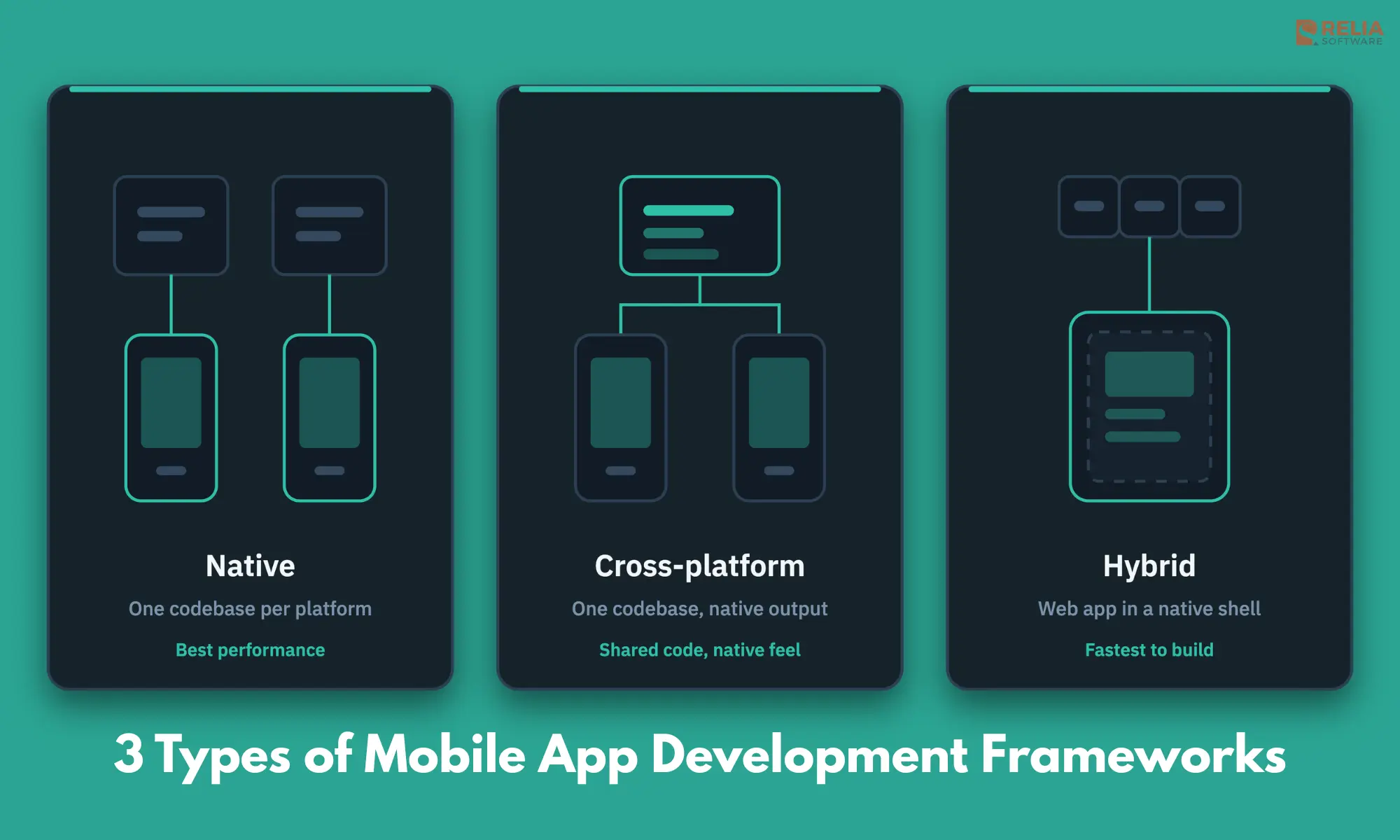
Frameworks fall into three categories based on how they render the app and which platforms they target: native, cross-platform, and hybrid. Let’s break down what separates them:
- Native frameworks build directly on a platform's own SDK, such as SwiftUI for iOS or Jetpack Compose for Android. They give the best performance and full access to hardware, but each platform needs its own separate codebase.
- Cross-platform frameworks compile to native components from a single codebase. React Native, Flutter, .NET MAUI, and Kotlin Multiplatform all fall here. They cut development time by sharing code across iOS and Android while still producing apps that feel native.
- Hybrid frameworks wrap a web app built with HTML, CSS, and JavaScript inside a native shell. Ionic, Capacitor, Apache Cordova, and NativeScript take this approach. They're the fastest and cheapest to build, but can lag in performance for animation-heavy apps.
>> Read more: What is The Difference Between Native and Hybrid Apps?
10 Mobile App Development Frameworks
The comparison table below groups each framework by these categories so options can be compared within the approach that fits a given project.
|
Framework |
Type |
Language |
Best For |
Learning Curve |
Performance |
|
React Native |
Cross-platform |
JavaScript/TypeScript |
Enterprise and consumer apps needing fast iteration |
Medium |
High |
|
Flutter |
Cross-platform |
Dart |
Visually custom, animation-heavy apps |
Medium |
High |
|
.NET MAUI |
Cross-platform |
C# |
Enterprises on a Microsoft/.NET stack |
Medium-High |
High |
|
SwiftUI |
Native (iOS) |
Swift |
iOS-only apps needing deep Apple integration |
Low-Medium |
Highest on iOS |
|
Jetpack Compose |
Native (Android) |
Kotlin |
Android-only apps needing deep platform integration |
Low-Medium |
Highest on Android |
|
Kotlin Multiplatform |
Cross-platform (shared logic) |
Kotlin |
Android-first teams sharing logic, not UI |
High |
High |
|
Ionic |
Hybrid |
HTML/CSS/JS + Angular/React/Vue |
Startups, MVPs, content-driven apps |
Low |
Medium |
|
Capacitor |
Hybrid |
HTML/CSS/JS (any framework) |
Web teams shipping an existing app as native |
Low |
Medium-High |
|
NativeScript |
Hybrid, native UI |
JS/TS, Angular, Vue |
Native API access without a WebView |
Medium |
Medium-High |
|
Expo |
Cross-platform (React Native toolchain) |
JavaScript/TypeScript |
Startups and solo developers shipping fast |
Low |
High |
React Native
React Native is Meta's open-source framework for building iOS and Android apps with JavaScript or TypeScript and React. It renders real native UI components instead of a browser view, which makes React Native different from earlier hybrid tools like Cordova.
In practice, the Relia team has shipped React Native apps including Yellowdig, Skooc, and Uthrive. Across these projects, code sharing between iOS and Android has typically landed in the 70–90% range, which is the main reason timelines run shorter than building two native apps in parallel.
Key features:
- Renders actual native components rather than a WebView;
- Hot reload speeds up iteration during development;
- Large third-party library and plugin ecosystem;
- Big hiring pool of JavaScript and React developers;
- Backed long-term by Meta.
Best for: Enterprise and consumer apps that need native-level performance with a faster build process than fully native code on two separate platforms.
Limitations: Complex animations and heavy native-module work still need some native Swift or Kotlin code. Performance can dip on graphics-intensive screens without extra optimization.
Real apps: Instagram, Shopify, Discord, and Coinbase all run substantial parts of their apps on React Native.
Flutter
Flutter is Google's open-source UI toolkit that uses the Dart language and its own rendering engine to build apps for iOS, Android, web, and desktop from a single codebase.
Flutter engagements at Relia have included both new builds and migrating existing native or hybrid apps onto a single Flutter codebase. The recurring conversation with clients isn't animation quality, Flutter handles that well by default. The concern is app bundle size, since Flutter ships its own rendering engine inside the app, which shows up in install size comparisons clients run against competitor apps.
Key features:
- Renders its own widgets instead of wrapping native ones, giving full control over every pixel;
- Hot reload for fast iteration;
- One codebase spans mobile, web, and desktop;
- Built-in Material Design and Cupertino widget sets;
- Maintained directly by Google.
Best for: Apps where visual consistency and custom animation matter more than matching each platform's native look exactly.
Limitations: Dart has a smaller developer pool than JavaScript or Kotlin. Because Flutter draws its own UI rather than using platform components, apps typically have larger install sizes than native equivalents.
Real apps: Google Pay, Google Ads, and BMW's My BMW app are built with Flutter.
.NET MAUI
.NET MAUI (Multi-platform App UI) is Microsoft's cross-platform framework for building iOS, Android, Windows, and macOS apps in C# and XAML from a single project. It's the official successor to Xamarin, which Microsoft retired on May 1, 2024.
Most .NET MAUI adoption isn't greenfield, it's driven by an existing Xamarin.Forms codebase hitting its support cutoff. Teams migrating tend to underestimate the custom-renderer rework needed for anything beyond basic UI. So, it's worth budgeting extra QA time for the platform-specific edge cases that Xamarin's older tooling had already worked around.
Key features:
- Single project structure targets iOS, Android, Windows, and macOS;
- Deep integration with Visual Studio and the wider .NET ecosystem;
- Direct access to native APIs on each platform;
- Long-term Microsoft support and security updates;
- A defined migration path for teams moving off classic Xamarin.
Best for: Enterprises already standardized on C# and .NET, especially in finance, healthcare, and other regulated industries running Microsoft infrastructure.
Limitations: Smaller community and third-party plugin ecosystem than React Native or Flutter. Deep UI customization often still needs platform-specific code.
Real apps: Widely used for internal line-of-business apps at enterprises running Microsoft stacks; public consumer-app examples are less common than with React Native or Flutter.
SwiftUI
SwiftUI is Apple's declarative UI framework for building apps across iOS, iPadOS, macOS, watchOS, and tvOS using Swift.
Relia's iOS team has shipped production Swift apps including Tally, a bar-tab and payment app that has onboarded more than 100,000 users with over 10,000 daily active users. For new iOS projects, we usually start with SwiftUI, then bring in UIKit where needed for advanced animations, complex interfaces, or older third-party SDKs that still rely on it.
Key features:
- Declarative syntax that's shorter and less error-prone than the older UIKit;
- Live previews inside Xcode during development;
- Deep integration with Apple's newest OS features and hardware;
- Compiles to fully native code for maximum performance;
- Shares code across Apple platforms, though not Android;
Best for: iOS-first or iOS-only products, especially ones that need to use new Apple platform features on day one.
Limitations: No path to Android; teams need a separate framework, or a cross-platform tool, for the Android platform. Older iOS versions have incomplete SwiftUI feature parity.
Real apps: Apple builds parts of its own first-party apps in SwiftUI, and SwiftUI is now the default starting point for new iOS projects in Xcode.
Jetpack Compose
Jetpack Compose is Google's modern, declarative UI toolkit for building native Android apps in Kotlin, replacing the older XML-based Android View system.
At Relia Software, we’ve used Jetpack Compose to build native Android apps such as Reebonz’s luxury e-commerce marketplace and Swipe’s opinion-sharing platform. Jetpack is now our default choice for new Android UI work because it reduces the boilerplate of XML layouts, especially on dynamic screens with lots of conditional states.
Key features:
-
Declarative UI reduces boilerplate compared to XML layouts;
- Built and maintained directly by the Android team;
- Interoperates with existing View-based code for gradual migration;
- Strong integration with Kotlin coroutines and Android Architecture Components;
- The recommended default for new Android UI development.
Best for: Android-only apps, or the Android side of a Kotlin Multiplatform project, where deep platform integration matters more than sharing UI code with iOS.
Limitations: Android-only, with no iOS output. Teams fully invested in the older XML View system face a real migration effort.
Real apps: Google's own sample apps, including Jetnews, Jetchat, and Jetcaster, demonstrate production patterns.
Kotlin Multiplatform (KMP)
Kotlin Multiplatform is JetBrains' framework for sharing business logic, such as networking, data storage, and validation, across iOS and Android. Whereas, each platform still keeps its own fully native UI built in SwiftUI or Jetpack Compose.
The pattern that shows up most often with KMP adoption is starting too big. Teams that succeed usually begin by sharing one well-isolated module, such as networking or data validation, before expanding scope. Trying to share UI-adjacent logic too early tends to create more coordination overhead between iOS and Android teams than it saves.
Key features:
- Shares the logic layer only, not the UI, so each platform keeps a fully native look and feel;
- Lower migration risk than a full cross-platform rewrite;
- Works alongside existing Android and iOS codebases;
- Backed by JetBrains with growing tooling support;
- Already used in production by large-scale consumer apps.
Best for: Android-first teams that want to cut duplicate logic code without giving up native UI on either platform.
Limitations: Still requires two separate UI codebases. Smaller community and fewer ready-made libraries than React Native or Flutter.
Real apps: Netflix uses KMP in its Prodicle production-management app, and McDonald's, Forbes, 9GAG, and Cash App have adopted it in production as well.
Ionic
Ionic is an open-source framework for building hybrid mobile apps, progressive web apps, and desktop apps using HTML, CSS, and JavaScript with Angular, React, or Vue.
The gap between an Ionic prototype and a production app is usually bigger than teams expect going in. The component library gets a demo-ready build out fast, but list-heavy screens and complex form validation often need custom work once real data and real users show up.
Key features:
- Large library of pre-built UI components;
- Works with Angular, React, or Vue, so web teams don't need to learn a new language;
- Strong progressive web app support;
- Uses Capacitor (or, in older projects, Cordova) as its native runtime layer;
- Large plugin ecosystem for device features.
Best for: Startups and web development teams building MVPs, internal tools, or content-driven apps where fast iteration matters more than native-level animation performance.
Limitations: Runs inside a WebView, so complex animations and gesture-heavy interactions can feel less fluid than fully native, React Native, or Flutter apps.
Real apps: MarketWatch and Amtrak are among the apps built on Ionic.
Capacitor
Capacitor is Ionic's native runtime, which wraps any web app, built with any framework and not just Ionic's own components, in a native iOS or Android shell with access to native device APIs.
Teams moving an existing web app into Capacitor usually find that the framework itself is not the hardest part. The bigger issues often come from earlier web decisions, such as routing, local storage, or browser-specific assumptions, that do not translate cleanly into a native app shell.
Key features:
- Works with any web framework or vanilla JavaScript, not tied to Ionic's UI library;
- Direct native API access without routing everything through a WebView bridge;;
- Actively maintained as the modern replacement for Apache Cordova;
- Builds for iOS, Android, and desktop from the same web codebase;
- Straightforward native plugin system for camera, filesystem, and push notifications.
Best for: Teams with an existing web app, or an existing web team, who want to ship it as a native app without adopting a new UI framework.
Limitations: Shares the same WebView performance ceiling as other hybrid tools for animation-heavy interfaces. Anything outside Capacitor's core API set still needs native plugin code.
NativeScript
NativeScript is an open-source framework that lets developers write apps in JavaScript, TypeScript, Angular, or Vue while compiling to fully native UI components, with no WebView involved.
The tradeoff that catches teams off guard with NativeScript is less about performance and more about ecosystem depth. Straightforward CRUD-style screens go smoothly, but if a native SDK has no existing NativeScript plugin, your team will need to write platform-specific bridge code. That still requires solid iOS and Android expertise, even in a JavaScript-first stack.
Key features:
- Direct access to native Android and iOS APIs from JavaScript or TypeScript;
- No WebView, so UI rendering is closer to native performance than Ionic or Cordova;
- Works with Angular or Vue for teams already using those frameworks;
- Single codebase targets both iOS and Android;
- Open-source with an active plugin marketplace.
Best for: Teams that want native-level UI performance but prefer to stay in a JavaScript or TypeScript codebase rather than adopting Dart, Swift, or Kotlin.
Limitations: Smaller community and fewer ready-made UI components than React Native or Flutter. Documentation and tooling are less polished.
Expo
Expo is a set of tools and managed services built on top of React Native that removes most native build configuration. Teams start and ship a React Native app without touching Xcode or Android Studio directly.
Expo and EAS Build are a standard part of Relia’s React Native workflow, especially for over-the-air updates that let us ship JavaScript-only fixes without waiting for App Store or Play Store review.
The key decision is whether the app will need native modules outside Expo’s managed ecosystem. It is better to plan for that early, since changing the setup later can add avoidable migration work.
Key features:
- Little to no native-config setup required for most projects
- Over-the-air updates for JavaScript-only changes, without an app store resubmission
- Managed build and submission pipeline through EAS Build and EAS Submit
- Large library of pre-built native modules for the camera, notifications, and location
- The officially recommended way to start new React Native projects
Best for: Startups, solo developers, and teams that want to move fast without maintaining native build tooling in-house.
Limitations: Some advanced native integrations still require "ejecting" into a bare React Native workflow, which reintroduces the native configuration Expo otherwise hides.
FAQs
What is the best mobile app framework for startups?
Flutter and React Native (often through Expo) are the most common choices for startups because they combine fast iteration with a large hiring pool. The better fit depends on whether the team already knows JavaScript/React or is starting fresh.
Is Flutter or React Native better?
Neither is universally better. React Native fits teams with existing JavaScript or React experience and needs the largest plugin ecosystem. Flutter fits teams that want tighter control over custom visuals and animation across platforms.
What replaced Xamarin?
.NET MAUI is Xamarin's official successor. Microsoft ended support for classic Xamarin on May 1, 2024, and recommends migrating existing Xamarin.Forms projects to .NET MAUI.
Is Kotlin Multiplatform production-ready?
Yes. Netflix, McDonald's, Forbes, 9GAG, and Cash App all run Kotlin Multiplatform in production. It's a lower-risk option than a full framework switch because it shares only the logic layer, not the UI, so teams can adopt it incrementally rather than rewriting an app in one go.
Conclusion
The right framework depends on the app's performance needs, the team's existing skills, and how long the business plans to maintain it, not on which name shows up most often in search results.
Relia Software works across React Native, Flutter, and native iOS and Android development, and helps businesses match a framework to their actual product requirements before writing the first line of code. Share your app requirements to get a framework recommendation based on your specific project.
>>> Follow and Contact Relia Software for more information!

- Mobile App Development
- development