


Choosing one of the React state management libraries is hard in a real app without first asking where the source of truth lives, the browser, the server, or the URL, and what needs to stay in sync.
Most production pain comes from the wrong category choice: copying API data into a global store while also using a fetch cache, or treating atom-based state as the default for every project.
In this blog, I don't just provide a list, I make clear different types of states in React, then pick the best tool that can handle each one well.
Let's take a look at my top picks first:
| Library | Get | Give up | Trade-off |
|---|---|---|---|
| useState / useReducer | Zero deps, easy onboarding | No global devtools, prop drilling at scale | Prefer until sharing pain is real. |
| Context + reducer | Simple app-wide dispatch | Easy to misuse; re-render footguns | Fine for auth theme and small apps; split contexts. |
| Zustand | Minimal API, selectors, middleware | Fewer “enterprise rails” than Redux | Prefer for most shared client state in 2026. |
| Jotai | Fine-grained atoms, great derives | Different mental model from “single store” | Prefer when state is a graph of small pieces. |
| Redux Toolkit | Strong patterns, devtools, ecosystem | Boilerplate and ceremony | Prefer for large teams and strict workflows. |
| MobX | Expressive reactive stores | “Magic” and convention drift | Prefer when team knows observables well. |
| Valtio | Proxy ergonomics, tiny surface | Less common in hiring market | Prefer for rapid UI state with object shapes. |
| XState | Correctness for workflows | Learning curve | Prefer when illegal states cost money. |
| TanStack Query | Server cache, mutations, retries | Another concept to teach | Always consider for remote data. |
| SWR | Very small, great defaults | Less mutation tooling vs Query | Prefer for read-mostly, simple apps. |
| Rematch | Redux-like models, lighter API | eclipsed by Redux Toolkit for new Redux work | Brownfield codebases already on Rematch. |
| Hookstate | Hooks-first partial updates | Narrow vs full cache / workflow stacks | Tiny apps; most outgrow without shame. |
How I use this table in practice: I pick the row that matches the failure mode I fear most like debuggability, hiring, refetch storms, illegal workflow states, not the row with the fewest cons on paper.
What Is React State Management?
React state management means managing the state of a React component, which determines how that component looks and behaves. At the architecture level, it means how your app coordinates facts over time: which layer can change them, how other parts of the app get updates, and how teams trace those changes when something breaks.
It is not only “state inside a component props tree”. That picture misses server-owned rows, cross-route cache, and bookmarked UI state. React hooks already handle local UI well; react state management libraries become useful when multiple subtrees need the same client-owned fact under rules, or when you need devtools and audits at org scale.
React already gives you tools for local state. Libraries add structure when sharing, async boundaries, or compliance-style traceability demand it. The goal is predictable updates and minimal subscriptions, not picking the trendiest store.
Good state design also names derived values explicitly. If you can compute fullName from firstName and lastName, derive it in render or with a memoized selector instead of storing a third field that can drift out of sync.
Teams that write this down in a short “state charter” cut debate time sharply: one paragraph on where server truth lives, one on URL conventions, one on when a module may introduce a global store.
On my teams, that charter is rarely more than half a page in Notion. The ROI is huge: new hires stop asking “do we put this in Redux?” because the doc already says query layer or Zustand feature module.
4 Types of State in React Apps
Splitting state by where it lives and who owns the truth keeps you from forcing everything into one store.
| Type | What it is | Typical tools |
|---|---|---|
| Local (component) | UI that only one subtree cares about. | useState, useReducer, useOptimistic |
| Global (shared client) | User preferences, cart draft, wizard step. | Zustand, Jotai, Redux Toolkit, MobX, Valtio |
| Server (remote/async) | API responses, pagination, cache. | TanStack Query, SWR, RTK Query |
| URL | Shareable filters, tabs, deep links. | React Router, TanStack Router, Next.js searchParams |
Note: If the server is the source of truth, DO NOT duplicate that slice in a global client store unless you have a sharp reason (optimistic UI beyond what your fetch layer already gives you).
URL state deserves explicit respect. Filters, tabs, and sort order that belong in a shared link should live in searchParams, not in Redux. You get back buttons, shareable URLs, and analytics that read the real user intent.
I’m blunt here: if a PM can phrase it as “user should land in the same view when they paste the link,” and you stored it in Zustand only, you chose the wrong layer. I have rewritten those features late; front-load the URL work.
Form state is another common trap. Ephemeral field values belong to the form boundary (React Hook Form, TanStack Form, or uncontrolled inputs) until submit, not to a global store unless multiple distant panels must edit the same draft with instant sync.
Personal default: I keep wizard steps and field errors in the form library. I only lift field values into a global store when two panels on different routes must edit the same draft live, otherwise global state becomes a dumping ground for “might need later.”
When You DO NOT Need a State Management Library?
You don't need a dedicated state management library when your React app ships fine with hooks + Context for auth session metadata, URL state for filters, and TanStack Query for data that comes from an API.
React 19 patterns also make this easier: use() for reading promises in render, useOptimistic for optimistic UI, and useFormStatus for pending form states. Along with the stable React Compiler, these tools reduce extra boilerplate and manual memoization in many apps.
Pro Tip: Prop drilling three levels deep is not a crime. It is clearer than an invisible global dependency graph.
In my experience, the apps that “needed Redux on day one” do not need a global store first, but most often need clear boundaries and server cache, not a second source of truth for API payloads.
Practical rule: if your state table is “fetch X on mount, put X in store, read X in five components,” delete the store step and add useQuery once. I have deleted hundreds of lines that way.
Additionally, internal admin CRUD with one heavy screen, colocated hooks, and no shared draft across routes. The moment a second screen needs the same optimistic list, I promote the list to Query + a tiny client slice, not before.
Built-in React Options for Simple State Management
useState and useReducer
useState fits independent values and useReducer fits event-driven updates with a single object or discriminated unions, think form steps or modal stacks.
Here is a tiny reducer that keeps transitions explicit:
type ModalState =
  | { step: "closed" }
  | { step: "confirm"; targetId: string };

type ModalAction =
  | { type: "OPEN_CONFIRM"; targetId: string }
  | { type: "CLOSE" };

function modalReducer(_: ModalState, action: ModalAction): ModalState {
  switch (action.type) {
    case "OPEN_CONFIRM":
      return { step: "confirm", targetId: action.targetId };
    case "CLOSE":
      return { step: "closed" };
    default:
      return { step: "closed" };
  }
}

// Usage in a component:
// const [modal, dispatch] = useReducer(modalReducer, { step: "closed" });
This keeps every transition in one function, which beats sprinkling setState across handlers when the flow grows.
When I use this in real code: checkout steps, multi-step modals, anything where product says “what states can the user be in?” and the answer is more than two booleans. If I can’t draw it as a short table, I stop and consider XState instead.
Context API
Context is dependency injection for React trees, not a performance-optimized store. Any value change re-renders consumers unless children memoize carefully or you split contexts by concern.
Pair Context with useReducer for small apps: one dispatch pipeline, predictable updates, no extra dependency. When re-renders bite, reach for colocation, context splitting, or a tiny external store before Redux.
Split “fast-changing” from “slow-changing” into two contexts if you must use Context at scale. A theme and a live stock ticker do not belong in the same provider value.
Lesson I paid for: one AppContext with { session, theme, unreadCount } where unread ticks every few seconds will flash your whole tree. Splitting unread into its own provider, or better, pushing counts behind a narrow subscription, which fixed real jank I had blamed on React.
Signals and fine-grained reactivity (optional path)
Signals (popularized in Solid, and available in React via libraries like Preact Signals or community bridges) push updates at fine granularity: a single primitive changes without re-rendering a whole subtree.
Legend-State and similar libraries pursue a related goal: make lists and objects feel mutable while keeping React re-render costs under control.
I reach for signals-style tooling only when hot paths prove costly in React DevTools Profiler and selectors or Server Components have not solved the issue. For most CRUD dashboards, TanStack Query + Zustand selectors is enough. If you adopt signals, document why so the next hire does not rip them out in week one.
React 19: use, useOptimistic, useFormStatus
useOptimistic gives you instant feedback while a transition completes, great for lists and toggles without a global store.
import { useOptimistic, useTransition } from "react";

type Todo = { id: string; title: string; done: boolean };

export function TodoList({ initialTodos }: { initialTodos: Todo[] }) {
  const [isPending, startTransition] = useTransition();
  const [optimisticTodos, setOptimisticTodos] = useOptimistic(
    initialTodos,
    (current, patch: { type: "toggle"; id: string }) =>
      current.map((todo) =>
        todo.id === patch.id ? { ...todo, done: !todo.done } : todo
      )
  );

  async function toggleRemote(id: string): Promise<void> {
    // Replace with your fetch; errors should surface in UI
    const response = await fetch(`/api/todos/${id}/toggle`, {
      method: "POST",
    });
    if (!response.ok) throw new Error("Toggle failed");
  }

  function onToggle(id: string): void {
    startTransition(async () => {
      setOptimisticTodos({ type: "toggle", id });
      try {
        await toggleRemote(id);
      } catch (error) {
        console.error(error);
        // Surface toast / inline error; optimistic layer reconciles on refresh
      }
    });
  }

  return (
    <ul aria-busy={isPending}>
      {optimisticTodos.map((todo) => (
        <li key={todo.id}>
          <button type="button" onClick={() => onToggle(todo.id)}>
            {todo.done ? "Done" : "Todo"}: {todo.title}
          </button>
        </li>
      ))}
    </ul>
  );
}
I use useOptimistic for lists and toggles where the server is the source of truth but UX expects instant feedback. I do not use it as a stand-in for a cart durability story, you still need persistence or server merge logic when the tab dies.
useFormStatus pairs with Server Actions in frameworks like Next.js for pending buttons. If you are on React Server Components and Next.js Server Actions, you already own a slice of server state without a client library.
For concurrency, review useTransition and related React docs. For memoization discipline, review useMemo and useCallback, still relevant even as the Compiler removes some manual work.
When Should You Use a State Management Library?
Add a library when one of these is true:
- Many distant components read and write the same client-owned state, and prop drilling hurts clarity.
- You need devtools, middleware, or replayable actions for debugging or audits.
- You are modeling multi-step workflows where invalid states must be impossible (here, XState shines).
- Your team agrees on a single pattern and you will enforce it in code review (Redux Toolkit’s sweet spot).
I usually think about this in terms of a complexity budget. Every global store adds a cost: more onboarding, more code, and more chances for developers to work around the intended pattern. The best choice is the tool that solves the problem with the smallest API and the least extra structure.
Libraries also earn their keep when testing demands reproducible updates. Action-first stores and machines replay cleanly in unit tests. That matters less in a weekend prototype and more in checkout, billing, and permissions code.
If your only reason for adding a store is “we might have fifty components later,” do not add it yet. Start with colocated state and ship the feature first. Then measure the real sharing pain. If a store becomes necessary, extract one with a domain-focused name like cart, onboarding, or editorSession, not something vague like globalAppState.
Heuristic I use in code review: Would this still be the wrong design if the app had only one route? If the answer is yes, that state probably does not need to be global yet.
There are still cases where I choose Redux or XState early. I do this for regulated workflows, finance-related systems, or any feature where postmortems need a clear and replayable trail of state changes. Simpler state tools often trade away that level of traceability, so the choice should be intentional.
Top React State Management Libraries by Use Cases
Shared Client State
Zustand
Zustand is a lightweight option for shared client state in React. Its stores are plain objects with subscriptions, and it does not require providers. Components can read only the state they need by using selectors, which helps reduce unnecessary re-renders.
import { create } from "zustand";
import { devtools } from "zustand/middleware";

type CartLine = { sku: string; qty: number };

type CartState = {
  lines: CartLine[];
  addLine: (line: CartLine) => void;
};

export const useCartStore = create<CartState>()(
  devtools(
    (set) => ({
      lines: [],
      addLine: (line) =>
        set(
          (state) => ({
            lines: [...state.lines.filter((l) => l.sku !== line.sku), line],
          }),
          false,
          "cart/addLine"
        ),
    }),
    { name: "CartStore" }
  )
);

// In a component:
// const qtyForSku = useCartStore((s) => s.lines.find((l) => l.sku === sku)?.qty ?? 0);
Zustand is usually my default choice for new global client state in React. It has a small API, works well with React 18 and React 19, and adds much less setup than heavier state tools.
The persist middleware is useful for session-based drafts such as carts or builder interfaces, especially when some delay between client state and server state is acceptable. If you persist data, it is a good idea to version the stored shape so you can migrate or clear old data safely when the structure changes.
For short-lived UI state, such as hover previews or drag state, local component state or a small store with refs is a better fit. That kind of state does not need to be saved to disk or tracked in devtools.
In development, I enable devtools for any Zustand store that is more than trivial. It takes very little setup and makes it much easier to trace changes when debugging.
One rule matters a lot with Zustand: use selectors carefully. If a component calls useCartStore() without a selector, it subscribes to the whole store and may re-render on every cart update. I usually flag that in code review before it ships.
Jotai
Jotai manages React state with atoms, which are small pieces of state that can be combined and derived from each other. It works especially well when state is made up of many separate parts and the relationships between those parts matter.
import { atom, useAtom } from "jotai";

const countAtom = atom(0);
const doubleAtom = atom((get) => get(countAtom) * 2);

export function CounterDemo(): JSX.Element {
  const [count, setCount] = useAtom(countAtom);
  const [doubled] = useAtom(doubleAtom);

  return (
    <div>
      <p>
        {count} → {doubled}
      </p>
      <button type="button" onClick={() => setCount((c) => c + 1)}>
        Increment
      </button>
    </div>
  );
}
Jotai is a strong choice when your state feels like many small independent pieces with lots of derived values. Zustand is a better fit when you want one clear store or module for each feature.
atomFamily is useful for dynamic lists because it lets each item or row have its own atom without forcing you to build one large normalized map by hand. Jotai also supports async atoms for data fetching, but I still prefer TanStack Query when the app needs shared cache, retries, and request deduplication across routes.
I use Jotai most on screens that behave almost like a spreadsheet, where many values depend on each other and derived state is easier to manage than one large reducer.
>> Read more:
- TanStack Router vs React Router: Which One Fits Your App?
- A Full Guide to Migrate from React Router to TanStack Router
Redux Toolkit
Redux Toolkit is the modern way to use Redux in React. It adds useful defaults like slices, Immer inside reducers, and optional async data handling through RTK Query.
import { configureStore, createSlice, PayloadAction } from "@reduxjs/toolkit";
import { TypedUseSelectorHook, useDispatch, useSelector } from "react-redux";

type UserState = { status: "idle" | "loading"; name?: string };

const userSlice = createSlice({
  name: "user",
  initialState: { status: "idle" } as UserState,
  reducers: {
    loadStarted(state) {
      state.status = "loading";
    },
    loadSucceeded(state, action: PayloadAction<{ name: string }>) {
      state.status = "idle";
      state.name = action.payload.name;
    },
  },
});

const store = configureStore({ reducer: { user: userSlice.reducer } });

export type RootState = ReturnType<typeof store.getState>;
export type AppDispatch = typeof store.dispatch;

export const useAppDispatch: () => AppDispatch = () => useDispatch<AppDispatch>();
export const useAppSelector: TypedUseSelectorHook<RootState> = useSelector;
Redux Toolkit is a strong choice when team standards, devtools, and predictable structure matter more than minimal code. It fits larger teams and more structured product organizations.
A common choice in 2026 is RTK Query vs TanStack Query. RTK Query works inside Redux, which is useful for teams that already rely on Redux and want one devtools timeline. TanStack Query is the better default for new apps because it offers a stronger ecosystem for server-state management.
My rule is simple: use TanStack Query for server state in greenfield apps, and keep RTK Query in existing Redux codebases until a rewrite is worth it. What I avoid is using both for the same server entities without a clear rule about the source of truth.
I still like Redux when the team commits to it. Clear slice structure, lint rules, and one Redux DevTools trace help during debugging and incidents. What I push back on is cargo-cult Redux, especially storing API responses in slices when they belong in the query layer.
Redux also has a real incident-response advantage. When production breaks, a sequence of dispatched actions is often easier to trace than a more implicit state graph. That matters more in complex or regulated systems.
MobX
MobX manages state through observable values and automatic updates. You write code that looks mutable, while MobX keeps derived values and reactions in sync.
Stores built with classes and makeAutoObservable feel natural to teams with Java or C# backgrounds. The trade-off is lower discoverability. It is not always easy to see who is subscribing to what.
MobX is a strong choice for teams that prefer an OOP-style approach to state. But its reactive model can confuse developers who are new to observables, so it works best with clear team conventions and careful code review.
I usually avoid MobX for fresh TypeScript-first teams that have never worked with observables, because the onboarding cost can be high. I still consider it when the domain model already uses classes and the team naturally thinks in that style. In those cases, forcing an immutable-only pattern can create unnecessary friction.
Valtio
Valtio uses proxy-based state, so you can mutate plain objects directly while React reads stable snapshots.
It works especially well for nested UI state, such as canvas editors or scene graphs, where immutable update code can get noisy fast. The main thing to watch is serialization. If state needs to cross worker boundaries, define the snapshot contract first.
Valtio is a strong choice for teams that prefer mutable-style updates and want minimal ceremony. The real choice between Valtio, Jotai, and Zustand is about mental model, not popularity.
I use Valtio most when prototyping nested editor state. It feels fast and natural early on. But if mutations need to move across workers or other serialization layers, I switch to snapshots with clear boundaries before things get messy.
Besides aforementioned tools, many also look for tools like Recoil, Effector, Rematch, and Hookstate. Although they are still part of the broader React state management conversation, I don't include them in this shortlist for specific reasons:
- Recoil is archived and no longer a safe default for new work.
- Effector is powerful, but it stays niche and is less common in typical React team setups.
- Rematch made Redux simpler, but Redux Toolkit is now the more standard and maintained path.
- Hookstate can work for small apps, but it usually falls short once teams need richer devtools, shared server-state patterns, or broader ecosystem support.
Complex state logic and workflows
XState (v5)
XState models state as explicit states and transitions. It is most useful when invalid combinations are costly, such as in payments, onboarding flows, and compliance-heavy features.
If a feature is easier to explain with a flowchart, XState is a strong fit. If the whole workflow is really just a simple boolean modal, it isn't.
The biggest XState mistakes I have seen are making machines too big to fit on one screen and naming events after UI actions (CLOSE_MODAL) instead of domain facts (PAYMENT_DECLINED). Keep each machine focused, and split it into smaller parts when the logic grows too large.
import { assign, createMachine } from "xstate";

export const checkoutMachine = createMachine(
  {
    id: "checkout",
    initial: "editing",
    context: { retries: 0 },
    states: {
      editing: { on: { SUBMIT: "processing" } },
      processing: {
        on: { SUCCESS: "done", FAIL: "failed" },
      },
      failed: {
        entry: assign({
          retries: ({ context }) => context.retries + 1,
        }),
        on: { RESET: "editing" },
      },
      done: { type: "final" },
    },
  },
  {
    types: {} as {
      context: { retries: number };
      events:
        | { type: "SUBMIT" }
        | { type: "SUCCESS" }
        | { type: "FAIL" }
        | { type: "RESET" };
    },
  }
);

// In components: import { useMachine } from "@xstate/react"; const [snap, send] = useMachine(checkoutMachine);
I usually skip XState for login forms, simple filters, and basic CRUD flows with no invalid state combinations. I only take on the extra complexity when a bad state can cost money, break a critical flow, or trigger legal or compliance risk.
Server state and async data
TanStack Query
TanStack Query caches, dedupes, invalidates, and retries network data. It is the closest thing to a standard for server state in React.
import { useMutation, useQuery, useQueryClient } from "@tanstack/react-query";

type Product = { id: string; name: string; priceCents: number };

async function fetchProduct(id: string): Promise<Product> {
  const res = await fetch(`/api/products/${id}`);
  if (!res.ok) throw new Error("Failed to load product");
  return res.json();
}

export function useProductQuery(id: string) {
  return useQuery({
    queryKey: ["product", id],
    queryFn: () => fetchProduct(id),
  });
}

export function useRenameProduct(id: string) {
  const qc = useQueryClient();
  return useMutation({
    mutationFn: async (name: string) => {
      const res = await fetch(`/api/products/${id}`, {
        method: "PATCH",
        headers: { "Content-Type": "application/json" },
        body: JSON.stringify({ name }),
      });
      if (!res.ok) throw new Error("Rename failed");
      return res.json() as Promise<Product>;
    },
    onSuccess: () => qc.invalidateQueries({ queryKey: ["product", id] }),
  });
}
Install TanStack Query on every app that talks HTTP. Treat client stores as UI and session, not as mirrors of the REST graph.
Treat queryKey arrays as part of your public API. Changing key shape without a migration plan causes ghost caches: components show stale successes while you chase “impossible” bugs. Document keys next to route loaders or OpenAPI tags.
Tune staleTime per resource: reference data can live for minutes; user-specific dashboards might need seconds. Use placeholderData or keepPreviousData for pagination UX. Prefetch on hover for detail panels, your P99 perceived latency drops more than micro-optimizing selectors.
In my experience, half of “React is slow” reports trace to refetch storms (staleTime: 0 everywhere) rather than to render cost.
Defaults I start from: reference data 60s–5m staleTime, user dashboards often 10–30s unless compliance says fresher. I bump down when screens show money or inventory. I never leave staleTime: 0 as the global default “because correctness”—that correctness is usually nervousness, not a spec.
Team habit: I ask juniors to say their queryKey out loud in standup when a bug involves stale UI. If they can’t, the key design is wrong.
SWR
SWR is lighter and fits the Vercel ecosystem. For multi-tab invalidation, offline, and rich mutations, TanStack Query usually wins unless your surface area is tiny and you want the smallest dependency.
If you pick SWR, keep mutation helpers thin: optimistic rows belong next to the mutation, with a rollback path on error. Reach for TanStack Query the first time you need mutual invalidation graphs across ten related resources, SWR can do it, but you will reinvent Query’s ergonomics.
When I still pick SWR: Vercel-forward demos, read-mostly marketing sites, or a team that already ships SWR patterns in ten repos and would pay a tax to retool. I do not fight uniformity there, I fight adding a second cache library mid-flight.
Lightweight apps
For MVPs, Zustand + TanStack Query (or Jotai + TanStack Query) stays small, testable, and easy to delete if a feature dies. Avoid Redux until process, not LOC, demands it.
My MVP pledge: I am allowed one global client store per bounded context (checkout, settings). If I need a second store in week one, I usually failed to name domains clearly, not “need more libraries.”
How to Choose the Right React State Management Solution?
Start from state type, not from Hacker News trends.
flowchart TD
  entryNode[New feature or app]
  serverQ{Server-owned data?}
  queryUse[TanStack Query or SWR]
  localQ{Fits one subtree?}
  localUse[useState useReducer useOptimistic]
  urlQ{Shareable URL state?}
  urlUse[Router search params]
  globalQ{Many distant readers writers?}
  zustandUse[Zustand or Jotai]
  reduxQ{Need strict org-wide patterns?}
  reduxUse[Redux Toolkit]
  flowQ{Flowchart-like workflow?}
  xstateUse[XState]
  entryNode --> serverQ
  serverQ -->|Yes| queryUse
  serverQ -->|No| localQ
  localQ -->|Yes| localUse
  localQ -->|No| urlQ
  urlQ -->|Yes| urlUse
  urlQ -->|No| globalQ
  globalQ -->|Yes| reduxQ
  reduxQ -->|Yes| reduxUse
  reduxQ -->|No| zustandUse
  globalQ -->|No| flowQ
  flowQ -->|Yes| xstateUse
  flowQ -->|No| localUse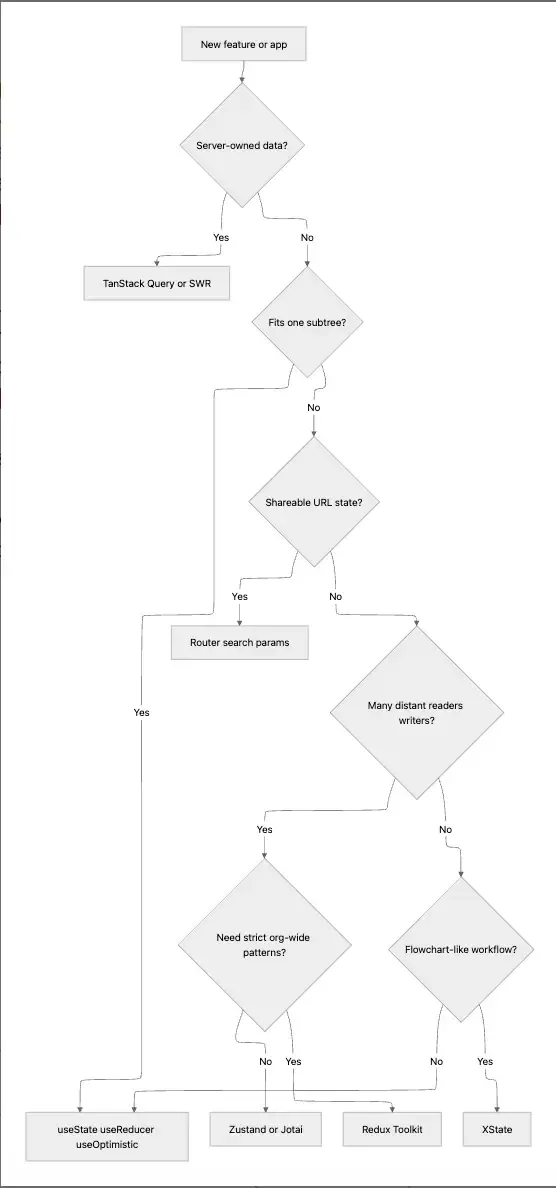
- Choose Zustand (or Jotai) when you need shared client state without Redux’s weight.
- Choose Redux Toolkit when onboarding, audits, or cross-app consistency dominate.
- Choose XState when the feature is a protocol, not a bag of flags.
- Choose TanStack Query when data crosses the network—full stop for most teams.
Monday-morning version: draw a box labeled HTTP on the whiteboard. Everything inside it gets Query (or SWR). Everything outside is UI session, URL, or machine state - never both for the same row without a written merge rule.
React State Management Solutions in Real-world Cases
eCommerce cart
Keep catalog and inventory in TanStack Query. Keep cart lines in Zustand (or URL + cookie for guest merge). On checkout, post the cart and invalidate order queries, do not treat the cart as “server truth” until the order exists.
Handle reservations and stock at the API: the client store holds intent, not guarantees. When two tabs diverge, server reconciliation wins; surface a toast if line items dropped.
What I do in practice: guest cart in Zustand + persist, merged on login via a single server endpoint that returns authoritative lines. I resist storing price in the client store except as display cache from the last Query fetch, never as the billing source of truth.
import { useMutation, useQueryClient } from "@tanstack/react-query";

export function useAddToCart() {
  const qc = useQueryClient();
  return useMutation({
    mutationFn: (body: { sku: string; qty: number }) =>
      fetch("/api/cart", {
        method: "POST",
        headers: { "Content-Type": "application/json" },
        body: JSON.stringify(body),
      }).then((r) => {
        if (!r.ok) throw new Error("Cart rejected");
        return r.json();
      }),
    onSuccess: () => qc.invalidateQueries({ queryKey: ["cart"] }),
  });
}
Admin dashboard
Put filters, sort, pagination in the URL so shares and refreshes work. Put table rows in TanStack Query with keepPreviousData for smooth paging. Reserve a tiny store for UI chrome (sidebar, density).
Virtualized tables still need stable row keys and careful invalidation: prefer entity-centric query keys (["accounts", listParams]) over dumping opaque strings into keys.
When exports or bulk actions run, track job ids with polling or queries, avoid a parallel Redux slice for job status unless many unrelated surfaces must read it.
Personal nit: I put column visibility and table density in Zustand or localStorage, not URL as users rarely share those. Filters and sort always go to URL; I have fought that war and URL wins for support tickets.
Auth and session
HttpOnly cookies beat localStorage for session tokens. Client stores should hold derived user (name, roles) from a /me query, not raw secrets. Refresh flows belong in your fetch layer or Route loaders, not scattered useEffect nodes.
Role-gated routes should read from the same query or loader your layout uses. Divergent sources create “flash of wrong nav” bugs that are hard to reproduce.
For client-side validation patterns that pair with APIs, Zod covers schema patterns, so treat them as UX helpers; authorization stays on the server.
What I store in client memory after login: display name, avatar URL, role flags, not permissions as a substitute for server checks. I have seen “hide the button” treated as security; it is only UX.
FAQs
What are the main react state management libraries in 2026?
The common production choices are Zustand, Jotai, Redux Toolkit, MobX, Valtio for client state, TanStack Query and SWR for server state, and XState for workflow-heavy features. Recoil should be avoided for new projects because it is unmaintained.
For SSR and frameworks like Next.js, align fetch layers with your router’s cache story so client libraries do not fight server rendering.
Do I still need Redux for React apps?
You need Redux when your team benefits from action logs, strict reducers, and shared patterns. Many apps only need TanStack Query + a small client store, which cuts duplication and invalidation complexity.
If your org already ships Redux templates, training, and example apps, the cost of switching may exceed the benefit, improve the Redux slice boundaries instead of swapping for fashion.
Is Zustand better than Redux?
Zustand is smaller and faster to adopt. Redux Toolkit is better when discipline and tooling outweigh brevity. “Better” depends on team size and governance, not benchmark charts.
I reach for Zustand when reviewers ask for obvious modules and fewer files; I keep Redux when reviewers ask for action transcripts during incidents.
When is state management in React “overkill”?
It is overkill when local state and URL state cover the feature, or when you duplicate server rows in a global store that TanStack Query already caches.
If your README lists four state libraries before the first feature ships, you are probably optimizing for conference talks, not delivery.
Should I put API data in Context?
Rarely. Context is not a cache. Prefer TanStack Query for fetching, retries, and staleness. Use Context for stable, slow-changing values like theme and auth profile summary.
If you must bridge a legacy Context, wrap one useQuery at the provider level and expose memoized values downward, never raw fetch promises without Suspense/error boundaries.
What replaced Recoil?
Teams moved to Jotai (similar atom mental model) or Zustand (simpler store). For Facebook-scale needs, internal stacks vary; for public apps, maintained libraries win.
Migration starts by listing which atoms were actually shared; many Recoil apps only needed two lifted values.
Conclusion
Before choosing one of React state management libraries, split local, global client, server cache, and URL state; put network truth in TanStack Query (or SWR) before you reach for heavier client globals.
Today’s default product stack remains TanStack Query for remote data plus Zustand or Jotai for shared UI state, with XState when the feature is really a protocol. Built-ins and the Compiler buy you simplicity, so spend that on domain naming and query key discipline, not on a second store full of API clones.
When you draft your next ADR, write the failure modes first: stale cart, double mutation, lost filters on refresh, wrong role flash. If your chosen stack makes those cheap to test, you picked well.
Last thing I tell the team on day one: pick the tool that makes on-call less scary, not the tool that makes the hello-world demo shortest. You will spend far more hours debugging state than writing the initial store.
>>> Follow and Contact Relia Software for more information!

- coding
- development