


Online learning is now a normal part of education, corporate training, and professional development, and the market continues to grow. Statista projects worldwide online education revenue to pass $220 billion in 2026, with the number of learners growing beyond one billion later this decade. This is why many founders, schools, and training companies are now considering e-learning mobile app development.
In this article, we’ll explain what e-learning mobile app development involves, which app types and features to consider, how the architecture works, the step-by-step app development guide, what compliance and security require, and the development cost.
Why Build an E-learning Mobile App?
Polaris Market Research put the market at roughly $440 billion in 2025, with strong double-digit growth ahead. At the same time, DataReportal reported 5.83 billion unique mobile users worldwide in April 2026, equal to 70.4% of the global population, while Mordor Intelligence forecasts the mobile learning market to reach US$200.24 billion by 2031.
For businesses, the message is clear: learners are already using their phones every day. An e-learning mobile app can build on that habit by offering quick, flexible, and repeatable learning experiences.
Moreover, a mobile app gives e-learning businesses additional revenue streams, such as subscriptions, paid courses, certificate fees, in-app upgrades, and corporate licensing. Since the app stays on the learner’s phone, you can send timely reminders and keep users engaged longer than with a website they forget to visit again.
What Is E-learning Mobile App Development?
E-learning mobile app development is the process of building a mobile app that helps users learn, teach, manage courses, take quizzes, and track progress from their phones or tablets. A strong e-learning app is not just a place to upload videos, PDFs, or quizzes, but also needs a clear learning flow, easy navigation, stable performance, secure data handling, and features that encourage learners to keep studying.
Main Types of E-learning Mobile Apps
The type of e-learning app you choose will affect the features, cost, users, and management needs of the app. Many real products combine more than one type, but understanding the main categories helps you define what you are actually building.
|
App Type |
What is it |
Key Characteristics |
Real Examples |
|
Online Course App |
A platform where users buy, subscribe to, or join online courses. |
Best for self-paced learning, course catalogs, and instructor-led content. |
Coursera, Udemy, edX |
|
Language Learning App |
An app for learning vocabulary, grammar, speaking, or listening. |
Built around daily practice, repetition, levels, and learning habits. |
Duolingo, Babbel, Busuu |
|
Virtual Classroom & Live Learning App |
An app for real-time teaching through video sessions. |
Best for live classes, tutoring, coaching, and remote interaction. |
Preply, Cambly, Outschool |
|
Corporate Training App |
An app for employee onboarding, training, and required courses. |
Best for assigned learning, deadlines, reports, and manager tracking. |
Docebo, 360Learning, SAP Litmos |
|
Kids’ Education App |
An app designed for young learners. |
Uses simple design, safe content, parent controls, and game-like lessons. |
Khan Academy Kids, ABCmouse, Lingokids |
|
Social & Community Learning App |
An app where learners study through discussion and peer interaction. |
Best for community posts, comments, group learning, and participation. |
Yellowdig, 360Learning, NovoEd, Disco |
Key Features of an E-learning Mobile App
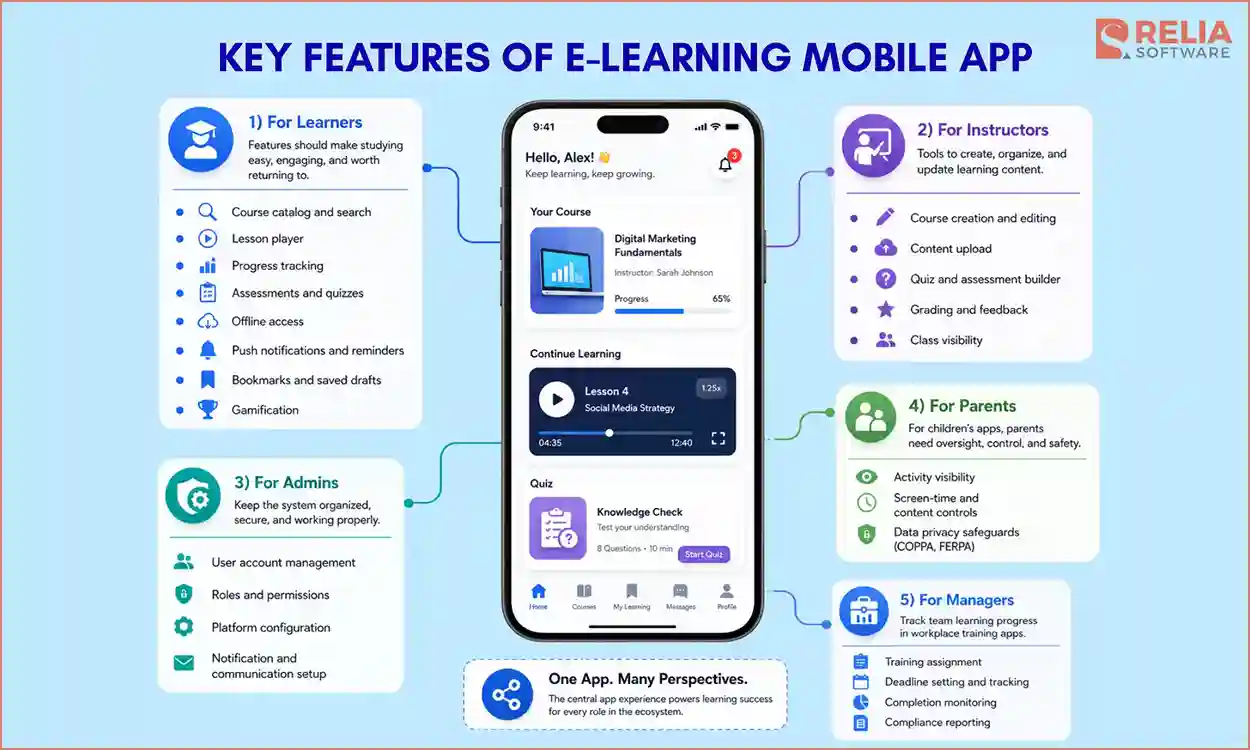
For The Learners
Learners are the main users of the app, so their features should make studying easy, engaging, and worth returning to.
- Course catalog and search: Help learners find the right course or lesson quickly.
- Lesson player: Let learners watch videos, read text, listen to audio, or open files in one place.
- Progress tracking: Show what learners have finished, what comes next, and how they are doing.
- Assessments and quizzes: Help learners check their understanding and see clear feedback.
- Offline access: Let learners study even with weak internet or no connection.
- Push notifications and reminders: Remind learners to continue lessons before they lose the habit.
- Bookmarks and saved drafts: Let learners save lessons, notes, or unfinished answers for later.
- Gamification: Use points, badges, streaks, or instant feedback to keep learners motivated.
For Instructors
Instructors, teachers, trainers, and course creators need tools to create, organize, and update the learning content that learners use inside the app.
- Course creation and editing: Help instructors organize lessons, modules, and learning paths.
- Content upload: Let instructors add videos, documents, slides, and other learning materials.
- Quiz and assessment builder: Help instructors create tests to check what learners understand.
- Grading and feedback: Let instructors review submissions, give scores, and leave comments.
- Class visibility: Show student progress, weak areas, and learners who can be falling behind, so instructors can support them earlier.
For Admin
Admins’ job is to keep the system organized, secure, and working properly for learners, instructors, parents, and managers.
- User account management: Let admins add, remove, and organize learners, instructors, parents, managers, and staff.
- Roles and permissions: Control what each user can see and do inside the app.
- Platform configuration: Help admins manage branding, settings, categories, payment gateways for subscription handling, and app structure.
- Notification and communication setup: Let admins send reminders, updates, announcements, and system messages.
For Parents
Parent features are only needed for apps designed for children. In these apps, parents need to monitor learning, manage access, and keep the child’s experience safe. This role is also important for consent, privacy, and children’s data protection rules.
- Activity visibility: Let parents see what their child is learning and how well they are progressing.
- Screen-time and content controls: Help parents manage what children can access and how long they can use the app.
- Data privacy safeguards: Protect children’s data and support requirements like COPPA and FERPA.
For Manager
Managers are usually needed in corporate or workplace training apps. Their role is different in that managers have to track their team’s learning progress. Managers need to:
- Training assignment: Let managers assign courses to specific employees, teams, or departments.
- Deadline setting and tracking: Help managers set due dates and follow up on required training.
- Completion monitoring: Show who has completed the training and who still needs to finish.
- Compliance reporting: Provide records that prove who completed which training and when.
Architecture, Tech Stack & Integrations For App Development
Frontend Layer
The frontend layer is everything learners and staff actually see and interact with. It includes the learner mobile app, plus an instructor portal, admin dashboard, or parent and manager views, depending on the product.
Tech Stack: Flutter or React Native (cross-platform), Swift and Kotlin (native), Vue.js, Angular, React or Next.js (web)
>> Read more: 12 Frontend Technologies and 8 Development Trends
Application and Backend Layer
The backend layer runs the main logic behind the app, which handles user accounts, roles, course access, enrollments, subscriptions, certificates, progress updates, and admin actions. If the app includes LMS-like functions, this is also where course rules, learning paths, and enrollment logic are managed.
Assessments are also handled in this layer. For important tests or graded work, scoring should happen on the server so results cannot be changed from the learner’s device. For quick practice quizzes, the app can show instant feedback on the device and sync the result later. To keep learning records easier to share with other systems, the backend can also support e-learning standards like SCORM and xAPI.
Tech Stack: Node.js, Python (Django), Ruby on Rails, Java, or .NET for the server; Go for high-performance services; REST or GraphQL for the API. Standards: SCORM, xAPI, cmi5, LTI.
>> Read more: Top Back-End Technologies & Trends For Developers
Assessment and Progress Tracking Layer
The assessment and progress tracking layer handles quizzes, assignments, mock tests, scoring, feedback, certificates, lesson completion, and learning history. This layer is what makes the product a real learning app, not just a video library.
Tech Stack: SCORM, xAPI, cmi5, LTI. Grading logic runs server-side for anything that counts; the records themselves are stored in the data layer below.
Data, Content, and Storage Layer
This layer holds everything the app needs to keep. It covers two kinds of storage that work differently, so it helps to see them as two parts of one layer:
-
Content files: Videos, PDFs, slides, audio, and images. These live in cloud storage and are delivered through a CDN so learners load them quickly from anywhere. Video uses adaptive streaming to stay smooth on weak connections, and if the app supports offline learning, secure downloads sit here too.
-
Structured records: Users, courses, enrollments, quiz results, certificates, payments, subscriptions, progress, and activity history. These live in a database, where the data has to stay accurate and consistent. Progress and scores must stay right across devices, so the server is the source of truth, with a local copy on the device for speed and a sync once any dropped connection returns.
Learners never see this layer, but it sits under almost every screen, and a clean structure keeps the app fast and its reports, certificates, and payments reliable.
Tech Stack: Cloud storage (AWS S3, Google Cloud Storage, Azure Blob) with a CDN (CloudFront, Cloudflare, Akamai) and video via Mux, Vimeo, or AWS Media Services; PostgreSQL or MySQL as the main database, MongoDB or Firestore for flexible data, Redis for caching.
>> Read more:
- SQL vs NoSQL Databases: What's the Difference & When to Use?
- Vector Database vs Graph Database: Which One Is Better?
Integration Layer
Integrations connect the app with trusted outside tools instead of building everything from scratch, saving development time and making the product more reliable, especially for payments, login, video, analytics, and enterprise systems.
The connections most learning apps reach for:
- SSO (single sign-on): Lets people log in with accounts they already have, via Google, Microsoft, or SAML. Schools and companies often treat this as a hard requirement.
- Payments: Stripe for card and payments; Apple and Google's in-app purchase systems, which are mandatory for digital goods sold inside the app and take a cut worth planning for.
- SCORM / xAPI: Supporting these standards lets your content run inside other LMS platforms, and other content run inside yours.
- Video and live classes: Streaming through Mux or Vimeo; real-time teaching through Zoom or Agora SDKs.
- Analytics: Mixpanel, Amplitude, or Firebase to see how learners behave and where they drop off, so you can improve the app with evidence instead of guesses.
Security and Compliance Layer
The security and compliance layer protects user accounts, learning records, payments, private content, admin actions, and personal data. It should be planned from the beginning, not added only before launch.
Tech Stack: OAuth 2.0, OpenID Connect, SSO, MFA, role-based access control, encryption, audit logs, secure payment handling, privacy controls.
Step-by-Step E-learning Mobile App Development Process
After knowing what will be included in an e-learning mobile app, we now come to how to combine all these layers and the architecture above in an app.
Learning Problem Discovery
Everything starts by defining the real learning problem before designing any screens. Who are the learners? What are they struggling with now? Why would a mobile app help more than their current learning method?
This is also where you confirm the app type, because a corporate compliance app and a kids’ language learning app need very different features, flows, and designs. The main mistake to avoid is building an app just because the idea sounds good. If it does not solve a real learning need, users will not come back after launch.
The strategy for the app should be clear: who the app is for, what users will be able to do, what learning problem it solves, and which features have to be a priority and which can wait until a later updated version.
Design the Prototype
Once the scope is clear, the team now designs how the learning experience will work on screen. This step usually starts with wireframes, then a clickable prototype, before coding begins. The order is really important here for a smooth user experience: from finding a course, starting a lesson, taking a quiz, checking progress, and returning later. After that, you can design the instructor and admin screens around the same flow.
Investing in a prototype is essential because it is much easier to move a button or fix a confusing step in a prototype design file than after the feature has been built. AI design tools have made this stage faster too, turning what used to take a few days of mockup work into a few hours, which speeds up development time. This stage is also the best time to test the flow with a few real learners and improve it before writing code.
>> Read more:
- 10 Popular Prototyping Tools For UI/UX Developers
- A Practical Guide to Prototype Testing in Software Development
Plan Architecture and Compliance
At this stage, the team decides how the app is built underneath. Here, you will have to make two important decisions as follows.
The first is the content model, which means how courses, lessons, quizzes, assessments, certificates, and progress records are structured. If the app needs to share learning data with other systems, the team should also decide whether to support standards like SCORM or xAPI.
The second is compliance. If the app serves children, schools, universities, or companies, data privacy and accessibility requirements can affect the whole architecture. These decisions should be planned early, not rushed right before launch.
MVP Development
After the scope, design, and architecture are clear, the team can start development. Start with a focused MVP that handles the main learning flow well, then add extra features later.
A common development order is:
- Build the core learner flow.
- Then, add admin and instructor tools.
- Add a content management system.
- Add additional features your app actually needs (quizzes and progress tracking, payments, video, notifications, integrations, etc) depending on the type of app.
- Finally, prepare App Store releases.
For example, a course app can start with a course catalog, lesson player, quizzes, and progress tracking. Features like gamification, an AI tutor, or offline downloads can be added in later versions. A focused first release helps you launch faster and test the app with real learners. Their behavior will show what to improve next more clearly.
The development process should happen in short cycles, with something testable at the end of each cycle, which can keep the client involved and make progress easier to review. It also helps the team catch mistakes before they become expensive to fix.
QA and Security Testing
Testing should happen throughout development, but it becomes more focused before the launch phase. For an e-learning mobile app, the team needs to test features, security, and the user learning experience.
In detail, feature testing checks whether all features in the app work correctly. Security testing makes sure user accounts, learner records, and payment data are protected. Meanwhile, user learning experience testing checks whether the app still works well on older phones, with weak internet, or in offline mode.
Real content should also be added during this stage. Some problems only appear when the app has actual videos, quizzes, files, and lessons inside it. For example, a video can load slowly on a mid-range phone, or a quiz answer can fail to save when the connection drops.
Launch, Measure & Continuous Improvement
After testing, the app can be launched to real users. The first step is getting approved on the App Store and Google Play, which can take time because each platform has its own review rules. For many e-learning apps, a soft launch with a small group of users is safer than launching to everyone at once, which gives the team time to collect feedback, fix issues, and improve the learning flow before scaling.
After a successful launch, you should track both product metrics and learning metrics. Product metrics show whether people return, pay, and stay active. Learning metrics show whether users actually complete lessons and improve.
Other important metrics include:
- Sign-up conversion rate.
- Course enrollment rate.
- Lesson completion rate.
- Quiz pass rate.
- Course completion rate.
- Drop-off points.
- Daily and monthly active users.
- Subscription conversion rate.
- Churn rate.
- Live class attendance rate.
- Support tickets and common complaints.
These numbers help the team decide what to improve next. For example, if users sign up but do not finish lessons, the learning flow can be too long or confusing. If users enroll but do not pay, the pricing or course value can not be clear enough.
The development process does not end at launch. A strong e-learning app improves over time based on learner behavior, feedback, content performance, and business goals.
Compliance and Security in E-learning App Development
E-learning apps often handle personal data, student records, children’s data, payments, certificates, class recordings, and learning history. That is why compliance and security should be planned early, not added right before launch.
Compliance tells you which rules the app need to follow. Security tells you how the app protects users, content, payments, and learning records in practice.
Compliance Requirements
|
Compliance Area |
Applies When |
What It Means |
|
Children's Online Privacy Protection Act (COPPA) |
The app targets children under 13 in the U.S. |
Requires parental consent, a clear privacy policy, and limits on child data collection |
|
General Data Protection Regulation – children's provisions (GDPR) |
The app serves children in the EU/EEA |
Require parental consent depending on the child’s age threshold 13–16 by country |
|
Family Educational Rights and Privacy Act (FERPA) |
The app works with U.S. schools or student education records |
Student records must be protected and shared only with proper permission |
|
GDPR / California Consumer Privacy Act / California Privacy Rights Act (CCPA/CPRA) |
The app collects personal data from users |
Users need clear rights over their data, including access, deletion, and consent where required |
|
Web Content Accessibility Guidelines (WCAG) |
The app serves learners with different accessibility needs |
Support readable contrast, captions, keyboard access, screen readers, and clear layouts. |
|
Payment Card Industry Data Security Standard (PCI DSS) |
The app accepts card payments |
Use trusted payment gateways instead of storing card details directly |
Security Requirements
|
Area |
What It Protects |
Common Controls |
|
Account security |
User accounts and login sessions |
SSO, MFA, OAuth 2.0, OpenID Connect, passwordless login |
|
Access control |
User roles and permissions |
Role-based access for learners, instructors, admins, parents, and managers |
|
Data protection |
Learning records, personal data, and private content |
Encryption in transit and at rest, secure storage, data minimization |
|
Payment security |
Purchases, subscriptions, and invoices |
Stripe, PayPal, Apple Pay, Google Pay, tokenized payments |
|
Content protection |
Paid courses, videos, files, and certificates |
Signed URLs, access rules, download limits, private storage |
|
Monitoring and audit logs |
Admin actions and suspicious activity |
Audit logs, login history, alerts, and activity tracking |
E-learning Mobile App Development Cost and Timeline
The cost of e-learning mobile app development depends heavily on the type of app being built. There is no fixed price for every e-learning app, so businesses should treat cost estimates as planning ranges. Here is the estimated cost and development timeline for some e-learning apps:
|
E-learning App Types |
Estimated Development Time |
Estimated Cost |
|
Online Course App |
4–7 months |
$20,000–$50,000 |
|
Language Learning App |
4–8 months |
$25,000–$55,000 |
|
Virtual Classroom & Live Learning App |
6–10 months |
$35,000–$85,000+ |
|
Corporate Training App |
5–9 months |
$30,000–$70,000 |
|
Kids’ Education App |
5–10 months |
$30,000–$60,000 |
|
Social & Community Learning App |
5–10 months |
$30,000–$65,000 |
Other factors that affect e-learning app development cost include:
- Number of platforms: Building for both iOS and Android can cost more, especially with native app development.
- Development team location: Rates vary by outsourcing types, region, team seniority, and engagement models.
- Post-launch support: Maintenance, hosting, updates, bug fixes, and feature improvements should be planned as part of the long-term budget.
Businesses can reduce development costs by starting with the most important learning flow, using cross-platform development when suitable, integrating trusted third-party services, and avoiding advanced features before the core product is validated.
How to Monetize an E-learning Mobile App?
An e-learning mobile app can make money in different ways, depending on the app type, target users, content format, and learning goal. Common monetization models used in e-learning mobile app development include:
- Subscription plans: Users pay monthly or yearly to access lessons, courses, or premium features.
- One-time course purchases: Users pay once to access a specific course, test package, or training program.
- Freemium model: Users access basic content for free and pay for advanced lessons, offline access, AI tools, or extra practice.
- Paid certificates: Users pay to receive certificates after completing a course, test, or training program.
- Pay-per-session tutoring: Learners pay for each live class, tutoring session, or coaching package.
- Marketplace commission: The platform takes a percentage from course sales, tutor bookings, or instructor earnings.
- Corporate training packages: Companies pay for employee training access, reporting, compliance records, and admin tools.
- White-label licensing: Schools, training providers, or companies pay to use the platform under their own brand.
- In-app purchases: Users buy extra lessons, question banks, practice sets, learning games, or premium materials.
- Sponsorships or ads: The app earns from sponsored content or advertising, but this should be used carefully, especially in apps for children.
For most e-learning startups, it is better to start with one main revenue model instead of combining too many options. A simple model is easier to explain, easier to build, and easier to test with real users. For example, a test prep app can start with paid exam packages before adding subscriptions or certificates later.
Future Trends in E-learning Mobile App Development
- AR and VR learning: AR and VR features help learners practice in simulated environments, such as medical procedures, machine training, or safety drills. They are still niche but useful when real-world practice is costly or risky.
- Microlearning: More apps are moving toward short lessons that fit into small moments during the day. This works well on mobile because learners can complete quick lessons during breaks, commutes, or between tasks.
- AI authoring: AI tools can help instructors create lesson outlines, quizzes, summaries, flashcards, and draft learning materials faster. They reduce repetitive work, but instructors should still review the content for accuracy, tone, and learning value.
- AI-assisted scoring: AI can score objective assessments and support grading for short answers, essays, or spoken responses. It can also provide faster feedback, but human review is still important for high-stakes assessments and unclear answers.
- Wearable learning: Smartwatches and connected devices can support small learning actions, such as reminders, quick reviews, or vocabulary prompts. The phone is still the main device, but learning has spread across more screens.
- Portable digital certificates: Digital badges and certificates are becoming more important. Learners want credentials they can share across platforms, portfolios, LinkedIn, or with employers.
>> Read more: A Comprehensive Guide to AI-Assisted Software Development
Relia Software E-learning App Case Study: Yellowdig Project
Project Timeline: 6 months
Situation
Yellowdig is a social learning platform built around community rather than courses. With the increase in mobile use, they needed a native e-learning mobile app that felt fast, supported notifications, and gave students easy access from their home screen. Their final goal was to bring a mature web platform to mobile without losing the community experience that made it valuable.
The challenges are:
- The editor: Yellowdig's posting tool ran on a rich text editor made for browsers (Slate.js), and there was no clean native version that behaved the same way. Rebuilding it from scratch would have been slow and risky.
- The score system: It had to work exactly the same as on the web, because points are the heart of how Yellowdig motivates learners, and a scoring system that disagreed with the web version would quietly break trust.
Solution
For the editor, we used Yellowdig’s existing rich text editor and connected it with the mobile experience. This solution kept the posting flow familiar for learners while saving unnecessary rebuild time. We also carefully rebuilt the point system so that scores worked the same way on mobile as on the web platform.
We built the mobile app with React Native, so one codebase could support both iOS and Android. Furthermore, we also used FlashList for smoother scrolling, Zustand to manage app state, and Prism.js to support code discussions with syntax highlighting. We also supported both U.S. and Australian deployments and set up over-the-air updates, so fixes could reach learners faster without waiting for every small app store review.
Result
Yellowdig’s mobile app included more than 253 screens and 130 reusable components, with performance kept stable across more than 190 iteration builds. The app gave students a faster, easier way to stay active in learning discussions from their phones. We also set up over-the-air updates, so critical fixes could reach users quickly without waiting for App Store or Google Play review.
The Yellowdig project reflects how we approach e-learning work generally: understand what already works, respect the logic behind it, and build it for mobile without losing what users actually rely on. We always discuss and plan offline use features, real-device performance, accurate scoring and progress tracking, and compliance for your target users from the start, not after development has already begun.
FAQs
1. Should I build a native or cross-platform e-learning app?
Cross-platform app development with Flutter or React Native is often suitable for apps that need to launch on both iOS and Android faster. Native development with Swift and Kotlin can be better when the app needs deep platform control, heavy performance optimization, or advanced device-specific features.
>> Read more: Native vs Cross-Platform App: Which Approach is Better?
2. Can AI be added to an e-learning mobile app?
Yes. AI can support course recommendations, AI tutors, speaking practice, automated feedback, content tagging, quiz generation, and personalized learning paths. However, AI should solve a clear learning problem. It should not be added only because it sounds modern.
3. How do I choose the right e-learning app development company?
When comparing companies, check whether they have:
- Experience with LMS apps, course platforms, tutoring apps, or corporate training systems.
- Strong iOS, Android, or cross-platform development skills.
- UX/UI capability for learners, instructors, admins, parents, or managers.
- Backend and integration skills for payments, video tools, LMS, analytics, SSO, CRM, HRIS, or AI.
- Security knowledge for student data, children’s data, payments, messages, and training records.
- QA and post-launch support for testing, bug fixes, updates, and performance improvements.
- Also, review their case studies, client feedback, and cost estimates before making a decision.
>> You may be interested in:
- A Complete Guide to Successful Travel App Development
- The Comprehensive Guide To EHR Software Development
- Telemedicine App Development: Key Features, Cost & Best Practices
Conclusion
As digital learning continues to grow, schools, training companies, enterprises, and EdTech startups have more opportunities to create mobile-first learning products. The key is to understand your users, choose a scalable technical approach, and work with a development partner that can turn your idea into a stable, practical, and easy-to-use e-learning mobile app.
If you are considering building an e-learning app, we're glad to talk through your scope, compare your options, and estimate the cost based on real requirements instead of guesswork.
>>> Follow and Contact Relia Software for more information!

- Mobile App Development
- development
- mobile app
- mobile applications