


Payroll software is a system that automatically calculates employee wages, applies taxes and deductions, processes payments, and creates payslips and tax records, helping businesses pay employees accurately and on time. The following statistic shows the need for this kind of system:
- ADP’s 2024 Global Payroll Survey found that average global payroll accuracy was only 78%, that one-third of companies needed at least two pay cycles to fix errors, and that IT teams spent nearly 22 hours per week per country moving payroll data between systems.
- This research in 2026 also reported that 70% experienced a payroll-related cyber incident in the past two years, up from 57% a year earlier.
- Payroll and HR compliance software is also expected to rise from $25.6 billion in 2026 to $40.7 billion by 2031, which is a significant signal for companies building payroll as a product.
In this article, we'll explain when custom payroll software is worth building, what core features and integrations the system needs, what compliance and security shape the architecture, our development process from mapping pay rules to launch, and what it costs to build.
When Should Businesses Build Custom Payroll Software?
Businesses should build custom payroll software when your standard platforms no longer support your rules, workflows, integrations, or business model. There are also other cases that you should be aware of:
- Complex payroll rules: Standard tools can struggle with tiered commissions, union agreements, shift premiums, piece rates, deduction priorities, and other specific rules. Custom software can automate these calculations and keep every result linked to the rule used.
- Multiple entities or jurisdictions: Different locations use separate tax rules, currencies, pay calendars, benefits, and reports. Custom software can manage them in one platform while keeping each entity’s data and rules separate.
- Complex approval workflows: Fixed approval chains cannot support reviews based on location, department, entity, employee type, or payment amount. A custom system can match the approval process your business actually uses.
- Legacy system limitations: Older technology is difficult to update, integrate, and maintain, leading to limited APIs that often force teams to move data through CSV files and reconcile it manually. A custom platform can connect directly with HR systems, time tracking, accounting, banking, benefits, and tax systems.
- Strict data control: Some businesses need specific controls for data location, retention, encryption, and access. A custom platform gives you direct control over the infrastructure and security setup.
- Payroll as a product: Payroll providers and HR technology companies need multi-tenancy, white-labelling, and client-specific settings. Owning the platform also gives them control over features, pricing, branding, and the product roadmap.
>> Read more: 9 Outstanding HR Software Development Companies in Vietnam
Core Features of a Payroll Software
- Employee data management: Stores employee profiles, employment terms, pay rates, tax profiles, bank details, and entity assignment, with full change history so payroll can pay what was true during each period.
- Time and attendance tracking: Captures hours, overtime, shift patterns, and absence, then validates and locks that input before the run begins.
- Payroll calculation: Applies base pay, overtime, bonuses, and allowances to produce gross pay, then applies taxes, statutory contributions, and deductions in the correct legal order to arrive at net pay.
- Payment processing: Generates payment files in the formats banks expect, supports multiple currencies and payment methods, and tracks the status of each transfer.
- Payslips and tax documents: Issues payslips for every run and year-end statements for employees.
- Employee self-service: Gives employees access to payslips, tax documents, leave balances, and personal detail updates without going through HR.
- Payroll reporting: Produces labour cost, tax liability summaries, and the reconciliation output that feeds the general ledger.
- Compliance and audit trail: Generates statutory filings and records who changed data, who approved each run, and how every figure was calculated.
Payroll Software Integrations
Payroll exchanges data with many surrounding systems. Every manual transfer creates another chance for errors, so integrations should cover the full payroll cycle where possible.
Must-Have Integrations
- Payments: Connect directly with banks or use providers such as PayPal, Modern Treasury, Nium, Airwallex, Currencycloud, or Wise Platform. The system must support payments, collections, payment status, failures, reversals, and reconciliation.
- Tax and statutory filing: Connect with tax, social insurance, and pension authorities where required. These integrations are often the most complex and expensive, especially across several countries.
- KYC, KYB, and sanctions screening: Required when the platform holds or moves client funds. Common providers include Persona, Alloy, ComplyAdvantage, and Onfido.
- Public API and webhooks: Provide employee data, payroll-run events, payslip access, idempotency, and a sandbox. Without this, other platforms cannot integrate with your product easily.
Should-Have Integrations
- Accounting and ERP: Send payroll journals to Xero, QuickBooks, Sage, NetSuite, MYOB, or similar systems.
- Time and attendance: Import hours, overtime, shifts, and absences.
- HRIS: Sync hires, terminations, and pay changes with systems such as BambooHR, HiBob, Personio, or Workday.
- Benefits, pension, and insurance: Exchange contribution and deduction data.
- SSO and SCIM: Support enterprise login and user provisioning.
- Bank account verification: Reduce failed payments with providers such as Plaid, TrueLayer, or Tink.
- Email and SMS: Send payslip alerts, approval requests, and failure notices.
Optional Integrations
- Expense platforms for reimbursements
- Earned wage access providers
- Slack, Teams, or Google Workspace
- Recruitment systems such as Greenhouse or Lever
- Data exports to Snowflake or BigQuery
- E-signature tools
- Foreign exchange and multi-currency services
- Contractor and EOR platforms such as Deel, Remote, or Papaya
Payroll Software Compliance and Security
Payroll systems store highly sensitive data, including salaries, national ID numbers, tax records, and bank details, so security and compliance should be built into the system from the start.
Payroll Compliance Requirements
Payroll rules are set by named regulations and enforced by specific authorities. Which ones apply depends on where employees are paid, not where the company is based.
|
Obligation |
Named Examples |
What the System Must Do |
|
Income tax withholding & filing |
IRS Forms W-4, W-2, 941 (US); PAYE and RTI (UK); Single Touch Payroll (Australia) |
Configurable, versioned tax tables per jurisdiction; submission formats that change independently of calculation logic |
|
Statutory contributions |
FICA (US); National Insurance (UK); CPF (Singapore); EPF (India) |
Rate rules with effective dates, caps, and employer-versus-employee splits |
|
Wage and hour rules |
Fair Labor Standards Act (US); Fair Work Act (Australia) |
Overtime thresholds as configuration, not code; classification flags per employee |
|
Court-ordered deductions |
Consumer Credit Protection Act (US) |
A deduction priority chain that resolves correctly when net pay is insufficient |
|
Record retention |
FLSA: three years; IRS: four years for employment tax records |
Immutable payroll results and payslips reproducible exactly as issued |
|
Employee data protection |
GDPR (EU/UK); CCPA and CPRA (California) |
Encryption, access control, retention limits, and export or deletion on request |
Security Requirements
|
Area |
What It Protects |
Common Controls |
|
Access control |
Who can view and change payroll data |
Role-based permissions, segregation of duties, approval limits |
|
Authentication |
User accounts and sessions |
SSO, MFA, OAuth 2.0, session management |
|
Data protection |
Salaries, ID numbers, and bank details |
Encryption in transit and at rest, field-level encryption, data minimisation |
|
Secrets management |
Bank credentials and API keys |
Dedicated key vaults, credential rotation, no secrets in code |
|
Audit logging |
Evidence of who did what |
Immutable logs covering data changes, approvals, and payment releases |
|
Infrastructure |
Hosting and network security |
Environment separation, restricted production access, patching, monitoring |
|
Third-party risk |
Data shared with integrations |
Vendor assessment, scoped API access, encrypted transfer |
Bank details and payment release are two areas that need extra protection because they are common attack points. Bank detail changes should be verified, approved, and confirmed with the employee, while payment release should also require approval from someone other than the person who prepared the payroll run.
How To Design and Build Custom Payroll Software?
Phase 1: Map Payroll Rules and Edge Cases
The first step is to understand exactly what the system must calculate. The result is a payroll rule inventory, not a feature list. Each rule should record:
- Trigger: When and to whom the rule applies.
- Calculation: The formula, rate, or limit.
- Priority: The order in which it runs.
- Effective date: When the rule starts or changes.
- Expected result: The correct output for testing.
You also need to confirm all required jurisdictions and identify edge cases early, such as multiple pay rates, mid-period hires and leavers, backdated salary changes, etc. This phase often takes longer than expected because many payroll rules exist only in spreadsheets or in the knowledge of the payroll team. The results of this stage then guide the data model, calculation engine, and test cases of the further steps.
Phase 2: Design the Payroll Data Model
Unlike a basic employee database, a payroll model must keep historical values. Payroll calculations should use the data and rules that were valid during the pay period, not the latest information. For example, the system must handle a mid-month raise, a department transfer, or a correction backdated several months without overwriting earlier records.
Key decisions include:
- Effective dates: Which records need start and end dates.
- Payroll snapshots: What data is saved with each payroll run.
- History: How older values and rule versions are preserved.
- Separation: How legal entities and jurisdictions remain independent.
- Corrections: How adjustments link back to the original result.
Effective dates are essential because payroll data changes over time. A salary increase should apply only from its start date, while completed payroll runs must keep the original employee data and rule versions. A well-designed data model allows the system to calculate current payroll correctly without changing past results.
This is a payroll-specific modelling problem, separate from the general schema, storage, and stack decisions covered in the architecture section above.
Phase 3: Design the Payroll Calculation Engine
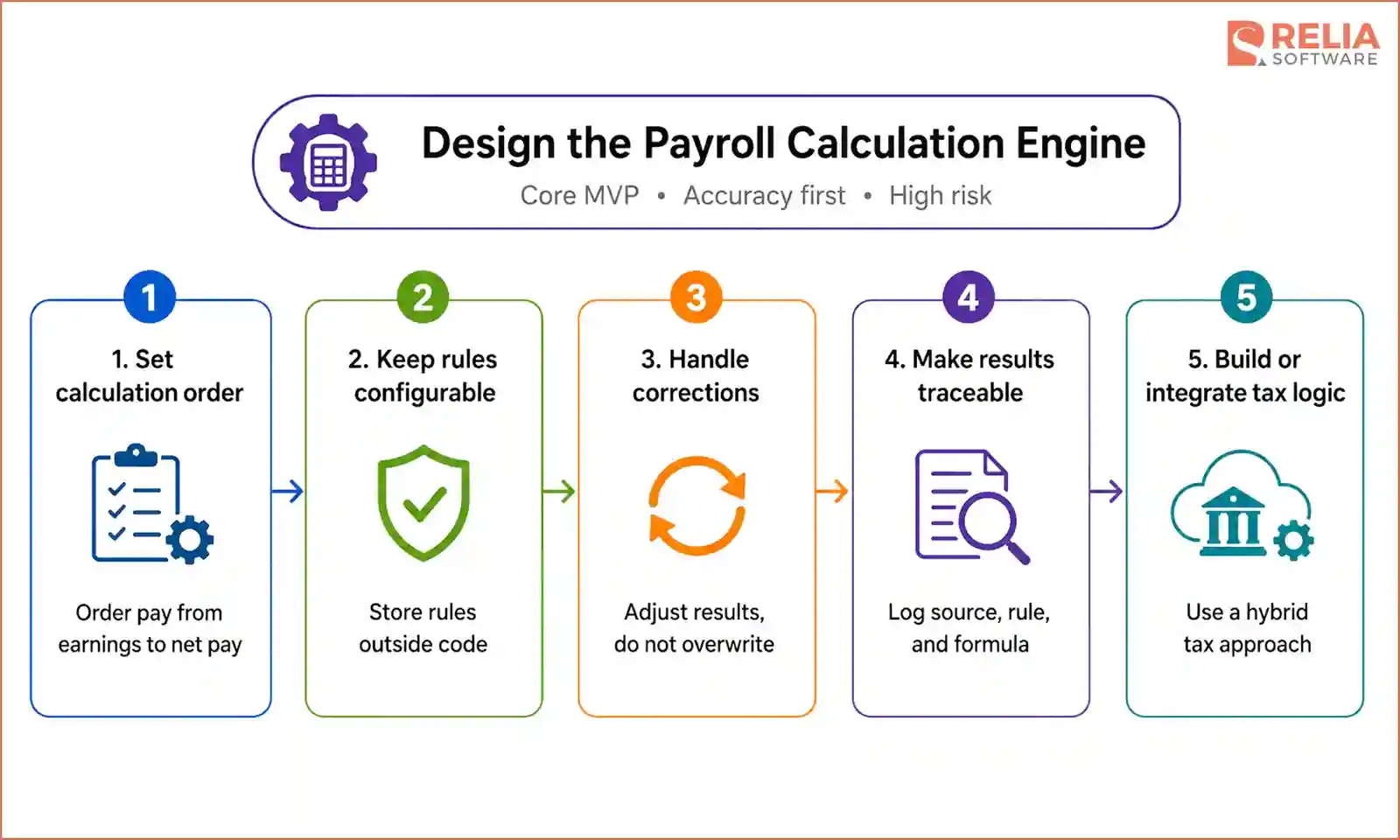
Since the payroll calculation engine is the core function of payroll software, this phase can also be considered the MVP development stage, focusing on accurate payroll calculations before adding more advanced workflows, reports, and integrations.
Moreover, this calculation engine is also the highest-risk part of the system because one error can affect many employees in the same payroll run. Therefore, this phase has to be conducted carefully in steps.
Step 1: Define the Calculation Order
Payroll calculations must follow a clear order because each result affects the next. The order should be:
- Calculate regular earnings.
- Add overtime, bonuses, commissions, and allowances.
- Calculate gross pay.
- Apply pre-tax deductions.
- Determine taxable earnings.
- Calculate taxes and employer contributions.
- Apply post-tax deductions.
- Enforce contribution limits and deduction priorities.
- Calculate net pay.
- Generate payment and accounting records.
The engine must also know what to do when an employee does not earn enough to cover every deduction, including which deductions take priority, which can be reduced, and which should carry over to the next period.
Step 2: Keep Payroll Rules Configurable and Versioned
Tax rates, overtime policies, deduction limits, and contribution rules should not be spread throughout the application code. They should be stored as controlled rules that the engine can apply and update separately.
Each rule should define:
- Scope: Who and where it applies.
- Inputs: Which data it uses.
- Calculation: The formula, rate, or fixed amount.
- Priority and limits: When it runs and which restrictions apply.
- Effective period: When the rule starts and ends.
- Version history: What changed and who approved it.
Step 3: Handle Corrections Without Replacing Original Results
The engine must support backdated salary changes, late overtime, incorrect deductions, reversals, off-cycle runs, and replacement payments. However, original payroll results should never be overwritten. The system should keep the first result and create a linked adjustment for the difference, which preserves a clear history of what was originally paid, what changed, and how the correction was calculated.
Step 4: Make Every Result Traceable
Payroll teams should be able to explain every figure on a payslip. For each calculation, the system should record:
- The source data.
- The applied rule and its version.
- The formula used.
- The calculation steps.
- The rounding method.
- The final amount.
This step makes employee questions and audits easier to handle. It also helps the team confirm that all earnings, taxes, and deductions match the final amount paid.
Step 5: Decide Whether to Build or Integrate Tax Logic
Building tax logic for many jurisdictions requires the team to maintain a large and changing set of rules. Integrating an established tax engine can reduce development time, but it also creates dependence on an external provider.
A practical approach is to integrate tax logic where local rules are complex and change often, while building company-specific pay rules in-house. The tax service should sit behind an internal interface so it can be replaced later without rebuilding the entire payroll engine.
Phase 4: Build Payroll Workflows and Controls
Once the calculation engine is stable, the next step is to control who can perform each action and when. As a basic rule, the person who prepares a payroll run should not be the person who approves it.
Alongside roles, each payroll run should also move through clear states:
- Draft: Data can still be added or corrected.
- Locked: Inputs are frozen, and calculations are complete.
- Approved: The run is reviewed and ready for payment.
- Paid: Payment instructions have been submitted and confirmed.
- Corrected: An adjustment is linked to a completed run.
The system must define what each role can do at every stage, including who can unlock a run, approve large payments, issue off-cycle payments, or create reversals. This is what prevents a closed period from being quietly edited after payment, and it is usually the first thing an auditor asks about.
With that model in place, the team now builds the workflows that payroll, HR, finance, managers, and employees work through. The goal is to make each payroll run clear, controlled, and easy to review before payment.
Core workflows usually include payroll preparation, validation, exception review, approval, locking, payment, corrections, and reporting. Every action should remain linked to the correct payroll run, creating a clear record of who changed data, approved the run, and released payment.
Phase 5: Connect the Integration Layer
The main challenge in this step is not simply connecting them, but deciding the right build order and making sure payroll responds safely when a system fails or sends incorrect data.
Each integration should include:
- Clear data ownership: Define which system provides each field.
- Input validation: Reject incorrect data before it reaches payroll.
- Secure access: Use protected credentials that can be changed safely.
- Duplicate prevention: Repeated requests should create only one result.
- Retry handling: Temporary failures should recover automatically.
- Error reporting: Payroll teams should see what failed and why.
- Reconciliation: Confirm that sent and received records match.
Bank files and tax submissions should be tested against real sandbox systems as early as possible, since a file may still be rejected even when it matches the documentation. Banking also needs extra protection because payments are difficult to reverse. The system should prevent duplicate transfers and track payment status for each employee, not only for the full payroll batch.
Phase 6: Test With Real Payroll Scenarios
Payroll testing should cover four areas:
- Calculation accuracy: Salaries, overtime, bonuses, deductions, taxes, limits, rounding, and retroactive changes.
- Workflow controls: Approvals, locked payroll runs, corrections, reversals, and off-cycle payments.
- Integration failures: Missing time records, duplicate imports, rejected bank payments, and delayed external systems.
- Performance: A full payroll run at the expected employee volume within the available processing window.
Some common testing methods include:
- Unit testing: Checks individual formulas and payroll rules.
- Integration testing: Confirms that external systems exchange data correctly.
- Regression testing: Makes sure new changes do not break existing calculations.
- Security testing: Verifies permissions, data protection, APIs, and audit logs.
- User acceptance testing: Allows payroll, HR, and finance teams to confirm that the system matches real workflows.
- Parallel payroll testing: Runs the old and new systems with the same data and compares the results before launch.
The test data should include normal payroll cases and difficult situations such as mid-period hires, multiple pay rates, backdated changes, failed payments, and deductions that exceed available net pay. The system should not go live until every difference is explained and the payroll team approves the results.
>> Read more:
- Top 7 Web App Security Testing Tools For Developers
- Top 15 Best Usability Testing Tools For Businesses
- 7 Leading Performance Testing Tools for Developers
Phase 7: Launch and Maintain the Platform
Launching payroll software should follow a controlled plan, not a single switch. Before the first live run, the team has to complete the final data migration, freeze changes in the old system, get approval from payroll and finance, and prepare rollback and emergency payment procedures.
Where possible, launch should happen at the start of a new pay period or tax year. This keeps year-to-date figures cleaner and avoids splitting one reporting period across two systems.
After launch, the platform needs ongoing maintenance:
- Regulatory updates: Tax rates, contribution limits, forms, and filing formats.
- Payroll rule changes: New benefits, allowances, deductions, and company policies.
- Integration updates: API changes from banks, HR, accounting, and tax systems.
- Security maintenance: Patches, access reviews, and audit monitoring.
- Performance monitoring: Payroll run times, failures, and capacity as the workforce grows.
Every change must be updated, tested against approved payroll cases, reviewed by the responsible team, and released before its effective date. The business must also decide who is accountable for tracking regulatory changes and shipping them on time, whether that is an internal team or a development partner under a support agreement.
>> Read more: The Importance Of Software Maintenance: 7 Crucial Reasons
Payroll Software Development Cost and Timeline
In general, custom payroll software can cost from $25,000 to more than $300,000, depending on the number of payroll rules, jurisdictions, integrations, users, and security requirements. Furthermore, a typical payroll MVP may take 6 to 12 months to build.
By Project Scope
|
Project Scope |
What it covers |
Timeline |
Cost |
|
Basic payroll system |
One entity, one country, standard pay rules, core calculation engine, payslips, basic self-service |
3–5 months |
$25,000–$50,000 |
|
Standard business payroll |
One country, complex pay rules, HR and accounting integrations, approval workflows, reporting |
5–8 months |
$50,000–$95,000 |
|
Multi-entity payroll |
Multiple legal entities, states, or provinces, with separate rules and consolidated reporting |
7–12 months |
$95,000–$180,000 |
|
Multi-country enterprise payroll |
Multi-jurisdiction compliance, statutory filing, multi-currency, global reporting |
12–18 months+ |
$180,000–$350,000+ |
A white-label or SaaS platform usually costs 25–40% more than a similar internal system because it needs multi-tenancy, client-specific settings, and branding. These features should be planned from the start, since adding them later may require major redevelopment.
By Development Phases
The table below follows the standard development lifecycle. Figures reflect Vietnam development rates of $25–45 per hour with a team of four to six people, and should be treated as planning ranges rather than quotes.
|
Phase |
% of Budget |
Estimated Cost |
Duration |
|
Discovery and requirements |
8% |
$4,000–$15,000 |
2–4 weeks |
|
Design and architecture |
14% |
$6,000–$25,000 |
3–6 weeks |
|
Development |
51% |
$26,000–$92,000 |
12–28 weeks |
|
Testing and QA |
17% |
$9,000–$30,000 |
4–10 weeks |
|
Deployment and migration |
10% |
$5,000–$18,000 |
2–5 weeks |
|
Total |
$50,000–$180,000 |
5–12 months | |
|
Maintenance and support |
15–25% of build cost annually |
Ongoing | |
>> Read more: How To Reduce Software Development Costs?
Relia Software Payroll Case Study: Codapay (by Finity)
Codapay is a UK payroll and HR platform serving recruitment agencies, umbrella companies, and payroll bureaus. Between 2021 and 2024, Relia Software worked as the client's core engineering partner to rebuild its payroll software, which was running payroll for around 150,000 workers a month.
The Problem
The client's existing platform ran on an ageing .NET Framework monolith, and it was reaching its limits. Processing payroll for 150,000 workers each month caused significant delays, and data was drifting out of sync across timesheets, payroll, invoicing, and banking. Workers had no self-service access to payslips or expenses, multi-tenancy was weak, and real-time integration with UK compliance services like HMRC was difficult to maintain.
Relia Software Solutions
Rather than patch the monolith, Relia’s team re-engineered the platform on a microservices architecture based on .NET 8 and React, split into separate services for the payroll back office, recruitment, the calculation engine, supplier management, and shift substitution. The migration ran while the existing platform stayed live, so payroll was never interrupted during the transition.
The most important part was the calculation engine, built as a dedicated library rather than logic scattered through the application. It covers UK, Scottish, and Welsh tax regimes across more than a decade of historical rules, from 2012 to 2024 and beyond, with the tax logic held in configuration so that rule changes do not require code rewrites. It allowed the system to handle mid-year regulatory changes, including the three separate updates the UK made in 2022.
To handle payroll at scale, our team added a Redis caching layer and Azure Service Bus messaging, and used semaphore-controlled concurrency to process large batches without overloading the database. Multi-tenancy was also built in from the start, with automatic query filtering and strict tenant-scoped data isolation so multiple agencies could run on one system without their data mixing.
Compliance and verification services were integrated directly, including HMRC for tax, Credas for Right to Work checks, and NEST for pensions, with distributed tracing across the services for full visibility into how each part of the system was performing.
Results
The final platform delivered:
- Scale that holds up: Payroll for around 150,000 workers a month, with bulk processing of over 10,000 timesheets and payslips in under five seconds.
- Consistent data end to end: Timesheets, payroll, invoicing, and banking now stay in sync across the whole workflow.
- Worker self-service: A React-based portal where workers manage their own payslips, timesheets, and expenses.
- Compliance that keeps up: Accurate coverage of UK, Scottish, and Welsh tax across more than ten years of rules, including mid-year changes.
- A platform built to grow: Multi-tenant support for many agencies on one system, on an architecture the client can maintain and extend.
FAQs
1. Should we build custom payroll software or buy an existing platform?
Buy an existing platform if your payroll rules, workflows, and integrations are standard. However, let’s build custom software when pay rules are too complex, approval workflows have too many conditions and stages, integrations need more data, or internal policies and regulations require control over where payroll data is stored and who can access it.
2. How do we keep the system compliant when tax rules change?
Store payroll rules as configurable, versioned data instead of hard-coding them. Assign a team or partner to monitor changes, test updates, and release them before they take effect.
3. Can custom payroll software integrate with existing HR and accounting systems?
Yes. It can connect with HR, time tracking, banking, tax, and accounting systems through APIs or file exchange. Banking and tax integrations should start early because external approval can take weeks.
4. How much does payroll software cost to maintain?
Plan to spend around 15–25% of the original build cost each year on rule updates, integrations, security, infrastructure, testing, and support.
5. How to choose a qualified payroll software development partner?
You should choose a software development company with experience in financial calculations, secure data, and complex integrations. Look at their previous projects. Fintech, accounting, or HR projects are useful signals because general app experience can not be enough for payroll.
Ask how the team handles rule changes, corrections, testing, data migration, and launch carefully. Also confirm what support they provide after go-live, since payroll software needs ongoing updates and maintenance.
>> Read more:
- HR Software Development: Types, Modules, Process, & Costs
- A Detailed Guide To FinTech App Development for Businesses
Conclusion
Building quality payroll software requires a detailed and well-defined development process, from mapping payroll rules and designing the data model to testing real scenarios and planning long-term maintenance. Therefore, businesses should find a reliable development partner with experience in complex calculations, secure integrations, compliance-heavy systems, and ongoing support.
Relia Software can help you scope the build, design a system that handles rule changes as routine updates, and support it once it is live. Contact us to discuss your requirements and get an estimate that covers both the build and what follows it!
>>> Follow and Contact Relia Software for more information!

- development
- web development