


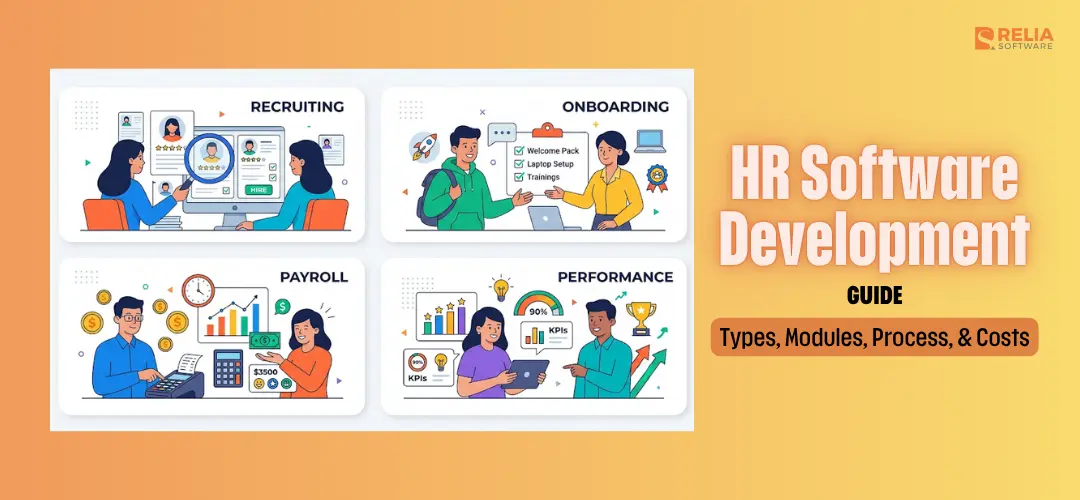
HR (Human Resources) software development is the process of designing, building, and integrating systems that manage the full employee lifecycle like hiring, records, payroll, performance, learning, and workforce planning, often across multiple regions and regulatory regimes.
In 2026, how HR platforms are built has changed due to 2 main shifts: AI features are moving from experiments into production, and the EU AI Act is bringing stricter rules for high-risk HR AI systems. These changes raise the bar for HR software development.
In this guide, we don't just cover features and costs, we also discuss what to comply with, and how to ship a first version in four to nine months, not two years.
HR Software Market Demand
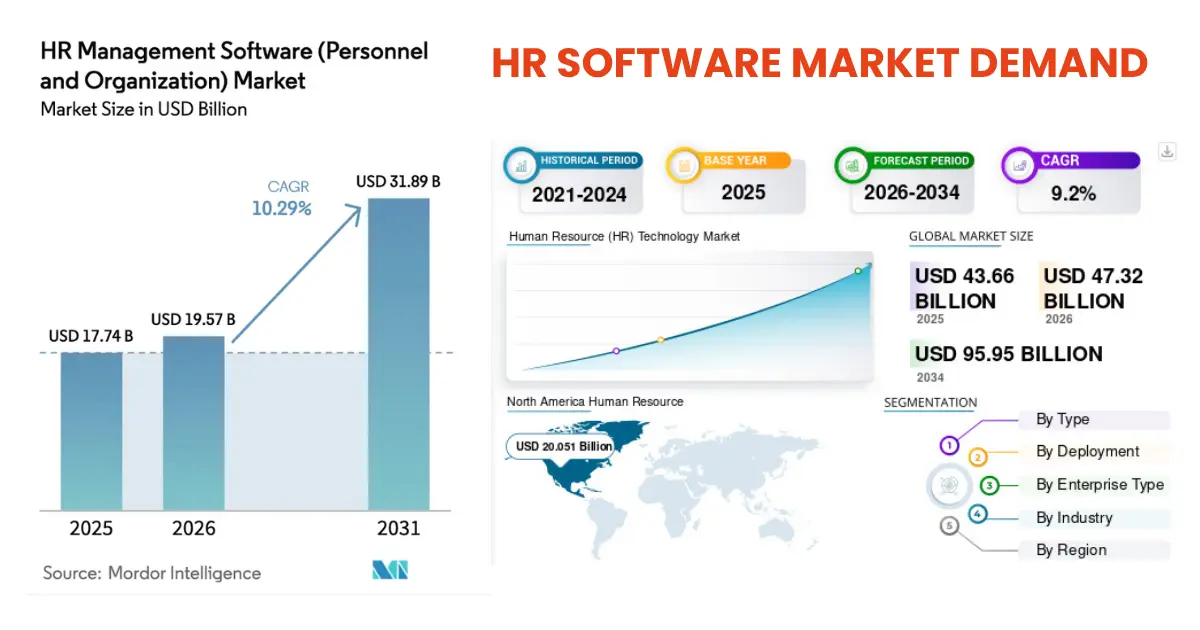
The HR software market continues to grow quickly as companies invest in better employee data systems, workflow automation, AI features, and integrated HR operations.
Mordor Intelligence estimates the global HR software market at $19.57 billion in 2026, with growth expected to reach $31.89 billion by 2031. Broader HR technology, including talent management, payroll, and learning systems, is even larger. Fortune Business Insights values the market at $47.32 billion in 2026, with a projected rise to $95.95 billion by 2034.
Tthe overall trend is clear: demand for HR software is growing steadily. HR software demand in 2026 is mainly driven by 4 forces:
- AI adoption: AI features are becoming real product requirements, not experimental add-ons.
- Remote and hybrid work: Distributed teams need self-service portals, mobile workflows, digital approvals, and asynchronous HR support to reduce manual HR work.
- Stricter compliance: Regulations around data privacy and AI in hiring are making audit trails, explainability, data governance, and permission controls essential from day one.
- SaaS integration issues: Many companies now use 4-6 HR tools across payroll, ATS (Applicant Tracking System), LMS (Learning Management System), engagement, and benefits. When syncing all those systems becomes too costly, custom HR software becomes a practical option.
What is HR Software?
HR software are business systems that store employee data and automate the workflows built on top of it like hiring, onboarding, payroll, time and attendance, performance, learning, and workforce reporting.
However, HR software is not one single product. Most companies use several overlapping systems, and confusing them is one of the most common scoping mistakes in HR tech projects.
3 Common Types of HR Software
|
System |
Main Scope |
Typical Users |
|
HRIS |
Employee records, org structure, benefits data |
50–500 employees needing their first real HR system |
|
HRMS |
HRIS + payroll, time tracking, self-service, performance |
200–2,000 employees with growing HR operations |
|
HCM |
HRMS + workforce planning, succession, learning, analytics |
2,000+ employees with strategic HR needs |
HRIS (Human Resource Information System)
HRIS stores the authoritative record of every employee, including personal data, employment history, compensation, benefits enrollment, job title, and department. Everything else in the HR stack reads from it.
HRIS is the source of truth for employee data. When two systems disagree about an employee’s role, manager, or status, the HRIS should be the system that wins.
Companies usually need a proper HRIS once spreadsheets become too hard to manage, often around 50–100 employees.
Common commercial examples: BambooHR, Rippling, Namely.
HRMS (Human Resource Management System)
An HRMS includes HRIS functions but adds the operational workflows HR teams use every day, including: payroll, benefits administration, time and attendance, employee self-service, leave management, and basic performance tracking.
If HRIS answers “Who is this employee?”, HRMS answers “What does HR need to do with this employee this week?”
Many mid-sized companies actually need an HRMS, not just an HRIS, because they need both employee records and day-to-day workflow automation.
Common examples: Workday mid-market, SAP SuccessFactors, Zoho People.
HCM (Human Capital Management)
An HCM system usually includes HRIS and HRMS capabilities, plus workforce planning, succession planning, learning management, advanced analytics, and executive dashboards.
The HCM system is where large companies answer strategic questions such as:
- Where are our future leaders?
- Which teams have high attrition risk?
- What skills do we need in each region?
- How should we plan headcount for next year?
HCM is usually a better fit for enterprises with 2,000+ employees or companies with mature talent strategies.
Common examples: Workday HCM, Oracle HCM Cloud, SAP SuccessFactors full suite.
When You Should Build Custom HR Software?
Build custom HR software when at least two of the following five conditions are true. Otherwise, configure a SaaS product and integrate around it.
- Fast headcount growth: If you have 500+ employees and are growing quickly, SaaS per-seat pricing can become expensive over time. A fixed custom build makes more financial sense within a few years.
- Non-standard workforce: Custom HR software is worth considering if you manage many contractors, deskless workers, seasonal staff, or complex pay models such as commissions, tips, piecework, or shift-based pay.
- Regulated industry requirements: Healthcare, finance, defense, gambling, and other regulated industries often need strict audit trails, data residency, access control, and compliance workflows that standard SaaS tools can not support well.
- High integration cost: If your company already uses six or more HR tools and spends heavily on syncing data between them, custom development can reduce long-term complexity.
- HR workflow as a competitive advantage: If your HR operations are part of how your business works such as staffing dispatch, gig worker payouts, healthcare credentialing, or workforce allocation, custom software is necessary.
Core Modules in HR Software Development
Employee Records and Org Structure
This is the core system of record for employee data, including identity, contact details, employment history, role, manager, department, location, compensation, and benefits.
Must-have features:
- Effective-dated records
- Role and position separation
- Custom fields for local requirements
- Soft delete with audit trail
Employee Self-Service Portal
The main interface employees use to access HR services, request changes, and find information.
Must-have features:
- Mobile-first UI
- Single sign-on
- PTO (Paid Time Off) and document requests
- Personal info updates
- Policy document library
- Notifications and reminders
Time, Attendance, and Scheduling
This module manages working hours, leave, shifts, and attendance records.
Must-have features:
- Clock-in/out on web, mobile, or kiosk
- Timesheet approval
- Leave request and balance tracking
- Shift scheduling
- Overtime rules by location
Onboarding and Offboarding
This module manages the first and last stages of the employee lifecycle.
Must-have features:
- Task lists with owners and due dates
- E-signature for documents
- IT and equipment provisioning
- Welcome content
- Offboarding checklist
- Access removal workflows
Payroll and Benefits
Payroll is usually better integrated, not built from scratch. Tax rules, filings, deductions, and country-specific requirements change too often.
Must-have features if integrating payroll:
- Country-specific tax handling
- Off-cycle payroll support
- Benefits deductions
- Employee tax documents
- General ledger export
Performance and Goals
This module helps managers track goals, reviews, and employee progress.
Must-have features:
- OKR (Objectives and Key Results) or SMART (Specific, Measurable, Achievable, Realistic, Time-bound) goals
- Manager or 360-degree reviews
- Review cycle scheduling
- Calibration dashboards
- Historical review archive
Recruitment and Applicant Tracking
Recruitment can be part of the platform, but it is often better scoped after the MVP unless hiring is central to the business.
Must-have features:
- Requisition approvals
- Careers page
- Resume parsing
- Interview scorecards
- Offer letter templates
- Compliance reporting where required
Learning and Development
Learning modules track skills, training, certifications, and development plans.
Must-have features:
- Course catalog
- Assignment rules
- Completion tracking
- Certification expiry alerts
- SCORM (Sharable Content Object Reference Model)/xAPI support
Analytics and Workforce Reporting
Analytics helps HR and leadership understand workforce trends.
Must-have features:
- Headcount reports
- Turnover tracking
- Time-to-fill reports
- Cost-per-hire reports
- Compensation trends
- Snapshot reporting by date
Compliance and Audit Trail
Compliance should be built into the platform from day one, not added later.
Must-have features:
- Immutable audit logs
- Data retention rules
- Consent capture
- Access control
- Data export and deletion workflows
- AI and hiring audit exports where required
|
Notes: A practical HR software MVP focuses on the modules that help HR run daily operations without delaying launch. For most companies, the first release should include:
Payroll is usually better integrated through a third-party provider. Recruitment, learning, and advanced analytics can be added in later phases. |
AI Features Worth Building in HR Software
Resume Parsing and Candidate Matching
AI extracts skills, work history, education, certifications, and contact details from resumes, then maps them into structured candidate profiles. A stronger version can compare candidate profiles against job requirements and highlight possible matches.
HR Chatbot for Employee Support
An HR chatbot can answer common employee questions about leave policies, benefits, payroll dates, onboarding steps, company rules, and internal processes. This cuts HR work load in answering the same questions many times. However, never let AI chatbots answer legal, medical, or compensation-specific questions without escalation.
Attrition Risk Prediction
Attrition prediction helps HR identify employees or teams with higher risk of leaving. This feature works well when you have at least two years of clean tenure and engagement data (eg., role changes, compensation history, workload, and performance.)
The output should never be a "flight risk" label surfaced to managers, which is a lawsuit. Instead the outcome is a recommendation to run a stay interview, a compensation review, or a development conversation.
Performance Review Drafting
AI supports writing clearer performance review drafts based on goals, manager notes, peer feedback, self-assessments, and previous review history. Reviewers can save time and efforst, especially during large review cycles. But the manager should remain the final author, editor, and decision-maker.
Smart Document and Policy Search
HR teams often manage many documents: contracts, handbooks, benefits guides, compliance policies, training materials, and internal procedures. AI-powered search can help employees and HR teams find the right information faster. But, employees should only see documents they are authorized to view.
Compliance and Audit Support
AI can flag missing documents, unusual approval patterns, expired certifications, incomplete training, or inconsistent policy application. This feature ensures compliance in regulated industries such as healthcare, finance, logistics, and government contracting.
|
AI Features to AVOID in HR Software: Not every AI feature belongs in HR software. Here are AI features that create more legal, ethical, and trust risks than business value:
|
6-Step HR Software Development Process
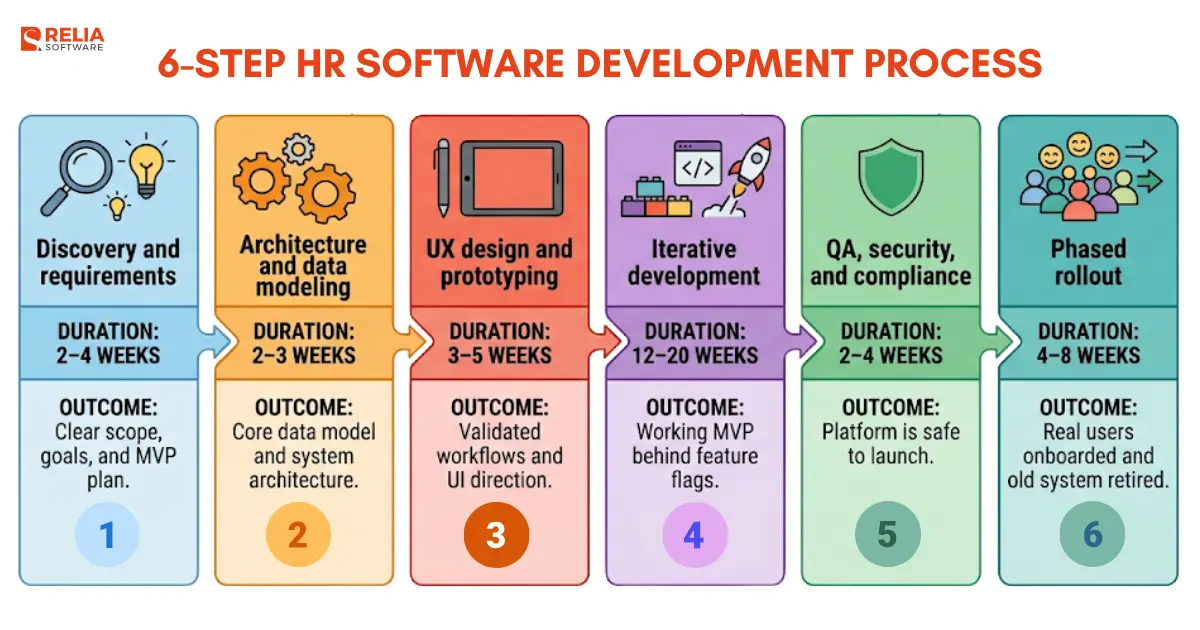
A production-ready HR software MVP takes about 4 – 9 months from discovery to first rollout. The 6 steps below aren't fully sequential in the classic waterfall model, but often overlap in every real build. What matters is each step produces the right output before the next one goes too deep.
Step 1: Discovery and Requirements
Timeline: 2–4 weeks
Goal: Turn HR pain points into a clear, prioritized product plan.
In the discovery stage, interview HR, payroll, finance, IT, managers, and employees. Then map current tools, workflows, compliance needs, and the main reasons for building custom software (the two-of-five build-vs-buy criteria that triggered the project) and rank modules by pain × frequency.
Key deliverables:
- Business goals and success metrics
- MVP vs phase-two scope
- Integration inventory
- Compliance checklist
- Rough budget and timeline
Watch out: Do not interview HR only. Managers and employees often feel the most friction in the current system, so their input is critical.
Step 2: Architecture and Data Modeling
Timeline: 2–3 weeks
Goal: Design the data structure before building the interface.
What to do: Design the employee record model with effective-dating, decide on role-vs-position separation, pick the integration architecture (event bus vs. point-to-point vs. iPaaS), define the audit and retention strategy, choose the tech stack, and sketch the reference architecture.
Key deliverables:
- Employee data model
- Role and position structure
- API and integration design
- Security and compliance architecture (eg., RBAC, encryption, data residency)
- Tech stack decision record
Watch out: Do not treat the data model as a small technical detail. Payroll, analytics, compliance, and AI features all depend on clean employee data. Reworking the data model later means migrating live employee data, which can cause system disruption.
Step 3: UX Design and Prototyping
Timeline: 3–5 weeks
Goal: Validate key workflows before development starts.
What you do: Design the self-service portal first (it's the most-used surface), then the manager and HR admin flows. Build clickable prototypes for the three highest-frequency workflows, for example, requesting PTO, approving a request, running a report. Then test with 5–8 real employees per role.
Key deliverables:
- Design system
- High-fidelity MVP prototypes
- Usability test findings
- Accessibility review
Watch out: Do not design only for HR admins. HR admins log in daily, so they'll adapt to almost any interface. In contrast, employees often log in monthly and use the system less often, so the interface must be simple and easy to understand.
Step 4: Iterative Development
Timeline: 12–20 weeks
Goal: Build the MVP in usable slices through short sprints.
What you do: Run two-week sprints, front-load the data layer and identity plumbing, ship one module end-to-end per sprint pair, integrate payroll and IdP early (they'll surface the hardest bugs), and demo to real HR users every two weeks.
Key deliverables:
- Working MVP modules
- CI/CD pipeline
- Automated tests including at least one end-to-end path per module
- Payroll and identity integrations
- Feature-flagged releases
Watch out: Avoid stacking modules horizontally. Teams that build all data models first, then all APIs, then all UI, end up with nothing usable at week 12 and no feedback until week 20. Slice vertically instead, one module fully working beats four modules half-built.
Step 5: QA, Security, and Compliance Testing
Timeline: 2–4 weeks
Goal: Find the failures that only appear at scale, with real data, and under adversarial conditions.
What you do: load-test with a realistic employee dataset (10× current headcount is a good target), run a penetration test against the auth and audit layers, run GDPR/EU AI Act compliance testing on every AI feature, test the offboarding flow end-to-end (this is where security gaps hide), verify backup and disaster-recovery procedures.
Key deliverables:
- Penetration test report
- Load test results
- Compliance sign-off
- Audit log verification
- Backup and recovery plan
Watch out: Do not cut QA time just to meet the original launch date. Slipping the launch date is always cheaper than a broken launch.
Step 6: Phased Rollout and Continuous Improvement
Timeline: 4–8 weeks
Goal: Launch safely without disrupting HR operations or payroll.
Start with a pilot group, such as one department or around 50 users. Run the new system in parallel with the old one for at least one full payroll cycle. Expand only after the data and workflows are verified.
What you do: Roll out to a pilot group (one department or around 50 users), run parallel with the old system for one full payroll cycle. Then expand only after the data and workflows are verified. Retire the old system only after two clean payroll cycles on the new one. When everything works smoothly, move phase-two modules into the roadmap.
Key deliverables:
- Phased rollout plan
- Pilot support playbook
- Adoption metrics
- Issue tracking process
- Phase-two roadmap
Watch out: Avoid a big launch. Payroll, access control, and employee records have to be verified carefully before retiring the old system.
Architecture and Technology Stack in HR Software Development
The stack that follows are the practical one that ships fastest for a team of 4 to 8 engineers building an HRMS with AI features, running on cloud infrastructure, and expecting to integrate with payroll, identity providers, and other HR solutions.
|
Layer |
Recommended Options |
|
Database |
PostgreSQL 16+ |
|
Cache / Queue |
Redis, SQS, Google Cloud Tasks |
|
Object Storage |
S3, GCS, Cloudflare R2 |
|
Search |
OpenSearch, Meilisearch |
|
Backend |
Node.js with NestJS/Fastify, Python with FastAPI/Django |
|
Mobile |
React Native or Flutter |
|
Web |
Next.js or Remix |
|
DevOps |
GitHub Actions, GitLab CI, Terraform, Pulumi |
|
Observability |
Datadog, Grafana Cloud, New Relic, Sentry |
|
Integration |
Merge.dev, Workato, Tray.io, Kafka, NATS |
Data Layer
PostgreSQL is often the default choice for HR software. Employee data is highly relational, with records such as roles, positions, managers, departments, etc.
Recommended tools:
- Primary database: PostgreSQL 16+
- Cache and queues: Redis
- Durable async jobs: Amazon SQS or Google Cloud Tasks
- Object storage: AWS S3, Google Cloud Storage, or Cloudflare R2
- Search: OpenSearch or Meilisearch
- Data warehouse: BigQuery, Snowflake, or ClickHouse for phase-two analytics
Avoid using MongoDB or DynamoDB as the primary employee record store. HR data needs consistency and clear relationships, which relational databases handle better.
Backend Services
For most HR software projects, Node.js and Python are practical backend choices.
Recommended options:
- Node.js with NestJS or Fastify: Good for API-heavy HR systems and TypeScript teams.
- Python with FastAPI or Django: Strong choice when the platform includes AI, reporting, or data-heavy features.
- Go: Useful for high-throughput services such as event processing, bulk reports, or audit pipelines.
For API design:
- Use REST for external integrations.
- Use GraphQL only if the frontend team can maintain it well.
- Use gRPC for internal service-to-service communication when performance matters.
>> Read more: gRPC vs GraphQL: Choosing the Right API Technology
Frontend and Mobile
Recommended tools:
- Web: Next.js or Remix
- UI components: Radix UI or Headless UI
- Styling: Tailwind CSS
- Mobile: React Native or Flutter
- Fallback: Progressive Web App for users who do not install native apps
>> Read more: PWA vs Native App: Key Differences and How to Choose?
Cloud and DevOps
Recommended tools:
- Compute: Kubernetes if you have platform engineers; otherwise ECS Fargate, Cloud Run, or Azure Container Apps
- CI/CD: GitHub Actions or GitLab CI
- Observability: Datadog, Grafana Cloud, New Relic, and Sentry
- Instrumentation: OpenTelemetry
- Secrets management: AWS Secrets Manager, GCP Secret Manager, or HashiCorp Vault
- Infrastructure as code: Terraform or Pulumi
Avoid manual cloud configuration where possible. Infrastructure should be version-controlled, repeatable, and audit-friendly.
Integration Layer
Recommended approach:
- Use custom connectors for critical systems such as payroll, identity provider, and ATS
- Use an iPaaS platform such as Merge.dev, Workato, or Tray.io for lower-priority integrations
- Use an event bus such as Kafka, NATS, or Confluent Cloud for internal domain events
- Use an API gateway such as Kong, Envoy, AWS API Gateway, or GCP API Gateway
Compliance in Human Resources Software Development
In 2026, the main areas to plan for are GDPR, the EU AI Act, US state-level AI rules, and jurisdictional data residency requirements.
|
Rule |
Main Point |
Applies When |
Design Requirement |
Maximum Penalty |
|
GDPR Article 22 |
Restricts solely automated decisions that have legal or significant effects on people |
Any EU employee's data |
Human-in-the-loop, explainability, override path |
€20M or 4% revenue |
|
EU AI Act |
Any AI system used for recruitment, promotion, task allocation, or performance evaluation is classified high-risk under Annex III. High-risk means specific obligations, not just "be careful." |
AI in hiring, promotion, allocation, evaluation
|
Risk assessment, documentation, transparency, oversight, monitoring |
€35M or 7% revenue |
|
NYC Local Law 144 |
Annual bias audit for any "automated employment decision tool" used in NYC hiring or promotion. Public summary required. |
Automated employment tools used in NYC |
Annual bias audit, public summary, candidate notice |
Per-violation fines |
|
California AB 2930 |
Bias audits, notice requirements, and record-keeping for automated employment decision tools. |
Automated employment decision tools are used |
Bias audits, notice, record-keeping |
Per-violation fines |
|
Data residency laws |
Employee data almost always crosses at least one border. The architecture has to plan for where employee data is stored, processed, and accessed. |
Employee data is stored or processed across jurisdictions |
Region-locked storage and processing |
Regulator-specific |
Custom HR Software Development Costs
Custom HR software development ranges from $15,000 to $100,000+. The widest cost driver isn't what the software does, it's where the team is based. A mid-market HRMS MVP built by a Vietnam-based team lands between $15,000 and $100,000. The same MVP from a US-based team is 2–3× higher.
The tables below split costs by scope, phase, and geography so you can build a realistic number for your project.
Cost by scope
|
Build Type |
Typical Cost |
What’s Included |
|
Basic HRIS |
$15k–$35k |
Employee records, org structure, basic self-service, simple reports, 1 integration |
|
HRMS MVP |
$35k–$75k |
Employee records, self-service, onboarding, time tracking, audit trail, payroll/IdP integration |
|
Advanced HRMS |
$75k–$150k+ |
More modules, AI features, custom workflows, multi-country support, advanced permissions |
|
Enterprise HCM |
$150k–$300k+ |
Workforce planning, deep analytics, complex compliance, multiple integrations, custom reporting |
Cost by Phase
For a typical HRMS MVP around $50,000–$80,000, the cost is usually spread across these phases:
|
Phase |
Typical Cost |
Duration |
|
Discovery and requirements |
$2k–$6k |
1–3 weeks |
|
Architecture and data modeling |
$3k–$8k |
1–2 weeks |
|
UX design and prototyping |
$5k–$12k |
2–4 weeks |
|
MVP development |
$25k–$55k |
8–16 weeks |
|
QA, security, and compliance testing |
$5k–$15k |
2–4 weeks |
|
Deployment and rollout |
$3k–$8k |
1–3 weeks |
|
Post-launch support |
$10k–$30k/year |
Ongoing |
Development is the largest cost item, but discovery and architecture decide whether the project is built correctly. Cutting too much from planning often leads to rework later.
Cost by Team Location
Development rates vary heavily by region. Offshore teams can reduce the total build cost while still giving access to experienced developers.
|
Region |
Typical Hourly Rate |
Notes |
|
US / Canada |
$80–$180/hr |
Highest cost, strong senior talent pool |
|
Western Europe |
$60–$130/hr |
Strong for EU-focused and compliance-heavy projects |
|
Eastern Europe |
$40–$80/hr |
Mature engineering market and good timezone overlap with Europe |
|
Vietnam |
$20–$50/hr |
Cost-effective, strong web/mobile talent, good fit for offshore HR software builds |
|
India |
$18–$45/hr |
Large talent pool, quality varies by vendor |
Choosing an offshore team can reduce development costs by 40–70% compared with a fully US-based team. However, the cheapest rate is not always the best choice. Team stability, communication, technical leadership, and domain understanding matter more than hourly cost alone.
Total Cost of Ownership
Custom HR software still costs money after launch. A realistic five-year cost should include maintenance, hosting, new features, compliance updates, and third-party integrations.
For a $60,000 HRMS MVP, a five-year cost estimate may look like this:
|
Line Item |
5-Year Cost |
|
Initial MVP build |
$60k |
|
Maintenance and bug fixes |
$50k–$120k |
|
New modules and feature upgrades |
$40k–$150k |
|
Cloud and infrastructure |
$15k–$60k |
|
Compliance and security updates |
$10k–$50k |
|
Third-party integrations |
$20k–$80k |
|
Estimated 5-year total |
$195k–$520k |
How Relia Software Helps Build Custom HR Software?
Relia Software builds HR and payroll platforms end-to-end from a over-100-engineer center in Ho Chi Minh City, at $25–$50/hour senior rates. Since 2011, we've delivered applications for global clients with HR-tech work spanning HRIS, payroll, worker self-service, and multi-tenant enterprise platforms.
Case study: Codapay
Codapay is a UK payroll and HR platform serving recruitment agencies, umbrella companies, and payroll bureaus. Relia modernized the legacy .NET platform into a scalable, multi-tenant enterprise system.
- Scope: payroll automation, worker self-service portal, multi-tenancy, HMRC compliance, Azure infrastructure.
- Scale: ~150,000 workers processed per month.
- Stack: .NET, Azure, multi-tenant architecture with tenant-isolated data.
- Outcome: a compliant, self-service HR-payroll platform running at scale in one of the UK's most heavily regulated workforce niches.
Conclusion
Custom HR software is now more accessible thanks to offshore talent, cloud infrastructure, and mature development tools. But the build is also more complex: AI raises compliance risks, employees expect smooth self-service, and integrations can take as much effort as the core platform.
Whether you build, buy, or use a hybrid model depends on your headcount, workforce complexity, regulations, and how important HR operations are to your business.
The safest path is to scope carefully, design the data model properly, build compliance in from day one, and roll out in phases. The best HR platforms are not the most feature-heavy. They are the ones that fit how the company actually works.

- development
- Mobile App Development
- Web application Development
- outsourcing