


Outsourcing Shopify development means hiring a freelancer, agency, or dedicated team outside your company to build, customize, or maintain your Shopify store. Most businesses choose outsourcing services when they need custom theme work, a platform migration, or ongoing technical support that their in-house team doesn't have the time or skills to handle.
There's no best way to outsource Shopify development, instead it depends on the specific project. In this guide, we cover what Shopify development outsourcing services include, when it makes sense, what it costs, and how outsourcing models compare, so you can pick the right one for your store.
You'll also find a step-by-step outsourcing process, a checklist for vetting a development partner, and the main risks to plan for before handing your store over to an outside team.
What Is Shopify Development Outsourcing?
Shopify development outsourcing is the practice of hiring an external freelancer, agency, or team to build, customize, or maintain a Shopify store instead of relying only on in-house staff. The outsourced team works within Shopify's existing platform and app ecosystem rather than building a site from scratch.
Businesses often outsource Shopify development services below:
- Theme development: Building or customizing a Shopify theme to match a brand's design and improve navigation.
- App and API integration: Connecting third-party tools such as email marketing platforms, loyalty programs, or ERP systems to the store.
- Custom app development: Building Shopify apps for features no existing app covers, such as custom pricing rules or subscription logic.
- Platform migration: Moving a store from WooCommerce, Magento, or BigCommerce to Shopify without losing product data, order history, or search rankings.
- Performance optimization: Improving page load speed, mobile responsiveness, and Core Web Vitals scores.
- Technical SEO setup: Structuring URLs, metadata, and site architecture so the store is easy for search engines to crawl and index.
When Should You Outsource Shopify Development?
Launching a new store: Store architecture, theme customization, payments, shipping, and product catalog setup all benefit from someone who has done similar work before. So, an experienced outsourcing team can help you save much time and effort rather than doing all new things from scratch.
Running multiple stores: Enterprise retailers manage many storefronts across regions, brands, or sales channels need consistent development support to keep everything in sync. However, with theme, integrations, and performance and various things, it is harder for a single in-house developer to stretch across all of them.
Migrating from another platform: Moving from WooCommerce, Magento, BigCommerce, or another platform to Shopify involves transferring products, customers, order history, content, URLs, and SEO data. All need experienced Shopify developers to map the data, rebuild required functionality, set up redirects, and validate the new store before launch without breaking search rankings.
Building custom functionality: Custom Shopify development is not the same as general ecommerce website design. Developers who are skilled at WordPress or Squarespace with general web design experience don't all know how to work with Liquid (Shopify’s own language), Shopify’s APIs, apps, themes, and platform limits.
Scaling traffic or catalog size: As traffic, orders, or catalog size increase, the store needs performance optimization, app cleanup, better search and filtering, new integrations, or changes to its technical architecture. A Shopify development partner can identify bottlenecks and improve the store without disrupting daily operations.
Lacking internal skills: Many businesses do not have enough ongoing work to justify hiring a full-time Shopify developer. Others already have an internal team, but they are stretched across several projects. Outsourcing adds specialist capacity without requiring a permanent hire.
4 Ways to Outsource Shopify Development: Which Model is the Best Fit?
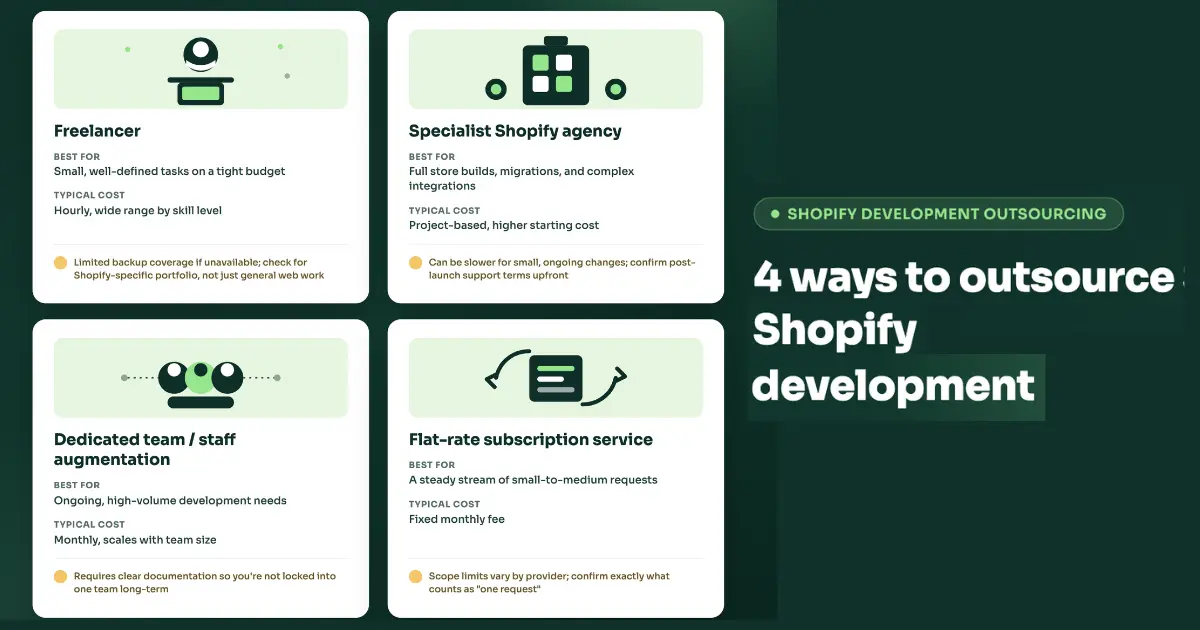
The best way to outsource Shopify development depends on 3 factors: how complex the project is, what your budget allows, and how much ongoing support you'll need after launch. Here are 4 models cover most situations:
|
Model |
Best for |
Typical cost pattern |
Watch-outs |
|
Freelancer |
Small, well-defined tasks on a tight budget |
Hourly, wide range by skill level |
Limited backup coverage if they're unavailable; check for a Shopify-specific portfolio, not just general web work |
|
Full store builds, migrations, and complex integrations |
Project-based, higher starting cost |
Can be slower for small, ongoing changes; confirm post-launch support terms upfront | |
|
Dedicated team / staff augmentation |
Ongoing, high-volume development needs |
Monthly, scales with team size |
Requires clear documentation so you're not locked into one team long-term |
|
Flat-rate subscription service |
A steady stream of small-to-medium requests |
Fixed monthly fee |
Scope limits vary by provider; confirm exactly what counts as "one request" |
Note: Match the model to the situation rather than the price tag alone.
- A single theme fix or a small bug rarely: Hire a freelancer with Shopify-specific experience to get things done faster and cheaper.
- A full store build or platform migration: Need the coordinated design, development, and QA process an agency provides.
- Your store needs constant iteration like new landing pages, seasonal updates, ongoing optimization: A dedicated team or flat-rate service avoids re-scoping and re-quoting every request.
There's no single best option across the board; there's a best option for what you're building and how often you'll need help after it launches.
How Much Does It Cost to Outsource Shopify Development?
Cost by Project Type
|
Project type |
Typical cost range |
What drives the price |
|
Store setup / theme customization (existing theme) |
$800 – $2,000 |
Configuration, minor design tweaks, product catalog setup |
|
Custom-designed theme (higher-fidelity design, no bespoke code) |
$1,500 – $3,500 |
Custom layout and branding within Shopify's theme framework |
|
Fully custom build (bespoke design + complex commerce logic) |
$5,000 – $20,000+ |
Custom apps, advanced integrations, unique checkout or catalog logic |
|
WooCommerce → Shopify migration |
$1,500 – $8,000 (as low as $500–$2,000 for catalogs under 500 products using app-based tools) |
Product count, custom functionality, data complexity |
|
Magento → Shopify Plus migration |
$5,000 – $20,000+ (ERP-integrated or multi-store B2B builds: $20,000 – $50,000+) |
Catalog size, ERP integrations, multi-store setup |
|
Ongoing maintenance |
$600 – $800/month for a typical Shopify Advanced plan with an app stack |
App subscriptions, routine updates, support hours |
Cost by Talent Region
Rates vary significantly by where the developer is based. Based on 2026 freelance-market data and Clutch.co's published agency rates:
|
Region |
Typical hourly rate |
Notes |
|
North America |
$95 – $200/hr |
Highest rates; senior agency talent runs up to $200/hr |
|
Western Europe |
$80 – $150/hr |
Comparable quality to North America, generally somewhat lower cost |
|
Eastern Europe |
$40 – $90/hr |
Strong technical talent; frequently cited as the best cost-to-quality ratio |
|
South & Southeast Asia (incl. Vietnam) |
$20 – $60/hr |
Most cost-effective; senior talent in markets like Vietnam increasingly prices closer to Western mid-level rates |
Rates vary by experience level as much as by region, expert-level freelancers can charge two to three times more than entry-level developers within the same country.
>> Read more: Top 10 Best Countries for Outsourcing Software Development
How to Vet and Choose a Shopify Development Partner?
Vetting a Shopify development partner comes down to verifying claims instead of taking them at face value. 6 checks catch most problems before you sign a contract:
- Review a portfolio of live Shopify stores: Test the checkout flow and mobile experience yourself. Screenshots can hide slow load times, broken forms, and clunky navigation.
- Confirm experience with your specific needs: Migration, subscriptions, B2B/wholesale, and headless builds each require different skills, so general Shopify experience doesn't guarantee competence in your particular use case.
- Check communication process and time zone overlap: Ask how they handle status updates, how fast they respond to questions, and how much working-hours overlap you'll actually have.
- Get explicit terms on code ownership, credential handoff, and data access: Confirm in writing that you retain ownership of the code and full access to your store's credentials once the project ends.
- Ask for named references or case studies, not just star ratings: A star rating tells you little, but a named client willing to talk about their experience tells you a lot more.
7-Step Shopify Development Outsourcing Process
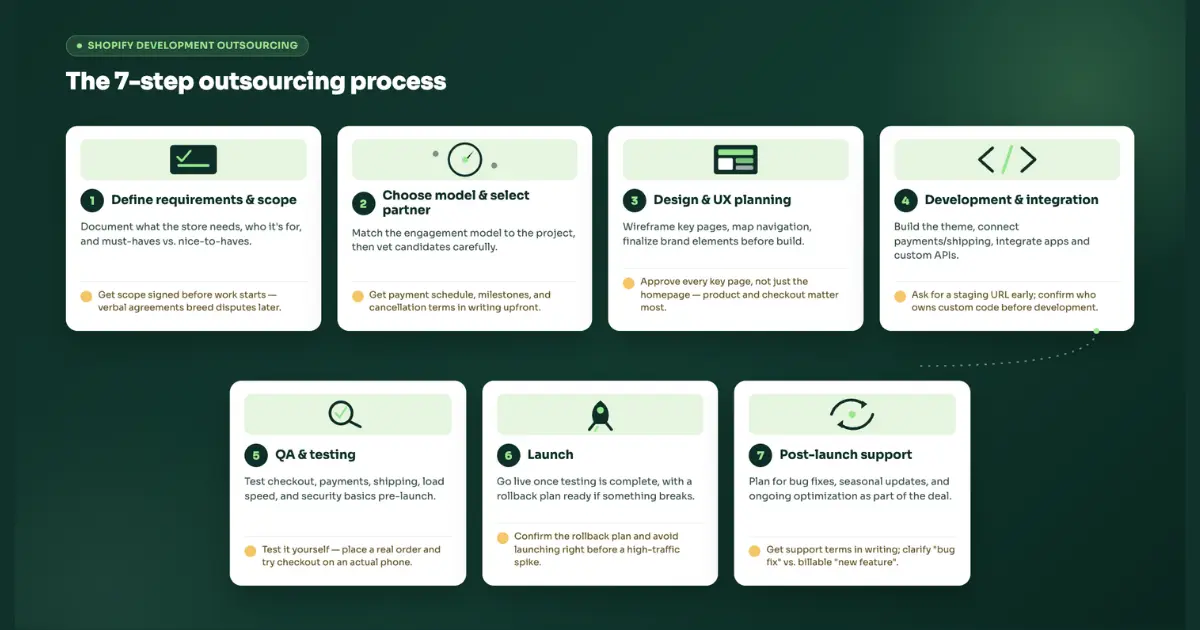
A Shopify outsourcing project moves through seven stages from initial scoping to post-launch support. At each stage, there's a specific thing worth watching as the client, not just what the developer should do.
Step 1: Define requirements and scope
Document what the store needs to do, who it's for, and which features are must-haves versus nice-to-haves. A written scope prevents the most common source of delays and budget overruns: assumptions that were never confirmed.
Watch for: Don't let work start without a signed scope document. Verbal agreements are where "that wasn't included" disputes come from later.
Step 2: Choose an engagement model and select a partner
Match the model to the project using the comparison above, then vet candidates against the checklist in the previous section.
Watch for: Don't skip vetting because a quote came in fast or cheap. Get payment schedule, milestones, and cancellation terms in writing before paying anything upfront.
Step 3: Design and UX planning
Wireframe the key pages (homepage, product listings, product detail, checkout), map navigation and category structure, and finalize brand elements before development starts.
Watch for: Review and approve wireframes for every key page, not just the homepage. Changes requested after development begins cost more and take longer. Also, homepage-only previews can cause quality problems on the pages that actually convert (product, cart, checkout) but stay hidden until later.
Step 4: Development and integration
The developer builds or customizes the theme, connects payment gateways and shipping providers, integrates any third-party apps, and implements custom functionality through Shopify's APIs.
Watch for: Ask for a staging URL early so you can see progress, not just a status update at the end. Confirm in writing who owns any custom code or apps being built before development starts, not after the invoice arrives.
Step 5: QA and testing
Test checkout on desktop and mobile, verify payment processing and shipping calculations, check page load speed, and confirm security basics like credential handling and access controls before the store goes live.
Watch for: Test the store yourself before signing off. Don't rely on the developer's words that "it all works." Personally place a test order, check every payment method, and try checkout on an actual phone. Problems caught here are far cheaper than problems caught after launch.
Step 6: Launch
Go live once testing is complete, with a rollback plan in place in case something breaks under real traffic.
Watch for: Confirm there's a rollback plan and someone reachable at launch. Avoid launching right before a high-traffic period like a sale, a campaign, a seasonal spike unless the developer has explicitly load-tested for it.
Step 7: Post-launch support and iteration
After going live, always plan for bug fixes, seasonal updates, and ongoing optimization as part of the engagement, not as a surprise add-on cost.
Watch for: Get post-launch support terms in writing before the project starts, and clarify what counts as a free "bug fix" versus a billable "new feature." This distinction is the most common source of disputes after launch.
Risks of Outsourcing Shopify Development
Outsourcing Shopify development carries four main risks, and each has a straightforward mitigation once you plan for it upfront rather than after something goes wrong.
|
Risk |
What it looks like |
Mitigation |
|
Communication gaps / time zone friction |
Slow answers to questions, misunderstood requirements, scope drift |
Scheduled overlap hours, written specs, async status updates in a shared tool |
|
Inconsistent quality |
Messy code, features that work in testing but break in production |
Code review checkpoints, a staging environment for testing before every launch |
|
Data and security exposure |
Overly broad access to admin, payment, or customer data |
Scoped access limited to what's needed for the task, an NDA, encrypted credential handling |
|
Vendor dependency |
Can't make changes yourself once the project ends; locked into one vendor |
Documentation requirements built into the contract, retained ownership of code and credentials |
None of these risks are reasons to avoid outsourcing, but they're reasons to put the mitigations in the contract before work starts. A short section in the scope document covering access limits, documentation requirements, and code ownership resolves most of this list before it becomes a problem.
FAQs
Is it worth outsourcing Shopify development?
For most businesses, yes. Outsourcing gives you access to Liquid, API, and theme-architecture expertise that's expensive to build in-house for occasional work.
What's the best way to outsource Shopify development for a small business?
For a small business with a limited budget and a well-defined task, a vetted freelancer with Shopify-specific experience is usually the fastest, most affordable option. As needs grow to include multiple features or ongoing updates, a specialist agency or flat-rate service becomes more cost-effective.
Can I outsource just one page or feature instead of the whole store?
Yes. Freelancers and most agencies will take on scoped, single-feature work like a landing page, a checkout tweak, or one integration. Starting with a small task is also a practical way to test a new partner's quality before handing them the full store.
How do I protect my data when outsourcing Shopify development?
Limit access to only what the task requires, put an NDA in place before sharing credentials, and confirm in writing who owns the code and data once the project ends.
Conclusion
There's no single best way to outsource Shopify development. Whichever model you choose, the outcome depends less on the model itself and more on how carefully you vet the partner and scope the work upfront. Skip those steps and even the right model can go wrong.
>>> Follow and Contact Relia Software for more information!

- E-commerce
- development
- offshore development
- web development
- development companies