


If your team picked serverless, good call. 70% of North American enterprises now run production workloads on serverless platforms, and the serverless computing market is projected to hit $92 billion by 2034 (source: https://www.precedenceresearch.com/serverless-computing-market).
But now comes the harder question: AWS Lambda or Azure Functions?
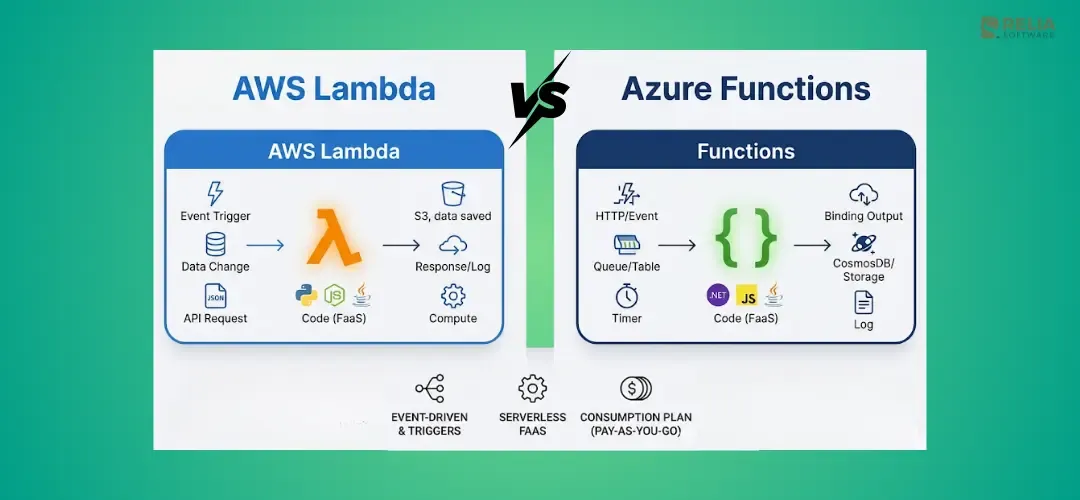
Both AWS Lambda and Azure Functions are one of the top Function-as-a-Service (FaaS) platforms that run code triggered by events without managing server. On paper, they look similar, but they differ in programming models, execution limits, and ecosystem integration. So, the wrong choice costs you months of migration pain and thousands in unexpected bills.
This guide cuts through the marketing. We compare real pricing scenarios, cold start benchmarks, runtime support, developer tooling, and ecosystem depth, so you can make the decision once and move on to building.
Key Takeaways:
|
What Are AWS Lambda and Azure Functions?
AWS Lambda and Azure Functions are Function-as-a-Service (FaaS) platforms that run code in response to events, charge per execution, scale to zero, and support multiple languages without server management.
AWS Lambda:
Launched in 2014, Lambda pioneered serverless compute. It powers over 45,700 companies and has the largest serverless community (1.5M+ users). Key 2025–2026 additions include Durable Functions for multi-step workflows, Managed Instances for GPU access, and Tenant Isolation for multi-tenant SaaS.
>> Read more:
- How to Build A Serverless React App with AWS Lambda and Vercel?
- An In-Depth Guide for Deploying Ruby App to AWS Lambda
Azure Functions:
Launched in 2016, Azure Functions integrates deeply with the Microsoft ecosystem like Active Directory, Office 365, Visual Studio, and Cosmos DB. Recent updates include MCP tool triggers for AI agents (now GA), Flex Consumption plans, and Durable Functions v3 with improved cost efficiency.
Pricing Comparison: Which Platform Costs Less?
AWS Lambda and Azure Functions are very close in base pricing, but AWS Lambda is often cheaper for many short, high-volume workloads. Let's expore more details to know what is exactly cheaper for your own situation.
Consumption-Based Pricing Models
Both platforms use the same billing model: per-request fee + compute time (GB-seconds) and offer identical permanent free tiers.
| Metric | AWS Lambda | Azure Functions |
|---|---|---|
| Price per 1M requests | $0.20 | $0.20 |
| Price per GB-second | $0.0000166667 | $0.000016 |
| Free tier requests | 1M/month (permanent) | 1M/month (permanent) |
| Free tier compute | 400,000 GB-s/month | 400,000 GB-s/month |
| Billing granularity | 1ms | 1ms |
At face value, the platforms are functionally identical on consumption pricing. The real cost differences emerge from memory allocation models and optimization options.
For example: For a workload of 1 million requests at 256 MB memory and 300ms average execution:
- AWS Lambda: ~$2.73/month
- Azure Functions: ~$18/month
The gap comes from Azure's memory allocation model. Azure Functions allocate memory differently, which inflates the GB-second calculation for certain workload profiles. For memory-intensive workloads, Azure's Flex Consumption plan can narrow this gap.
How to Optimize Costs?
For cost optimization, consider implementing these strategies that I have refered from my own experience:
AWS Lambda:
- ARM/Graviton2 processors: ~20% cost savings on compute.
- Provisioned Concurrency: predictable pricing for latency-sensitive workloads.
- Savings Plans: up to 17% discount for steady-state usage.
- Managed Instances (new): EC2-based pricing for specialized hardware.
Azure Functions:
- Flex Consumption plan: per-function scaling with different cost structure.
- Premium Plan: pre-warmed instances (eliminates cold start cost trade-off).
- Azure Hybrid Benefit: savings with existing Microsoft licenses.
Important: Since August 2025, AWS bills for the Lambda INIT phase. If your functions have heavy initialization logic (loading ML models, large dependency trees), expect a 10–50% cost increase on affected workloads.
>> Read more:
- How to Dockerize A Node.js Application & Deploy it To EC2?
- How to Migrate Your AWS Workloads from EC2 to ECS?
Performance and Cold Starts
AWS Lambda delivers tighter p95 cold start latency (1.2–2.8s for Node.js) compared to Azure's broader range (1–10s, with occasional 30-second outliers on the Consumption plan).
| Runtime | AWS Lambda | Azure Functions (Consumption) |
|---|---|---|
| Node.js | 200–400ms | 500ms–2s |
| Python | 200–1,200ms | 500ms–3s |
| Java | 2–3s (sub-200ms w/ SnapStart) | 2–5s |
| .NET | 1–3s | 1–3s (isolated worker) |
| Rust | Sub-100ms | N/A (custom handler) |
How to Mitigate Cold Start?
AWS Lambda:
- SnapStart (Java/.NET): Snapshots the initialized function, reducing Java cold starts to 90–140ms, which is a game-changer for JVM workloads.
- Provisioned Concurrency: Pre-warms a specified number of instances.
- ARM64/Graviton2: 45–65% latency reduction across all runtimes.
Azure Functions:
- Premium Plan: Pre-warmed instances eliminate cold starts entirely
- Flex Consumption: Always-ready instances for critical paths
- Microsoft has reduced cold start latency by ~53% over the past 18 months
Warm Execution Performance
Once warmed, both platforms perform comparably. Warm invocation overhead is typically 1–5ms on both. AWS reports a 39ms latency difference between new and existing instances, negligible for most workloads.
If cold start latency is critical (user-facing APIs, real-time processing), AWS Lambda currently has the edge, especially for Java workloads with SnapStart. Azure can remove cold starts too, but you normally need the Premium plan, which costs more.
Runtime and Language Support
| Language | AWS Lambda | Azure Functions |
|---|---|---|
| Node.js | 22, 24 (managed) | 20+ (isolated worker) |
| Python | 3.12–3.14 | 3.9–3.12 |
| Java | 11, 17, 21 | 11, 17, 21 |
| .NET | 8, 10 | 8, 10 (isolated only) |
| Go | Native support | Custom handler |
| Ruby | 3.3, 3.4 | Custom handler |
| PowerShell | Custom runtime | Native support |
| Rust | Custom runtime | Custom handler |
AWS Lambda adopts new language versions faster. Python 3.14 and Node.js 24 are already available as managed runtimes. Go and Ruby have native support rather than requiring custom handlers.
Azure Functions focuses on the .NET ecosystem with superior tooling, debugging, and Visual Studio integration. PowerShell is natively supported, relevant for Windows-heavy DevOps teams. Azure follows a stricter LTS-only policy for new runtimes.
Notable: Watch these deadlines for critical 2026 deprecations:
- AWS: Node.js 20 - no new functions after June 1, 2026; no updates after July 1, 2026. Amazon Linux 2 EOL: June 30, 2026
- Azure: In-process model support ends November 10, 2026. Migration to the isolated worker model is required for all .NET functions
Developer Experience and Tooling
Local Development
| Capability | AWS Lambda (SAM CLI) | Azure Functions (Core Tools) |
|---|---|---|
| Local execution | sam local invoke | func start |
| Local API | sam local start-api | Built-in HTTP triggers |
| Storage emulation | LocalStack (third-party) | Azurite (bundled with VS 2026) |
| Container debugging | Docker-based execution | Container support |
| Hot reload | SAM Accelerate | Built-in |
AWS SAM CLI is more mature for polyglot teams with language-agnostic, Docker-based, and well-integrated with GitHub Actions. SAM Accelerate pushes changes to the cloud for debugging, reducing local/cloud mismatch.
Azure Functions Core Tools excels for .NET developers. Visual Studio 2026 auto-starts Azurite and enables F5 debugging out of the box. The experience is seamless if your stack is C#/.NET.
CI/CD and Deployment
Both support Terraform and Pulumi for infrastructure-as-code. Native tooling differs:
- AWS: SAM templates, CDK (TypeScript/Python), CloudFormation,
sam pipelinefor GitHub Actions scaffolding - Azure: Bicep, ARM templates, Azure DevOps Pipelines, deployment slots for staging, .NET Aspire orchestration (new)
Monitoring and Observability
- AWS: CloudWatch Logs, X-Ray distributed tracing, CloudWatch Application Signals
- Azure: Application Insights, Azure Monitor, AI-assisted observability (new), enhanced OpenTelemetry support
Both platforms have strong native observability. AWS has a broader third-party ecosystem (Lumigo, Datadog, Epsagon). Azure's Application Insights provides deeper AI-powered analysis within the Microsoft ecosystem.
Ecosystem and Integrations
Native Service Integrations
AWS Lambda connects to 90+ AWS services natively via Event Source Mappings:
- S3, DynamoDB Streams, Kinesis, SQS, SNS, EventBridge, API Gateway, ALB, Cognito, MSK, Amazon MQ
Azure Functions integrates through Triggers and Bindings:
- Blob Storage, Service Bus, Event Hubs, Event Grid, Cosmos DB, Queue Storage, HTTP, Timer
AWS's EventBridge and Azure's Event Grid serve similar roles as event routers, with comparable capabilities. AWS has a broader raw count of native integrations; Azure's integrations are deeper within the Microsoft stack.
AI and LLM Integration
Both platforms are positioning serverless as the compute layer for AI agents:
- AWS: Amazon Bedrock integration, Lambda Durable Functions for multi-step AI workflows (checkpoint, suspend up to 1 year)
- Azure: MCP tool trigger extension (GA), AI Foundry Agent Service, native OpenAI Service integration
If you're building AI agents, both platforms are investing heavily. Your choice depends on whether your AI stack is AWS-native (Bedrock, SageMaker) or Microsoft-native (Azure OpenAI, Copilot).
Workflow Orchestration
- AWS: Step Functions (visual workflows, 10,000+ state transitions) + Lambda Durable Functions (new, closes the gap with Azure)
- Azure: Durable Functions v3 (mature, improved cost efficiency) + Logic Apps (low-code alternative)
Azure's Durable Functions have been production-proven for years. AWS's entry into durable functions is newer but leverages the broader Lambda ecosystem. Both now support long-running, stateful serverless workflows.
AWS Lambda vs Azure Functions: When to Choose?
Choose AWS Lambda When:
- Already on AWS: S3, DynamoDB, EventBridge integrations are seamless
- Polyglot team: broadest native language support (Go, Ruby, Python 3.14, Node 24)
- Cold starts are critical: SnapStart for Java (90–140ms), ARM/Graviton for all runtimes
- Long-running functions: 15-minute timeout vs Azure's 5–10 minutes
- Edge computing: Lambda@Edge and CloudFront Functions for CDN-layer compute
- Cost-sensitive workloads: ARM/Graviton yields ~20% savings
Choose Azure Functions When:
- Microsoft-centric organization: Office 365, Active Directory, Azure AD integration
- Heavy .NET workloads: superior Visual Studio debugging, F5 experience, Aspire orchestration
- Hybrid/on-premises: Azure Arc and Kubernetes deployment flexibility
- PowerShell automation: native support vs custom runtime on AWS
- Mature stateful workflows: Durable Functions v3 is battle-tested
- Enterprise Microsoft licensing: Azure Hybrid Benefit reduces costs
When Either Works:
- Standard REST API backends
- Event-driven data processing pipelines
- Scheduled tasks and cron jobs
- Webhook processing
- Basic queue consumers
Migration Considerations
First of all, you have to assess the complexity of migration. Not all code is equally portable:
- Easy to migrate: Pure business logic in Python, Node.js, Java, function signatures differ, but logic transfers
- Moderate effort: API Gateway / HTTP trigger configurations, IAM/RBAC mappings, environment variables
- Significant rewrite: Platform-specific bindings, Step Functions ↔ Durable Functions, EventBridge ↔ Event Grid event schemas
Typical timeline for a non-trivial application: 2–6 months, depending on integration depth.
Reducing Vendor Lock-In
- Use provider-agnostic IaC: Terraform or Pulumi instead of CloudFormation/Bicep
- Encapsulate cloud-specific logic: separate integration layer from business logic
- Adopt CloudEvents standard: normalize event schemas across providers
- Favor loosely coupled architectures: event-driven patterns transfer more easily than tightly bound triggers/bindings
Decision Framework: Which Platform Should You Choose?
| Factor | Winner | Notes |
|---|---|---|
| Pricing (high volume) | Lambda | ms billing + ARM/Graviton savings |
| Cold starts | Lambda | SnapStart (90–140ms Java), tighter p95 |
| Language support | Lambda | More native runtimes, faster adoption |
| .NET experience | Azure | Superior tooling and debugging |
| AI integrations | Tie | Both investing heavily (Bedrock vs OpenAI) |
| Enterprise/Microsoft shops | Azure | Office 365, AD, licensing benefits |
| Ecosystem breadth | Lambda | 90+ native services, larger community |
| Hybrid deployment | Azure | On-prem via Azure Arc + Kubernetes |
| Stateful workflows | Tie | Both now have durable functions |
| Monitoring | Tie | Strong native tools on both sides |
If you're already on AWS, choose Lambda. If you're already on Azure, choose Azure Functions. Neither platform has a decisive technical advantage that justifies switching ecosystems.
For greenfield projects, lean toward AWS Lambda for broader language support, tighter cold start performance, and a larger community. Lean toward Azure Functions if your organization runs on Microsoft 365, .NET is your primary stack, or you need hybrid deployment.
FAQs
Is AWS Lambda cheaper than Azure Functions?
Generally yes, for high-volume, short-duration workloads. Lambda's ARM/Graviton processors offer ~20% savings, and its memory allocation model is more favorable for certain workload profiles. For low-volume workloads, both platforms' free tiers (1M requests + 400,000 GB-seconds/month) make them effectively free.
Which has better cold start performance?
AWS Lambda. SnapStart reduces Java cold starts to 90–140ms. Node.js cold starts are 200–400ms vs Azure's 500ms–2s. Azure's Premium Plan eliminates cold starts entirely through pre-warmed instances, but at higher baseline cost.
Can I use AWS Lambda with .NET?
Yes. Lambda supports .NET 8 and .NET 10. However, Azure Functions offers deeper .NET tooling like Visual Studio debugging, F5 launch, Aspire integration, and the isolated worker model optimized for .NET patterns.
What is the maximum execution time?
Lambda: 15 minutes (900 seconds). Azure Functions: 5 minutes on Consumption (configurable to 10 min), no hard limit on Premium/Dedicated plans. For long-running tasks, Lambda's 15-minute ceiling is higher than Azure's default, but Azure Premium offers unlimited execution time at higher cost.
Do both support containers?
Yes. Lambda supports container images up to 10 GB. Azure Functions runs on Azure Container Apps with full container features. Both support custom runtimes via containers.
Which is better for AI workloads?
Both are investing heavily. AWS offers Bedrock integration and Lambda Durable Functions for multi-step AI workflows. Azure offers MCP tool triggers and AI Foundry Agent Service. Choose based on your existing AI/ML stack, for example, users should pick Lambda for Bedrock/SageMaker or pick Azure Functions for Azure OpenAI/Copilot.
Can I run serverless functions on-premises?
Azure Functions supports hybrid deployment via Azure Arc and Kubernetes, you can run the same function code on-premises. AWS Lambda is cloud-only, though Lambda@Edge extends execution to CloudFront edge locations (CDN-layer, not on-prem).
Conclusion
AWS Lambda and Azure Functions are both mature, production-ready serverless platforms. Neither is totally better, but the right choice depends on your existing cloud ecosystem, team skills, and workload requirements.
The 2 platforms are converging: pricing is near-identical, both now offer durable functions, both are racing to become the compute layer for AI agents. The gap is narrowing with every release.
The single biggest decision driver is your existing cloud investment. Don't fight your ecosystem. If you're on AWS, use Lambda. If you're on Azure, use Azure Functions. If you're starting fresh, Lambda's broader language support, tighter cold start performance, and larger community give it a slight edge for most teams.
>>> Follow and Contact Relia Software for more information!

- coding
- development