Development and operations teams used to work in separate silos with developers writing the code and operation engineers deploying and maintaining it. The handoff between them was where most delays and miscommunication happened. DevOps, short for “development” and “operations” exists to close that gap.
This guide covers what DevOps means, how the lifecycle works, the core principles behind it, and how teams put it into practice.
>> Explore further: DevOps vs Agile: Key Differences & How They Work Together
What is DevOps?
DevOps, short for development and operations, is a software development approach that merges development and operations into one continuous process, rather than treating them as separate stages handled by separate teams.
Not just a set of tools, DevOps is a way or culture of working where developers, operations engineers, testers, and often security teams collaborate throughout the entire application lifecycle instead of working in isolation.
The goal is straightforward: shorten the development cycle, ship releases more often, and keep applications stable and reliable.
How DevOps Works?
In practice, DevOps runs on an automated pipeline that moves code from a developer's machine to production with minimal manual steps. A developer commits code to a shared repository, an automated system builds and tests it. And if the code passes, that same system deploys the code, often multiple times a day instead of once every few weeks.
The automation pipeline is what actually replaces the old handoffs. Instead of a developer finishing a feature and filing a ticket for someone else to deploy later, deployment runs automatically as part of the process the developer already triggered by committing code.
Monitoring tools then track how the change performs in production and route any problems straight back to the team that shipped it, not a separate team several tickets away.
Some organizations also build security checks into this same pipeline, catching vulnerabilities automatically before code reaches production instead of reviewing for them afterward. That expanded version is usually called DevSecOps.
>> You can consider: 14 Best Open-Source DevSecOps Tools for Developers
5 Key DevOps Principles
DevOps is underpinned by a set of guiding principles that contribute to its success:
Collaboration: Collaboration is what DevOps is built around. When development and operations work as one team instead of two, communication stops being a separate step and becomes part of how the work actually gets done.
Automation First: Teams use DevOps tools to automate repetitive manual work like testing, deployments, infrastructure setup wherever possible. This isn't just about speed, but also improves accuracy. Manual processes are also where human error creeps in, so automating them removes a major source of bugs and outages.
Continuous Improvement: Instead of large, infrequent overhauls, DevOps teams ship small changes continuously and use real data like deployment frequency, error rates, user feedback to decide what to fix or improve next.
Customer-Centric Development: Teams build based on how the product is actually being used, not assumptions about it. Fast feedback loops and real-time monitoring show teams how users interact with a live product, so decisions are grounded in real behavior rather than guesswork.
End-to-End Responsibility: The team that builds a feature is also responsible for running and supporting it in production, an approach often summarized as "you build it, you run it." That gives engineers a direct stake in code quality, since they're the ones who get paged if the system breaks.
The DevOps Lifecycle
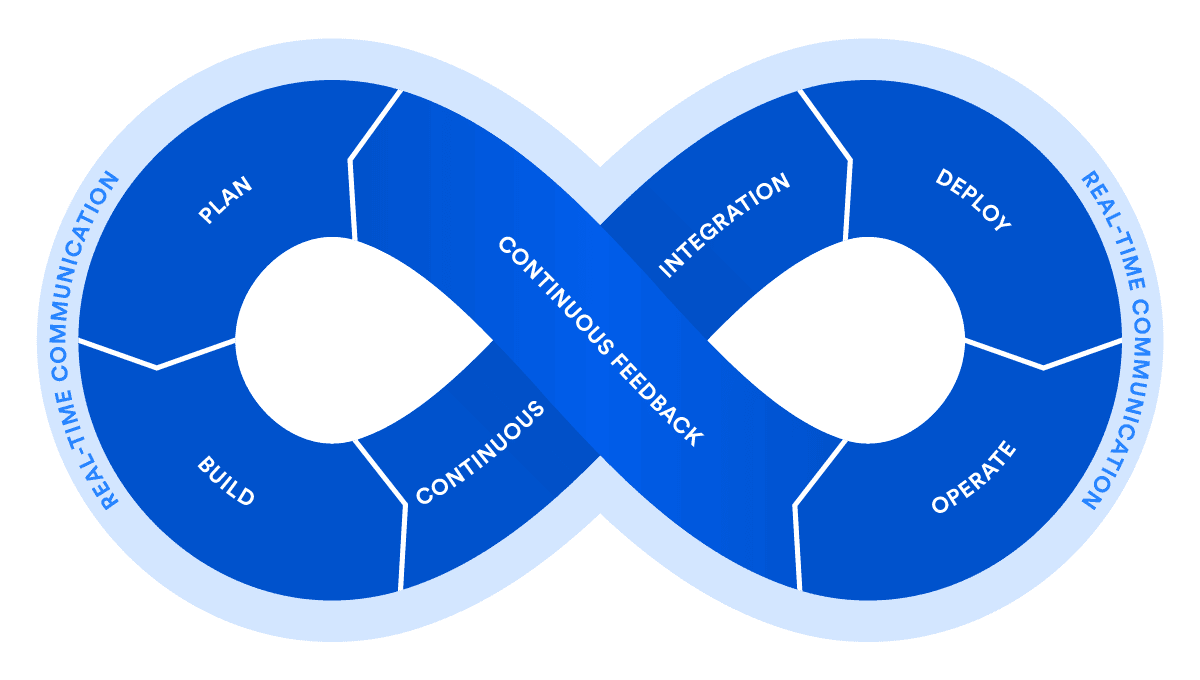
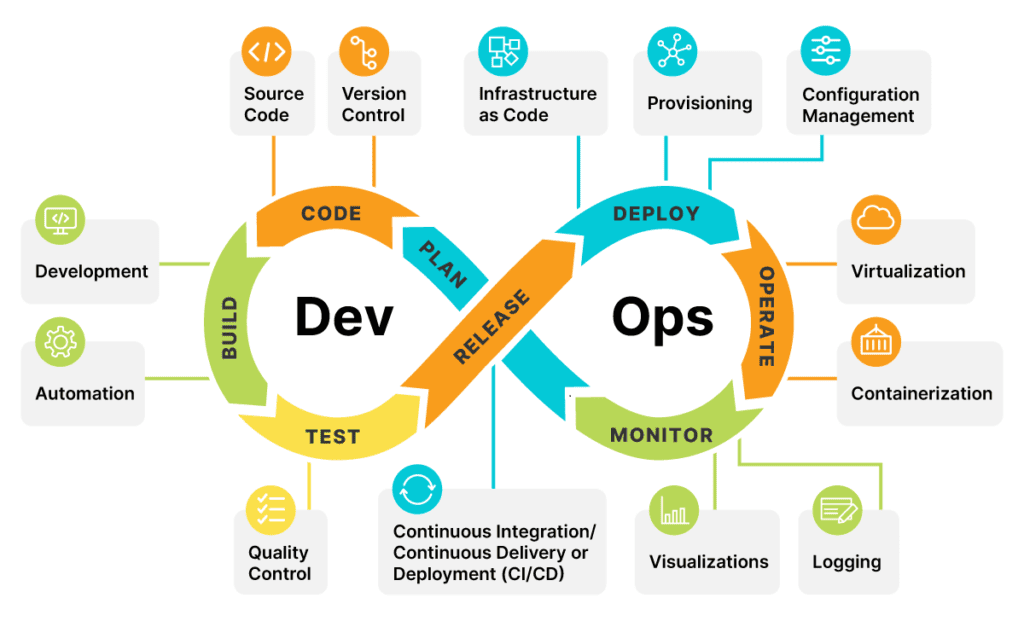
The DevOps lifecycle is a continuous loop, not a one-time sequence. It moves through seven stages, then loops back to planning based on what monitoring reveals in production. That loop is what the diagram below actually shows.
1. Plan: In the planning phase, teams define project requirements, scope, and goals. Collaboration between development, operations, and other stakeholders ensures alignment and a clear understanding of the project's objectives. Planning also involves prioritizing features, setting milestones, and estimating resources.
2. Code: During the coding phase, developers write and commit code changes to a shared version control repository, such as Git. Code is reviewed collaboratively, ensuring that it adheres to coding standards, follows best practices, and is well-documented. The goal is to maintain code quality and consistency.
3. Build: The commit triggers an automated build that compiles the code and packages it into a deployable artifact. If the build fails, the team finds out immediately instead of days later.
4. Test: Automated tests run against the build: unit tests on individual components, integration tests on how components work together, and often a security scan. Code that fails doesn't move forward.
5. Deploy: The tested build moves through staging into production via an automated pipeline. Automated deployment pipelines orchestrate the deployment process, which includes setting up infrastructure, configuring services, and deploying code artifacts. Teams often use deployment tools to roll out to a small percentage of users first, to limit the damage if something goes wrong.
6. Operate: Once the software is deployed, it enters the operational phase. The team keeps the application running: managing infrastructure, scaling resources with demand, and responding to incidents.
7. Monitor: Monitoring tools track app performance, errors, and usage in production. What they reveal feeds directly into the next planning cycle. That feedback loop is what makes this a cycle rather than a one-time process.
>> Read more: 7 Necessary Network Debugging Tools for DevOps Experts
DevOps Practices
DevOps practices encompass a series of methodologies and strategies that foster collaboration, automation, and continuous improvement within software development and operations teams.
Continuous Integration (CI)
Developers merge code changes into a shared repository often, sometimes multiple times a day, and an automated system builds and tests each change immediately. The aim of CI is to catche bugs while the change is still fresh and small, instead of days later when it's mixed with everyone else's work.
Continuous Delivery (CD)
Continuous delivery takes CI a step further: every change that passes its automated tests gets packaged and made ready to deploy, not just tested. Teams that adopt CD always have a deployable version of their product on hand, so releasing isn't a special event that needs its own preparation.
>> Read more:
- CI/CD vs DevOps: Key Differences & How They Work Together
- 5 Best Practices for Enhancing CI/CD Pipeline Security
Microservices
Instead of building one large application, teams split the system into small, independent services. Each service is responsible for one specific job and able to be built, deployed, and scaled on its own. Microservices architecture lets teams update one part of the system without redeploying everything else, though it also means managing more moving pieces.
>> Explore more about microservices:
- Top 10 Microservices Design Patterns Developers Should Know
- Monolithic vs Microservices vs Serverless: How to Choose?
Infrastructure as Code
Teams define servers, networks, and other infrastructure in code instead of setting them up by hand. Engineers can manage infrastructure using IaC tools, resembling the approach adopted for application code.
The infrastructure code can be version-controlled, reviewed, and reused just like application code, which keeps environments consistent instead of relying on someone remembering manual setup steps.
Two practices build directly on IaC:
- Configuration management automates how systems are set up and kept consistent, so servers don't drift out of sync with each other over time.
- Policy as code encodes compliance and security rules like PCI-DSS or HIPAA requirements directly into infrastructure definitions, so non-compliant changes get caught automatically instead of during a manual audit.
Monitoring and Logging
Teams track application and infrastructure performance continuously, not just when something breaks. Logs and metrics show how real changes affect real users, which helps catch a problem in minutes instead of hearing about it from a customer.
4 Core Benefits of DevOps
DevOps teams ship more often, break less often, and fix problems faster when something does go wrong.
Faster, More Frequent Releases
Teams practicing DevOps release far more often than teams that don't. Google Cloud's DORA research finds that top-performing teams deploy on demand, sometimes multiple times a day.
Also, the lead time from code commit to production is under a day compared to weeks or months for lower-performing teams. Automating testing and deployment is what makes that pace possible without cutting corners on quality.
Fewer Failures, Faster Recovery
DORA's research also tracks change failure rate and recovery time, and top-performing teams keep both low: a small percentage of changes cause failures, and when something does break, recovery typically takes under an hour.
Smaller, more frequent changes are part of why a change that touches less code is easier to diagnose and roll back than a large, infrequent release.
Faster Issue Resolution
When development and operations work as one team, there's no ticket to file and wait on when something breaks. The same team that shipped the change is the one that fixes it. That shortens the distance between "something's wrong" and "it's fixed," which limits how long customers feel the impact.
Better Handling of Unplanned Work
Unplanned work such as an urgent bug, a security patch, a production incident is inevitable for every team. DevOps teams handle it well because ownership is already clear: people know who's responsible, so they can fix the problem without throwing off everything else in progress. No one has to stop and figure out whose job it is first.
>> Read more: 7 Ways DevOps Speeds Up the Digital Transformation
How Relia Software Apply DevOps?
Relia Software builds DevOps practices into projects that need reliable, frequent releases across distributed teams and regulated environments. DevOps is not as our add-on, but as part of how the offshore development team operates from day one. Our 2 projects show what DevOps looks like in practice.
WhiteCoat is a digital healthcare provider operating across Singapore, Myanmar, and Indonesia. Healthcare software carries strict compliance requirements, and needs deployments that are consistent and auditable. Relia set up an offshore development center for WhiteCoat and built DevOps practices into how the team operates, keeping releases reliable across every market the platform serves.
Finch App (for Bakkt):
Bakkt is a US-based digital asset platform. Relia built the Finch app for Bakkt with an offshore development team and DevOps practices supporting the release process. The DevOps setup matters for a fintech product, where reliability and consistent deployments carry real weight.
>> Read more: Top 10 DevOps Consulting Companies in Vietnam
FAQs
Do we need a dedicated DevOps engineer?
Not necessarily, especially early on. Small teams often handle DevOps practices within the existing development team rather than hiring a dedicated role. A dedicated DevOps engineer becomes more valuable as the team, infrastructure, and release frequency grow past what developers can manage alongside their regular work.
What tools do DevOps teams use?
Common categories include CI/CD platforms (Jenkins, GitLab CI, GitHub Actions), infrastructure as code tools (Terraform), containerization (Docker, Kubernetes), and monitoring platforms (Datadog, Prometheus). The right stack depends on the product and existing infrastructure, there's no single required toolset.
Is DevOps only for large companies?
No. Small teams and startups often benefit the most, since automating deployment and testing early avoids the manual bottlenecks that get harder to remove as a team and codebase grow. A two-person team can use CI/CD just as a two-hundred-person team can.
How is AI used in DevOps?
AI shows up in a few specific places rather than replacing the process wholesale. Monitoring tools use AI to detect unusual patterns in logs and metrics automatically, flagging problems before they escalate into outages. AI code review and test-generation tools catch issues earlier in the pipeline, and some teams use AI coding assistants directly inside CI/CD workflows to speed up routine fixes.
Conclusion
DevOps isn't a tool to install or a role to hire, it's how a team chooses to work together, automate the repetitive parts of shipping software, and take ownership of what happens after code goes live. Teams that do this well don't just release faster, they also release with fewer surprises, because problems get caught earlier by the people closest to them.
Where to start depends on where a team is today. Some need to automate their build and test process first, others need to fix how development and operations communicate before any tool will help. If you don't have a specific answer, Relia Software can help figure out which one matters most for your team.
>>> Follow and Contact Relia Software for more information!