


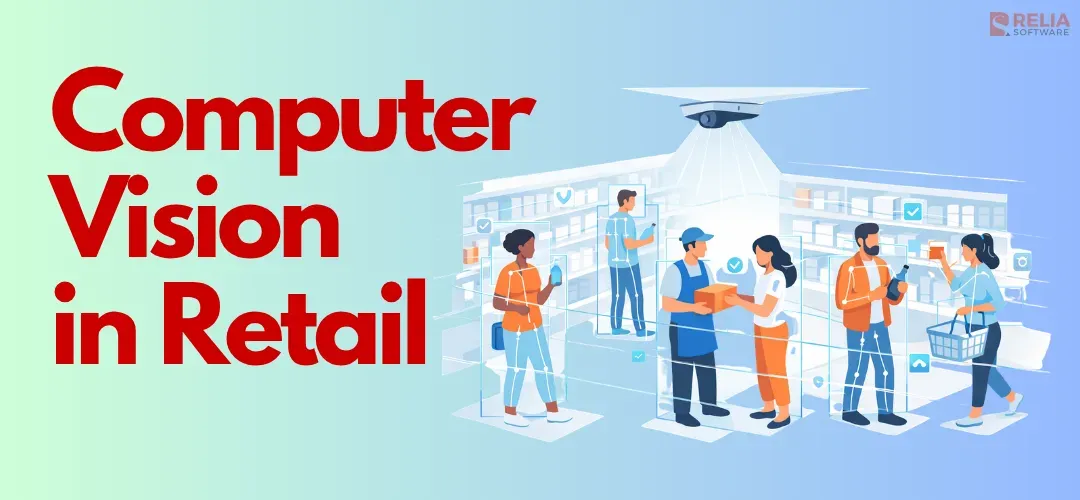
Computer vision in retail is changing how stores manage daily operations, track products, and improve the shopping experience. Grand View Research estimated the computer vision AI in the retail market at $2.05 billion in 2025, with continued growth at a CAGR of 25.4% from 2025 to 2033. As retail becomes more competitive, better visibility and faster action are essential more than ever.
Therefore, more businesses are paying attention to computer vision in retail, from grocery and convenience stores to fashion and specialty brands. In this article, we will explain what computer vision in retail means, how it works, its main use cases, benefits, challenges, costs, and the technologies behind it.
What is Computer Vision in Retail?
Computer vision in retail is an AI-powered technology that uses cameras and machine learning to analyze, identify, and track items, customers, and staff in real-time. This technology is used for automated inventory tracking, cashierless checkout, loss prevention, and customer behavior insights, helping to enhance the efficiency of store management for retailers.
In practice, it works by taking video or image feeds from store cameras and running them through AI and deep learning models that can detect objects, movement, patterns, and events. The system recognizes an empty shelf, a long queue, a product placed in the wrong spot, or unusual activity at self-checkout. Then, turning what it sees into useful output, such as an alert, a dashboard update, or a task for store staff.
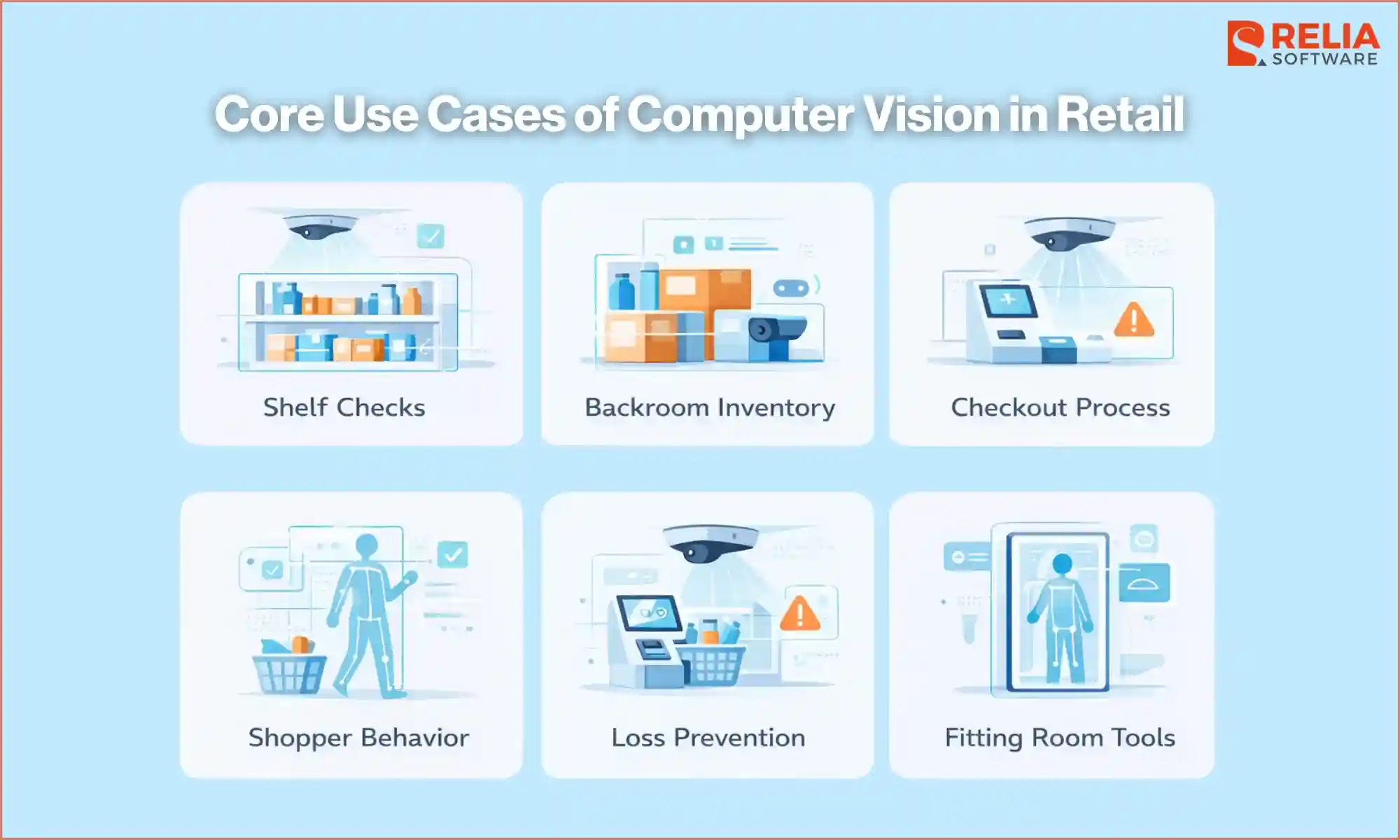
Core Use Cases of Computer Vision in Retail
Shelf Checks
Computer vision helps retailers monitor shelves more quickly and consistently by detecting low stock, empty spaces, misplaced items, poor product facing, and display problems. Thus, store teams restock faster, keep shelves aligned with planograms, and maintain better product presentation, especially in grocery and food sections, where shelf condition also affects customer trust.
In this use case, computer vision is usually connected to cameras placed above aisles or near shelves to read what is on the shelf, compare it with data about what should be there, and alert staff when something looks wrong.
Backroom Inventory
Retailers can also use computer vision in stockrooms, receiving areas, and other back-of-store spaces to track product movement, storage issues, and handling mistakes before they affect shelf availability by following boxes, pallets, and product movement in the backroom. Teams can get a better view of where inventory problems begin and help improve stock accuracy across the store.
Checkout Process
Computer vision is used here through cameras placed around self-checkout lanes, checkout counters, or store exits. It can compare what the shopper does with what is scanned or paid for, notice when lines are getting too long, and support systems that track items automatically during checkout. As a result, the shrinkage problem can be reduced significantly; retailers can also create a smoother checkout experience for shoppers.
Shopper Behavior
With computer vision technology, retailers can understand how shoppers move through the store. Machine learning will study movement patterns and product interaction across the sales floor to create heat maps that show busy areas, quiet zones, and where people stop the longest, which areas get the most attention, without focusing on personal identity.
This technology can also track product engagement, such as when shoppers pick up an item and put it back, helping teams improve layout, product placement, and promotions.
Loss Prevention
For loss prevention, computer vision helps to monitor high-risk areas such as self-checkout zones, entrances, exits, and valuable product sections. It spots suspicious activity and checkout mistakes, detecting cases where an item moves through checkout without being scanned, and highlighting unusual behavior in the store.
The final result is that video can be reviewed faster by highlighting moments that may need attention, which helps security teams become aware of important moments faster and respond more effectively.
Fitting Room Tools
Computer vision can also support smart fitting rooms and other in-store tools by identifying the items a shopper brings in, and helping staff respond faster. It can also show which items are tried on but not bought, which may point to fit, style, or product appeal problems. All of these features can improve the shopping experience and may also help reduce returns significantly.
Benefits & Challenges of Computer Vision in Retail
Benefits
Better store execution and daily operations
Computer vision helps retailers see shelf problems earlier, such as empty spaces, low stock, misplaced items, or display issues, so staff can fix them faster and reduce missed sales. Stores check whether shelves and displays match store plans, which keeps planograms, promotions, and product placement more consistent across locations.
Instead of checking every shelf, queue, or display by hand, staff can use computer vision to see where attention is needed most, which saves time and helps teams focus on the right tasks during the day.
Lower loss and fewer checkout errors
Computer vision can help reduce shrinkage by spotting suspicious activity, missed scans, and other checkout or in-store problems, giving store teams a better chance to review important events quickly and respond sooner.
Better customer experience
Computer vision makes shopping smoother and helps remove common points of frustration more easily by reducing long lines, improving product availability, and supporting faster service in key areas of the store.
Smarter store decisions
Sales data shows what was sold, but it does not always show what happened in the store. Computer vision adds that missing view by showing how shoppers move, where they stop, and how they interact with products, helping retailers improve layout, displays, and product placement.
Better control across the store
Computer vision is useful not only on the sales floor but also in stockrooms, checkout areas, and fitting rooms, giving retailers a clearer view of store activity from front to back and helping them manage operations more effectively.
Challenges
Privacy and data rules
Laws like the GDPR in Europe or the CCPA in California have strict rules about how biometric data is handled. Retailers need clear rules for how video is collected, stored, and used, especially when cameras are tracking shopper or staff activity. Even if the system does not identify people directly, the business still needs to show that data is handled safely and in line with privacy laws.
Visibility limitations
Lighting can strongly affect how well computer vision works. Bright sunlight, dark corners, or flickering lights can make products harder to see. Reflections from glass doors or shiny floors can also confuse the system and make it harder to tell what is real.
Moreover, cameras do not always have a clear view because shoppers, boxes, signs, and store fixtures can block shelves or products, and store layouts often change over time. Due to this, one camera angle is often not enough; stores often need multiple camera angles to maintain a clear line of sight, which increases hardware costs.
Integration with old systems
Computer vision works best when it connects with POS, inventory tools, task systems, and reporting platforms. Many retailers still rely on older software, and connecting new vision tools to those systems can be difficult. If the data does not match across systems, it can create confusion instead of helping operations.
Large amounts of video data
Video creates a huge amount of data, so sending every stream to the cloud all day can be costly and slow, which can increase bandwidth, storage, and cloud processing costs. Because of that, many retailers process video inside the store with edge systems to reduce those cloud-related costs and support faster response times.
However, this does not remove the cost completely. Instead, some of the cost shifts to local hardware, deployment, patching, security, and remote support. When a retailer has many stores, managing those systems across locations can become a major IT management and operational challenge.
Too many useless alerts
If the system sends too many useless or annoying alerts, especially ones that are too frequent, repetitive, vague, or triggered by small issues, staff will pay less attention and may miss important alerts for serious cases.
Or when employees get constant notifications while they are already busy, they will start ignoring them. Therefore, alerts need to be clear, useful, and tied to action. Finding the right balance is important because a noisy system quickly loses value.
More efforts to design systems store-by-store
Different stores may have different lighting, layouts, traffic levels, and staffing conditions, so computer vision systems often need to be adjusted for each location. These adjustments mean teams may need more time and effort to design, test, and fine-tune the system store by store. It also usually requires people who understand both the technology and how retail operations work, leading to longer setup time and higher costs for deployment and maintenance.
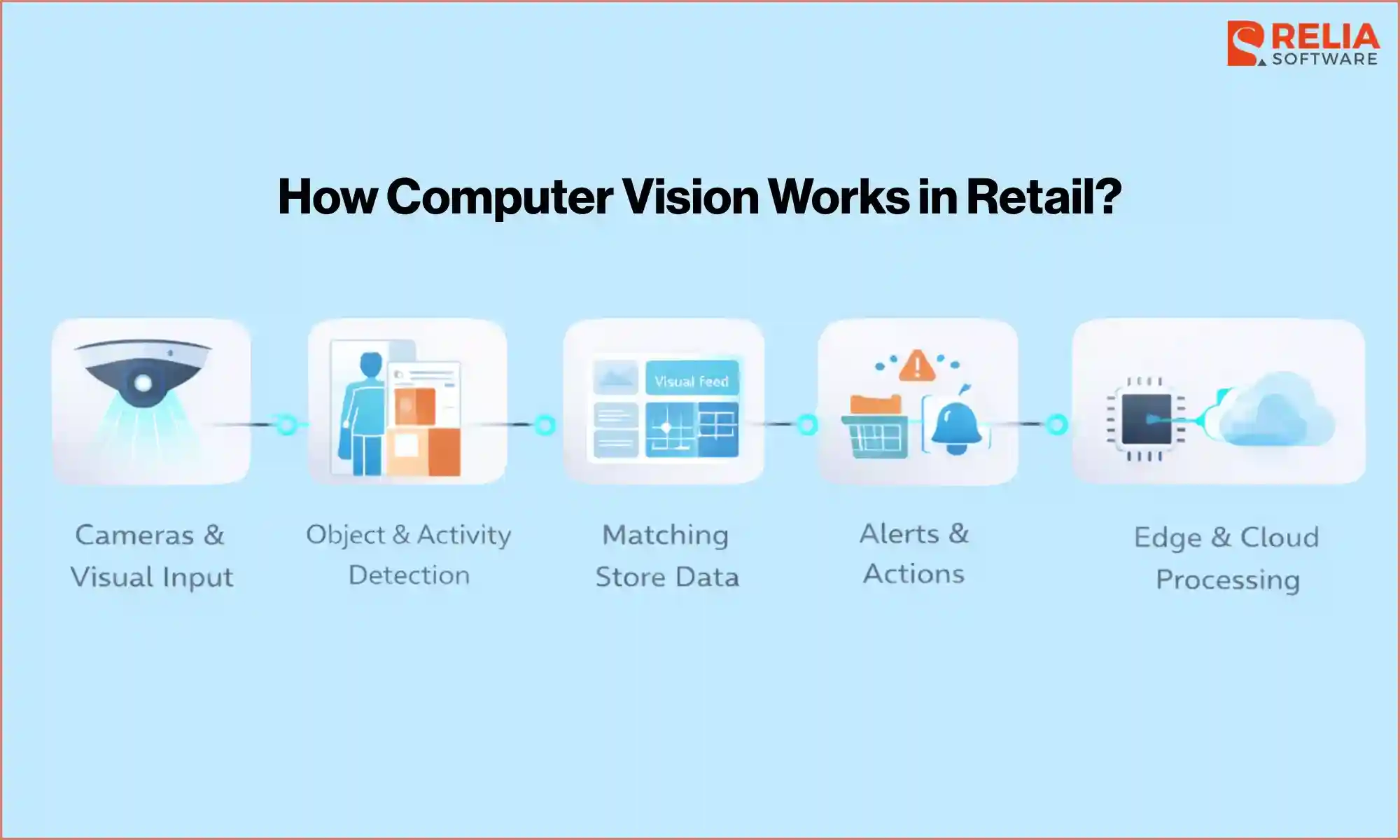
How Computer Vision Works in Retail?
Cameras and Visual Input
Computer vision starts with cameras placed in key parts of the store, such as shelves, checkout areas, entrances, stockrooms, or fitting rooms, to capture images or video of what is happening in real time. Retailers usually use high-definition cameras with high frame rates, so the system can capture movement clearly and avoid missing important actions.
In more advanced setups, they may also include depth sensors, such as LiDAR or Time-of-Flight, which help the system measure the real distance between objects. This advanced setup ensures that AI can understand the scene in three dimensions and avoid being misled by flat images, such as a product picture printed on a shopping bag.
The cameras work as the eyes of the system, sending a steady stream of visual data into a processing unit. Their placement is also planned carefully, with overlapping views, so if one camera is blocked by a shopper, another can still follow the activity from a different angle. In some setups, retailers also use other inputs like scanners, weight sensors, or RFID data, but the camera feed is still the main source.
Object and Activity Detection
Once the system receives the visual input, AI starts its main analysis process, often called inference, where the AI works out what it is seeing. It first uses object detection to identify items such as milk cartons, detergent bottles, or shopping carts. The software is trained on a very large number of images, so it can still recognize a product even if it is turned sideways, upside down, or partly hidden behind another item on the shelf.
At the same time, it uses pose estimation to track human movement. By following key points on the body, such as the shoulders, elbows, and wrists, the system can tell the difference between someone simply looking at a product and someone actually picking it up and putting it into a basket.
Matching With Store Data
After detecting objects or activities, the system also needs to know exactly what that object is and what information is attached to it. To do this, the system often compares the visual information with other store data, such as a planogram or inventory management system.
For example, when the camera detects a red box of crackers, it checks the database to confirm the exact SKU, its current price, and where it is supposed to be placed in the aisle. If the visual result shows that one SKU is sitting in the space meant for another, the system marks it as a mismatch.
Alerts and Actions
When the system finds a problem or an important event, based on rules set in advance, the system can trigger specific actions, such as triggering an alert or creating a task for store staff.
For example, if it detects that on-shelf availability for bread has fallen below 10%, it can automatically create a restocking task for a store employee. In loss prevention cases, if it detects a non-scan event at self-checkout, it may gently pause the transaction and ask the shopper to scan again, or it may quietly alert security staff.
Computer vision is more useful in the daily operations of retailers because it helps stores act on problems instead of only recording them.
Edge and Cloud Processing
Some retailers process this data inside the store, while others send part of it to the cloud. However, video files are very large, so sending footage from many cameras to a data center all the time would put too much pressure on the store’s internet and create high bandwidth costs. To avoid this, many retailers use edge computing, which is a powerful server placed inside the store, often in the backroom, to process the video locally.
Local processing can support faster response and reduce the need to send large amounts of video over the network. The local server analyzes the footage, detects important movements or events, and then sends only small pieces of data as an alert. The cloud is then used for long-term analysis and broader reporting, while the edge handles the store’s immediate, real-time needs.
Guide to Implementing Computer Vision in Retail
Step 1: Defining the Objective and Scoping
The best way to start is by focusing on one problem that clearly affects store performance, which could be empty shelves, poor planogram compliance, self-checkout errors, long queues, or weak visibility in the backroom. Starting with one clear use case helps retailers stay focused and makes it easier to measure results.
- Set a clear KPI: Decide what the system should improve, such as fewer out-of-stock cases, less checkout work, or lower shrinkage.
- Check store readiness: Review ceiling height, power access, camera positions, and internet quality, since high-quality video may need better wiring or network support.
- Create a privacy plan: Set rules for how data will be handled before any video is captured. A strong setup should blur faces early and avoid storing personal details unnecessarily.
Step 2: Hardware Selection and Installation
Different retail formats need different computer vision setups. A grocery store may care more about shelf checks, while a fashion store may focus more on shopper behavior or loss prevention. Retailers need to choose the use case, camera setup, and processing model based on the store’s real needs.
Moreover, computer vision requires high-fidelity visual input to distinguish between products. Therefore, it is necessary for retailers to:
- Place cameras carefully: Ceiling cameras are useful for tracking shopper movement, while cameras placed closer to shelves are better for reading labels, spotting gaps, and checking product placement.
- Improve lighting if needed: Dark corners or strong glare can make it harder for the system to read products correctly. Some stores need better lighting so colors and shelf details look more consistent.
- Use a local edge server: Many stores install a local AI server in the backroom to process video in real time. This helps the system respond faster, keep data inside the store, and continue working even if the internet connection drops.
Step 3: Model Training and Customization
A retail AI system does not automatically know every product in a store, so it must be trained for that specific inventory.
- Label product images: Teams upload many images of store items and label them with the correct SKU so the system can recognize each product more accurately.
- Add the store planogram: A digital shelf map is also added to show where each item should be placed. This helps the system detect when a product is in the wrong spot.
- Use synthetic data if needed: For new or rare items with limited photos, teams can use digital product images to train the system before the real product reaches the shelf.
Step 4: Integration with Existing Systems
Computer vision becomes much more useful when it connects with the systems the store already uses, including POS, inventory tools, task systems, or reporting platforms.
- API Connections: The AI is linked to the Inventory Management System (IMS). When the camera sees that a shelf is empty, it automatically triggers a restock ticket in the store's backend software.
- Employee Interface: Workers are given handheld devices or smartwatches. The implementation includes training staff on how to respond to these new AI-generated alerts. If the system is too sensitive, workers will get alert fatigue, so the thresholds for what triggers a notification must be fine-tuned during the first month.
- Point of Sale (POS) Sync: For loss prevention, the video feed is synchronized with the cash register logs. This allows the system to compare what the camera saw with what was actually paid for.
When the system is connected properly, it can turn what the camera sees into real action. For example, a shelf gap can create a restocking task, or a checkout issue can be flagged for review.
Step 5: Run a Small Pilot First
Most retailers should begin with a small pilot instead of rolling the system out widely right away. A pilot helps the team test accuracy, check whether alerts are helpful, and see how the system performs in daily store operations. It also gives the business a chance to spot problems early and make adjustments before spending more money on a larger rollout. A small test is usually the safest way to learn what works and what still needs improvement.
- A/B testing: Retailers often run the AI in one part of the store while keeping another part manual, so they can measure the real difference in accuracy, efficiency, or sales.
- Feedback loops: During the pilot, if the AI identifies a product the wrong way, a person corrects it. This human review helps the system learn from mistakes and improve its accuracy before a wider rollout.
- Full deployment: Once the pilot shows clear ROI, the retailer can standardize the setup and expand it across more stores.
Step 6: Train Staff and Define Actions
Store teams need to know what the system does and how they should respond when it flags a problem. If staff do not understand the alerts or do not know what action to take, the system will quickly lose value. That is why retailers need simple workflows, clear responsibilities, and practical training. The goal is to make computer vision part of daily store work, not just another tool that people ignore easily.
Step 7: Track Results and Improve
After the system goes live, retailers need to track whether it is actually helping. They should look at whether it is reducing stockouts, improving shelf compliance, lowering shrinkage, or helping stores respond faster to problems.
If results are weaker than expected, the system may need better tuning, clearer alerts, or changes in workflow. This step matters because implementation does not end at launch. The system needs ongoing review to stay useful in real store conditions.
Step 8: Scale Carefully
Retailers should not assume that one setup will work the same way in every location, because stores can differ in layout, lighting, traffic, and staffing. A careful rollout gives teams time to adjust the system for each environment and avoid problems that often appear during large deployments. Scaling slowly usually gives better long-term results than trying to expand too fast.
Technology Used To Apply Computer Vision in Retail
Computer vision in retail relies on several technologies working together. Each one plays a different role, from capturing video to analyzing store activity and connecting the results with retail systems.
Hardware Infrastructure
The hardware layer is the physical setup inside the store. It usually includes cameras, sensors, cables, and local servers that work together to capture video and support fast processing.
Some of the main hardware parts include:
- High-resolution IP cameras: capture clear video so the system can tell similar products apart
- Depth sensors: tools like LiDAR or Time-of-Flight sensors help measure distance and understand object position more accurately
- PoE cabling: carries both power and data, which helps connect cameras more easily
- Edge servers: local servers inside the store that process video close to where it is captured
- GPUs or TPUs: powerful chips inside those servers that handle the heavy AI processing
AI Models and Vision Software
This is the part of the system that reads the visual data and turns it into useful information. These models are trained to detect products, shelves, shoppers, carts, hand movements, and store events.
Some of the main software technologies include:
- Object detection models: tools such as YOLO or SSD help the system recognize products and locate them in the video very quickly
- Pose estimation: tracks body movement so the system can tell the difference between actions, such as picking up an item or putting it back
- Semantic segmentation: helps the system detect the exact shape and edges of a person, face, or object, which is useful for tasks like virtual try-on
- Real-time inference: allows the system to analyze video continuously and respond while the activity is still happening
These models can support tasks such as shelf checks, queue detection, product recognition, self-checkout monitoring, and shopper behavior analysis.
Machine Learning Frameworks
Machine learning frameworks are the tools developers use to build, train, test, and deploy computer vision models. They provide the libraries and core functions needed to create retail AI systems without building everything from scratch.
Some of the main tools include:
- PyTorch: a popular framework for building and training deep learning models
- TensorFlow: another widely used framework for training, deploying, and scaling AI models
- OpenCV: a computer vision library used for image processing tasks before the data reaches the AI model
- Hardware support tools: help these frameworks run efficiently on GPUs, TPUs, and edge servers
>> Read more: Top 7 Machine Learning Solutions For Growing Your Business
Edge Computing
Many retailers use edge computing so video can be processed inside the store instead of sending everything to the cloud. This helps the system respond faster and reduces the pressure on the store’s internet connection.
Edge computing is especially useful because it can:
- Support real-time response: helps the system react quickly to events such as checkout errors or shelf gaps
- Reduce bandwidth use: avoids sending large amounts of video to the cloud all the time
- Improve privacy control: more processing can stay inside the store
- Support daily operations better: makes computer vision more practical for real-time retail use cases
Cloud Platforms
Cloud platforms are often used for storage, reporting, long-term analysis, and system updates. After the video is processed locally, the system can send smaller pieces of data to the cloud for broader analysis across stores.
Cloud platforms are useful for:
- Long-term reporting
- Trend analysis across multiple locations
- Central system updates
- Managing large-scale rollouts
>> Read more: 8 Best Cloud Application Development Companies in Vietnam
Communication Protocols
Communication protocols help different parts of the system share data quickly and reliably. They make it possible for alerts, updates, and structured information to move between edge servers, cloud platforms, staff devices, and store systems.
Some of the main communication technologies include:
- MQTT: A lightweight protocol used to send fast alerts, such as spill warnings or checkout issues
- WebSockets: Support real-time updates between the system and staff devices or dashboards
- REST APIs: Help send structured data to systems such as inventory, billing, or reporting tools
- gRPC: Supports fast and secure system-to-system communication, especially for more complex integrations
- Private 5G: Can support fast and stable data transfer in larger or more advanced store setups
Store Data Systems
Computer vision becomes much more useful when it connects with the retail systems already used by the business. These systems help turn what the camera sees into a useful store action.
Common connected systems include:
- POS systems
- Inventory tools
- Planograms
- Task management platforms
- Reporting dashboards
This connection helps the system compare visual activity with store data, then turn that result into something useful, such as a restocking task, a checkout review, or a performance report.
Cost of Applying Computer Vision in Retail
The cost of computer vision in retail can vary a lot depending on the store size, number of cameras, use case, and how deeply the system connects with retail software.
The table below gives estimated cost ranges for the main technology layers.
|
Cost Category |
Item |
Estimated Cost (USD) |
Frequency |
|
Hardware |
AI-enabled cameras |
$500 – $2,500+/ unit |
One-time |
|
Edge processing hardware |
$250 – $12,000 per store |
One-time | |
|
Networking and PoE cabling |
$150 – $300 per drop |
One-time | |
|
Mounting and sensors |
$500 – $2,000 total |
One-time | |
|
Software |
Base software or platform licensing |
$15 – $30 per camera/month |
Recurring |
|
Advanced analytics platform |
Custom quote |
Recurring | |
|
Custom model development and tuning |
$10,000 – $50,000 |
One-time / Initial | |
|
API and system integration |
$5,000 – $15,000 |
One-time | |
|
Operations |
On-site technical labor |
$100 – $200 per hour |
As needed |
|
Cloud processing and storage |
$200 – $1,000+ per month |
Recurring | |
|
Ongoing support and maintenance |
Custom quote or internal cost |
Recurring |
>> Read more: Detailed Breakdown For App Development Cost
The Future of Computer Vision in Retail
>> Read more: Top 9 Retail Tech Trends For Businesses
Generative AI and Synthetic Data
One big challenge in recent retail AI is training the system to recognize new products quickly. In the future, generative AI can create many realistic versions of a new item from one digital file, so the system can learn it before the product even reaches the store, reducing the time and cost of updating retail systems when products change.
Emotion and Sentiment Analysis
Future systems may do more than track movement, such as reading facial expressions and body language to spot when a shopper looks confused, frustrated, or interested. This innovative technology helps stores send the right staff member at the right time and create a more helpful in-store experience.
Robotic and Drone Integration
Computer vision is also likely to work more closely with robots and drones in stores. These machines could scan shelves at night, count inventory, spot damaged items, and even detect spills, helping stores start each day with better shelf conditions and more accurate stock data.
Hyper-Personalized Phygital Experiences
Retail stores may also become more interactive by combining physical shopping with digital support. With AR tools on phones or smart glasses, shoppers could see useful information on top of real shelves, such as product reviews, prices, or items that match their needs, making in-store shopping more personal and easier to navigate.
>> Read more: Guide To AR & VR App Development For Businesses
Ethical and Privacy-First AI
As computer vision becomes more common, privacy will matter even more. Future systems will likely remove personal details earlier in the process and keep only the data needed to support store tasks, helping retailers use the technology more responsibly and protecting customer trust.
FAQs
1. How long does implementation take?
It depends on the store setup and the use case. A small pilot can be launched much faster, while a full rollout takes more time because it needs testing, integration, and system tuning.
2. Does computer vision replace store staff?
No. In most cases, it is used to support staff, not replace them. It helps teams spot problems faster and focus on the tasks that need attention.
3. Can retailers use existing cameras to implement computer vision?
Sometimes they can, but it depends on the camera quality, angle, and coverage. Some stores can keep part of their current setup, while others may need better cameras for more accurate results.
Conclusion
Computer vision in retail can support shelf checks, checkout monitoring, shopper behavior analysis, loss prevention, and many other retail tasks. When used well, it helps retailers improve efficiency, reduce blind spots, and make better store decisions.
However, retailers also need the right use case, the right setup, and a rollout plan that fits real store conditions. The best approach is usually to start with one clear problem, test the system carefully, and scale only when the results are clear. With that approach, computer vision in retail can create real value for businesses.
>>> Follow and Contact Relia Software for more information!

- E-commerce
- automation
- development