


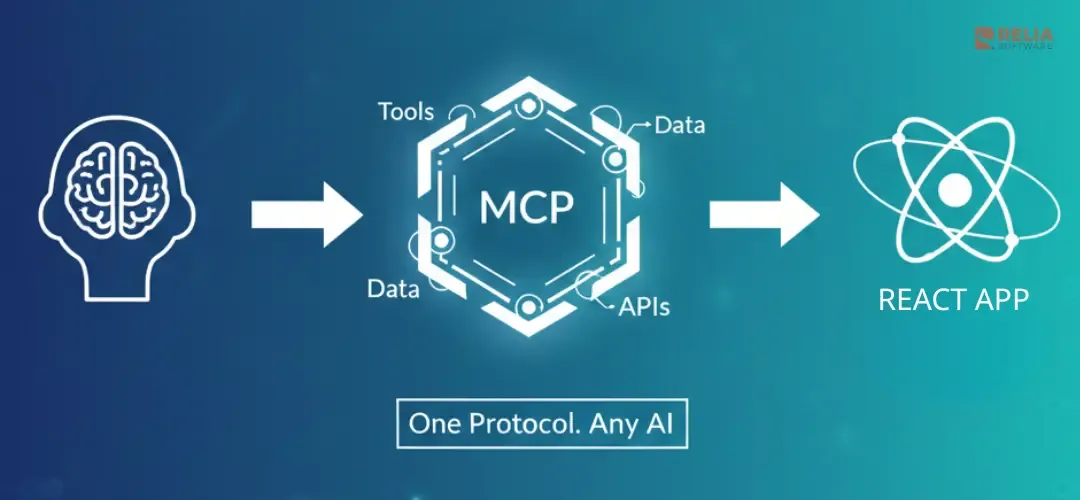
AI assistants need a standard way to call into your app to run a report, fetch status, create a ticket. Building a custom integration per vendor doesn't scale. The Model Context Protocol (MCP) gives you one contract: tools, resources, and prompts that any MCP client can discover and call.
This guide is practical: you'll build a minimal MCP server and a React client that talks to it, using the stack you already use (Next.js, Vite + Express, or browser-only). By the end you'll have a runnable server, a React UI that invokes tools, and a clear path to production.
A small note that just keep using React Server Actions or your framework's data layer for normal user-facing data. MCP is for the AI-facing surface.
>> Read more: How to Build a React Chatbot UI with Vite, Tailwind, Shadcn?
What You'll Build?
You'll build two pieces:
- A minimal MCP-style server (Node): one HTTP server that exposes two tools (e.g.
get_statusandrun_report). Each tool accepts arguments and returns a result in the usual MCP content shape. You run it once (e.g. on port 3001). - A React app that calls those tools: a button or form that sends a request (tool name + arguments) and displays the response. How the request gets to the server depends on the method:
- Method 1 (Next.js): React calls a Next.js API route; the route proxies the request to the MCP server.
- Method 2 (Vite + Express): React (Vite) calls an Express server; Express proxies to the MCP server.
- Method 3 (Browser-only): React calls the MCP server directly over HTTP (CORS must allow your app origin).
The server we build is minimal on purpose: it uses a simple HTTP JSON API that mirrors the MCP tool response shape for learning. It is not a full MCP server (real MCP uses JSON-RPC 2.0 over stdio or HTTP). When you're ready, swap it for a full MCP SDK server and keep the same client-side pattern.
>> Explore further: How to Build a Node.js Chatbot Backend with Express and OpenAI?
Prerequisites
- Node.js 18+ and npm (or pnpm).
- Basic React (components,
useState,fetch). - One of: Next.js (App Router), Vite + Express, or a plain Vite React app for the browser-only method.
>> You might need: A Full Guide to Migrate from React Router to TanStack Router
Build the Minimal MCP Server
Create a small Node project that exposes two tools over HTTP. The response shape mirrors the MCP tool result format ({ content: [{ type: "text", text: "…" }] })—useful for learning, though real MCP clients use JSON-RPC 2.0 (see the SDK link below).
Step 1: Create the project
mkdir mcp-server && cd mcp-server
npm init -y
npm install express cors
Step 2: Add the server file
Create server.mjs (we use the .mjs extension so Node treats it as an ES module; if you prefer server.js, add "type": "module" to your package.json):
import express from "express";
import cors from "cors";

const app = express();
app.use(cors());
app.use(express.json());

const tools = {
  get_status() {
    return { content: [{ type: "text", text: "OK – server is running. Time: " + new Date().toISOString() }] };
  },
  run_report({ scope = "week" } = {}) {
    const report = `Report (${scope}): generated at ${new Date().toISOString()}. Add your real logic here.`;
    return { content: [{ type: "text", text: report }] };
  },
};

app.post("/mcp/tools", (req, res) => {
  const { name, arguments: args } = req.body || {};
  const fn = tools[name];
  if (!fn) {
    return res.status(400).json({ error: "Unknown tool", content: [{ type: "text", text: "Unknown tool: " + name }] });
  }
  try {
    const result = tools[name](args || {});
    res.json(result);
  } catch (e) {
    res.status(500).json({ content: [{ type: "text", text: "Error: " + e.message }] });
  }
});

const PORT = 3001;
app.listen(PORT, () => console.log("MCP server on <http://localhost>:" + PORT));
Step 3: Run it
node server.mjsLeave it running. You'll point your React app (or proxy) at http://localhost:3001/mcp/tools with POST body { "name": "get_status", "arguments": {} } or { "name": "run_report", "arguments": { "scope": "week" } }.
Pro Tip: For production you'd use the official MCP SDK (stdio or HTTP transport) and register tools with proper schemas. This minimal server keeps the tutorial focused on the React side.
3 Methods to Integrate MCP Tools into a React UI
Method 1: Next.js (API Route Proxy)
Most React apps use Next.js. Here the browser never talks to the MCP server directly; it calls a Next.js API route that forwards the request.
1. Create the Next app
npx create-next-app@latest my-mcp-app --typescript --app --no-src-dir
cd my-mcp-app
2. Add the API route
Create app/api/mcp/tools/route.ts:
import { NextRequest, NextResponse } from "next/server";

const MCP_SERVER = process.env.MCP_SERVER_URL ?? "<http://localhost:3001>";

export async function POST(request: NextRequest) {
  const body = await request.json();
  try {
    const res = await fetch(`${MCP_SERVER}/mcp/tools`, {
      method: "POST",
      headers: { "Content-Type": "application/json" },
      body: JSON.stringify(body),
    });
    if (!res.ok) {
      return NextResponse.json({ error: "MCP server error" }, { status: res.status });
    }
    const data = await res.json();
    return NextResponse.json(data);
  } catch {
    return NextResponse.json({ error: "MCP server unreachable" }, { status: 502 });
  }
}
3. Add a page that calls the route
In app/page.tsx (or a new page):
"use client";

import { useState } from "react";

type MCPResult = { content?: Array<{ type: string; text?: string }> };

async function callMCPTool(name: string, args: Record<string, unknown> = {}): Promise<string> {
  const res = await fetch("/api/mcp/tools", {
    method: "POST",
    headers: { "Content-Type": "application/json" },
    body: JSON.stringify({ name, arguments: args }),
  });
  if (!res.ok) throw new Error("MCP call failed");
  const data: MCPResult = await res.json();
  return data.content?.[0]?.text ?? "";
}

export default function Home() {
  const [result, setResult] = useState<string | null>(null);
  const [loading, setLoading] = useState(false);

  const handleGetStatus = async () => {
    setLoading(true);
    try {
      const text = await callMCPTool("get_status");
      setResult(text);
    } finally {
      setLoading(false);
    }
  };

  const handleRunReport = async () => {
    setLoading(true);
    try {
      const text = await callMCPTool("run_report", { scope: "week" });
      setResult(text);
    } finally {
      setLoading(false);
    }
  };

  return (
    <main style={{ padding: "2rem" }}>
      <h1>React + MCP (Next.js)</h1>
      <div style={{ display: "flex", gap: "0.5rem", marginBottom: "1rem" }}>
        <button type="button" onClick={handleGetStatus} disabled={loading}>
          Get status
        </button>
        <button type="button" onClick={handleRunReport} disabled={loading}>
          Run report
        </button>
      </div>
      {result != null && <pre style={{ background: "#f4f4f4", padding: "1rem" }}>{result}</pre>}
    </main>
  );
}
4. Run both
- Terminal 1:
node server.mjs(from the MCP server folder). - Terminal 2:
npm run devin the Next app. SetMCP_SERVER_URL=http://localhost:3001if the server is not on the same host.
So: the browser only sees /api/mcp/tools. Your Next.js backend owns auth, rate limiting, and logging before calling the MCP server.
Method 2: Vite + Express (Express Proxy)
If your stack is Vite for the frontend and Express for the backend, run the React app and Express on different ports; Express proxies to the MCP server.
1. Create Vite React app
npm create vite@latest my-mcp-client -- --template react-ts
cd my-mcp-client
npm install
2. Install proxy dependencies and create the Express proxy
In the same repo or a sibling folder, install Express and CORS for the proxy, then add a small server file (e.g. server.mjs in the project root or in a server/ folder):
npm install express corsimport express from "express";
import cors from "cors";
const app = express();
app.use(cors({ origin: "<http://localhost:5173>" }));
app.use(express.json());
const MCP_SERVER = process.env.MCP_SERVER_URL ?? "<http://localhost:3001>";
app.post("/api/mcp/tools", async (req, res) => {
try {
const r = await fetch(`${MCP_SERVER}/mcp/tools`, {
method: "POST",
headers: { "Content-Type": "application/json" },
body: JSON.stringify(req.body),
});
if (!r.ok) return res.status(r.status).json({ error: "MCP server error" });
const data = await r.json();
res.json(data);
} catch {
res.status(502).json({ error: "MCP server unreachable" });
}
});
app.listen(3002, () => console.log("Proxy on <http://localhost:3002>"));In src/App.tsx, reuse the same component markup from method 1— only callMCPTool changes (point it to the Express proxy on port 3002):
const API = "<http://localhost:3002/api/mcp/tools>";

async function callMCPTool(name: string, args: Record<string, unknown> = {}): Promise<string> {
  const res = await fetch(API, {
    method: "POST",
    headers: { "Content-Type": "application/json" },
    body: JSON.stringify({ name, arguments: args }),
  });
  if (!res.ok) throw new Error("MCP call failed");
  const data = await res.json();
  return data.content?.[0]?.text ?? "";
}
Run the MCP server on 3001, the proxy on 3002, and Vite on 5173. The React app only talks to 3002; Express adds a single place for auth and rate limiting.
Method 3: Browser-Only (Direct HTTP + CORS)
For local dev or demos, React can call the MCP server directly if the server allows your app's origin. The minimal server in the previous section already uses cors() with no origin restriction, so it will accept requests from any origin (suitable only for development).
1. Use the same MCP server (with cors() enabled).
2. Create a Vite React app (or any React app) and call the server URL:
const MCP_URL = "<http://localhost:3001>";

async function callMCPTool(name: string, args: Record<string, unknown> = {}): Promise<string> {
  const res = await fetch(`${MCP_URL}/mcp/tools`, {
    method: "POST",
    headers: { "Content-Type": "application/json" },
    body: JSON.stringify({ name, arguments: args }),
  });
  if (!res.ok) throw new Error("MCP call failed");
  const data = await res.json();
  return data.content?.[0]?.text ?? "";
}
3. Run the server and the app. Open the app in the browser (e.g. http://localhost:5173). Buttons that call callMCPTool("get_status") and callMCPTool("run_report", { scope: "week" }) will work as long as the server is on 3001 and CORS allows the page origin.
Warning: Do not expose this setup to the internet without auth and a strict CORS policy. For production, use method 1 or 2 so the browser never talks to the MCP server directly.
When to Use vs Not to Use MCP with React?
When to use with React:
- You want Cursor, Copilot, or another client to trigger actions or read data from your app.
- You prefer one standard integration instead of custom plugins per vendor.
- You're building internal tools or dashboards that should be AI-friendly (e.g. "create ticket", "run report" as tools).
When not to: Your app is purely user-facing with no need for AI to call back, or you only call external AI APIs from React, use normal fetch or an SDK for that. MCP is for the AI-facing surface, not for replacing React Server Actions or your data layer.
FAQs
How is MCP different from a REST API?
A REST API is designed for app-to-app communication with custom endpoints you define. MCP is a standardised protocol that lets AI systems discover and call your tools automatically, one integration instead of one custom endpoint per vendor. See the official MCP documentation and the MCP SDK on GitHub for the full spec.
Why use MCP with React?
So AI assistants can use your app's data and actions through one standard protocol instead of custom integrations per vendor.
Does React run the MCP server?
Usually not. The MCP server runs in Node or your backend. Your React app calls your own API (Next.js or Express), which then talks to the MCP server. That keeps auth and security in one place.
Is MCP production-ready?
The protocol is used in production by several vendors. Your implementation (auth, rate limiting, CORS) must be production-ready; the protocol does not enforce that for you.
How do I secure MCP in production?
Authenticate callers, use a backend proxy so the browser never talks to the MCP server directly, add rate limiting, and log tool calls for audit.
>> Read more: Build A Production-Ready React AI Chatbot with Streaming, RAG, & More
Can I use MCP in the browser?
Yes, if the server is exposed over HTTP and CORS allows your origin. For production, prefer a backend proxy (method 1 or 2).
Does MCP replace my React data fetching?
No. MCP is for AI systems to call into your app. Use your normal data fetching (Server Actions, GraphQL, fetch) for user-driven flows.
Why do tool descriptions matter?
LLMs use the tool's schema and description when deciding what to call. Clear descriptions and actionable error messages improve reliability.
Conclusion
You built a minimal MCP-style server and a React client that calls it via three patterns: Next.js API route proxy, Vite + Express proxy, or browser-only HTTP. Use the method that matches your stack; in production, use a proxy (Next.js or Express) and add auth, CORS, and rate limiting. Start with one or two tools, validate the flow, then expand.
Next Steps:
- Swap to the official MCP SDK for full JSON-RPC 2.0 support, tool schemas, and resources/prompts.
- Add SSE or streaming transport so tools can push progress updates to the client.
- Register tools with JSON Schema descriptions so LLMs can discover and choose tools automatically.
>>> Follow and Contact Relia Software for more information!

- coding
- development