


The mobile game market is worth about $103 billion in 2025, accounting for roughly 55% of global gaming revenue and making mobile larger than console and PC combined (Newzoo, 2025). However, a lot of mobile game ideas never make it to launch, and many that do struggle to keep players engaged for long. The biggest problems often start with decisions around the game engine, platform, monetization model, development scope, etc.
This guide covers the key decisions behind mobile game development, from choosing the right engine and using AI tools to comparing native and cross-platform development. It also breaks down realistic development costs and timelines, and current trends in mobile games. The goal is to help you plan a mobile game project with fewer costly mistakes and a clearer path from concept to launch.
What Is Mobile Game Development?
Mobile game development is the process of designing, building, testing, and maintaining games for mobile devices such as smartphones and tablets. The work includes game design, art, animation, sound, programming, testing, and ongoing updates. You can build mobile game apps using native or cross-platform development.
Unlike PC and console games, mobile game controls must work well on a small touchscreen, and gameplay should suit shorter sessions, which often last around five to eight minutes (Sensor Tower, 2025). These constraints push developers to design a core loop that rewards players quickly and an interface built around large touch targets and simple gestures.
There are 3 main types of mobile games:
- Hyper-casual and casual games: Simple 2D mechanics and short sessions, such as puzzle, arcade, and match-three titles.
- Mid-core games: More depth and progression, often in 3D, such as strategy, role-playing, and shooter titles.
- Hardcore and live-service games: Persistent worlds, real-time multiplayer, and frequent content updates, such as MMORPGs and competitive battle games.
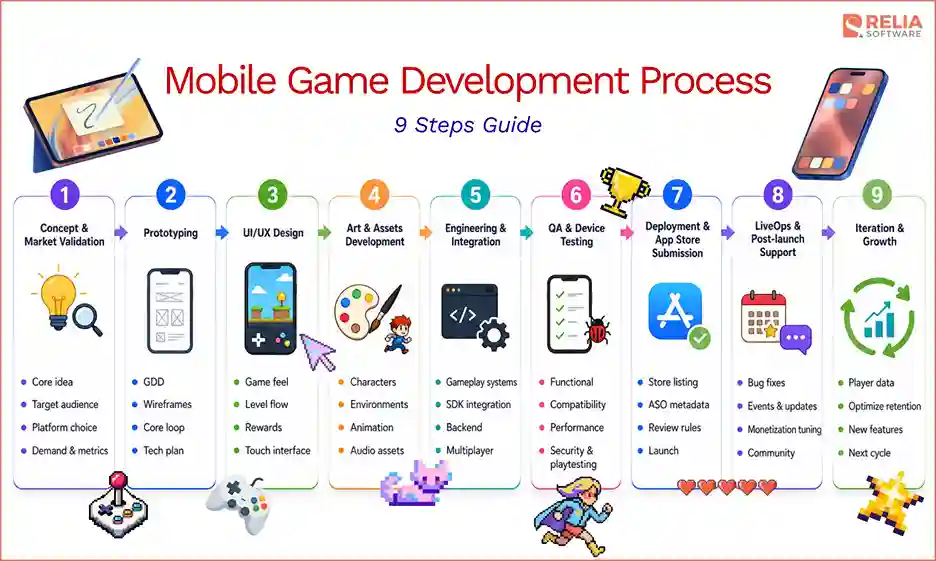
9 Steps to Build A Mobile Game App
Step 1: Concept & Market Validation
This stage decides what you are building, for whom, and whether the idea can earn money. The team works through a few core decisions:
- Define the core idea and target audience.
- Choose the launch platforms, whether iOS, Android, or both.
- Study similar games and player behavior to confirm real demand
- Set success metrics that define what a viable game looks like.
A validated concept gives the next phase a clear target to prototype against, and ideas without proven demand or a realistic way to make money get removed before they cost anything.
Step 2: Prototyping
Prototyping turns the approved concept into a written plan and a rough, playable prototype. This phase produces the documents the rest of the team builds from:
- Write the Game Design Document (GDD) and wireframes that record the mechanics, art direction, and scope.
- Build a stripped-down version of the core loop, the main action players repeat.
- Test whether the mechanic is fun on its own before adding anything else.
- Plan the production schedule and technical approach.
A completed GDD and a proven core loop give the design team a clear plan to expand next. If the prototype falls flat, the team reworks the idea now, while changes are still cheap.
Step 3: UI/UX design
UI/UX design defines how the game feels, how it plays, and what keeps players coming back. Designers detail the parts that shape the experience:
- Set the core mechanics, level structure, and difficulty curve, tying every choice back to the core loop.
- Pace progression and rewards so the game stays challenging but fair as players improve.
- Shape the touch interface so buttons sit under the thumb and text stays readable across screen sizes.
The output is a set of detailed level designs and UI layouts that expand the GDD into something the art and engineering teams can build from. A vague decision here surfaces later as rework, which is why design is worth finishing before assets get made.
Step 4: Art & Assets Development
With the design locked, the art and audio teams produce every visual and sound asset the game needs. Their work balances visual and audio quality with mobile performance, including:
- Create character designs, environments, and animations.
- Produce sound effects and music that fit the game's tone.
- Keep textures and particle effects light, since heavy assets strain the GPU, drain the battery, and hurt frame stability.
Optimized, production-ready assets then hand off to engineering. Assets built without performance limits in mind force expensive fixes once the build comes together.
Step 5: Engineering & Integration
In this phase, developers turn the design and assets into a working game. They need to:
- Build the gameplay systems from the design using game engines and other supporting development technologies.
- Connect the backend and integrate SDKs for analytics, ads, and in-app purchases.
- Add server infrastructure for matchmaking and real-time data in multiplayer titles.
The result is a feature-complete build, and the more stable that build is, the faster the testing phase can move.
Step 6: Quality Assurance & Device Testing
In general, a mobile game needs several kinds of testing:
- Functional testing: Check that mechanics, menus, progression, and purchases work as designed.
- Compatibility testing: Run the game on real devices across brands, operating system versions, screen sizes, and price points.
- Performance testing: Measure frame rate, load times, memory use, battery drain, and heat, especially on lower-end phones.
- Network and multiplayer testing: Check latency, matchmaking, data sync, and how the game handles a dropped connection.
- Playtesting: Run closed beta tests with real players to check balance, difficulty, and fun.
- Compliance & security testing: Protect payments and player data, and confirm the build meets each store's guidelines.
A stable, tested build is the one the team submits to the stores, and every bug caught here costs far less than the same bug found after launch.
>> Read more:
- 7 Leading Performance Testing Tools for Developers
- Top 7 Web App Security Testing Tools For Developers
Step 7: Deployment & App Store Submission
The deployment stage puts the finished game in front of players on the App Store and Google Play. The team must:
- Prepare store listings, screenshots, and preview videos.
- Write metadata built for discovery and apply app store optimization.
- Meet each store's guidelines, then submit to Apple and Google, whose reviews can take from hours to several days.
You have to be careful about several store rules which can delay a first release if the team handles them late:
- Target API level: New Google Play apps must target Android 16 (API level 36), according to the latest Google Play announcement.
- Closed testing: Personal Google Play accounts must also run a closed test with at least 12 testers for 14 continuous days before production access.
- Privacy disclosures: Complete Apple's App Privacy details and Google Play's Data safety form before review.
- Age and content ratings: Fill out each store's content-rating questionnaire.
- In-app purchases: Use each store's billing system for digital goods and follow its payment rules.
Approval on the app stores and the first wave of downloads produce the real player data, such as retention rates, the points where players quit, and what they spend on, which sets the priorities for the next step, showing the team which bugs to fix, where to ease difficulty, and which content to build first.
>> Read more: Exploring 6 Deployment Strategies for Smooth Software Updates
Step 8: LiveOps & Post-launch Support
The work continues after launch, because a mobile game is a live product rather than a one-time release. Live operations (LiveOps) act on the launch data to keep players and revenue growing:
- Fix the bugs and crashes that the first player cohorts reveal.
- Ease difficulty at the points where players drop off, guided by retention data.
- Ship content updates and limited-time events built around what players engage with most.
- Tune monetization and pricing based on what players actually spend on.
- Scale servers and manage the community as the audience grows.
Steady, data-driven LiveOps is often what separates a game that keeps players for years from one that fades after a strong launch week. The insights it produces also feed new features and future concepts, which returns the development cycle to where it began.
Mobile Game Development Engines
Game engines are the software development framework that handles rendering, physics, and input that the team can use for developing the game.
|
Engine |
Primary Language |
2D/3D |
Cost and license |
|
Unity |
C# |
Both |
Free tier; paid Pro above $200k revenue |
|
Unreal Engine |
C++ / Blueprints |
Mainly 3D |
Free; 5% royalty after $1M revenue |
|
Godot |
GDScript |
Both |
Free and open-source |
|
Cocos2d-x |
C++ |
2D |
Free and open-source |
|
Solar2D |
Lua |
2D |
Free and open-source |
|
Flame |
Dart |
2D |
Free and open-source |
Unity
Unity is the most widely used mobile game engine, and it handles both 2D and 3D from a single codebase. Its large asset store and broad platform support speed up the development process and cut the work of shipping to iOS and Android. Unity fits most mobile projects, from casual 2D games to mid-core 3D titles.
Unreal Engine
Unreal Engine produces the highest visual fidelity of the mainstream engines, which makes it a strong choice for graphics-heavy 3D games. The trade-off is a steeper learning curve and larger build sizes, both of which matter more on mobile than on console or PC. Unreal Engine suits teams building console-quality titles that can absorb the extra complexity.
Godot
Godot is a free, open-source engine that has grown quickly with indie developers. It handles both 2D and 3D, uses its own lightweight GDScript language, and charges no royalty or license fee. Godot suits budget-conscious teams and smaller 2D or 3D games.
Cocos2d-x
Cocos2d-x is a lightweight, open-source C++ engine built mainly for 2D games. Its small footprint produces efficient builds that run well on lower-end phones. Cocos2d-x fits fast, performance-sensitive 2D titles and is common in casual and hyper-casual games.
Solar2D
Solar2D, formerly Corona SDK, is a free, open-source engine that uses the Lua scripting language. Its simple workflow and quick iteration make it approachable for beginners and small 2D projects. Solar2D suits prototypes and straightforward 2D games rather than complex 3D work.
Flame
Flutter paired with the Flame engine lets teams build casual 2D games and gamified features using the Dart language. This pairing works best when a game sits inside a larger Flutter app, or shares code with one. Flutter and Flame suit mini-games and app-based game features more than standalone, graphics-heavy titles.
Technologies Used in Developing a Mobile Game
The table below groups these technologies by what they handle in the pipeline.
|
Category |
Purpose |
Common tools |
|
Programming languages |
Code a game per engine or platform |
C#, C++ (engines); Swift, Kotlin, Java (native) |
|
3D art |
Model and animate 3D assets |
Blender, Maya, 3ds Max |
|
2D art |
Create sprites, backgrounds, and UI |
Photoshop, Illustrator, Procreate |
|
Audio |
Build and mix sound and music |
FMOD, Wwise |
|
Backend & live services |
Run multiplayer, saves, and player data |
Firebase, PlayFab, AWS |
|
Analytics & monetization |
Track players and earn revenue |
Google AdMob, Unity Ads, ironSource |
|
AI tools |
Speed up coding and content creation |
GitHub Copilot and Cursor (coding) Scenario and Leonardo AI (2d art) Meshy & Tripo (turn text or images into 3D) Inworld AI (NPC dialogue & behavior) ElevenLabs (character voices) modl.ai (automated playtesting) Unity Muse & Unreal AI (in-engine assistance) |
>> Read more:
- Top 11 Best AI Development Tools for Software Developers
- Top AI Tools for Web Development: From UI Design to Deployment
Mobile Game Development Cost and Timeline
By Project Complexity
|
Types |
Typical Cost |
Timeline |
Team size |
|
Hyper-casual / simple 2D |
$20,000–$60,000 |
2–4 months |
3-5 members |
|
Casual 2D with backend |
$60,000–$150,000 |
4–8 months |
5-8 members |
|
Mid-core 3D or light multiplayer |
$150,000–$300,000 |
8–12 months |
8-15 members |
|
Complex 3D or real-time multiplayer |
$300,000+ |
12+ months |
15+ members |
These ranges assume a single, focused game. Adding platforms, heavier art, or live-service features moves a project up a tier in both cost and time.
By Regions
|
Region |
Typical Hourly Rate |
|
North America (US, Canada) |
$75–$150+ |
|
Western Europe (UK, Germany, France) |
$70–$150 |
|
Eastern Europe (Poland, Ukraine, Romania) |
$30–$80 |
|
Latin America (Brazil, Argentina, Mexico) |
$30–$60 |
|
South & Southeast Asia (Vietnam, India, Philippines) |
$20–$55 |
Monetization Strategies For Mobile Game Apps
Almost all mobile game apps are free to download and earn after the install, since free-to-play games drove about 96% of downloads in 2025 (Sensor Tower, 2026). However, mobile games can still earn revenue through five main models:
- In-app purchases (IAP): Players buy virtual goods, currency, or upgrades. IAPs generate the largest share of mobile game revenue, about 77% of the total in 2025 (Sensor Tower, 2025), even though only a small share of players ever pay.
- In-app advertising (IAA): Ads earn revenue from players who never spend. Rewarded video ads, which players opt into for an in-game bonus, make up about 62% of ad revenue and tend to frustrate players least (Tekrevol, 2026).
- Hybrid monetization: Combines purchases and ads, and sometimes subscriptions, to earn from both paying and non-paying players. Most top-grossing games now blend models, and hybrid titles can see 20% to 30% higher revenue per user than single-model games (Adjust and Tenjin, 2025).
- Subscriptions and battle passes: Players pay a recurring fee for ongoing benefits, exclusive content, or a season of rewards. This model suits live-service games with steady updates.
- Premium pricing: Players pay once to download the game. Premium is now rare on mobile and fits polished, content-complete titles more than free-to-play games.
The right mix depends on genre and audience: casual games lean on ads, while mid-core and hardcore games lean on in-app purchases. Since monetization affects gameplay, teams usually plan it from the start instead of adding it after launch.
Mobile Game Development Trends in 2026
Several technical shifts are changing what players expect from mobile games in 2026. The trends below affect design, backend, and budget, so they belong in early planning rather than post-launch.
AR mobile games
Augmented reality games place game elements over the real world through the phone camera, as Pokémon GO made popular. AR adds location, camera, and motion features that raise the technical and testing load. AR fits games built around real-world movement and exploration, but it demands extra work on performance, battery use, and privacy.
>> Read more: Guide To AR & VR App Development For Businesses
Cross-play and shared progression
Cross-play lets players on different platforms, such as an iPhone and an Android phone or a PC, play together with one account and synced progress. This feature widens the player base and keeps friends connected across devices. It also requires a unified account system and careful backend design.
Real-time multiplayer backends
Real-time multiplayer runs live matches between many players at once, which depends on server infrastructure for netcode, matchmaking, and scaling. This infrastructure is a major driver of cost and complexity, and it needs ongoing capacity planning. Teams that expect a live audience should design the backend for scale from the start.
Cloud and streamed mobile gaming
Cloud gaming streams console-grade games to phones, so the device does not run the game locally. Faster 5G networks make this more practical, and some operators now bundle game libraries with data plans (Mordor Intelligence, 2026). Latency and cost still limit how far streaming reaches, so most studios treat it as an extra channel rather than the main one.
AI in live game systems
AI is moving inside the shipped game, not only the build process. Studios use AI for smarter non-player characters, difficulty that adapts to the player, and player support or moderation during LiveOps. These systems can improve retention, but they add cost and need careful testing to stay fair and stable.
Mobile Game Development Outsourcing Services at Relia Software
Relia Software builds a mobile game with full product development, covering planning, UX, architecture, development, QA, launch, and long-term support rather than a single code handoff. The team applies the same product engineering process it uses across mobile, web, and enterprise apps, following the phases described earlier in this guide.
Besides, we also bring a few concrete strengths to a mobile game build:
- Over a decade of delivery: More than 10 years of experience in building mobile, web, and enterprise products since 2011.
- Native and cross-platform depth: Go through a lot og iOS and Android projects built natively or with React Native and Flutter.
- Real-device QA and security: Testing across real devices and secure handling of payments and player data.
- Scalable backends: Built for multiplayer, live events, and post-launch growth.
- Offshore cost efficiency: Vietnam-based delivery at rates well below North American ones.
Across each project, we always focus on the engineering that keeps a game stable and shippable: choosing an engine and stack that fit the game, testing across real devices, securing payments and player data, and planning for updates after launch. If you are scoping a mobile game or a gamified app, Relia Software's team is ready to help you plan the build, choose the stack, and set up testing and support for your projects.
FAQ
1. How much does it cost to publish a mobile game on the app stores?
App Store (Apple) charges $99 per year for its Developer Program, and Google Play (Android) charges a one-time $25 registration fee. Remember that these platform fees are separate from the cost of building the game.
2. Is Unity free to use for mobile games?
Unity is free under its Personal tier for individuals and companies with annual revenue and funding below $200,000 (Unity, 2026). Above that threshold, Unity Pro costs about $2,200 per seat each year. Unity cancelled its earlier Runtime Fee in 2024, so per-install charges no longer apply.
3. Can AI build a full mobile game on its own?
No, current AI tools can only help with code, test passes, translations, and draft assets, but the input, such as game design, and output do need human review. Remember, just treat AI as an assistant that speeds up parts of the work, not a replacement for the team.
4. Should I build mobile games in native or cross-platform?
Cross-platform is the better choice for most mobile games, since one codebase deploys to both iOS and Android at lower cost with near-native performance. Choose native only when the game pushes graphics hard or needs platform-specific features, such as AR through ARKit or ARCore, or access to the newest device sensors.
Conclusion
Mobile game development involves much more than coding. A game's cost, performance, and long-term potential depend on early choices around the engine, platform, monetization model, features, and qualified development team. A clear process, the right technology stack, practical use of AI, and a realistic budget and timeline give the project a much stronger foundation.
For businesses without the right in-house resources, working with an experienced development partner can make the development and launching process easier with ongoing support. If you are planning a new mobile game, Relia Software's mobile game development services can help turn your idea into a stable, engaging product built for both iOS and Android.
>>> Follow and Contact Relia Software for more information!

- Mobile App Development
- development
- mobile app
- mobile applications