


Managed IT services pricing usually ranges from around $100 to $250 per user per month, but the actual cost depends on what services are included, how much support you need, and how complex your systems are. A small business with simple tools will pay less than a large company that needs 24/7 support, strong security, and multi-site management.
In this article, you will learn how much managed IT services cost by category, the most common pricing models, what affects the cost, how managed IT services are priced, and how to estimate your budget. It also includes comparison tables, real examples, and a simple pricing template to help you understand what you are really paying for.
How Much Do Managed IT Services Cost?
By Pricing Model
The pricing model shapes the monthly bill, which affects how predictable the cost feels, how easy it is to scale support, and how much work may still be billed outside the base contract.
|
Pricing Models |
Price Range (per month) |
|
Per-user pricing | |
|
Common managed agreements |
$150–$175 per user |
|
Broader packages |
$175–$250 per user |
|
Higher-end cloud-heavy or security-heavy support |
$250–$400 per user |
|
Per-Device Pricing | |
|
Workstations |
$50–$100 per workstation |
|
Servers |
$100–$400 per server |
|
Firewalls |
$30–$75 per firewall |
|
Switches |
$15–$40 per switch |
|
Tiered Pricing | |
|
Basic tier |
$500–$1,500 |
|
Mid-tier / standard tier |
$1,500–$3,000 |
|
Premium tier |
$3,000–$6,000+ |
|
Flat-Fee / All-Inclusive | |
|
Standard full outsourcing |
No standard, depends on the provider's scope (can be $100–$250 per user or $2,500–$5,000 for small teams) |
|
Higher-end full outsourcing |
No standard, depends on the provider's scope (usually $250–$400+ per user or $5,000–$10,000+ for teams) |
By Service Types
|
Types |
Price Range |
Note |
|
Fully Managed IT Services |
$110–$400/user/month |
Usually the highest standard service type |
|
Co-Managed IT Services |
$75–$175/user/month |
20–40% lower than fully managed IT because your team handles some responsibilities. |
|
Managed Security Services |
$50–$200+/user/month |
Usually adds cost above standard managed IT pricing due to stronger security layers |
|
Cloud Management Services |
$250–$400/user/month (fully hosted/cloud) $10–$50/user/month for cloud backup only |
Basic cloud admin may stay affordable, but active cloud infrastructure support, security controls, and continuous cloud monitoring raise the monthly cost. |
|
Helpdesk & User Support |
$50–$150/user/month (standalone) |
Often be a part of a broader MSP plan rather than a stand-alone public rate. |
The above should be used as a practical planning benchmark, not as a fixed market rate card.
By Business Size
|
Business size |
Est. Monthly Total |
Recommended Service Type |
|
Small Business (10–50 employees) |
$2,000–$6,000 |
Fully Managed IT Services |
|
Mid-Sized Business (50–250 employees) |
$6,000–$20,000 |
Co-Managed or Fully Managed IT Services |
|
Large Enterprise (250+ employees) |
$20,000+ |
Co-Managed + Managed Security Services |
By Regions
|
Regions |
Cost Per User (USD)/ month |
|
North America (USA & Canada) |
$110–$400 |
|
Europe (UK/EU) |
$70–$200 |
|
Western Europe (Germany, France) |
$70–$210 |
|
Australia & New Zealand |
$50–$180 |
|
Southeast Asia (Singapore, Malaysia, Vietnam) |
$25–$100 |
|
Latin America (Brazil, Mexico) |
$40–$100 |
|
Middle East & Africa |
$30–$90 |
>> Read more: Offshore Software Development Rates by Country
By Industries
|
Industry |
Price Range (USD per user/month) |
|
Finance / Fintech |
$200–$400 |
|
Healthcare |
$175–$350 |
|
Manufacturing |
$125–$250 |
|
Legal / Accounting |
$150–$300 |
|
Retail / NGO |
$100–$200 |
What Affects Managed IT Services Cost?
Managed IT pricing changes based on how much work the provider is taking on, how complex your environment is, and how much support the business expects. Some factors that make the managed IT services cost more include:
- Systems and environment complexity: Older systems, mixed tools, custom software, and multi-site setups usually cost more because they take more time to support.
- Support coverage and response speed: 24/7 support and faster SLA response times usually cost more than standard business-hour support.
- Security and compliance needs: Stronger security, tighter access control, and compliance-related work increase the price.
- Users, devices, and locations: More users, managed devices, and office branches usually lead to more support work and a higher monthly cost.
- Service scope: A basic package costs less than a broader contract that also includes more services like backups, cloud management, vendor support, and strategic IT help.
- Onboarding and onsite support: Messy environments, difficult transitions, and regular onsite visits usually add more cost than clean setups with mostly remote support.
- Industry requirements: Regulated industries often increase cost due to needs like stricter access control, audit logs, data protection standards, compliance reporting, security monitoring, and regular system reviews.
- Business location and service region: Costs vary by region due to differences in labor rates, onsite support costs (travel, accommodation, transport), and higher operating expenses in major cities or multi-location setups.
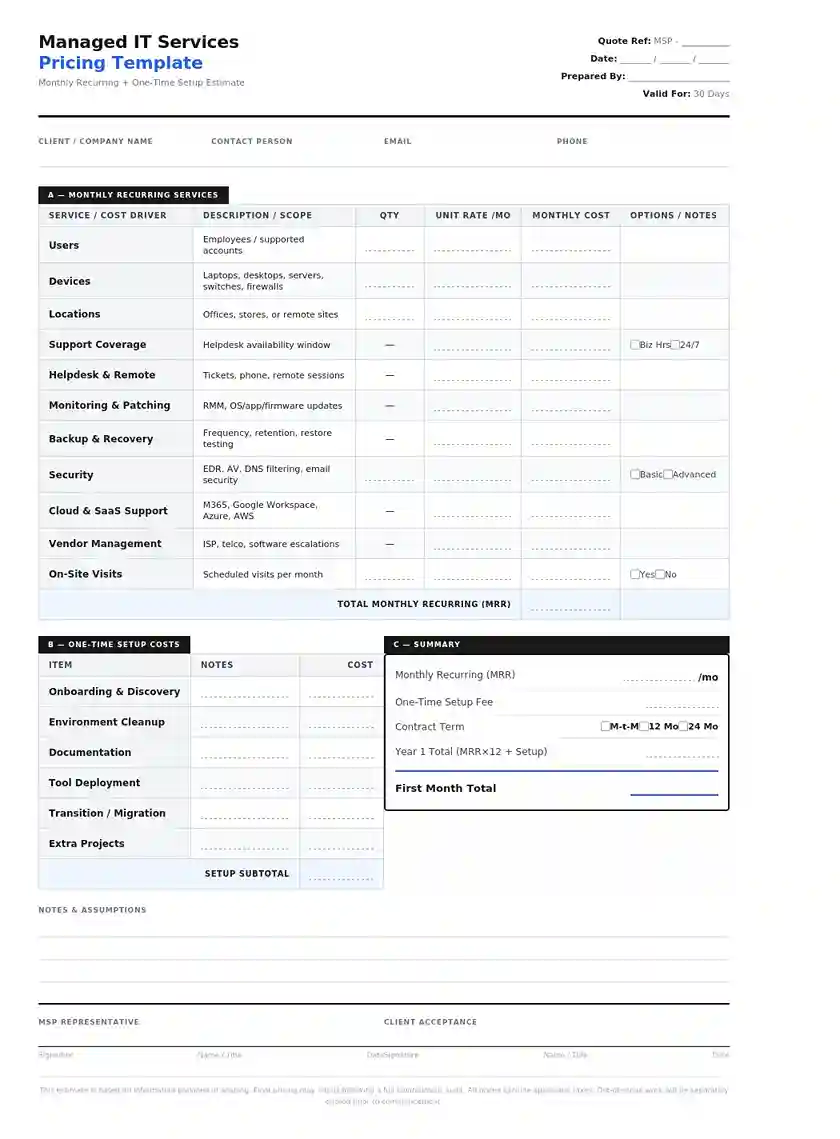
Practical Managed IT Services Pricing Template
A practical managed IT pricing template has to cover the main cost drivers in a normal support agreement. You can structure it like this:
- Number of users: How many employees or supported users need IT support.
- Number of devices: Laptops, desktops, servers, firewalls, switches, and other managed assets.
- Number of locations: Offices, stores, clinics, or other sites that need support.
- Support coverage: Business hours only or wider support coverage.
- Service scope: Helpdesk, monitoring, patching, backups, security, cloud support, vendor management.
- Security needs: Basic protection or stronger security support.
- On-site/Remote support: Whether regular on-site visits are needed.
- One-time setup costs: Onboarding, cleanup, documentation, or transition work.
- Extra project work: Migrations, upgrades, or support outside the monthly scope.
This format keeps the estimate simple. It also helps the buyer separate the ongoing monthly cost from the one-time setup cost.
ROI Comparison: Outsourced MSP vs. In-house IT
At first glance, hiring one in-house IT person may look cheaper, but the real cost is often higher once you add benefits, tools, training, and backup support. Meanwhile, an outsourced MSP may cost more per month, but it usually gives you broader support and access to a full team.
So this comparison should not be based on salary vs monthly fee alone. It should look at total cost, support coverage, downtime risk, and how much productive time the business gets back.
|
Cost Factor |
Outsourced MSP |
In-house IT |
|
Monthly cost structure |
Fixed or semi-fixed monthly fee |
Salary-based monthly |
|
Hiring cost |
None |
Include recruitment, onboarding, and training costs |
|
Benefits and insurance |
Usually included in vendor pricing |
Paid by the employer |
|
Skill coverage |
Access to a team with different skills |
Often depends on one person or a very small team |
|
Support hours |
Can include extended hours or 24/7 support |
Usually limited to work hours unless more staff are hired |
|
Backup coverage |
Built into the provider team |
Harder if one person is absent or leaves |
|
Tools and systems |
Often bundled into the service |
May require separate software and tool spending |
|
Scalability |
Easier to scale up or down |
Hiring more support takes more time and cost |
|
Project support |
May be included or added as needed |
Often limited by internal capacity |
|
Downtime risk |
Often lower if support is broad and proactive |
Can be higher if the internal team is small or overloaded |
>> Read more: In-House VS Outsourcing: Which is Better for Your Project?
FAQs
1. Is per-user or per-device pricing better?
Per-user pricing is usually better for modern businesses with standard user setups, while per-device pricing fits better when support is tied more closely to hardware and shared systems.
2. What does co-managed IT usually cost?
Co-managed IT usually costs around $50 to $200 per user per month, depending on how much work is handled by the MSP and how much stays with your internal IT team.
3. Can I switch MSP providers easily?
Yes, but it depends on how well your current systems are documented and how smoothly the new provider can take over access, tools, and processes.
4. Do managed IT services include hardware costs?
No, hardware such as laptops, servers, or network equipment is usually billed separately unless included in a specific contract.
5. How often should I review my managed IT contract?
It is better to review the managed IT contract at least once a year or whenever your business changes in size, systems, or support needs.
Conclusion
Managed IT services pricing depends on your service scope, support level, systems, and how much responsibility the provider takes on. That is why two businesses with similar sizes can still receive very different quotes due to their distinct requirements.
The best way to choose the right option is to focus on what your business actually needs, not just the lowest price. A clear understanding of pricing models, cost drivers, and hidden costs will help you avoid surprises and find a solution that gives stable support and better long-term value.
>>> Follow and Contact Relia Software for more information!

- outsourcing