


Most companies start a legacy application migration project because a system now costs too much to maintain, can't pass a security review, or can't scale past its current user base. However, many businesses still consider with many questions about planning, budget, and timeline, common failures, and how to avoid business interruption.
This guide covers what legacy application migration is, its strategy, budget, the process from assessment to cutover, and what dependencies could break. We also include a practical migration project Relia Software implemented with experience and lessons learnt.
What is Legacy Application Migration?
Legacy application migration is the process of moving an outdated application, along with its data and integrations, onto modern infrastructure (e.g., cloud platforms or distributed systems) or newer technologies with minimal to zero business operation interruption.
The term "legacy" is defined variedly by different companies, but a few signs show up in general:
- The platform or language is no longer supported by its vendor,
- The team can't find engineers who know the platform or language well,
- The infrastructure can't meet a compliance or scaling requirement the business now has.
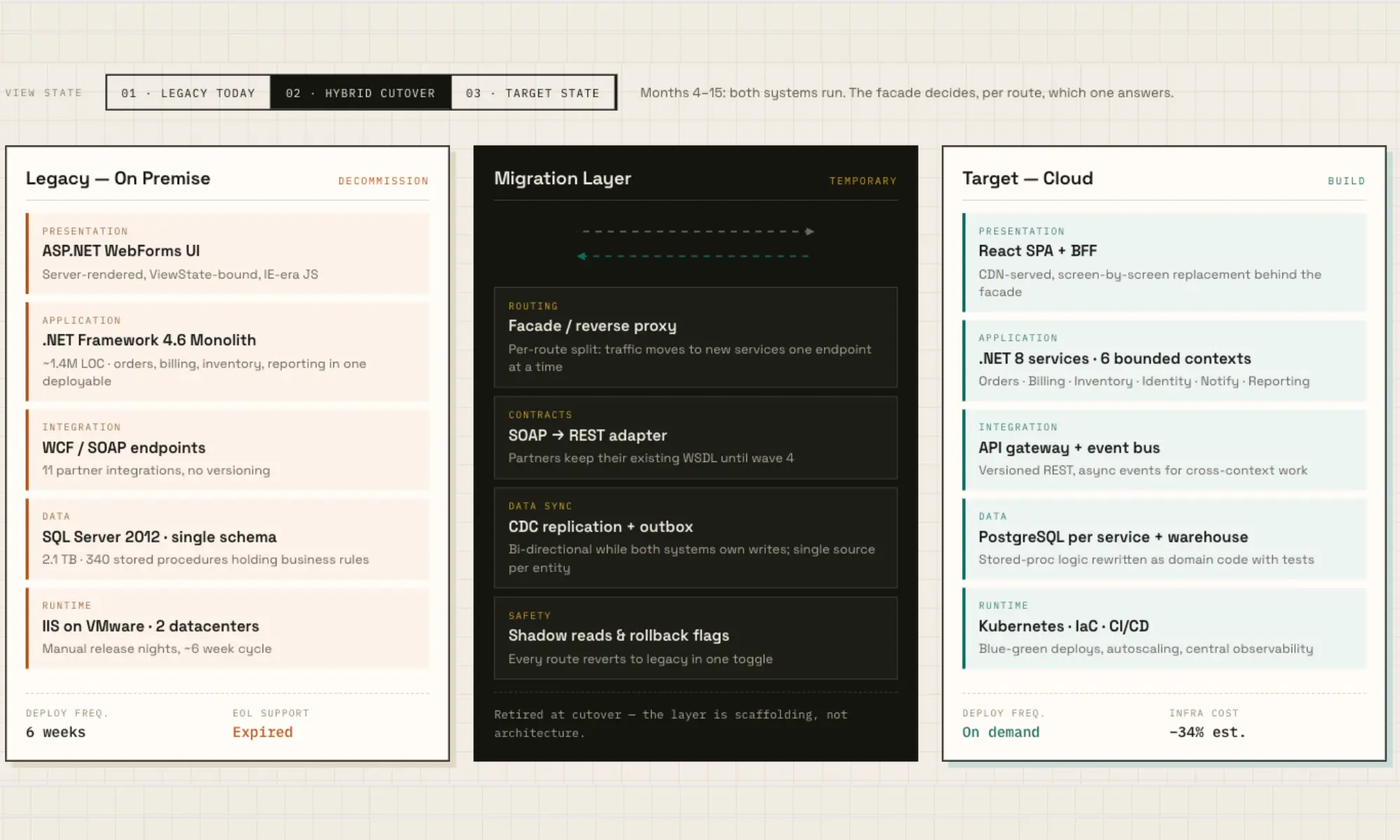
Many people confuse migration with modernization, but they are not the same. Migration moves an app to a new environment without changing core business logic and data. Modernization changes how the application is built. For example, moving an app to the cloud is a migration, but refactoring the app to make it cloud-ready during that move is both migration and modernization.
A migration is also different from a rewrite. Migration keeps the existing application mostly unchanged, while a rewrite replaces it with a new system built from the original requirements.
When the Application Should Be Migrated and When It Shouldn't?
An application being old is not enough reason to migrate it. The real question is whether the cost, risk, or limitations of keeping the app outweighs the cost and disruption of moving.
Signs an application should be migrated:
- Maintenance costs keep climbing: Older applications can consume more budget to stay operational. As a system becomes harder to support, more money goes into keeping it running instead of improving it.
- The vendor or platform support ending: Once the operating system, framework, database, or vendor stops security updates and official support, the team has to rely on temporary fixes and workarounds. Those fixes reduce immediate risk, but add instability and more security vulnerabilities.
- The system can't meet compliance requirements: Some certifications and regulations require infrastructure capabilities, such as current encryption standards, detailed audit logging, or granular access controls, that older platforms were never built to support.
- Limited performance or capacity: The system slows down even under normal load. Also scaling the system further requires manual changes, expensive hardware, not just adding resources.
- New integration is hard: Integration requests keep getting turned down or delayed because the system can't expose the APIs or data access that current partners, tools, or customers expect.
- The pool of engineers is increasingly small: COBOL, older .NET Framework versions, or unsupported J2EE stacks now lack skilled engineers because fewer people learn every year. This raises both staffing costs and the risk of losing the one or two people who actually understand how the system works.
- Outages or defects trace back to the platform itself, not to a usage spike or an isolated bug, and keep recurring despite fixes.
Signs the app is better to wait:
- The system is stable, secure, and still supported: Age alone does not make software a migration candidate. Migrating a supported system that performs well and receives security updates wastes your time and money to solve no problems.
- Usage and business impact are low: For a low-traffic, low-criticality application, migration cost can exceed the problem it would solve. Retaining it temporarily is more economical.
- The application will soon be retired or replaced: Moving an application that is already scheduled for replacement creates duplicate work that's about to become unnecessary. In this case, the better option may be to keep it stable until the replacement is ready.
- No compliance, security, or integration pressure: Without one of those, migration is an improvement project rather than a necessity.
- The team is not ready to migrate it safely: If dependencies are still unknown, rollback has not been tested, or the target architecture is unclear, delaying the move long enough to prepare can be cheaper than recovering from a failed migration.
6 Legacy App Migration Strategies: How to Choose the Right Approach?
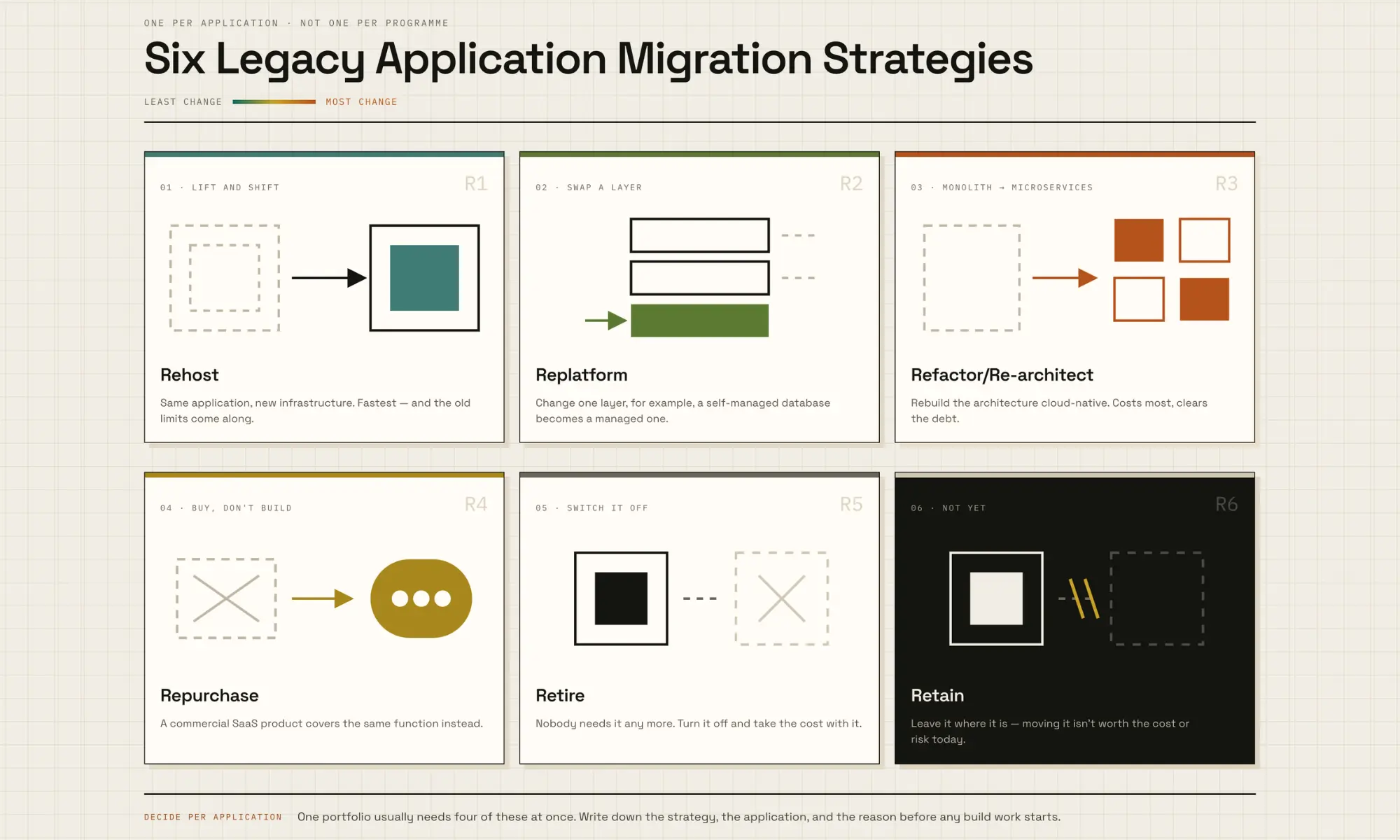
Most legacy migrations use one of six approaches: rehost, replatform, refactor, repurchase, retire, or retain.
- Rehost (Lift and Shift): Move the application to new infrastructure with minimal code changes. Rehosting is the fastest and cheapest option, but carries forward most of the application's existing limitations.
- Replatform: Change just selected parts of the environments, not a full architectural rebuild. Migrating AWS workloads from EC2 to ECS is an example of this kind of targeted, infrastructure-level move.
- Refactor/Rearchitect: Change deeply the application's architecture to make the app cloud-native, often breaking a monolithic application into microservices. This costs the most and takes the longest, but it removes technical debt the other options leave in place.
- Repurchase: Replace the application with a commercial SaaS alternative that covers the same function.
- Retire: Stop the application or turn off old features because it no longer serves a real business need.
- Retain: Leave the application where it is, because migrating it isn't worth the cost or risk right now.
Use this decision path for each application:
|
1. Does the business still need the function?
2. Can SaaS or commercial software replace it?
3. Is there a strong reason to move now?
4. Can it move with little or no code change?
5. Can limited platform changes solve the problem?
6. Is the architecture itself the problem?
|
Choose the least disruptive strategy that solves the real problem.
The Legacy Application Migration Process: 7 Detailed Steps
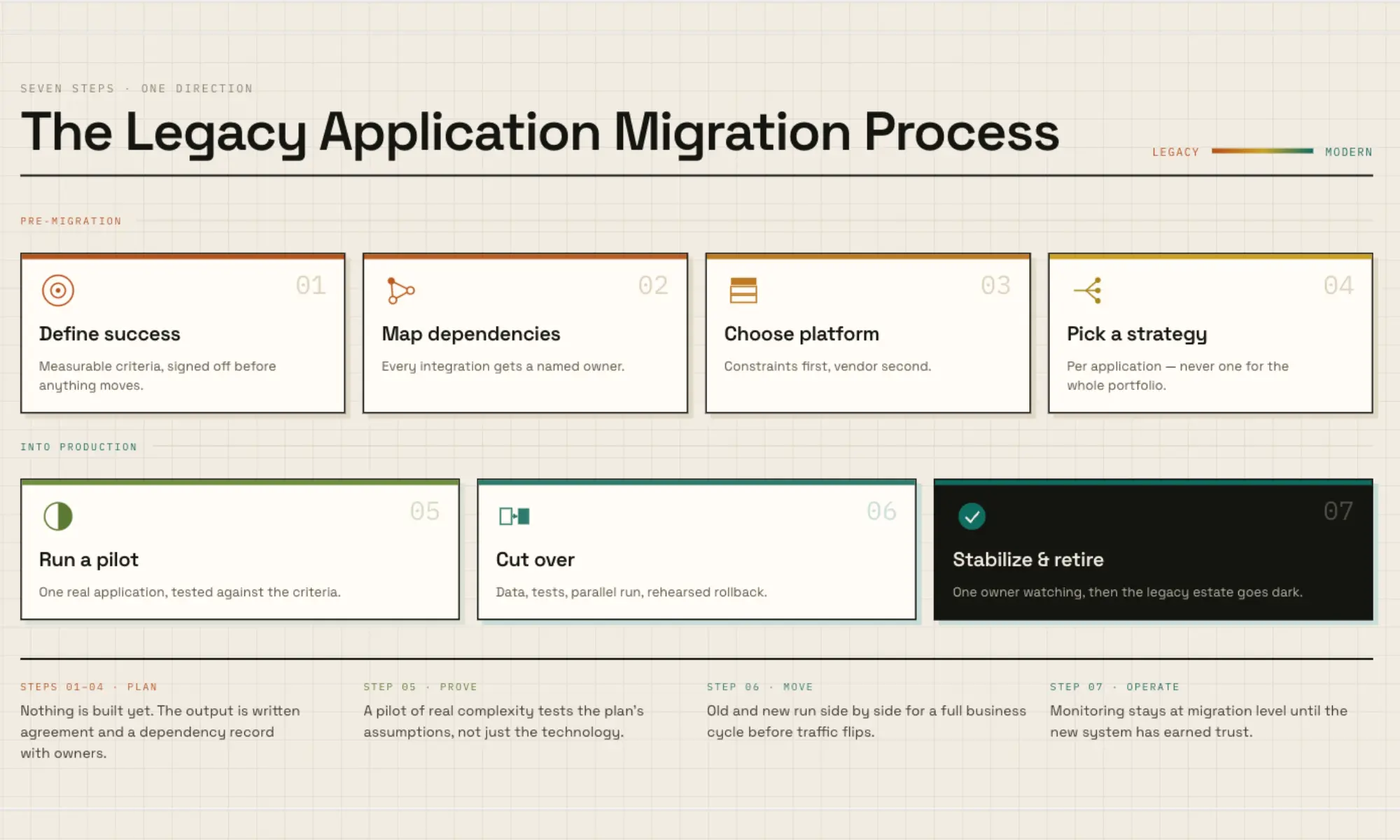
Step 1: Define the Problems and Success Criteria
In the pre-migration phase, write down the specific problems driving this migration. Then, define how the team will know, in measurable terms, that the project solved them. The criteria has to be clear, for example:
- Maximum response time under production-equivalent load;
- Maximum acceptable downtime during cutover;
- Data reconciliation tolerance;
- Required integration pass rate;
- Named integrations that need owner sign-off;
- Monitoring that must be active on day one;
- Recovery time and backup requirements;
- Expected operating cost for the new environment;
Put these criteria into a written document and get agreement from the application owner, technical team, and relevant business stakeholders before the pilot begins.
The document in this step is the foundation for the next steps and reference point the team returns to.
Step 2: Inventory the Application and Map Dependencies
Many migration failures come from an integration nobody documented, not from the technology choice. Finding those dependencies takes more than one method because no single source shows the full picture.
Start by documenting the application's core technical components:
- Application servers and operating systems;
- Runtime and framework versions;
- Databases and storage;
- Internal and third-party APIs;
- Authentication and authorization services;
- Message queues and middleware;
- Scheduled jobs and batch processes;
- Shared file systems;
- Network routes and firewall rules;
- Monitoring and backup systems;
- Software licenses;
- Physical hardware dependencies
Then verify that inventory against how the system actually operates:
- Capture real traffic across a full business cycle, not just a typical week, so monthly, quarterly, and year-end jobs show up before they cause a surprise later.
- Review database access logs and reconcile every service account against a known owner.
- Inventory scheduled jobs on every host that touches the system, including ones nobody remembers setting up.
- Search the codebase for hard-coded endpoints and credentials, which rarely show up in an architecture diagram.
- Talk to the people who operate the system day to day, not just the engineers who built it. Operators often know about manual workarounds that never made it into documentation.
The deliverable here is a written dependency record with a named owner for each integration, not a diagram alone. A legacy application migration diagram can be skimmed and forgotten, but a named owner is someone who has to answer for it if it breaks.
Step 3: Choosing a Target Platform and Service Model
Do not start defaultly with AWS, Azure, or Google Cloud, start with the application's constraints instead.
Check what the workload actually requires:
- Operating system and kernel dependencies
- Runtime and database compatibility
- Hardware dependencies
- Licensing terms tied to the current platform
- Network and latency requirements
- Data residency rules
- Security and compliance requirements
- Availability and disaster recovery needs
These constraints narrow the possible destinations before vendor preference enters the discussion.
Next, decide how much infrastructure the team wants to manage after migration.
|
Service Model |
What the Team Still Manages |
Good Fit When |
|
IaaS (Infrastructure as a Service) |
OS, runtime, application, data, and much of the configuration |
The application needs low-level control or cannot easily move to managed services. |
|
PaaS (Platform as a Service) |
Mainly application code, configuration, and data |
The application can use managed runtimes, databases, or container platforms. |
|
SaaS (Software as a Service) |
Mostly configuration, users, and business data |
An existing product can replace the legacy application altogether. |
A workload with strong operating-system dependencies may need IaaS first. An application with fewer infrastructure constraints may benefit from PaaS because the provider manages more of the runtime and supporting infrastructure.
Also pick a cloud deployment model in this step:
- Public cloud for agility and cost efficiency, when the workload has no strong requirement to keep infrastructure separate from other tenants.
- Private or hybrid cloud for data-sensitive workloads, when compliance or data residency rules from Step 2 rule out a fully shared environment.
- Multi-cloud if vendor neutrality or redundancy is a priority, such as avoiding dependence on a single provider's pricing or uptime.
Step 4: Assign a Migration Strategy to Each Application
Do not choose one migration strategy for the entire portfolio. A single migration program can include applications that need different approaches. Apply the decision table from the strategy section above to every application individually, not to the migration as a whole.
Always document the strategy, the application it applies to, and the reasoning behind it in one list before any build work starts.
Step 5: Run a Pilot With Written Success Criteria
Pick one representative application for the pilot. The pilot should be of moderate complexity, real integrations, and a measurable amount of data. Avoid choosing the simplest system in the portfolio, which proves little. At the same time, do not start with the hardest application, which risks turning the pilot into the hardest part of the whole project.
Then compare the outcomes from the pilot with the success criteria defined in step 1.
A pilot is not just a pass-or-fail checkpoint. Its real value is showing whether the assumptions behind the wider migration plan still hold. Different results should lead to different actions:
|
What the Pilot Shows |
What It Means for the Rest of the Project |
|
Performance and cost are close to what was modeled |
Apply the same approach to similar applications with more confidence |
|
The system works, but costs more than expected |
Adjust sizing, service choices, or resource allocation before scaling the approach |
|
Performance drops under real production traffic |
Reconsider the application or target architecture, not just the server size |
|
An integration fails in a way the dependency map did not predict |
Expand the dependency assessment before migrating more applications |
|
Migration takes longer than planned |
Recalculate cutover windows and revise the schedule for later waves |
|
Data reconciliation exposes unexpected differences |
Fix the migration and validation rules before moving more data |
|
Too many manual steps are required |
Automate or simplify the process before repeating it across the portfolio |
|
The system passes technical checks, but users resist the change |
Address training, communication, and change management before calling the pilot successful |
Once the pilot holds up, the rest of the portfolio moves in waves rather than all at once. Group applications by shared dependencies, business value, technical risk, and lessons from earlier waves.
Systems that share databases, APIs, or authentication should usually move together. Give each wave a clear start and end date so delays can be identified and re-planned early.
Step 6: Plan Data Migration, Testing, Cutover, and Rollback
Data Migration Plan
The data migration plan of legacy applications should have its own design, separate from the application move.
Start by mapping:
- Source fields to target fields;
- Data types;
- Required transformations;
- Records that do not fit the new schema;
- Duplicate records;
- Missing values;
- Orphaned records;
- Inconsistent formats;
- Retention requirements.
Resolve known data-quality problems before migration where practical. Copying dirty data accurately only moves the same problem into the new environment. Then choose the transfer method based on data volume and downtime requirements.
- A smaller system with an acceptable maintenance window can use a one-time export and import.
- A larger transactional system requires: Initial bulk transfer → ongoing synchronization → final synchronization → cutover. This allows the target to stay close to the source while production continues operating.
Test the System
Migration testing should cover data, functionality, and performance because each exposes different problems.
- Data reconciliation confirms that the information in the target matches the source and that relationships between records remain correct.
- Functional testing checks whether the migrated application still performs the business processes users depend on. Include edge cases and undocumented exceptions discovered during dependency mapping, not just the happy paths described in requirements documents.
- Performance testing compares the new environment against the application's real production behavior. Use realistic transaction volumes, concurrent users, batch jobs, database activity, and integration traffic rather than a test workload chosen because it is easy to run.
Security, backup, recovery, and monitoring should also be validated before production cutover.
Run the Old and New Systems in Parallel
For cutover, run the legacy and new systems side by side on the same inputs, and compare outputs daily for at least one full business cycle rather than a few days.
Set a go or no-go checkpoint with written thresholds, covering data variance tolerance, integration test pass rate, and response time against the pilot baseline. Check results against that checkpoint before flipping production traffic over.
Rehearse Rollback Before Production Cutover
Rehearse the rollback before cutover, with the actual team and production-like data. The rehearsal should confirm:
- Who decides to roll back;
- What triggers rollback;
- How production traffic returns;
- How the old application becomes writable again;
- How data created during the failed migration is handled;
- How long rollback takes;
- How users and stakeholders are informed.
Keep the legacy system running until the parallel run comes back clean, then set a real date rather than an open-ended "sometime after this settles down."
Step 7: Stabilize Operations After Cutover
For the first weeks after production cutover, name one person as the owner for the health of the migrated application, with a clear escalation path. Avoid using a shared inbox that everyone thinks someone else is watching. Keep the same level of monitoring used during migration until the application has proven stable under full production traffic.
Set a recurring cost review, monthly is common, to check whether actual spend is tracking toward the budget set during planning. Check the results against the success criteria defined in step one, since that's what the project was actually measured against.
Then, remove manual work left over from the pilot, including infrastructure provisioning, deployment, and patching, often by adopting infrastructure as code practices and DevOps automation. So, ongoing operations doesn't depend on someone remembering a long sequence of manual steps every time the application needs to be deployed or maintained.
Once the application remains stable, the success criteria are met, and the rollback period has ended, the team can remove the legacy environment along with its costs and risks.
How Much Does Legacy Application Migration Cost?
Legacy application migration cost mainly depends on some factors: the number of applications, data volume, integration complexity, migration strategy, and the team delivering the work. Let’s break down key drivers:
Strategy has the biggest effect on price:
- Rehosting is cheapest because it changes the least,
- Refactoring is the most expensive because it rebuilds the architecture from the ground up,
- Repurchasing falls in between, trading a lower upfront cost for an ongoing subscription fee,
- Retaining looks like the cheapest option of all, but it only defers the maintenance cost covered earlier in this guide rather than avoiding it,
- Retiring is usually the least expensive strategy overall aside from any data archival or regulatory retention requirements.
Team location also affects cost because labor is usually the largest expense. US DevOps and cloud engineering rates often run $50 to $200+ per hour, Western Europe $40–$120, and Vietnam roughly $18–$70 depending on seniority. The work may be similar, but lower regional rates can move the same migration scope toward the lower end of its budget range.
Project complexity:
- Application count and interdependency: More applications, and more connections between them, mean more integration testing and a longer discovery phase.
- Data volume and quality: Large datasets take longer to migrate and validate, and messy or duplicated data adds cleanup work.
- Compliance scope: Healthcare, finance, and government projects carry audit, encryption, and access-control requirements that add real engineering time.
Other hidden costs:
- Running two systems in parallel during the transition,
- Retraining staff and end users on the new platform,
- Post-migration tuning (performance or configuration issues that only appear under real production load, and fixing them is rarely built into the original scope),
- New tooling and licensing (app monitoring, logging, and infrastructure management tools),
- Extending legacy support past the planned decommissioning date,
- Compliance re-certification.
How Relia Software Helped Finity Modernize Its Legacy Payroll Platform?
Finity's payroll platform, Codapay, processes payroll for roughly 150,000 UK workers a month across recruitment agencies, umbrella companies, and payroll bureaus.
The original system ran on a monolithic ASP.NET MVC application on .NET Framework 4.7.2, with:
- tightly coupled UI and business logic,
- no caching or message queuing layer,
- multi-tenant support was too weak to keep client data cleanly separated as the business grew.
- data inconsistencies spanned timesheets, payroll, invoicing, and banking,
- no worker self-service portal,
- integrating with HMRC and other UK compliance services was harder than it should have been.
Relia Software served as Finity's core engineering partner from 2021 to 2024, refactoring the platform into a microservices architecture on .NET 8 and React. We also used Redis caching, Azure Service Bus, and automatic tenant data isolation to replace the original system's tightly coupled, manual approach.
The result processes more than 10,000 timesheets and payslips in under five seconds, continues to support around 150,000 workers a month, and absorbs HMRC's mid-year tax rule changes without a full system freeze.
FAQs
How long does legacy application migration take? It depends heavily on strategy and scope, from a few weeks for a narrow rehost of one low-complexity application to well over a year for a multi-application enterprise refactor.
Can a legacy application be migrated without downtime? Often, yes, using a phased migration or by running the legacy and new systems in parallel until the new system is verified.
What happens to the legacy system after migration? Most teams keep it running for a defined period as a fallback rather than decommissioning it immediately. That overlap costs more in the short term, but it gives the team a tested way back if the new system surfaces a problem after cutover.
Conclusion
The decision that matters most in a legacy application migration isn't whether to do it. Most teams start the migration process only after the cost of staying put has become obvious.
The decision that matters is which strategy fits each application, how much the organization can take on at once, and whether the team has handled the specific legacy platform before. Those answers come from a detailed application assessment, and that assessment is the right place to start before committing to a timeline or a budget.

- Mobile App Development
- development
- mobile app
- web development