


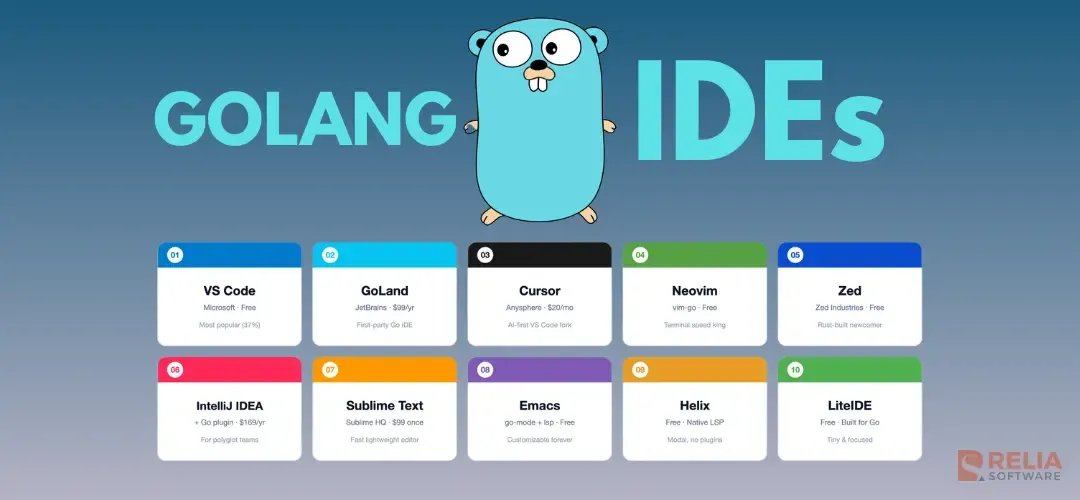
For fast and productive coding, developers need the correct Integrated Development Environment (IDE). Golang also does. A Go-specific IDE with code completion, debugging, project management, and communication can help developers so much in development.
We've written Go in production for years and used most of the Golang IDEs across that time. Some of them got better. Some got worse. One of them died.
So, in this blog, we will review the top 10 best Golang IDEs that Go developers actually today based on our own experience. We hope that you can choose an optimal one that meet your needs and preferences.
|
Key Takeaways:
|
Now, take a first look at the IDEs we will discuss in this blog:
| Editor | License | Price (2026) | Go Support | Built-in Debugger | Best for |
| VS Code + Go extension | Free, open source | $0 | Official extension by the Go team | Yes (Delve) | Most developers |
| GoLand | Commercial | $99/yr ($79 y2, $59 y3+) | First-party JetBrains IDE | Yes (Delve) | Professional Go teams |
| Cursor | Freemium | Free tier + $20/mo Pro | VS Code Go extension works as-is | Yes (Delve) | AI-assisted coding |
| Neovim + vim-go | Free, open source | $0 | Plugin (vim-go) + gopls via LSP | Yes (vim-go or nvim-dap) | Vim users |
| Zed | Freemium | Free + AI tier | Native gopls via built-in LSP | Yes (Delve, zero-config) | Speed and modern UI |
| IntelliJ IDEA Ultimate + Go plugin | Commercial | $169/yr | Same Go engine as GoLand | Yes (Delve) | Java/Go polyglot teams |
| Sublime Text + LSP-gopls | Commercial | $99 one-time | Plugin (LSP + LSP-gopls) | External (Delve CLI) | Light, fast text editing |
| Emacs + go-mode + lsp-mode | Free, open source | $0 | Plugin + gopls via LSP | Yes (dap-mode) | Emacs users |
| Helix | Free, open source | $0 | Native LSP (no plugins) | External (Delve CLI) | Modal editing without configs |
| LiteIDE | Free, open source | $0 | Built around Go specifically | Yes (gdb/Delve) |
>> Read more:
- Top 10 Best Golang Web Frameworks
- Practical Guide to Dependency Injection in Go: Hands-On Implementation
- Detailed Code Examples of Dependency Inversion Principle in Go
Visual Studio Code (VS Code)
| Price | Platforms | License | Maker |
| Free | Windows, macOS, Linux | MIT (editor) | Microsoft |
VS Code is what most Go developers use. The 2025 Go Developer Survey puts it at 37%, the largest share of any single editor.
VS Code works well for Go because the official Go extension is maintained by the Go team at Google. Install the extension, open a .go file, and the editor sets up gopls (the official Go language server) for you. You get autocomplete, jump-to-definition, refactoring, inline error messages, and run-tests-from-the-gutter without any configuration.
Debugging runs on Delve and is one click away. You can debug tests, debug a single function, or debug the whole main package.
What's good: VS Code is free, the extension is first-party, and the ecosystem is huge. If something goes wrong, someone has already posted a Stack Overflow answer.
What's NOT good: VS Code can feel slow on very large repos compared with GoLand. The Electron base means VS Code uses more memory than Sublime or Helix. Refactoring is good but not as deep as GoLand's.
Pick VS Code if:
- You are starting out;
- You switch between languages often;
- You want a free editor that handles 95% of what GoLand does.
>> Read more: 10 Best VSCode Extensions to Improve Developer's Productivity
GoLand
| Price | Platforms | Maker |
|
$99/year; $79 second year; $59 third year onward Free for students and open-source maintainers | Windows, macOS, Linux | JetBrains |
GoLand is the dedicated Go IDE from JetBrains. It is paid software, and people pay for GoLand because the refactoring and debugging are the best you can get for Go.
In daily use, GoLand feels different from a code editor with a plugin. The whole IDE knows about Go, for example:
- Rename a struct field across a 50,000-line codebase and it just works.
- Inline a function, extract an interface, or find all usages of an exported method.
Each of these features exists in VS Code too, but in GoLand they are faster and more thorough.
Debugging in GoLand is another outstanding thing. Conditional breakpoints, expression evaluation in the variables pane, and memory views for byte slices all just work.
What's good: Best-in-class refactoring, best debugger experience, deep test coverage tooling, integrated database tools, and an integrated HTTP client.
What's NOT good: GoLand costs money, and the cost is per developer. The startup time is slower than VS Code, and the interface has many panels and can feel busy.
Pick GoLand if:
- You write Go professionally;
- Your company pays for tools;
- You want the best refactoring on the market.
Cursor
| Price | Platforms | Maker |
|
Free tier; Pro is $20/month | Windows, macOS, Linux | Anysphere |
Cursor is a fork of VS Code with AI built in at every level. Because it is a VS Code fork, the official Go extension and gopls work exactly the same way. Everything that runs in VS Code runs in Cursor.
What you get:
- Agent-mode editing across multiple files,
- An inline chat that knows your repo,
- A Tab key that predicts the next change in your code, not just the next token.
For Go, these features are genuinely useful when writing repetitive code like struct method receivers, test table cases, or boilerplate error wrapping.
What's good: All of VS Code's Go features, plus AI that actually helps with Go's verbose patterns (if err != nil, struct tags, test tables). Cursor's repo-aware chat is much better than copy-pasting code into ChatGPT.
What's NOT good: AI features are gated behind the $20/month Pro plan after the free tier runs out. The base editor is otherwise the same as VS Code, so if you don't want AI you should use VS Code directly.
Pick this if: You already use AI tools daily and want them inside the editor instead of a separate browser tab.
Neovim (with vim-go or gopls + nvim-dap)
| Price | Platforms | License |
|
Free | Windows, macOS, Linux | Apache 2.0 |
If you live in the terminal, Neovim is the fastest editor on this list. It opens instantly, uses very little memory, and runs over SSH without screen tearing.
Two ways to set up Neovim for Go:
- The plugin route: Install
vim-goby Fatih Arslan, a Go contributor. It bundles everything:gopls,gofmt, test running, build commands, and a debugger mode using Delve. One:GoDebugStartand you have a working debugger inside Vim. - The LSP route: Use
goplsdirectly through Neovim's built-in LSP client (since 0.5), plusnvim-dapandnvim-dap-gofor debugging. This means more config, but more flexibility.
What's good: Fastest editor on the list. Neovim works well over SSH, and modal editing is faster once you learn it. The Go-specific tooling is great because the maintainer is part of the Go community.
What's NOT good: The learning curve is steep and the first week is slow. You have to configure things yourself, and the debugger is functional but has a text-based UI.
Pick this if: You already know Vim, you work on remote machines often, or you value editor speed above everything else.
Zed
| Price | Platforms | License | Maker |
| Free; AI features have a paid tier | macOS, Linux (Windows in beta as of 2026) | GPL 3.0 (some components Apache 2.0) | Zed Industries (the team behind Atom) |
Zed is an interesting new editor in the past few years. It is written in Rust, runs natively (no Electron), and has a built-in LSP client that detects gopls automatically. From the official Zed Go docs: "Zed has a built-in LSP client and knows to run gopls when visiting a Go source file."
Debugging is also native as Zed supports zero-configuration debugging of Go tests and main functions using Delve. The 2025 Go Developer Survey shows 4% of Go developers use Zed as their primary editor. That is small, but the trend line is up.
What's good: Zed is fast with a clean UI. Native Go support out of the box and real-time collaboration is built in (think Google Docs, for code).
What's NOT good: Zed has a smaller plugin ecosystem than VS Code. Windows support is still in beta, and some features that exist in VS Code aren't there yet.
Pick this if: You want a modern, fast editor and you don't need every single VS Code extension. Try Zed for a week on a side project before committing to it for daily work.
IntelliJ IDEA Ultimate (with the Go plugin)
| Price | Platforms | Maker |
|
169/year individual ($135 y2, $101 y3+) | Windows, macOS, Linux | JetBrains |
IntelliJ IDEA Ultimate with the Go plugin is the same Go engine that powers GoLand, but inside an IDE that also supports Java, Kotlin, JavaScript, Python, and most other major languages.
If your team writes Go and Java in the same project, which is often common in microservices teams migrating off the JVM, this is the right pick. You don't have to switch IDEs to switch languages.
What's good: Everything GoLand has, plus first-class support for ~15 other languages. One license covers everything.
What's NOT good: It costs more than GoLand alone and is heavier because it loads more components. If you only write Go, this is overkill.
Pick this if: You write Go and at least one other language daily, and your team works in a polyglot stack.
>> Read more:
- A Complete Guide to Build Microservices with Golang Echo
- A Complete Guide to Implement Golang gRPC with Example
Sublime Text (with LSP and LSP-gopls)
| Price | Platforms | Maker |
|
$99 one-time license (you keep the version you bought; updates are continuous) | Windows, macOS, Linux | Sublime HQ |
Sublime Text is one of the fastest GUI editors made, opening 200MB files without slowing down. It has been around for over a decade and is still actively developed.
Go support comes from two community packages installed through Package Control: LSP and LSP-gopls. Together they give you autocomplete, diagnostics, jump-to-definition, and refactoring through gopls. There is no built-in debugger UI, you run Delve from the command line.
What's good: High speed and stability. The one-time license is a refreshing alternative to modern subscription pricing.
What's NOT good: No built-in Go debugger UI and a smaller plugin ecosystem than VS Code. The official Go Wiki notes that some editors in this category "may have less modern Go support". Sublime works fine with gopls, but the experience is more text-editor and less IDE.
Pick this if: You want a fast, lightweight editor and you're comfortable running Delve from the terminal.
Emacs (with go-mode and lsp-mode)
| Price | Platforms | Maker |
|
Free | Windows, macOS, Linux | GPL 3.0 |
Emacs has supported Go for as long as Go has existed. The standard setup uses three packages: go-mode (syntax), lsp-mode or eglot (LSP client for gopls), and dap-mode (debugging through Delve).
What's good: Endlessly customizable. Org-mode integration is unmatched if you keep your notes and code in the same place. The Emacs community has Go tooling that has been refined for over a decade.
What's NOT good: Steep learning curve and configuration is written in Emacs Lisp. Default keybindings can be uncomfortable for many people.
Pick this if: You already use Emacs daily. If you don't, the time investment is hard to justify when free alternatives like VS Code exist.
Helix
| Price | Platforms | Maker |
|
Free | Windows, macOS, Linux | Mozilla Public License 2.0 |
Helix is a modal editor (like Vim) written in Rust. The main thing that makes it different: it has a built-in LSP client and a built-in tree-sitter parser, so you don't install plugins to get language support. Install gopls and Helix uses it automatically.
The Go team has official Helix setup docs, and setup requires just a one-line config file.
What's good: Zero plugin management, fast performance, and modal editing with a selection-first approach. Helix provides great defaults out of the box.
What's NOT good: Helix is a younger project, so the ecosystem is smaller. There is no built-in debugger UI yet (Delve runs from the terminal), and there is less community content than Neovim.
Pick this if: You want modal editing without the time sink of configuring Neovim, and you don't need a graphical debugger UI inside the editor.
LiteIDE
| Price | Platforms | Maker |
|
Free | Windows, macOS, Linux | LGPL 3.0 |
LiteIDE is the longest-running IDE built specifically for Go. It is small, fast, and focused. No JavaScript runtime, no plugin marketplace, and no AI features.
It supports gopls, Delve debugging, test running, and the basic refactoring most developers need. The project is maintained, but development moves slowly.
What's good: Tiny resource footprint and built for Go from the ground up with no setup required.
What's NOT good: The LiteIDE's UI feels dated and it has fewer features than VS Code or GoLand. The Go Wiki classifies it in the "less popular" category alongside other older editors.
Pick this if: You work on a low-resource machine (4GB RAM or less), or you want a no-frills, Go-only IDE.
>> Read more:
- Comprehending Arrays and Slices in Go Programming Language
- Cloud Success Blueprint: Why Go Is A Perfect Match?
What We Use at Relia Software?
We've built around 30 Go services across client projects since 2018. Here is what the team actually uses:
- About half the team uses VS Code with the Go extension. It is the default for new hires, and setup takes 5 minutes.
- The senior backend engineers use GoLand. Two reasons: the refactoring saves them hours per week on large codebases, and the debugger handles complex goroutine inspection better than the VS Code Delve integration.
- One engineer uses Neovim with vim-go. He works from a tablet over SSH about half the time, which is where Neovim earns its keep.
- We have implemented Cursor in recent years. It helped most when generating test tables and boilerplate. We didn't standardize on it because the AI costs add up across a team and the productivity gain was real but not dramatic.
- Several developers on the team use Cursor alongside VS Code. It started as an experiment in 2024 and is now part of our daily workflow. It helps most with generating test tables, error-wrapping boilerplate, and drafting new functions, not just glue code. We pay the per-seat cost for the developers who want it.
In short, if you are starting a new Go team and need one default: install VS Code on every machine. If you have budget for senior developers, add GoLand licenses for the ones who want them. That is the setup we put on most projects.
Conclusion
Choosing the right Golang IDEs comes down to matching your tools with your workflow and experience level. For the vast majority of developers, VS Code remains the safest and most reliable free option, backed directly by the Go team's first-party support.
If you are a professional developer working within massive codebases or demanding complex debugging workflows, investing in GoLand pays for itself in time saved. Meanwhile, the rapid rise of native and fast editors like Zed and AI-first workflows like Cursor show that the ecosystem is evolving quickly.
Ultimately, because almost every modern editor utilizes the same official language server (gopls) under the hood, your choice is less about language capability and more about your preference for speed, configuration overhead, and user interface.
Stick with what makes you productive, and don't hesitate to use the simple setup until your projects demand something more advanced.
>>> Follow and Contact Relia Software for more information!

- golang
- coding
- Web application Development
- development