


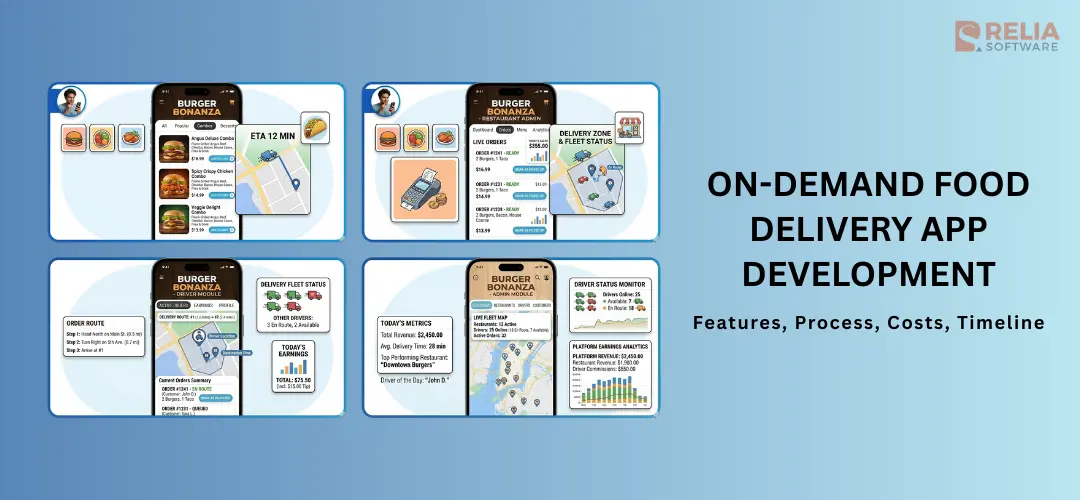
Food delivery app development means creating an app that lets customers order food online and receive it at home, at work, or at another location. The app can be used for hungry users, a single restaurant, a cloud kitchen, a delivery startup, or a large marketplace with many vendors.
But building a food delivery app is not really easy, but also not too difficult if you have a strategic plan and a reliable software development partner.
In this blog, we will help you understand all the things in customized food delivery app development, including the main types, core features, process, costs, timeline, more. The goal is to help you successfully build a food delivery app and minimize unexpected risks.
What is Food Delivery App Development?
Food delivery app development is the process of building a digital platform that helps customers order food, restaurants manage incoming orders, drivers handle delivery, and admins control the whole operation (e.g., orders, payments, users) in one system.
To develop a food delivery app, you actually have to build distinct interfaces:
|
Component |
Primary Users |
Key Purpose |
|
Customer App |
Hungry users |
Browsing menus, placing orders, and real-time tracking. |
|
Restaurant App |
Kitchen staff/Owners |
Order management, menu updates, and revenue tracking. |
|
Courier App |
Delivery drivers |
GPS navigation, order pickup/drop-off, and earnings dashboard. |
|
Admin Panel |
Your business team |
The dashboard that manages users, restaurants, and overall platform analytics. |
Types of Food Delivery Apps
Single Restaurant Apps
A single restaurant (known as restaurant-to-consumer) app is built for one food business or one restaurant chain, so the business has full control over branding, menu updates, pricing, customer data, and promotions. It works well for restaurants that already have a stable customer base and want to manage direct orders without depending too much on third-party marketplaces.
For restaurant chains, this app can also support multiple branches, local delivery zones, and branch-based order routing.
Examples: Domino’s app, Pizza Hut app
Multi-Vendor Marketplace Apps
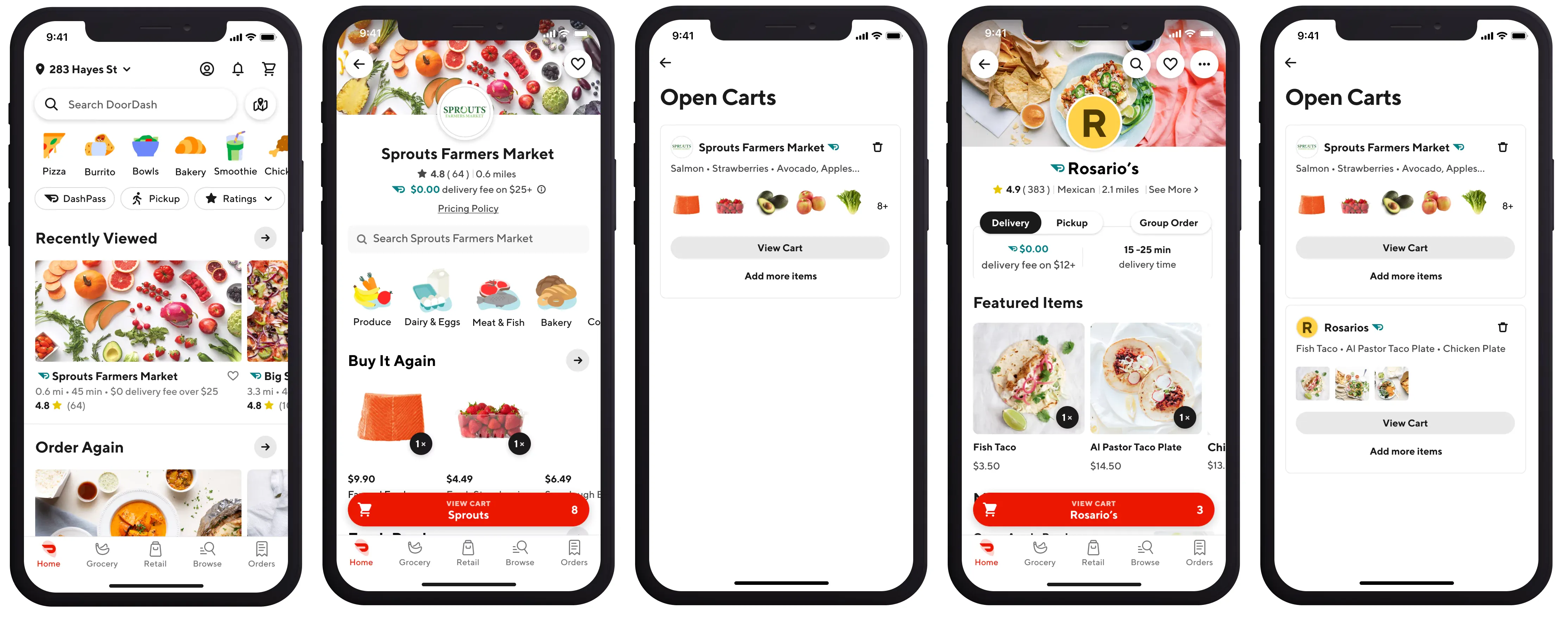
A multi-vendor marketplace app (or platform-to-consumer) app connects many restaurants to many users on one platform. Customers can use only one app to browse different food brands, compare menus and prices, place orders, and track delivery.
In this app type, the platform is in charge of managing the customer experience, restaurant onboarding, order flow, payments, driver coordination, promotions, and commissions. Startups and delivery businesses that want to scale across different restaurant partners and locations often use this app because it can attract more users.
Examples: Uber Eats, DoorDash
Cloud Kitchen (Ghost Kitchen) Apps
Cloud kitchen delivery apps are built for delivery-only food businesses without serving dine-in customers, so the app is the main sales channel. The app needs features like real-time order updates, branch-based kitchen assignment, menu switching by location, and tight integration with delivery logistics.
This type is useful for businesses that want to launch food brands with lower front-of-house costs or operate multiple delivery brands from one kitchen.
Examples: Rebel Foods (with brands like Faasos, Behrouz Biryan, Oven Story, Mandarin Oak); Curefoods (with brands like EatFit, CakeZone, Sharief Bhai)
Hybrid Apps
Hybrid apps combine features from different food delivery app types. For example, a business may run a marketplace with many restaurants, offer its own delivery fleet in selected areas, and also support direct ordering for specific partner brands. Some hybrid platforms also mix restaurant-owned delivery with platform-managed delivery depending on the partner or location.
The hybrid app type gives businesses more flexibility because they do not have to follow one fixed setup from the start. It works well for companies that want to grow step by step, test different delivery strategies, or serve different partner types under one platform.
Food and Grocery Delivery Apps
Food and grocery delivery service apps are built to deliver not only restaurant meals but also groceries, daily essentials, and convenience items. Instead of focusing on one type of seller, this app connects users with restaurants, supermarkets, grocery stores, convenience stores, or dark stores in one platform.
Food and grocery delivery apps are often designed for fast ordering, real-time inventory updates, delivery slot management, and location-based fulfillment.
Examples: Instacart, Gopuff, DoorDash, GrabMart
3 Business Models for Food Delivery App
There are several key business models for food delivery apps, each with its own advantages and considerations. Here's a breakdown of the most common ones:
Aggregator Model
This is the most popular model where the app acts as a middleman, connecting restaurants with customers. Users browse restaurants listed on the app, place orders, and track deliveries. Restaurants receive orders, prepare food, and potentially handle delivery themselves or outsource it.
Revenue Generation:
- Commissions: The app charges restaurants a commission fee (typically 10-30%) on each order placed through the platform.
- Delivery Fees: The app may charge customers a delivery fee on top of the order total. This fee can be fixed or variable based on distance.
- Premium Subscriptions: Some apps offer premium memberships with perks like free delivery or exclusive discounts.
Advantages:
- Efficient for both restaurants (no need to manage online presence) and users (wide variety of options).
- Lower initial investment for app owners compared to in-house delivery.
Disadvantages:
- Restaurants have less control over customer experience and branding.
- Competition can be high, leading to pressure on commission rates.
Example:
DoorDash connects users with a vast network of restaurants in their area. Users browse menus, place orders, and track deliveries all within the DoorDash app. Restaurants receive orders, prepare food, and can choose to handle deliveries themselves (if they have their own drivers) or partner with DoorDash for delivery through their network of independent drivers. DoorDash generates revenue through commissions charged to restaurants on each order.
Order-and-Delivery Model
The app handles the entire process, from receiving orders to delivering food. This often involves partnering with restaurants and managing a fleet of delivery drivers.
Revenue Generation:
- Delivery Fees: Similar to the aggregator model, the app charges a delivery fee to customers.
- Restaurant Markups: The app might markup restaurant menu prices to cover operational costs and generate profit.
Advantages:
- App owner maintains full control over customer experience and branding.
- Potential for higher profit margins compared to the commission-based model.
Disadvantages:
- Requires significant investment in building and managing a delivery fleet.
- Operational complexity is higher compared to the aggregator model.
Example:
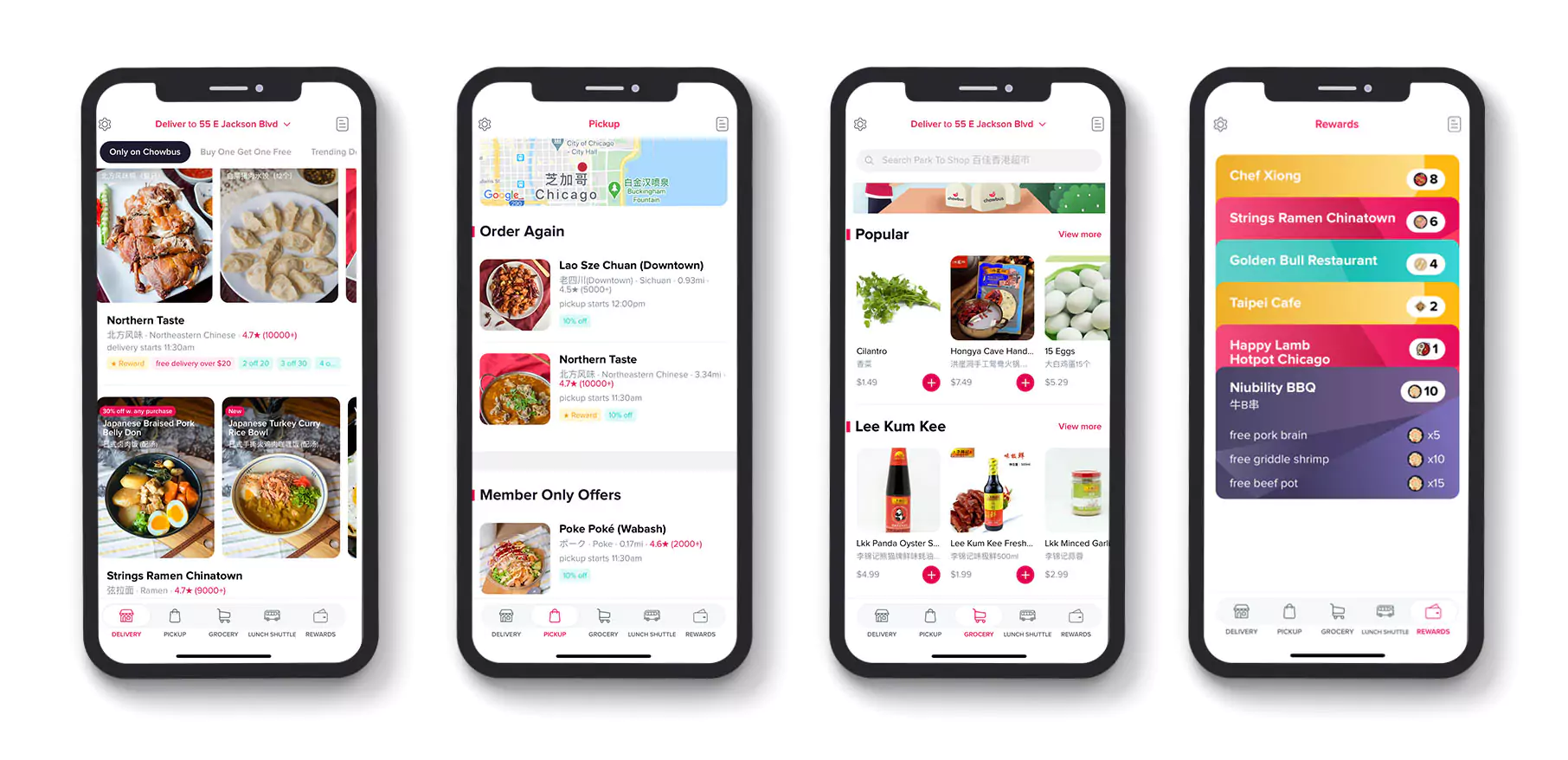
Chowbus is a popular food delivery app in China. Unlike DoorDash, Chowbus doesn't rely on restaurants for deliveries. They have their own fleet of drivers who pick up food from restaurants and deliver it directly to customers. For operational costs and profit, Chowbus negotiates menu prices or markups with restaurants. Chowbus has more control over delivery but must invest much in drivers and logistics.
In-House Delivery Model
Similar to the order-and-delivery model, but the app belongs to a restaurant chain that handles all aspects of delivery itself, from processing orders to using their own delivery staff.
Revenue Generation: Delivery fees and standard restaurant profit margins.
Advantages:
- Highest level of control over customer experience and branding.
- Improved profitability due to eliminating commission fees to third-party platforms.
Disadvantages:
- Limited to established restaurant chains with the resources to manage delivery logistics.
- Less scalable compared to the other models.
Example:
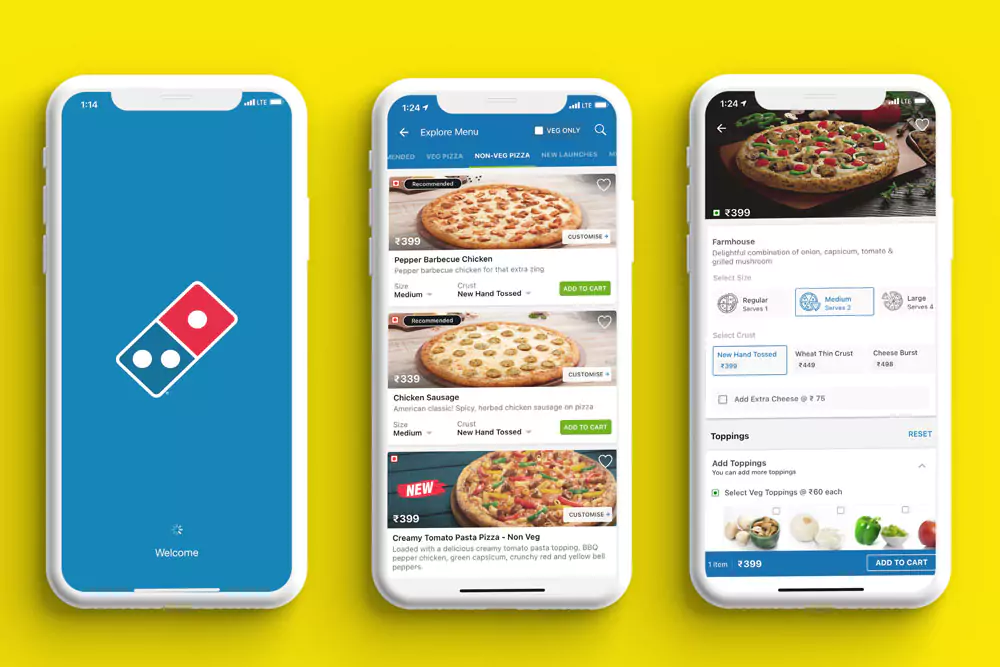
Domino's has its own online ordering platform and a dedicated team of delivery drivers. When you order a pizza from Domino's, everything from taking the order, preparing the food, and delivering it to your doorstep is handled by Domino's employees. This model provides Domino's with complete control over the customer experience but limits its reach to only their own menu items.
Revenue Models for A Food Delivery App
Modern food delivery apps have multiple revenue streams to generate income. Here's a breakdown of the most common models:
Commission on Orders
The app charges a commission on the total order value placed by the user. This is the most common revenue model for aggregator apps like DoorDash and Uber Eats.
- Pros: Simple to implement, provides a steady stream of income based on order volume.
- Cons: Highly dependent on user base and order frequency. Restaurants might find high commission rates a burden on their profits.
Delivery Fees
The app charges users a separate delivery fee on top of the order total. This fee can be fixed or vary based on factors like distance, order weight, or delivery time.
- Pros: Provides additional income and can be used to offset operational costs.
- Cons: High delivery fees can deter users from ordering, especially for smaller orders. Transparency in fee structure is crucial.
Subscription Model
Users pay a monthly or annual subscription fee in exchange for benefits like free or discounted delivery on a certain number of orders per month. This model is gaining traction.
- Pros: Provides recurring revenue and incentivizes users to order more frequently.
- Cons: Requires a strong value proposition to convince users to subscribe. May not be suitable for all user segments.
Restaurant Advertising
The app offers premium placement or advertising options for restaurants within the app to increase their visibility to users. This can be in the form of sponsored listings, banner ads, or targeted promotions.
- Pros: Provides an additional revenue stream and allows restaurants to reach a wider audience.
- Cons: Needs a large user base to attract restaurant interest. Ensure transparency to avoid compromising user trust.
In-App Upselling and Marketing
The app partners with restaurants or other businesses to offer in-app upselling opportunities, such as suggesting add-on items or promoting specific menu selections.
- Pros: Can generate additional revenue for both the app and restaurants.
- Cons: Must be implemented thoughtfully to avoid overwhelming users with promotions and compromising user experience.
The optimal revenue model (or a combination of models) depends on your target audience, market dynamics, and overall business strategy. Here are some factors to consider:
- Target Market: Price-sensitive users might be more receptive to lower commissions and transparent delivery fees.
- Competition: Analyze how competitors are generating revenue and identify potential gaps in the market.
- Value Proposition: Ensure your revenue model aligns with the overall value proposition you offer to users and restaurants.
Essential Features for A Food Delivery App
Here are the essential features a food delivery app should have, categorized for users, restaurants, drivers, and admin:
For Users
- User Registration and Profiles: Allows customers to create accounts, save addresses, and manage personal preferences.
- Automatic Location: Automatic location detection for effortless delivery address selection, with the option to save multiple addresses for convenience.
- Restaurant Listings: Comprehensive details about restaurants, including cuisine types, ratings & reviews, delivery fees, opening hours, and estimated delivery times.
- Search and Filter Options: Allow users to search and filter restaurants by cuisine, dietary preferences (vegan, gluten-free, etc.), price range, or even specific keywords (e.g., "healthy").
- Menu Browsing: High-quality photos and clear descriptions of menu items are essential for informed choices.
- Multiple Payment Options: Supports cards, digital wallets, and other payment methods.Consider saving preferred payment methods for faster transactions.
- Live Order Tracking: A map visualization showing the delivery driver's location and estimated arrival time keeps users informed and reduces anxiety.
- Order Status Updates: Provide updates throughout the process, such as order confirmation, preparation, and when the driver is on the way. This transparency builds trust and manages user expectations.
- Group Ordering: Allow multiple users to join one shared order, with payment options such as one person paying for all or each person paying for their own items. This often increases order value and improves convenience.
- Ratings and Reviews: Lets customers rate restaurants and share feedback.
- Customer Support: Offer easy access to customer support through various channels like live chat, email, or a dedicated phone number for inquiries or resolving issues.
For Restaurants
- Simple Registration: A quick and easy process for restaurants to register and list their menus on the app.
- Menu Management: Restaurants can update menu items, prices, availability, or special offers with clear descriptions, images and pricing.
- Order Management: Helps restaurants accept, reject, and prepare incoming orders.
- Kitchen Status Updates: Allows restaurants to update order preparation progress.
- Sales Tracking: Shows order history and sales performance to help restaurants optimize their menus, pricing strategies, and overall performance on the platform.
- Promotion Management: Restaurants can create discounts or special offers.
- Secure Communication Channel: Enable secure two-way communication with customers for order clarifications or updates.
For Drivers
- Driver Registration and Verification: Allows drivers to sign up and verify their profiles.
- New Order Alerts: Drivers should receive real-time notifications about new order requests within their designated delivery zone. Order details are shown with clear and concise information about restaurant location, customer delivery address, and order items.
- Order Assignment: Allow drivers to accept or reject orders based on factors like distance, estimated delivery time, or potential conflicts with other deliveries.
- Navigation Support: Utilize a reliable GPS navigation system integrated with the app to guide drivers to the restaurant for pickup and then to the customer's delivery location.
- Traffic Updates: Real-time traffic updates can help drivers avoid congestion and optimize their delivery times.
- Delivery Status Updates: Features to mark orders as picked up from the restaurant and successfully delivered to the customer.
- Contacting Customers: Allow drivers to contact customers directly through the app in case of any issues with locating the delivery address or unforeseeable delays.
- Earnings Tracker: A clear overview of the driver's earnings for completed deliveries, potentially including breakdowns by shift or individual orders (depending on your pay structure).
- Performance Metrics: Optional features could include delivery completion rates, average delivery times, and customer ratings, providing drivers with insights into their performance.
- Push Notifications: Targeted notifications for important updates like new order availability, account-related information, or app maintenance.
For Admin
- User management: Manage customer, restaurant, and driver accounts, including profile details, account status, access control, and platform activity.
- Restaurant onboarding: Add, review, and approve restaurant partners, then set up store details, menus, service areas, and operating status.
- Order monitoring: Track orders across the platform in real time, from placement and preparation to pickup, delivery, and completion.
- Commission and payment management: Manage restaurant commissions, delivery payments, service fees, refunds, and financial records across the platform.
- Analytics and reporting: Track key business metrics such as order volume, revenue, delivery performance, customer activity, and restaurant performance.
- Promotion management: Launch and manage discounts, promo codes, featured listings, and other marketing campaigns to drive more orders.
By including these essential features and considering additional functionalities, you can create a user-friendly and efficient food delivery app that caters to all stakeholders - users, restaurants, and delivery drivers. Remember, a successful app requires a balance between core functionalities and features.
Essential Integrations You Need for A Food Delivery App
An on-demand food delivery app also needs several third-party integrations to support payments, logistics, notifications, and daily operations besides frontend and backend features.
Payment Gateway: Payment gateway integration allows users to pay for orders directly inside the app by different payment methods such as credit cards, debit cards, digital wallets, and sometimes cashless local payment options. The platform manages refunds, transaction records, and payment verification.
Maps and Location: Maps and location features identify user locations, calculate delivery distances, and provide users and restaurants with real-time delivery tracking. Thus, drivers can navigate efficiently and customers can see where their orders are during delivery.
Push Notifications and Messaging: Push notifications notify customers when an order is confirmed, when the driver is on the way, or when the order has arrived. Messaging integrations can support in-app communication between customers, drivers, and restaurants to resolve delivery issues quickly.
POS and Restaurant System: POS (point-of-sale) integration connects the food delivery app with restaurant management systems so that the order information can be sent directly to the restaurant’s kitchen or POS system. This integration reduces manual order entry, improves order accuracy, and speeds up kitchen operations.
Analytics and Reporting Tools: Integrating analytics tools to track important data such as order volume, customer behavior, delivery performance, and revenue trends. With these information, businesses can make better decisions about promotions, delivery zones, pricing strategies, and menu offerings.
Customer Support: Customer support tools help users contact support teams when they face problems with orders, payments, or deliveries via live chat, support tickets, or help center systems. This feature is necessary to improve customer satisfaction and helps businesses resolve issues quickly.
A Comprehensive Guide for Food Delivery App Development
The journey of developing a successful food delivery app involves several crucial stages. Here's a breakdown of the life cycle, encompassing planning, development, and launch processes:
Step 1: Planning and Ideation
Market Research: Conduct thorough research to understand the competitive landscape, identify your target audience, and analyze current trends in food delivery apps.
Define Your Value Proposition: What makes your app unique? How will it address a specific user need or differentiate itself from existing competitors? This is a critical step to guide your development efforts.
Model Selection: Choose the most suitable business and revenue model for your app. Consider factors like user behavior and operational costs.
Feature Prioritization: Develop a roadmap outlining the essential features and potential future functionalities. Prioritize features based on user needs and project timelines.
Step 2: Design and Development
UI/UX Design: Craft an intuitive and user-friendly interface that is easy to navigate for both customers and restaurants. Focus on a clean design, clear labeling, and a smooth workflow for ordering and delivery tracking.
App Development: Choose a development approach. Will you create native apps for iOS and Android, or opt for a hybrid app solution? Select appropriate programming languages and development tools based on your chosen approach.
API Integration: Integrate APIs with restaurant partners (if applicable) and payment gateways to facilitate seamless ordering and transactions. This ensures secure data exchange between your app and external platforms.
Step 3: Testing and QA
Rigorous Testing: Perform thorough testing on various devices and operating systems (iOS and Android versions) to ensure functionality, usability, and security across different platforms.
Bug Fixing: Identify and address any bugs or glitches that could hinder user experience. Prioritize critical issues that impact core functionalities.
Security Assessments: Conduct comprehensive security testing to ensure user data and financial information are protected. This includes measures against data breaches and unauthorized access.
>> Read more about testing:
- Top 6 Automation Testing Tools for Businesses
- End-To-End Testing: Definition & Best Practices
- What is Automation Testing in Software Development?
- Top 10 Best End-to-End Testing Tools and Frameworks
Step 4: Launch and Marketing
App Store Optimization (ASO): Optimize your app listing with relevant keywords and captivating visuals to improve discoverability in app stores (Apple App Store, Google Play Store).
Marketing Strategy: Develop a comprehensive marketing plan to reach your target audience. This may include social media marketing, influencer partnerships, public relations efforts, and potentially targeted advertising campaigns.
App Launch: Finally, launch your app on the respective app stores. Ensure a smooth launch process with clear communication and potential launch promotions to attract users.
Step 5: Maintenance and Growth
Performance Monitoring: Continuously monitor app performance metrics like user engagement, crashes, and feedback. Utilize analytics tools to track user behavior and identify areas for improvement.
App Updates: Regularly update your app with new features, bug fixes, and security patches to maintain user interest, address evolving needs, and stay ahead of security vulnerabilities.
User Feedback Integration: Actively collect user feedback through surveys, reviews, and support channels. Analyze feedback and prioritize improvements based on user needs and suggestions.
Additional Considerations
Compliance with Regulations: Ensure your app adheres to relevant data privacy regulations and food safety standards in your target markets.
Scalability: Design your app and backend infrastructure to handle increasing user traffic and potential future growth.
Team Building: Secure the services of skilled developers, designers, testers, and marketing professionals to execute your development plan. Build a team with the necessary expertise to bring your vision to life.
By following these steps and considering these additional factors, you can move your food delivery app idea from concept to a successful launch. Remember, the food delivery market is dynamic, so continuous improvement, user-centricity, and adaptation to changing trends will be crucial for long-term success.
Tech Stack and Techniques for Food Delivery App Development
The tech stack for your food delivery app will depend on several factors, including your target platforms (iOS, Android, or both), budget, and desired features. Here's a general overview of commonly used technologies:
Front-end Development
Languages:
- Native Apps: Choose platform-specific languages (like Swift for iOS and Kotlin for Android).
- Hybrid Apps: Using languages like JavaScript or Dart (with frameworks like React Native or Flutter allowing you to create a single codebase for both iOS and Android).
UI Frameworks:
- Native Apps: UIKit (iOS) or Jetpack Compose (Android).
- Hybrid Apps: React Native Elements or Flutter.
Back-end Development
- Languages: Python (with Django or Flask frameworks) or Node.js (with Express.js) are popular choices.
- Real-time Features: Consider using technologies like Socket.IO or Pusher if real-time features like live order tracking are crucial,
Databases
- Structured Data: Relational databases like MySQL, PostgreSQL, or Microsoft SQL Server are widely used for storing user information, restaurant details, and order data.
- Unstructured Data: NoSQL databases like MongoDB or Cassandra might be suitable for storing user reviews or images.
APIs
- Mapping Services: Integrate Google Maps or MapKit for location services, route optimization, and delivery tracking functionalities.
- Payment Gateways: Integrate secure payment gateways like Stripe or Braintree to handle online transactions.
- Restaurant Integrations: Depending on your model, you might need APIs to connect with restaurant management systems for menu management and order fulfillment.
Additional Tools and Techniques:
- Cloud Platforms: Utilize cloud platforms like AWS, Google Cloud Platform, or Microsoft Azure for scalability and hosting.
- Version Control Systems: Use Git for code management and collaboration.
- Push Notifications: Utilize Firebase Cloud Messaging (FCM) or Amazon Simple Notification Service (SNS) for real-time updates.
Emerging Technologies
- Machine Learning (ML): Explore the potential of ML for personalized recommendations, dynamic pricing strategies, or even chatbots for customer service.
- Artificial Intelligence (AI): AI-powered route optimization can improve delivery efficiency.
>> Read more about AI-related topics:
- Top 17 Best AI Apps For Individuals and Businesses
- Top 10 Best AI Development Tools for Software Developers
- Benefits of Artificial Intelligence (AI) in Mobile App Development
Food Delivery App Development Cost & Timeline
The cost of building a food delivery app can vary widely depending on app complexity, the number of user panels (customer, driver, restaurant, admin), integrations, platforms (iOS, Android, web), and whether you build a simple MVP or a fully featured enterprise product. Here is a typical price range:
| Type | Estimated cost | Est. Timeline | Features |
| MVP | $15,000 – $30,000 | 3–4 months |
|
| Mid-Size | $30,000 – $80,000 | 4–6 months |
|
| Full-Featured / Enterprise App | $80,000 – $150,000+ | 6–9+ months |
|
Factors Affecting Cost and Time
- App Complexity: Simple apps with basic features will cost less than feature-rich apps.
- Development Approach: Native app development will generally be more expensive than a hybrid app.
- Development Team Location: Hiring developers in regions with lower hourly rates can reduce costs.
- UI/UX Design: A well-designed and user-friendly interface might require additional investment in design expertise.
- Back-end Development: Robust back-end infrastructure for scalability and security can add to the cost.
- Ongoing Costs: Factor in ongoing costs like app store fees, server maintenance, and security updates.
- Marketing and User Acquisition: Budget for marketing efforts to attract users after launch.
Tips for Managing Costs
- Prioritize Features: Start with a core set of essential features and build upon them based on success.
- Explore Open-Source Solutions: Utilize open-source libraries or frameworks where possible to reduce development time and costs.
- Consider a Hybrid Approach: If targeting both iOS and Android, a hybrid app can be a cost-effective option.
- Get Quotes from Multiple Developers: Compare quotes from different development teams to find the best fit for your budget and project requirements.
By understanding these factors and considering cost-saving strategies, you can develop a food delivery app that meets your needs and budget.
>> Read more:
Case Studies: Food Delivery Apps Built by Relia Software
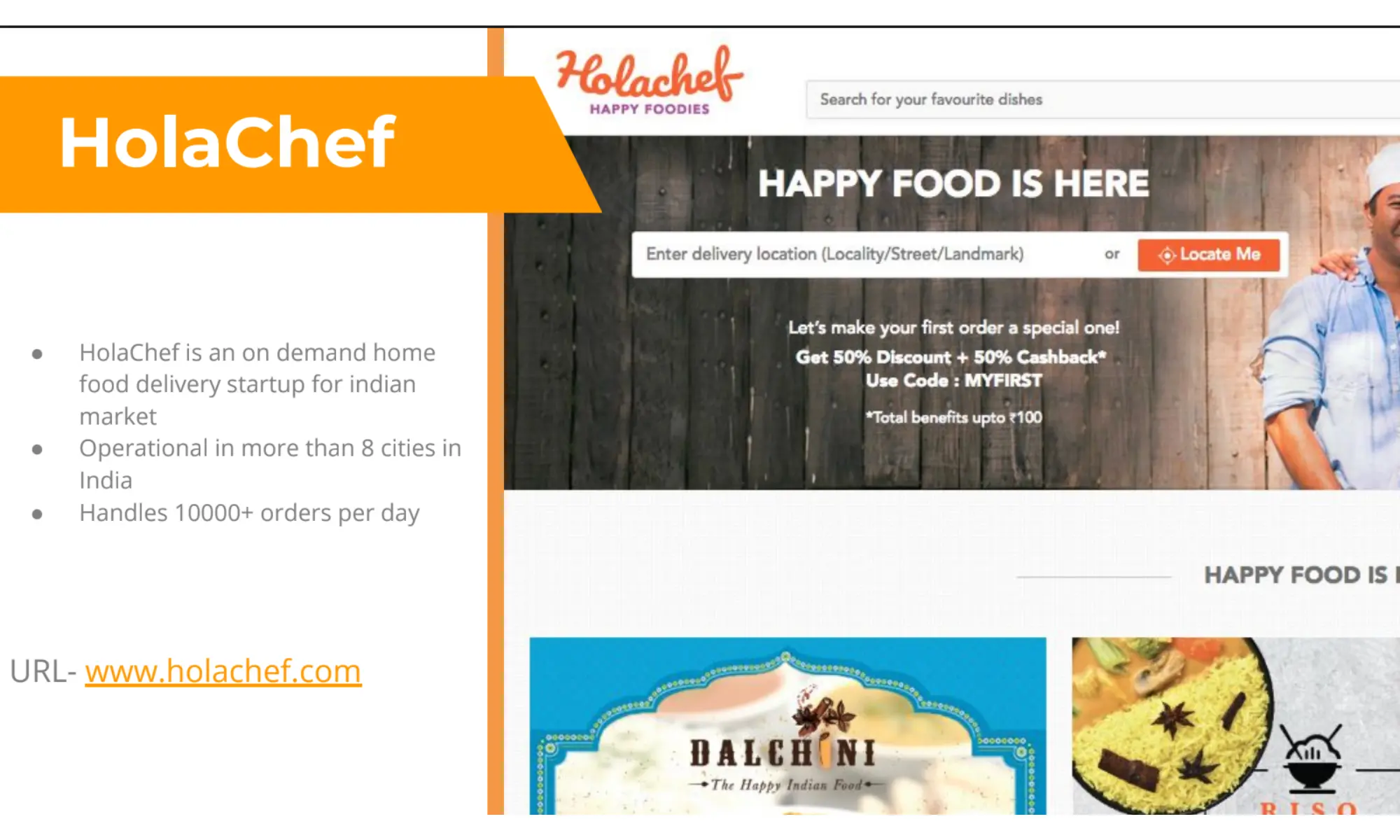
HolaChef
Challenge: HolaChef needed a platform that could support multi-city food delivery operations and handle a high number of daily orders while keeping the ordering flow simple for users.
Solution by Relia Software: Relia Software designed and developed a user-friendly web platform with a smooth ordering experience, clear location input, and scalable frontend architecture for multi-restaurant operations.
Outcome: HolaChef expanded to more than 8 cities in India and handled over 10,000 orders per day.
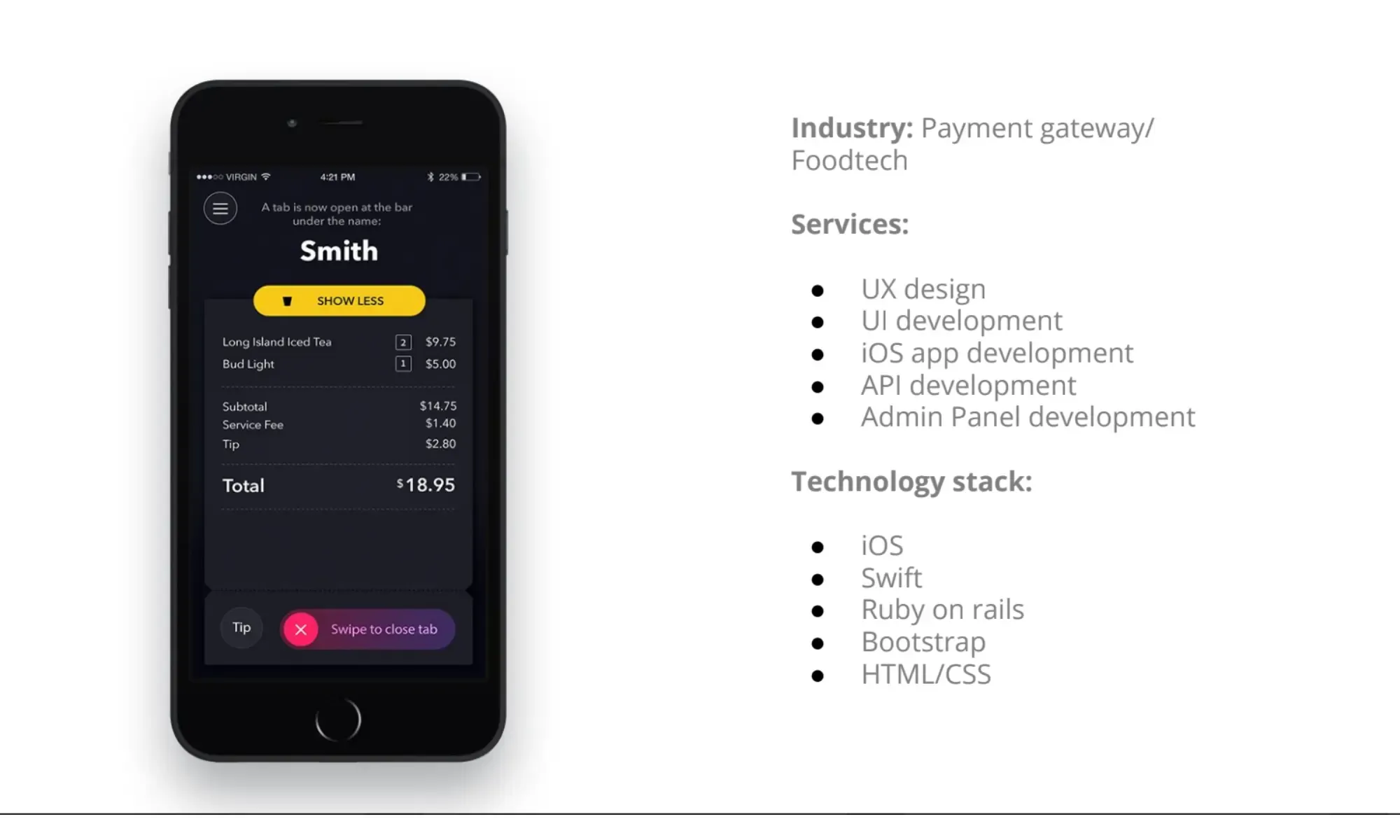
Tally
Challenge: The client needed a mobile app that could simplify ordering and payment in bars and restaurants, especially during busy hours.
Solution by Relia Software: Relia Software built an iOS app that lets users open tabs, place orders, manage payments, and access offers in one place, supported by backend APIs and an admin panel.
Outcome: Tally reached more than 100,000 users and over 10,000 daily active users across the U.S.
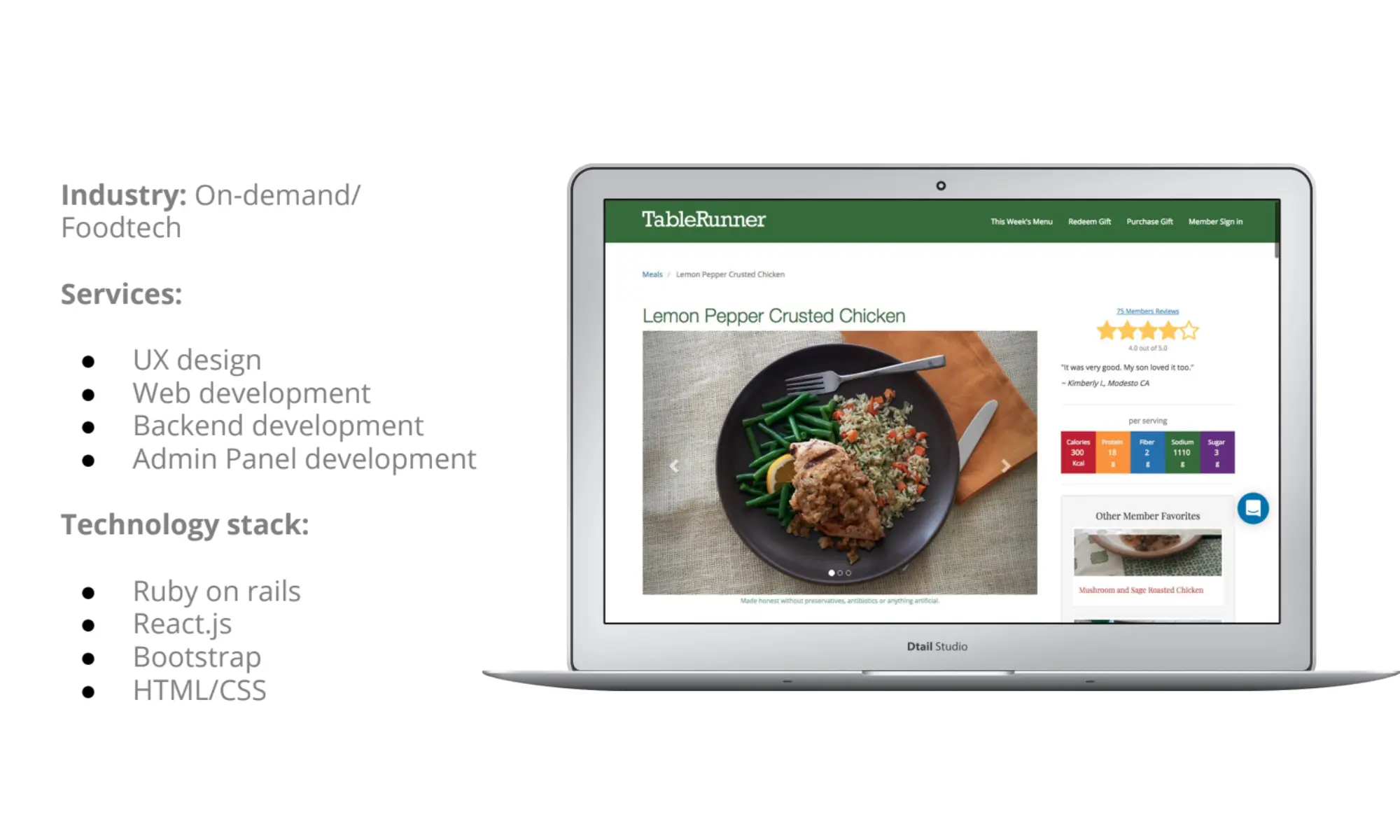
TableRunner
Challenge: TableRunner needed a platform that could manage recurring meal subscriptions, scheduled deliveries, and large subscription volume without making the user experience complicated.
Solution by Relia Software: Relia Software developed a web platform with subscription management, scheduling, backend support, and an admin panel for smooth day-to-day operations.
Outcome: TableRunner handled more than 50,000 monthly subscriptions.
Emerging Trends for Food Delivery App Development in 2026
The food delivery industry is constantly evolving, with new technologies and innovative approaches changing how food reaches our doorsteps. Here's a glimpse into some of the key trends shaping the future of food delivery app:
Artificial Intelligence (AI)
Personalized Recommendations: AI algorithms can analyze user data to suggest dishes, restaurants, and cuisines based on past preferences and dietary restrictions.
Dynamic Pricing and Promotions: AI can optimize pricing strategies based on demand and user behavior, offering targeted promotions and discounts. These adjustments contribute to AI conversion rate optimization by ensuring prices remain competitive and aligned with customer expectations, ultimately driving more sales."
Delivery Route Optimization: AI algorithms can calculate the most efficient delivery routes, reducing wait times and fuel costs.
>> You may be interested in: No-Code And Low-Code Solutions In Logistics And Supply Chain
Automation and Robotics
Autonomous Vehicles (AVs) and Drones: Driverless vehicles and drones have the potential to revolutionize food delivery, especially for long distances or congested urban areas. While legal and safety hurdles remain, advancements in this field could lead to faster and more cost-effective deliveries.
Delivery Robots: Ground-based robots are being tested for last-mile delivery, particularly in college campuses or closed environments.
Focus on Sustainability
Eco-Friendly Packaging: Consumers are increasingly environmentally conscious. Biodegradable or reusable packaging options will be crucial for reducing the industry's environmental footprint.
Carbon-Neutral Deliveries: Apps might offer carbon offsetting initiatives or partner with restaurants offering sustainable practices to appeal to eco-conscious users.
Enhanced User Experience
Augmented Reality (AR) Integration: AR apps could allow users to virtually "try on" dishes before ordering, visualizing portion sizes or customizing toppings.
Virtual Kitchens and Dark Stores: These cloud kitchens focus solely on online orders, optimizing efficiency and delivery speed. This trend could be further enhanced with automation for food preparation and packaging.
Conclusion
The food delivery app market is a thriving space with the potential to revolutionize how people order and enjoy food. By carefully planning, selecting the right development approach, and prioritizing user needs, you can create a successful app that caters to both users and restaurants. Remember, the key to success lies in a user-friendly interface, a robust tech stack, and a focus on continuous improvement to stay ahead of the curve.
Are you ready to take a bite out of the booming food delivery market? Partner with our experienced developers to create a user-friendly and feature-rich food delivery app that stands out. Schedule a call or email us now!
>>> Follow and Contact Relia Software for more information!

- Mobile App Development
- development