


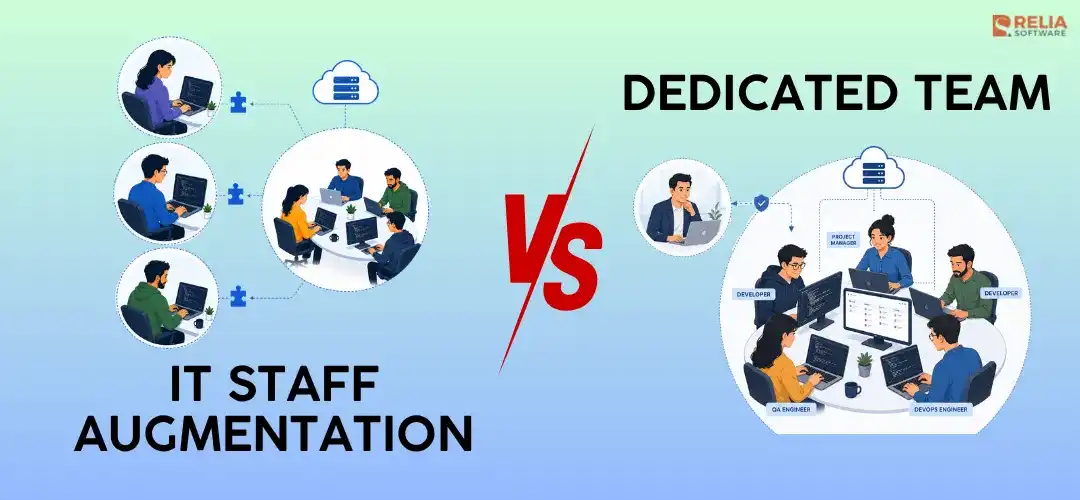
Both staff augmentation and dedicated teams help businesses scale software development, but the two engagement models work in different ways. Staff augmentation is a flexible team extension model where external specialists join your existing workflow and work under your management. A dedicated team is a more complete outsourcing model where an external team supports you throughout the development process.
In this article, we’ll compare staff augmentation vs. dedicated teams by management responsibility, cost, speed, scalability, accountability, and project fit. The goal is to help you decide whether your business needs extra remote developers to support your current team or a stable cross-functional development team to carry out long-term product delivery.
|
Key Takeaways:
|
Before going into each difference in detail, here is a quick comparison of IT staff augmentation and a dedicated development team.
|
Aspect |
IT Staff Augmentation |
Dedicated Development Team |
|
Definition |
External specialists join your existing team |
A full external team works on your product or project |
|
Main purpose |
Fill skill gaps or temporary capacity needs |
Build, scale, or maintain a software product |
|
Team structure |
Individual developers or specialists |
Cross-functional team with developers, QA, PM, UI/UX, DevOps, or BA |
|
Management |
Client manages directly |
Vendor or shared management |
|
Control |
Higher direct control over daily work |
More delegated control and delivery support |
|
Accountability |
Client owns the delivery |
Shared or vendor-supported delivery |
|
Best duration |
Short to medium term |
Medium to long term |
|
Best for |
Extra capacity, niche skills, temporary scaling |
MVPs, product scaling, long-term roadmaps |
|
Hidden cost |
Internal management effort |
Vendor coordination layer |
Staff Augmentation vs Dedicated Team: Pros and Cons
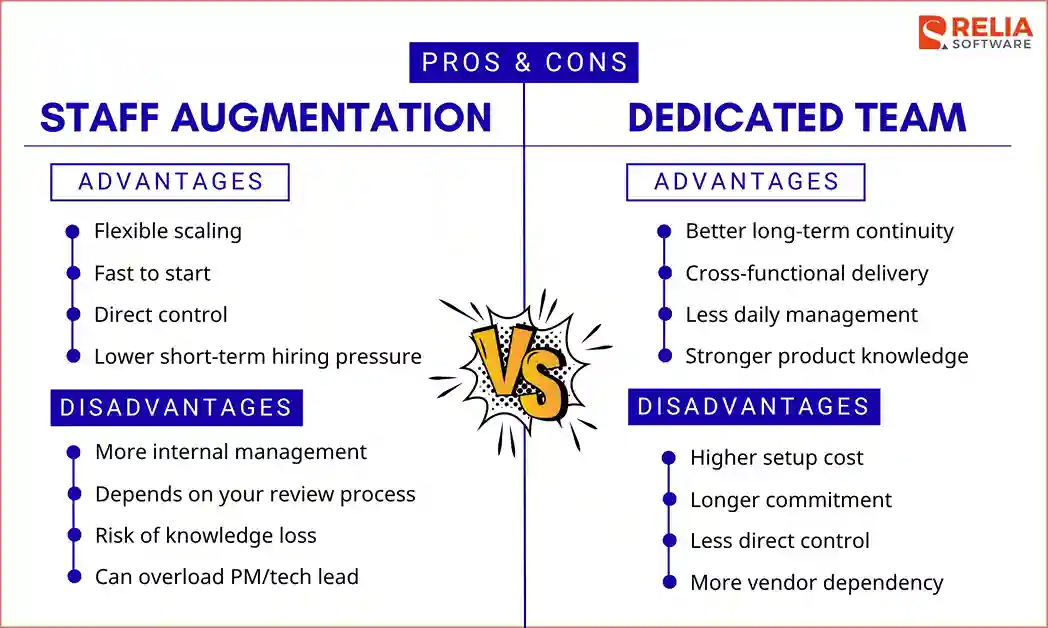
Staff Augmentation:
Pros
- Flexible for adding or removing specialists.
- Fast to start for one or a few roles.
- Gives you direct control over tasks and workflow.
- Reduces short-term hiring pressure.
Cons
- Requires more internal management.
- Quality depends on your internal review process.
- Knowledge may leave when the specialist exits.
- Can overload your tech lead or PM.
Dedicated Team:
Pros
- Better continuity for long-term development.
- Supports delivery across multiple roles.
- Reduces daily management pressure.
- Keeps product knowledge inside a stable team.
Cons
- Higher setup cost.
- Usually needs a longer commitment.
- Less direct control over each person’s daily work.
- More vendor dependency.
For more details on the differences between these two approaches, please continue to read.
Management Responsibility
Staff augmentation gives more direct control to the client. External specialists join your existing team, and your project manager, product owner, or tech lead decides what they do each day. Your team manages the Agile delivery process, backlog, sprint planning, code review, QA coordination, and release quality.
In a dedicated team model, management responsibility is more shared between the client and the vendor. The client still owns product goals, priorities, and business decisions, but the vendor can help manage team coordination, sprint planning, progress tracking, and delivery workflow. If the team includes a project manager or tech lead, the client does not need to manage every developer directly.
|
Responsibility |
Staff Augmentation |
Dedicated Team |
|
Daily task assignment |
Client |
Vendor or shared |
|
Sprint planning |
Client |
Shared |
|
Code review |
Client tech lead |
Vendor tech lead or shared |
|
QA coordination |
Client |
Usually included in team |
|
Performance tracking |
Client with vendor support |
Mostly vendor-managed |
|
Control level |
High |
Medium to high, depending on setup |
Before choosing an approach, businesses should test their internal management capacity. Ask these questions:
- Do we have a tech lead with time to review code?
- Do we have a clear backlog and task priorities?
- Can we onboard external developers quickly?
- Can our PM handle more sprint coordination?
- Do we already have QA and release processes?
If most answers are yes, staff augmentation can work well because your team is ready to manage extra specialists. If most answers are no, a dedicated team is better because it provides more structure, coordination, and delivery support.
Pricing Models & Hidden Costs
In staff augmentation, the cost is usually based on a time-and-materials pricing model. You pay an hourly, daily, or monthly rate for each external specialist. This pricing model makes the cost easier to control when you need a specific role, such as one backend developer or one QA engineer.
However, staff augmentation means you are buying talent, not a delivery outcome. Your internal team still carries the cost of planning work, assigning tasks, reviewing code, managing quality, and keeping the person aligned with your product.
Meanwhile, the dedicated team model is paid on a monthly team fee. You pay for a full team setup, including developers, QA, project management, UI/UX, DevOps, or business analysis. This approach creates better budget predictability, especially for long-term product development.
The drawback is that the cost is less flexible because you are paying for a team structure, not just individual hours. If requirements are delayed or the team is underused, you still have to pay the full monthly cost.
|
Cost factor |
Staff Augmentation |
Dedicated Team |
|
Pricing model |
Hourly, daily, or monthly per person |
Monthly team-based cost |
|
Initial cost |
Lower |
Higher |
|
Budget predictability |
Predictable when headcount and hours are fixed |
More stable for long-term budgeting with an agreed team size |
|
Cost flexibility |
Easier to reduce costs by removing individual specialists |
Less flexible because of team size and contract terms |
|
Hidden cost |
Internal management and onboarding time |
Idle time, ramp-up, and vendor coordination |
In terms of hidden costs, IT staff augmentation can include:
- Management time: Your PM or tech lead spends extra time assigning tasks, reviewing work, and keeping specialists aligned, which reduces their time for core delivery.
- Onboarding effort: External specialists need time to understand your codebase, product logic, tools, and workflow before they become fully productive.
- Quality control: Your internal team still has to review code and manage QA. If this process is weak, the project may face more bugs, rework, and delays.
- Replacement risk: If a specialist leaves, you lose product knowledge and spend more time onboarding a replacement.
Meanwhile, hidden costs of a dedicated team can include:
- Ramp-up time: The team needs time to understand your product, goals, technical standards, and delivery process before reaching full speed.
- Idle time: If requirements, designs, or approvals are delayed, the team may be blocked while the monthly cost continues.
- Vendor coordination: Your team still needs time for roadmap alignment, progress reviews, feedback, and delivery decisions.
- Handover cost: If the partnership ends, documentation, knowledge transfer, and transition planning require extra time.
So, staff augmentation is not always cheaper just because the per-person rate is lower. It works best when your internal team has enough management capacity to absorb the added specialists. A dedicated team is not always too expensive either. It can make more financial sense when the project needs several roles, stable delivery, and less daily management from your internal team.
Speed and Scalability
The key difference in this aspect is about speed to start versus speed to sustain delivery.
With staff augmentation, businesses can often move faster and scale more easily because they only need to add specific roles based on workload. For example, you may hire one backend developer to complete an API module or one QA engineer to support pre-launch testing. If your backlog, architecture, and internal processes are already clear, the specialist can join the team and start contributing quickly.
A dedicated team usually takes more time to set up because the vendor needs to form the right team, align roles, understand the product, and define the working process. However, once the team is stable, it can scale delivery better than separate augmented specialists. This is especially true when the project needs coordination between frontend, backend, mobile, QA, UI/UX design, DevOps, and project management.
Instead of only adding separate individuals, a dedicated team model allows the vendor to expand capacity around an existing team structure, with shared product knowledge, sprint rhythm, coding standards, and delivery ownership.
|
Factor |
Staff Augmentation |
Dedicated Team |
|
Time to start |
Faster for individual roles |
Slower setup, but stronger once formed |
|
Ramp-up time |
Shorter if the task is clear |
Longer because the whole team needs alignment |
|
Best duration |
Short to medium term |
Medium to long term |
|
Development timeline |
Best for urgent tasks, sprint support, or temporary gaps |
Best for MVPs, product scaling, and continuous delivery |
|
Scaling style |
Add or remove individuals |
Scale by team capacity |
|
Timeline fit |
Clear tasks, urgent gaps |
Product roadmap, MVP, long-term delivery |
|
Risk to speed |
The internal team gets overloaded |
Setup and alignment take time |
Accountability and Risk
In the staff augmentation model, the client carries most of the accountability. If the project is delayed or the output is poor, the issue is often not just due to the external specialist but also to weak internal direction, slow review, unclear requirements, or overloaded managers of your team.
On the other hand, accountability is more shared between the client and the vendor in a dedicated team model. The client remains accountable for the product vision, business goals, priorities, and final acceptance. The vendor is accountable for the team’s delivery performance, workflow, reporting, technical execution, and output quality based on the agreed scope.
That is why accountability should be clearly defined before the project starts. If delivery slows down or quality drops, both sides need to know whether the issue comes from unclear client priorities, weak vendor delivery processes, poor communication, or unstable team performance to decide who will incharge to solve that problem.
|
Risk |
Staff Augmentation |
Dedicated Team |
|
Delivery ownership |
Mostly client-owned |
Shared between client and vendor |
|
Quality control |
Depends on client’s review process |
Depends on vendor process and shared standards |
|
Internal management overload |
Higher |
Lower |
|
Vendor dependency |
Lower |
Higher |
|
Quality risk |
High if internal review is weak |
Depends on the vendor's process |
Should You Choose IT Staff Augmentation or a Dedicated Team?
Businesses should choose IT staff augmentation when they already have a capable internal team but need extra specialists to fill skill gaps, increase capacity, or support short-term delivery. This model works best when your company can manage external developers directly and already has clear tasks, workflows, and technical direction.
Meanwhile, when businesses need a stable, cross-functional team to build, scale, or maintain a product over the long term, they should choose a dedicated team instead. This model gives a more complete delivery setup, including support planning, development, testing, and release coordination, which is useful when the project needs several roles working together over time.
The table below gives a quick way to match your business situation with the best model:
|
Question |
IT Staff Augmentation |
Dedicated Team |
|
What do you need? |
Extra specialists |
A full delivery team |
|
How many people do you need? |
1–3 roles |
Multiple roles working together |
|
Do you have internal tech leadership? |
Yes, your CTO or tech lead can manage the work |
No, or your internal leaders are overloaded |
|
How clear is the scope? |
Tasks, backlog, and requirements are already clear |
Scope may evolve and needs more planning support |
|
Who should manage daily work? |
Your internal team |
Vendor or shared management |
|
How much control do you want? |
High direct control over tasks and workflow |
More delegated control with vendor support |
|
How long is the project? |
Short to medium term |
Medium to long term |
|
What is your budget priority? |
Lower short-term cost |
Better long-term delivery efficiency |
|
What is the main risk? |
Internal management overload |
Vendor dependency |
Some businesses can also use a hybrid model. For example, a dedicated team can handle core product development, while staff augmentation adds a short-term DevOps, AI/ML, QA automation, or mobile specialist when needed. This model works well only when there is one clear backlog owner, one technical direction, and one reporting rhythm.
FAQs
1. Is staff augmentation cheaper than a dedicated team?
Yes, staff augmentation is usually cheaper because you pay for individual specialists, not a full team. However, if you need several roles for long-term delivery, a dedicated team can be more cost-effective.
2. Which model gives businesses more control?
Staff augmentation gives more direct control because external specialists work under your process and management. A dedicated team gives more delivery support but less daily control.
3. Which model is better for startups?
Staff augmentation works for startups with a CTO or tech lead who can manage developers. A dedicated team is better for startups without strong internal technical leadership.
>> Read more:
- The Comparison of Staff Augmentation VS Managed Services
- Comparision of Staff Augmentation VS. Independent Contractors
Conclusion
In conclusion, staff augmentation helps businesses quickly add skilled specialists to an existing team. It is flexible, cost-effective upfront, and useful when your internal managers can lead the work directly. A dedicated team usually requires more setup and vendor trust, but it can give businesses better continuity and less daily management pressure.
The right choice depends on whether you need extra people to support your current process or if you need a team that can help carry the delivery with you. If you are unsure, Relia Software can help businesses choose a suitable model with your requirements.
>>> Follow and Contact Relia Software for more information!

- outsourcing
- offshore outsourcing software
- offshore development