


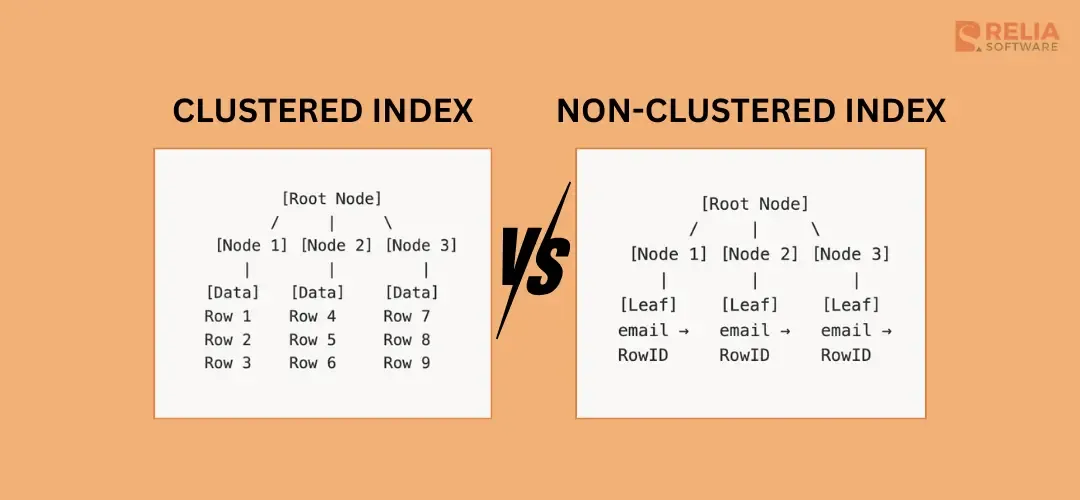
The main difference between a clustered and a non-clustered index is that: A clustered index stores the table rows in the same order as the index key, while a non-clustered index is a separate structure that stores the indexed values and points back to the actual rows.
In practice, clustered indexes are usually better for primary keys, range queries, and ordered reads, while non-clustered indexes are better for lookups, joins, and supporting different query patterns on the same table. Still, the exact behavior depends on the database engine. SQL Server, MySQL, and PostgreSQL do not handle these indexes in exactly the same way, so it is important to understand both the concept and the engine-specific details.
Database indexes help SQL queries run faster, but not all index types work in the same way. This guide covers everything you need to know about clustered and non-clustered indexes, including when to use each type, performance implications, and practical code examples.
>> Explore more: A Complete Guide to Multi-Valued Indexes with Examples
What is a Clustered Index?
A clustered index determines the physical order of data in a table. The data rows themselves are stored in the order of the clustered index key. Because the rows themselves are stored in the order of the clustered key, a table can have only one clustered index. The data can only be stored in one order at a time.
Key Characteristics of Clustered Indexes:
- One per table: A table can have only ONE clustered index
- Data IS the index: The leaf level of a clustered index contains the actual data rows
- Defines physical order: Rows are physically stored in the order of the index key
- Automatically created: Primary keys create clustered indexes by default (in most databases)
Creating a Clustered Index
- SQL Server:
-- Create a clustered index on the customer_id column
CREATE CLUSTEREDINDEX IX_Customers_CustomerID
ON Customers (customer_id);

-- Or define it with a primary key
CREATETABLE Customers (
    customer_idINTPRIMARYKEY CLUSTERED,
name NVARCHAR(100),
    email NVARCHAR(255)
);
- PostgreSQL:
PostgreSQL does not keep clustered storage in the same way as SQL Server. You can reorder a table once with CLUSTER, but PostgreSQL does not automatically maintain that order after later inserts and updates.
-- PostgreSQL uses CLUSTER command to physically reorder
CREATEINDEX idx_customers_idON customers (customer_id);
CLUSTER customersUSING idx_customers_id;
What is a Non-Clustered Index?
A non-clustered index is a separate structure from the data rows. It contains the indexed columns plus a pointer (row locator) back to the actual data. Because it is separate from the data, you can create many non-clustered indexes on the same table. This makes them useful when the table supports multiple search patterns.
Key Characteristics of Non-Clustered Indexes:
- Multiple per table: A table can have up to 999 non-clustered indexes (SQL Server 2008+)
- Separate structure: Index is stored separately from the data
- Contains pointers: Leaf level contains index keys + row locators
- Does not affect physical order: Data remains in its original order
Creating a Non-Clustered Index:
-- Create a non-clustered index on the email column
CREATE NONCLUSTEREDINDEX IX_Customers_Email
ON Customers (email);

-- Create a composite non-clustered index
CREATE NONCLUSTEREDINDEX IX_Orders_CustomerDate
ON Orders (customer_id, order_dateDESC);

-- Create a covering index with included columns
CREATE NONCLUSTEREDINDEX IX_Orders_Status
ON Orders (status)
INCLUDE (order_total, customer_id);
Clustered vs Non-Clustered Index: Key Differences
| Feature | Clustered Index | Non-Clustered Index |
|---|---|---|
| Per table limit | 1 | Up to 999 (SQL Server) |
| Data storage | Data rows stored in index order | Separate from data rows |
| Leaf level contains | Actual data rows | Index key + row locator |
| Storage overhead | No extra storage (data is index) | Additional storage required |
| Range queries | Excellent performance | Good (may need key lookups) |
| Insert/Update cost | Higher (may require data movement) | Lower |
| Best for | Primary keys, range queries | Columns in WHERE, JOIN, ORDER BY |
Per Table Limit
A table can have only one clustered index because the data rows can only be physically stored in one order. However, a table can have many non-clustered indexes because they are separate structures built on top of the table.
This makes clustered indexes the main storage path, while non-clustered indexes are used to support different query patterns.
Storage Overhead
A clustered index does not usually require separate storage for the data itself because the data rows are stored at the leaf level of the index. A non-clustered index requires additional storage because it exists separately from the data rows.
If a table has many non-clustered indexes, storage usage can increase significantly, especially on large tables.
Physical Order of Data
A clustered index defines the physical order of data in the table. If the clustered index is built on a date column, the rows are physically stored based on that date order. Because of this, a table can only have one clustered index.
A non-clustered index does not affect the physical order of the table. The table data stays in its original storage structure, while the index provides a separate access path.
Leaf Level Content
Leaf level content refers to what is stored at the lowest level of the index structure.
In a clustered index, the leaf level contains the actual data rows. Once SQL Server reaches that level, it already has the full row.
           [Root Node]
          /     |     \
    [Node 1] [Node 2] [Node 3]
       |        |         |
   [Data]   [Data]    [Data]
   Row 1    Row 4     Row 7
   Row 2    Row 5     Row 8
   Row 3    Row 6     Row 9
In a non-clustered index, the leaf level contains the indexed key values plus a row locator. If the query needs columns that are not included in the index, the database may need an extra lookup to fetch the full row.
           [Root Node]
          /     |     \
    [Node 1] [Node 2] [Node 3]
       |        |         |
   [Leaf]    [Leaf]    [Leaf]
   email →   email →   email →
   RowID     RowID     RowID
Query Performance
Clustered indexes usually perform better for range queries and queries that return many columns, because the rows are stored in index order and can be read more efficiently.
Non-clustered indexes are often better for selective lookups, JOIN conditions, and queries that only need a few columns. However, if the query needs many extra columns that are not in the index, SQL Server may need key lookups, which can reduce performance.
Now let's comprare their performance in some real situations
- Point Lookup
For point lookups, a clustered index can be efficient when the query searches by the clustered key, because SQL Server can go directly to the full row.
-- Find a specific customer by ID
SELECT *FROM CustomersWHERE customer_id =12345;
| Index Type | Performance | Reason |
|---|---|---|
| Clustered on customer_id | Excellent | Direct access to data |
| Non-clustered on customer_id | Good | Index seek + key lookup |
- Range Query
For range queries, clustered indexes are often stronger because rows with nearby key values are stored close together.
-- Find orders in a date range
SELECT *FROM Orders
WHERE order_dateBETWEEN'2026-01-01'AND'2026-01-15';
| Index Type | Performance | Reason |
|---|---|---|
| Clustered on order_date | Excellent | Sequential read of adjacent rows |
| Non-clustered on order_date | Moderate | May cause many key lookups |
- Covering Query
For covering queries, a non-clustered index can perform well if it already contains all the needed columns.
-- Select only indexed columns
SELECT email, created_date
FROM Customers
WHERE status ='active';
Insert and Update Cost
Clustered indexes often have a higher insert and update cost because changing row order may require page splits or data movement. This is especially true when the clustered key is random or frequently updated.
Non-clustered indexes also add maintenance cost, but they usually do not involve reordering the table data itself. Even so, having too many non-clustered indexes can still slow down writes.
Clustered vs Non-Clustered Index: When to Use?
Cases You Should Use a Clustered Index
- Primary key columns: The column is used as the primary identifier and is often searched directly.
- Range queries: You frequently query ranges of values (dates, sequential IDs)
- Ordered retrieval: You often need data in a specific order
- Wide rows: Your table has many columns (reduces lookup overhead)
- Frequently accessed main path: The table has one dominant query pattern that deserves the fastest access path.
Example: Date-Based Range Queries
-- Good candidate for clustered index
SELECT *
FROM Orders
WHERE order_dateBETWEEN'2026-01-01'AND'2026-01-31';

-- Create clustered index on order_date
CREATE CLUSTEREDINDEX IX_Orders_Date
ON Orders (order_date);
Cases You Should Use a Non-Clustered Index
Use non-clustered indexes when:
- Lookup queries: You frequently search by specific values such as email, username, status, or product code.
- Multiple search patterns: The table supports different filters and access paths, so one clustered order is not enough.
- JOIN columns: Columns frequently used in JOIN conditions and need faster matching.
- Covering index: You can include extra columns so the query can be answered directly from the index to avoid lookups.
- Selective queries: The query usually returns a small number of matching rows.
Example: Email Lookup
-- Frequent query pattern
SELECT customer_id,name
FROM Customers
WHERE email ='user@example.com';

-- Create covering non-clustered index
CREATE NONCLUSTEREDINDEX IX_Customers_Email
ON Customers (email)
INCLUDE (customer_id,name);
Best Practices for Index Design
Choose Clustered Index Keys Wisely
In most cases, a good clustered key should be narrow, stable, unique or close to unique, and preferably increasing over time. This helps reduce page splits, fragmentation, and unnecessary row movement.
Columns such as identity-based IDs or sequential values are often strong choices. On the other hand, wide string columns, random GUIDs, and frequently updated columns are usually poor clustered key candidates because they make storage less efficient and increase maintenance cost.
The clustered index affects how the table rows are stored, so this choice has a large impact on overall performance.
-- Good: Narrow, unique, ever-increasing
CREATE CLUSTEREDINDEX IX_Orders_OrderID
ON Orders (order_id);

-- Avoid: Wide, non-unique, random
-- Don't cluster on GUID or frequently updated columns
Use Covering Indexes
A covering index is useful when it contains all the columns needed by a query. This allows SQL Server to return the result directly from the index without doing extra key lookups to the base table.
This can improve performance a lot for frequently used queries, especially when the query filters on one column but also needs a few additional columns in the result. Still, included columns should be chosen carefully. Adding too many can make the index larger and more expensive to maintain.
-- Include columns to avoid key lookups
CREATE NONCLUSTEREDINDEX IX_Products_Category
ON Products (category_id)
INCLUDE (product_name, price, stock_quantity);
Monitor Index Usage
Not every index continues to be useful over time. Some indexes are heavily used, while others take up space and add write cost without helping many queries. That is why index usage should be reviewed regularly.
In SQL Server, you can check usage statistics to see how often each index is used for seeks, scans, lookups, and updates. This helps you find indexes that may be valuable, underused, or candidates for removal.
-- SQL Server: Check index usage statistics
SELECT
    OBJECT_NAME(s.object_id)AS TableName,
    i.nameAS IndexName,
    s.user_seeks,
    s.user_scans,
    s.user_lookups,
    s.user_updates
FROM sys.dm_db_index_usage_stats s
JOIN sys.indexes iON s.object_id = i.object_id
AND s.index_id = i.index_id
WHERE OBJECTPROPERTY(s.object_id,'IsUserTable') =1
ORDERBY s.user_seeksDESC;
Consider Index Maintenance
Indexes can become fragmented over time, especially on busy tables with many inserts, updates, or deletes. Fragmentation can make reads less efficient and increase storage waste, so maintenance should be part of long-term index management.
In SQL Server, you can check fragmentation levels and decide whether an index should be reorganized or rebuilt. Reorganizing is usually a lighter operation for moderate fragmentation, while rebuilding is more suitable for heavily fragmented indexes.
-- Check fragmentation level
SELECT
    OBJECT_NAME(ips.object_id)AS TableName,
    i.nameAS IndexName,
    ips.avg_fragmentation_in_percent
FROM sys.dm_db_index_physical_stats(DB_ID(),NULL,NULL,NULL,'LIMITED') ips
JOIN sys.indexes iON ips.object_id = i.object_id
AND ips.index_id = i.index_id
WHERE ips.avg_fragmentation_in_percent >10;

-- Rebuild highly fragmented indexes
ALTERINDEX IX_Orders_DateON Orders REBUILD;

-- Reorganize moderately fragmented indexes
ALTERINDEX IX_Customers_EmailON Customers REORGANIZE;
Database-Specific Differences
SQL Server:
- Default: Primary key creates clustered index.
- Limit: 1 clustered, 999 non-clustered indexes.
MySQL (InnoDB)
- Primary key is always clustered (called "clustered primary key").
- Secondary indexes store primary key as row locator.
- No explicit CLUSTERED keyword.
>> Read more: MySQL DDL: Statements, Atomic DDL, Online DDL, Algorithms
PostgreSQL
- No true clustered indexes (all indexes are secondary).
- CLUSTER command physically reorders data once (not maintained).
- Use BRIN indexes for naturally ordered data.
>> Read more: 6 PostgreSQL Index Types Explained: A Complete Guide
Oracle
- Index-Organized Tables (IOT) = clustered concept
- Heap tables with B-tree indexes = non-clustered
Conclusion
Knowing when to use clustered and non-clustered indexes is important for database performance. In most cases, a table should have one clustered index, often on the primary key, while non-clustered indexes should be added carefully based on real query patterns.
| Use Case | Recommended Index |
|---|---|
| Primary key | Clustered in many cases, but depends on the database engine. |
| Date range queries | Clustered on date column |
| Email/username lookups | Non-clustered |
| Multiple search patterns | Multiple non-clustered |
| Columns in WHERE + SELECT | Non-clustered covering index |
| JOIN columns | Non-clustered |
| ORDER BY optimization | Non-clustered matching order |
>>> Follow and Contact Relia Software for more information!

- development
- coding