


Go is ideal for web scraping at scale without dependency hell, GIL bottleneck, and runtime overhead because it is fast, concurrent, and compiles to a single binary.
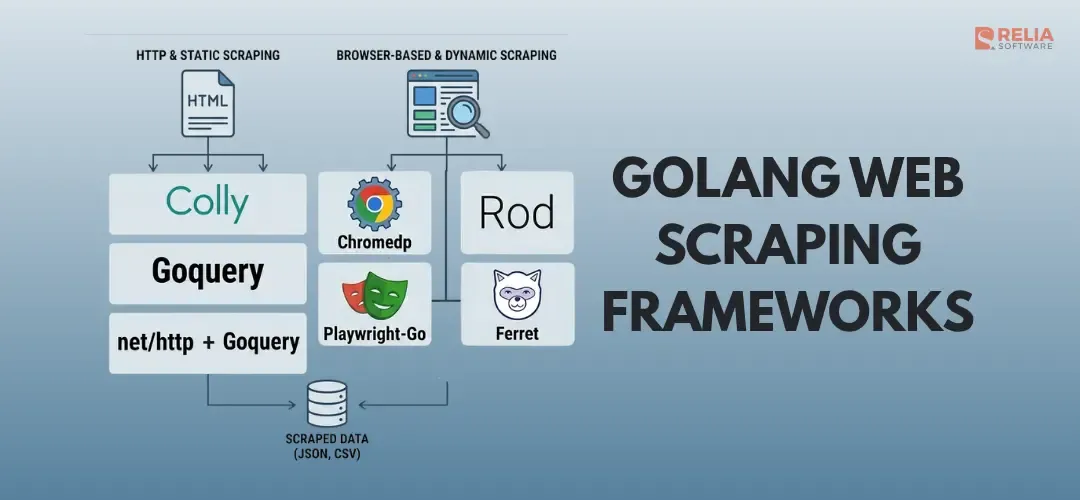
Currently, Colly, Goquery, Rod, Chromedp, Ferret, Playwright-Go, and net/http + Goquery are the most popular web scraping frameworks for Golang. But which one should you actually use?
This guide compares the 8 major Go web scraping frameworks above, with working code examples, pros/cons, and a decision matrix so you can pick the right tool for your project.
| Framework | GitHub Stars | JS Rendering | Best For | Learning Curve |
| Colly | ~25K< | No | Large-scale crawling | Low |
| Goquery | ~14K | No | HTML parsing | Low |
| Rod | ~6K | Yes | Stealth scraping | Medium |
| Chromedp | ~11.5K | Yes | Browser automation | Medium |
| Ferret | ~3K | Yes | Declarative extraction | Low |
| Playwright-Go | Community | Yes | Cross-browser | Medium |
| net/http + Goquery | stdlib | No | Simple one-off scrapes | Low |
Colly
GitHub: gocolly/colly | Stars: ~25K
Colly is the most popular Go scraping framework and works well for static HTML pages. It manages the entire crawling lifecycle including handling HTTP requests, rate limiting, cookies, caching, and parallel tasks.
Key Features:
- Built-in concurrency with configurable parallelism;
- Automatic cookie and session handling;
- Request/response caching;
- Robots.txt compliance;
- Proxy rotation support;
- Distributed scraping via Redis backend.
Code Example:
package main

import (
    "fmt"
    "time"
    "github.com/gocolly/colly/v2"
)

func main() {
    c := colly.NewCollector(
        colly.AllowedDomains("example.com"),
        colly.Async(true),
    )

    // Set concurrency limits
    c.Limit(&colly.LimitRule{
        DomainGlob:  "*",
        Parallelism: 4,
        Delay:       2 * time.Second,
    })

    // Extract data on every matching element
    c.OnHTML("article.post", func(e *colly.HTMLElement) {
        title := e.ChildText("h2")
        link := e.ChildAttr("a", "href")
        fmt.Printf("Title: %s | Link: %s\n", title, link)
    })

    // Handle pagination
    c.OnHTML("a.next-page", func(e *colly.HTMLElement) {
        e.Request.Visit(e.Attr("href"))
    })

    c.OnError(func(r *colly.Response, err error) {
        fmt.Printf("Error: %s | URL: %s\n", err, r.Request.URL)
    })

    c.Visit("https://example.com/blog")
    c.Wait()
}
Pros/Cons:
| Pros | Cons |
|---|---|
|
|
Best for: Production crawlers that scrape static HTML at scale. If you're building a data pipeline that hits thousands of pages, Colly is your first choice.
Rating: 9/10 for static content scraping.
Goquery
GitHub: PuerkitoBio/goquery | Stars: ~14K
Goquery brings jQuery-style DOM manipulation to Go for searching by class, ID, tag, child selector, sibling selector, and table structure. In fact, Goquery is not a full scraping framework, so it does not crawl pages, manage retries, or handle rate limits.
Goquery is actually a parsing library that parse HTML and let you find data with CSS selectors. For many Go scrapers, Goquery is the parsing layer behind the crawler.
Key Features:
- jQuery-like CSS selector API
- Chainable method calls
- Parent/sibling/child traversal
- Memory-efficient parsing
- Works with any HTML source (files, strings, HTTP responses)
Code Example:
package main

import (
    "fmt"
    "log"
    "net/http"
    "github.com/PuerkitoBio/goquery"
)

func main() {
    resp, err := http.Get("https://example.com")
    if err != nil {
        log.Fatal(err)
    }
    defer resp.Body.Close()

    doc, err := goquery.NewDocumentFromReader(resp.Body)
    if err != nil {
        log.Fatal(err)
    }

    // jQuery-style selectors
    doc.Find("div.product").Each(func(i int, s *goquery.Selection) {
        title := s.Find("h3.title").Text()
        price := s.Find("span.price").Text()
        link, _ := s.Find("a").Attr("href")
        fmt.Printf("#%d: %s — %s (%s)\n", i+1, title, price, link)
    })

    // Chain traversals
    doc.Find("table tbody tr").Each(func(i int, row *goquery.Selection) {
        cells := row.Find("td")
        name := cells.Eq(0).Text()
        value := cells.Eq(1).Text()
        fmt.Printf("%s: %s\n", name, value)
    })
}
Pros/Cons:
| Pros | Cons |
|---|---|
|
|
Best for: When you need precise, complex DOM traversal. Often paired with Colly (which uses Goquery internally) or net/http for simple scrapes.
Rating: 8/10 as a parsing library (not standalone scraper).
Rod
GitHub: go-rod/rod | Stars: ~6K
Rod controls Chrome or Chromium through the Chrome DevTools Protocol and is useful when the page needs JavaScript before your data appears. It uses a decode-on-demand architecture that makes it faster and lighter than Chromedp for most workloads.
Rod is often chosen for scraping single-page apps, dashboards, infinite-scroll pages, product pages with client-side rendering, and sites where you need to click, type, wait, scroll, or intercept network traffic.
Key Features:
- Auto-wait for elements (no manual sleep);
- Built-in stealth mode via go-rod/stealth;
- Chrome version management (auto-download);
- Thread-safe for concurrent scraping;
- Screenshot and PDF generation;
- Network interception.
Code Example:
package main

import (
    "fmt"
    "github.com/go-rod/rod"
    "github.com/go-rod/rod/lib/launcher"
    "github.com/go-rod/stealth"
)

func main() {
    // Launch with stealth to bypass bot detection
    url := launcher.New().Headless(true).MustLaunch()
    browser := rod.New().ControlURL(url).MustConnect()
    defer browser.MustClose()

    page := stealth.MustPage(browser)

    page.MustNavigate("https://example.com/spa").MustWaitLoad()

    // Auto-waits for element to appear
    title := page.MustElement("h1.product-title").MustText()
    price := page.MustElement("span.price").MustText()

    fmt.Printf("Product: %s | Price: %s\n", title, price)

    // Handle infinite scroll
    for i := 0; i < 5; i++ {
        page.MustEval(`window.scrollTo(0, document.body.scrollHeight)`)
        page.MustWaitIdle() // Wait for AJAX to complete
    }

    // Extract all loaded items
    items := page.MustElements("div.item")
    for _, item := range items {
        name := item.MustElement(".name").MustText()
        fmt.Println(name)
    }
}
Pros/Cons:
| Pros | Cons |
|---|---|
|
|
Best for: JavaScript-heavy sites that need high performance. The stealth mode makes it ideal for scraping sites with anti-bot detection.
Rating: 9/10 for JS-rendered scraping.
Chromedp
GitHub: chromedp/chromedp | Stars: ~11.5K
Chromedp provides the simplest API for controlling Chrome/Chromium via CDP. Without WebDriver or external dependencies, Chromedp is a solid choice when you want browser automation.
Chromedp is useful for form submission, screenshots, PDF generation, UI checks, login flows, and scraping rendered HTML from JavaScript-heavy pages.
Key Features:
- Direct Chrome DevTools Protocol communication;
- No external dependencies (no Selenium/WebDriver)
- Context-based execution model;
- Screenshot and PDF generation;
- Network event handling;
- Form interaction and navigation.
Code Example:
package main

import (
    "context"
    "fmt"
    "log"
    "github.com/chromedp/chromedp"
)

func main() {
    ctx, cancel := chromedp.NewContext(context.Background())
    defer cancel()

    var html string
    var title string

    err := chromedp.Run(ctx,
        // Navigate to page
        chromedp.Navigate("https://example.com/dynamic-page"),

        // Wait for content to load
        chromedp.WaitVisible("div.content", chromedp.ByQuery),

        // Extract text
        chromedp.Text("h1", &title, chromedp.ByQuery),

        // Get full HTML
        chromedp.OuterHTML("body", &html, chromedp.ByQuery),
    )
    if err != nil {
        log.Fatal(err)
    }

    fmt.Printf("Title: %s\n", title)
    fmt.Printf("HTML length: %d\n", len(html))
}
Form Submission Example:
err := chromedp.Run(ctx,
    chromedp.Navigate("https://example.com/login"),
    chromedp.WaitVisible("#email"),
    chromedp.SendKeys("#email", "user@example.com"),
    chromedp.SendKeys("#password", "secret"),
    chromedp.Click("#submit"),
    chromedp.WaitVisible(".dashboard"),
    chromedp.Text(".welcome-message", &welcomeMsg),
)
Pros/Cons:
| Pros | Cons |
|---|---|
|
|
Best for: Browser automation tasks form filling, screenshot capture, quick JS rendering. Chromedp is the go-to choice when you need browser control with minimal setup.
Rating: 8/10 for general browser automation.
Ferret
GitHub: MontFerret/ferret | Stars: ~3K
With Ferret, you write declarative queries in FQL (Ferret Query Language) instead of writing every request, wait, selector, and loop in Go code, which is inspired by ArangoDB's AQL.
Ferret is useful when scraping rules need to be written, reviewed, or changed separately from the Go application. For example, an internal data want to update extraction logic without touching the main service code.
Key Features:
- Declarative FQL query language;
- Handles both static and dynamic pages;
- Embeddable in Go applications;
- Built-in browser support;
- Extensible via custom functions.
Code Example:
package main

import (
    "context"
    "fmt"
    "github.com/MontFerret/ferret/pkg/compiler"
    "github.com/MontFerret/ferret/pkg/drivers/http"
)

func main() {
    // Define WHAT data to get, rather than HOW to get it
    query := `
        LET doc = DOCUMENT("https://news.ycombinator.com/", { driver: "http" })
        FOR item IN ELEMENTS(doc, ".athing")
            LET title = ELEMENT(item, ".titleline > a")
            RETURN {
                title: INNER_TEXT(title),
                url: ATTR(title, "href")
            }
    `

    comp := compiler.New()
    comp.RegisterDrivers(http.NewDriver())

    program, _ := comp.Compile(query)
    result, _ := program.Run(context.Background())

    fmt.Println(string(result))
}
Pros/Cons:
| Pros | Cons |
|---|---|
|
|
Best for: Data extraction workflows where you want to define "what" to extract, not "how". Great for teams that want non-programmers to write scraping rules.
Rating: 7/10 — innovative but niche.
Playwright-Go
GitHub: MontFerret/ferret | Stars: ~3K
Playwright-Go is a community-driven port of Microsoft’s popular Playwright tool. It is the only Go framework that lets you switch between Chromium, Firefox, and WebKit using an identical interface.
For scraping, cross-browser support is not always necessary. Playwright-Go becomes more useful when your project also involves browser testing, mobile emulation, trace debugging, or cross-browser behavior checks.
Key Features:
- Multi-browser support (Chromium, Firefox, WebKit);
- Auto-wait for element state;
- Network interception and mocking;
- Mobile device emulation;
- Trace viewer for debugging.
Code Example:
package main

import (
    "fmt"
    "log"
    "github.com/playwright-community/playwright-go"
)

func main() {
    pw, _ := playwright.Run()
    defer pw.Stop()

    // Launch any browser — Chromium, Firefox, or WebKit
    browser, _ := pw.Chromium.Launch(playwright.BrowserTypeLaunchOptions{
        Headless: playwright.Bool(true),
    })
    defer browser.Close()

    page, _ := browser.NewPage()
    page.Goto("https://example.com/products")

    // Auto-wait + modern locator API
    products := page.Locator("div.product-card")
    count, _ := products.Count()

    for i := 0; i < count; i++ {
        card := products.Nth(i)
        name, _ := card.Locator("h3").TextContent()
        price, _ := card.Locator(".price").TextContent()
        fmt.Printf("%s — %s\n", name, price)
    }
}
Pros/Cons:
| Pros | Cons |
|---|---|
|
|
Best for: When you need cross-browser compatibility or already use Playwright in your testing stack.
Rating: 7.5/10 — powerful but heavier than Go-native options.
>> Read more: Top 6 Best Golang Testing Frameworks for Developers
net/http + Goquery
Go's standard library net/http combined with Goquery is often enough for simple scraping tasks. Sometimes you don't need a framework like Colly to only fetch a few pages, parse static HTML, and save the result.
Code Example:
package main

import (
    "encoding/csv"
    "fmt"
    "log"
    "net/http"
    "os"
    "sync"
    "time"

    "github.com/PuerkitoBio/goquery"
)

func scrape(url string, wg *sync.WaitGroup, ch chan<- []string) {
    defer wg.Done()

    client := &http.Client{Timeout: 10 * time.Second}
    req, _ := http.NewRequest("GET", url, nil)
    req.Header.Set("User-Agent", "Mozilla/5.0 (compatible; GoScraper/1.0)")

    resp, err := client.Do(req)
    if err != nil {
        log.Printf("Error fetching %s: %v", url, err)
        return
    }
    defer resp.Body.Close()

    doc, _ := goquery.NewDocumentFromReader(resp.Body)
    doc.Find("div.listing").Each(func(i int, s *goquery.Selection) {
        title := s.Find("h2").Text()
        price := s.Find(".price").Text()
        ch <- []string{url, title, price}
    })
}

func main() {
    urls := []string{
        "https://example.com/page/1",
        "https://example.com/page/2",
        "https://example.com/page/3",
    }

    ch := make(chan []string, 100)
    var wg sync.WaitGroup

    for _, url := range urls {
        wg.Add(1)
        go scrape(url, &wg, ch)
    }

    go func() {
        wg.Wait()
        close(ch)
    }()

    // Write results to CSV
    file, _ := os.Create("output.csv")
    writer := csv.NewWriter(file)
    writer.Write([]string{"URL", "Title", "Price"})

    for row := range ch {
        writer.Write(row)
    }
    writer.Flush()
    fmt.Printf("Scraped %d pages → output.csv\n", len(urls))
}
Pros/Cons:
| Pros | Cons |
|---|---|
|
|
Best for: One-off scraping tasks, learning Go concurrency patterns, or when you want full control without framework overhead.
Rating: 7/10 — maximum flexibility, minimum magic.
Performance Benchmarks
Static Page Throughput (pages/second)
| Framework | 100 Pages | 1,000 Pages | 10,000 Pages |
| Colly (async) | ~50 p/s | ~45 p/s | ~40 p/s |
| net/http + Goquery | ~40 p/s | ~35 p/s | ~30 p/s |
| Goquery (single-threaded) | ~15 p/s | ~12 p/s | ~10 p/s |
JS-Rendered Page Throughput
| Framework | 100 Pages | 1,000 Pages |
| Rod | ~8 p/s | ~6 p/s |
| Chromedp | ~5 p/s | ~4 p/s |
| Playwright-Go | ~4 p/s | ~3 p/s |
| Ferret (CDP driver) | ~3 p/s | ~2 p/s |
Memory Usage (per 100 pages)
- Goquery: ~15 MB;
- Colly: ~30 MB;
- Rod: ~150 MB;
- Chromedp: ~200 MB;
- Playwright-Go: ~250 MB
Note: Benchmarks are approximate ranges based on community reports and typical workloads on a 4-core machine with stable network. Actual performance varies significantly by target site complexity, network latency, and hardware. Run your own benchmarks before making architecture decisions.
Common Go Scraping Patterns
Proxy Rotation
Proxy rotation splits your traffic across a list of different servers. To the target website, the requests look like they are coming from multiple different users instead of a single machine. This can avoid your IP address is blocked if you send too many requests in a short period of time.
// Works with Colly
c := colly.NewCollector()

proxies := []string{
    "http://proxy1:8080",
    "http://proxy2:8080",
    "http://proxy3:8080",
}

rp, _ := proxy.RoundRobinProxySwitcher(proxies...)
c.SetProxyFunc(rp)
Respectful Rate Limiting
Respectful rate limiting mimics human behavior to avoid overloading a website's server. This pattern sets a maximum number of parallel downloads and adds a small, randomized delay (called jitter) between requests. This keeps your scraper polite and less likely to trigger security blocks.
c.Limit(&colly.LimitRule{
    DomainGlob:  "*.example.com",
    Parallelism: 2,
    Delay:       3 * time.Second,
    RandomDelay: 2 * time.Second, // Jitter to look human
})
Error Retry with Backoff
A retry pattern catches specific failures (like HTTP 429 Too Many Requests or 500 Server Errors) and attempts to download the page again after waiting a few seconds.
c.OnError(func(r *colly.Response, err error) {
    if r.StatusCode == 429 || r.StatusCode >= 500 {
        time.Sleep(time.Duration(r.Request.Retries*2) * time.Second)
        r.Request.Retry()
    }
})
Concurrent Scraping with Channels
To scrape safely at high speeds, you use channels to pass data between these parallel tasks. One goroutine downloads the page, while another safely receives the data and saves it to a database or file without mixing up the information.
results := make(chan Product, 100)
var wg sync.WaitGroup

for _, url := range urls {
    wg.Add(1)
    go func(u string) {
        defer wg.Done()
        product := scrapeProduct(u)
        results <- product
    }(url)
}

go func() {
    wg.Wait()
    close(results)
}()

for product := range results {
    saveToDatabase(product)
}
Go vs Python: Which One is Better for Web Scraping?
| Factor | Go | Python |
| Speed | ~5x faster (compiled, goroutines) | Slower (GIL limits concurrency) |
| Memory | Lower footprint | Higher, especially with browser |
| Deployment | Single binary, zero dependencies | Requires runtime + pip packages |
| Ecosystem | Growing (Colly, Rod, Chromedp) | Mature (Scrapy, BeautifulSoup, Selenium) |
| Learning Curve | Steeper for beginners | Easier, more tutorials |
| Community | Smaller but focused | Massive |
| Best For | Production pipelines, high throughput | Prototyping, one-off scrapes |
Bottom line: Use Go when performance and deployment simplicity matter. Use Python when you need rapid prototyping or access to the largest ecosystem of scraping tools.
FAQs
Which Go web scraping framework is the fastest?
For static HTML, Colly is the fastest with built-in async support handling 40-50 pages/second. For JavaScript-rendered pages, Rod outperforms Chromedp with its decode-on-demand architecture.
Can I scrape JavaScript-rendered pages with Go?
Yes. Use Rod, Chromedp, or Playwright-Go, all use the Chrome DevTools Protocol to control a real browser. Rod and Chromedp are Go-native; Playwright-Go wraps the Playwright ecosystem.
Is Colly still maintained in 2026?
Yes. Colly remains actively maintained and is the most starred Go scraping library (~25K stars). It's production-ready with a stable API.
Which framework handles anti-bot detection?
Rod with the go-rod/stealth plugin is the best option to handle anti-bot detection. It patches common browser fingerprinting checks automatically. For HTTP-level evasion, combine Colly with proxy rotation and randomized headers.
Can I use multiple frameworks together?
Absolutely. A common pattern is Colly + Goquery. Colly handles the crawling lifecycle (HTTP, rate limits, parallelism) while Goquery provides advanced DOM traversal. For sites with both static and dynamic pages, pair Colly with Rod.
Conclusion
The Go web scraping ecosystem has matured significantly. Here are the common web scraping frameworks you can choose based on your specific needs:
- Static HTML at scale → Colly
- Precise HTML parsing → Goquery (pair with Colly)
- JS-heavy sites + performance → Rod
- Quick browser automation → Chromedp
- Cross-browser needs → Playwright-Go
- Declarative extraction → Ferret
- Simple one-off tasks → net/http + Goquery
Personally, I start with Colly for most projects, and add Rod when I hit JavaScript walls.
The combination of Go's goroutines, compiled speed, and these frameworks gives you a scraping stack that can handle millions of pages with the footprint of a single Docker container.
>>> Follow and Contact Relia Software for more information!

- Web application Development
- web development